
A Claude API 429 Too Many Requests response means the request reached Anthropic but could not be served under the current usage limits. That does not always mean your application simply sent too many requests in one minute. A 429 can come from request or token rate limits, a sudden acceleration in traffic, a usage-tier monthly spend cap, or a separate Fast Mode limit.
The first troubleshooting step is therefore not to retry blindly. Read the error body and response headers, especially retry-after, then decide whether the request should wait, reduce throughput, or stop retrying until account-level access resumes.
For a normal Claude API rate-limit 429, read the retry-after header and wait at least that long before sending the next request. If the response has no retry-after header and the Messages API error contains error.details.error_code = enforced_spend_limit_reached, the organization has reached its usage-tier monthly spend cap. Repeated retries will continue to fail until access resumes or the limit is raised. A proxy or a different API key does not increase an organization-level Claude API rate limit.
- Claude API 429 responses use the
rate_limit_errorerror type. - Messages API limits can apply to requests per minute (RPM), input tokens per minute (ITPM), and output tokens per minute (OTPM).
- A normal rate-limit 429 includes
retry-after; retries sent earlier will fail. - A usage-tier spend-cap 429 has no
retry-afterand can be identified byenforced_spend_limit_reachedon the Messages API. - The Anthropic Python SDK retries 429 responses twice by default, so custom retry loops should account for SDK-level retries.
- Short bursts and sudden traffic growth can trigger 429 responses even when long-term average traffic looks acceptable.
What Does Claude API 429 Actually Mean?
Anthropic classifies HTTP 429 as rate_limit_error. For the Messages API, normal limits are measured in requests per minute, input tokens per minute, and output tokens per minute. Anthropic also documents acceleration-limit 429s when an organization's traffic increases sharply, and usage-tier spend caps can return the same 429 status with a different diagnostic pattern.
| Possible Cause | What to Look For | Should You Retry Immediately? | First Action |
|---|---|---|---|
| RPM limit | 429 with retry-after; request-related limit headers |
No | Wait for retry-after and reduce request bursts |
| ITPM limit | 429 with token-limit headers | No | Reduce uncached input throughput or wait for capacity |
| OTPM limit | 429 while output throughput is high | No | Throttle output-heavy workloads and wait for reset |
| Acceleration limit | 429 after a sharp increase in traffic | No | Ramp traffic more gradually |
| Usage-tier monthly spend cap | No retry-after; enforced_spend_limit_reached on Messages API |
No; repeated retries will fail | Wait for access to resume or request a higher limit |
| Fast Mode limit | 429 with retry-after and Fast Mode rate-limit context |
No | Wait for capacity or use standard speed when appropriate |
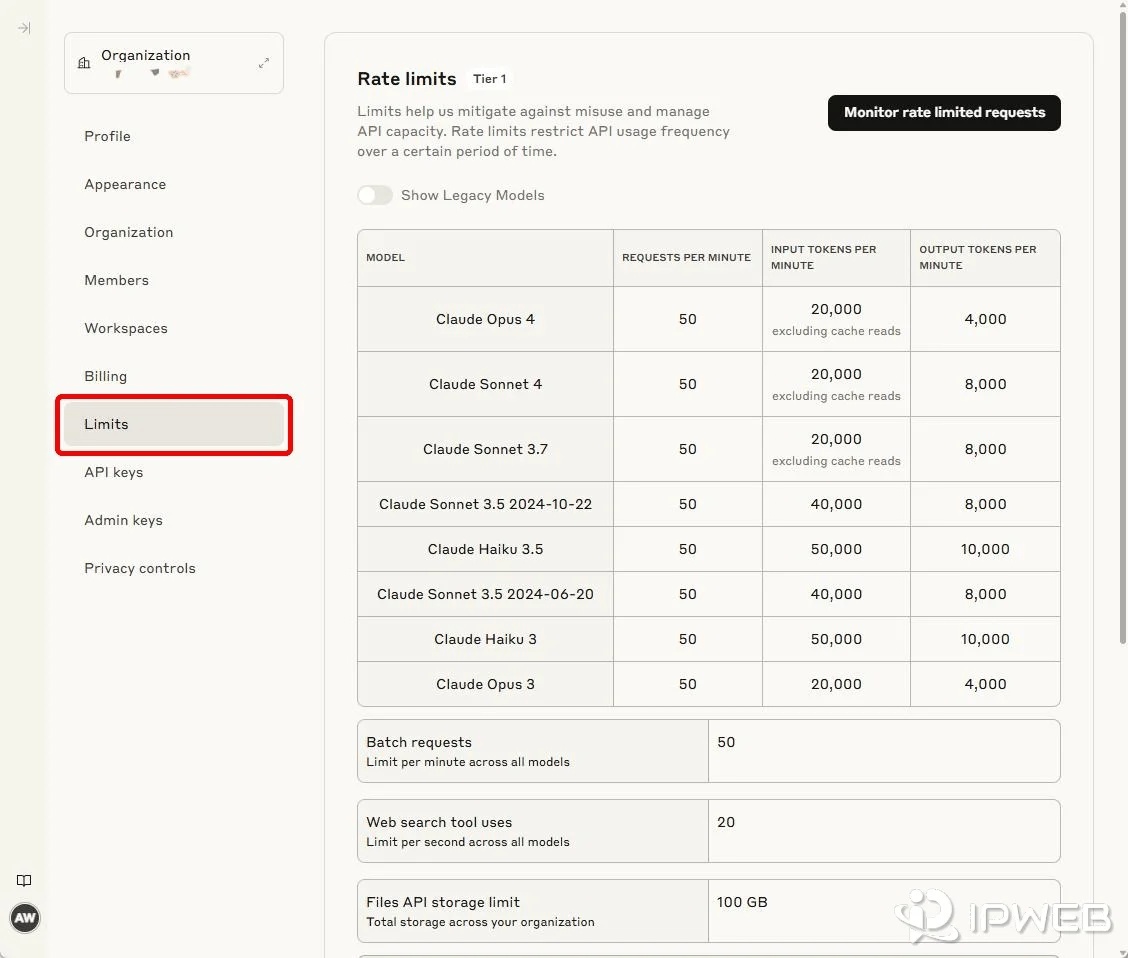
The important distinction is that the HTTP status alone is not enough. Anthropic's current rate-limit documentation specifies different recovery behavior for a normal rate limit and a monthly spend-cap 429.
Check retry-after Before Retrying
For a normal Messages API rate-limit 429, Anthropic returns a retry-after response header with the number of seconds to wait. Requests sent before that delay expires will fail again. Treat the server-provided delay as the minimum retry time instead of replacing it with a hard-coded sleep value.
- Read
retry-after. - If it exists, wait at least that long before the next attempt.
- If it is missing, inspect the error body before assuming the header was lost.
- If the Messages API error contains
enforced_spend_limit_reached, stop retrying until account-level access changes. - If neither condition explains the failure, log the request ID and the relevant rate-limit headers for further diagnosis.
This prevents a costly failure mode: an application receives a spend-cap 429, assumes every 429 is transient, then keeps retrying a request that cannot succeed yet.
Read the Claude Rate-Limit Headers
Claude API responses include rate-limit headers that show the active limit, remaining capacity, and reset time. These values are more useful than copying a fixed quota from an old tutorial because Anthropic can apply different limits by tier, model class, workspace, or service configuration.
| Header | What It Tells You |
|---|---|
retry-after |
Seconds to wait before retrying a normal rate-limited request |
anthropic-ratelimit-requests-limit |
Maximum requests allowed within the active request-limit period |
anthropic-ratelimit-requests-remaining |
Remaining request capacity before the request limit is reached |
anthropic-ratelimit-requests-reset |
RFC 3339 time when request capacity is fully replenished |
anthropic-ratelimit-input-tokens-* |
Input-token limit, remaining capacity, and reset time |
anthropic-ratelimit-output-tokens-* |
Output-token limit, remaining capacity, and reset time |
anthropic-ratelimit-tokens-* |
The most restrictive token limit currently in effect |
The reset headers are timestamps, while retry-after is a delay in seconds. When a normal 429 includes both, use retry-after for the next retry and keep the reset values for monitoring and capacity planning.
Catch Claude API 429 Errors in Python
The current Anthropic Python SDK maps HTTP 429 responses to anthropic.RateLimitError. During diagnosis, temporarily disabling SDK retries makes it easier to inspect the first 429 response instead of waiting for the client's built-in retry attempts.
import anthropic
from anthropic import Anthropic

client = Anthropic(max_retries=0)

try:
    message = client.messages.create(
        model="claude-opus-5-5",
        max_tokens=64,
        messages=[
            {"role": "user", "content": "Reply only with OK"}
        ],
    )
    print(message.content[0].text)

except anthropic.RateLimitError as exc:
    headers = exc.response.headers
    body = exc.response.json()

    retry_after = headers.get("retry-after")
    request_id = headers.get("request-id")
    error = body.get("error", {})
    details = error.get("details", {}) or {}

    print("status:", exc.status_code)
    print("error type:", error.get("type"))
    print("retry-after:", retry_after)
    print("request-id:", request_id)
    print("detail code:", details.get("error_code"))
Do not log the API key, authorization header, or full credentials alongside this diagnostic output. The request ID, error type, retry-after, detail code, timestamp, and selected rate-limit headers are normally enough to identify the branch.
If the code is running against an older Anthropic SDK release, update the SDK before relying on current exception behavior and transport details. The current Python SDK documentation lists RateLimitError for HTTP 429 and documents the retry controls used below.
Understand Anthropic SDK Automatic Retries
Anthropic's official SDKs retry several transient failures automatically. In the Python SDK, connection errors, HTTP 408, 409, 429, and server errors at 500 or above are retried two times by default with a short exponential backoff. Anthropic also states that the SDK honors retry-after when the header is present.
This matters when application code also implements its own retry loop. Five application-level attempts do not necessarily mean five HTTP attempts if every call can trigger SDK retries underneath.
from anthropic import Anthropic

# Useful while diagnosing the first raw 429 response.
client = Anthropic(max_retries=0)
Use max_retries=0 as a troubleshooting control, not as a universal production recommendation. Production clients usually benefit from bounded retries, but retries should remain aware of server-provided delays and should not multiply uncontrollably across SDK, queue, worker, and application layers.
Rate Limit vs Monthly Spend Cap
A normal rate limit and a usage-tier monthly spend cap can both return HTTP 429, but they require different responses.
Normal rate-limit 429
A normal Messages API limit returns rate_limit_error with retry-after. Wait for the specified delay, then retry at a lower or smoother throughput.
Usage-tier spend-cap 429
When an organization reaches its service-configured monthly usage-tier spend cap, Anthropic pauses API usage and returns HTTP 429. On the Messages API, the error body includes:
{
  "type": "error",
  "error": {
    "type": "rate_limit_error",
    "details": {
      "error_code": "enforced_spend_limit_reached"
    }
  },
  "request_id": "req_..."
}
This 429 does not include retry-after. Anthropic explicitly notes that SDK automatic retries also fail until access resumes. The correct action is to check the organization's Billing and Rate limits pages, wait for the stated access-resumption time, or request a higher limit when appropriate.
Do not confuse this with a spend limit that your own organization administrator sets below the tier cap. Anthropic currently documents those user-configured organization or workspace spend-limit failures as HTTP 400 invalid_request_error, not the usage-tier 429 described above. Claude Code workspace limits have separate behavior and can return 429 in specific cases.
RPM vs ITPM vs OTPM
Messages API throughput is not controlled by one generic “requests per minute” number. Anthropic applies separate request and token constraints, so reducing only concurrency may not solve a token-throughput bottleneck.
| Limiter | What It Measures | Typical Fix |
|---|---|---|
| RPM | Requests per minute | Queue requests, smooth bursts, reduce concurrency |
| ITPM | Input tokens per minute | Reduce repeated uncached context, use prompt caching where appropriate |
| OTPM | Actual output tokens generated per minute | Throttle output-heavy jobs or distribute work more evenly |
Prompt caching can reduce ITPM pressure
For most current Claude models, cached input tokens read from prompt cache do not count toward ITPM. Tokens written to cache and uncached input still count. Repeated system instructions, tool definitions, large context documents, and conversation history are therefore good candidates for prompt caching when the workload naturally reuses them.
One exception matters: Anthropic currently documents different cache-read rate-limit behavior for Claude Haiku 3.5. Avoid assuming that one caching rule applies to every model generation.
max_tokens does not set OTPM usage
Anthropic evaluates OTPM using the output tokens actually generated. The max_tokens request parameter does not itself count toward the OTPM limit, so lowering max_tokens is not a guaranteed fix unless it also reduces real output generation.
Avoid Acceleration-Limit 429s
A workload can encounter 429 responses after a sharp increase in usage even when the long-term average appears to fit within published limits. Anthropic calls these acceleration limits and recommends ramping traffic gradually while maintaining more consistent usage patterns.
This also explains why a service can behave normally during a low-volume test and then return 429 errors immediately after a large deployment or job fan-out. Build a controlled ramp instead of moving from a handful of requests to full production concurrency in one step.
Short bursts matter for ordinary rate limits too. Anthropic notes that a nominal per-minute request allowance can be enforced over shorter intervals, so a burst concentrated into one or two seconds can fail even if the minute-level average looks acceptable.
Reduce 429s Without Slowing Everything Down
The goal is not to serialize every API call. A better design keeps throughput high while preventing bursts from exceeding the active request or token bucket.
- Queue bursty work: release requests at a controlled rate instead of starting every task simultaneously.
- Limit concurrency by workload: separate short interactive calls from large context or output-heavy jobs.
- Watch remaining headers: throttle before
*-remainingreaches zero. - Use prompt caching for repeated context: reduce uncached input pressure where the model and workload support it.
- Use Message Batches for suitable asynchronous jobs: batch processing has separate limits and can be a better fit for non-interactive bulk work.
- Ramp new traffic gradually: avoid sudden step changes that can trigger acceleration limits.
Rate limits are applied separately by model class, so capacity planning should be based on the models actually used by the workload rather than one global assumption.
Claude API 429 vs 529
HTTP 429 and 529 can both look like temporary capacity problems, but Anthropic assigns them different meanings. A 429 is a rate_limit_error tied to organization usage, spend, acceleration, or a service-specific rate limit. A 529 is overloaded_error, meaning the API is temporarily overloaded.
| Question | 429 | 529 |
|---|---|---|
| Official error type | rate_limit_error |
overloaded_error |
| Typical scope | Your organization, workspace, usage pattern, or service-specific limit | Anthropic API capacity |
| First check | Error details, retry-after, rate-limit headers, Console Usage |
Retry behavior and service status if the issue persists |
| Does changing a proxy raise the limit? | No | No |
Anthropic's current API error documentation also notes that official SDKs retry transient failures, including rate limits and 5xx errors, twice by default.
When a Proxy Is Not the Fix
If Anthropic returns a structured HTTP 429 with a request ID, the request has already reached the API. Changing an HTTP or SOCKS5 proxy does not increase the organization's Claude API rate limit, monthly spend cap, or token capacity.
If the actual symptom is a proxy authentication error, TLS problem, connection timeout, or a request that never receives an Anthropic HTTP response, use the Claude API proxy setup and transport checks instead. If the response is HTTP 401 or 403, move to the Claude API authentication and permission checks.
Check Claude Console Before Changing Code
The Claude Console Usage page provides separate rate-limit charts for input and output tokens. Anthropic documents the input chart as showing hourly maximum uncached input tokens per minute, the current input-token rate limit, and cache rate. The output chart shows hourly maximum output tokens per minute and the current output-token limit.
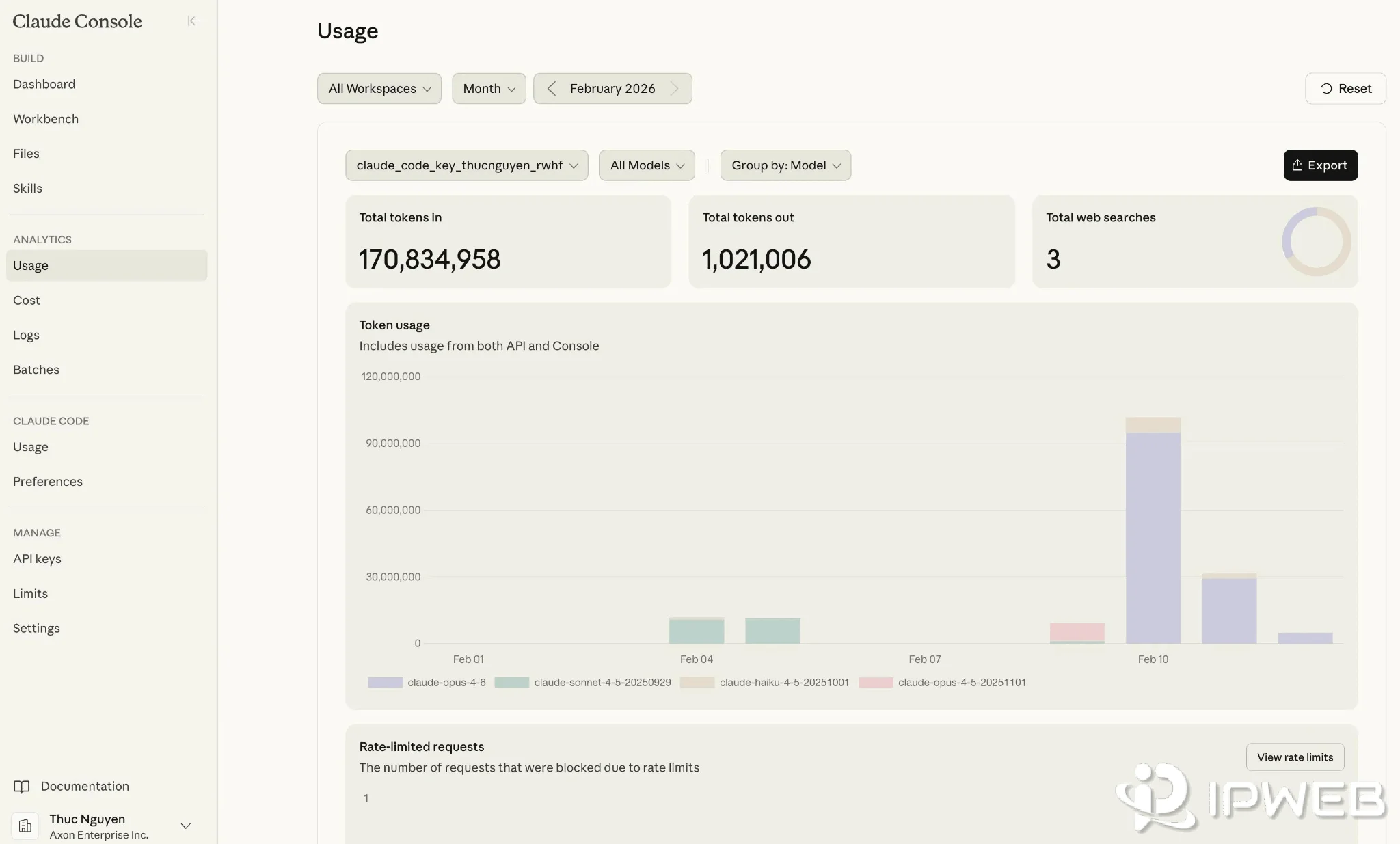
Use those charts together with the response headers. The headers tell you what happened to a specific request; the Console shows whether the issue is a recurring capacity pattern.
- Confirm the HTTP status is 429.
- Record the request ID.
- Read
retry-afterand the rate-limit headers. - Inspect the error body for
enforced_spend_limit_reached. - Check Claude Console Usage and Rate limits.
- Only then adjust queues, concurrency, caching, model distribution, or account limits.
Frequently Asked Questions
retry-after header. Earlier retries will fail. If the 429 is a usage-tier spend-cap response, retry-after is absent and ordinary retries will not restore access.retry-after. Check whether error.details.error_code equals enforced_spend_limit_reached. Also consider whether an intermediary removed a header, but do not assume that before checking the error body.retry-after when it is present. Use max_retries to change or temporarily disable that behavior.rate_limit_error and generally relates to organization usage, spend, acceleration, or a service-specific limit. HTTP 529 is overloaded_error and indicates that the Anthropic API is temporarily overloaded.Final Thoughts
A Claude API 429 should be treated as a classification problem before it becomes a retry problem. Start with retry-after, the rate-limit headers, the request ID, and the error details. A normal rate-limit response usually needs controlled waiting and smoother throughput; a usage-tier spend-cap 429 needs an account-level change or time for access to resume.
Once the cause is clear, optimize the correct layer: queue bursts for RPM, reduce uncached repeated context for ITPM, control output-heavy workloads for OTPM, ramp traffic gradually for acceleration limits, and avoid retry loops when Anthropic explicitly indicates that retries cannot succeed yet.