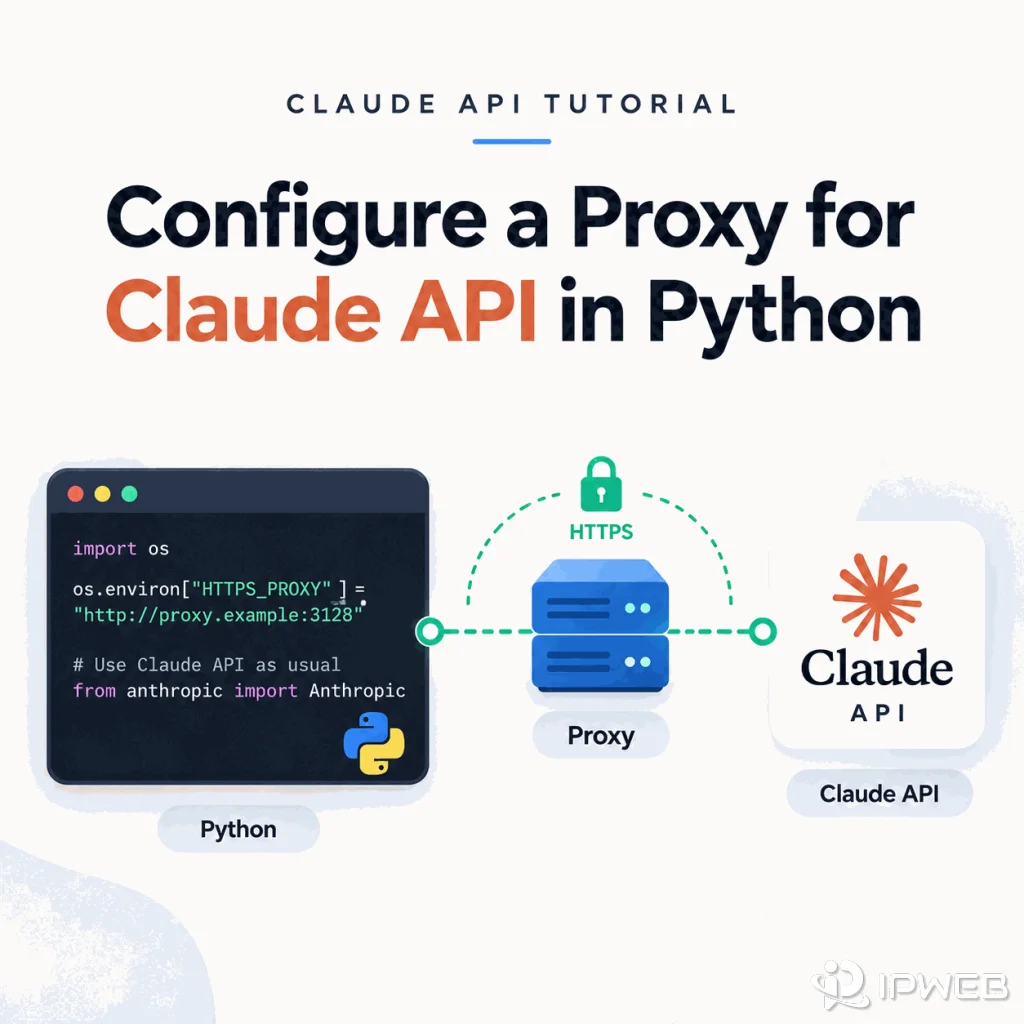
A Python application that calls the Claude API normally uses the network route available to the process that runs it. When you need a specific outbound route for development, fixed-egress testing, or an approved network environment, the Anthropic Python SDK can send requests through an explicit proxy instead of relying on the machine's default connection.
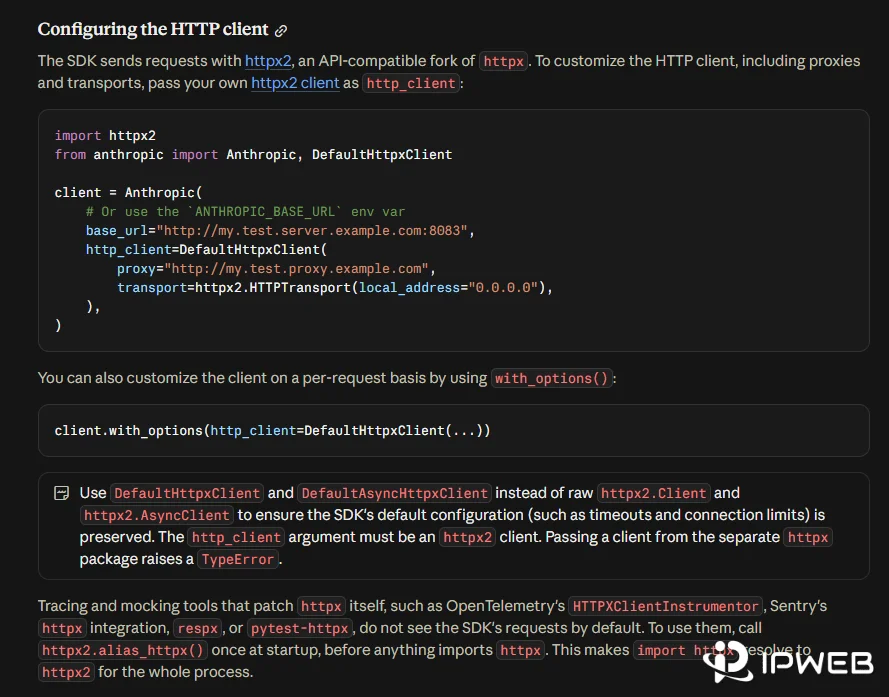
The current Anthropic Python SDK uses httpx2 for its HTTP layer and lets you customize that layer with DefaultHttpxClient. Anthropic directly documents an HTTP proxy configuration, while HTTPX2 also provides optional SOCKS proxy support. That makes it possible to use either an HTTP proxy or a SOCKS5 proxy without changing the Claude API endpoint itself.
Use DefaultHttpxClient(proxy=...) when you want Claude API traffic from the official Anthropic Python SDK to use a specific proxy. An HTTP proxy works with the base SDK. For SOCKS5, install HTTPX2's SOCKS extra first, then pass a socks5:// proxy URL through the same proxy argument. Keep proxy= separate from base_url=: a proxy changes the network route, while a base URL changes the API destination.
- Anthropic's current Python SDK supports custom proxy routing through
DefaultHttpxClient. - Anthropic directly documents HTTP proxy configuration; SOCKS5 support comes from the SDK's current HTTPX2 transport layer.
- Install
httpx2[socks]before using asocks5://proxy URL. - An HTTPS Claude API request can still use an
http://proxy URL because HTTPS can be tunneled through an HTTP proxy. proxy=changes the route to Anthropic;base_url=changes the destination itself.- A Claude API 401 or 403 should be diagnosed as an authentication or permission problem, not treated as proof that the proxy is bad.
What a Proxy Changes in a Claude API Request
A network proxy sits on the outbound path between your Python process and Anthropic. The request still targets Anthropic's API, still uses the same API key, and still follows the same workspace, model, billing, and permission rules. Only the network path changes.
| Setting | What It Changes | What It Does Not Change |
|---|---|---|
proxy= |
Outbound network route | Anthropic API destination, API key, or permissions |
base_url= |
API destination | Whether the client uses a network proxy |
ANTHROPIC_API_KEY |
API authentication | Network route |
| Workspace context | Authorization and resource scope | Proxy endpoint |
This distinction prevents a common troubleshooting mistake. Changing a proxy cannot repair an expired API key, missing workspace permission, usage limit, or unsupported account state. It can only change the route used to reach the API.
Install the Current Anthropic Python SDK
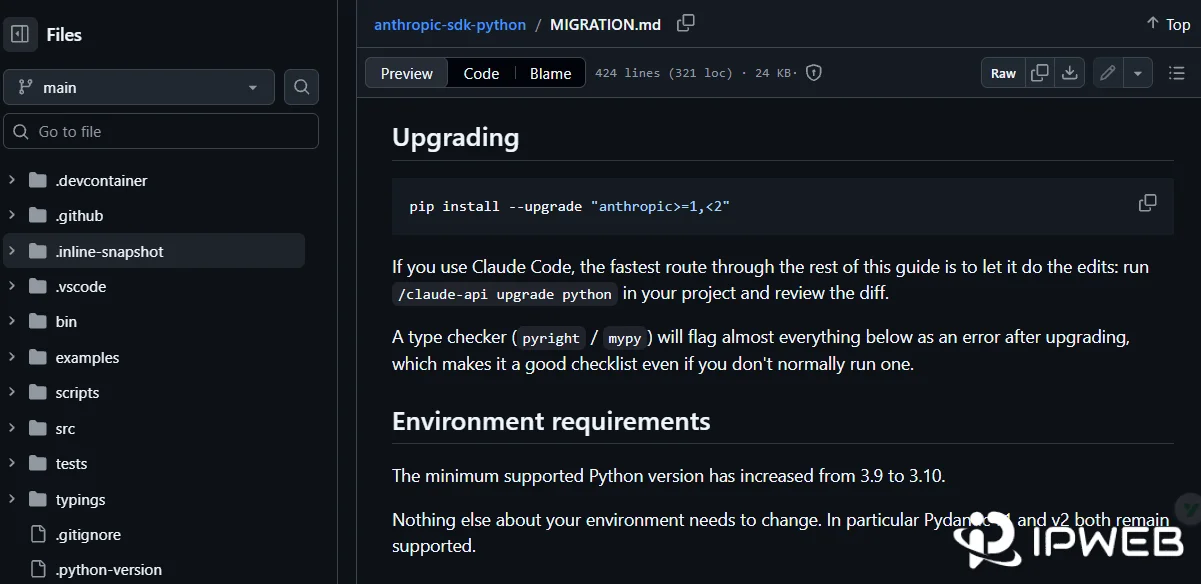
The current Anthropic Python SDK documentation requires Python 3.10 or later and states that the SDK now sends requests with httpx2. Anthropic released Python SDK v1.0 on August 20, 2026, moving the HTTP layer from the older httpx package to httpx2. The SDK's DefaultHttpxClient and DefaultAsyncHttpxClient helpers remained available across that migration, but custom client, timeout, transport, response, and exception objects passed into v1 must come from httpx2.
If an existing project still uses an Anthropic 0.x release, check its installed version before copying transport-specific code from this guide. A legacy project may still be built around httpx. After upgrading to v1, passing an old httpx.Client or httpx.AsyncClient as http_client= raises a TypeError; switch those custom HTTP objects to httpx2 or use Anthropic's DefaultHttpxClient helper.
For an HTTP proxy, install or update the Anthropic SDK:
pip install -U anthropicFor SOCKS5, install HTTPX2's optional SOCKS dependency as well:
pip install -U anthropic "httpx2[socks]"HTTPX2 documents socksio as its optional SOCKS proxy dependency. If SOCKS support is missing, a socks5:// configuration can fail before the request reaches Anthropic.
Configure an HTTP Proxy for Claude API
Anthropic's current SDK documentation shows proxy configuration through DefaultHttpxClient(proxy=...). Store the API key and proxy URL outside the source file, then create one client that uses the explicit route.
macOS, Linux, or WSL
export ANTHROPIC_API_KEY="your-api-key"
export PROXY_URL="http://username:password@proxy-host:port"
Windows PowerShell
The examples below use PowerShell syntax. If you run Python from Command Prompt instead, set environment variables with set NAME=value rather than PowerShell's $env:NAME=... syntax. Modern Windows versions also include curl.exe, so the shell difference is mainly environment-variable syntax, not whether cURL exists.
$env:ANTHROPIC_API_KEY="your-api-key"
$env:PROXY_URL="http://username:password@proxy-host:port"
Then send a minimal Claude request:
import os

from anthropic import Anthropic, DefaultHttpxClient

client = Anthropic(
    api_key=os.environ["ANTHROPIC_API_KEY"],
    http_client=DefaultHttpxClient(
        proxy=os.environ["PROXY_URL"],
    ),
)

message = client.messages.create(
    model="claude-opus-5",
    max_tokens=16,
    messages=[
        {
            "role": "user",
            "content": "Reply only with OK",
        }
    ],
)

print(message.content[0].text)
print("Request ID:", message._request_id)
claude-opus-5 is the model used in Anthropic's current Python SDK examples at the time of writing. If your project uses another available model, replace the model value without changing the proxy configuration.
Why an HTTPS API Can Still Use an http:// Proxy URL
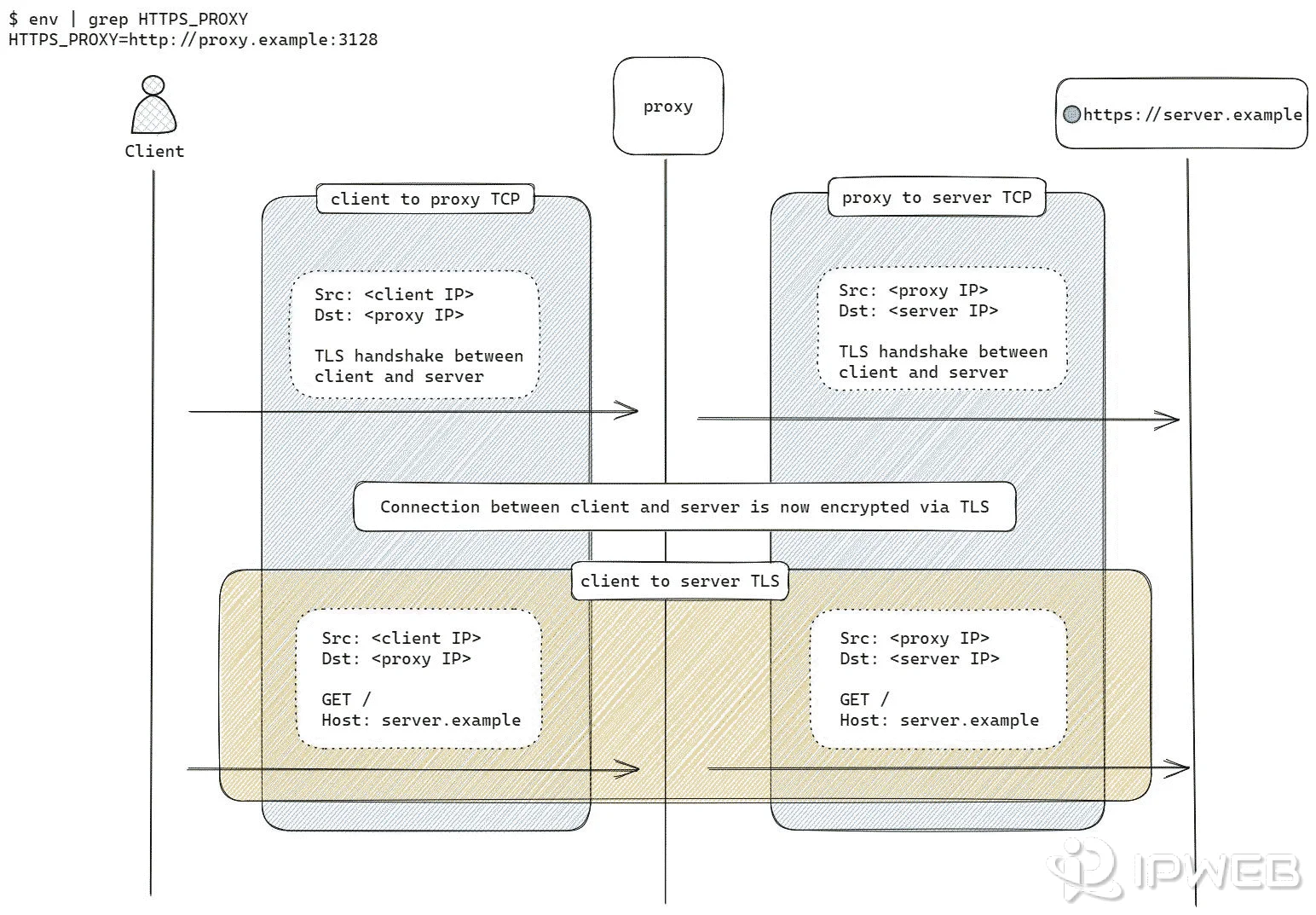
The Claude API endpoint is HTTPS, but that does not mean the proxy URL must also start with https://. With a typical HTTP proxy, the client can establish an HTTP CONNECT tunnel and then perform TLS with the destination through that tunnel. HTTPX2's proxy troubleshooting documentation specifically notes that an HTTPS destination commonly still uses an http:// proxy URL.
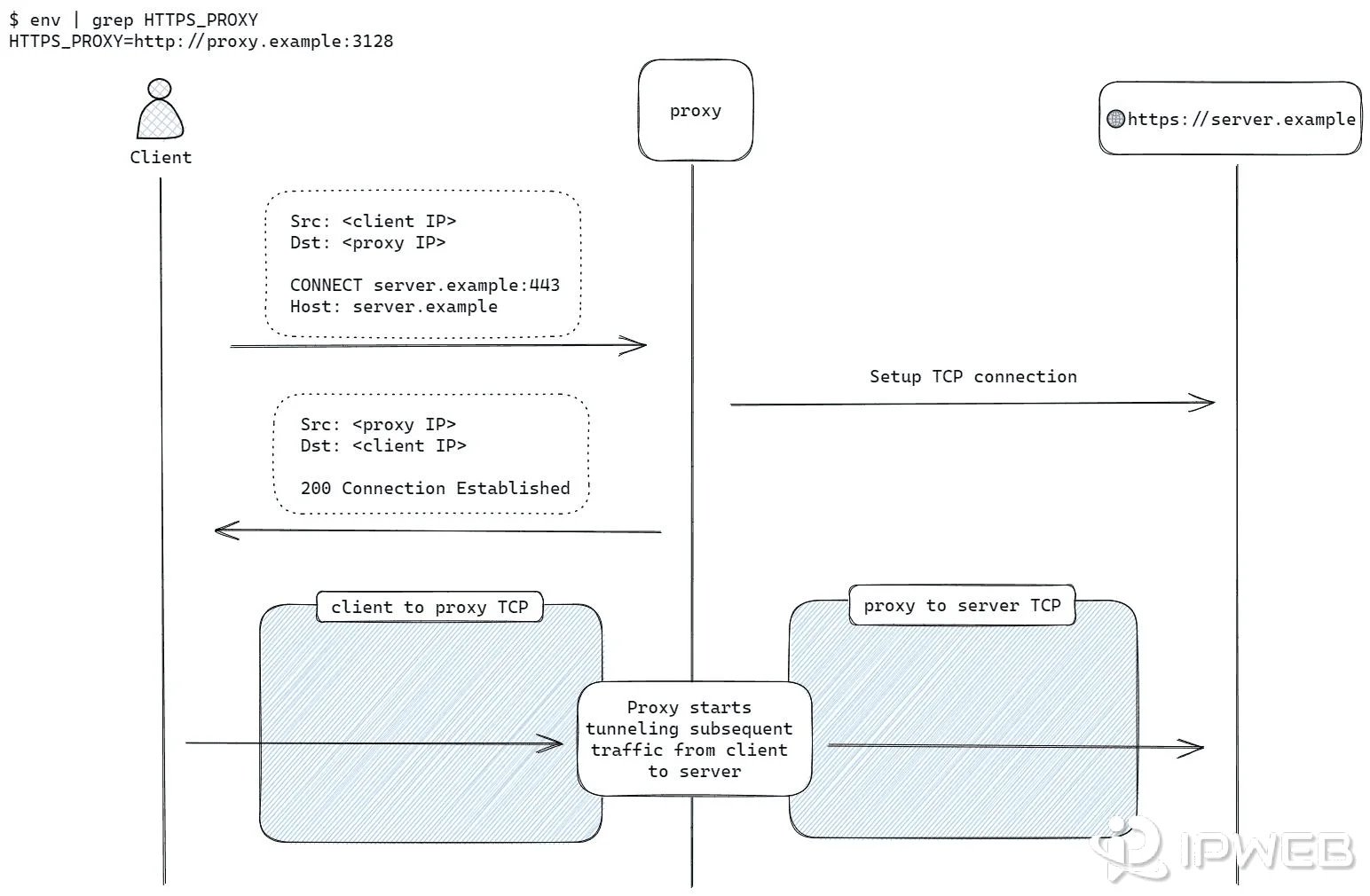
Use the scheme and endpoint documented by your proxy provider. Do not change an HTTP proxy endpoint to https:// simply because api.anthropic.com uses HTTPS. HTTPX2 also warns that connecting to a true HTTPS proxy has separate compatibility limitations. See its proxy troubleshooting guidance when an HTTPS-proxy connection itself fails.
Configure a SOCKS5 Proxy for Claude API
SOCKS5 is not the proxy example Anthropic highlights in its SDK documentation, but the SDK's current HTTPX2 transport supports SOCKS proxies as an optional feature. After installing httpx2[socks], pass a socks5:// URL through the same proxy argument.
export PROXY_URL="socks5://username:password@proxy-host:port"On Windows PowerShell:
$env:PROXY_URL="socks5://username:password@proxy-host:port"The Anthropic client code does not need a second API implementation:
import os

from anthropic import Anthropic, DefaultHttpxClient

client = Anthropic(
    api_key=os.environ["ANTHROPIC_API_KEY"],
    http_client=DefaultHttpxClient(
        proxy=os.environ["PROXY_URL"],
    ),
)

message = client.messages.create(
    model="claude-opus-5",
    max_tokens=16,
    messages=[{"role": "user", "content": "Reply only with OK"}],
)

print(message.content[0].text)
The proxy URL scheme tells the HTTP transport which proxy mechanism to use. If a provider gives you an HTTP endpoint, use its HTTP format. If it gives you a SOCKS5 endpoint, use the documented SOCKS5 host, port, and credentials instead of changing the scheme by guesswork.
HTTP Proxy vs SOCKS5 for Claude API
| Check | HTTP Proxy | SOCKS5 Proxy |
|---|---|---|
| Anthropic SDK example | Directly documented | Not the primary Anthropic example |
| HTTPX2 support | Built in | Supported through optional SOCKS dependency |
| Extra install | None beyond the SDK | httpx2[socks] |
| Proxy URL example | http://user:pass@host:port |
socks5://user:pass@host:port |
| Best first test | Use when you want the closest path to Anthropic's documented example | Use when your network or provider specifically supplies a SOCKS5 endpoint |
Neither protocol changes Claude's authentication or permission rules. Choose the protocol your environment supports, then verify the route before changing unrelated API settings.
Use Proxy Authentication Safely
Proxy endpoints often include a username and password. Keep those credentials in environment variables or a secret manager rather than hard-coding them in Python files, notebooks, screenshots, or Git repositories.
PROXY_URL=http://username:password@proxy-host:port
# or
PROXY_URL=socks5://username:password@proxy-host:port
If a username or password contains reserved URL characters such as @, :, /, #, or %, encode the credential components before building the URL. A malformed credential string can look like a routing failure even when the host and port are correct.
A 407 Proxy Authentication Required response belongs to the proxy layer. Check the proxy username, password, authentication mode, and endpoint before changing the Anthropic API key.
Verify That Claude API Is Actually Using the Proxy
A successful Claude response proves that the API request completed, but it does not by itself show which public IP was used. Verify the network route separately, then run the Claude request with the same proxy URL.
Step 1: Check the visible proxy IP
import os
import httpx2

with httpx2.Client(
    proxy=os.environ["PROXY_URL"],
    timeout=15.0,
) as client:
    response = client.get("https://api.ipify.org?format=json")
    response.raise_for_status()
    print(response.json())
Compare the returned address with the machine's normal public IP. If you need a broader validation sequence, IPWeb's proxy verification guide covers visible IP, location, ASN, protocol, DNS, and application-specific checks.
Step 2: Run one minimal Claude request
Use the same PROXY_URL with a very small Messages API call. Log the response, request ID, proxy endpoint label, and timestamp. If the route check shows the intended exit IP and Claude returns a normal response, the path Python → proxy → Anthropic → response is working.
- Proxy protocol and endpoint label
- Visible proxy exit IP
- Claude request result
message._request_id- Timestamp and approximate latency
Proxy vs Base URL: Do Not Confuse Them
Many projects use the phrase “Claude API proxy” for a reverse proxy or compatibility gateway. That is a different architecture from the network proxy configured in DefaultHttpxClient.
| Configuration | Destination | Purpose |
|---|---|---|
DefaultHttpxClient(proxy="http://...") |
Anthropic API remains the destination | Change outbound network route |
ANTHROPIC_BASE_URL=http://localhost:... |
Custom server becomes the destination | Use a gateway, compatibility layer, mock, or reverse proxy |
If the goal is to route the official Anthropic SDK through a normal proxy service, keep Anthropic as the API destination and configure proxy=. Do not replace ANTHROPIC_BASE_URL unless you intentionally operate or trust another API endpoint.
Troubleshoot Common Proxy Errors
Separate network-layer failures from Anthropic API responses before changing settings. The error type usually tells you which layer deserves attention first.
If you test the route with a raw httpx2.Client instead of the Anthropic SDK, transport failures can surface as HTTPX2 exceptions such as ProxyError, ConnectError, ConnectTimeout, or UnsupportedProtocol. When the same failure occurs through the Anthropic SDK, the SDK commonly exposes transport failures through its own APIConnectionError or APITimeoutError layer, with the underlying transport error available as the cause.
| Symptom | Likely Layer | First Check |
|---|---|---|
407 Proxy Authentication Required |
Proxy authentication | Proxy credentials and authentication mode |
APIConnectionError |
Transport / connectivity | Proxy host, port, reachability, DNS, and TLS |
APITimeoutError |
Transport / latency | Proxy latency, route stability, timeout value |
| HTTP proxy connects, but HTTPS requests fail | Proxy tunneling | Confirm the proxy allows HTTP CONNECT tunneling to api.anthropic.com:443 |
| Missing SOCKS dependency | Python transport | Install httpx2[socks] |
TypeError after passing an old httpx.Client |
SDK compatibility | Use httpx2 or DefaultHttpxClient |
401 / AuthenticationError |
Anthropic authentication | API key validity |
403 / PermissionDeniedError |
Anthropic authorization | Workspace and permission scope |
429 / RateLimitError |
Anthropic API limits | Rate, usage tier, and retry guidance |
| Works direct, fails through proxy | Proxy path | Endpoint, credentials, TLS, and route |
An HTTP proxy that works for plain HTTP traffic is not automatically guaranteed to tunnel HTTPS traffic. Claude API requests target an HTTPS endpoint, so an HTTP proxy must permit the CONNECT method to the destination on port 443. If the proxy accepts the initial connection but rejects or cannot create the tunnel, the request can fail before TLS with Anthropic begins.
Disable SDK retries temporarily when isolating a route failure
The Anthropic Python SDK retries connection errors, 408, 409, 429, and 5xx responses twice by default. That is useful in normal operation, but one function call can produce multiple network attempts while you are diagnosing a flaky proxy route. Temporarily set max_retries=0 when you need to observe the first failure cleanly.
client = Anthropic(
    api_key=os.environ["ANTHROPIC_API_KEY"],
    max_retries=0,
    http_client=DefaultHttpxClient(
        proxy=os.environ["PROXY_URL"],
    ),
)
Restore an appropriate retry policy after the network problem is understood. Disabling retries is a debugging technique, not a general production recommendation.
If Anthropic returns 401 or 403
If the request reaches Anthropic and returns a structured 401 or 403, stop rotating routes and inspect the API layer. Anthropic maps 401 to authentication problems and 403 to permission problems in the Python SDK. Use the dedicated Claude API 401 and 403 troubleshooting workflow for API key, workspace, and permission checks.
If the problem occurs in the Claude Code CLI rather than a Python API client, the configuration path is different. Use the Claude Code proxy setup guide for CLI environment variables, TLS, and terminal-specific checks.
Use a Stable Proxy While Debugging
Network diagnosis is easier when one variable changes at a time. If every request uses a different exit IP, route, location, and ASN, a different result does not show which change mattered. Start with one known endpoint, record its exit IP, and repeat the same request before introducing rotation.
For approved workflows that specifically need a fixed proxy egress for recurring API tests, regional QA, or IP allowlisting, IPWeb Static Residential Proxies keep the assigned IP stable for the active subscription and support HTTP(S) and SOCKS5 connections. A fixed proxy does not replace the Claude API key, account eligibility, workspace permissions, or Anthropic policy checks.
Async Claude API Requests Through a Proxy
The same pattern works with the asynchronous client. Use DefaultAsyncHttpxClient so the proxy is applied to the async SDK's HTTPX2 transport.
import asyncio
import os

from anthropic import AsyncAnthropic, DefaultAsyncHttpxClient

client = AsyncAnthropic(
    api_key=os.environ["ANTHROPIC_API_KEY"],
    http_client=DefaultAsyncHttpxClient(
        proxy=os.environ["PROXY_URL"],
    ),
)

async def main():
    message = await client.messages.create(
        model="claude-opus-5",
        max_tokens=16,
        messages=[{"role": "user", "content": "Reply only with OK"}],
    )
    print(message.content[0].text)

asyncio.run(main())
If the async path uses SOCKS5, the same httpx2[socks] dependency is required. Keep the first test small and synchronous if you are unsure whether a failure belongs to the proxy, the async runtime, or the API.
Frequently Asked Questions
Yes. Anthropic's Python SDK lets you provide a custom HTTP client, and its current documentation shows DefaultHttpxClient(proxy=...) for proxy routing. The API request still targets Anthropic and still requires valid credentials and permissions.
The SDK currently uses HTTPX2, and HTTPX2 provides SOCKS proxy support as an optional feature. Install httpx2[socks], then use a valid socks5:// proxy URL in DefaultHttpxClient(proxy=...). Anthropic's own proxy example is HTTP, so SOCKS5 support comes from the transport layer rather than a separate Claude API feature.
http:// proxy URL?An HTTP proxy can tunnel an HTTPS connection with CONNECT. The destination remains HTTPS even though the client first connects to the proxy over HTTP. Use the actual scheme documented for the proxy endpoint rather than changing it to https:// because the Claude endpoint is HTTPS.
httpx2[socks] for a SOCKS5 proxy?Yes for HTTPX2's optional SOCKS support. The extra installs the SOCKS dependency used by the transport. A normal HTTP proxy does not require that extra.
ANTHROPIC_BASE_URL the same as a proxy?No. ANTHROPIC_BASE_URL changes the API destination, while proxy= changes the network route used to reach the destination. A reverse proxy or compatibility gateway therefore belongs to a different architecture from an outbound network proxy.
Check the proxy host, port, credentials, protocol, TLS path, and required SOCKS dependency before changing Claude settings. If the direct request succeeds and the same request fails only after the route changes, the proxy path is the strongest first lead.
Not as a general fix. A 401 maps to API authentication and a 403 maps to permission or authorization. If Anthropic returned one of those statuses, inspect the API key, workspace, and permission context first.
HTTP_PROXY or HTTPS_PROXY environment variables with the Anthropic Python SDK?Yes. HTTPX2 honors HTTP_PROXY, HTTPS_PROXY, and ALL_PROXY environment variables by default unless trust_env=False. Because Anthropic's current default HTTP client is built on HTTPX2, those ambient proxy settings can affect Claude API routing. For Claude API requests, which use an HTTPS destination, HTTPS_PROXY or ALL_PROXY is the relevant ambient setting. This guide uses an explicit proxy= value so the selected route is visible in the client configuration and does not depend on machine-wide proxy settings.
Use a stable endpoint first when the goal is diagnosis or reproducibility. Keeping the exit IP and route constant makes before-and-after comparisons easier. Introduce rotation only when the application has a separate, approved reason to use changing endpoints.
Final Thoughts
Claude API proxy configuration in Python is straightforward once the network layer is separated from the API layer. Use DefaultHttpxClient for an explicit HTTP proxy, add HTTPX2's SOCKS dependency when the endpoint is SOCKS5, and verify the visible route before drawing conclusions from the Claude response.
When the failure is a proxy connection, timeout, TLS, or 407 error, stay in the transport branch. When Anthropic returns 401, 403, or 429, move to the API branch. That separation prevents unnecessary route changes and makes the troubleshooting result reproducible.