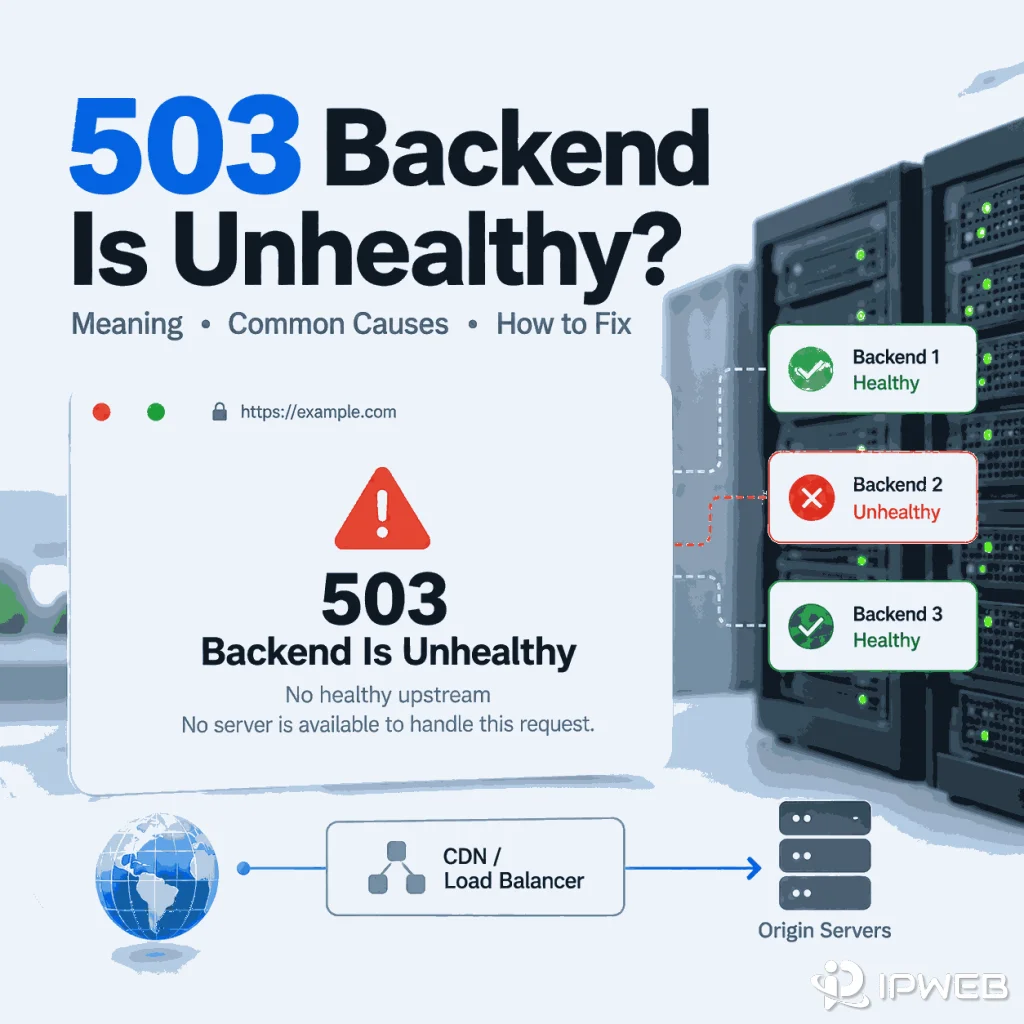
You receive an HTTP 503 response, but the page does not just say “Service Unavailable.” Instead, it says “backend is unhealthy,” “no healthy upstream,” or “no server is available to handle this request.” Those messages narrow the problem: a front-end layer received the request but could not select or reach a backend that it considered healthy.
The useful question is no longer “What does HTTP 503 mean?” It is which backend-selection or health-check layer produced the message, and why did every eligible upstream fail?
“503 backend is unhealthy” usually means a reverse proxy, load balancer, CDN, or gateway could not route the request to a backend that was currently eligible to receive traffic. The backend may be failing health checks, unreachable, overloaded, restarting, in maintenance, or dependent on another failing service. If you only need the broad meaning of HTTP 503, use the general 503 troubleshooting flow instead. This page focuses on the narrower backend/upstream-health case.
- “Backend is unhealthy” is a routing-health clue, not a generic explanation for every 503.
- “No healthy upstream” usually means the gateway has no eligible upstream server to choose at that moment.
- The exact wording alone does not identify the vendor or root cause; inspect the response body, edge headers, request ID, and server-side health state.
- If you own the infrastructure, start with upstream health checks, readiness, capacity, dependency health, and recent deployments.
- If you do not own the site, treat the response as evidence of availability trouble somewhere on the target-side delivery path unless controlled route testing shows the symptom is isolated to one path.
What “Backend Is Unhealthy” Actually Means
Modern websites often place one or more routing layers in front of the application that ultimately handles the request. A CDN, reverse proxy, ingress layer, API gateway, or load balancer may accept the connection first and then choose a backend from an upstream pool.
A backend becomes unhealthy when that routing layer decides it should not receive normal traffic. The decision can come from active health checks, failed production requests, timeouts, connection errors, readiness failures, or provider-specific capacity rules.
For example, NGINX documents both passive and active health-check behavior. Failed connections can cause an upstream server to be marked unavailable, while NGINX Plus active checks can mark a server unhealthy after communication errors, timeouts, or responses that do not meet the configured success conditions. See the official NGINX HTTP health-check documentation.
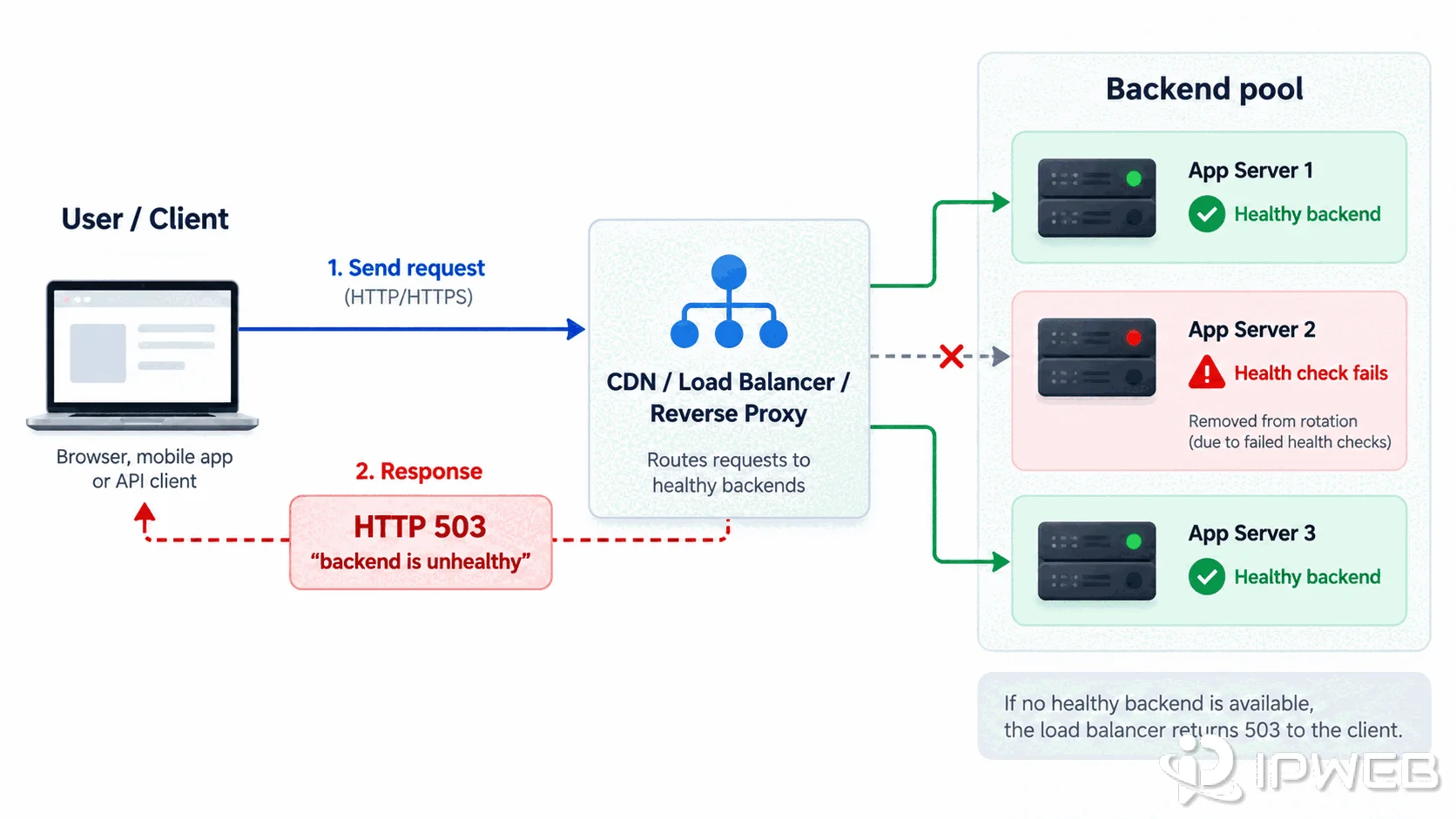
This is why a backend-health message is narrower than a generic 503. The broad status code still means the service is unavailable, but the wording points toward the relationship between the routing layer and its upstream pool.
Backend Is Unhealthy vs No Healthy Upstream vs No Server Available
These messages are similar, but they are not guaranteed to come from the same product or configuration. Treat the wording as a diagnostic clue, not as a vendor fingerprint.
| Observed message | What it usually suggests | Best first check |
|---|---|---|
503 backend is unhealthy | A routing or edge layer considers the selected backend unavailable or ineligible. | Check backend health state, health-check failures, readiness, and recent restarts. |
no healthy upstream | No upstream in the eligible pool is currently considered healthy. | Check whether every upstream is down, failing checks, draining, or removed from rotation. |
no server is available to handle this request | The front layer has no available server that can accept the request at that moment. | Check the backend pool, capacity, maintenance state, and health-check results. |
Plain 503 Service Unavailable | The service is temporarily unavailable, but the response does not by itself identify a backend-health failure. | Use the broader 503 troubleshooting flow before assuming an unhealthy upstream. |
The most important distinction is whether the message explicitly points to an upstream or backend. If it does not, do not force the request into a backend-health diagnosis. The broader HTTP 503 troubleshooting guide is the better owner for maintenance, generic overload, Retry-After, and general crawler retry behavior.
First 5 Minutes: Capture Evidence Before You Change Anything
The easiest way to lose the cause of a backend-health 503 is to start changing variables immediately. Before you rotate a route, restart a client, change headers, or retry repeatedly, capture one clean failure exactly as it happened.
- Save the exact error wording. “Backend is unhealthy,” “no healthy upstream,” and a plain “503 Service Unavailable” should not be treated as interchangeable evidence.
- Record the HTTP status and response headers. Keep server, CDN, request-ID, trace-ID, cache, and retry-related headers when they are present.
- Record the route you actually used. Note whether the request was direct or proxied, the proxy protocol, the selected region, and the observed exit IP if a proxy was involved.
- Keep the URL, method, and request headers fixed. If those change between attempts, a different result cannot be attributed to the route alone.
- Write down the timestamp. Backend health can change within seconds during a deployment, autoscaling event, or recovery window.
For a quick header capture, use the same URL that produced the error. On Windows, curl.exe avoids PowerShell aliases and makes the test easier to reproduce:
curl.exe -sS -D headers.txt -o NUL https://example.com/
type headers.txt
If the failure only appears in a proxied workflow, repeat the same request through the configured proxy without changing the target URL or request headers:
curl.exe -sS -D proxy-headers.txt -o NUL -x http://PROXY_HOST:PORT https://example.com/
type proxy-headers.txt
These commands do not prove the root cause by themselves. Their value is that they preserve a comparable HTTP response before later retries, cache changes, DNS changes, or backend recovery make the original symptom disappear.
Which Layer Generated the 503?
Once the wording points to backend health, identify the layer that actually returned the response. A valid HTTP 503 means some HTTP-speaking component answered the request. That is different from a request that never received an HTTP response at all.
| Evidence | More likely boundary | What to inspect next |
|---|---|---|
| No HTTP response, proxy authentication failure, connection refused, or protocol mismatch | Client or forward-proxy path | Use the proxy error guide instead of treating it as backend health. |
| HTTP 503 with explicit backend, upstream, or no-server wording | Target-side intermediary or backend pool | Capture the response body, edge headers, request ID, timestamp, and backend-health evidence. |
| Cloudflare-branded 503 content | Cloudflare edge path may have generated the response | Compare Cloudflare-specific response wording and diagnostic information with the origin state. |
| CloudFront 503 | Often origin capacity; sometimes edge, function, or origin-connectivity conditions | Check origin capacity, backend health checks, function errors, and relevant CloudFront logs. |
| The same backend-health message persists across multiple approved routes | Target-side availability becomes more likely | Investigate the backend pool or wait for the site owner to restore service. |
If the only uncertainty is whether your browser, script, or automation tool is actually using the configured proxy, verify that separately with the proxy route validation guide. Route validation should not be mixed with backend-health diagnosis.
Use a Three-Run Comparison Before Blaming the Proxy
A single successful or failed retry is weak evidence. A better diagnostic is to hold the request constant and compare three controlled runs: direct, the route that produced the 503, and one second approved route. The pattern matters more than any one response.
| Direct | Route A | Route B | What the pattern suggests |
|---|---|---|---|
| 503 with the same backend wording | 503 with the same backend wording | 503 with the same backend wording | Target-side backend health is more likely. Changing the proxy again is unlikely to repair an upstream pool that is unhealthy everywhere you tested. |
| 200 | 503 | 200 | Route, edge, region, or resolver differences deserve attention. Do not jump straight to “bad proxy”; compare CDN headers, DNS path, exit region, and timing first. |
| 200 | No HTTP response | 200 | This is not strong evidence of backend health. Check proxy authentication, protocol support, DNS, firewall, and route connectivity. |
| 503 | 503 with different edge wording | 200 | The failure may sit at different edge/origin boundaries. Compare request IDs, provider headers, and timestamps before assigning ownership. |
This framework also prevents a common false conclusion: “It worked after I changed proxies, therefore the old proxy caused the 503.” The second request may have reached a different CDN edge, used a different resolver, landed after the backend recovered, or hit a different cache state. Treat route changes as experiments, not proof.
Nginx: What to Check When Upstreams Are Unhealthy
If Nginx is in the path, do not start by asking “Why did Nginx return 503?” Start with a narrower question: did Nginx lose one backend, or did it lose every backend that was eligible for this request? Those are operationally different failures.
- Compare healthy-host count with pool size. One failed node should still leave capacity if other upstreams are healthy. A 503 becomes more plausible when all eligible upstreams are unavailable, draining, or failing checks.
- Check the health endpoint separately from the application endpoint. A process can be running while readiness fails because a database, cache, queue, or internal API is unavailable.
- Compare passive failures with active health state. Connection refusals, upstream timeouts, and repeated failed requests can remove a server from normal traffic even when the application has not fully crashed.
- Look at the deployment timeline. If the first 503 appears during a rollout, restart, autoscaling event, or drain window, ask whether new instances became ready before old ones were removed.
- Check capacity, not only liveness. A backend can be technically alive but unable to accept useful work because workers, database connections, queues, CPU, or memory are saturated.
A useful counterexample is a healthy-looking process with a failing readiness path. Restarting the reverse proxy will not fix that condition; the upstream may immediately be marked unhealthy again because the dependency failure still exists.
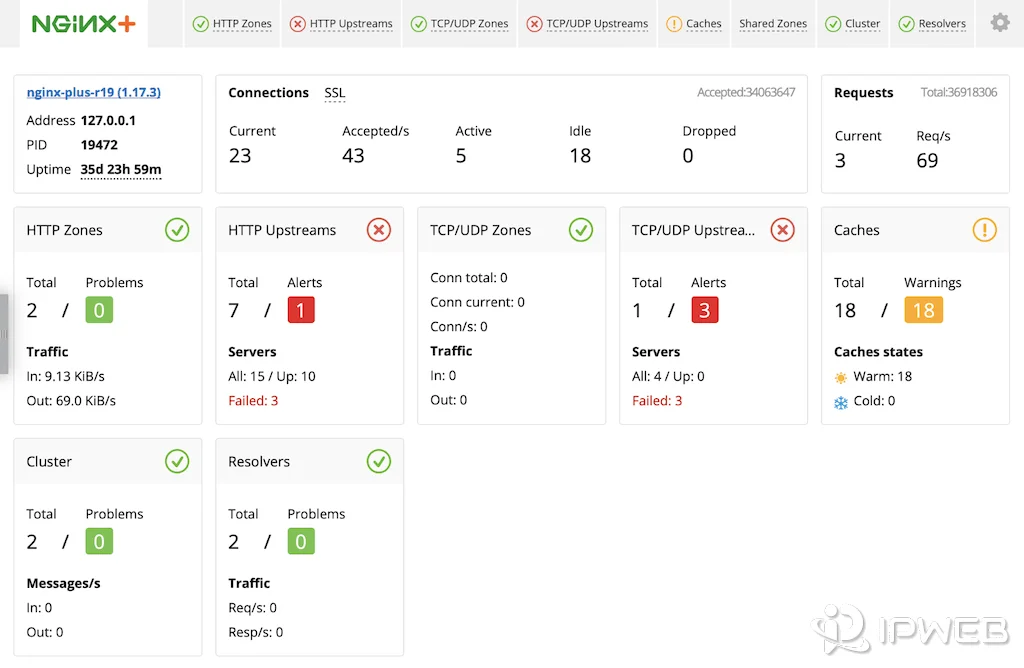
NGINX documentation is useful here as a factual reference: passive failures and active health checks can remove an upstream from service, depending on configuration. The practical diagnosis, however, comes from correlating that health state with the exact request, the backend pool, recent changes, and dependency health rather than treating “Nginx 503” as a complete root cause.
CDN, Load Balancer, and Origin: Separate the Failure
Do not assign the error to the first brand name you see on the page. A CDN can generate a 503 itself, relay one from the origin, or expose a failure that actually began in a load balancer or application behind the origin hostname.
Work from the outside in:
| Layer | Question to answer | Evidence that changes the diagnosis |
|---|---|---|
| CDN / edge | Did the edge generate the 503, or relay an origin failure? | Provider-specific body wording, edge headers, request or trace ID, cache status, provider logs. |
| Load balancer | Was there at least one healthy target eligible for this request? | Healthy-host count, target-health reason, drain state, health-check history, capacity. |
| Reverse proxy | Could the proxy connect to an upstream that met its health rules? | Upstream errors, connect/response timing, fail counters, health-check state. |
| Origin application | Was the application ready to serve this path, not merely alive? | Readiness output, worker saturation, dependency errors, recent deploys, queue depth. |
Here is a useful failure pattern: if the CDN edge is reachable and returns a branded 503, the client-to-edge path may be working perfectly while the edge-to-origin path is failing. In that case, changing forward-proxy credentials is solving the wrong problem.
Another pattern is the opposite: if one route reaches a healthy edge and another route consistently lands on an edge path that cannot reach the origin, the backend may not be globally unhealthy. That is why route-specific 503s should be compared with the same URL, headers, and time window rather than generalized from one request.
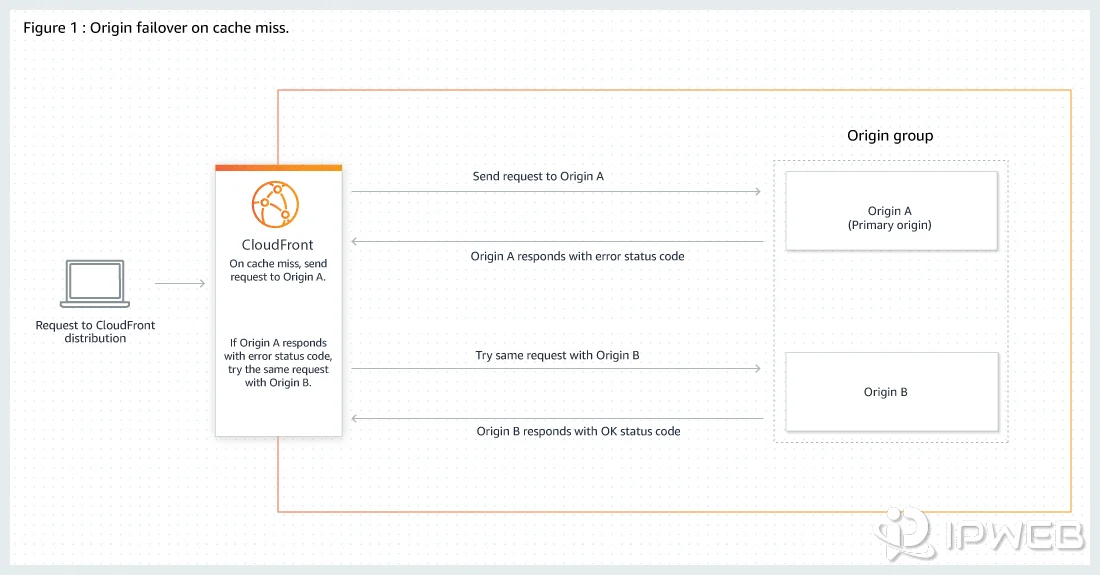
Cloudflare's 503 documentation and Amazon CloudFront's HTTP 503 documentation provide vendor-specific confirmation for these edge/origin distinctions, but the transferable method is the same across providers: identify which layer returned the HTTP response, preserve its request identifiers and headers, and then test whether the failure follows the request, the route, or the backend pool.
If You Own the Server vs If You Only Consume the Site
The same 503 should lead to different actions depending on what you can actually observe. Trying to use an operator-only fix when you only consume a third-party site usually creates guesswork.
| Your position | What you can prove | Best next action |
|---|---|---|
| You operate the site or API | Backend pool state, health-check failures, logs, capacity, deployments, dependency health | Find why targets became ineligible, restore a healthy backend, then verify that the routing layer adds it back into service. |
| You consume a third-party public site | Status, wording, headers, request ID, timing, and whether the error changes across controlled routes | Preserve the evidence, reduce retries, and treat the source as temporarily unavailable unless route comparison points to a narrower network path. |
| You use a forward proxy | Whether the route is active and whether the destination returned a real HTTP 503 | Validate the proxy route separately. A working proxy can still deliver a genuine target-side 503. |
For a public web data workflow, a backend-health 503 is not successful content and should not be converted into an empty business result. Store the failure state with enough evidence to retry or review later. Use the broader 503 troubleshooting flow for generic retry policy rather than duplicating that logic here.
Common Misdiagnoses
“503 means my proxy credentials are wrong.”
Usually not if you received a valid HTTP 503 response from the target-side path. Credential, host, port, and protocol failures belong to client or forward-proxy troubleshooting. Use the proxy error guide when the connection fails before a normal HTTP response is returned.
“Any upstream problem is a 503.”
No. A 502 Bad Gateway usually indicates that a gateway received an invalid response from an upstream, while a backend-health 503 points more toward temporary unavailability or the absence of an eligible healthy backend. Keep those failure classes separate.
“A CDN-branded error always means the CDN itself is broken.”
No. A CDN can relay an origin-generated failure, and some providers can also generate their own 503 responses. Use provider-specific evidence before assigning ownership. If the response is actually a CDN or WAF access denial rather than backend unavailability, the CDN 403 troubleshooting guide is the better diagnostic path.
“Changing routes until the 503 disappears proves the backend was healthy.”
No. A route change can also change the CDN edge, DNS path, timing, session state, or other variables. If route comparison is necessary, change one variable at a time and keep the same URL, method, headers, and test window.
“The process is running, so the backend must be healthy.”
Not necessarily. Liveness and readiness answer different questions. A process can stay alive while its readiness check fails because a required database, cache, queue, or internal API is unavailable. From the load balancer’s point of view, that backend can still be correctly removed from rotation.
Frequently Asked Questions
It usually means a reverse proxy, load balancer, CDN, gateway, or similar routing layer has no backend it currently considers healthy enough to receive the request. Check upstream health, readiness, reachability, capacity, and dependency state.
It is a narrower case of HTTP 503. A generic 503 only tells you that the service is temporarily unavailable. Backend-health wording adds a clue that an intermediary is having trouble selecting or reaching a healthy upstream.
It generally means the gateway or load-balancing layer currently has no upstream server eligible to receive the request. All candidates may be failing health checks, unreachable, draining, overloaded, or otherwise removed from service.
Yes. Nginx can use failed live traffic for passive health checks, and NGINX Plus can also use active health checks. Depending on the configuration, failed attempts, timeouts, or responses outside the accepted conditions can cause an upstream to be removed from normal traffic until it recovers.
A proxy route can influence which edge or network path reaches the target, but it cannot repair an unhealthy target backend. If you receive a valid 503 response, first identify which target-side layer returned it before treating the forward proxy as the cause.
Retry conservatively rather than immediately. Respect Retry-After when present, cap retries, and store the response as temporary unavailability rather than successful content. The broader 503 guide covers retry behavior in more detail.
Final Thoughts
A “503 backend is unhealthy” message is useful because it narrows the investigation. Do not restart from a generic list of every possible 503 cause. First identify the component that selected the backend, then determine why no eligible upstream could serve the request.
If you control the infrastructure, inspect upstream health checks, readiness, capacity, dependencies, and deployment state. If you only consume the site, preserve the response evidence and treat it as availability trouble somewhere on the target-side delivery path unless a controlled route comparison shows the symptom is isolated to one path. For generic 503 causes, retry policy, and crawler handling, use the broader 503 troubleshooting flow as the primary reference.