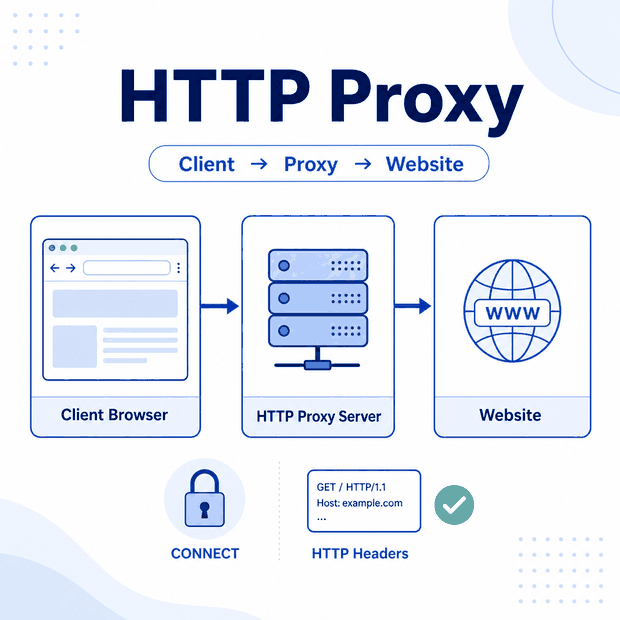
An HTTP proxy sits between a client and a destination server. It receives web requests from the client, forwards them to the destination, and returns the response.
The name can be confusing. An HTTP proxy is not limited to websites that use plain HTTP. It can also carry HTTPS traffic by using the CONNECT method to open a tunnel to the destination server.
An HTTP proxy is a server that accepts HTTP-style proxy requests and forwards them through another network route. It can inspect unencrypted HTTP requests. For HTTPS destinations, it commonly creates a CONNECT tunnel that carries the encrypted TLS connection without reading the page content.
- HTTP proxy describes how the client connects to the proxy, not the protocol used by the final website.
- Unencrypted HTTP requests can be inspected by the proxy.
- HTTPS traffic commonly passes through a CONNECT tunnel.
- The proxy scheme, authentication, CONNECT support, DNS handling, and timeouts must match the client application.
- A proxy changes the network route but does not change browser state, account permissions, or website policies.
What Is an HTTP Proxy?
An HTTP proxy is a forward proxy designed to receive web requests from a browser, application, command-line tool, or script. The client connects to the proxy first instead of connecting directly to the destination.
The proxy then opens a separate connection to the destination and returns the response to the client. As a result, the destination normally sees the proxy’s public IP for that connection rather than the original device’s public IP.
HTTP proxies are commonly used for controlled web routing, debugging, regional website testing, browser automation, and permitted public web data workflows. Depending on its configuration, a proxy may also apply authentication rules, record connection metadata, or route requests through a selected network.
For the broader concept, see IPWeb’s guide to what a proxy server is. This page focuses specifically on HTTP proxy behavior.
How HTTP Proxy Requests Work
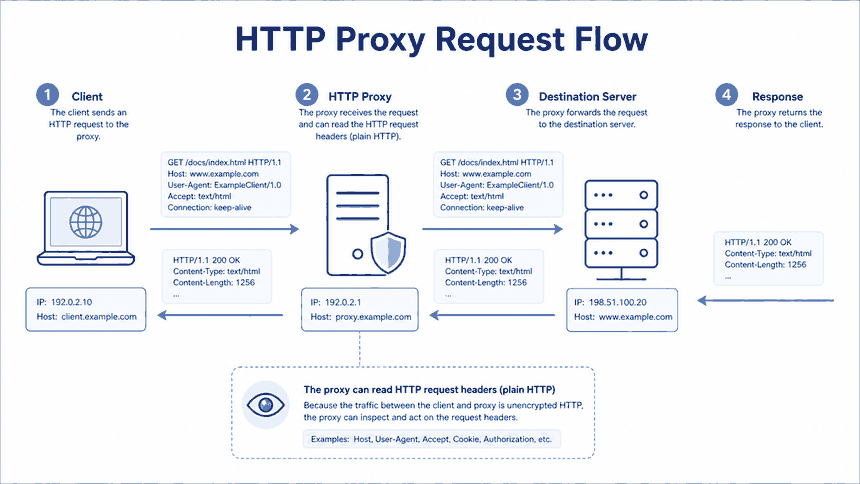
For an unencrypted HTTP destination, the client commonly sends the proxy an absolute URL rather than only a path. The request can include the method, headers, and an optional body.
A simplified request at the proxy boundary may look like this:
GET http://example.com/docs/index.html HTTP/1.1
Host: example.com
User-Agent: ExampleClient/1.0
Accept: text/html
Because this request is not protected by end-to-end TLS, the proxy can inspect its URL, headers, and content. Depending on its purpose and configuration, it may also add proxy-related headers, apply access rules, cache responses, or record request metadata.
The proxy then creates its own connection to the destination server. It forwards the request, receives the response, and passes the response back to the client.
A proxy may add a Via header to describe intermediary handling. If the service requires credentials, the client may send a Proxy-Authorization header to authenticate with the proxy. That authentication is separate from any login, cookie, or token used by the destination website.
The application must be configured with the correct proxy scheme, hostname, port, and authentication method.
HTTP CONNECT and HTTPS Traffic
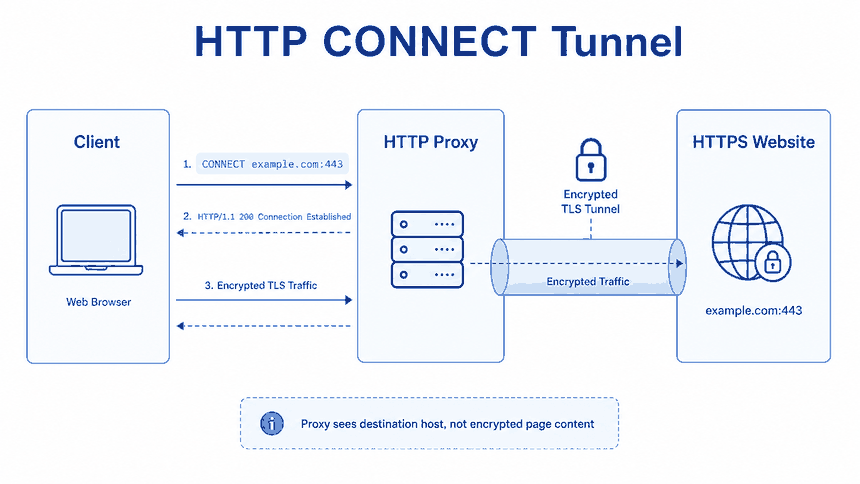
Most websites use HTTPS. Instead of sending the encrypted website request directly to the HTTP proxy for inspection, the client commonly asks the proxy to open a tunnel to the destination host and port.
A simplified CONNECT request looks like this:
CONNECT example.com:443 HTTP/1.1
Host: example.com:443
Proxy-Authorization: Basic ********
If the proxy accepts the request, it opens a TCP connection to the destination and returns a successful CONNECT response. The client then performs the TLS handshake through that tunnel.
The proxy can normally see the client connection, proxy authentication identity, CONNECT destination host and port, connection timing, and traffic volume. It cannot normally read the HTTPS URL path, page content, cookies, request headers, or request body carried inside the encrypted tunnel.
Reading the encrypted content would require deliberate TLS interception. This is commonly associated with managed enterprise inspection systems that install a trusted certificate on the client device. Without that trust configuration, replacing the destination certificate should cause normal TLS validation to fail.
The HTTP CONNECT method is defined in the IETF HTTP Semantics specification.
HTTP Proxy vs Other Proxy Types
HTTP, SOCKS, transparent, and reverse proxies describe different protocols or network roles. These labels are separate from IP-source labels such as residential, ISP, or datacenter proxy.
| Proxy Type | Common Fit | What to Check |
|---|---|---|
| HTTP proxy | Browsers, HTTP clients, APIs, and web automation. | HTTP support, CONNECT behavior, authentication, and client configuration. |
| SOCKS5 proxy | General application traffic, commonly TCP and optionally UDP when supported. | Application support, DNS mode, authentication, and UDP availability. |
| Transparent proxy | Network filtering, caching, or managed organization routing. | It may be added by the network without explicit client configuration. |
| Reverse proxy | Receiving and routing traffic for a website or online service. | It represents the origin service rather than the browsing client. |
HTTP CONNECT can also carry TCP traffic that is not ordinary webpage content when both the client and proxy permit the destination. However, SOCKS5 is generally designed for a wider range of application-level traffic and does not depend on HTTP request semantics.
When to Use an HTTP Proxy
Use an HTTP proxy when the workflow is primarily web-oriented and the client application supports HTTP-style proxy configuration.
| Use Case | Why an HTTP Proxy Fits | What to Validate |
|---|---|---|
| Browser testing | Most browsers and automation tools support explicit HTTP proxy settings. | Visible IP, CONNECT support, browser context, and session behavior. |
| API requests | Popular HTTP libraries commonly support proxy URLs and authentication. | Timeouts, retries, proxy scheme, and response handling. |
| Regional QA | Requests can be routed through an IP in a selected network or region. | Location accuracy, language, currency, and final page content. |
| Debugging | A controlled proxy can help inspect unencrypted requests or connection metadata. | Privacy requirements, TLS behavior, and sensitive log content. |
| Permitted web data work | Many request libraries and browser tools support HTTP proxies directly. | Source rules, request rate, session design, and output consistency. |
An HTTP proxy changes the network route. It does not automatically change cookies, browser storage, account state, request frequency, browser capabilities, or website policies.
When an authorized regional workflow genuinely requires changing residential routes, dynamic residential proxies can provide configurable locations and sessions. The HTTP or HTTPS proxy protocol still needs to be supported correctly by the application.
How to Test an HTTP Proxy
Test the proxy from the same browser, application, or command-line environment used by the real workflow. A successful browser test does not prove that a script uses the same settings.
Confirm an HTTPS Route with curl
Use this command to check whether curl can create a CONNECT tunnel through the configured HTTP proxy:
curl -sS \
  -x "http://username:password@proxy.example:port" \
  https://httpbin.org/ip
Replace the example hostname, port, username, and password with the real proxy configuration. The response should show the public IP visible to the destination.
The http:// scheme in the proxy URL describes the client-to-proxy connection. It does not prevent the destination URL from using HTTPS.
Inspect CONNECT and TLS Setup
Use verbose output when the proxy authenticates successfully but the HTTPS request still fails:
curl -v \
  -x "http://username:password@proxy.example:port" \
  https://example.com/
The output can show:
- The connection to the proxy server.
- The CONNECT request and response status.
- The TLS handshake with the destination.
- The final HTTP status and redirect path.
Do not publish complete verbose logs without removing proxy credentials, authorization headers, cookies, and other sensitive values.
Test Plain HTTP Separately
Use an HTTP destination only when you need to confirm unencrypted proxy behavior:
curl -v \
  -x "http://username:password@proxy.example:port" \
  http://example.com/
This request does not use CONNECT. The proxy receives the HTTP request directly and can inspect the request line and headers.
What to Check Before Using One
A reliable HTTP proxy setup requires more than a working hostname and port. Authentication, CONNECT support, DNS handling, timeout rules, and application behavior can differ between clients.
- Proxy scheme: Confirm whether the client-to-proxy connection uses HTTP or encrypted HTTPS.
- Host and port: Verify the exact endpoint supplied by the provider.
- Authentication: Check the username, password, IP allowlist, or token format.
- CONNECT support: Test an HTTPS destination rather than assuming tunneling is available.
- DNS handling: Confirm whether the destination hostname is passed to the proxy or resolved locally by the client.
- Proxy hostname resolution: Remember that the client may still need to resolve the proxy server’s own hostname.
- Timeouts: Review connection, CONNECT, TLS, read, and total timeout behavior.
- Visible route: Check the public IP, ASN, location estimate, and session behavior.
- Rotation: Retest after changing an IP, endpoint, or sticky session.
- Application scope: Confirm whether the proxy applies to one process, one browser profile, or the whole device.
For standard explicit HTTP proxy requests, the destination hostname is commonly sent to the proxy. Exact DNS behavior can still vary by client library and configuration, so test the application used by the real workflow.
Common HTTP Proxy Mistakes
Using the Wrong Proxy Scheme
The proxy URL scheme describes the connection from the client to the proxy, not the protocol used by the final website. An HTTP proxy can still access an HTTPS destination through CONNECT.
Assuming Browser and Script Settings Are Shared
A browser, command-line tool, desktop application, and operating system may each use different proxy settings. Confirm the route from the exact client used by the workflow.
Confusing Proxy Authentication with Website Login
Proxy-Authorization authenticates the client to the proxy. It is separate from the cookies, access tokens, or credentials used by the destination website.
Assuming the Proxy Can Read Every HTTPS Request
A normal CONNECT proxy forwards encrypted TLS traffic. It cannot normally read the URL path, page content, cookies, or headers inside the tunnel.
Using Timeouts Designed for Direct Requests
A proxied HTTPS request can include several stages: connecting to the proxy, authenticating, opening the CONNECT tunnel, negotiating TLS, and waiting for the destination response. A direct-request timeout may be too short.
Treating Every Connection Failure as a Bad IP
Failures can also result from the wrong scheme, incorrect credentials, unsupported CONNECT destinations, DNS problems, certificate validation, application-specific settings, or short timeouts.
Publishing Verbose Logs Without Redaction
Diagnostic logs may contain proxy usernames, passwords, authorization headers, cookies, target URLs, or account information. Remove sensitive values before sharing them.
Frequently Asked Questions
Final Thoughts
An HTTP proxy is best understood as a web-oriented routing layer. It receives proxy-aware requests from a client and forwards them through another network connection.
For unencrypted HTTP traffic, the proxy can inspect the request. For HTTPS, CONNECT normally carries an encrypted TLS connection that protects the page content and request details from the proxy.
Production reliability depends on the proxy scheme, authentication, CONNECT behavior, DNS handling, timeout settings, session design, and application support. Start with a small curl test, confirm the route in the real application, and record each failure stage separately before scaling the setup.