
A proxy list checker is useful when you have more than one endpoint to validate. Instead of testing proxies manually, the goal is to parse the entire file, remove bad or duplicate rows, test unique entries with controlled concurrency, export the results, and decide which endpoints should remain active.
This guide focuses on list-level quality control. For a single proxy route check, use the separate proxy testing workflow.
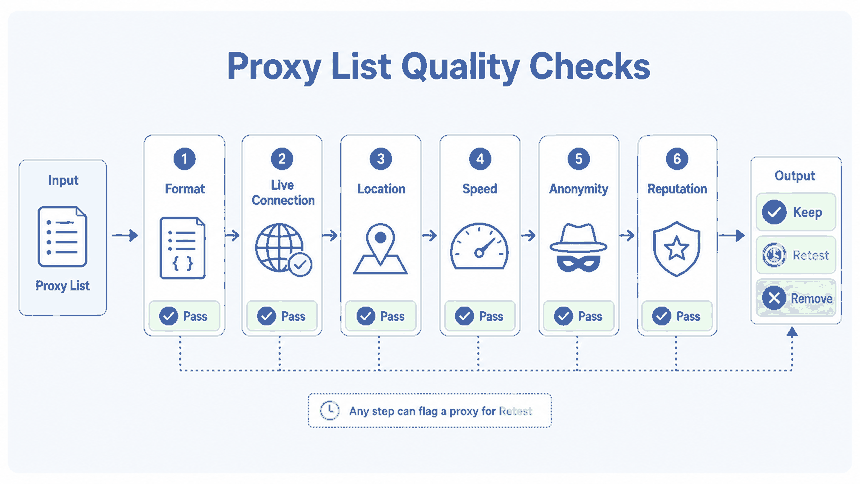
To check a proxy list, normalize every row into a valid proxy URL, reject malformed entries, remove duplicates, run several requests through each unique endpoint, and export status, success rate, median latency, exit IP, errors, and test time to CSV. Then score the whole list using the same test conditions.
- Parse and deduplicate the list before sending network requests.
- Repeat each test so one successful response is not mistaken for stability.
- Preserve invalid and duplicate rows in the report instead of silently dropping them.
- Score the whole list using format quality, uniqueness, reachability, stability, and latency.
What a Proxy List Checker Should Do
A proxy list checker should turn an untrusted text file into a decision table. The output should show which rows are valid, duplicated, reachable, unstable, or failed, along with the evidence behind each result.
| Task | Single Proxy Test | Proxy List Checker |
|---|---|---|
| Main question | Does this proxy work now? | Is this entire list clean and stable enough to use? |
| Input | One proxy endpoint | A file, spreadsheet, or exported list |
| Core method | One-off route and configuration validation | Parsing, deduplication, repeated tests, scoring, and retesting |
| Useful output | Visible IP and basic error | Row-level CSV plus list-level quality metrics |
| Next action | Correct one setting or credential | Keep, quarantine, correct, retest, or remove groups of entries |
Build a Clean proxies.txt File
Save the input as a plain-text file with one proxy per line. Explicit schemes reduce ambiguity during batch testing.
http://203.0.113.10:8080
http://username:password@proxy.example.net:8080
https://198.51.100.24:8443
proxy.example.net:3128
In the example script, an entry without a scheme is treated as an HTTP proxy. Keep unsupported formats, labels, and source notes outside the proxy URL unless your parser explicitly handles them.
Passwords containing characters such as @, :, or spaces should be URL-encoded before they are added to the file. Store proxies.txt securely because the source file may contain unmasked credentials.
Deduplicate Before Testing
If one endpoint appears several times, it can waste concurrency slots and inflate the apparent size of the list. Deduplication should therefore happen before the network test.
The script below creates a normalized key from the scheme, host, port, and a short hash of the credentials. The hash distinguishes credentials without writing the password into the CSV report.
- Ignore blank lines and comments.
- Reject missing hosts, invalid ports, and unsupported schemes.
- Normalize hostnames and schemes before comparison.
- Record the source line for every valid, invalid, and duplicate row.
- Keep the duplicate count for list-level scoring.
Batch Test the List with Python
The following standard-library script supports proxy URLs using the http:// and https:// schemes. It tests every unique proxy three times, limits concurrency, masks passwords, records failure categories, and creates two files:
proxy-results.csv: one row for each valid, invalid, duplicate, or tested entryproxy-summary.csv: list-level rates, latency, quality score, and rating
Create proxies.txt in the same directory, then save the script as proxy_list_checker.py and run:
python proxy_list_checker.pyimport csv
import hashlib
import json
import re
import socket
import ssl
import time
import urllib.error
import urllib.parse
import urllib.request
from collections import Counter
from concurrent.futures import ThreadPoolExecutor, as_completed
from datetime import datetime, timezone
from pathlib import Path
from statistics import mean, median
INPUT_FILE = Path("proxies.txt")
RESULTS_FILE = Path("proxy-results.csv")
SUMMARY_FILE = Path("proxy-summary.csv")
TEST_URL = "https://api.ipify.org?format=json"
DEFAULT_SCHEME = "http"
TIMEOUT_SECONDS = 8
ATTEMPTS = 3
MAX_WORKERS = 10
ALLOWED_SCHEMES = {"http", "https"}
def utc_now():
return datetime.now(timezone.utc).isoformat()
def redact_text(value):
text = str(value).replace("\n", " ").strip()
text = re.sub(
r"(://[^:@/\s]+:)[^@/\s]+@",
r"\1***@",
text,
)
return text[:180]
def safe_proxy_label(parsed):
host = parsed.hostname or ""
if ":" in host and not host.startswith("["):
host = f"[{host}]"
auth = ""
if parsed.username:
auth = f"{parsed.username}:***@"
return (
f"{parsed.scheme.lower()}://"
f"{auth}{host}:{parsed.port}"
)
def normalize_proxy(raw_value, line_number):
value = raw_value.strip()
if not value or value.startswith("#"):
return None
if "://" not in value:
value = f"{DEFAULT_SCHEME}://{value}"
parsed = urllib.parse.urlparse(value)
scheme = parsed.scheme.lower()
if scheme not in ALLOWED_SCHEMES:
raise ValueError(
f"Unsupported scheme: {parsed.scheme or 'missing'}"
)
if not parsed.hostname:
raise ValueError("Missing proxy host")
try:
port = parsed.port
except ValueError as exc:
raise ValueError("Invalid proxy port") from exc
if port is None:
raise ValueError("Missing proxy port")
username = parsed.username or ""
password = parsed.password or ""
credential_source = f"{username}:{password}"
credential_id = hashlib.sha256(
credential_source.encode("utf-8")
).hexdigest()[:12]
dedupe_key = (
f"{scheme}|{parsed.hostname.lower()}|"
f"{port}|{credential_id}"
)
return {
"source_line": line_number,
"proxy_url": value,
"safe_proxy": safe_proxy_label(parsed),
"scheme": scheme,
"host": parsed.hostname,
"port": port,
"dedupe_key": dedupe_key,
}
def classify_error(exc):
if isinstance(exc, urllib.error.HTTPError):
if exc.code == 407:
return "proxy_authentication_required_407"
return f"http_error_{exc.code}"
if isinstance(exc, urllib.error.URLError):
reason = exc.reason
if isinstance(reason, socket.timeout):
return "timeout"
if isinstance(reason, ssl.SSLError):
return "tls_error"
if isinstance(reason, ConnectionRefusedError):
return "connection_refused"
if isinstance(reason, socket.gaierror):
return "dns_resolution_error"
return f"url_error: {redact_text(reason)}"
if isinstance(exc, (TimeoutError, socket.timeout)):
return "timeout"
return (
f"{type(exc).__name__}: "
f"{redact_text(exc)}"
)
def test_proxy(item):
proxy_handler = urllib.request.ProxyHandler({
"http": item["proxy_url"],
"https": item["proxy_url"],
})
opener = urllib.request.build_opener(proxy_handler)
latencies = []
exit_ips = []
error_counts = Counter()
for _ in range(ATTEMPTS):
started = time.perf_counter()
request = urllib.request.Request(
TEST_URL,
headers={
"User-Agent": "ProxyListChecker/2.0",
"Accept": "application/json",
},
)
try:
with opener.open(
request,
timeout=TIMEOUT_SECONDS,
) as response:
body = response.read().decode("utf-8")
data = json.loads(body)
exit_ip = str(
data.get("ip", "")
).strip()
if not exit_ip:
raise ValueError(
"Test endpoint returned no IP"
)
latency_ms = round(
(
time.perf_counter()
- started
) * 1000,
1,
)
latencies.append(latency_ms)
exit_ips.append(exit_ip)
except Exception as exc:
error_counts[classify_error(exc)] += 1
success_count = len(exit_ips)
success_rate = round(
(success_count / ATTEMPTS) * 100,
1,
)
if success_count == ATTEMPTS:
status = "live"
elif success_count:
status = "unstable"
else:
status = "failed"
error_summary = "; ".join(
f"{name} x{count}"
for name, count
in error_counts.most_common()
)
return {
"source_line": item["source_line"],
"duplicate_of_line": "",
"proxy": item["safe_proxy"],
"scheme": item["scheme"],
"host": item["host"],
"port": item["port"],
"status": status,
"attempts": ATTEMPTS,
"success_count": success_count,
"success_rate_percent": success_rate,
"median_latency_ms": (
round(median(latencies), 1)
if latencies
else ""
),
"exit_ips": ";".join(
sorted(set(exit_ips))
),
"error": error_summary,
"tested_at_utc": utc_now(),
}
def result_template(
source_line,
proxy,
status,
error="",
duplicate_of_line="",
):
return {
"source_line": source_line,
"duplicate_of_line": duplicate_of_line,
"proxy": proxy,
"scheme": "",
"host": "",
"port": "",
"status": status,
"attempts": 0,
"success_count": 0,
"success_rate_percent": 0,
"median_latency_ms": "",
"exit_ips": "",
"error": error,
"tested_at_utc": utc_now(),
}
def load_proxy_file(path):
unique_items = []
initial_results = []
first_seen = {}
source_rows = 0
valid_rows = 0
duplicate_rows = 0
invalid_rows = 0
with path.open(
"r",
encoding="utf-8",
) as file:
for line_number, raw_value in enumerate(
file,
start=1,
):
stripped = raw_value.strip()
if not stripped or stripped.startswith("#"):
continue
source_rows += 1
try:
item = normalize_proxy(
raw_value,
line_number,
)
except Exception as exc:
invalid_rows += 1
initial_results.append(
result_template(
source_line=line_number,
proxy=redact_text(stripped),
status="invalid",
error=redact_text(exc),
)
)
continue
if item is None:
continue
valid_rows += 1
key = item["dedupe_key"]
if key in first_seen:
duplicate_rows += 1
initial_results.append(
result_template(
source_line=line_number,
proxy=item["safe_proxy"],
status="duplicate",
error="Duplicate normalized entry",
duplicate_of_line=first_seen[key],
)
)
continue
first_seen[key] = line_number
unique_items.append(item)
counts = {
"source_rows": source_rows,
"valid_rows": valid_rows,
"invalid_rows": invalid_rows,
"duplicate_rows": duplicate_rows,
"unique_rows": len(unique_items),
}
return unique_items, initial_results, counts
def percentage(part, whole):
if not whole:
return 0.0
return round((part / whole) * 100, 1)
def latency_quality_score(latency_ms):
if latency_ms in {"", None}:
return 0.0
if latency_ms <= 500:
return 100.0
if latency_ms <= 1000:
return 80.0
if latency_ms <= 2000:
return 60.0
if latency_ms <= 5000:
return 30.0
return 10.0
def build_summary(results, counts):
tested = [
row for row in results
if row["status"]
in {"live", "unstable", "failed"}
]
reachable = [
row for row in tested
if row["success_count"] > 0
]
fully_live = [
row for row in tested
if row["status"] == "live"
]
endpoint_latencies = [
float(row["median_latency_ms"])
for row in reachable
if row["median_latency_ms"] != ""
]
valid_format_rate = percentage(
counts["valid_rows"],
counts["source_rows"],
)
duplicate_rate = percentage(
counts["duplicate_rows"],
counts["valid_rows"],
)
uniqueness_rate = round(
100 - duplicate_rate,
1,
)
reachable_rate = percentage(
len(reachable),
len(tested),
)
fully_live_rate = percentage(
len(fully_live),
len(tested),
)
average_success_rate = round(
mean(
float(row["success_rate_percent"])
for row in tested
),
1,
) if tested else 0.0
list_median_latency = round(
median(endpoint_latencies),
1,
) if endpoint_latencies else ""
latency_score = latency_quality_score(
list_median_latency
)
quality_score = round(
(valid_format_rate * 0.15)
+ (uniqueness_rate * 0.10)
+ (reachable_rate * 0.35)
+ (average_success_rate * 0.25)
+ (latency_score * 0.15),
1,
)
if quality_score >= 85:
rating = "strong"
elif quality_score >= 70:
rating = "usable_with_review"
elif quality_score >= 50:
rating = "weak"
else:
rating = "poor"
return {
**counts,
"reachable_rows": len(reachable),
"fully_live_rows": len(fully_live),
"valid_format_rate_percent": valid_format_rate,
"duplicate_rate_percent": duplicate_rate,
"reachable_rate_percent": reachable_rate,
"fully_live_rate_percent": fully_live_rate,
"average_success_rate_percent": (
average_success_rate
),
"list_median_latency_ms": (
list_median_latency
),
"latency_score": latency_score,
"quality_score": quality_score,
"rating": rating,
"tested_at_utc": utc_now(),
}
def write_results(path, rows):
fieldnames = [
"source_line",
"duplicate_of_line",
"proxy",
"scheme",
"host",
"port",
"status",
"attempts",
"success_count",
"success_rate_percent",
"median_latency_ms",
"exit_ips",
"error",
"tested_at_utc",
]
with path.open(
"w",
newline="",
encoding="utf-8-sig",
) as file:
writer = csv.DictWriter(
file,
fieldnames=fieldnames,
)
writer.writeheader()
writer.writerows(rows)
def write_summary(path, summary):
with path.open(
"w",
newline="",
encoding="utf-8-sig",
) as file:
writer = csv.DictWriter(
file,
fieldnames=list(summary.keys()),
)
writer.writeheader()
writer.writerow(summary)
def main():
if not INPUT_FILE.exists():
raise FileNotFoundError(
f"Input file not found: {INPUT_FILE}"
)
items, results, counts = load_proxy_file(
INPUT_FILE
)
with ThreadPoolExecutor(
max_workers=MAX_WORKERS
) as executor:
future_map = {
executor.submit(
test_proxy,
item,
): item["source_line"]
for item in items
}
for future in as_completed(future_map):
line_number = future_map[future]
try:
results.append(future.result())
except Exception as exc:
results.append(
result_template(
source_line=line_number,
proxy="",
status="failed",
error=(
"Unexpected worker error: "
f"{redact_text(exc)}"
),
)
)
results.sort(
key=lambda row: row["source_line"]
)
summary = build_summary(
results,
counts,
)
write_results(
RESULTS_FILE,
results,
)
write_summary(
SUMMARY_FILE,
summary,
)
print(f"Row results: {RESULTS_FILE}")
print(f"List summary: {SUMMARY_FILE}")
print(
"Quality score: "
f"{summary['quality_score']}/100"
)
print(f"Rating: {summary['rating']}")
if __name__ == "__main__":
main()The script uses Python’s standard library and does not require an extra package. It supports HTTP-style proxy URLs only. SOCKS4 and SOCKS5 entries require a SOCKS-aware library or a separate test tool and should not be mixed into this run.
The test endpoint returns the visible IP address. For large or recurring jobs, use a permitted test endpoint that can handle the expected request volume. The script is a starting template rather than a complete production monitoring system.
For implementation details, see the official Python documentation for ProxyHandler and ThreadPoolExecutor.
Export Results to CSV
The row-level CSV preserves failed, invalid, and duplicate entries so the report reflects the quality of the original list rather than only the surviving endpoints.
| CSV Field | Example | Purpose |
|---|---|---|
| source_line | 18 | Links the result to the original file row |
| status | live, unstable, failed, invalid, duplicate | Separates network results from parsing and duplicate issues |
| success_rate_percent | 66.7 | Shows how many repeated attempts succeeded |
| median_latency_ms | 428.5 | Summarizes successful response times for the endpoint |
| exit_ips | 198.51.100.24 | Records unique IPs returned during the test |
| duplicate_of_line | 7 | Identifies the original row for a duplicate entry |
| error | timeout x2 | Groups repeated failures without exposing the password |
| tested_at_utc | 2026-07-24T03:00:00+00:00 | Shows when the result was produced |
The summary CSV contains list-wide metrics such as valid-format rate, duplicate rate, reachable rate, average success rate, median latency, quality score, and rating.
Score the Whole Proxy List
The script uses an example 100-point scoring model. It is not a universal proxy-quality standard; adjust the weights and latency thresholds for the application using the list.
| Metric | Weight | What It Measures |
|---|---|---|
| Valid format rate | 15% | How much of the source file can be parsed correctly |
| Uniqueness rate | 10% | How much of the parsed list remains after duplicates are removed |
| Reachable rate | 35% | How many unique endpoints succeed at least once |
| Average success rate | 25% | How consistently the tested endpoints respond across repeated attempts |
| Latency score | 15% | How the median latency compares with the example thresholds |
- 85–100: Strong under the current test conditions
- 70–84.9: Usable, but review unstable and failed rows
- 50–69.9: Weak; substantial cleanup or replacement is needed
- Below 50: Poor under the current test conditions
A score should always be read with the test URL, timeout, concurrency, attempt count, and timestamp. Two scores produced under different conditions are not directly comparable.
Public List Risk Without Overweighting It
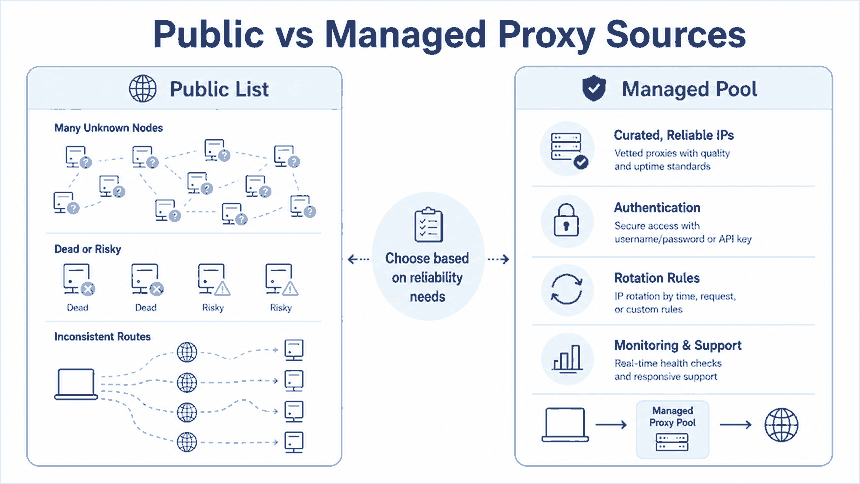
Public proxy lists deserve a short risk check, but public-versus-managed comparisons should not take over a batch-validation article. Regardless of the source, the first task is to measure format quality, duplicate rate, reachability, stability, latency, and failure distribution.
Use unknown public endpoints only for low-risk experiments and parsing tests. Do not send private account data, payment information, customer records, or confidential traffic through proxies operated by unknown parties.
Decide When to Retest or Remove Entries
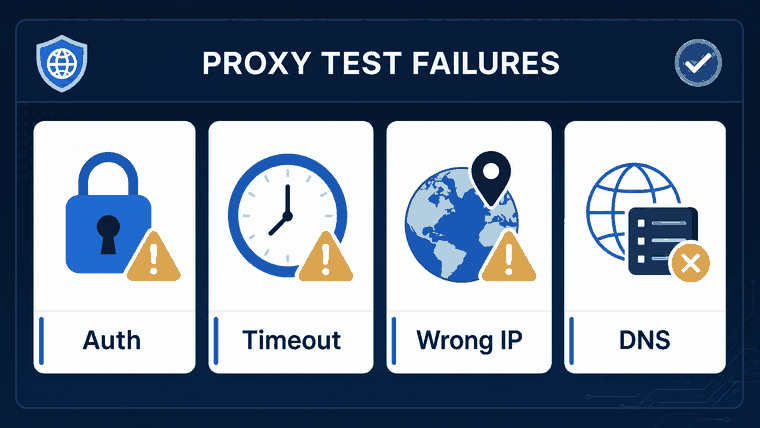
A failed request should not always cause immediate deletion. Temporary routing problems, test-endpoint limits, and local network conditions can affect one run. Repeated failure patterns are more useful than a single result.
| Result | Interpretation | Recommended Action |
|---|---|---|
| Live across all attempts | The endpoint was reachable and consistent during this run | Keep it and schedule the next routine test |
| Unstable | Only some attempts succeeded | Retest with lower concurrency or another permitted endpoint |
| 407 authentication error | The proxy responded but rejected the credentials or access rule | Verify credentials and authorization before removing it |
| Repeated timeout | The endpoint did not respond within the configured limit | Quarantine it and compare another test window |
| Invalid format | The row cannot be tested without correction | Edit or remove the source row |
| Duplicate | The same normalized route and credentials appear earlier | Remove it from the active list but preserve the duplicate count |
| Repeated failure across several runs | The endpoint has a persistent failure history | Remove it from the active list |
Keep historical reports so you can compare live rate, latency, and failure distribution over time. A controlled list should have a defined retest schedule; fast-changing public lists generally need more frequent validation.
Frequently Asked Questions
Final Thoughts
A useful proxy list is the smaller, documented set that remains after format validation, deduplication, repeated testing, failure classification, scoring, and scheduled maintenance. Preserve the test conditions with every report, and keep single-proxy troubleshooting or website-specific detection checks outside the first list-validation pass.