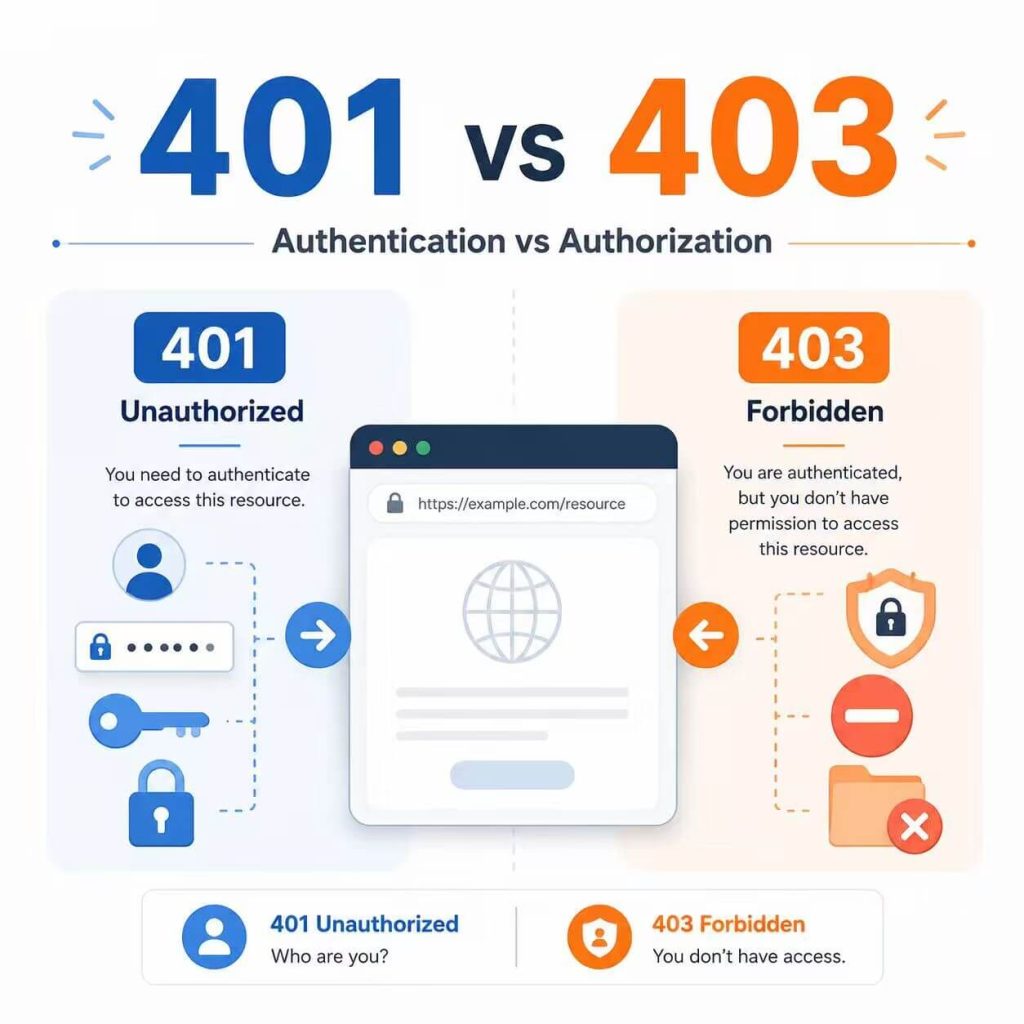
401 Unauthorized and 403 Forbidden are both HTTP client error responses, but they point to different parts of the access process.
A 401 response usually means the website or API does not accept your current authentication credentials. A 403 response means the request was understood, but the server refuses to allow the requested action.
If a proxy is involved, there is one more status to check: 407 Proxy Authentication Required. It means the proxy itself needs valid credentials before it can forward the request.
401 usually means “check your login, token, API key, or authorization header.” 403 usually means “your request is understood, but your account, role, token, or resource access is not allowed.” 407 means “authenticate with the proxy first.”
- 401 is mainly an authentication problem.
- 403 is mainly a permission or policy refusal.
- 407 is a proxy authentication problem.
- An expired token usually requires new credentials, not a new IP.
- A valid token can still return 403 when it lacks the required scope or role.
- If an error appears only through a proxy, compare sessions, redirects, headers, and proxy credentials.
- 401 vs 403 vs 407: Quick Comparison
- Authentication vs Authorization
- What Does 401 Unauthorized Mean?
- What Does 403 Forbidden Mean?
- What Does 407 Proxy Authentication Required Mean?
- Why Does the Error Appear Only with a Proxy?
- Quick Troubleshooting Checklist
- Test 401, 403, and 407 with curl
- Common Authentication Mistakes
- Frequently Asked Questions
- Final Thoughts
401 vs 403 vs 407: Quick Comparison
The fastest way to separate these errors is to identify which system returned the response and which credentials it expected.
| Status | Main Problem | Typical Meaning | What to Check First |
|---|---|---|---|
| 401 Unauthorized | Authentication | The target server does not accept the current credentials. | Login session, API key, token, cookie, and Authorization header. |
| 403 Forbidden | Permission or policy | The server understands the request but refuses it. | Account role, token scope, resource access, account status, and application rules. |
| 407 Proxy Authentication Required | Proxy authentication | The proxy will not forward the request until the client authenticates. | Proxy username, password, endpoint, port, protocol, and credential format. |
Authentication vs Authorization
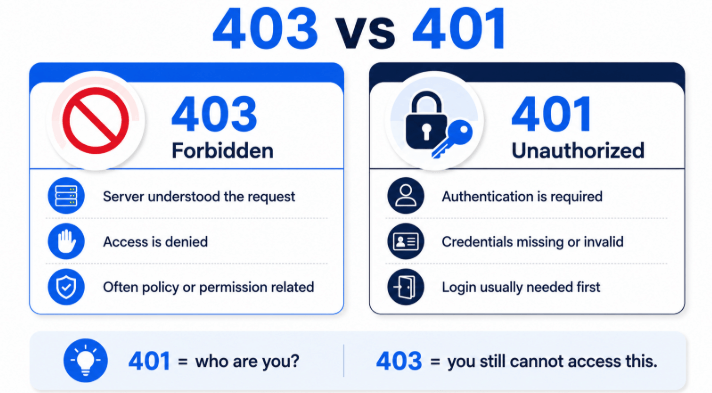
The difference between 401 and 403 becomes easier to understand when you separate authentication from authorization.
Authentication answers: “Who are you?”
Authorization answers: “What are you allowed to do?”
| Stage | Question | Common Failure | Likely Status |
|---|---|---|---|
| Authentication | Can the server verify the user, application, or token? | Missing credentials, expired token, invalid password, or incorrect API key. | 401 |
| Authorization | Can the verified identity access this resource or perform this action? | Missing role, insufficient scope, private resource, or account restriction. | 403 |
| Proxy authentication | Can the client authenticate with the proxy service? | Incorrect proxy username, password, endpoint, or credential format. | 407 |
For example, an API token may be valid, which means authentication succeeds. However, if that token does not include the required write scope, the API may return 403 when the client tries to modify a resource.
What Does 401 Unauthorized Mean?
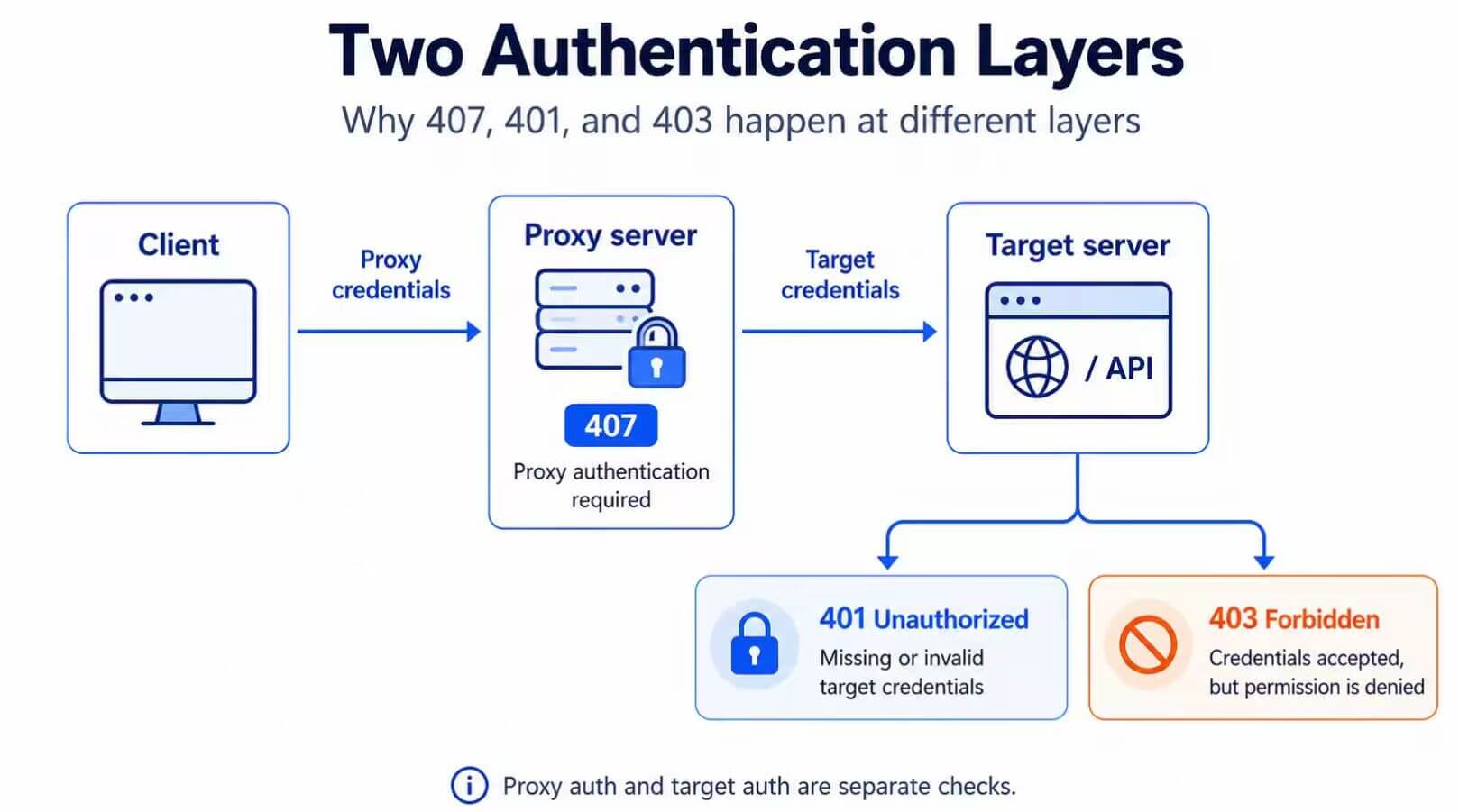
A 401 Unauthorized response means the target server does not accept the authentication credentials supplied with the request.
Despite the word “Unauthorized,” 401 is primarily about authentication. The HTTP specification for 401 states that the response must include a WWW-Authenticate header describing how the client can authenticate.
Common causes include:
- The request does not include an
Authorizationheader. - The bearer token has expired.
- The API key or password is incorrect.
- The login cookie is missing or no longer valid.
- The access token was revoked or rotated.
- The request uses the wrong authentication scheme.
- A redirect, custom gateway, or application failed to forward the credentials.
If a request previously worked and suddenly returns 401, refresh the token or sign in again before changing the proxy, DNS, or browser environment.
What Does 403 Forbidden Mean?
A 403 Forbidden response means the server understood the request but refuses to complete it. Authentication may be valid, but the account, role, token, or resource permission may not allow the requested action.
Examples include:
- A normal user opening an administrator page.
- A valid API token without the required scope.
- An account that cannot access a specific workspace.
- A user trying to open a private resource owned by another account.
- An application rule refusing the requested action.
A 403 does not always prove that authentication succeeded. Some applications use status codes differently. Check the response body and service documentation before assuming the cause.
This page focuses on the difference between authentication and permission errors. For server rules, CDN or firewall responses, request context, network restrictions, CORS, and complete 403 troubleshooting, read the 403 Forbidden diagnosis guide.
What Does 407 Proxy Authentication Required Mean?
A 407 response means the proxy requires authentication before it will forward the request. It is not the same as a website or API returning 401.
The HTTP specification for 407 associates this response with proxy authentication headers:
Proxy-Authenticatetells the client how to authenticate with the proxy.Proxy-Authorizationcarries the client’s proxy credentials.
Common causes include:
- An incorrect proxy username or password.
- A missing proxy credential.
- The wrong proxy endpoint or port.
- An application that does not support authenticated proxies.
- A credential format that does not match the proxy provider’s requirements.
A proxied API request may need two sets of credentials. The proxy username and password authenticate with the proxy. The bearer token or API key authenticates with the target API. Fixing one layer does not automatically fix the other.
Why Does the Error Appear Only with a Proxy?
A proxy does not normally create a 401 response by itself. However, enabling a proxy may change the session, redirect path, IP context, or application configuration used by the request.
The existing login cookie may have been created on the local connection. After the route changes, the website may require the user to authenticate again.
What to do: connect through the proxy, start a clean session, and sign in again. Compare the final URL and cookies instead of immediately replacing the proxy.
If repeated account or API tests require the same approved network route, a static residential proxy can keep the visible IP consistent while you compare cookies, sessions, redirects, and authentication headers. A stable IP can improve test consistency, but it cannot repair an expired token or grant account permission.
A custom gateway, application wrapper, redirect, or forwarding configuration may fail to pass the Authorization header to the final destination.
What to do: inspect the final outbound request. Confirm that the token is attached after redirects and that the final hostname matches the intended API domain.
The proxy username, password, endpoint, port, or protocol may be incorrect. In this case, changing the API token will not help because the request has not reached the target API.
What to do: verify the proxy credentials separately using a simple public test URL.
The token may be valid but lack the required role, scope, workspace membership, or resource permission.
What to do: inspect the token scope and account role. Replacing the proxy will not grant additional API permission.
IP reputation and network restrictions can affect access, but those situations more commonly appear as 403, 429, CAPTCHA, or a verification page. Do not label every proxy-only 401 as an IP reputation problem.
Quick Troubleshooting Checklist
Use this process to identify the failing layer without changing several variables at once.
- Test the request without a proxy. If it still returns 401, focus on the login, token, API key, cookie, or authorization header.
- Check the exact status. Confirm whether the response is 401, 403, or 407.
- Refresh the target credentials. Sign in again or generate a fresh token.
- Test the proxy separately. Confirm that the proxy credentials work before adding the target API credentials.
- Inspect redirects and headers. Make sure the
Authorizationheader reaches the intended hostname. - Check token scope and account role. Do this when authentication works but the requested action still returns 403.
- Change one variable at a time. Keep the account, URL, token, browser profile, and request method consistent during testing.
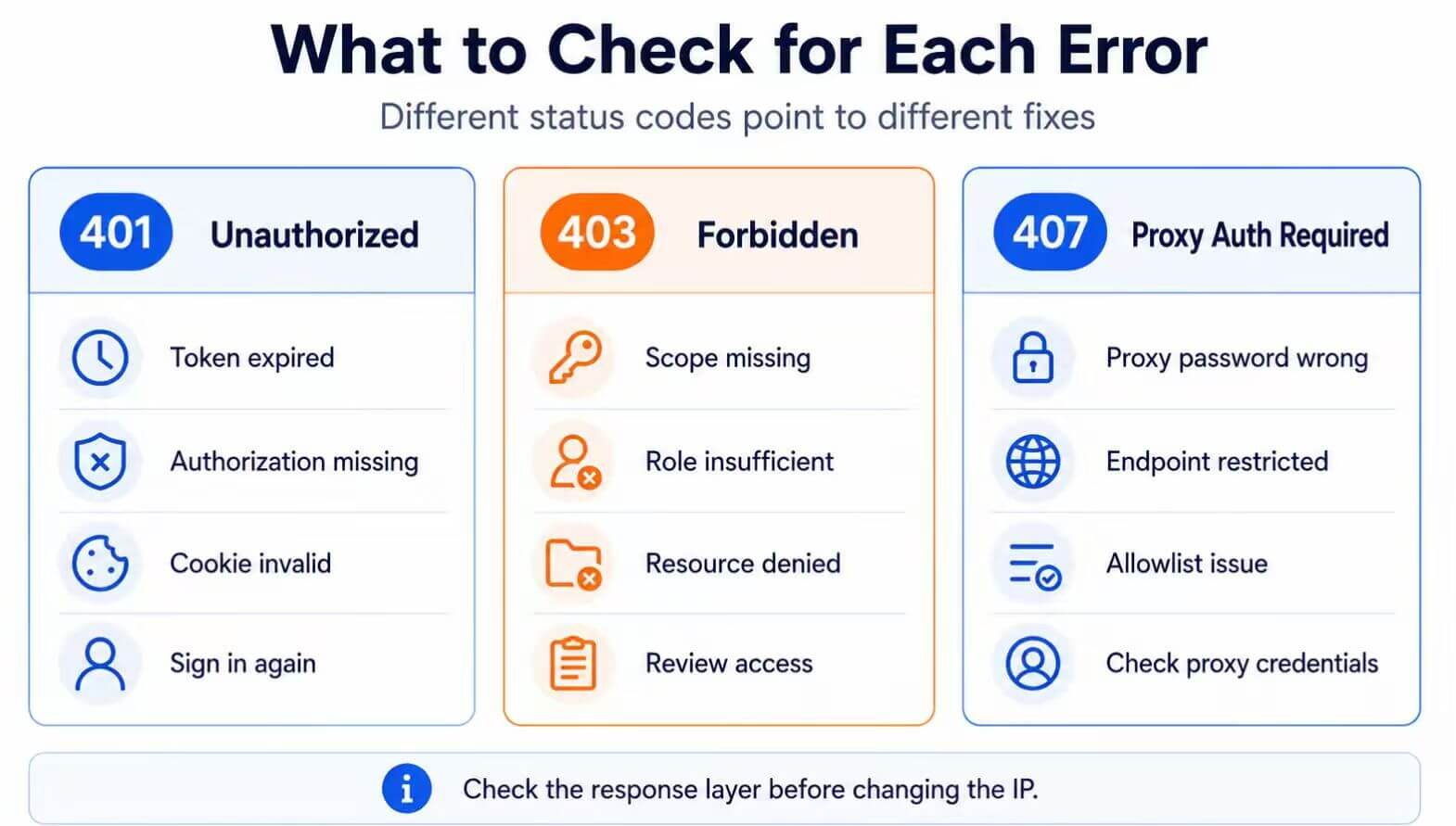
401: refresh or correct target credentials. 403: check scope, role, account access, and resource permission. 407: correct the proxy credentials or configuration.
Test 401, 403, and 407 with curl
The following examples use placeholder domains and credentials. Replace them only with resources you are authorized to test.
Test the Resource Without Credentials
curl -i https://example.com/protected-resourceLook for the status code, response body, and a possible WWW-Authenticate header.
Test the Target API with a Bearer Token
curl -i \
  -H "Authorization: Bearer YOUR_TOKEN" \
  https://api.example.com/resource
If the first request returns 401 and this request succeeds, the original problem was missing authentication.
If this request returns 403, the token may be valid but lack the required scope, role, or resource access.
Test the Proxy and Target Authentication Together
curl -i \
  --proxy http://proxy.example.com:8000 \
  --proxy-user "PROXY_USER:PROXY_PASSWORD" \
  -H "Authorization: Bearer YOUR_TOKEN" \
  https://api.example.com/resource
In this command:
--proxy-userauthenticates with the proxy.- The
Authorizationheader authenticates with the target API.
Use verbose mode when you need to inspect connection and redirect details:
curl -v -L https://example.com/protected-resourceVerbose output can contain tokens, cookies, proxy passwords, and account information. Remove sensitive data before sharing logs.
Common Authentication Mistakes
| Mistake | Why It Fails | Better Approach |
|---|---|---|
| Changing the proxy before refreshing the token | An expired token remains expired on every IP. | Test fresh credentials before changing the route. |
| Using proxy credentials as API credentials | The proxy and target server authenticate separately. | Configure both credential layers in the correct fields. |
| Assuming every 403 means the token is invalid | The token may be valid but lack permission. | Check the token scope, user role, and resource access. |
| Ignoring redirects | A redirect may lead to another hostname or remove sensitive headers. | Inspect the final URL and redirect chain. |
| Calling every proxy failure a 401 | Incorrect proxy credentials normally produce 407. | Record the exact status and response source. |
| Changing several variables together | The test cannot identify which change affected the result. | Keep the request consistent and change one variable at a time. |
Frequently Asked Questions
Final Thoughts
Use the status code to identify the layer you need to inspect. A 401 response usually requires new or corrected credentials. A 403 response usually requires a permission, scope, role, or account-access check. A 407 response requires valid proxy credentials.
When an error appears only through a proxy, first confirm that the proxy connection works and then inspect the target authentication separately. Compare sessions, redirects, cookies, and authorization headers before replacing the IP.
The most reliable method is to keep the request consistent and change one variable at a time.