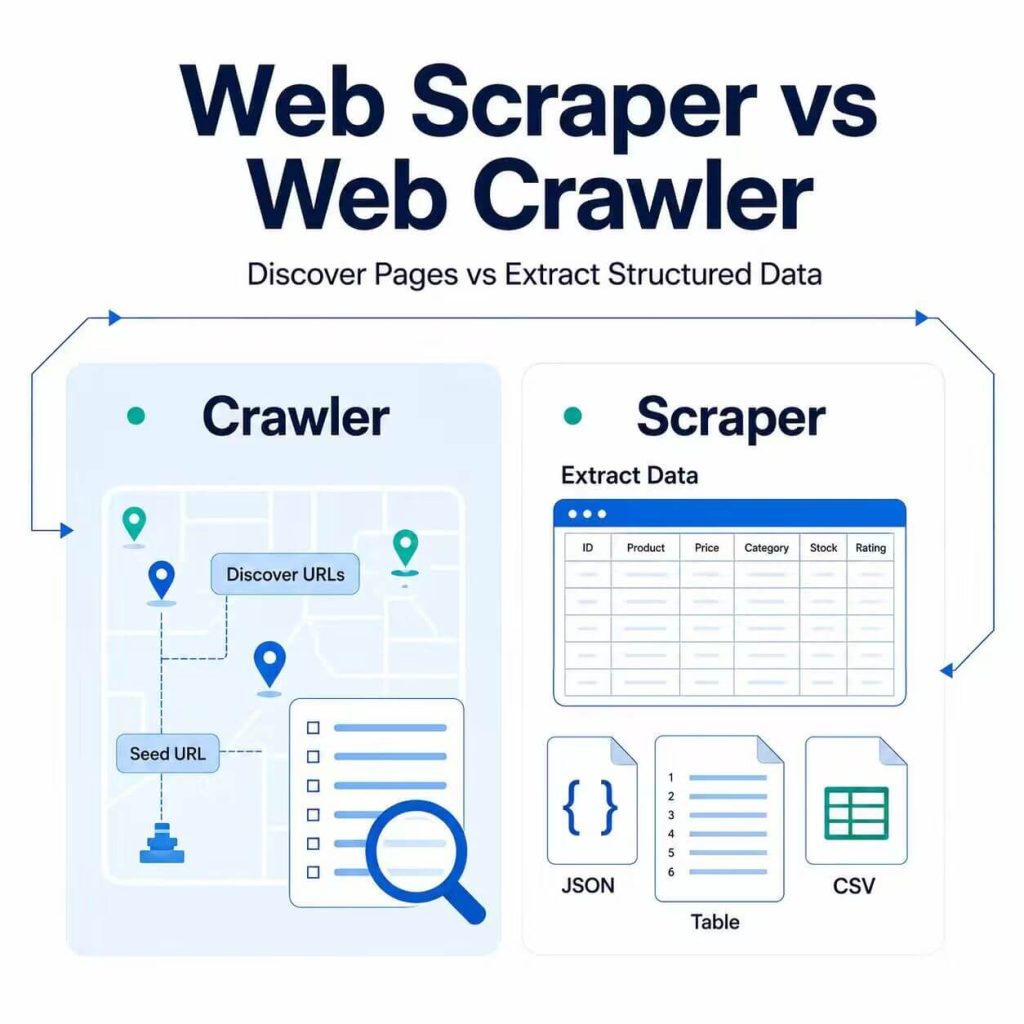
A web crawler discovers pages. A web scraper extracts selected data from those pages.
The terms are often used interchangeably because many web data tools perform both tasks. However, they solve different problems. Crawling helps build and maintain a relevant URL list, while scraping turns the content on those URLs into structured records such as product names, prices, publication dates, ratings, and availability.
A web crawler follows links or reads sitemaps to discover pages. A web scraper visits selected pages and extracts specific fields. Use a crawler when the complete URL list is unknown or frequently changes. Use a scraper when the target pages are known and structured data is the goal.
- Web crawling focuses on URL discovery and site navigation.
- Web scraping focuses on structured field extraction.
- A crawler usually produces a URL list; a scraper produces data records.
- Many public web data workflows use crawling first and scraping second.
What Is a Web Crawler?
A web crawler is software that discovers and visits web pages. It usually starts from one or more seed URLs and follows links to find additional pages.
The starting point may be a homepage, category page, XML sitemap, public directory, or existing URL list. The crawler requests a page, identifies relevant links, adds new URLs to a queue, and continues according to rules that control which pages it should visit.
A crawler can answer questions such as:
- Which product pages exist in this category?
- Which new articles have appeared since the previous run?
- Which pages are linked from a public directory?
- Which URLs redirect or return an error?
- Which areas of a website are reachable from the starting page?
Search engines also use crawlers to discover and fetch pages that may later be processed for indexing. Google provides a detailed overview of its crawlers and fetchers.
A crawler may record basic metadata while visiting a page, but its primary job is discovery. Its typical output is a URL list, crawl map, redirect record, or page-status report.
What Is a Web Scraper?
A web scraper extracts selected information from web pages and converts it into structured data.
Suppose a crawler discovers 10,000 public product pages. The scraper is the part of the workflow that visits those pages and collects fields such as:
- Product name
- Current price and currency
- Availability
- Rating and review count
- Seller name
- Source URL
- Collection time
A scraper may read HTML elements, CSS selectors, tables, embedded JSON, network responses, or browser-rendered content. Its output is normally saved as CSV, JSON, spreadsheet rows, or database records.
Downloading raw HTML is not enough. A reliable scraper also identifies the correct page, handles missing fields, normalizes values, and verifies that the extracted data matches the source.
For a broader explanation of this process, see our guide to what web scraping is and how it works.
Web Scraper vs Web Crawler: Quick Comparison
| Question | Web Crawler | Web Scraper |
|---|---|---|
| Main purpose | Discover and visit URLs | Extract selected data fields |
| Typical input | Seed URL, sitemap, category page, or URL list | Known page URL or crawler output |
| Primary output | URL list, crawl path, redirect, or page status | CSV, JSON, spreadsheet, or database records |
| Example task | Find every product page in a category | Extract the name and price from each product page |
| Main quality check | Were the correct pages discovered? | Were the correct values extracted? |
| Common failure | Collecting duplicate or irrelevant URLs | Saving missing, incorrect, or outdated values |
| Can it work alone? | Yes, when URL discovery is the final goal | Yes, when the required URLs are already known |
The distinction is easiest to remember by looking at the output: a crawler tells you which pages exist, while a scraper tells you what those pages contain.
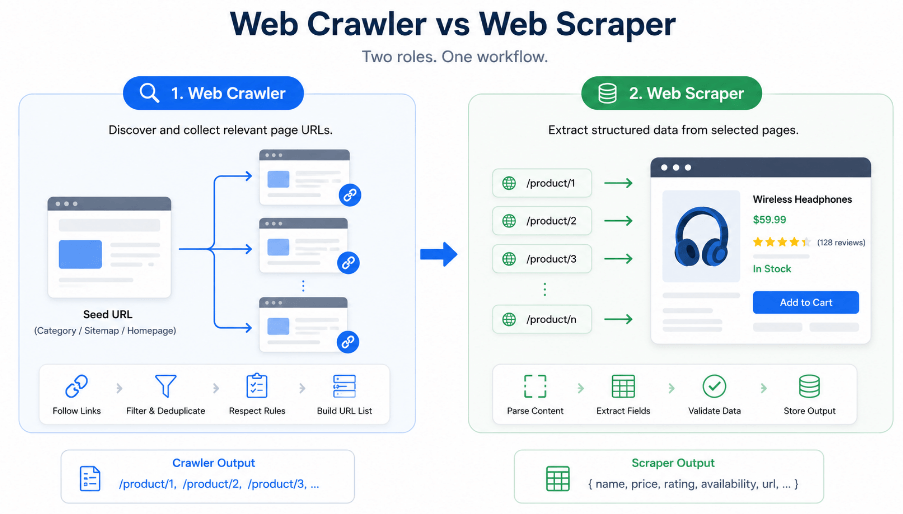
Crawler Output vs Scraper Output
Consider a public product category containing keyboards, computer mice, and webcams. A crawler may return the URLs it discovers, while a scraper returns selected information from one of those pages.
https://example.com/products/keyboard
https://example.com/products/mouse
https://example.com/products/webcam{
"name": "Wireless Keyboard",
"price": 39.99,
"currency": "USD",
"availability": "In stock",
"source_url": "https://example.com/products/keyboard"
}The crawler output helps determine which pages should be processed. The scraper output is ready for comparison, reporting, analysis, or scheduled updates.
The functions can overlap. A crawler may save page titles and status codes, while a scraper may discover a few related links during extraction. Their primary goals, however, remain different.
How Crawlers and Scrapers Work Together
Many real projects use a two-stage workflow: crawling builds the page list, and scraping extracts data from the selected pages.
| Stage | What Happens | Main Role |
|---|---|---|
| Start | The process begins with a category page, sitemap, directory, or known URL. | Crawler |
| Discover | Relevant links are found and added to a URL queue. | Crawler |
| Filter | Duplicates, irrelevant paths, and unwanted page types are removed. | Crawler |
| Extract | Selected pages are visited and required fields are collected. | Scraper |
| Validate | Missing values, wrong page types, and unexpected changes are flagged. | Scraper and data QA |
| Store | Validated records are saved in the required format. | Data pipeline |
Keeping discovery and extraction separate makes troubleshooting easier. When a record is missing, the team can check whether the crawler failed to discover the page or the scraper failed to extract its fields.
Cross-Border E-Commerce Example
Consider a cross-border seller that needs to compare public pricing and availability across a large marketplace category.
Where the marketplace terms, applicable data rules, and intended use permit the workflow, the crawler can begin with an approved category page or product directory. It follows relevant pagination and product links, removes duplicate URLs, and produces a filtered list of product pages.
The scraper then visits the selected pages and extracts the fields required by the research workflow:
- A marketplace product identifier, such as an ASIN where applicable
- Product title
- Displayed price and currency
- Public availability status
- Rating and review count
- Seller or fulfillment information, where publicly shown
- Source URL and collection time
The seller can compare the resulting records over time to identify public price changes, newly listed competitors, or changes in displayed availability.
The two stages can fail independently. If the crawler misses newly added product URLs, the dataset will be incomplete. If the scraper reads the wrong price element, the URL list may be complete while the final comparison remains unreliable.
Before using marketplace data in a report, manually compare a sample of records with the visible source pages. Confirm the product identifier, price, currency, availability, final URL, and collection time. A successful HTTP request does not automatically mean the extracted record is correct.
A Working Python Example
The following example uses Books to Scrape, a public sandbox created for web scraping practice. It demonstrates both tasks in one small script:
- The crawler discovers book-detail URLs from a category page.
- The scraper visits each selected URL and extracts the title, price, and availability.
Install the required packages first:
python -m pip install requests beautifulsoup4from datetime import datetime, timezone
from urllib.parse import urljoin
import requests
from bs4 import BeautifulSoup
HEADERS = {
"User-Agent": "Mozilla/5.0 (compatible; PublicDataExample/1.0)"
}
TIMEOUT = 20
def get_soup(url: str) -> tuple[BeautifulSoup, str, int]:
"""Request a page and return its parsed HTML and response details."""
response = requests.get(
url,
headers=HEADERS,
timeout=TIMEOUT,
)
response.raise_for_status()
soup = BeautifulSoup(response.text, "html.parser")
return soup, response.url, response.status_code
def crawl_book_urls(category_url: str) -> list[str]:
"""Discover book-detail URLs from a category page."""
soup, _, _ = get_soup(category_url)
book_urls = {
urljoin(category_url, link["href"])
for link in soup.select("article.product_pod h3 a[href]")
}
if not book_urls:
raise ValueError("No book URLs were found on the category page")
return sorted(book_urls)
def scrape_book(book_url: str) -> dict:
"""Extract selected fields from one book-detail page."""
soup, final_url, status_code = get_soup(book_url)
title = soup.select_one("div.product_main h1")
price = soup.select_one("p.price_color")
availability = soup.select_one("p.availability")
if title is None or price is None:
raise ValueError(
f"Expected product fields were not found: {final_url}"
)
return {
"title": title.get_text(strip=True),
"price": price.get_text(strip=True),
"availability": (
availability.get_text(" ", strip=True)
if availability
else None
),
"source_url": final_url,
"status_code": status_code,
"collected_at": datetime.now(timezone.utc).isoformat(),
}
CATEGORY_URL = (
"https://books.toscrape.com/"
"catalogue/category/books/travel_2/index.html"
)
book_urls = crawl_book_urls(CATEGORY_URL)
print(f"Discovered {len(book_urls)} book URLs")
for book_url in book_urls[:5]:
try:
print(scrape_book(book_url))
except (requests.RequestException, ValueError) as error:
print({
"source_url": book_url,
"error": str(error),
})The crawler function returns a deduplicated list of detail-page URLs. The scraper function then extracts selected fields from each page and preserves the final URL, response status, and UTC collection time.
This example is intentionally limited to one category page. A production workflow may also require pagination handling, request pacing, retries, duplicate checks, structured error logs, data validation, and alerts when the source layout changes.
Which One Do You Need?
Start with the result you need rather than the name of a tool.
| Your Goal | Best Starting Point | Reason |
|---|---|---|
| Find all pages in a category | Web crawler | The complete URL list is not yet known. |
| Extract prices from known URLs | Web scraper | The pages are already known and structured data is the goal. |
| Detect newly published articles | Crawler plus scraper | The crawler finds new URLs and the scraper collects article metadata. |
| Check redirects and broken pages | Web crawler | URL reachability and response status matter more than page fields. |
| Turn listings into a spreadsheet | Web scraper | The task requires structured extraction from known pages. |
| Build a recurring public price dataset | Crawler plus scraper | The workflow needs page discovery followed by repeated extraction. |
You may only need a crawler when the desired output is a site map, URL inventory, or page-status report. You may only need a scraper when another source already provides a reliable list of target URLs.
Common Mistakes
Building the Scraper Before Confirming the URL List
A well-built scraper still produces incomplete data if it never receives all relevant pages. Confirm how pages are discovered, how new URLs appear, and whether pagination or filters create additional targets.
Crawling Without Clear Boundaries
An unrestricted crawler may collect login paths, duplicate filters, tracking URLs, search pages, calendar pages, or other irrelevant content. Define the allowed domains, paths, page types, and URL patterns before starting.
Treating Raw HTML as Finished Data
Raw page content is only the input. Useful output normally requires selected fields, consistent formats, source URLs, collection times, and validation results.
Assuming a Successful Response Contains the Correct Page
A server may return a login page, consent page, regional version, or error message with a normal-looking response. Check the final URL, page title, expected fields, and response content instead of relying on the status code alone.
Ignoring JavaScript-Rendered Content
Some pages load important fields after the initial HTML response. In those cases, the workflow may need browser automation such as Puppeteer or Playwright, or a suitable official data source. MDN’s HTTP overview explains the request-and-response model behind page loading.
Ignoring Site Rules and Data Responsibilities
Review the website’s terms, the nature of the data, privacy obligations, and the intended use before collection. Google’s robots.txt guide explains how site owners can manage automatic crawler access, but robots.txt should not be treated as the only compliance consideration.
Where Proxies Fit
Proxies are network infrastructure. They do not determine whether a workflow is crawling or scraping.
A proxy may be relevant for authorized regional page testing, traffic separation, or checking how public content varies between network locations. It does not repair an incomplete URL list, correct a broken selector, validate extracted values, or replace a review of access rules.
If a workflow uses a proxy, verify that the connection is applied to the same script, browser, or application running the task. Our proxy testing guide explains how to check the visible IP, region, provider, protocol, and application environment.
Choose the data workflow first. Decide whether you need page discovery, field extraction, or both. Network configuration should come after the required pages and output fields are clear.
Frequently Asked Questions
Final Thoughts
A web crawler and a web scraper are not competing tools. Use a crawler when you need to discover, filter, or revisit pages. Use a scraper when you need to convert selected page content into structured records. Use both when the project requires ongoing URL discovery followed by repeatable extraction.
Keeping the stages separate makes failures easier to diagnose. Missing data may come from incomplete URL discovery, failed field extraction, or weak validation. Start with a clear data goal, collect only the required fields, and verify the final records against their source pages.