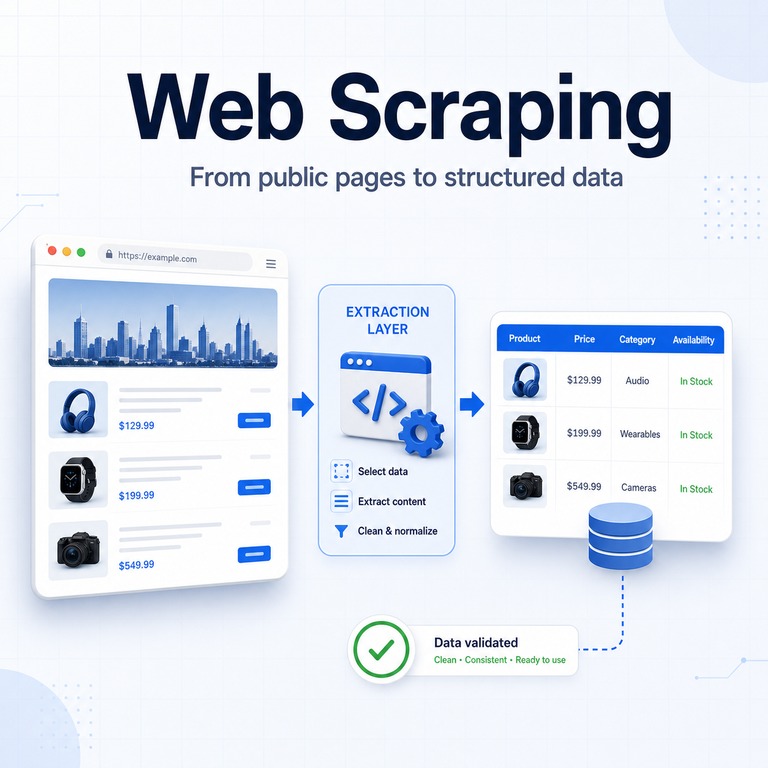
A product page may show a title, price, rating, seller, and availability to a human reader. Web scraping turns those visible fields into structured records that software can compare, validate, search, and store.
The output may be saved as CSV, JSON, a database table, or an internal dashboard. This makes it possible to analyze information across many public pages without manually copying every value.
Real-world web scraping involves more than downloading HTML. A dependable workflow must identify the right fields, handle missing or JavaScript-rendered content, validate the extracted values, and respect the technical, privacy, and policy limits surrounding the source.
Web scraping is the process of extracting selected information from web pages and converting it into structured data. A typical workflow fetches or renders a page, selects the required fields, cleans the values, validates the result, and stores the output for later use.
- Web scraping converts page content into reusable structured data.
- Web crawling discovers pages, while web scraping extracts fields from them.
- Reliable workflows separate page access, extraction, validation, and storage.
- JavaScript-rendered pages may require a browser-based rendering step.
- Terms, privacy obligations, request rates, and source policies should be reviewed before collecting data.
What Web Scraping Means
In simple terms, web scraping turns information from web pages into structured data that can be stored, analyzed, or reused. The Scrapy documentation describes web scraping as crawling websites and extracting structured data for purposes such as data mining and information processing.
In practice, a scraper normally does not need every part of a page. It extracts only the fields required for a specific task.
For example, a public product listing may contain a title, displayed price, rating, seller name, shipping detail, and availability status. A scraping workflow identifies those values in the page structure, normalizes them, and saves them in predictable columns.
| On the Web Page | In the Dataset | Why It Matters |
|---|---|---|
| Product title | title |
Supports matching, deduplication, and search. |
| Displayed price | price, currency |
Supports price comparison and change analysis. |
| Rating and review count | rating, reviews |
Helps compare visible demand and reputation signals. |
| Availability text | stock_status |
Shows whether a listed item or service is currently available. |
How Web Scraping Works
A web scraping workflow usually follows a predictable path. It starts with a controlled list of relevant URLs, fetches or renders each page, extracts the required fields, checks the result, and stores the data.
The implementation becomes more complex when pages use JavaScript rendering, pagination, infinite scroll, regional variations, login sessions, or frequently changing HTML structures.
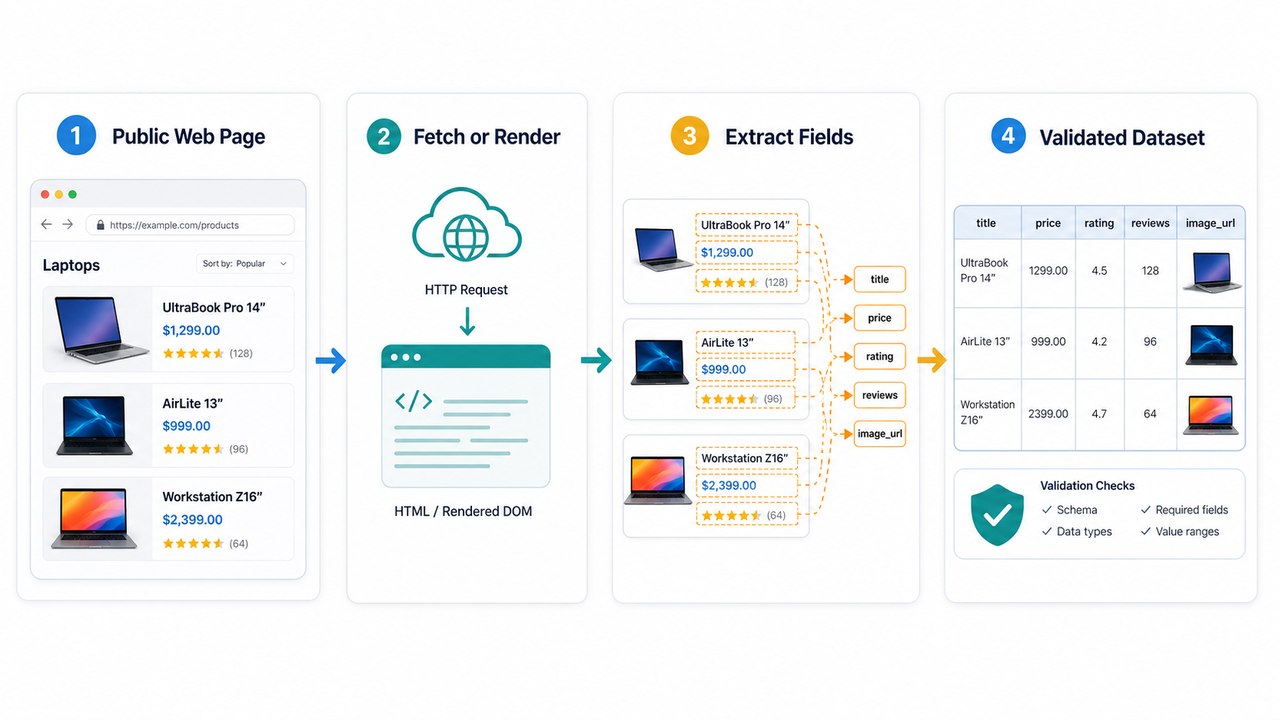
| Stage | What Happens | Typical Output |
|---|---|---|
| URL selection | Choose public pages that are relevant, permitted, and useful for the business question. | A controlled URL list. |
| Fetch or render | Request the HTML or render the page when important content depends on JavaScript. | HTML or a rendered DOM. |
| Extract fields | Select specific data using HTML structure, CSS selectors, structured data, or parsing rules. | Raw records. |
| Clean and normalize | Standardize prices, dates, units, names, missing values, and duplicates. | Consistent records. |
| Validate and store | Check required fields, data types, ranges, schema, and unusual change rates before saving. | A usable dataset. |
A Simple Web Scraping Example
The following Python example requests a public page, parses its HTML, extracts the first h1 heading, and prints a structured record.
Install the required packages:
pip install requests beautifulsoup4Create a file named scrape_example.py:
import requests
from bs4 import BeautifulSoup

url = "https://example.com"

response = requests.get(
    url,
    timeout=15,
    headers={
        "User-Agent": "ExampleResearchClient/1.0"
    },
)

response.raise_for_status()

soup = BeautifulSoup(response.text, "html.parser")
heading = soup.select_one("h1")

record = {
    "url": response.url,
    "status": response.status_code,
    "title": heading.get_text(strip=True) if heading else None,
}

print(record)
The selector h1 works for this simple example, but a real website may require more specific selectors. Always check whether the expected field exists before calling methods such as get_text().
This example reads the initial HTML response. If the required content appears only after JavaScript runs, a browser automation tool such as Playwright may be needed to render the page before extraction.
Run scraping code only on pages you are permitted to access. Review the source’s terms, robots.txt guidance, request-rate expectations, privacy implications, and applicable rules before expanding a test into a larger workflow.
Common Web Scraping Use Cases
Web scraping is most useful when a team needs to compare public information that changes over time or appears across many pages. The value comes from repetition and structure rather than from downloading as much content as possible.
- Price and availability analysis: Compare public prices, promotions, inventory signals, and listing changes.
- Market research: Organize public category, feature, review, and catalog data.
- Content and SEO audits: Review page titles, headings, metadata, status codes, and templates across many URLs.
- Public directory research: Structure public business listings, locations, service descriptions, or contact fields when permitted.
- Public mention analysis: Review visible mentions, ratings, profile changes, and customer feedback.
- Scheduled data checks: Compare selected public fields at a defined interval to identify meaningful changes.
A good use case begins with a clear question and a narrow data definition. A weak use case often begins with “scrape everything” and only later asks what the data is for.
Collecting unnecessary fields increases storage, quality-review costs, processing time, and compliance risk without necessarily producing better decisions.
Web Scraping, Data Scraping, and Crawling
Web scraping, data scraping, and web crawling are related, but they do not describe exactly the same activity.
| Term | Main Focus | Example |
|---|---|---|
| Web scraping | Extracting selected data from web pages. | Collecting product titles and prices from public listing pages. |
| Data scraping | Extracting data from a source that may or may not be a website. | Extracting rows from reports, files, documents, or web pages. |
| Web crawling | Discovering pages and following links. | Finding public category and product URLs across a website. |
| Web scraper | The tool, script, or system that performs the extraction. | A Python script that saves price fields into a database. |
A crawler can discover pages before extraction begins, but crawling alone does not produce a clean structured dataset. A scraper can also process a known list of URLs without discovering the rest of the website.
Separating page discovery from field extraction makes a larger workflow easier to test, maintain, and debug.
What Makes Web Scraping Break
Web scraping breaks when the assumptions behind the workflow change. A selector may stop matching, a field may move, important content may load after the initial HTML response, or the source may return different content based on language, region, device, or session state.
- The HTML structure changes and existing selectors no longer match.
- Important content is loaded after the initial HTML response.
- Pagination, filters, or infinite scroll hide part of the dataset.
- Prices, dates, currencies, or units use inconsistent formats.
- Duplicate and variant URLs create repeated records.
- The source returns errors, redirects, or region-specific content.
- A required field is missing, renamed, or moved to structured data.
Network consistency can also affect approved public data workflows. When a project legitimately requires regional route comparison or distributed requests, dynamic residential proxies can provide changing residential routes.
A proxy changes the network path. It does not repair broken selectors, incorrect parsing rules, invalid account credentials, or source-side service failures.
How to Keep a Web Scraping Workflow Reliable
A reliable workflow is designed for change. It does not assume that every page will load, every field will be present, or every extracted value will be clean.
Instead, it captures enough evidence to explain failures and uses validation rules to prevent incomplete or incorrect data from silently entering the final dataset.
- Define the schema first. Decide which fields are required, optional, derived, or ignored.
- Use stable selectors. Prefer semantic structure, structured data, and durable page patterns when available.
- Check the response before parsing. Record the status code, content type, final URL, and unexpected redirects.
- Save raw evidence when useful. Preserve timestamps, request metadata, and limited HTML samples for debugging.
- Validate before storage. Check required fields, expected data types, reasonable ranges, missing values, and duplicates.
- Track change rates. Sudden drops in records or increases in empty fields often indicate a broken selector or failed request.
- Use limited retries. Add increasing delays rather than repeatedly sending immediate requests.
- Respect source constraints. Review terms, robots.txt guidance, privacy obligations, and reasonable request rates before scaling.
The Robots Exclusion Protocol defines how robots.txt rules are communicated to automated clients. Google also explains how robots.txt manages crawler access in its robots.txt documentation.
Robots.txt should be treated as an important source-policy signal. It is not a complete legal analysis, permission system, or replacement for reviewing the intended use of the collected data.
What Web Scraping Cannot Solve
Web scraping is not a shortcut around data rights, privacy review, source quality, or product strategy. It can extract values from pages, but it cannot make inaccurate source data accurate or turn a prohibited use into a permitted one.
It also does not replace a direct data partnership when one is required. If a source provides a stable official API, data export, feed, or partner program, that option may be cleaner and easier to maintain.
Scraping is often most appropriate when the required information is public, page-based, repeatable, narrowly defined, and not available through a better structured channel.
Frequently Asked Questions
Final Thoughts
Web scraping is best understood as a structured data workflow, not simply as a script that downloads pages.
A dependable system separates page access, rendering, extraction, normalization, validation, storage, and source-policy review. This makes it easier to identify failures when websites change and prevents incomplete records from silently entering the dataset.
Start with a narrow data definition and a small permitted test. Confirm that the extracted fields answer a real business question before adding more pages, infrastructure, or request volume.