Choosing a residential proxy is not just about picking a country, checking the price, or choosing the largest IP pool. The more practical question is this: should the IP stay the same, or should it change during the workflow?
That decision matters more than many users expect. A dashboard login, seller account, social media profile, or long-running browser session usually works better with a stable IP. A regional search check, ad review, product availability check, or larger data access task may need many residential IPs across sessions instead of one fixed route.
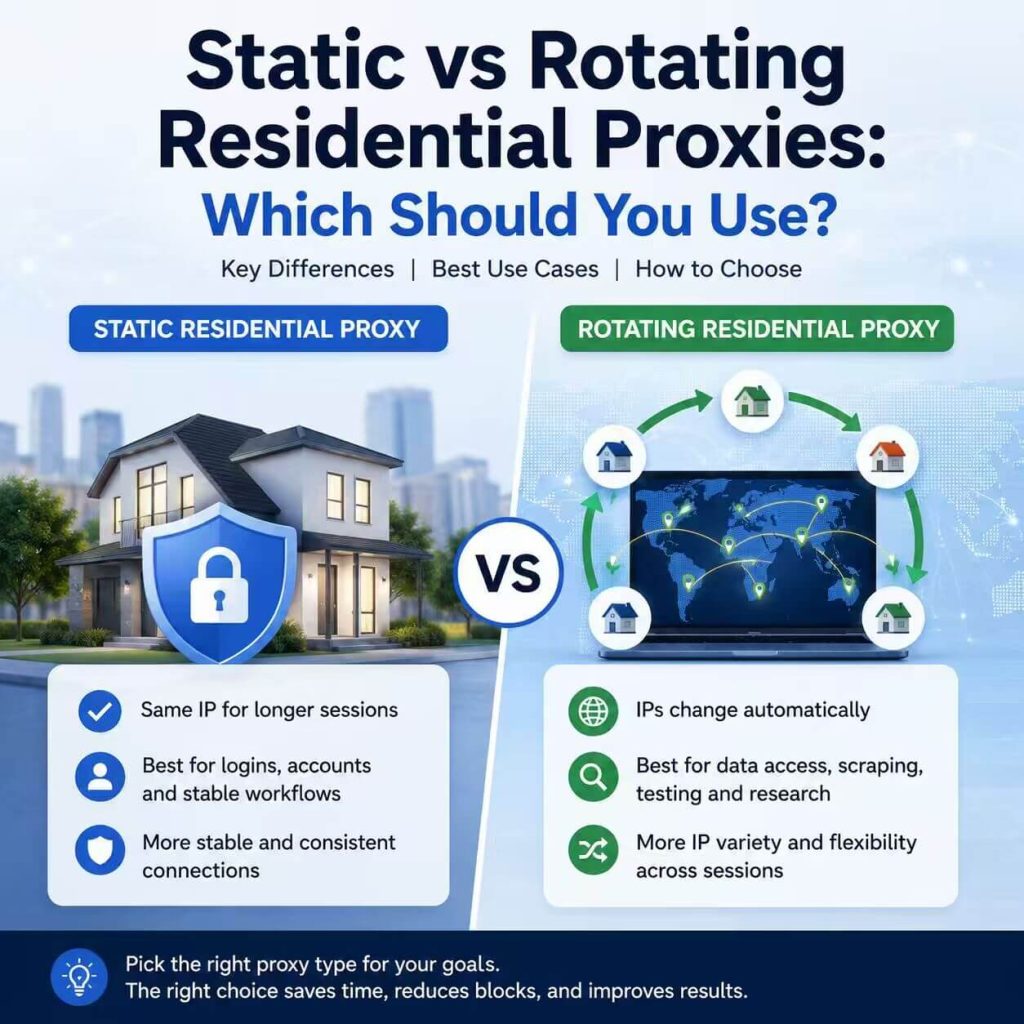
A static residential proxy keeps the same residential IP for a longer period. A rotating residential proxy changes the outgoing residential IP based on time, request count, session rules, or provider settings. Both are useful, but they solve different problems.
- Choose static residential proxies when one stable residential IP matters more than IP variety.
- Choose rotating residential proxies when coverage, location flexibility, and IP distribution matter more than one long session.
- Static proxies are usually better for logins, dashboards, account-based tools, and stable browser profiles.
- Rotating proxies are usually better for regional testing, ad review, market research, product checks, and approved data access workflows.
- The wrong session model can create problems even when the proxy itself is working.
- Static vs Rotating Residential Proxies: Quick Answer
- What Is a Static Residential Proxy?
- What Is a Rotating Residential Proxy?
- Static vs Rotating Residential Proxies: Key Differences
- When Static Residential Proxies Make More Sense
- When Rotating Residential Proxies Make More Sense
- Why Session Stability Matters
- Speed, Cost, and IP Quality
- Common Mistakes When Choosing Static or Rotating Proxies
- How to Choose the Right Residential Proxy Setup
- Frequently Asked Questions
Static vs Rotating Residential Proxies: Quick Answer
Use a static residential proxy when the same IP needs to stay consistent over time. Use a rotating residential proxy when the task benefits from changing IPs across sessions, locations, or request batches.
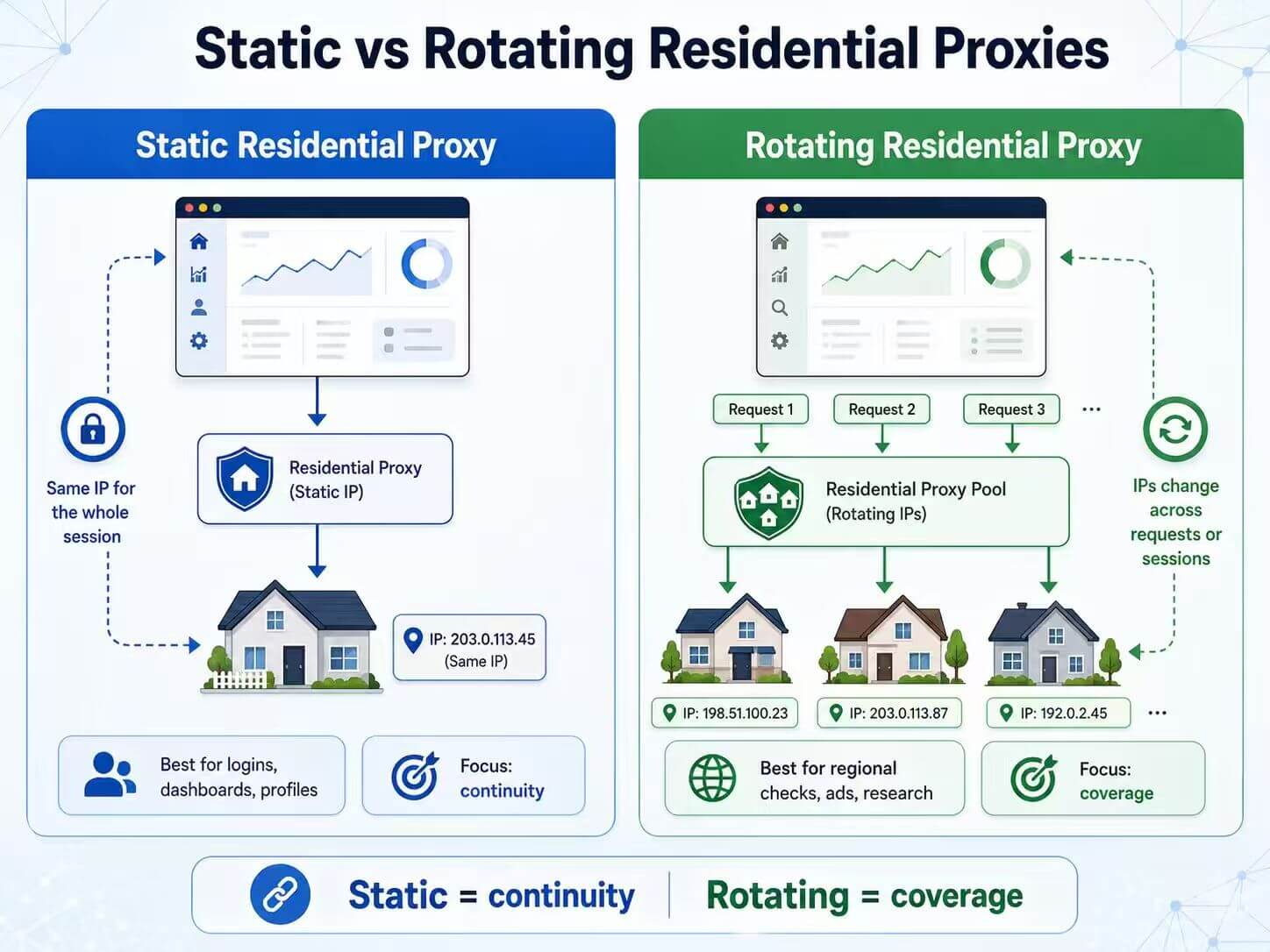
A static residential proxy is best for workflows where an IP change would feel disruptive: logging into the same dashboard every day, managing a long-running browser profile, checking reports, updating listings, or keeping one account environment stable.
A rotating residential proxy is best for workflows where using only one IP is too limiting: checking pages across regions, reviewing localized search results, testing ads, comparing product availability, or running approved data access tasks that need broader residential coverage.
If you are still learning the basic concept, read our guide on what a residential proxy is. This article focuses only on how to choose between static and rotating residential proxy sessions.
| Choose Static Residential Proxies If... | Choose Rotating Residential Proxies If... |
|---|---|
| You need one stable IP for a long session. | You need many IPs across sessions or tasks. |
| You manage accounts, dashboards, listings, or profiles. | You test pages, ads, search results, or product data across regions. |
| IP changes may trigger verification or session friction. | One fixed IP is too narrow for the task. |
| Consistency matters more than scale. | Coverage matters more than continuity. |
| You want predictable behavior from the same residential IP. | You want controlled IP changes from a residential pool. |
What Is a Static Residential Proxy?
A static residential proxy is a residential proxy that keeps the same outgoing IP address for a longer period. The IP is associated with a residential or ISP-style network, but the key point is stability: the IP does not change constantly during the session.
In practice, many providers use terms like static residential proxy and ISP proxy closely because both are used for stable, long-session IP environments. The exact network source may vary by provider, but the user goal is usually the same: keep a consistent residential or ISP-style IP for a task that should not jump between network routes.
ISP Static Proxy vs General Static Residential Proxy
Many users compare general static residential proxies with ISP static proxies because both are used for fixed, long-session IP environments. The difference is not that one is automatically “safe” and the other is not. The difference is usually the IP source, assignment model, and how controlled the usage history is.
| Feature | General Static Residential Proxy | ISP Static Proxy |
|---|---|---|
| IP source | Residential or consumer-style IP pools, depending on the provider. | Fixed-line ISP-style IP resources, depending on the provider’s network model. |
| Session behavior | Designed to keep the same IP for longer sessions. | Also designed for stable long-session use with a fixed network identity. |
| Usage history | May vary by pool, assignment method, and previous usage. | Often easier to keep controlled when the IP is dedicated or assigned long-term. |
| Network appearance | Can look residential, but quality depends on IP source and reputation. | Can provide a stable ISP-style network appearance, but still depends on IP quality, ASN, and usage history. |
| Best fit | Stable browsing, report checks, and lower-risk long-session tasks. | Long-running browser profiles, dashboards, and workflows where stable IP identity matters. |
ISP-style static proxies usually cost more because they are designed for more stable, long-session environments. They can be a better fit when IP consistency matters, but they do not guarantee fewer checks, higher account trust, or account safety by themselves. Browser settings, account history, cookies, request behavior, and IP reputation still matter.
For long-session workflows where the same IP needs to stay consistent, IPWeb’s static residential proxies are designed for stable residential or ISP-style network environments.
This is useful when continuity matters. If a team logs into the same dashboard, checks reports, updates account settings, or manages a browser profile over several hours, changing the IP every few minutes can create unnecessary friction. A static residential proxy helps keep that network path stable.
Static residential proxies are commonly used for:
- Long login sessions
- Dashboard access
- Stable browser profiles
- Account-based tools
- Ecommerce account workflows
- Social media account environments
- Repeated access from the same network identity
What Is a Rotating Residential Proxy?
A rotating residential proxy is a residential proxy setup where the outgoing IP changes based on time, request count, session rules, or provider settings. Instead of keeping one residential IP for the whole task, the proxy can provide different IPs from a larger residential pool.
This is useful when the task needs broader coverage. For example, a team may need to check how landing pages appear in different regions, compare search results from multiple locations, review ads, or run a larger QA task where all requests should not come from one residential IP.
The advantage is flexibility. The risk is inconsistency. If the IP changes in the middle of a login-based session, the website may ask for extra verification, show different content, or treat the session as unusual. That is why rotating proxies work best when the task does not depend on one long-lived account session, or when sticky sessions are configured correctly.
Rotating residential proxies are commonly used for:
- Regional website testing
- Localized search result checks
- Ad verification
- Market research
- Product availability checks
- Large-scale QA workflows
- Approved data access workflows that need flexible IP distribution
For testing across locations or running flexible residential IP sessions, IPWeb’s dynamic residential proxies are a better fit than keeping one fixed IP for every request.
Static vs Rotating Residential Proxies: Key Differences
The main difference is not whether one is “better.” The main difference is how the IP behaves during the task. Static residential proxies focus on continuity. Rotating residential proxies focus on controlled change.
| Feature | Static Residential Proxy | Rotating Residential Proxy |
|---|---|---|
| IP behavior | Keeps the same IP for a longer session. | Changes IPs by time, request, session, or provider rule. |
| Best for | Logins, dashboards, stable profiles, and account-based workflows. | Regional testing, larger checks, ad review, and broader data tasks. |
| Session continuity | Stronger. | Depends on rotation rules and sticky session settings. |
| Location flexibility | Usually tied to one selected IP or location. | More flexible across IPs, locations, or sessions. |
| IP history | One IP carries more workflow history over time. | Traffic can be spread across different IPs. |
| Main risk | A poor IP can affect the same task repeatedly. | Frequent IP changes can break session consistency. |
| Better question to ask | Does this task need the same IP to stay in place? | Does this task need many IPs or locations? |
A static residential proxy is best for workflows that need one stable residential IP over time. A rotating residential proxy is best for workflows that need many residential IPs across sessions, locations, or request batches.
When Static Residential Proxies Make More Sense
Static residential proxies make more sense when the user session should look continuous. This usually includes tasks where the same account, profile, dashboard, or browser environment is used repeatedly.
For example, if a user logs into a platform, reviews reports, updates listings, changes settings, and returns to the same account later, a stable residential IP is usually a better fit than a frequently changing IP. The goal is not to create extra movement in a session that should feel steady.
Static residential proxies are a better fit when you need:
- Long login sessions
- Repeated access from the same profile
- Stable dashboard management
- Account-based workflows with fewer network changes
- Consistent residential or ISP-style IP behavior
- Lower risk of session interruption caused by IP changes
- A predictable IP route for a specific browser, tool, or account environment
The main benefit is continuity. The main tradeoff is that one IP carries more of the workflow history. If the static IP has poor reputation, outdated location data, or a mismatch with the account environment, keeping it fixed will not solve the problem. In that case, the issue is not static vs rotating. The issue is IP quality or environment consistency.
When Rotating Residential Proxies Make More Sense
Rotating residential proxies make more sense when the task needs broader IP coverage. They are useful when one fixed residential IP is too narrow for the amount of testing, checking, or research you need to run.
For example, a marketing team may want to review localized landing pages in several regions. A QA team may need to test how a website behaves from different residential networks. A research workflow may need to check many pages where using one IP for every request would be too repetitive. These tasks usually benefit from rotation.
Rotating residential proxies are a better fit when you need:
- Multiple residential IPs across sessions
- Location coverage across different regions
- Search result checks from different areas
- Ad and landing page review
- Product availability or pricing display checks
- Large QA tasks that need more than one IP route
- Approved automation workflows with controlled IP distribution
The main benefit is coverage. The main tradeoff is that frequent IP changes can create friction in workflows that expect continuity. If the task involves a login, a cart, an account dashboard, or a long-running session, rotation should be controlled carefully with sticky sessions or longer session windows.
Why Session Stability Matters
Session stability is one of the biggest reasons to choose static or rotating residential proxies carefully. A session is not only about whether the page loads. It is also about whether the network environment remains believable and consistent while the task continues.
Many account-based workflows expect a stable pattern. A user logs in, moves between pages, edits settings, checks reports, or manages a profile. If the IP changes repeatedly during that process, the website may ask for verification, expire the session, show different content, or require another login.
That does not mean every IP change is a problem. For non-login tasks, rotation can be useful. But for long sessions, sudden IP movement is often unnecessary and sometimes harmful.
| Task | Session Need | Better Proxy Behavior |
|---|---|---|
| Account login | High continuity | Static residential proxy |
| Dashboard management | High continuity | Static residential proxy |
| Browser profile management | High continuity | Static residential proxy or long sticky session |
| Localized page review | Medium continuity | Rotating residential proxy with controlled sessions |
| Search result checks | Low to medium continuity | Rotating residential proxy |
| Market research across many pages | Depends on target behavior | Rotating residential proxy or controlled sticky sessions |
A simple test helps: would this task look normal if the IP changed in the middle? If the answer is no, static is usually safer. If the answer is yes, rotating may be more efficient.
Speed, Cost, and IP Quality
Static and rotating residential proxies can also differ in speed, cost, and IP quality. These differences are not universal, but they can affect real results.
Speed
A static residential proxy can feel more predictable because the route stays the same. Once you test the IP and it performs well, the connection pattern is easier to understand.
A rotating residential proxy may vary more because each new IP can come from a different network route, ISP, city, or session. That does not make rotating proxies bad. It just means performance can change from one session to another.
Speed depends on provider quality, server distance, network route, traffic load, protocol support, and the target website. Static is not always faster. Rotating is not always slower.
Cost
Static residential proxies and rotating residential proxies are often priced differently. Static setups may be priced by IP, plan, port, or long-session access. Rotating setups may be priced by bandwidth, port, pool access, or traffic volume.
Common Pricing Models for Static and Rotating Residential Proxies
Pricing affects long-term fit, but proxy pricing is not standardized across providers. Always check the actual plan details, including bandwidth, concurrency, fair-use rules, session duration, authentication method, and whether the IP is shared or dedicated.
| Pricing Model | Usually Fits | What to Check |
|---|---|---|
| Fixed monthly per-IP plan | Small teams that need a limited number of stable long-session IPs. | Whether bandwidth is included, whether the IP is dedicated, and how long the assignment lasts. |
| Pay-as-you-go per GB | Lower or medium-volume regional checks, ad review, and controlled research workflows. | Actual monthly traffic volume, overage costs, and whether traffic spikes are common. |
| Rotating pool access plan | Workflows that need broader location coverage and changing residential IPs. | Pool size, targeting options, sticky session support, and rotation rules. |
| Unlimited residential proxy plan | High-volume workflows where bandwidth predictability matters more than per-GB pricing. | Fair-use rules, port limits, concurrency, speed policies, and whether the plan fits your traffic pattern. |
If the task uses only a small number of stable sessions, static pricing may be easier to manage. If the task involves broader coverage, many locations, or larger request volume, rotating pricing may make more sense. For very high-volume residential traffic, unlimited residential proxy plans may also be worth comparing, but only when the use case truly needs heavy ongoing traffic.
IP Quality
IP quality matters for both static and rotating residential proxies. A static proxy with a poor reputation can cause repeated friction because the same IP is used again and again. A rotating proxy pool with uneven quality can also create inconsistent results across sessions.
Before scaling either setup, check the visible IP, location, ISP, ASN, connection stability, and risk labels. External IP intelligence tools such as IPinfo’s Privacy Detection database and MaxMind’s GeoIP Anonymous IP database show why many websites and risk systems look beyond location and also evaluate VPN, proxy, hosting, relay, or other IP classification signals.
ASN data is also useful because it helps identify the larger network behind an IP route. IANA explains that it coordinates Internet Protocol addressing systems and Autonomous System Numbers used for routing Internet traffic through its Number Resources page.
If you are not sure why a residential IP creates warnings, review your IP quality score instead of assuming the session type is the only issue.
Common Mistakes When Choosing Static or Rotating Proxies
Many proxy problems come from choosing the wrong session model. The proxy can connect correctly and still be a bad fit for the job.
Common mistakes include:
- Using rotating residential proxies for long login sessions.
- Using one static residential IP for tasks that need broader regional coverage.
- Changing IPs too often during account-based workflows.
- Assuming static residential proxies always have better quality.
- Assuming rotating residential proxies always scale better.
- Ignoring sticky session settings in rotating proxy plans.
- Choosing by price before checking session length, IP quality, and target behavior.
- Testing only whether the page loads instead of checking visible IP, location, and session stability.
A better approach is to define the task first. If the task is tied to one account, one dashboard, or one browser profile, prioritize stability. If the task is tied to many pages, locations, or checks, prioritize controlled rotation.
How to Choose the Right Residential Proxy Setup
Choosing between static and rotating residential proxies becomes easier when you translate the task into session requirements.
| Question | If Yes | If No |
|---|---|---|
| Does the task require login or account continuity? | Use a static residential proxy or a long sticky session. | Rotating residential proxies may work well. |
| Would an IP change during the session create friction? | Prioritize static IP behavior. | Controlled rotation may be fine. |
| Do you need many regions or many IPs? | Use rotating residential proxies. | A static residential proxy may be enough. |
| Is the task mostly repeated access from the same profile? | Use static residential proxies. | Rotating residential proxies may fit broader checks. |
| Is traffic volume high and continuous? | Compare bandwidth, rotation rules, and unlimited traffic options. | A smaller static or traffic-based setup may be enough. |
| Does the target site react strongly to IP changes? | Prioritize IP stability, clean browser settings, and IP quality. | Rotation may be acceptable if sessions are short and controlled. |
Pre-Scaling Proxy Testing Checklist
Before using static or rotating proxies in a larger workflow, run a small validation test. The goal is not to prove that a proxy will work everywhere. The goal is to catch basic setup, location, stability, and session problems before they affect a real task.
- Static proxy stability test: Keep the proxy connected during the expected session window. Recheck the visible IP, geolocation, ISP, and ASN at intervals to watch for unexpected IP shifts or location mismatches.
- Rotating proxy sticky session test: If your plan supports sticky sessions, set the duration to your target window, open a test session, and confirm the IP remains consistent for that window before rotation.
- Location consistency test: Cross-check the IP location across two or three independent IP lookup tools. IP geolocation databases can disagree, especially at city level.
- Workflow simulation test: Recreate your real task, such as dashboard login, ad review, product availability checks, or localized page review, and watch for unexpected session changes.
- Speed consistency test: Record page load speed or response time during different hours to understand whether route performance stays usable for your workflow.
After choosing a setup, test it before scaling. Confirm the visible IP, location, session length, connection stability, and target workflow behavior. If the website still sees your original IP, start by checking whether the proxy is active. Our guide on how to check if your proxy is working walks through that first step.
Frequently Asked Questions
A static residential proxy keeps the same residential IP for a longer session. A rotating residential proxy changes the outgoing IP based on time, request count, session rules, or provider settings. Static is better for continuity. Rotating is better for broader IP coverage.
Use static residential proxies when you need long sessions, account continuity, dashboard access, repeated logins, stable browser profiles, or a consistent residential or ISP-style IP for the same task.
Use rotating residential proxies when you need changing IPs for regional testing, search result checks, ad review, market research, product availability checks, QA workflows, or approved data access tasks that need broader residential coverage.
Not always. Static residential proxies are better for session stability. Rotating residential proxies are better for IP distribution and location flexibility. The better choice depends on whether the task needs continuity or coverage.
Some rotating residential proxy plans support sticky sessions, which keep the same IP for a set time or session window. Sticky sessions can help when you need some stability but still want access to a larger rotating pool.
Not necessarily. Static proxies can feel more predictable because the route stays the same, but speed depends on provider quality, location, ISP route, traffic load, protocol support, and the target website.
They can if the IP changes too often during a login-based workflow. For account sessions, static residential proxies or long sticky sessions are usually safer than frequent rotation.
Start with the session requirement. If the task needs one consistent IP over time, choose static. If the task needs many IPs, locations, or distributed checks, choose rotating. Then test visible IP, location, speed, IP quality, and session stability before scaling.
Final Thoughts
Static and rotating residential proxies are not competing versions of the same tool. They are different session models for different jobs.
If the task depends on one stable account environment, one browser profile, or one long-running session, static residential proxies are usually the better fit. If the task depends on broader location coverage, repeated page checks, ad review, market research, or controlled IP distribution, rotating residential proxies usually make more sense.
The safest way to choose is simple: decide whether the task needs continuity or coverage. Then test the visible IP, location, session behavior, connection quality, and target website response before scaling the setup.