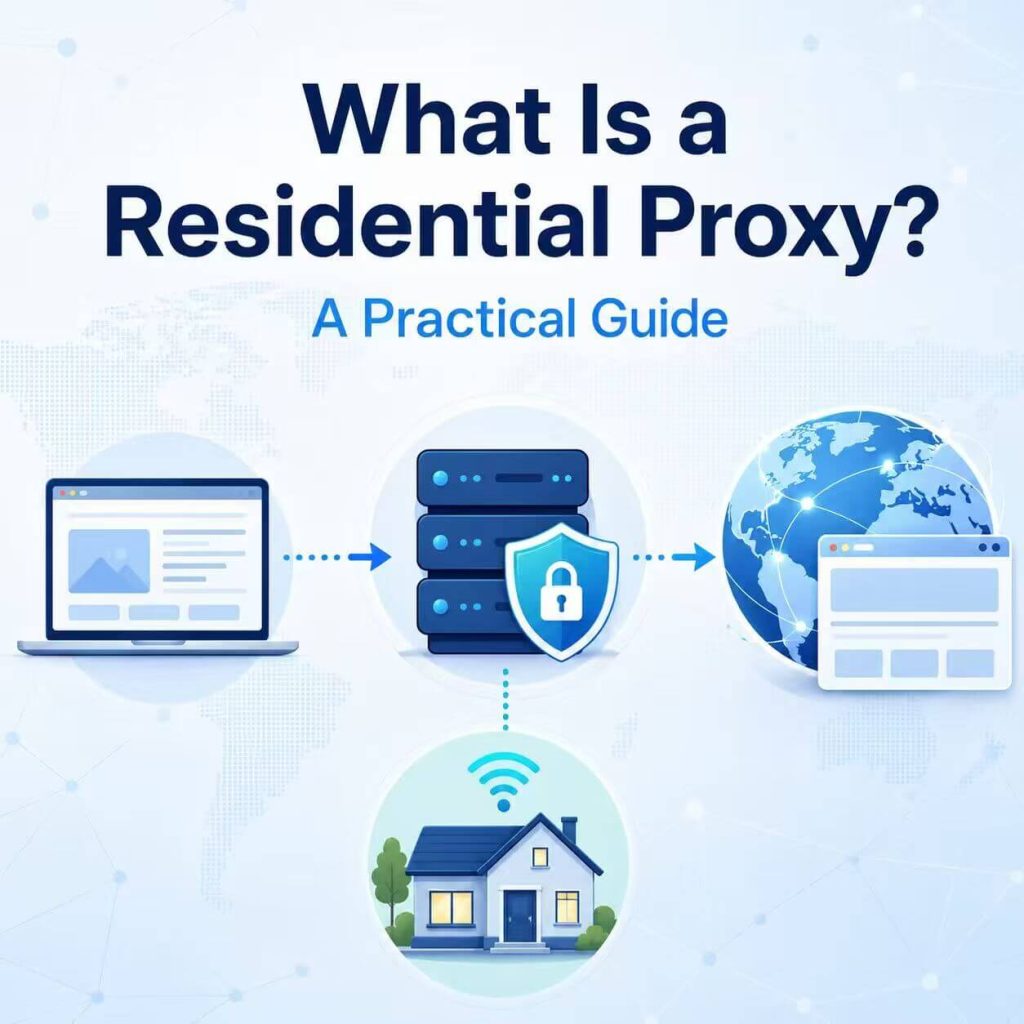
Not every proxy IP is treated the same way. One IP may come from a cloud hosting provider. Another may look like it belongs to a normal home internet connection. For websites, apps, risk systems, ad platforms, and regional content services, that difference can matter.
A residential proxy is a proxy that routes traffic through an IP address associated with a residential internet connection. Instead of seeing your original public IP address or a typical data center IP, the destination website sees the residential proxy IP.
This guide explains what a residential proxy is, how it works, what a residential IP means, how residential proxies compare with datacenter proxies, when you should use one, and what to check before choosing a residential proxy provider.
A residential proxy is a proxy server that sends your traffic through an IP address associated with a residential internet network. Websites usually see the residential proxy IP instead of your original IP address. Residential proxies are most useful when location, ISP type, session consistency, or consumer-network appearance matters.
- The main value of a residential proxy is the residential IP source, not a completely different proxy mechanism.
- Residential proxies are useful when location, ISP type, session consistency, or residential network appearance affects the workflow.
- Datacenter proxies are often faster and cheaper, while residential proxies are better when consumer-network appearance matters.
- Static residential proxies are better for longer sessions, while rotating residential proxies are better for flexible IP changes.
- A residential proxy does not automatically fix poor IP reputation, browser mismatches, DNS leaks, cookies, account history, or risky request behavior.
- What Is a Residential Proxy?
- How Does a Residential Proxy Work?
- What Is a Residential IP?
- Residential Proxy vs Datacenter Proxy
- Static Residential Proxy vs Rotating Residential Proxy
- Residential Proxy vs Residential VPN
- Who Needs a Residential Proxy?
- What Is a Residential Proxy Used For?
- When Should You Use a Residential Proxy?
- How to Choose a Residential Proxy Provider
- Common Residential Proxy Problems
- Frequently Asked Questions
What Is a Residential Proxy?
A residential proxy is a proxy server that uses an IP address associated with a residential internet connection. When your browser, app, profile, or tool sends traffic through a residential proxy, the destination website usually sees the residential proxy IP instead of your original public IP address.
The important part is the IP source. A residential proxy still works like a proxy: your request goes through an intermediary route before reaching the destination. What makes it different is that the outgoing IP is tied to a residential network instead of a hosting or data center network.
If you are new to the proxy concept itself, start with our guide on what a proxy server does. That article explains the basic middle-server model. A residential proxy is one specific proxy type inside that larger category.
Residential proxies are often used when the visible IP address, network type, location, ISP label, and session behavior matter. Common examples include regional testing, ad verification, market research, ecommerce page review, browser profile routing, and approved data access workflows that need residential IP coverage.
Still, a residential proxy is not automatically clean, private, or low risk. Residential IPs can have outdated location records, shared usage history, unstable sessions, or reputation problems. The quality of the proxy still matters.
How Does a Residential Proxy Work?
A residential proxy works by routing selected traffic through a residential IP address before the request reaches the target website or online service.
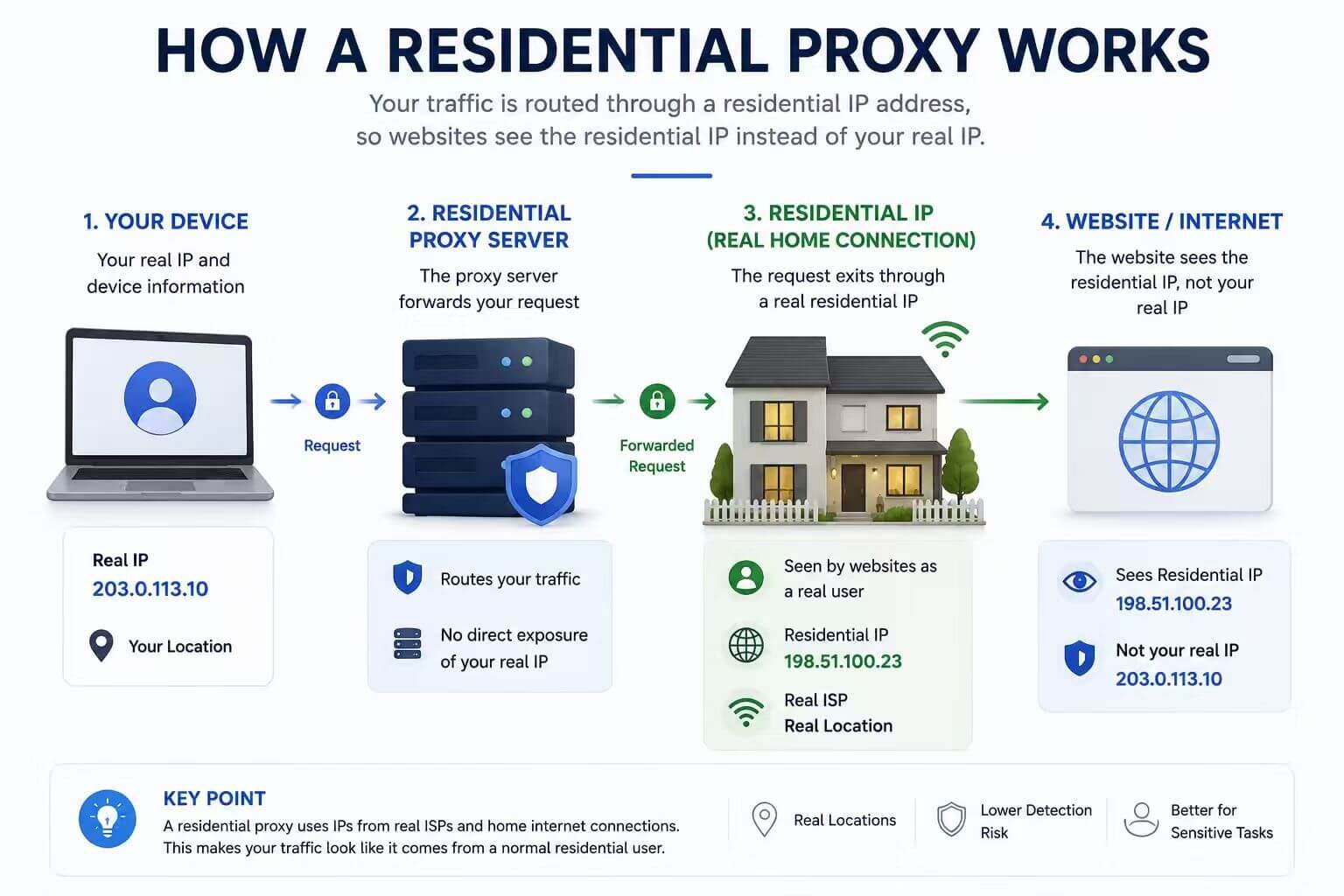
The basic flow looks like this:
- Your browser, app, profile, or script prepares a request.
- The request is sent to the residential proxy endpoint.
- The proxy routes the request through a residential IP.
- The target website receives the request from the residential proxy IP.
- The website returns a response to the proxy route.
- The response is sent back to your browser, app, profile, or script.
From the website’s point of view, the visible IP is the residential proxy IP. The website may also evaluate the IP location, ISP, ASN, browser headers, cookies, account history, DNS behavior, and request patterns.
This is why configuration matters. If the proxy is added only to one browser profile, only that profile may use the residential IP. If the proxy is added inside one script, only that script may use it. A residential proxy does not automatically change every app on your device unless those apps are configured to use it.
For account-based or browser-based workflows, the proxy is only one part of the environment. The visible IP, timezone, language, DNS behavior, cookies, and session behavior should stay consistent with the task.
What Is a Residential IP?
A residential IP is an IP address associated with an internet connection typically assigned by an internet service provider to a home or residential user. In IP lookup tools, these IPs often appear under broadband providers, consumer ISPs, or local internet networks rather than cloud hosting companies.
Residential IPs can look closer to normal consumer traffic than datacenter IPs. That is why residential proxies are often preferred for workflows where the network type matters. A website may treat a residential ISP network differently from a cloud or hosting network.
However, residential IP does not automatically mean high quality. A residential IP can still have issues such as:
- Outdated geolocation records
- Shared usage history
- Previous risk labels
- Unstable sessions
- DNS or browser environment mismatch
- Location that does not match the workflow
If a residential IP is active but still causes unexpected checks, the issue may be related to reputation, risk labels, or historical usage. In that case, review the IP quality score instead of judging the IP by location alone. You can also compare the visible IP, location, ASN, and network details with a third-party lookup tool such as IPinfo’s IP lookup.
In short, a residential IP describes the network source. It does not guarantee that every website will treat the IP the same way.
Residential Proxy vs Datacenter Proxy
The biggest difference between a residential proxy and a datacenter proxy is where the IP comes from.
A residential proxy uses an IP associated with a residential internet network. A datacenter proxy uses an IP from hosting, cloud, or data center infrastructure. Both can route traffic through another IP address, but websites and risk tools may classify them differently.
| Feature | Residential Proxy | Datacenter Proxy |
|---|---|---|
| IP source | Residential ISP or consumer-like network. | Hosting, cloud, or data center network. |
| Network appearance | Looks closer to normal residential traffic. | Looks more like server or hosting infrastructure. |
| Speed | Can vary by route, session, and network quality. | Often fast and stable for server-side workflows. |
| Cost | Usually higher because residential IP resources are more limited. | Usually lower and easier to scale. |
| Best fit | Location-sensitive, account-based, and consumer-network workflows. | Fast testing, infrastructure tasks, and cases where residential appearance is not required. |
| Main limitation | Speed, price, and session quality can vary. | More likely to be labeled as hosting or server traffic. |
Residential proxies are not always better. Datacenter proxies can be a better choice when you need speed, lower cost, and predictable infrastructure traffic. Residential proxies are more useful when the workflow depends on residential network appearance, regional consistency, or account environment stability.
The best choice depends on the task. Choose residential proxies when the IP source actually matters, not just because the word “residential” sounds safer.
Static Residential Proxy vs Rotating Residential Proxy
Residential proxies can also be grouped by session behavior. The two common options are static residential proxies and rotating residential proxies.
A static residential proxy keeps the same IP address for a longer period. A rotating residential proxy changes the outgoing IP based on time, request count, session settings, or provider rules.
| Feature | Static Residential Proxy | Rotating Residential Proxy |
|---|---|---|
| IP behavior | Keeps the same IP for longer sessions. | Changes IPs by time, request, or session rule. |
| Best for | Logins, dashboards, long sessions, and stable account workflows. | Regional testing, distributed requests, and controlled research workflows. |
| Session stability | Higher. | Depends on rotation rules and sticky session settings. |
| Location flexibility | Usually tied to a selected IP or location. | Often more flexible across locations or pools. |
| Main risk | One IP carries more workflow history over time. | Changing IPs too often can look inconsistent for session-based tasks. |
Use a static residential proxy when the task needs a stable network identity, such as long dashboard sessions, repeated access from the same browser profile, or account-based workflows where frequent IP changes would create friction.
Use a rotating residential proxy when the task benefits from flexible IP changes, such as regional testing, larger page review tasks, market research, QA workflows, or data access tasks that should not all come from one original network path.
For IPWeb users, the choice usually comes down to stability versus flexibility: static residential proxies are better for longer sessions, while dynamic residential proxies are better for flexible residential IP routing across locations.
Residential Proxy vs Residential VPN
Residential proxies and residential VPNs sound similar because both may involve residential-looking or ISP-like IPs. But they are usually used in different ways.
A residential proxy is commonly configured inside a browser, app, browser profile, software tool, or automation script. This makes it useful when you need per-tool or per-profile routing control.
A residential VPN usually works through a VPN app or system-level connection. It may be easier for general browsing, but it usually gives less granular control over separate browser profiles, scripts, or tools.
| Feature | Residential Proxy | Residential VPN |
|---|---|---|
| Routing scope | Often browser, app, profile, or script level. | Often VPN app or device level. |
| Workflow control | More flexible for separate tools and profiles. | Simpler, but usually less granular. |
| Automation use | Easier to integrate with tools that support proxy settings. | Less flexible for per-script routing. |
| Best for | Workflow control and profile-level routing. | Simple device-level browsing through a VPN app. |
If you want a broader comparison between proxy and VPN behavior, read our proxy vs VPN guide. This section only covers the residential IP angle.
Who Needs a Residential Proxy?
You may need a residential proxy when the result depends on how a website sees your network source. This is common when location, ISP type, session consistency, or browser profile separation affects the workflow.
Residential proxies are usually more useful for teams that need to review, test, or access web content from consumer-like network environments. They are less necessary when the task only needs fast server-side requests or basic IP masking.
| User Type | Common Need | Residential Proxy Fit |
|---|---|---|
| SEO teams | Check localized search results and landing pages. | Useful when location accuracy matters. |
| Ecommerce teams | Review regional product pages, stock status, and pricing displays. | Useful for consumer-market testing. |
| Ad verification teams | Review how ads and landing pages appear in different locations. | Useful for regional ad checks. |
| Web testing teams | Test websites from different residential network environments. | Useful for QA and regional experience testing. |
| Browser profile users | Keep different profiles on separate network routes. | Useful when each profile needs a consistent IP environment. |
| Data teams | Run approved web access workflows across locations. | Useful when residential IP coverage is required. |
If your task does not depend on residential network appearance, a datacenter proxy may be faster and more cost-effective. If the task depends on long sessions, a static residential proxy may be a better fit. If the task needs flexible location coverage, a rotating residential proxy is usually more practical.
What Is a Residential Proxy Used For?
A residential proxy is used when the workflow needs traffic to appear from a residential network source. That does not mean every use case needs one. It means the IP type, location, ISP, and session behavior are important enough to choose residential instead of datacenter or standard network routes.
Common residential proxy use cases include:
- Checking localized website content from different regions.
- Reviewing search results, ads, and landing pages by location.
- Testing ecommerce pages, product availability, and regional pricing displays.
- Supporting account-based workflows that need a consistent network environment.
- Running browser profiles with separate residential IP routes.
- Supporting market research workflows that require residential network coverage.
- Testing web apps from consumer-like network environments.
- Routing approved automation tools through selected residential IPs.
The value of a residential proxy is not only that it changes the IP address. The value is that it gives the workflow a residential network source, which may be more appropriate than a hosting or datacenter network in certain scenarios.
Residential proxies should also be used responsibly. Always follow the target website’s terms, applicable rules, and privacy requirements for your workflow.
When Should You Use a Residential Proxy?
You should use a residential proxy when the task depends on residential IP appearance, regional coverage, session consistency, or per-tool network routing.
| Situation | Is a Residential Proxy a Good Fit? | Why |
|---|---|---|
| You need a website to see a residential network IP | Yes | Residential proxies use IPs associated with residential networks. |
| You need different browser profiles to use different IPs | Yes | Proxies can be configured per profile or per tool. |
| You need long account sessions | Static residential proxy | A stable residential IP can keep the network environment more consistent. |
| You need changing IPs for regional testing | Rotating residential proxy | Rotation can provide flexible IP changes across sessions or locations. |
| You only need fast server-side requests | Not always | A datacenter proxy may be faster and more cost-effective. |
| You only want full-device encrypted browsing | Not usually | A VPN is usually easier for simple device-level privacy. |
| You only want local browsing history hidden | No | That is a browser privacy setting issue, not a residential proxy use case. |
A residential proxy is a strong fit when the IP source matters. It is not always the cheapest or fastest option, and it is not necessary for every proxy workflow.
How to Choose a Residential Proxy Provider
Choosing a residential proxy provider should start with the workflow, not only the price. A low-cost proxy plan may still be a poor fit if the IP locations are unstable, the session rules are too short, the protocol is unsupported, or the IP reputation does not match your use case.
When comparing residential proxy providers, check these points:
- Residential IP pool coverage by country, region, and city.
- Static, rotating, and sticky session options.
- HTTP, HTTPS, and SOCKS5 protocol support.
- Authentication methods, including username/password and IP allowlisting.
- Dashboard usability and proxy management tools.
- Traffic pricing, bandwidth limits, or unlimited traffic options.
- Connection stability and session reliability.
- IP quality, reputation, and network type accuracy.
- Support response time and documentation quality.
Which Residential Proxy Type Fits Your Workflow?
The right residential proxy type depends on the session behavior and traffic pattern you need. Use static residential proxies when a stable IP matters. Use rotating residential proxies when flexible IP changes and regional coverage matter. Use unlimited residential proxies when traffic volume is high and bandwidth predictability matters more than paying per gigabyte.
For smaller or controlled workflows, traffic-based residential proxies may be enough. For long sessions, static residential proxies are usually easier to manage. For larger location-based workflows, rotating residential proxies usually offer more flexibility.
You should also test a small workflow before scaling. Check whether the visible IP changes correctly, whether the location matches the task, whether the session stays stable, and whether the target website behaves as expected.
Choose residential proxies when the IP source matters. Choose static residential proxies when session stability matters. Choose rotating residential proxies when flexible location coverage matters. Choose datacenter proxies when speed and cost matter more than residential network appearance.
Common Residential Proxy Problems
Residential proxies can still fail or behave unexpectedly. Most issues come from configuration errors, location mismatches, unstable sessions, unsupported protocols, or expecting the proxy to fix browser and account signals that are outside the proxy itself.
| Problem | Common Cause | What to Check |
|---|---|---|
| Website still sees the original IP | The browser, app, or script is not actually using the proxy. | Check proxy host, port, credentials, and where the proxy is configured. |
| Location looks wrong | IP geolocation database mismatch or outdated location records. | Compare multiple IP lookup tools instead of relying on one result. |
| Session changes too often | Rotating proxy rules or short session duration. | Use a static residential proxy or longer sticky session settings. |
| Tool cannot connect | Wrong protocol, blocked port, bad credentials, or expired plan. | Confirm HTTP, HTTPS, or SOCKS5 support and authentication format. |
| Speed is unstable | Route distance, ISP network quality, load, or session changes. | Test several locations and compare static versus rotating sessions. |
| Website asks for more verification | IP reputation, cookies, browser signals, account history, or request behavior. | Review the whole environment, not only the residential proxy IP. |
| IP is residential but still risky | Shared history, abuse reports, risk labels, or poor reputation. | Check IP reputation and compare results across tools. |
After setting up a residential proxy, do not only check whether a page loads. Confirm that your browser, app, or script is actually using the proxy. A simple first step is to check if your proxy is working by comparing the visible IP before and after enabling the proxy. For browser-based workflows, you can also use BrowserLeaks DNS Test to check whether DNS behavior matches the network route you expect.
Frequently Asked Questions
A residential proxy is a proxy that routes traffic through an IP address associated with a residential internet connection. Websites usually see the residential proxy IP instead of your original public IP address.
Residential proxies are used for workflows where residential IP appearance, location, ISP type, or session consistency matters. Common uses include localized testing, ad verification, market research, browser profile routing, ecommerce page review, and account environment consistency.
A residential IP proxy is another way to describe a proxy that uses a residential IP address. The key point is that the outgoing IP is associated with a residential internet network rather than a hosting or datacenter network.
Not always. A residential proxy is better when residential network appearance and location consistency matter. A datacenter proxy can be better when speed, cost, and infrastructure stability are more important than residential IP type.
A static residential proxy keeps the same IP address for longer sessions. A rotating residential proxy changes IPs based on time, request count, session rules, or provider settings. Static is better for continuity. Rotating is better for broader IP coverage.
No. A residential proxy is usually configured inside a browser, app, profile, or script. A residential VPN usually works through a VPN app or device-level connection. Residential proxies usually give more workflow-level routing control.
Usually not. Datacenter proxies are often faster because they come from hosting infrastructure. Residential proxies may be more useful when network type and location matter, but speed can vary by route, provider, session type, and the target website.
Not always. Residential proxies can be useful for approved web scraping workflows when residential IP appearance, location coverage, or request distribution matters. For simple high-speed server-side requests, datacenter proxies may be faster and cheaper.
Check whether your visible IP changes after enabling the proxy. Then review the IP location, ISP label, ASN, and DNS behavior. If the page loads but the visible IP does not change, the proxy may be connected in the wrong browser, app, or profile.
Choose based on IP coverage, session options, protocol support, authentication methods, dashboard usability, stability, pricing model, support quality, and whether the provider fits your actual workflow. Test a small use case before scaling.
Final Thoughts
A residential proxy is useful when the IP source matters. It gives your browser, app, profile, or tool a residential network route instead of a typical hosting or data center IP. That can help with regional testing, account environment consistency, market research, ad verification, ecommerce review, and other workflows where residential IP appearance is important.
But residential proxies are not automatically better for every task. A datacenter proxy may be faster and cheaper. A static residential proxy may be better for long sessions. A rotating residential proxy may be better for flexible location testing. A VPN may be easier for simple personal browsing.
The best choice starts with the workflow. Decide whether you need residential IP source, static sessions, rotating sessions, location targeting, protocol support, or high-volume traffic. Then choose the proxy type that matches that need instead of choosing based on the word “residential” alone.