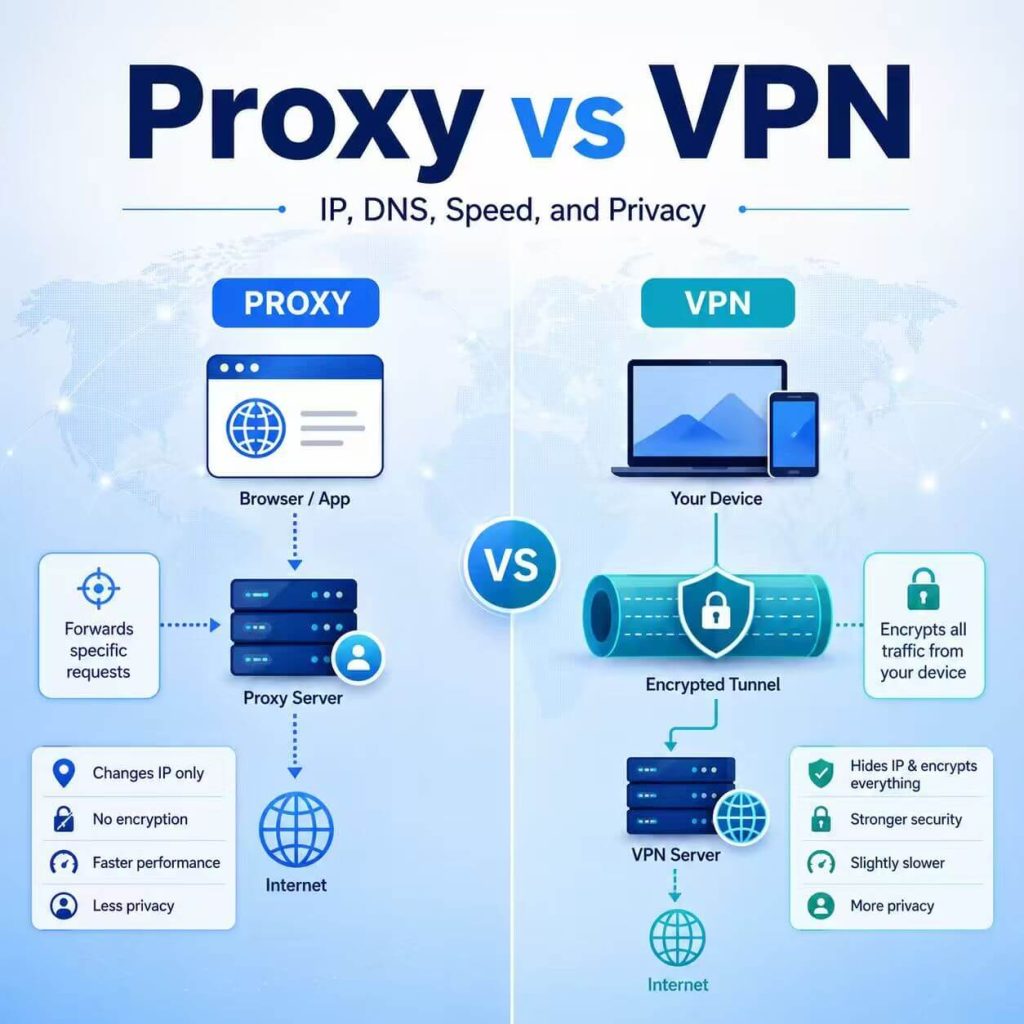
Proxy and VPN are often mentioned together because both can change the IP address a website sees. But they are not the same tool, and they are not built for the same kind of workflow.
A VPN is usually designed to route most device traffic through an encrypted tunnel. A proxy is usually configured for a specific browser, app, profile, script, or software tool. That difference affects IP routing, DNS behavior, speed, privacy, setup complexity, and how much control you have over individual workflows.
This guide compares proxy vs VPN in practical terms: how each one handles your IP address, what happens to DNS and browser signals, which one is better for speed, when privacy matters, and how to decide which option fits your task.
- Use a VPN when you want encrypted traffic for most of your device, especially on public or shared networks.
- Use a proxy when you need IP routing for a specific browser, app, profile, automation script, or software tool.
- A proxy usually gives more per-app and per-profile routing control than a VPN.
- A VPN usually provides stronger device-level encryption than a basic proxy setup.
- Neither a proxy nor a VPN automatically fixes browser fingerprint, account history, DNS mismatch, WebRTC, or IP reputation issues.
- Proxy vs VPN: Quick Answer
- What Is the Difference Between Proxy and VPN?
- IP Address: What Changes and What Does Not
- DNS, WebRTC, and Browser Signals
- Speed and Performance: Proxy vs VPN
- Privacy and Security: Which One Is Better?
- App Routing and Workflow Control
- Residential Proxy vs Residential VPN
- When to Use a Proxy vs When to Use a VPN
- Proxy vs VPN: Which Should You Choose?
- Common Mistakes When Comparing Proxy and VPN
- Frequently Asked Questions
Proxy vs VPN: Quick Answer
If you need a simple answer, use a VPN for device-level encrypted privacy and use a proxy for task-level IP routing.
A VPN is usually the better fit when you want most of your device traffic to go through one encrypted tunnel. This is useful for personal browsing, public Wi-Fi, remote work, or general network privacy.
A proxy is usually the better fit when you want a specific browser, app, account profile, automation script, or software tool to use a selected IP address. This is useful for browser profile routing, regional page testing, data access workflows, QA checks, and app-level network separation.
The real decision is not “which one is always better?” The better question is: do you need device-wide privacy or workflow-level routing control?
| Need | Better Choice | Why |
|---|---|---|
| Encrypt most device traffic | VPN | A VPN is built around an encrypted tunnel for device traffic. |
| Route one browser profile through a selected IP | Proxy | A proxy can be configured at the browser, profile, app, or script level. |
| Use different IPs for different tools | Proxy | Different tools can use different proxy configurations. |
| Protect traffic on public Wi-Fi | VPN | A VPN is usually easier for whole-device encrypted traffic. |
| Run automation through a specific endpoint | Proxy | Most automation tools support proxy-level routing. |
| Simple personal browsing with one network exit | VPN | A VPN app is often simpler for everyday users. |
What Is the Difference Between Proxy and VPN?
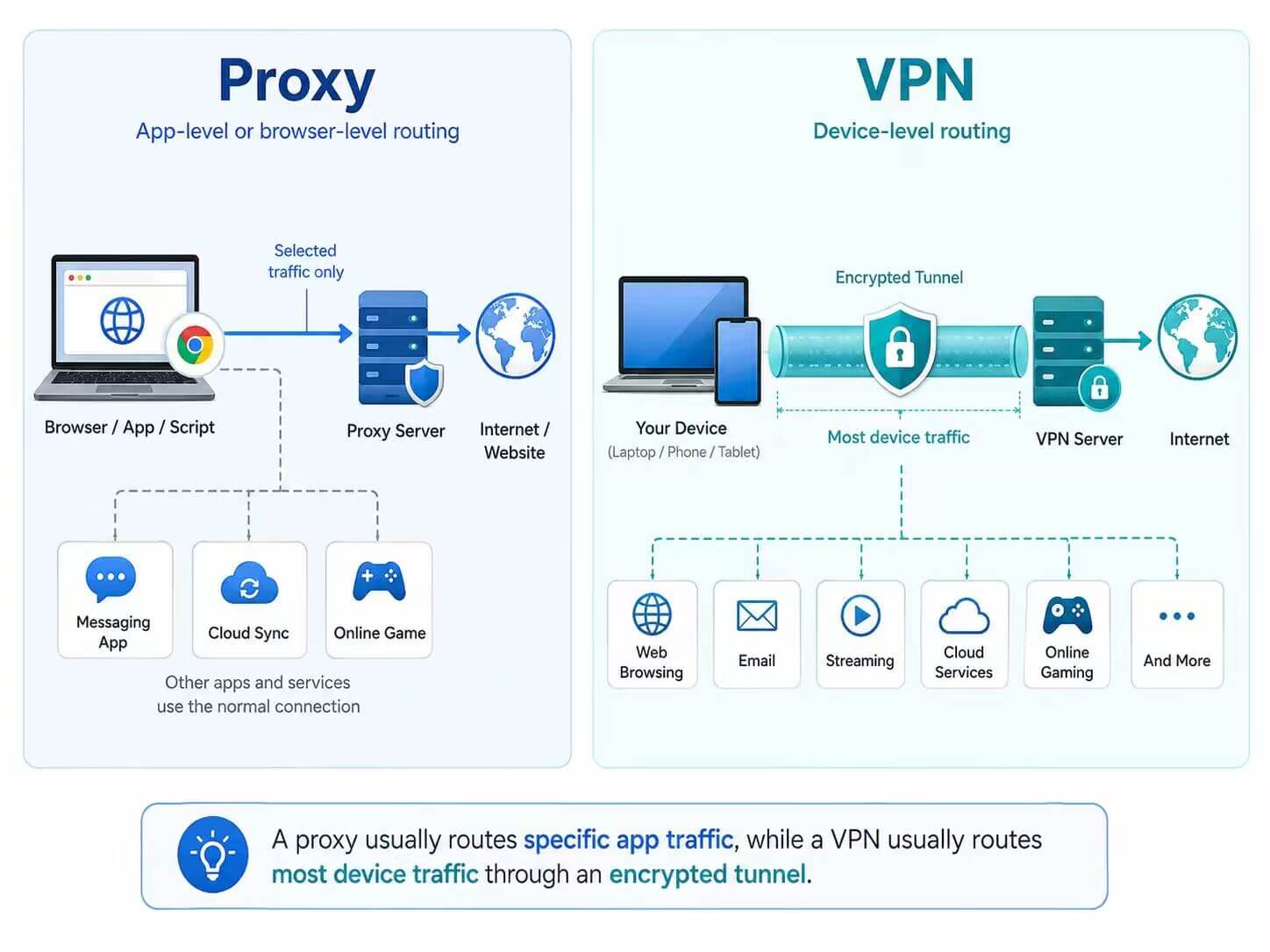
The main difference between proxy and VPN is traffic scope. A proxy usually routes traffic for a specific browser, app, profile, or script. A VPN usually routes most device traffic through an encrypted tunnel after the VPN app connects.
A proxy server acts as an intermediary for selected traffic. If your browser is configured to use a proxy, that browser’s traffic may go through the proxy. But another browser, desktop app, or background service may still use your original network unless it is also configured to use the proxy.
A VPN is usually installed as an app or system-level network service. Once connected, it typically routes most device traffic through the VPN server. The website sees the VPN server’s IP address, and traffic between your device and the VPN server is usually encrypted.
For a basic explanation of how proxies work as network intermediaries, see our what a proxy server does guide. MDN also explains that proxy servers and HTTP tunnels can sit between a user’s computer and a destination server on the internet.
Cloudflare describes a virtual private network as an Internet security service that lets users access the internet as if they were connected to a private network. That is a useful way to understand the basic VPN idea: it creates a private network route between your device and a VPN server.
| Feature | Proxy | VPN |
|---|---|---|
| Traffic scope | Usually browser, app, profile, or script level. | Usually device level after connection. |
| Visible IP | Changes for traffic configured to use the proxy. | Changes for most routed device traffic. |
| Encryption | Depends on protocol, destination, and app behavior. | Usually provides an encrypted tunnel between device and VPN server. |
| Setup style | Host, port, username, password, allowlist, extension, app, or script setting. | VPN app or system-level VPN configuration. |
| Best use | Browser routing, automation, testing, profile separation, selected workflows. | Personal privacy, public Wi-Fi, remote work, and whole-device encrypted traffic. |
| Per-tool control | Strong. | Limited unless split tunneling or advanced rules are available. |
IP Address: What Changes and What Does Not
Both proxies and VPNs can change the IP address a website sees, but they do it at different levels.
A proxy changes the visible IP address only for traffic that is actually configured to use the proxy. For example, if you configure a proxy inside one browser profile, websites opened inside that profile may see the proxy IP address. A second browser, another profile, a desktop app, or a command-line tool may still use your original IP unless it has its own proxy setting.
A VPN usually changes the visible IP address for most traffic routed through the device after the VPN connection is active. Websites usually see the VPN server’s IP address instead of the original public IP address assigned by the local network.
This difference matters in real workflows. A VPN is simpler when one network exit is enough for most apps. A proxy is more useful when you need one browser profile to use one IP, another profile to use another IP, and a script to use a separate route.
Neither option resets the full browser or account environment. Cookies, account history, browser fingerprint signals, location permissions, DNS behavior, and login patterns can still affect how websites evaluate a session.
If you are unsure whether your proxy is active, compare your visible IP before and after enabling it with our guide on how to check if your proxy is working.
DNS, WebRTC, and Browser Signals
Changing an IP address is not the same as making the whole environment consistent. Whether you use a proxy or VPN, websites may evaluate more than the visible IP.
DNS is one important signal. If your visible IP appears in one country but your DNS resolver appears somewhere else, some websites may treat the session as inconsistent. VPN apps often handle DNS at the system level, but that still depends on the VPN provider, app settings, operating system, and browser behavior. Proxy setups may require more careful checking because the proxy may only affect selected traffic.
WebRTC can also matter in browsers. MDN describes WebRTC as a browser technology for real-time communication and data exchange. Depending on browser, operating system, permissions, and configuration, WebRTC-related behavior can become part of the signals a website or testing tool evaluates.
Other browser signals can also affect results, including timezone, language, headers, cookies, local storage, account history, and device profile. A proxy or VPN can change the network route, but it does not automatically make all browser signals match that route.
Speed and Performance: Proxy vs VPN
Speed depends on server location, server load, protocol, provider quality, network distance, encryption overhead, and how the traffic is routed. A proxy is not always faster than a VPN, and a VPN is not always slower than a proxy.
In many selected workflows, a proxy can feel faster because it may route only one browser, app, or script instead of the whole device. There may also be less overhead when the proxy setup does not create a full-device encrypted tunnel.
A VPN may add more overhead because it usually encrypts traffic between your device and the VPN server and routes more device traffic through that tunnel. However, a high-quality VPN server close to your location may still perform well, while a poor proxy server far away may be slow.
IP type also matters. Datacenter proxies are often faster and more direct, but they may look like hosting infrastructure. Residential proxies may be more suitable when network type and location consistency matter, but speed can vary by route, provider, and session quality.
| Performance Factor | Proxy | VPN |
|---|---|---|
| Traffic scope | Often only selected app or browser traffic. | Often most device traffic. |
| Encryption overhead | Depends on protocol and app behavior. | Usually higher because of the VPN tunnel. |
| Server distance | Important. | Important. |
| Server load | Important. | Important. |
| Best performance use case | Selected workflows with specific IP routing needs. | General browsing when device-wide routing is needed. |
Privacy and Security: Which One Is Better?
For device-level privacy and traffic encryption, a VPN is usually the stronger fit. It is designed to route device traffic through an encrypted tunnel between your device and the VPN server. This is why VPNs are commonly used for public Wi-Fi, remote work, and general personal browsing privacy.
A proxy is usually better for controlling where specific traffic exits. It is not usually a full security tool by itself. A basic proxy setup may change the visible IP for a selected browser or app, but it may not encrypt all device traffic or protect other apps running on the same device.
That does not mean a VPN makes you fully anonymous. It also does not mean a proxy is unsafe in every case. The right choice depends on the goal. If your goal is whole-device encrypted traffic, VPN is usually a better starting point. If your goal is per-browser, per-profile, or per-tool routing, proxy is usually more flexible.
Both tools have limits. Cookies, account history, browser fingerprinting, DNS behavior, WebRTC behavior, location permissions, and IP reputation can still affect how websites evaluate a session.
App Routing and Workflow Control
App routing is where proxies often have a clear advantage. A proxy can be assigned to a single browser profile, one automation script, one software tool, or one testing workflow. This makes it easier to separate network environments without changing the entire device route.
For example, a QA team may test several regional versions of a website in separate browser profiles. A data team may run scripts through different endpoints. A marketing team may review localized search results or ad placements. In these cases, proxy routing can be more precise than turning on one VPN for the whole device.
A VPN can still support app control if it offers split tunneling or advanced routing rules, but that depends on the VPN app and operating system. Many everyday VPN setups are simpler: connect the device to one VPN server and route most traffic through it.
For workflows that require selected residential IPs across different locations, a dynamic residential proxy setup is usually more practical than a VPN because it can be assigned to specific browsers, tools, or scripts.
Residential Proxy vs Residential VPN
Residential proxy and residential VPN are related terms, but they are not the same thing. Residential proxy is usually a more direct technical setup. Residential VPN is often a service category or marketing term used for VPN-style services that route traffic through residential-looking or ISP-like network endpoints.
A residential proxy usually gives you proxy credentials or endpoint settings that can be added to a browser, extension, anti-detect browser profile, app, or automation tool. It is often used when workflow-level routing control matters.
A residential VPN usually works more like a VPN service. It may be easier for general browsing, but it usually gives less detailed control over per-profile, per-script, or per-tool routing.
| Feature | Residential Proxy | Residential VPN |
|---|---|---|
| Routing scope | Often browser, app, profile, or script level. | Often VPN app or device level. |
| Session control | Often more flexible for static or rotating sessions. | Usually simpler but less granular. |
| Automation use | Easier to integrate into tools and scripts. | Usually less flexible for tool-specific routing. |
| General browsing | Possible, but requires proxy setup. | Often easier for everyday browsing. |
| Best for | Workflow control and profile-level routing. | Simple residential-style browsing through a VPN app. |
If you only need one simple connection for personal browsing, a residential VPN may be easier. If you need different IPs for different tools, browser profiles, sessions, or scripts, a residential proxy is usually more flexible.
When to Use a Proxy vs When to Use a VPN
The easiest way to choose is to start with traffic scope. Do you want to route the whole device, or do you want to control one browser, app, script, or profile?
Use a Proxy When You Need Workflow-Level Routing
A proxy is usually the better choice when you need precise control over where selected traffic exits. This is especially useful when the task is tied to one browser, one app, one account profile, one automation script, or one testing environment.
A proxy is usually a good fit when you need to:
- Route one browser profile through a selected IP address.
- Use different IPs for different tools or profiles.
- Configure traffic inside an app, extension, script, or automation tool.
- Test how a website appears from different regions.
- Use static sessions for account-based workflows.
- Use rotating sessions for larger testing or data workflows.
- Choose between residential, ISP, datacenter, static, or rotating IP types.
Use a VPN When You Need Device-Level Privacy
A VPN is usually the better choice when you want a simple way to route most device traffic through an encrypted tunnel. This is especially useful for personal privacy, public Wi-Fi, remote work, and general browsing where you do not need different IPs for different tools.
A VPN is usually a good fit when you need to:
- Encrypt most device traffic through one tunnel.
- Protect general browsing on public or shared networks.
- Use one network exit point for most apps on the device.
- Keep setup simple for personal browsing.
- Avoid configuring proxy settings separately in each browser, app, or tool.
A proxy is not the best choice when you simply want all device traffic encrypted with minimal setup. A VPN is not always the best choice when you need one IP for one browser profile and another IP for another tool.
Proxy vs VPN: Which Should You Choose?
Choose based on the workflow, not based on which tool sounds more private or more technical. Proxy and VPN solve different network problems.
| Scenario | Better Choice | Why |
|---|---|---|
| You want full-device encrypted traffic | VPN | VPNs are designed for device-level encrypted tunnels. |
| You want one browser profile to use a selected IP | Proxy | Proxies can be configured at the browser or profile level. |
| You need different IPs for different tools | Proxy | Each tool can use a different proxy setup. |
| You want simple public Wi-Fi protection | VPN | A VPN is usually easier for whole-device privacy on shared networks. |
| You run scripts or automation tools | Proxy | Most tools support proxy host, port, username, and password settings. |
| You need long account sessions | Static proxy | A stable proxy IP can help keep the network environment consistent. |
| You need changing IPs for testing | Rotating proxy | Rotating proxies can change IPs by session, request, or time rule. |
| You want simple personal browsing | VPN | A VPN app is usually easier than configuring proxies per app. |
In short, choose VPN for simple device-level encrypted privacy. Choose proxy for targeted IP routing and workflow control.
Common Mistakes When Comparing Proxy and VPN
Many proxy vs VPN comparisons are confusing because they treat both tools as if they solve the same problem. They do not.
Here are the most common mistakes:
- Assuming a proxy encrypts all device traffic like a VPN.
- Assuming a VPN makes every browser, account, and device signal private.
- Using a VPN when only one browser profile needs a different IP.
- Using a proxy but testing a browser or app that is not configured to use it.
- Ignoring DNS, WebRTC, timezone, language, cookies, and account history.
- Judging the setup only by IP location instead of the full session environment.
- Choosing by price before checking protocol support, IP type, and session needs.
- Using rotating IPs when the workflow actually needs stable sessions.
A good comparison starts with one question: what traffic do you need to route, and how much control do you need over that route?
Frequently Asked Questions
The main difference is traffic scope. A proxy usually routes selected browser, app, profile, or script traffic through a proxy server. A VPN usually routes most device traffic through an encrypted tunnel after the VPN is connected.
A proxy is better when you need per-browser, per-app, or per-script IP routing. It is not always better for personal privacy or full-device encryption. For public Wi-Fi and general device-level privacy, a VPN is usually the better fit.
A VPN is better when you want simple device-level encrypted traffic. It is not always better for workflow control. If you need different IPs for different browser profiles, apps, or scripts, a proxy usually gives more flexibility.
Usually no. A proxy mainly routes selected traffic through a proxy server. Encryption depends on the protocol, destination website, and application behavior. A VPN is usually designed to create an encrypted tunnel between your device and the VPN server.
Yes, it is technically possible to use a VPN and proxy together, but it can make troubleshooting harder. You need to know which route the traffic uses first, which IP the website sees, and whether DNS, WebRTC, and browser settings remain consistent.
A residential VPN usually refers to a VPN-style service that routes traffic through residential-looking or ISP-like IP addresses. It is often simpler for general browsing, but it usually gives less per-tool routing control than a residential proxy.
A residential proxy is usually configured inside a browser, app, profile, or script. A residential VPN usually works through a VPN app or system-level connection. Residential proxies are usually more flexible for workflow control, while residential VPNs may be simpler for everyday browsing.
For browser profiles, a proxy is usually more flexible because each profile can use its own proxy settings. A VPN usually routes most device traffic through one network exit, unless advanced split tunneling or routing rules are available.
Final Thoughts
Proxy and VPN are both useful, but they are not interchangeable. A VPN is usually better for simple device-level encrypted privacy. A proxy is usually better for targeted IP routing, browser profile control, automation, regional testing, and tool-specific workflows.
The safest way to choose is to start with your task. If you need one encrypted tunnel for most device traffic, choose a VPN. If you need a selected IP for one browser, app, script, profile, or workflow, choose a proxy.
Whichever option you use, do not judge the setup by IP address alone. DNS behavior, WebRTC, browser signals, cookies, account history, location settings, and IP reputation can still affect the final result.