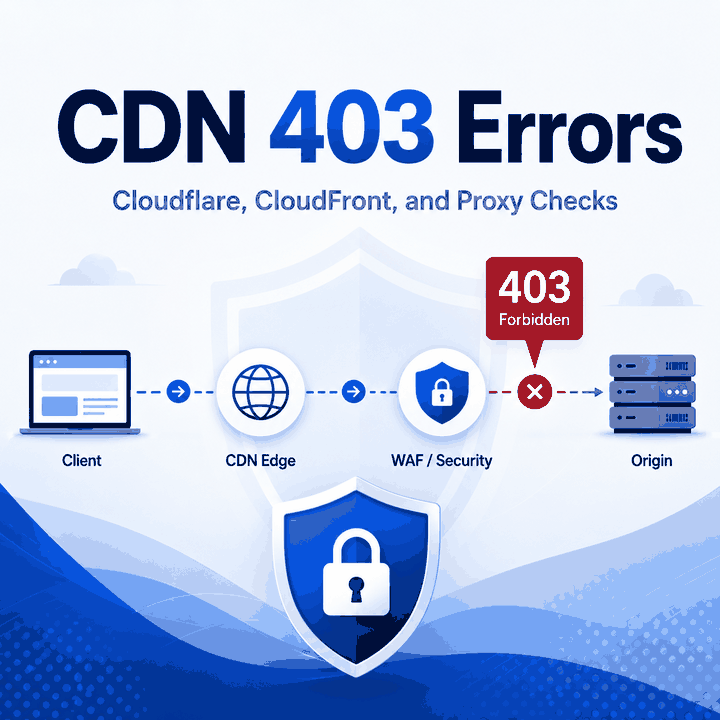
A CDN 403 is not just a generic "permission denied" message. If you are troubleshooting a 403 error where the page says "The request could not be satisfied" on CloudFront, or you see a Cloudflare 403 Forbidden response, the useful question is where the refusal happened: at the CDN edge, inside a WAF rule, at the origin server, or because the request did not match the access policy for that route.
That distinction matters. A normal retry can make a noisy log worse, while a focused check of headers, hostnames, WAF events, origin logs, and proxy route evidence can show who actually refused the request.
A CDN 403 error means a content delivery network, WAF, or origin behind the CDN refused the request after receiving it. For a CloudFront 403 that says "The request could not be satisfied," the phrase alone does not identify the root cause. First confirm the HTTP status and specific error text, then check the host header, SNI, WAF logs, origin permissions, geography rules, signed URL or cookie requirements, request method, and proxy route evidence.
A proxy can help test whether a response changes by network route or region, but it cannot override account rules, private content controls, legal restrictions, or a site's access policy.
- A 403 response means the request was understood but refused, according to the HTTP standard.
- Cloudflare-branded 403 pages often point to Cloudflare-side security features, while unbranded 403 pages may come from the origin server.
- CloudFront 403 errors can come from CNAME mistakes, AWS WAF, origin firewalls, S3 permissions, geography restrictions, signed URL rules, or stacked distributions.
- Route testing is useful only when it compares the same URL, method, headers, device context, and timing across known network paths.
- Do not treat proxies, header changes, or retries as a universal fix for CDN 403 errors.
What a CDN 403 Actually Tells You
HTTP 403 means the server understood the request but refuses to fulfill it. RFC 9110 also notes that the reason may be described in the response body, and that a client should not automatically repeat the request with the same credentials.
With a CDN in front of a site, the "server" refusing the request may not be the origin application. It may be the CDN edge, a WAF rule, a bot-control layer, a geography policy, a private-content rule, or an origin configuration exposed through the CDN.
That is why the first diagnostic step is not "try another proxy." The first step is to classify the layer that produced the 403.
CDN Layer, WAF Layer, or Origin Layer?
The fastest way to diagnose a CDN 403 is to separate response ownership from request symptoms. A 403 page with CDN branding, CDN-specific headers, or a CDN error phrase points to a different owner than a plain application-level 403 with your origin's template.
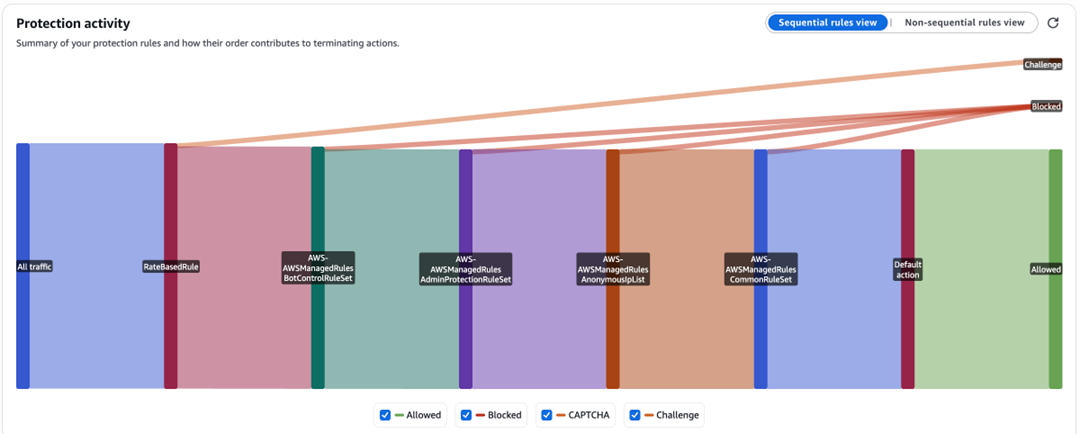
Cloudflare's Error 403 documentation makes this split clear: an unbranded 403 can come directly from the origin, while Cloudflare-branded 403 responses can be triggered by WAF rules, security settings, DDoS protection, Browser Integrity Check, and Validation Checks. Cloudflare also documents early-infrastructure cases such as host and SNI mismatch that can return an unstyled 403 before normal domain configuration is loaded.
CloudFront has a similar ownership problem. AWS CloudFront's HTTP 403 documentation lists several possible causes, including alternate CNAME configuration, AWS WAF, custom-origin firewalls, S3 origin permissions, geographic restrictions, signed URL or signed cookie requirements, and stacked CloudFront distributions.
| Evidence | Likely Owner | What to Check First | Why It Matters |
|---|---|---|---|
| CDN-branded 403 page | CDN or WAF | CDN security event, WAF rule, request method, host and SNI | The origin may never have accepted the request |
| Plain application 403 | Origin application | App permissions, authentication state, server ACLs, origin logs | CDN routing may be working correctly |
| "The request could not be satisfied" | CloudFront response; cause still needs classification | HTTP status, specific error text, CNAME, WAF, origin, geography, signed URL/cookie rules | The phrase alone does not identify whether CloudFront, WAF, or the origin caused the refusal |
| Different result by region | CDN policy or origin routing | Geo restrictions, regional rules, localized origin behavior | A route test can reveal a policy boundary |
| Same 403 from all routes | Origin, auth, path, or policy | Credentials, content permissions, request path, robots/terms | Network changes are unlikely to fix it |
Cloudflare 403 Checks
A Cloudflare 403 should be checked in two tracks: what the visitor sees and what the zone owner can verify. If the response has Cloudflare branding, a Ray ID, or a Cloudflare error page, the site owner should inspect Cloudflare security events before changing origin code. One exception matters: Cloudflare says some early-infrastructure 403 responses, including certain host/SNI mismatches, may be unstyled and may not appear in normal security logs because they occur before domain configuration is loaded.
Start with these checks:
- Confirm whether the response is Cloudflare-branded or a plain origin 403.
- Check WAF Custom Rules, Managed Rules, Bot Fight Mode or bot controls, Browser Integrity Check, and Security Level settings.
- Review whether the request triggered a challenge, block action, validation failure, or DDoS protection.
- Confirm that the client sends the correct host and SNI for the domain.
- Verify that origin firewall rules do not block Cloudflare IP ranges.
- Compare the request from a normal browser session and from the affected automation or QA environment.
Before changing routes, confirm that the request is authorized and the data is publicly available. Then check whether the failure belongs to request format, route quality, request rate, security policy, or content-access limits.
CloudFront and "The Request Could Not Be Satisfied"
The phrase "The request could not be satisfied" commonly appears on CloudFront error pages, but the phrase alone does not identify the root cause and does not prove that CloudFront blocked the request before reaching the origin. Confirm the HTTP status and the more specific error text first, then use logs and configuration evidence to determine whether the cause belongs to CloudFront, AWS WAF, the origin, or an access rule.
Practical checks include:
- Confirm the requested hostname is configured as an alternate domain name on the CloudFront distribution.
- Check whether AWS WAF blocked the request.
- Test the origin directly when it is safe and allowed, then compare that result with the CDN response.
- Review S3 bucket permissions, origin access control, object path, and custom error behavior when S3 is the origin.
- Check geography restrictions and private-content settings that require signed URLs or signed cookies.
- Avoid chaining one CloudFront distribution in front of another unless the architecture is intentionally designed and tested.
The important point is evidence order. A CloudFront 403 does not automatically mean the target site rejected the request because of the client IP. It may instead reflect the hostname, origin permissions, signed-access model, geographic restriction, or WAF policy applied to the exact request.
How Proxy Route Evidence Helps
Proxy route testing helps when you need to know whether the 403 changes by network path, country, IP type, ASN, or session behavior. It does not prove that the content is accessible, and it should never be used to ignore a site's access rules.
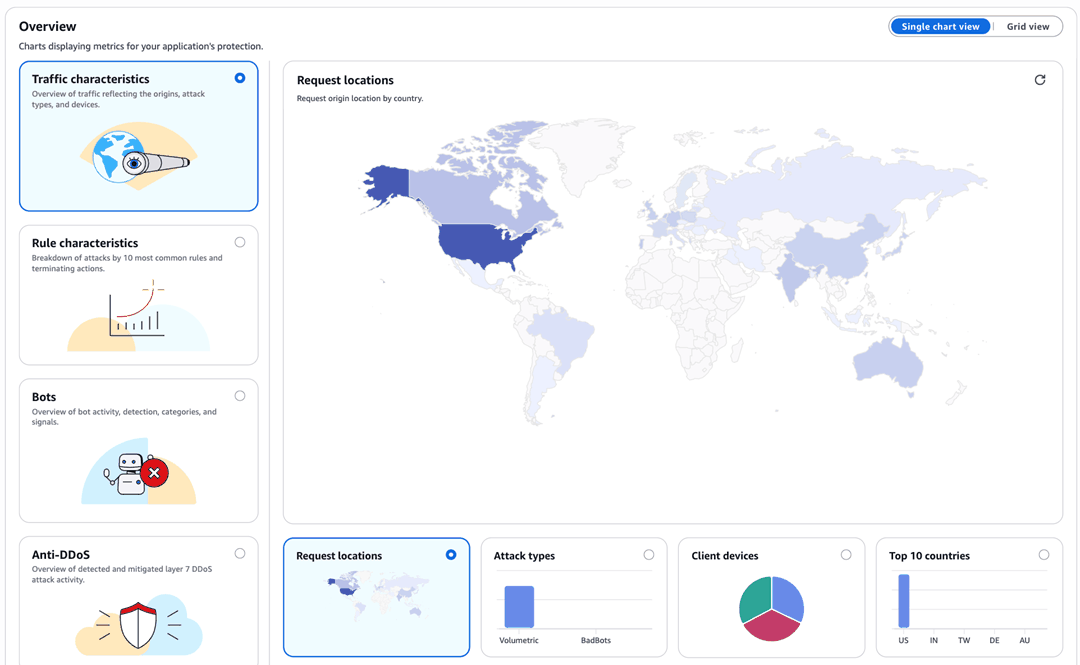
To keep the test useful, hold everything else constant:
- Use the same URL, method, request body, and query parameters.
- Keep the same headers unless the test is specifically about header behavior.
- Compare the same time window so rate limits and temporary rules do not distort the result.
- Record visible IP, country, ASN, DNS behavior, response code, response headers, CDN headers, and response body label.
- Separate browser-based testing from script-based testing because cookies, JavaScript, and session state may differ.
When route testing is appropriate, a rotating residential route can help compare public responses from different network paths. IPWeb's Dynamic Residential Proxies can be used for this kind of route validation, but a proxy only changes the network path. It cannot grant permission to private content, solve account restrictions, or neutralize WAF policy.
A Safe CDN 403 Diagnostic Workflow
Use a workflow that narrows the owner of the 403 before changing infrastructure.
- Record the exact URL, method, timestamp, request headers, response headers, and response body label.
- Identify whether the response is CDN-branded, origin-branded, or ambiguous.
- Check CDN logs, WAF events, and security rules for the same timestamp.
- Compare a normal browser request with the affected script, crawler, or QA tool.
- If you own the origin, check origin logs and firewall rules.
- If the request depends on a signed URL, cookie, token, or login state, verify that access model first.
- Run route testing only after the request itself is valid and allowed.
- Stop if the site policy, robots guidance, legal boundary, or authentication model says the data should not be collected.
Minimal cURL Check
Before changing routes, headers, or authentication state, capture a clean baseline response. This cURL command records the response headers, HTTP status, and remote IP without downloading the response body. Replace https://example.com/ with a URL you are authorized to test.
curl -sS -D - -o /dev/null \
  -w "\nHTTP status: %{http_code}\nRemote IP: %{remote_ip}\n" \
  https://example.com/
For a useful comparison, run the same request again after changing only one factor. If the status or CDN-specific headers change, that difference becomes evidence for the next diagnostic step rather than proof that any single route or IP was the root cause.
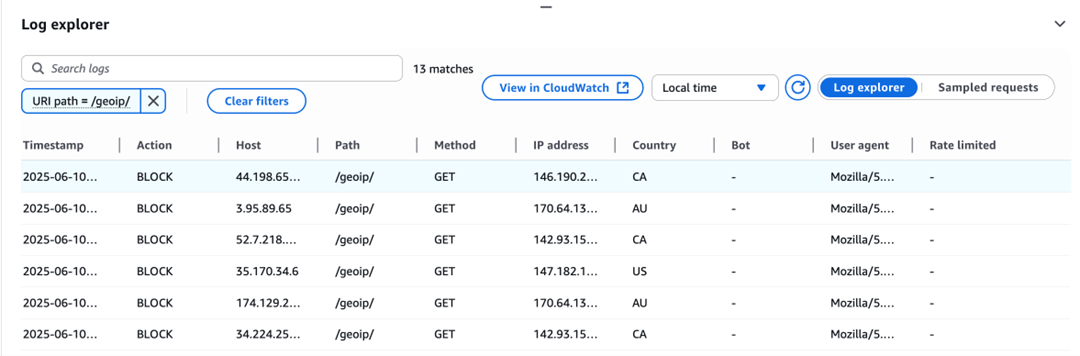
The clearest 403 investigations usually change one variable at a time. Record the timestamp, HTTP status, and CDN headers such as cf-ray, server, via, or x-cache when they are present, then change only the route, hostname mapping, or authorization state. If several variables change together, a different result does not show which change mattered.
What Not to Do
Do not solve a CDN 403 by blindly rotating IPs, copying random browser headers, or retrying at high volume. Those moves can hide the real cause and may create compliance, stability, or reputation problems.
Avoid these mistakes:
- Treating every CDN 403 as an IP block.
- Assuming Cloudflare, CloudFront, and the origin use the same rule set.
- Comparing a browser request with a script request without matching cookies, headers, and method.
- Ignoring signed URL, signed cookie, login, or private-content requirements.
- Turning a WAF denial into a bypass project.
- Using a proxy test result as proof that access is allowed.
If the denial is based on account permissions, private content, a legal restriction, or an explicit access policy, the right next step is not a network workaround. It is to change the request, get permission, use an official API, or stop.
When to Use Related IPWeb Guides
Use the broad 403 Forbidden guide when you need the general meaning and full troubleshooting scope of the status code. Use 401 vs 403 when you are not sure whether the problem is missing authentication or refused authorization.
For proxy-side evidence, start with How to Check If a Proxy Is Working and Proxy Error. If the issue appears during data collection, the web scraping proxy guide gives broader context about route quality, request limits, and compliance-aware collection.
If the failure is not a 403, use the error-specific path instead. A Cloudflare 502 Bad Gateway points to a gateway or upstream-response problem, while Cloudflare Error 525 specifically points to a failed TLS handshake between Cloudflare and the origin.
Frequently Asked Questions
Final Thoughts
A CDN 403 is easiest to solve when you stop treating it as one generic error. Identify the layer, preserve the request evidence, check WAF and origin logs, and use route testing only to answer a specific question.
For public data workflows, the safest conclusion is also the most useful one: a proxy can validate network behavior, but it cannot replace permission, compliant access, or a correct request design.