
In today’s hyperconnected world, cross-border e-commerce and social media marketing have become essential growth drivers for modern businesses. However, global teams often face serious challenges such as:
- Complex and risky multi-account management
- Expensive physical device setups with limited scalability
- Frequent account suspensions disrupting operations
- Repetitive manual tasks that drain productivity
- Fragmented tools (browser + proxy + device) leading to inconsistent environments and increased detection risk
FlashID was built to solve these problems. It provides an integrated, secure, cloud-based environment that unifies browser, proxy, and device layers into one system, empowers teams to manage multiple accounts, automate workflows, and scale operations across platforms — safely and efficiently.
What Makes FlashID Anti-detection Browser Different
FlashID is more than just an anti-detect browser — it is a unified environment system designed for multi-account operations at scale.
It combines cloud phone infrastructure, advanced anti-detect browser technology, and automation into a single integrated ecosystem. Now with built-in proxy infrastructure, FlashID ensures that IP, browser fingerprint, and device environment are fully aligned by default — eliminating the risks caused by mismatched configurations across different tools.
This alignment is critical for reducing detection signals and maintaining long-term account stability.
Key Features
Cloud Phone Environment
Operate multiple virtual mobile devices hosted on secure cloud servers. Each device runs independently, ensuring full isolation and preventing device fingerprint tracking.
Advanced Anti-Detect Browser
Every browser profile creates a unique digital fingerprint. You can log in to different accounts on a single computer without triggering association or bans.
Built-in Proxy Infrastructure
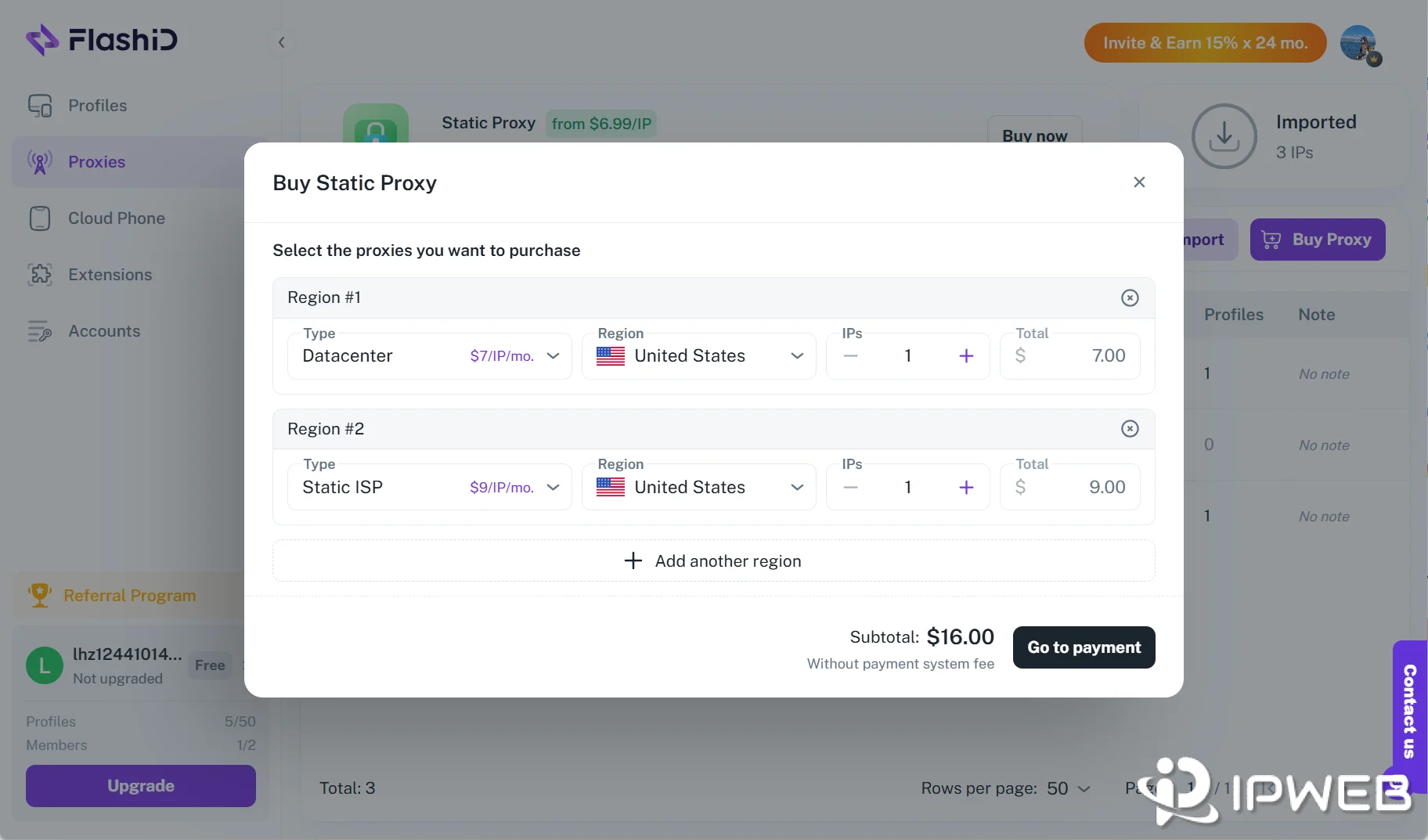
FlashID now offers built-in proxy purchasing options, allowing users to buy and manage proxy resources directly inside the platform instead of depending entirely on third-party proxy providers.
Key capabilities include:
- Coverage across 20+ countries
- Support for both static and rotating IPs
- Datacenter and Static ISP proxy options
- One-click binding with browser profiles and cloud phones
- Consistent and reliable IP reputation
Unlike traditional setups where proxies are configured separately, FlashID ensures that the IP is automatically aligned with the browser fingerprint and device environment. This eliminates manual configuration errors and significantly reduces detection risk, resulting in more stable account performance.
Automation and RPA Integration
FlashID includes built-in automation tools to handle repetitive actions like logins, form submissions, content posting, and data scraping, allowing your team to focus on high-value work.
Open API and Integrations
Developers can connect FlashID with internal systems, CRMs, or RPA bots to create custom workflows and large-scale automation.
Workspace Management
FlashID Workspace allows teams to manage different projects, clients, or business units in separate workspaces. Members can be assigned different roles and permissions, helping teams control access to browser profiles, cloud phones, account data, and other resources more safely.
Profile Templates
FlashID Profile Templates help users save and reuse common browser and mobile environment settings. Teams can quickly create new profiles with consistent fingerprint configurations, reducing repetitive setup work and improving operational efficiency.
Window Sync
FlashID Window Sync lets users synchronize actions across multiple browser profiles or cloud phone instances, including clicks, typing, scrolling, and other repeated operations. This helps teams manage multiple accounts more efficiently while keeping each environment isolated.
Unified Anti-Detection Ecosystem
By combining encrypted browser profiles, isolated cloud devices, and high-quality global proxies, everything works as one unified environment — not a combination of separate tools.
FlashID vs Other Antidetect Browser Solutions (2026)
| Feature | FlashID | GoLogin | Multilogin | Dolphin Anty |
|---|---|---|---|---|
| Positioning | All-in-one antidetect browser + cloud phone platform | Easy-to-use antidetect browser | Advanced antidetect platform | Browser-first antidetect browser |
| Core Environment | Browser profiles + Android cloud phones | Browser profiles + Cloud Android | Browser profiles + Android cloud phones | Browser profiles |
| Fingerprint Control | ✓ Detailed fingerprint settings | ✓ Auto + manual settings | ✓ Advanced configuration | ✓ Flexible fingerprint settings |
| Proxy Support | ✓ Built-in + custom proxies | ✓ Built-in + custom proxies | ✓ Built-in residential proxies | △ Mainly custom proxy workflows |
| Mobile Workflow | ✓ Native cloud phone support | △ Cloud Android available | ✓ Android cloud phones | △ Less central |
| Account Management | ✓ Account Center + 2FA + profile binding | △ Notes and folders | △ Tags and notes | △ Tags, notes, folders, statuses |
| Team Collaboration | ✓ Workspace + roles + permissions | ✓ Team sharing | ✓ Team permissions | ✓ Strong team controls |
| Profile Templates | ✓ Built-in templates | △ Basic reuse tools | △ Less central | △ Less central |
| Window Sync | ✓ Browser + cloud phone sync | ✓ Action Synchronizer | △ More automation-focused | ✓ Browser synchronizer |
| Batch Management | ✓ Profiles, proxies, accounts, cloud phones | ✓ Mass profile actions | ✓ Bulk profile management | ✓ Strong mass actions |
| Automation | ✓ API + browser + cloud phone automation | ✓ API + SDK + cloud browser | ✓ API + Selenium/Playwright/Puppeteer | ✓ API + synchronizer + scenario tools |
| API Support | ✓ Included for advanced workflows | ✓ Developer-friendly | ✓ Advanced automation support | ✓ Local / remote API |
| Best For | Teams managing both web and mobile accounts | Beginners and general multi-account users | Advanced teams with larger budgets | Browser-first account operation teams |
In most cases, the key difference comes down to browser-only workflows vs browser + mobile account operations. FlashID is better suited for teams that want browser profiles, cloud phones, proxies, account management, sync tools, and team collaboration in one platform. GoLogin is easier for general users, Multilogin fits more advanced and budget-ready teams, while Dolphin Anty is stronger for browser-first profile operations.
Typical Use Cases
All scenarios benefit from consistent browser + proxy + device environments, which significantly reduces account risk.
Cross-Border E-Commerce Operators
Run and manage multiple stores across markets such as Amazon, eBay, Shopee, or Lazada. FlashID helps maintain account security while automating everyday operations like product listings and inventory updates.
Best paired with static ISP proxies for long-term stable store operations.
Global Marketing and Social Media Teams
Safely handle multiple ad or content accounts across Facebook, Instagram, and TikTok, avoiding detection and maximizing reach.
Use residential or rotating proxies for safer account scaling and geo-based targeting.
Advertising Agencies and Affiliates
Operate multiple ad accounts in isolated environments for campaign testing and optimization, while maintaining consistent performance and ROI. Combine datacenter proxies + automation for high-efficiency campaign testing.
Product Development and Quality Testing
Quickly deploy separate test environments without additional hardware or internal interference, enabling faster iteration and development.
How to Configure FlashID
Setting up FlashID only takes a few minutes. Follow these three steps to start creating your isolated environments:
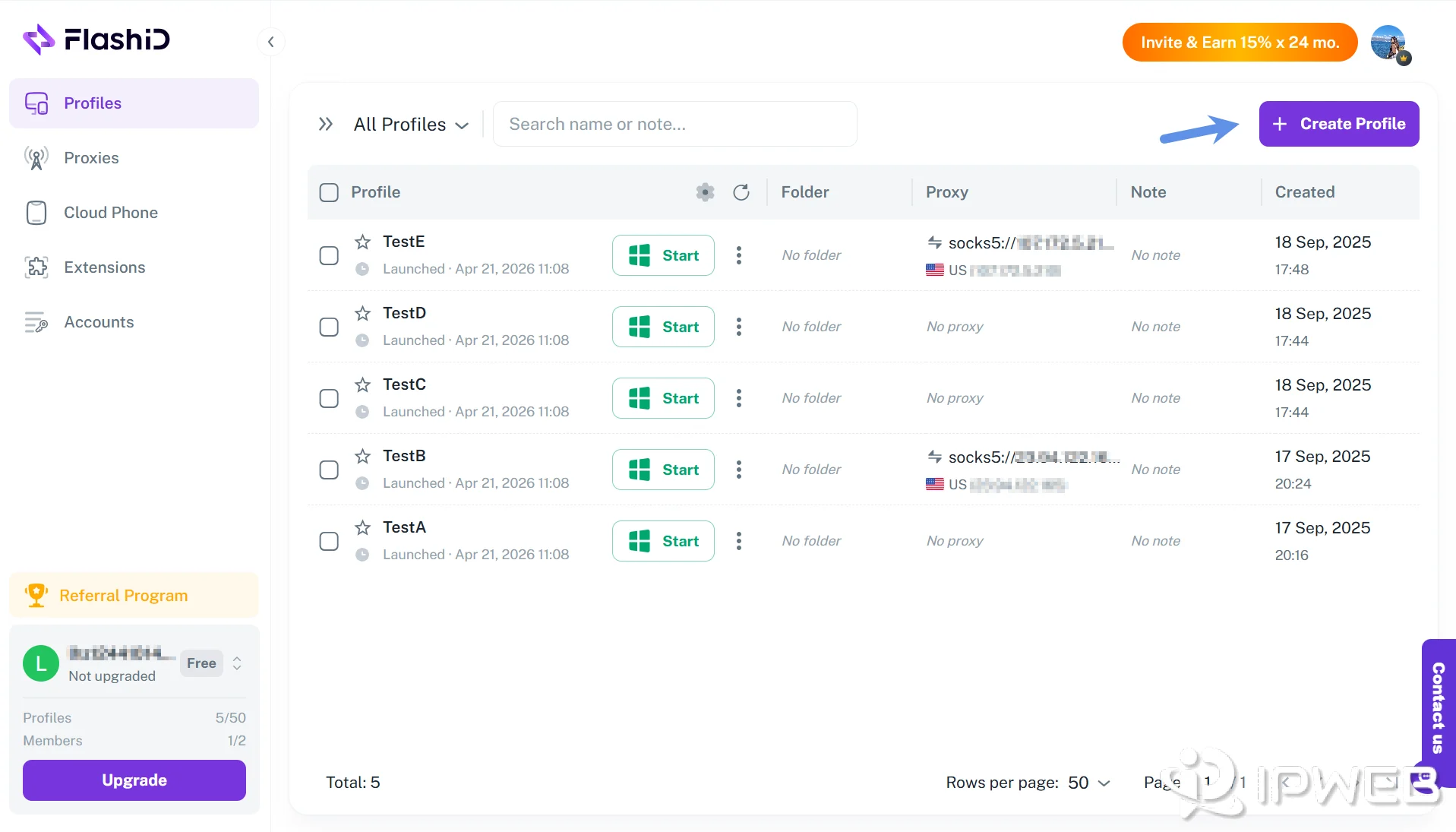
Step 1: Create a Profile
In your dashboard, click “Create Profile.”
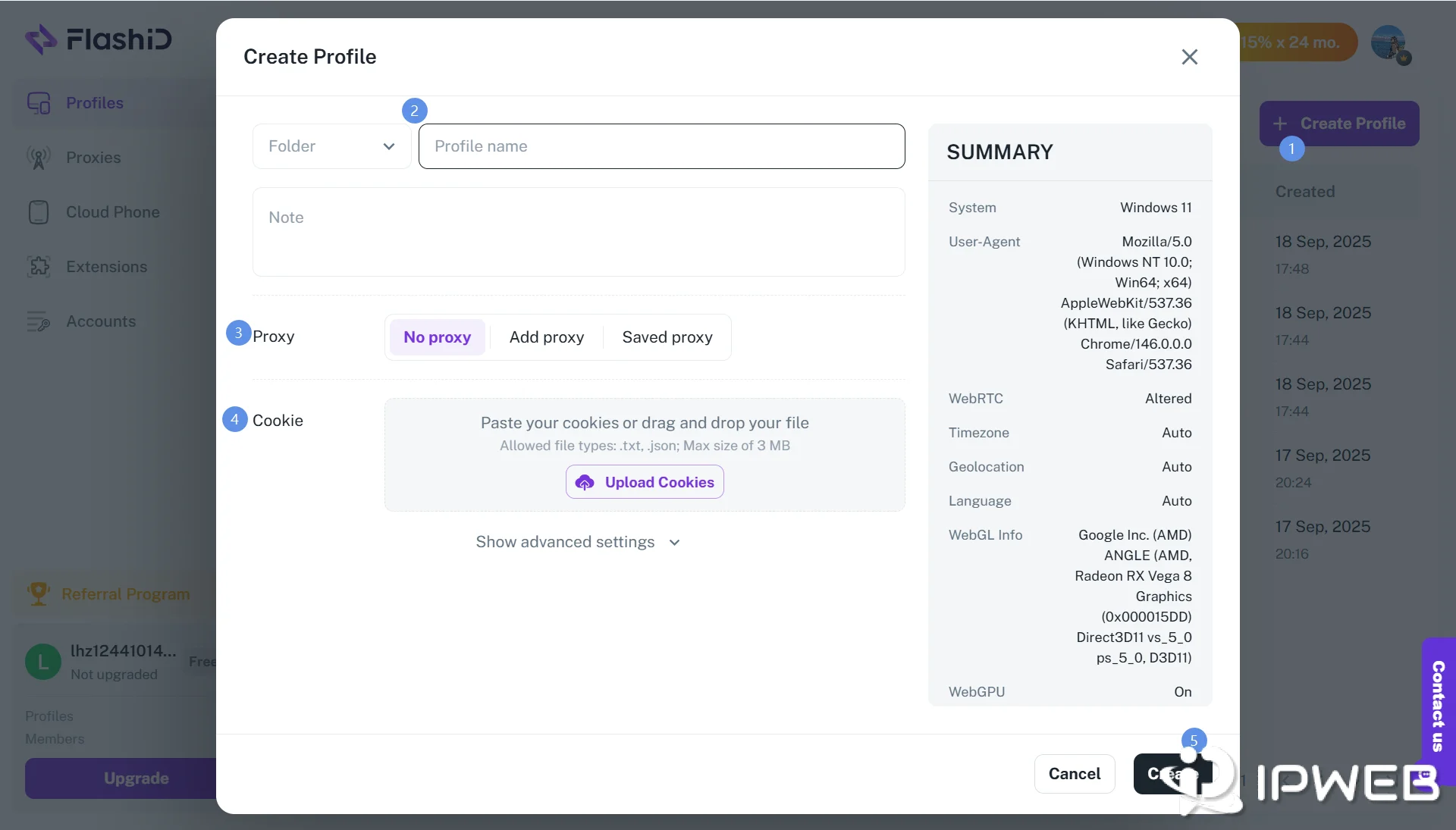
Enter a name and configure fingerprint parameters. Each profile generates a unique browser fingerprint and serves as the foundation of an independent environment.
Step 2: Add a Proxy
Go to the Proxy Settings panel, click “Add Proxy,” and input your proxy’s host, port, username, and password. Click “Test” to verify the connection and then save it.
Tip: You can also directly use FlashID built-in proxies for instant setup — no manual configuration required. This ensures optimal matching between IP and browser environment, reducing setup errors and improving account stability.
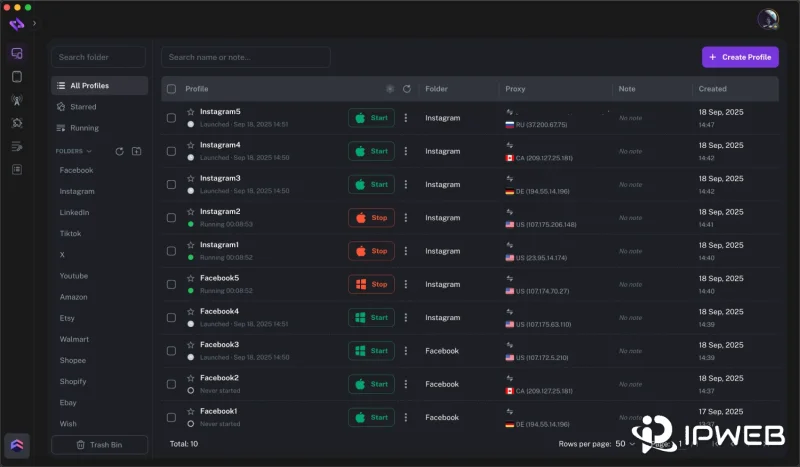
Step 3: Launch and Start Working
Click “Start” to launch your profiles. A new browser or cloud phone window will appear with its own fingerprint, IP address, and cache space.
You can now safely log in to your accounts without worrying about association or detection.
Why Choose FlashID
FlashID is built on a full-stack environment architecture that combines browser, proxy, and device layers into a single unified system — delivering higher success rates compared to standalone tools.
At the core, FlashID uses kernel-level rendering simulation to naturally generate hardware fingerprints across Canvas, WebGL, and AudioContext, creating realistic digital identities that can pass even advanced detection systems. Each browser profile and cloud phone operates as a fully independent environment, with distinct device IDs, storage, and processes, ensuring complete isolation and eliminating cross-contamination even at scale.
Beyond isolation, FlashID enables efficient team collaboration through role-based access control and operation logs, giving organizations full visibility and control over multi-account operations.
This integrated architecture translates directly into business value:
- Security: A fully aligned browser + proxy + device environment significantly reduces detection risk
- Scalability: Instantly create and manage environments as your business grows
- Efficiency: Built-in automation reduces repetitive tasks and improves productivity
- Cost-Effectiveness: Replace expensive hardware setups with flexible cloud infrastructure
- Reliability: A unified system ensures stable, long-term account performance across global operations
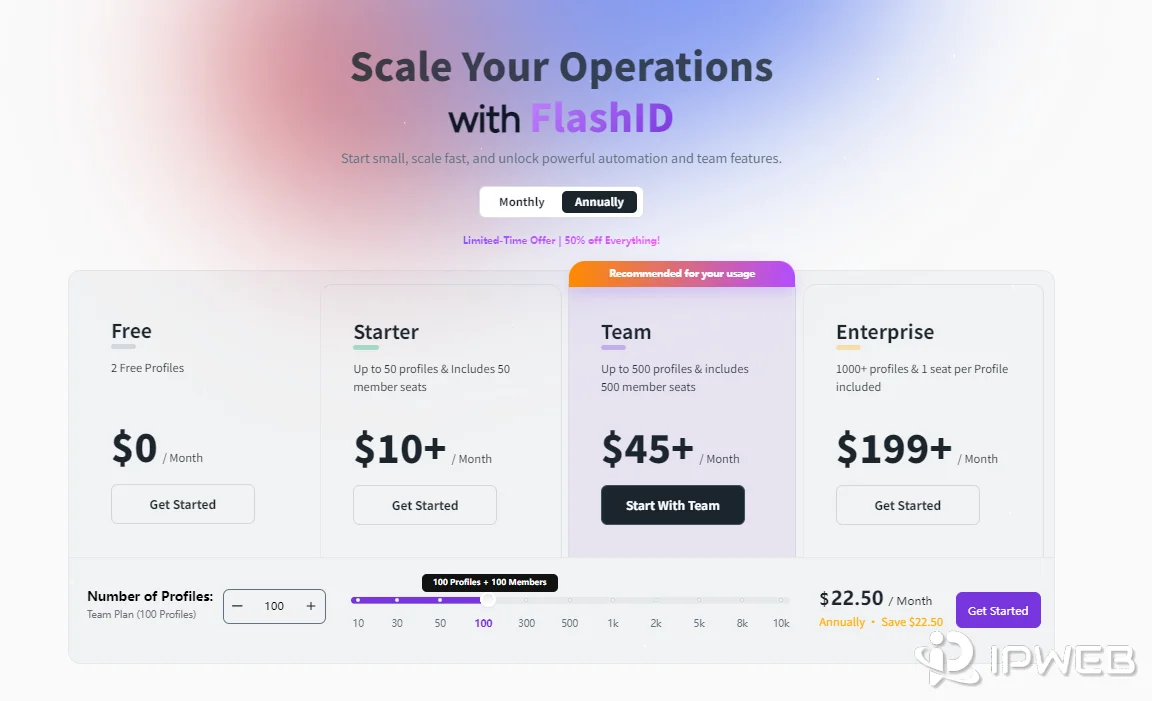
Pricing / Plans (USD)
Current official promotion: selected plans at 50% off (check the official site for live discounts).
Official site for live discounts and offers: FlashID Pricing
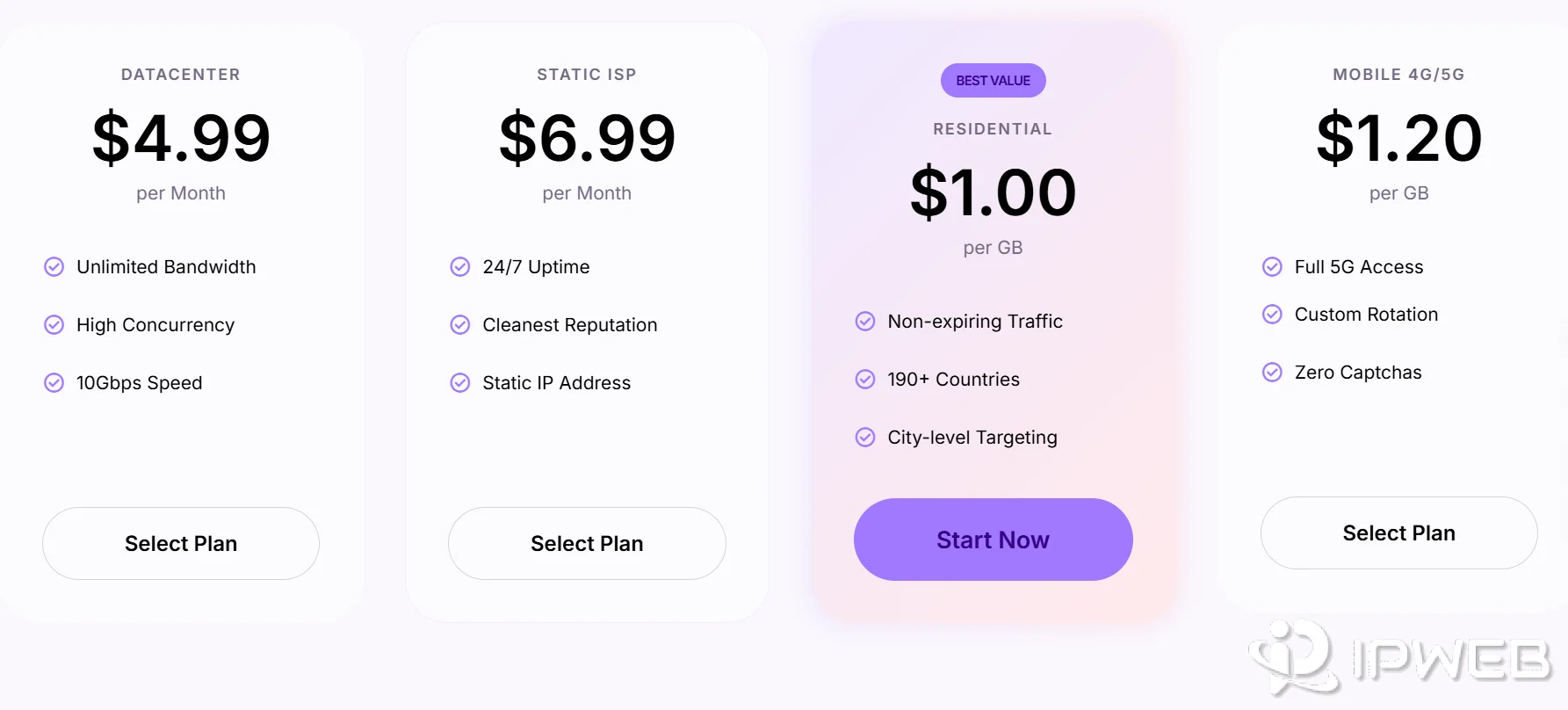
Built-in proxy pricing: flexible options available for different proxy types and usage needs (check the official site for live proxy prices).
Final Thoughts
In the global digital economy, the real challenge is no longer just managing accounts — but managing consistent environments at scale. FlashID empowers international teams to operate smarter, safer, and faster — transforming fragmented tools into a unified, proxy-integrated environment system for safer and more scalable operations.
Start using FlashID today to take control of your multi-account environments and accelerate your cross-border business growth.