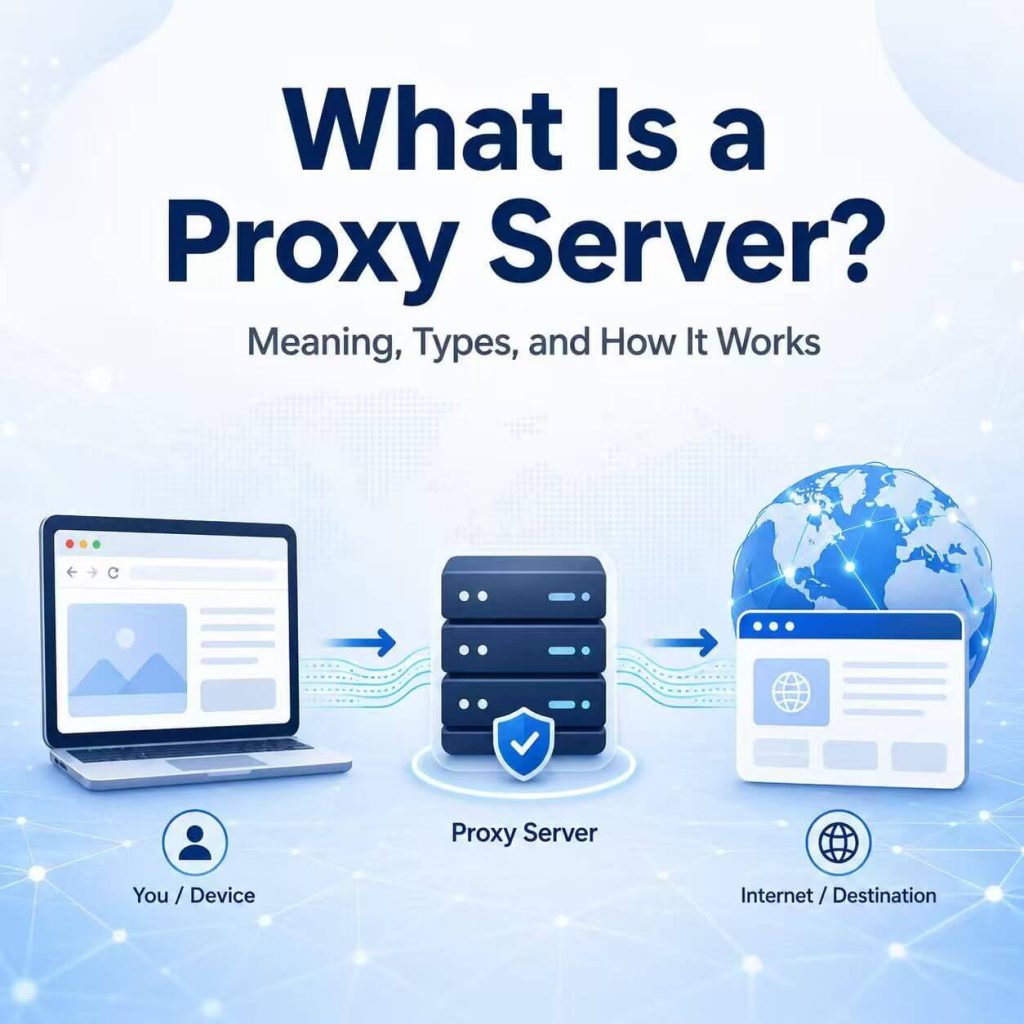
A proxy server is a middle server that forwards requests between your device and the website, app, or online service you want to reach. Instead of connecting directly to the destination, your browser, application, or script sends traffic to the proxy server first. The proxy server then sends the request onward and returns the response to you.
That middle position is what makes proxy servers useful. A proxy can change the visible IP address a website sees, route traffic through a selected server, separate traffic for different tools, or help keep a browser or application workflow more consistent.
This guide focuses on proxy servers from the user side: the type of proxy you configure in a browser, operating system, app, extension, anti-detect browser, or automation tool. It explains what a proxy server is, what proxy means, how a proxy server works, common proxy types, proxy protocols, what websites can see, and how to choose the right proxy server type for a real workflow.
- A proxy server is an intermediary server between your device and a destination website, app, or online service.
- When configured correctly, a website usually sees the proxy server’s IP address instead of your original public IP address.
- A proxy server mainly changes the network route and visible IP for selected traffic.
- Common proxy types include residential proxies, datacenter proxies, static proxies, rotating proxies, shared proxies, and dedicated proxies.
- Common proxy protocols include HTTP, HTTPS, and SOCKS5.
- The right proxy depends on your task, required IP type, session stability, protocol support, and location needs.
- What Is a Proxy Server?
- Proxy Meaning: What Does Proxy Mean?
- How Does a Proxy Server Work?
- Common Proxy Server Types
- Proxy Server Protocols: HTTP, HTTPS, and SOCKS5
- What Information Does a Website See When You Use a Proxy?
- What Is a Proxy Server Used For?
- How to Choose the Right Proxy Server Type
- Common Proxy Server Problems
- Frequently Asked Questions
What Is a Proxy Server?
A proxy server is an intermediate server that forwards internet requests between a client and a destination server. The client can be a browser, mobile app, desktop program, command-line tool, anti-detect browser profile, automation script, or software application. The destination can be a website, API endpoint, application server, search engine, marketplace, social platform, or other online service.
When you use a proxy server, your device does not send the request directly to the destination website. The request goes to the proxy server first. The proxy server then forwards that request to the destination. When the destination returns a response, the proxy server sends the response back to your device.
In a normal browser proxy setup, the website usually sees the proxy server’s IP address rather than your original public IP address. If you are still learning how websites read your visible IP, start with our What Is My IP guide.
However, a proxy server only affects traffic that is configured to use it. If you add a proxy to one browser profile, another browser or app may still use your original network. If you add a proxy to a script, only that script may use the proxy. This is why proxy configuration matters as much as proxy quality.
Proxy Meaning: What Does Proxy Mean?
The word proxy means a representative, substitute, or middle layer acting on behalf of another party. In networking, a proxy is a server that sends or receives requests on behalf of a client.
So when people search for proxy meaning, proxy server meaning, what is a proxy, or what does proxy mean, the core idea is simple: a proxy server is a network intermediary. It stands between your device and the destination server and handles traffic between them.
The word proxy describes the role of being in the middle. The actual behavior depends on the proxy type, protocol, authentication method, session rule, and where the proxy is configured.
For example, a browser proxy routes browser traffic. A proxy inside a software tool routes that tool’s requests. A static proxy keeps the same IP for longer sessions. A rotating proxy changes IPs based on time, request count, or session settings. All of them are proxies, but they are not used in the same way.
How Does a Proxy Server Work?
A proxy server works by receiving a request from your browser, app, or tool, forwarding that request to the destination website, and then returning the response back to you.
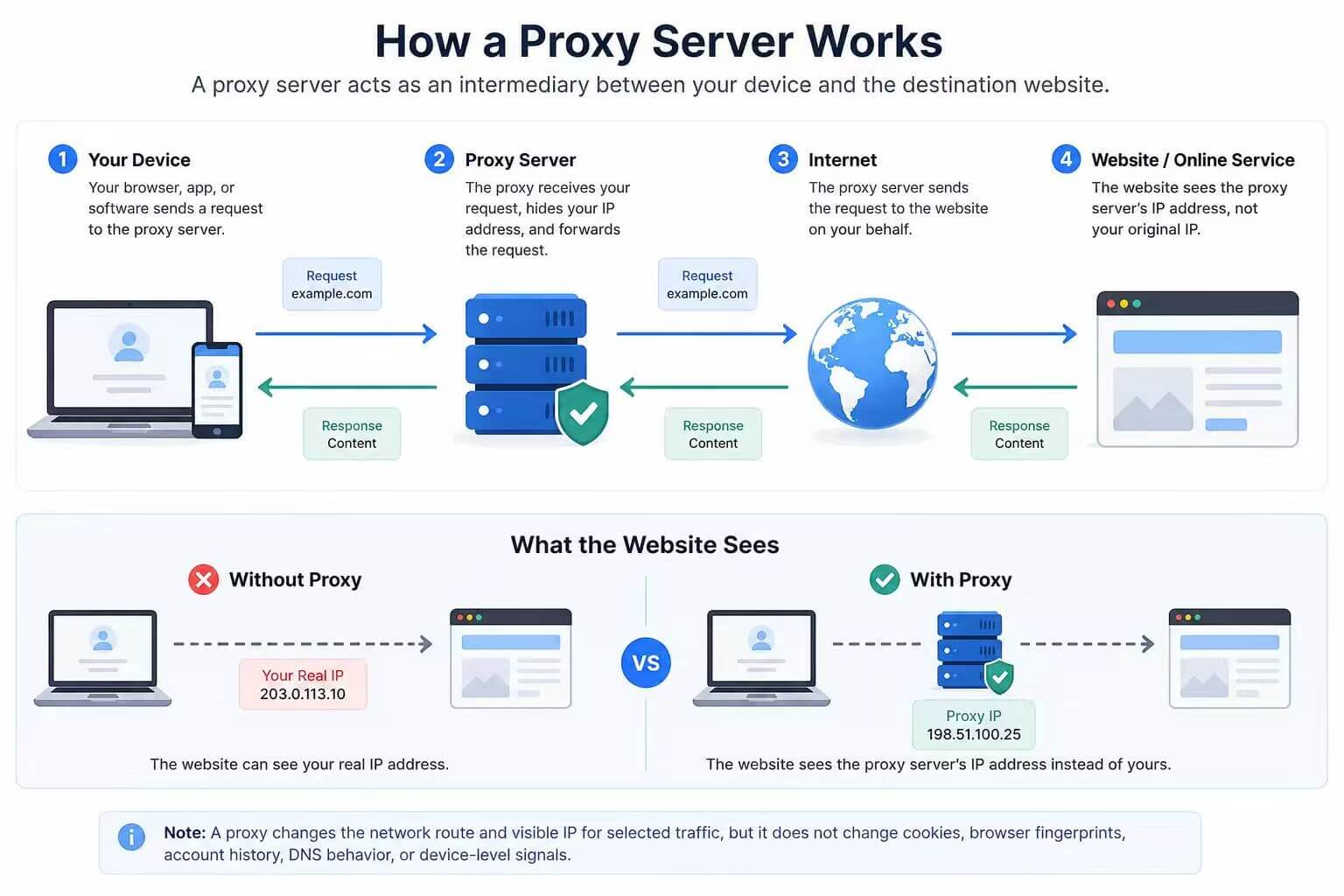
The basic flow looks like this:
- Your browser, app, or tool prepares a request to visit a website or online service.
- The request is sent to the proxy server instead of going directly to the destination.
- The proxy server checks the request based on its configuration and authentication rules.
- The proxy server forwards the request to the destination website or service.
- The destination responds to the proxy server.
- The proxy server sends the response back to your browser, app, or tool.
From the destination website’s perspective, the request usually comes from the proxy server. That is why the website may record the proxy IP address, proxy location, ISP, ASN, or network type instead of the user’s original connection.
This flow is easiest to understand with web traffic. A browser sends a request, a server returns a response, and the proxy sits between those two sides. The same general idea can also apply to apps, scripts, and software tools that support proxy settings.
A proxy server may also require authentication. In many commercial proxy setups, you need a host, port, username, and password. Some providers also support IP allowlisting, where only approved source IPs can use the proxy.
Common Proxy Server Types
Proxy servers can be grouped by IP source, session behavior, ownership model, and how the proxy is used. These categories matter because they affect speed, stability, reputation, location accuracy, and how suitable the proxy is for a specific workflow.
| Proxy Type | What It Means | Best Fit |
|---|---|---|
| Residential Proxy | A proxy IP associated with a residential internet connection. | Localized checks, account environment consistency, market research, and workflows where residential IP reputation matters. |
| Datacenter Proxy | A proxy IP from hosting or data center infrastructure. | Speed-focused tasks, server-side workflows, and cases where residential IP reputation is not required. |
| Static Proxy | A proxy that keeps the same IP address over time. | Long sessions, repeated logins, dashboards, and stable browser or app environments. |
| Rotating Proxy | A proxy setup where the outgoing IP changes by time, request, session, or provider rule. | Regional testing, distributed requests, and workflows that need changing IPs. |
| Shared Proxy | A proxy IP that may be used by multiple users or tasks. | Lower-cost tasks where strict IP consistency is not required. |
| Dedicated Proxy | A proxy IP assigned to one user or a controlled environment. | Workflows that need cleaner ownership, stability, and predictable usage history. |
Residential Proxy
A residential proxy uses an IP address associated with a real residential internet connection. These proxies are often used when location, ISP type, and normal consumer-network appearance matter. They are common in localized page checks, ad verification, account environment management, market research, and data access workflows that need residential IPs.
For workflows that need flexible residential IPs across locations, IPWeb provides dynamic residential proxies for browser, automation, and data access use cases.
Datacenter Proxy
A datacenter proxy uses an IP address from hosting or cloud infrastructure. Datacenter proxies are usually fast and cost-effective, but many websites and risk tools can identify them as hosting or server traffic. They are often useful for internal testing, server-side workflows, and cases where residential reputation is not necessary.
Static Proxy
A static proxy keeps the same outgoing IP address over time. This is useful when a workflow needs a consistent network identity, such as long sessions, account-based tasks, dashboard access, or repeated requests from the same environment.
Rotating Proxy
A rotating proxy changes the outgoing IP according to session rules, time intervals, request counts, or provider settings. Rotation can be useful for larger testing or data workflows, but it should be matched carefully with the expected behavior of the target website or application.
Shared Proxy
A shared proxy may be used by more than one user or task. Shared proxies can reduce cost, but the IP history may be less predictable because multiple users can affect the reputation or behavior pattern of the same IP.
Dedicated Proxy
A dedicated proxy is assigned to one user, team, or controlled workflow. It is usually better when stability, ownership, and predictable usage history matter more than the lowest possible cost.
Proxy Server Protocols: HTTP, HTTPS, and SOCKS5
Proxy server type and proxy protocol are not the same thing. A residential proxy describes where the IP comes from. A static proxy describes whether the IP changes. HTTP, HTTPS, and SOCKS5 describe how the traffic is handled at the protocol level.
| Protocol | What It Handles | Common Use |
|---|---|---|
| HTTP Proxy | HTTP web requests. | Basic web traffic, testing tools, simple scripts, and browser configurations. |
| HTTPS Proxy | Traffic to HTTPS websites, often using tunneling methods. | Modern website access, browser sessions, and tools that need encrypted website connections. |
| SOCKS5 Proxy | More general traffic types beyond only HTTP-style web requests. | Browsers, apps, automation tools, and workflows that need broader protocol support. |
HTTP Proxy
An HTTP proxy is designed for HTTP traffic. It is commonly used in web request tools, browsers, and simple automation workflows. For many basic web tasks, an HTTP proxy is enough.
HTTPS Proxy
An HTTPS proxy is commonly used when the destination website uses HTTPS. Since most modern websites use HTTPS, HTTPS proxy support is important for browser sessions and web applications. The exact setup depends on the browser, tool, provider, and authentication method.
SOCKS5 Proxy
A SOCKS5 proxy is more flexible because it can support different types of traffic. It is often used in desktop applications, browsers, automation tools, and environments where HTTP-only proxy behavior is too limited.
When choosing between HTTP, HTTPS, and SOCKS5, start with the application you are configuring. The best protocol is the one your browser, tool, or script supports correctly for the traffic you need to route.
What Information Does a Website See When You Use a Proxy?
When you use a proxy server correctly, a website usually sees the proxy server as the network source of the request. That does not mean the website only sees an IP address. A website or risk system may evaluate several signals at the same time.
| Signal | What It Can Show | Why It Matters |
|---|---|---|
| Visible IP Address | The proxy IP seen by the website. | Confirms which network exit point the request uses. |
| IP Location | Estimated country, region, or city of the proxy IP. | Affects localized pages, regional testing, and account consistency. |
| ISP or Organization | The network provider or organization associated with the IP. | Helps identify residential, mobile, ISP, hosting, or datacenter networks. |
| ASN | The larger network operator behind the IP route. | Useful for understanding network ownership and reputation patterns. |
| Headers | Browser, language, encoding, and request metadata. | Headers can reveal whether the browser environment matches the proxy location. |
| DNS Behavior | Which resolver path appears to be used. | DNS mismatches can make a proxy setup look inconsistent. |
| Session Data | Cookies, account history, and login behavior. | A proxy IP alone does not reset account or browser history. |
This is why a proxy server should be understood as one part of a network environment. It can change the visible IP and route selected traffic, but it does not automatically make the entire browser, account, or device environment consistent.
What Is a Proxy Server Used For?
A proxy server is used when a user, company, application, or workflow needs an intermediary layer for traffic routing, IP control, location testing, account environment consistency, or software-level network configuration.
Common proxy server use cases include:
- Routing browser traffic through a selected IP address.
- Testing how websites appear from different countries or regions.
- Separating network environments for different browser profiles or tools.
- Supporting web testing, QA checks, and localized user experience review.
- Managing account-based workflows that need a stable network environment.
- Running software tools or scripts through a specific proxy route.
- Checking search results, ads, prices, or content variations by location.
- Reducing repeated direct requests from one original network in automation workflows.
The important point is that a proxy server is not defined by one single use case. It is a network role. Different proxy types apply that role in different ways.
How to Choose the Right Proxy Server Type
The right proxy server type depends on what you need the proxy to do. Start with the workflow before choosing the proxy.
| Need | Better Proxy Type | Reason |
|---|---|---|
| Use a consumer-like network source | Residential proxy | It uses IPs associated with residential internet networks. |
| Keep the same IP for long sessions | Static proxy | It helps maintain a stable network identity over time. |
| Use fast infrastructure IPs | Datacenter proxy | It is usually faster and more cost-effective for server-side tasks. |
| Change IPs across sessions or requests | Rotating proxy | It can provide different outgoing IPs based on session rules. |
| Reduce unpredictable shared history | Dedicated proxy | It gives one user or workflow more predictable IP usage. |
| Support broader app traffic | SOCKS5 proxy | It can handle more traffic types than a basic HTTP proxy. |
For most browser, tool, and script workflows, the choice usually comes down to three questions:
- Do you need a residential, ISP, datacenter, or mobile network source?
- Do you need a static IP or a changing IP?
- Does your browser, app, extension, or script support HTTP, HTTPS, SOCKS5, or all of them?
Answering those questions is more useful than choosing a proxy based only on price or location. A cheap proxy with the wrong protocol, unstable sessions, or the wrong network type may not fit the task.
Common Proxy Server Problems
Most proxy server problems come from configuration mismatch, authentication errors, unsupported protocols, unstable sessions, poor IP reputation, or expecting a proxy to control signals that it does not control.
| Problem | Common Cause | What to Check |
|---|---|---|
| Proxy does not connect | Wrong host, port, username, password, or IP allowlist. | Check credentials, port, authentication type, and provider dashboard. |
| Website still sees the original IP | The app or browser is not actually using the proxy. | Check where the proxy was configured and whether the app respects that setting. |
| Only one app uses the proxy | The proxy is configured inside a single browser, extension, or script. | Decide whether you need app-level or system-level routing. |
| HTTPS pages fail | Unsupported protocol, blocked port, or incorrect proxy format. | Confirm whether the proxy supports HTTP, HTTPS, or SOCKS5 for that tool. |
| Session keeps changing | Rotating proxy rules or short session duration. | Use a static proxy or a longer session setting if the workflow needs stability. |
| Location looks inconsistent | IP geolocation database mismatch or DNS/browser setting mismatch. | Compare multiple IP lookup tools and review browser environment settings. |
| Website shows more verification | IP reputation, browser signals, request rate, or account history may trigger risk checks. | Review the whole environment, not only the proxy IP. |
A good proxy troubleshooting process starts with the basics: verify the host and port, confirm authentication, check the visible IP, test the correct protocol, and make sure the application is actually sending traffic through the proxy server.
After fixing the host, port, username, password, or protocol setting, the next step is to check if your proxy is working by comparing the visible IP before and after enabling the proxy.
Frequently Asked Questions
A proxy server is a middle server between your device and another website or online service. Your browser, app, or tool sends a request to the proxy first, and the proxy forwards that request to the destination.
Proxy means a representative or substitute. In networking, a proxy is a server that handles requests on behalf of a client, such as a browser, app, script, or software tool.
The main purpose of a proxy server is to act as an intermediary for traffic. It can route requests, change the visible IP address, separate traffic by app or profile, support location testing, or create a more consistent network path for a workflow.
A proxy server can change the IP address that a website sees if your traffic is correctly routed through the proxy. The website usually sees the proxy server’s IP address rather than your original public IP address.
An HTTP proxy is designed for HTTP-style web traffic. A SOCKS5 proxy is more general and can support different types of traffic depending on the application. The better choice depends on what your browser, tool, or script supports.
Most proxy setups require a host, port, username, and password. Some providers also support IP allowlisting, where only approved source IPs can connect to the proxy server.
Common reasons include a wrong host, wrong port, incorrect username or password, unsupported protocol, expired proxy plan, IP allowlist mismatch, or configuring the proxy in one app while testing another app that is not using it.
Choose based on the task. Use a residential proxy when residential network reputation matters, a static proxy when you need long sessions, a rotating proxy when you need changing IPs, and a datacenter proxy when speed and cost matter more than residential IP appearance.
Final Thoughts
A proxy server is best understood as an intermediary layer in a network connection. It can route traffic through a selected server, change the visible IP address, separate traffic for different tools, and help create a more controlled network environment.
The most important step is to match the proxy type to the real task. A residential proxy is different from a datacenter proxy. A static proxy is different from a rotating proxy. HTTP, HTTPS, and SOCKS5 also behave differently depending on the application.
If you understand the role, type, protocol, and limits of a proxy server, it becomes much easier to choose the right setup and troubleshoot problems when something does not work as expected.