SERP data looks simple from a browser: type a query, get a search results page, read the links. At workflow scale, it becomes harder. Results can vary by country, language, device, location, personalization signals, search features, ads, local packs, and freshness. A SERP API exists to make that search-result collection process more predictable for applications.
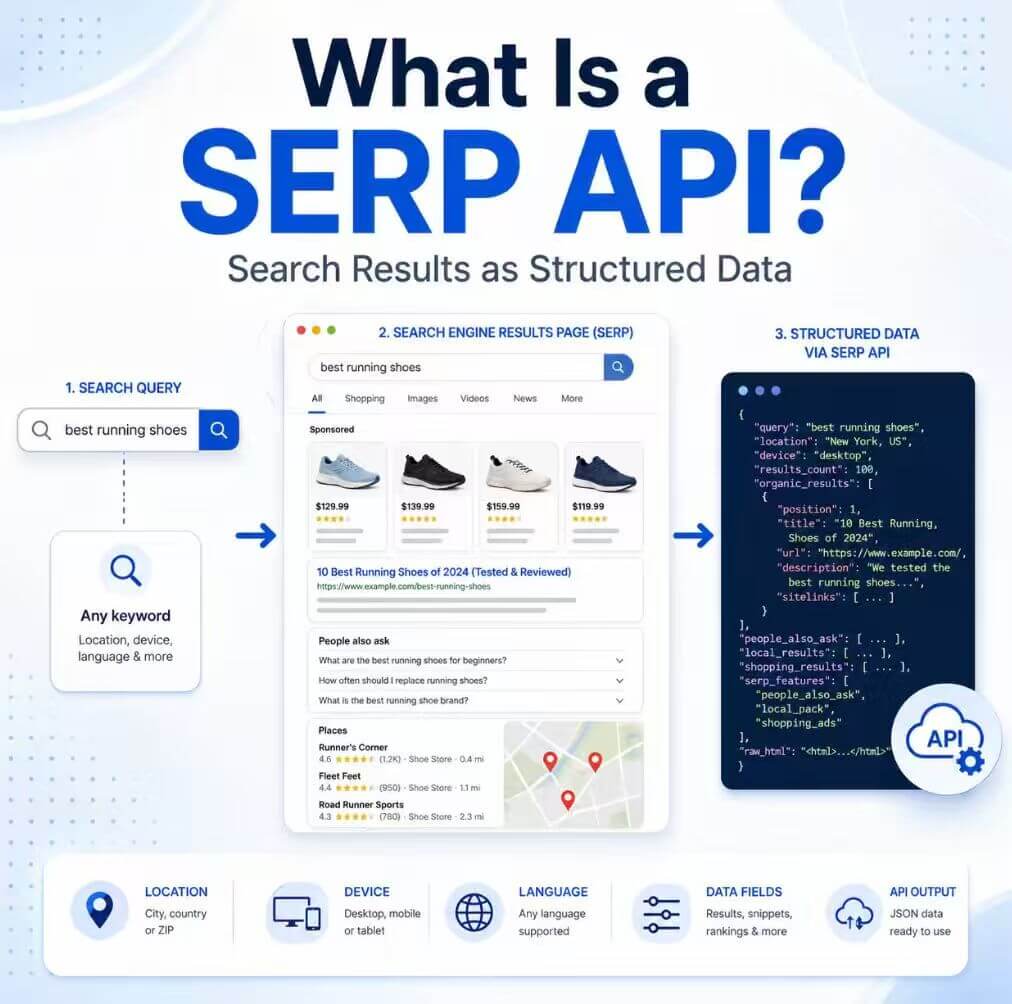
A SERP API is an interface that returns structured search engine results for a query, location, language, device, or search type. It can help with SEO monitoring, AI grounding, market research, and regional QA, but it does not guarantee ranking accuracy, remove search-engine policy requirements, or replace human validation.
- A SERP API collects search result pages and returns structured fields that software can store, compare, and analyze.
- It is narrower than a general web scraping API because the source is a search results page, not any arbitrary website.
- Location, language, device, and result type matter because search results can change across contexts.
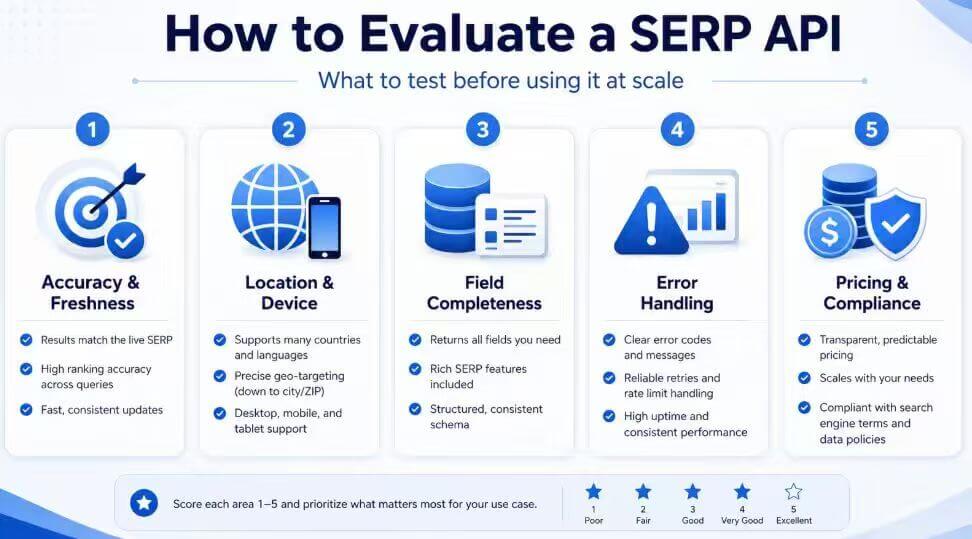
- A good evaluation should test freshness, field completeness, error handling, location accuracy, and pricing model.
- Use SERP APIs for legitimate public-result research, not search-engine abuse or policy circumvention.
Core Definition of a SERP API
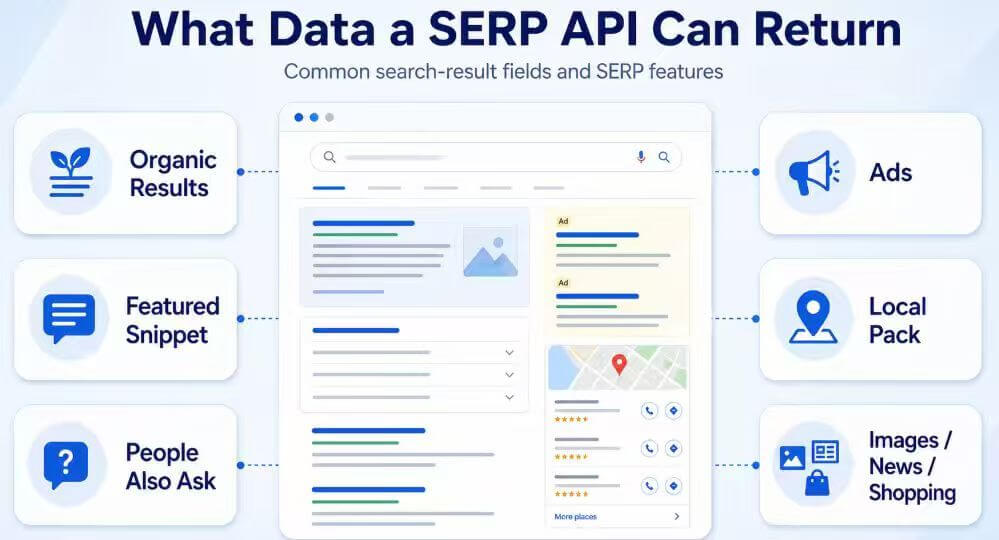
A SERP API is a search-result data interface. Your application sends a query and parameters such as search engine, country, language, device, page number, or result type. The API returns structured data from the search engine results page, often including organic results, paid results, local results, featured snippets, related questions, images, shopping blocks, or news results when supported.
The word SERP means search engine results page. A SERP API turns that page into data your software can process. Instead of asking a person to manually search and copy results, a workflow can request repeatable result snapshots and compare them over time.
This is not the same as a general scraping API. A broad web scraping API can collect many page types, while a SERP API focuses on search result pages and search-specific fields. For the broader concept, see IPWeb's guide to what web scraping is.
How a SERP API Works
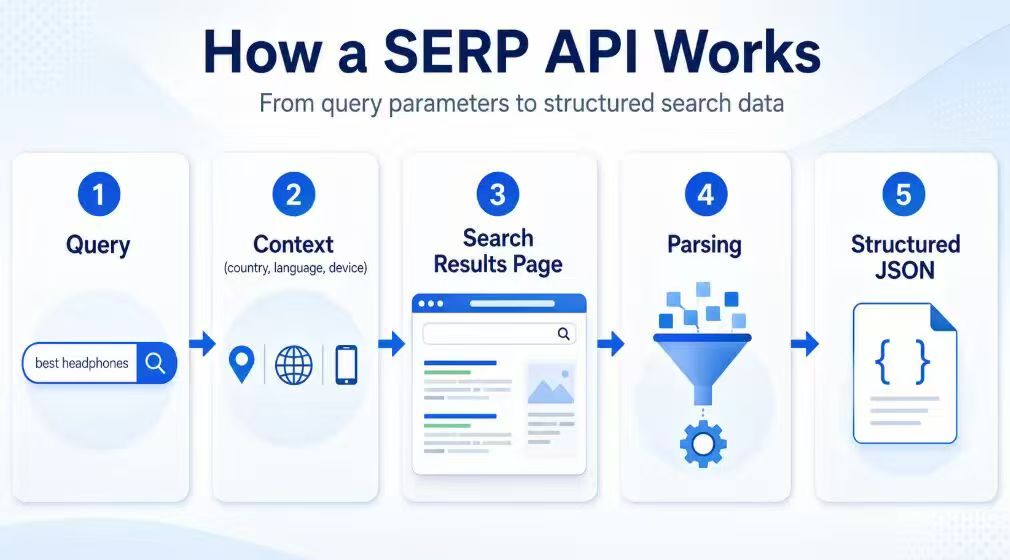
Most SERP API workflows follow a simple request-response pattern.
- Your application sends a query, API key, and parameters.
- The API provider collects the result page for the requested search context.
- The service parses visible result features into structured fields.
- Your application receives JSON or another documented response format.
- Your system stores, validates, and compares the response.
Official search APIs and third-party SERP APIs are not identical. Google documents the Programmable Search JSON API in its Programmable Search JSON API documentation, while Microsoft documents Bing Web Search API behavior in its Bing Web Search API documentation. These official APIs are useful when their coverage, quota, and result format fit the task. Third-party SERP APIs usually focus on returning the public search results page as a data product, including result-page features that may not map one-to-one to an official API response.
What Data a SERP API Can Return
The exact output depends on the provider, search engine, and result type. Common fields include:
- Query and search engine
- Country, language, device, and location parameters
- Organic result titles, URLs, snippets, and positions
- Paid result fields when supported
- Local pack entries, map-like results, or business fields when supported
- Featured snippets, People Also Ask, and related searches
- News, shopping, image, or video result blocks when supported
- Response status, request cost, and timing metadata
Treat these as fields to verify, not assumptions. A basic SERP API may return only organic results. A more specialized API may include Google SERP, Bing SERP, shopping, local, news, or AI-result fields. The right choice depends on the search features your workflow actually needs.
When Teams Use a SERP API
SERP APIs are useful when search results themselves are the dataset. Common examples include:
- SEO teams comparing keyword positions across regions and devices.
- Product teams checking how public search results change after a launch.
- Brand teams monitoring whether a company, product, or competitor appears for important queries.
- AI teams grounding agents or retrieval systems with fresh public search results.
- Market researchers tracking public visibility across categories.
- QA teams checking whether location-sensitive result pages match expected behavior.
For teams that need structured Google and Bing results across locations, languages, and devices, the IPWeb SERP API provides a managed route to search-result data without requiring teams to build the complete collection and parsing stack internally. Start with a small query set and compare the response with manually reviewed results before scaling.
SERP API vs Web Scraping API vs Rank Tracking API
A SERP API is a search-result collection interface. A general web scraping API can collect many page types. A rank tracking API turns search results into scheduled position monitoring.
| API Type | Primary Job | Best Fit | Main Limitation |
|---|---|---|---|
| SERP API | Return structured search results for queries and locations | Search-result data collection, AI grounding, SEO research, brand monitoring | You still need validation because result layouts and features change |
| Web scraping API | Fetch or render many kinds of web pages | Broad public web data collection and page extraction | It may not provide SERP-specific fields or rank-ready outputs |
| Rank tracking API | Store and compare positions over time | Scheduled keyword monitoring and reporting | It may be too narrow if you need raw result-page features |
Use the narrowest tool that matches the job. If the work is "collect today's result page for this query," a SERP API fits. If the work is "monitor 2,000 keywords every day and report position changes," a rank tracking API or a rank-tracking layer on top of SERP data is more appropriate.
If your team is building its own permitted search-result collection or regional QA workflow instead of using a managed SERP API, dynamic residential proxies can provide changing residential routes across locations. They affect the network path and regional context, but they do not parse rankings, normalize SERP features, or return structured JSON.
How to Evaluate a SERP API
The best SERP API for a workflow is the one that returns the right result fields consistently, not simply the one with the longest feature list. Test it with the same query set, locations, languages, and devices your production workflow will use.
Evaluation checklist:
- Search engine coverage: Google, Bing, or other engines required by the workflow.
- Result features: organic, ads, local, shopping, news, images, People Also Ask, or AI result elements.
- Location accuracy: country, city, language, and device parameters.
- Freshness: how close the response is to the live public result page at request time.
- Data contract: clear fields, stable schema, and documented handling of missing elements.
- Error handling: rate limits, unavailable results, parsing failures, and timeout reporting.
- Cost model: billing by request, result type, success, bandwidth, or credits.
- Compliance: terms, privacy obligations, and acceptable-use boundaries.
Do not choose a SERP API from a single perfect demo query. Build a small test set that includes easy queries, ambiguous queries, local-intent queries, brand queries, and queries with rich result features. Then compare returned data with a manually reviewed browser result.
Limits and Compliance Notes
A SERP API can reduce collection complexity, but it cannot make every result stable. Search engines continuously test layouts, personalize results, adjust features, and apply policies. A difference between two result snapshots is not always an API failure; it may reflect a real difference in time, location, language, device, or search treatment.
It also cannot remove your compliance responsibilities. Use SERP APIs for legitimate public data workflows, monitoring, QA, and research. Avoid using them for search manipulation, spam, credentialed scraping, or attempts to evade platform policies.
Frequently Asked Questions
Final Thoughts
A SERP API is valuable when search results are the data you need to collect, compare, or feed into another workflow. It is most useful when you define the search context clearly and validate the output before making decisions from it.
The main limitation is that search results are not static. Treat every response as a timestamped, parameter-dependent snapshot, then build checks for location, freshness, field completeness, and compliance before scaling the workflow.
If you are unsure whether you need a managed SERP API or a proxy-based custom workflow, contact IPWeb support with your target search engines, locations, query volume, and required fields. A small test can clarify the right architecture before you scale.