You check an IP address, and the result looks confusing. The IP works. The location looks right. Your proxy checker shows a new visible IP. But another tool gives the same IP a low quality score, a risky label, or a warning about proxy, VPN, abuse history, hosting infrastructure, or blacklist status.
That does not automatically mean the IP is unusable. An IP quality score is not a universal pass-or-fail grade. It is a risk estimate created by a specific tool based on signals such as IP type, ASN, ISP, hosting labels, proxy or VPN detection, abuse reports, blacklist data, and historical behavior.
The common mistake is to see a low score and immediately replace the IP. In practice, you should first ask a more useful question: what signal caused the score, and does that signal actually affect your workflow? A datacenter label, a blacklist hit, and an outdated location record require very different responses.
This guide explains what an IP quality score means, how to read an IP reputation report, why different tools may rate the same IP differently, and what to check before deciding whether an IP is actually a problem.
- An IP quality score is a risk estimate, not an official Internet standard.
- A low IP score is a warning signal, not a final verdict.
- Different IP score tools can disagree because they use different databases, risk models, and update schedules.
- IP reputation is affected by IP type, ASN, ISP, blacklist status, abuse reports, shared usage, and historical labels.
- Do not judge an IP by one score from one tool. Compare the score with the actual website, account, or workflow you are testing.
- What Is an IP Quality Score?
- What an IP Quality Score Can Show
- How to Read an IP Quality Score Report
- What Affects IP Reputation?
- Why Different IP Score Tools Give Different Results
- Does a Low IP Quality Score Mean the IP Is Bad?
- What to Do If Your IP Quality Score Is Low
- IP Quality Score vs Proxy Checker
- IP Quality Score vs IP Location
- When IP Score Is Not the Real Problem
- Frequently Asked Questions
What Is an IP Quality Score?
An IP quality score is a risk estimate that describes how an IP address may appear to a specific scoring tool. Some tools call it an IP reputation score, fraud score, risk score, proxy score, or abuse confidence score. The wording changes by platform, but the idea is similar: the tool is trying to estimate whether the IP looks ordinary, risky, suspicious, or associated with certain network behaviors.
There is no single official IP quality score used by the whole Internet. One tool may focus on fraud risk. Another may focus on blacklist status. Another may care more about proxy, VPN, hosting, Tor, relay, or anonymization labels. That is why the same IP can look clean in one tool and risky in another.
If you are still learning the basics of visible IP address, ISP, ASN, and IP location, start with our What Is My IP guide before comparing IP quality scores.
What an IP Quality Score Can Show
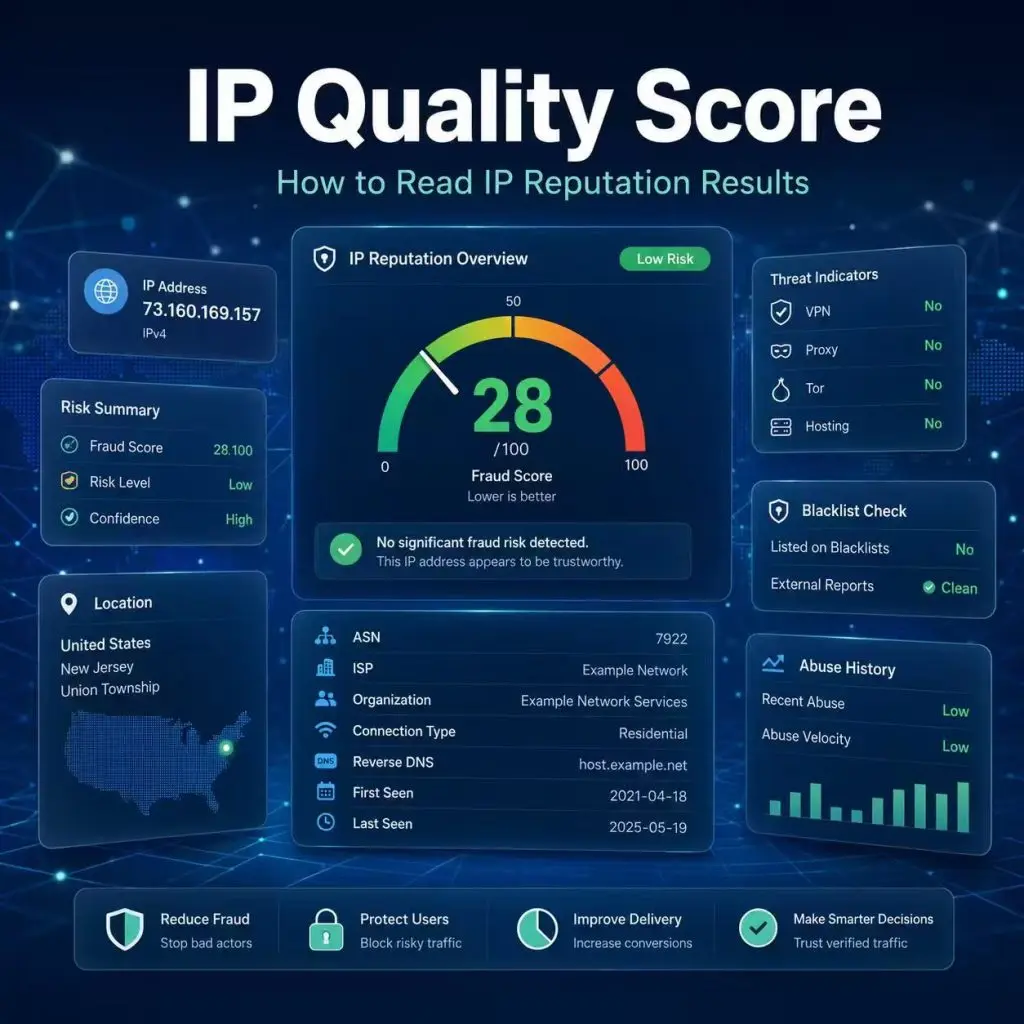
An IP quality score report usually includes more than a single number. A useful report may show the IP address, risk level, connection type, ISP, organization, ASN, country, proxy or VPN label, blacklist status, abuse history, and other signals.
For example, tools such as IPQualityScore combine IP lookup details with fraud and reputation signals such as geolocation, ISP, connection type, bot indicators, and IP risk scores. These fields can help explain why an IP receives a certain score, but the score should still be treated as one signal rather than the final truth.
| Field | What It Means | How to Read It |
|---|---|---|
| Score / Risk Level | The tool's overall estimate of IP risk. | Useful as a summary, but not a universal standard. |
| Proxy / VPN Label | Whether the tool thinks the IP is tied to proxy, VPN, Tor, relay, or anonymization use. | Important for some workflows, but not automatically bad in every context. |
| ISP / Organization | The provider, company, hosting network, or carrier behind the IP. | Helps confirm whether the network matches what you expected. |
| ASN | The larger network operator associated with the IP route. | Useful for understanding whether the IP belongs to an ISP, mobile carrier, cloud provider, or datacenter network. |
| Blacklist Status | Whether the IP appears on certain blocklists or reputation lists. | Important, but you still need to check which list and why it matters. |
| Abuse Reports | Historical user reports or security reports linked to the IP. | Can explain why an IP receives a lower reputation score. |
| Country / Location | The estimated IP geolocation. | Helpful context, but location accuracy is not the same as IP quality. |
| Hosting / Datacenter Label | Whether the IP is associated with hosting or server infrastructure. | Normal for server IPs, but some tools may treat it as a higher-risk signal. |
The key is to read the supporting fields, not just the final score. A number without context can be misleading.
How to Read an IP Quality Score Report
When you open an IP quality checker, start with the practical question: are you testing the correct IP, and does the report match the network you expected?
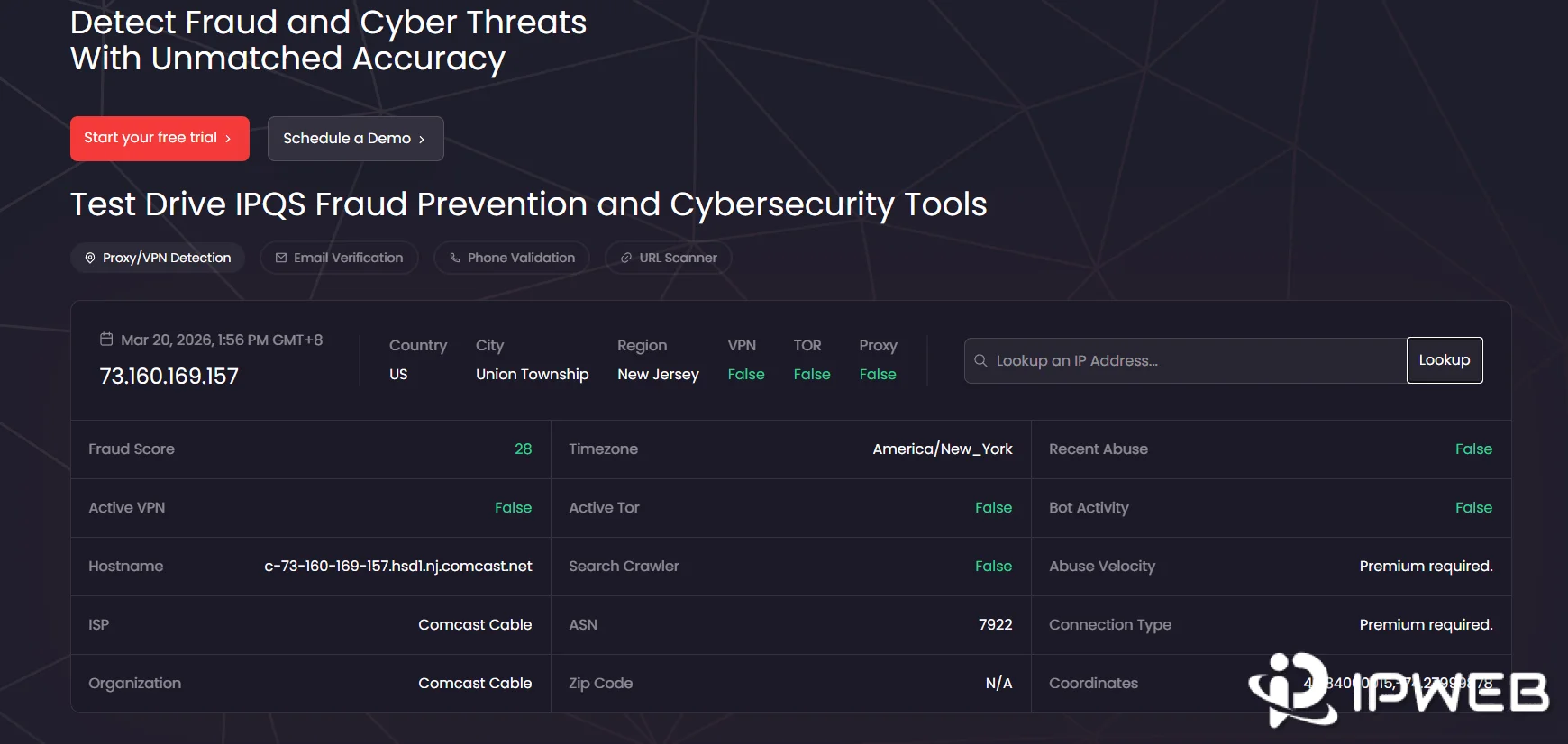
Use this reading order:
- Confirm the visible IP. Make sure the IP in the report is the IP you actually intended to test.
- Check the IP type. Look for residential, mobile, ISP, datacenter, hosting, proxy, VPN, or Tor labels.
- Review ASN and organization. Confirm whether the network operator matches the expected provider or route.
- Check country and location. Location is useful, but it is not the same thing as reputation.
- Look for proxy, VPN, or hosting labels. These labels may matter more for some websites than others.
- Review blacklist or abuse fields. A blacklist hit or abuse history can explain a lower score.
- Compare at least two tools. One tool alone may show outdated or incomplete data.
- Test the actual website or workflow. A score is only a signal; the real result depends on your use case.
IP intelligence tools such as IPinfo are useful for checking supporting fields such as location, ASN, privacy labels, proxy status, hosting labels, and network information. For proxy, VPN, hosting, and anonymizer classifications, databases such as MaxMind’s Anonymous IP database are also commonly used by fraud and risk teams.
What Affects IP Reputation?
IP reputation is shaped by several signals. Some are tied to the IP address itself. Others come from the larger network, past usage, reporting history, or how a scoring tool classifies a whole ASN or subnet.
IP Type
Residential, mobile, ISP, datacenter, and hosting IPs may be scored differently. A datacenter IP may be perfectly normal for server monitoring, API testing, or cloud workflows, but some scoring tools may still label it as hosting infrastructure. A residential or mobile IP may look different because it is associated with consumer access networks.
The label itself is not the final judgment. It tells you how the IP appears to the scoring tool.
ASN and Network Ownership
ASN and organization data help identify the larger network behind an IP. IANA’s Number Resources page explains that it coordinates Internet Protocol addressing systems and Autonomous System Numbers used for routing Internet traffic. In practice, ASN helps you understand whether an IP belongs to a broadband ISP, mobile network, cloud provider, university, corporate network, or hosting company.
Sometimes an IP receives a lower score because the broader ASN or subnet has a reputation pattern, even if the individual IP has not caused a problem in your own workflow.
Blacklist or Abuse History
Some tools look at blocklists, spam lists, user reports, security reports, or abuse history. Abuse history is especially important because repeated reports can influence reputation systems.
For example, AbuseIPDB uses a Confidence of Abuse rating from 0 to 100 based on user reports, where higher values mean stronger confidence that an IP has been associated with malicious activity. That does not mean every low-quality result comes from AbuseIPDB, but it shows how one type of reputation score may be built.
Blacklist Databases
Blacklist status is different from a general IP quality score. A blacklist result usually means the IP or domain appears on a specific list for a specific reason. It may relate to email abuse, malware, spam, bot traffic, or other categories depending on the list.
For email or security checks, tools such as the Spamhaus Reputation Checker can help verify whether an IP address or domain appears on one of its blocklists. For non-email workflows, a blacklist result should still be read in context because not every list applies equally to every use case.
Shared Usage
Shared IPs can collect mixed history. If many users or applications use the same IP over time, one user’s behavior may affect how a tool views that IP or subnet. This is one reason shared IP environments may show inconsistent reputation results across tools.
For business use, this is why it is important to test the actual target workflow instead of relying only on a general score.
Recent IP Reassignment
IP ranges can move between providers, networks, or use cases. If a database has not updated yet, old labels may remain. An IP may still carry an outdated hosting label, country label, or risk label even after its actual use has changed.
If only one tool shows a strange result, wait and compare other tools before making a final decision.
Why Different IP Score Tools Give Different Results
Different IP score tools can disagree because they are not measuring the exact same thing. One tool may emphasize fraud risk. Another may focus on proxy or VPN detection. Another may care more about blacklist status, ASN reputation, or historical abuse reports.
Fraud scoring tools such as Scamalytics may show an IP fraud score along with supporting fields such as true country, operator, proxy status, and Tor status. A security or blacklist tool may show a different result because it uses different data sources and a different definition of risk.
| Situation | What It May Mean | What to Do |
|---|---|---|
| One tool says risky, others look clean | Possible false positive, outdated label, or limited data. | Check another tool and test the real workflow. |
| Multiple tools flag proxy/VPN | The IP may be widely labeled as proxy, VPN, relay, or anonymized traffic. | Decide whether that label matters for your use case. |
| Only a blacklist tool flags it | The IP may appear on a specific blocklist. | Check which blacklist, category, and workflow it affects. |
| ASN is flagged, but the IP is new | A network-level label may affect the individual IP. | Review ASN, subnet, and organization data. |
| Score changed recently | A database update or usage signal may have changed the rating. | Recheck later and compare logs or target-site behavior. |
No single IP score tool is the final truth. The safer approach is to compare several signals and then test the actual workflow that matters to you.
Does a Low IP Quality Score Mean the IP Is Bad?
No. A low IP quality score does not always mean the IP is bad. It means one scoring tool has found one or more signals it considers risky. That signal may matter a lot, a little, or not at all depending on what you are trying to do.
A low IP quality score is a warning signal, not a final verdict.
| Result | How to Read It | How Much It Matters |
|---|---|---|
| Low score in one tool only | May be a database mismatch or false positive. | Medium |
| Low score across many tools | More likely to be a real reputation concern. | High |
| Datacenter label | Normal for cloud, hosting, and server networks. | Depends on the target website or workflow. |
| Proxy/VPN label | The IP may be recognized as proxy, VPN, relay, or anonymized traffic. | Depends on the use case. |
| Blacklist hit | The IP appears on a specific blocklist. | High, especially for email or security-sensitive workflows. |
| High score, but website still fails | The issue may not be IP reputation. | Check browser, account, cookies, DNS, WebRTC, or request behavior. |
| Low score, but workflow works normally | The score may not be relevant to that specific workflow. | Use real results as the final check. |
The best question is not “Is the score perfect?” The better question is “Does this score explain a real problem in my actual workflow?”
What to Do If Your IP Quality Score Is Low
If your IP quality score is low, do not switch everything immediately. Work through the result step by step and identify which signal is responsible for the score.
- Confirm you are testing the correct visible IP. Do not read a score for your local IP if you meant to test a proxy IP.
- Check whether the IP is residential, mobile, ISP, datacenter, or hosting. Some labels are expected depending on the network type.
- Review ASN and organization. The network behind the IP may explain the score.
- Compare the same IP in at least two tools. One score alone is not enough.
- Find the source of the low score. Is it blacklist status, proxy label, abuse history, ASN reputation, or hosting classification?
- Test the actual website or workflow. A low score only matters if it affects your use case.
- Check whether correction or delisting is possible. Some databases allow correction requests or blocklist review.
- Document the result. Save the IP, ASN, timestamp, tool, score, and target workflow result for comparison later.
Here is a practical way to decide what to do next:
| Low Score Cause | Should You Replace the IP? | First Check |
|---|---|---|
| Datacenter or hosting label | Not always | Check whether your target workflow accepts datacenter traffic. |
| Proxy or VPN label | Depends on the target site | Check whether the website blocks proxy, VPN, or anonymized traffic. |
| Blacklist hit | Usually yes for email or security-sensitive tasks | Check which blacklist, category, and reason apply. |
| Abuse reports | Often yes if multiple reports are recent | Check report date, report type, and whether the IP is shared. |
| Wrong location or ASN | Not immediately | Compare multiple databases and ask the provider whether the record is outdated. |
| One-tool-only warning | No, not immediately | Compare at least two other tools and test the actual workflow. |
| Multiple tools agree and the workflow fails | Usually yes | Treat the score as a real warning and move the workflow to a cleaner IP. |
If the problem is database-based, some providers may allow correction requests. If the problem is tied to historical abuse or a broad network-level label, it may take longer to change, and some tools may never fully agree with each other.
IP Quality Score vs Proxy Checker
IP quality score and proxy checker results are related, but they answer different questions. A proxy checker tells you whether the visible IP changed after you applied a proxy. An IP quality score tells you how that visible IP may be rated by a reputation or risk tool.
| Question | Use a Proxy Checker | Use an IP Quality Score Tool |
|---|---|---|
| Did the proxy become active? | Yes | No |
| Did the visible IP change? | Yes | No |
| Does the IP have risk labels? | Limited | Yes |
| Is the IP on a blacklist? | Usually no | Often yes, depending on the tool |
| Does the IP belong to the expected ASN or ISP? | Sometimes | Usually yes |
| Will the target website accept it? | No guarantee | No guarantee |
If you are not sure whether the proxy is active at all, start with our guide on how to check if a proxy is working before reading the IP quality score.
IP Quality Score vs IP Location
IP location and IP quality score are also different. IP location tries to estimate where an IP appears to be located. IP quality score tries to estimate whether the IP has reputation, risk, proxy, hosting, abuse, or blacklist signals.
A wrong city does not automatically mean the IP has a bad score. A low score does not automatically mean the location is wrong. These are separate fields that should be checked separately.
If the issue is that your IP shows the wrong city or region, read our guide on why your IP location may look wrong. IP location and IP quality score are related, but they are not the same thing.
When IP Score Is Not the Real Problem
Sometimes the IP score looks fine, but the website still behaves differently than expected. Other times, the IP score looks low, but the actual workflow works without problems. That is why the score should not be the only thing you check.
IP score may not be the real problem when:
- The visible IP changed, but the website still shows old content because of cookies or cache.
- The account region, billing region, or login history controls what the website displays.
- The browser timezone, language, or profile settings conflict with the test region.
- The target website uses request behavior, rate, or session history instead of only IP reputation.
- The IP location is wrong, but the IP reputation itself is not the issue.
- The proxy is not active, so the score belongs to the wrong IP.
A good workflow is simple: first confirm the visible IP, then check location, then read the IP quality score, then test the actual website. That order prevents you from blaming the wrong part of the setup.
Frequently Asked Questions
An IP quality score is a risk estimate created by a specific tool. It may consider IP type, ASN, ISP, proxy or VPN labels, blacklist status, abuse reports, hosting labels, and historical behavior.
They are closely related. IP reputation usually refers to the broader history and trust signals around an IP address, while an IP quality score is one tool’s way of turning those signals into a rating or risk level.
Your IP score may be low because of proxy or VPN labels, hosting classification, blacklist status, abuse history, shared usage, ASN reputation, or outdated database records. Check the supporting fields before making a decision.
Different tools use different data sources, risk models, update schedules, and definitions of suspicious behavior. The same IP can appear clean in one tool and risky in another.
No. Proxy status and IP reputation are different. First check whether the visible IP changed. Then read the IP score to understand how that IP may be classified.
No. An IP quality score can show reputation and risk signals, but it cannot fully explain cookies, account region, browser profile, DNS behavior, WebRTC, request rate, or a website’s own logic.
Sometimes. If the issue is an outdated location or incorrect label, some database providers may allow correction requests. If the issue is abuse history, blacklist status, or network-level reputation, improvement may take longer and may not update everywhere at the same time.
No. Use one score as a starting point, not the final answer. Compare at least two tools, review the supporting fields, and test the actual workflow before deciding whether an IP is suitable.
Final Thoughts
An IP quality score is useful, but it should not be treated as an official grade for every situation. It is one tool’s estimate based on its own data, models, and update cycle.
The real question is not whether an IP has a perfect score. The real question is whether the score explains a real failure in your workflow. If the proxy is active, the location is correct, and the target site works normally, a single low score may not require immediate action.
However, if multiple tools flag the same IP and your target workflow also fails, then the score is a useful warning. At that point, read the supporting fields carefully: visible IP, IP type, country, ISP, ASN, proxy or VPN label, blacklist status, and abuse history.
The safest approach is to test in order: confirm the IP, check the location, review the score, compare another tool, and then test the real website or workflow. That gives you a much clearer answer than relying on one number alone.