Web scraping tools can all appear to offer the same basic promise: select a page, extract data, and export the results. In practice, the differences are substantial.
A visual scraper may be enough for a one-time spreadsheet export from a simple page. A developer maintaining a large catalog workflow may need a crawling framework, custom validation, scheduled jobs, and browser rendering only for pages that require JavaScript.
The best choice is not always the tool with the longest feature list. It is the simplest option that can reliably collect, validate, and maintain the data your project actually needs.
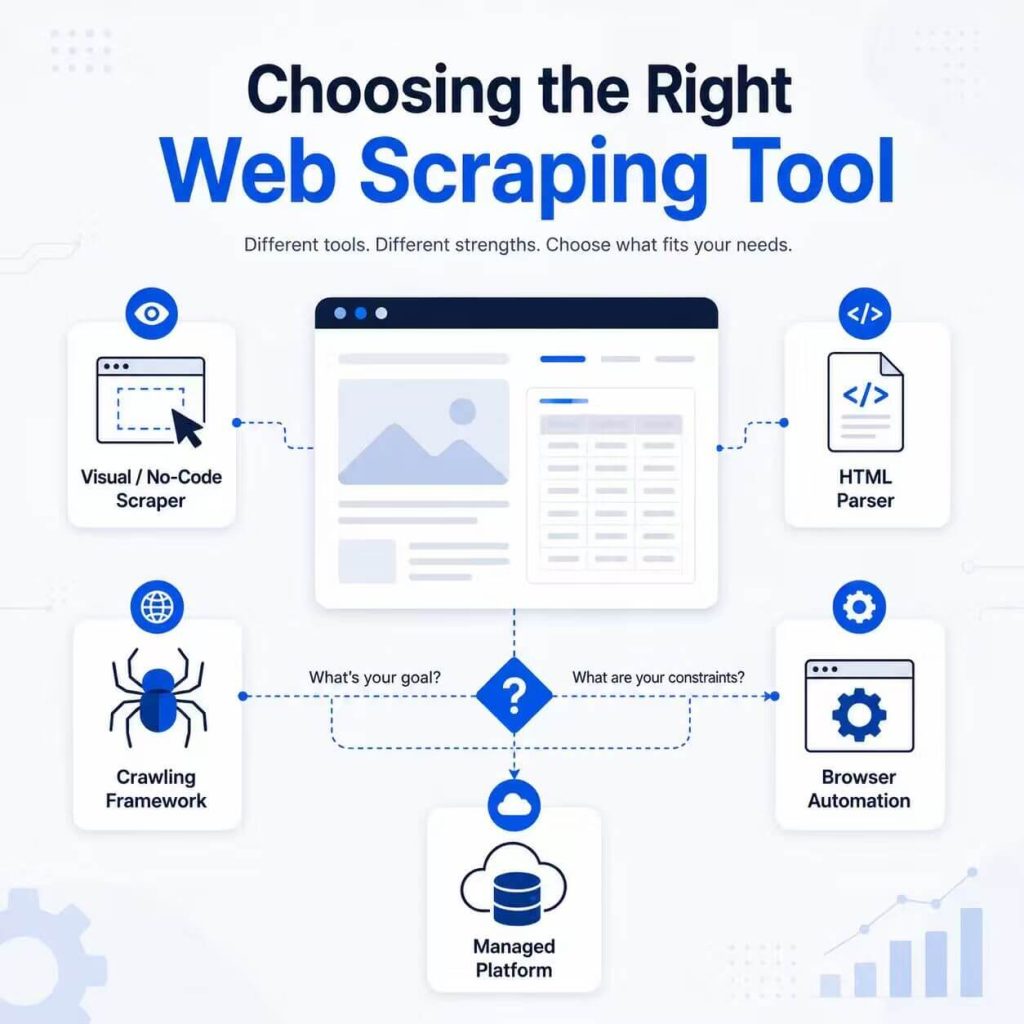
Choose a visual scraper for simple, low-code extraction; an HTML parsing library for lightweight custom scripts; a crawling framework for large URL-based workflows; browser automation for pages that require JavaScript or interaction; and a managed platform when scheduling and infrastructure are the main operational burden.
- Start with the page type and required fields, not a list of popular tools.
- No-code tools are useful for predictable pages and smaller projects.
- Beautiful Soup works well for parsing HTML, while Scrapy handles broader crawling and extraction workflows.
- Playwright and Puppeteer are useful when the required content depends on browser rendering or interaction.
- Managed platforms reduce infrastructure work but add cost and vendor dependency.
- Every tool still needs validation, error handling, access review, and maintenance.
What Do Web Scraping Tools Do?
Web scraping tools turn page content into structured data. Depending on the tool, that process may include requesting pages, discovering URLs, rendering JavaScript, selecting fields, cleaning values, scheduling runs, storing results, and reporting errors.
The final output may be a CSV file, JSON records, spreadsheet rows, database entries, or data sent to another application through an API.
Some tools focus on one part of the workflow. Beautiful Soup, for example, focuses on parsing HTML and XML. Scrapy combines page requests, crawling, extraction, and export. Browser automation tools control a real browser environment. Managed platforms may add scheduling, storage, monitoring, and cloud execution.
This distinction is similar to the difference between page discovery and field extraction. Our guide to web scrapers and web crawlers explains those two stages in more detail.
For a broader introduction to the process itself, see what web scraping is and how it works.
Main Types of Web Scraping Tools
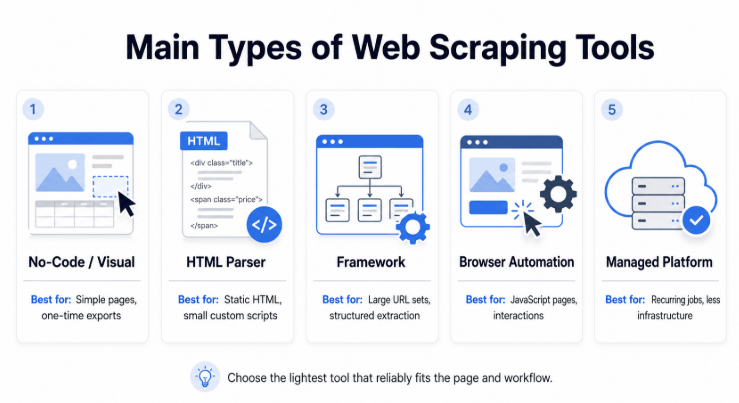
Most web scraping tools fit into five practical categories. Some products cover several categories, but this framework provides a useful starting point.
No-Code and Visual Web Scrapers
Visual scrapers let users select fields through a browser-like interface instead of writing extraction code. Examples include Octoparse and ParseHub.
These tools are useful for business users, research teams, one-time exports, and predictable page layouts. A user may open a page, click a product title and price, define pagination, and export the results to a spreadsheet.
The tradeoff is control. Visual workflows may become difficult to maintain when pages have several layouts, complex interactions, unusual authentication requirements, or frequently changing elements.
HTML Parsing Libraries
HTML parsing libraries are useful when a developer can request the page directly and needs to locate fields in the returned markup.
Beautiful Soup is a Python library for navigating and extracting information from HTML and XML. It is commonly paired with an HTTP client such as Requests.
This approach works well for smaller custom scripts and server-rendered pages. It gives the developer direct control over selectors, cleaning, validation, and output without launching a browser.
A parsing library is not a complete production workflow by itself. The team may still need to build URL discovery, scheduling, retries, storage, logs, and alerts.
Crawling and Scraping Frameworks
A framework is a stronger fit when the project needs to visit many pages, follow links, manage request queues, extract records, and export structured data.
Scrapy is a Python framework designed for both web crawling and structured data extraction. Its spiders can define which pages to follow and how records should be parsed.
Frameworks are useful for large catalogs, directories, article archives, and recurring workflows in which the URL list changes over time.
The tradeoff is engineering work. The team must maintain spiders, selectors, pipelines, request behavior, deployment, and monitoring.
Browser Automation Tools
Browser automation tools control a browser and are useful when the required data does not appear in the initial HTML response.
Playwright can automate Chromium, Firefox, and WebKit. Puppeteer provides a JavaScript API for controlling supported browsers. Selenium is another established browser automation option.
These tools can wait for rendered elements, scroll pages, click buttons, fill forms, and inspect the final page state. They are useful for JavaScript-heavy interfaces and workflows that require controlled browser interactions.
Browser automation is heavier than direct HTTP requests. It generally uses more memory and processing time, so it should be added when rendering or interaction is genuinely required.
Managed Scraping Platforms
Managed platforms combine extraction tools with cloud infrastructure. They may provide job scheduling, storage, execution, retries, browser environments, logs, and workflow integrations.
Apify is one example of a platform that supports web scraping and browser automation workflows.
A managed platform can be useful when a team needs recurring jobs but does not want to operate every part of the infrastructure. It may also help a small engineering team move from a local script to a scheduled workflow more quickly.
The tradeoffs include platform cost, service limits, data-handling requirements, and vendor dependency. The platform may run the job, but the user still has to define correct fields and verify the output.
Three Minimal Code Examples
These examples are intentionally small. They show the basic role of each tool rather than a full production workflow. Use them only on pages you are authorized to access, and replace the example URLs and selectors with values appropriate for your project.
import requests
from bs4 import BeautifulSoup

response = requests.get("https://example.com/", timeout=15)
response.raise_for_status()
soup = BeautifulSoup(response.text, "html.parser")
heading = soup.select_one("h1")
print(heading.get_text(strip=True) if heading else None)
This approach is appropriate when the required content already exists in the HTML response and no browser interaction is needed.
import scrapy

class ProductSpider(scrapy.Spider):
    name = "products"
    start_urls = ["https://example.com/"]

    def parse(self, response):
        yield {"title": response.css("h1::text").get()}
A real Scrapy project can add pagination, link following, duplicate filtering, pipelines, retries, and structured exports.
from playwright.sync_api import sync_playwright

with sync_playwright() as p:
    browser = p.chromium.launch()
    page = browser.new_page()
    page.goto("https://example.com/", wait_until="networkidle")
    print(page.locator("h1").inner_text())
    browser.close()
Playwright is more appropriate when the required element appears only after JavaScript runs or after the page reaches a particular browser state.
Web Scraping Tool Comparison
| Tool Type | Representative Tools | Best For | Technical Effort | Main Limitation |
|---|---|---|---|---|
| Visual scraper | Octoparse, ParseHub | Simple pages, one-time exports, non-developer users | Low | Less control over complex and frequently changing workflows |
| HTML parser | Beautiful Soup | Static HTML and smaller custom Python scripts | Medium | Does not provide a complete crawling and operations layer |
| Crawling framework | Scrapy | Large URL sets, crawling, structured extraction, custom pipelines | High | Requires development, deployment, and ongoing maintenance |
| Browser automation | Playwright, Puppeteer, Selenium | JavaScript rendering and interactive page flows | High | Uses more computing resources than direct HTTP extraction |
| Managed platform | Apify and similar services | Recurring jobs with less infrastructure management | Low to medium | Cost, platform constraints, and vendor dependency |
These categories are not mutually exclusive. A production workflow might use Scrapy for URL discovery, direct HTML parsing for static pages, Playwright for a small number of rendered pages, and a managed platform for scheduling and storage.
Which Tools Fit Real Workflows?
The right tool becomes easier to identify when the workflow is defined in practical terms.
A marketing analyst needs product names and displayed prices from 100 predictable public pages. The project will run once, and the analyst does not write code.
Practical starting point: a visual scraper such as Octoparse or ParseHub.
A cross-border seller needs to compare public product listings across several marketplace categories. New product pages appear regularly, and the output must include product IDs, displayed prices, availability, source URLs, and collection times.
Practical starting point: Scrapy can discover and schedule product URLs. Direct HTML extraction can handle normal pages, while Playwright can be reserved for pages whose required fields appear only after JavaScript rendering.
A QA team needs to verify the language, currency, and public page state shown in several regions after a user selects options or opens a menu.
Practical starting point: Playwright or Puppeteer because the workflow depends on browser state and interaction, not only the initial HTML.
If repeated tests need to use the same regional IP over time, a static ISP proxy may provide a more consistent network route for the browser session.
A small development team has working extraction logic but does not want to maintain scheduling servers, result storage, and job monitoring.
Practical starting point: a managed platform may reduce infrastructure work, provided its data-handling model and limits fit the project.
A Mixed E-Commerce Workflow
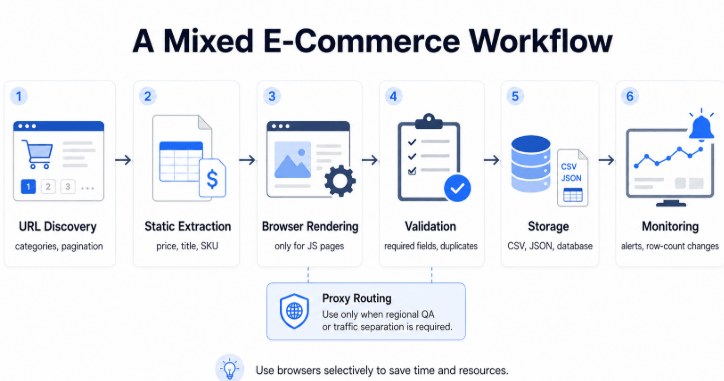
A larger cross-border e-commerce project often works better as a mixed pipeline than as a single-tool script.
Consider a seller that needs to compare public product listings across several approved marketplace categories. The workflow must detect new products, collect displayed prices and availability, handle a limited number of JavaScript-rendered pages, and publish validated records to an internal dashboard.
| Stage | Suggested Tool | What Happens |
|---|---|---|
| Define the schema | Project configuration | Set required fields such as product ID, title, price, currency, availability, seller, source URL, and collection time. |
| Discover product URLs | Scrapy | Crawl category and pagination pages, follow relevant product links, and remove duplicate URLs. |
| Process normal pages | Scrapy selectors or HTML parser | Extract fields directly from pages whose required content is present in the HTML response. |
| Handle rendered pages | Playwright | Send only pages that require JavaScript or interaction to a browser-rendering queue. |
| Apply network routing where required | Proxy configuration | Use an approved proxy route only when regional QA, traffic separation, or another defined network requirement exists. |
| Validate records | Data pipeline | Check required fields, value formats, duplicate rates, final URLs, response types, and sample records against source pages. |
| Store and monitor | Database or managed platform | Save validated records and alert the team when row counts, missing fields, or page types change unexpectedly. |
The main efficiency gain comes from using browser automation selectively. Static pages remain in the lightweight request pipeline, while only the pages that genuinely require rendering consume browser resources.
This separation also improves troubleshooting. If a product is missing, the team can determine whether URL discovery failed, static extraction failed, browser rendering failed, or the final record did not pass validation.
A Simple Tool Selection Map
The following pseudocode shows a simplified way to narrow down the tool category. It is a decision aid rather than executable production code.
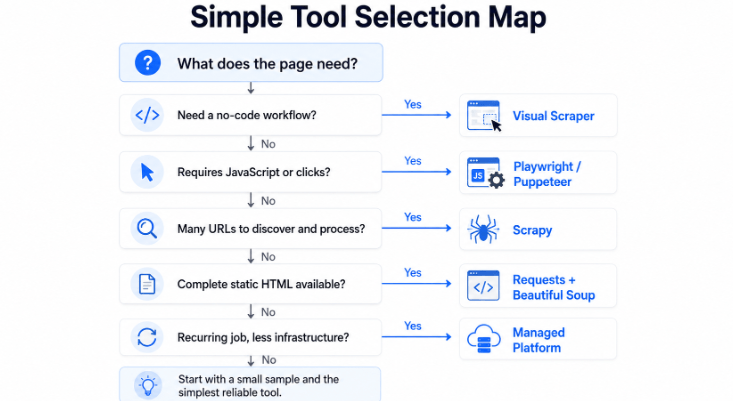
if project_is_one_time and team_needs_no_code:
    choose("visual scraper")

elif page_requires_javascript_or_clicks:
    choose("Playwright or Puppeteer")

elif project_must_discover_and_process_many_urls:
    choose("Scrapy")

elif page_returns_complete_static_html:
    choose("Requests plus Beautiful Soup")

elif project_is_recurring and team_wants_less_infrastructure:
    choose("managed scraping platform")

else:
    start_with("a small sample and the simplest reliable tool")
Real projects may use more than one category. The important point is to avoid using the heaviest tool for every page by default.
How to Evaluate a Web Scraping Tool
Define the Required Fields
Write down the exact output before comparing tools. For an e-commerce workflow, the schema might include product name, product ID, price, currency, availability, seller, source URL, and collection time.
If the required output is unclear, even a technically successful extraction can produce data that is difficult to use or verify.
Check Whether the Page Requires JavaScript
Compare the initial HTML response with the content visible in the browser. If the required fields already exist in the response, a browser may add unnecessary complexity. If they appear only after rendering or interaction, browser automation may be appropriate.
Estimate URL Volume and Change Frequency
A visual scraper may be sufficient for a small fixed list. A framework becomes more valuable when the project must discover new pages, process pagination, remove duplicates, and manage large request queues.
Decide Who Will Maintain the Workflow
A custom framework offers control, but someone must maintain it. Consider who will update selectors, investigate failures, deploy changes, and respond when the website layout changes.
Evaluate Validation and Error Reporting
The tool should make it possible to detect missing fields, duplicate records, redirects, unexpected page types, sudden row-count changes, and extraction failures.
A tool that exports rows without showing errors can create more risk than a tool that fails clearly.
Compare the Full Operating Cost
Open-source tools may have no software license fee, but they still require engineering time, servers, browser resources, storage, and monitoring. Managed tools include more infrastructure but may cost more as volume increases.
Compare the complete workflow rather than looking only at the initial price of the tool.
Review Access and Data Responsibilities
Before collecting data, review the website’s terms, the nature of the data, privacy obligations, robots.txt guidance, and applicable requirements. A tool can automate a workflow, but it cannot determine whether the intended collection is appropriate.
Google’s robots.txt guide explains how website owners can provide crawler instructions. It should be reviewed as one part of a broader access and data assessment.
Privacy and Regional Compliance
Public availability does not automatically remove privacy or data-protection responsibilities. The applicable rules depend on the type of data, the people connected to it, the organisations involved, the locations in which the data is collected or used, and the purpose of the workflow.
A product price or public article title generally raises different questions from a record containing a person’s name, contact information, location, account details, employment history, or online identifier.
| Framework | What It May Affect | Practical Questions |
|---|---|---|
| EU GDPR | Processing of personal data where the GDPR applies | Is there a valid basis and defined purpose? Is the data limited to what is necessary? How will accuracy, storage, security, transparency, and individual rights be handled? |
| California CCPA | Personal information handled by businesses covered by the law | Does the business fall within the law’s scope? What notices and consumer request processes are required? Is information sold, shared, retained, or used beyond the disclosed purpose? |
| Singapore PDPA | Collection, use, disclosure, protection, and transfer of personal data by organisations where the law applies | Is the purpose reasonable and communicated? Is consent or another permitted basis available? Are protection, accuracy, retention, access, correction, and transfer obligations addressed? |
The European Commission explains core GDPR principles in its data protection guidance.
The California Attorney General provides an overview of the CCPA and the responsibilities of covered businesses. Singapore’s Personal Data Protection Commission provides official guidance on the Personal Data Protection Act.
Identify whether the workflow handles personal data, document the collection purpose, minimise the fields collected, define retention and deletion rules, review cross-border transfers, and establish a process for responding to applicable individual rights. Higher-risk or uncertain projects should receive qualified legal and privacy review.
Not every project is subject to all three frameworks, and this overview is not legal advice. Tool selection, data design, and compliance planning should happen together rather than after a pipeline is already in production.
Common Tool Selection Mistakes
| Mistake | Why It Causes Problems | Better Approach |
|---|---|---|
| Choosing the most powerful tool by default | It adds infrastructure and maintenance that a simple project may not need. | Start with the lightest tool that can reliably produce the required fields. |
| Using browser automation on every page | It increases processing time and resource use. | Use direct requests for static pages and browsers only where rendering is required. |
| Selecting a tool before defining the schema | The project may collect large amounts of data without answering the real question. | Define required fields, identifiers, and validation rules first. |
| Assuming no-code means no maintenance | Visual workflows can still fail when layouts or page flows change. | Plan for testing, alerts, and workflow updates. |
| Comparing only software prices | Engineering time and infrastructure may cost more than the subscription. | Compare the full cost of building, running, and maintaining the workflow. |
| Ignoring output validation | The tool may complete successfully while returning incorrect or incomplete values. | Check samples against source pages and monitor missing-field rates. |
| Collecting personal data without a privacy review | The workflow may create legal, retention, transparency, or individual-rights obligations. | Assess applicable privacy rules and minimise personal data before scaling. |
Where Proxies Fit
A proxy is not a replacement for a web scraping tool. The tool discovers pages, renders content, or extracts fields. The proxy changes the network route used by the request.
Proxy routing may be relevant for authorized regional QA, traffic separation, or workflows that need to compare how public pages respond from different network locations. It does not repair incorrect selectors, incomplete URL discovery, missing validation, or unclear permission.
For suitable workflows that genuinely require changing residential network routes, a dynamic residential proxy pool may be relevant. The proxy type should be selected only after the data goal, page behavior, and operational requirements are clear.
After configuring a proxy, verify it in the same script, browser, or profile that will run the workflow. Our guide on how to check whether a proxy is working explains how to confirm the visible IP, country, ASN, protocol, credentials, and browser-level behavior.
Developers using browser automation can also follow the Puppeteer proxy configuration guide for proxy launch arguments, authentication, IP verification, and common setup errors.
Frequently Asked Questions
Final Thoughts
There is no single best web scraping tool for every project. A simple visual scraper may outperform a custom framework when the job is small and predictable. A lightweight parser may be more efficient than a browser for static HTML. A framework or managed platform becomes more valuable as page discovery, scheduling, scale, and maintenance become harder.
Production workflows often combine tools. A crawler can discover URLs, a lightweight parser can process normal pages, browser automation can handle the smaller number of rendered pages, and a managed platform can support scheduling and monitoring. The important part is assigning each tool a clear role.
Start with a small representative sample. Confirm the required fields, check whether JavaScript rendering is necessary, review the data and privacy implications, and test how the tool reports missing or incorrect output. Only then should you scale the workflow.
The right tool is not the one that automates the most features. It is the one that produces accurate, traceable data with an operating model your team can maintain responsibly.