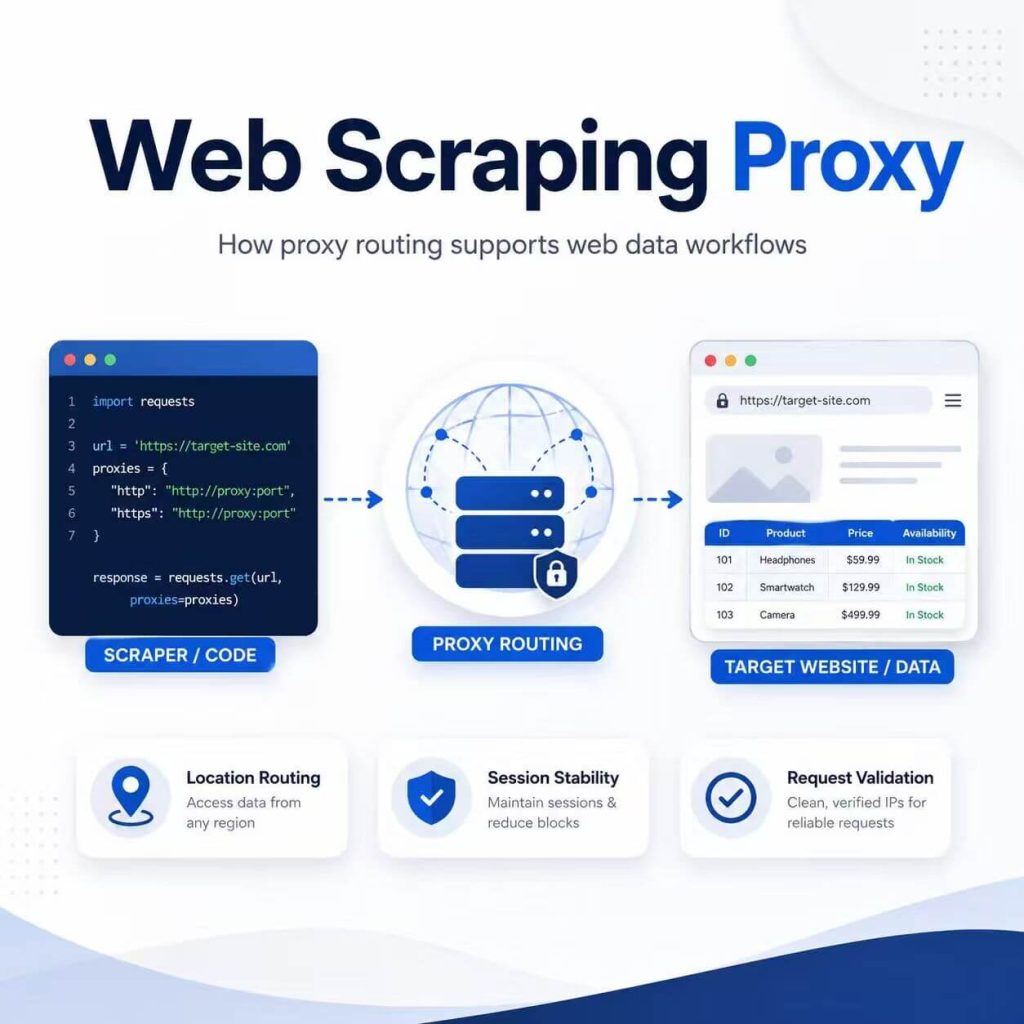
A web scraping proxy routes requests through another network path before they reach a public website. In a web data workflow, this can be useful when a team needs to test regional page differences, separate automated traffic from its normal office connection, or run approved checks through a defined network location.
A proxy does not collect or validate data. The scraper still has to request the correct page, extract the right fields, handle errors, and verify that the output matches the source. If those parts of the workflow are weak, changing the network route will not fix the underlying problem.
A web scraping proxy may be useful when controlled network routing is a genuine requirement of the workflow. Common examples include regional quality assurance, localized public page checks, and separating automated requests from normal business traffic. It is not required for every scraping project, and it does not replace permission review, responsible request behavior, or data validation.
- A proxy changes the network route used by a scraper; it does not perform the extraction itself.
- Proxy type and session behavior are separate decisions.
- Datacenter, residential, and static ISP describe network or IP characteristics.
- Rotating, sticky, and static describe how long an IP or session is maintained.
- Testing should confirm the visible IP, location, ASN, DNS behavior, page response, and extracted fields.
- Not every 403, 429, empty page, or incorrect record is caused by the proxy.
What Is a Web Scraping Proxy?
A web scraping proxy is a proxy server used as part of a public web data workflow. Instead of connecting directly from a local computer, cloud server, or office network, the scraper sends its request through a proxy endpoint.
The destination website sees the proxy IP as the network source of the connection. Depending on the selected service, the visible IP may be associated with a datacenter, residential, or ISP network.
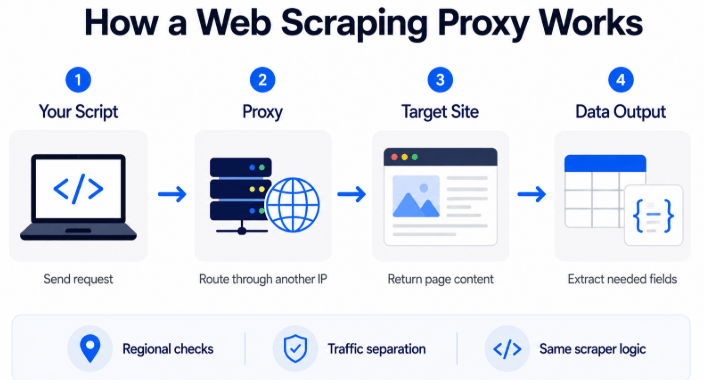
The rest of the scraping process remains unchanged. The workflow still needs to:
- Identify the correct URLs
- Send valid requests
- Render JavaScript when necessary
- Extract the required fields
- Handle redirects and errors
- Validate the output
- Store the source URL and collection time
This distinction matters because a working proxy connection does not guarantee a working data pipeline. The request can use the expected proxy IP and still return the wrong page, an incomplete response, or incorrect field values.
When May a Proxy Be Useful?
A proxy may be useful when network routing is a defined part of the project rather than a reaction to every failed request.
| Scenario | Why Routing May Matter | What to Verify |
|---|---|---|
| Regional page comparison | A public page may show different language, currency, products, or availability by location. | Visible country, currency, page variant, final URL, and account or cookie state. |
| Localized quality assurance | A QA team may need to check how a public page loads through approved network locations. | IP country, ASN, DNS behavior, page content, and browser settings. |
| Traffic separation | Automated jobs may need a network route that is separate from normal employee browsing. | Source IP, routing logs, credentials, and which application is using the proxy. |
| Response comparison | A technical team may need to compare whether the same public URL responds consistently across approved routes. | Status code, response time, content type, redirects, and extracted fields. |
For a workflow that genuinely needs changing residential network routes across requests, a dynamic residential proxy pool may be relevant. The decision should follow the project’s data goal and network requirements rather than come before them.
When a Proxy Will Not Help
A proxy is unlikely to solve the problem when the failure is outside the network-routing layer.
| Problem | Why a Proxy Does Not Fix It | Better Next Step |
|---|---|---|
| The scraper extracts the wrong price | The selector or parsing logic is incorrect. | Inspect the page structure and validate the selected element. |
| The required field is missing | The page may have changed or the field may load through JavaScript. | Compare the raw response with the rendered page. |
| An account lacks permission | Network routing does not change account authorization. | Review account access and platform requirements. |
| The requested data is private or restricted | A different IP does not create permission to access the data. | Use an approved data source or obtain the required authorization. |
| Requests are sent too aggressively | Changing IPs does not make disruptive traffic appropriate. | Reduce request frequency and review the workflow design. |
| The output contains duplicates or stale records | This is a data-quality and pipeline problem. | Add identifiers, timestamps, deduplication, and validation rules. |
A proxy can support specific network-routing requirements, but it cannot provide account permission, correct broken extraction logic, replace compliance review, or guarantee that a website will return the expected content.
Proxy Types by Network Source
Proxy services are commonly described by the type of network associated with the IP. This is separate from whether the IP rotates or remains stable.
| Network Type | Common Strength | Common Tradeoff | Potential Fit |
|---|---|---|---|
| Datacenter proxy | Fast connections and predictable infrastructure | The IP is associated with hosting or datacenter networks. | Infrastructure testing, lightweight public page checks, and speed-sensitive tasks |
| Residential proxy | Traffic is routed through IPs associated with consumer or residential networks. | Cost and performance can vary by location, provider, and session mode. | Authorized regional page testing and consumer-market content comparison |
| Static ISP proxy | A consistent IP associated with an ISP-style network | Less suitable when frequent IP changes are a project requirement. | Longer sessions, repeatable regional QA, and workflows that need a stable route |
No network type is automatically best for every scraping project. The choice depends on page behavior, location requirements, session duration, performance, cost, and whether the website permits the intended workflow.
Rotating, Sticky, and Static Sessions
Session behavior describes how the proxy IP is assigned over time. It should not be confused with the source of the IP.
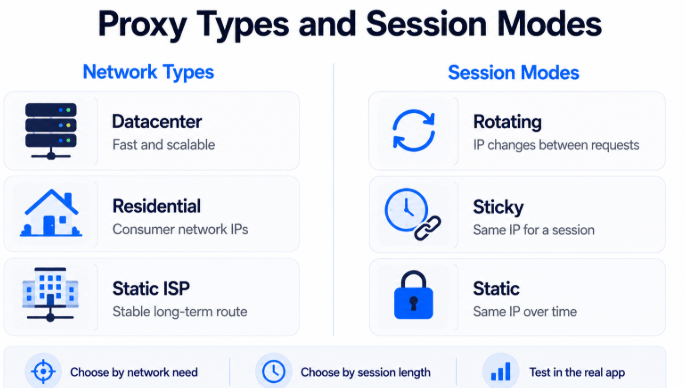
| Session Mode | How It Behaves | Potential Fit | Main Consideration |
|---|---|---|---|
| Rotating | A different IP may be assigned between requests or sessions. | Distributed public data requests where one persistent session is not required | The application must tolerate IP changes and validate each response. |
| Sticky | The same IP is maintained for a defined session period. | Multi-step page flows and short-to-medium regional sessions | The session duration must match the workflow. |
| Static | The same assigned IP remains available over a longer period. | Repeatable testing and workflows requiring a consistent route | A stable IP does not remove the need for responsible request behavior. |
A residential proxy can use rotating or sticky sessions. A static ISP proxy normally emphasizes longer-term IP consistency. These are related choices, not mutually exclusive product categories.
How to Choose a Proxy Setup
Start by defining the network requirement in one sentence. For example:
- “We need to compare the public product page shown in three countries.”
- “We need automated requests to use a route separate from the office connection.”
- “We need the same regional IP during a multi-step browser test.”
Then choose based on the actual requirement:
| Requirement | Likely Starting Point | Reason |
|---|---|---|
| Fast infrastructure checks | Datacenter route | Speed and predictable infrastructure may matter more than network classification. |
| Consumer-market regional QA | Residential route | The project needs to test a public page through a residential network location. |
| Short multi-step browser flow | Sticky session | The same network route should remain active during the flow. |
| Repeatable long-session testing | Static ISP route | The workflow benefits from a consistent IP over time. |
| Independent requests without session state | Rotating session | The workflow can accept a different IP between requests. |
Do not choose a rotating pool simply because the project processes many URLs. Volume, session state, target behavior, permitted request rate, and output quality all matter.
Minimal Python Proxy Test
The following example checks which IP is visible when a Python request is sent through a proxy. Store the full proxy URL in an environment variable instead of placing real credentials directly in source code.
import os
import requests

proxy_url = os.environ["PROXY_URL"]
proxies = {"http": proxy_url, "https": proxy_url}

response = requests.get(
    "https://httpbin.org/ip",
    proxies=proxies,
    timeout=20,
)
response.raise_for_status()
print(response.json())
A typical environment variable may use this format:
http://username:password@proxy-host:portMinimal Playwright Proxy Test
The following example launches Chromium through an authenticated proxy and checks the visible browser IP.
from playwright.sync_api import sync_playwright

proxy = {"server": "http://host:port", "username": "user", "password": "pass"}
with sync_playwright() as p:
    browser = p.chromium.launch(proxy=proxy)
    page = browser.new_page()
    page.goto("https://httpbin.org/ip", wait_until="domcontentloaded")
    print(page.locator("body").inner_text())
    browser.close()
This test only confirms the visible route returned by the endpoint. It does not prove that the target page, browser session, DNS configuration, cookies, account region, or extracted fields are correct.
Run the test with the same programming language, HTTP client, browser, or application that will run the real workflow. A proxy configured in one application does not automatically apply to another.
How to Test a Web Scraping Proxy
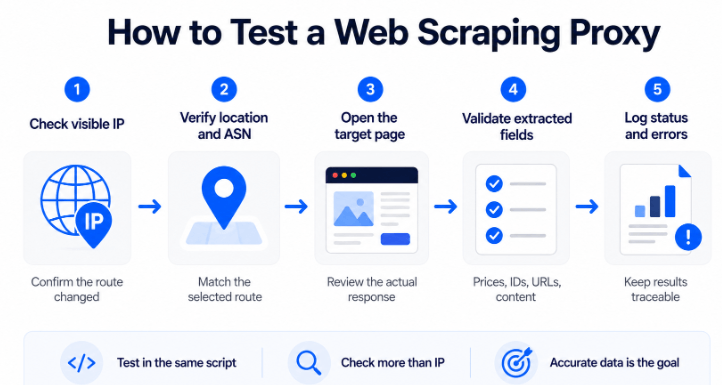
Compare the Connection Before and After
Check the visible IP before applying the proxy, then run the same check after the proxy is active. The test should run inside the same script, browser profile, or application used by the scraping workflow.
A service such as IPinfo can help compare the visible IP, location, organization, and ASN.
Verify More Than the IP Address
Confirm whether the country and network information match the selected route. City-level IP estimates may differ between databases, so country, ASN, and network organization are usually more useful than relying on one city result.
Check DNS Resolution Behavior
DNS behavior depends on the proxy protocol, client, browser, and configuration. Some clients resolve the destination hostname locally, while others pass it through the configured route.
For location-sensitive browser testing, confirm whether DNS requests use the expected path. A browser-based tool such as BrowserLeaks DNS Test can provide an additional signal, but the result should be interpreted together with the browser and proxy configuration.
Test the Actual Target Page
An IP-check endpoint confirms the visible route, not the complete workflow. Open or request the real target page and review:
- Final URL and redirects
- HTTP status code
- Content type
- Language and currency
- Expected page title or heading
- Required data fields
- Cookies and account state
Record Status Codes and Error Details
Log the status code, final URL, response time, error message, and validation result. MDN’s HTTP status code reference can help identify the general meaning of 2xx, 3xx, 4xx, and 5xx responses.
A status code is only one clue. A 200 response may still contain a login page, consent screen, regional fallback, or incomplete content.
Validate Extracted Fields
Compare sample records against the visible source page. Confirm identifiers, prices, currency, availability, dates, and source URLs. A proxy test has not passed if the IP changes but the final data remains wrong.
- Was the proxy tested in the same app, script, or browser that will run the task?
- Did the visible IP change from the original connection?
- Do the country, ASN, and network details match the selected route?
- Is DNS behavior appropriate for the client and test?
- Did the target page return the expected content?
- Did required fields pass validation?
- Were credentials kept outside public source code and logs?
For a broader step-by-step diagnostic process, see how to check whether a proxy is working.
Browser automation users can follow the Puppeteer proxy configuration guide for launch arguments, authentication, IP verification, and common setup errors.
Common Proxy Problems
| Problem | Likely Cause | What to Check Next |
|---|---|---|
| The proxy works in a browser but not in Python | The proxy was configured only in the browser, or the script uses the wrong format. | Check the proxy URL, protocol, credentials, environment variables, and client documentation. |
| The proxy IP does not change | The setting was not applied to the tested application, authentication failed, or traffic is bypassing the proxy. | Test in the same environment and review the client’s proxy configuration. |
| The country is correct but the page is different from expected | Cookies, language headers, account region, browser settings, or website logic may affect the page. | Use a clean session and compare locale, account, cookie, and browser settings. |
| Many requests return 403 or 429 | The cause may involve authorization, application rules, request frequency, session state, or server limits. | Review the response, reduce request frequency, verify permission, and inspect the complete request pattern. |
| The same workflow returns inconsistent fields | The site has multiple layouts, fields load dynamically, or the selectors are fragile. | Add page-type detection, rendered-page handling, and validation rules. |
| A rotating session breaks a multi-step flow | The IP changes before the flow is complete. | Use a suitable sticky session and confirm its duration. |
Frequently Asked Questions
Final Thoughts
A web scraping proxy should be selected after the data goal and network requirement are clear. Start by deciding whether the project actually needs regional routing, traffic separation, or a consistent network session.
Next, separate the two technical decisions: choose the network type, then choose the session behavior. Residential, datacenter, and static ISP describe the network or IP characteristics. Rotating, sticky, and static describe how the connection behaves over time.
Finally, test the proxy inside the real application. Confirm the visible route, DNS behavior, target-page response, and extracted fields. A changed IP is a useful signal, but accurate and traceable data remains the final measure of whether the workflow is working.
For complete end-to-end pipeline design combining crawlers, extraction tools, browser automation, and proxy routing, see our guide to choosing the right web scraping tool for your workflow.