Web scraping dynamic content becomes tricky when the data you need is not present in the first HTML response. A page may load a shell first, then use JavaScript, background requests, pagination, or infinite scroll to fill in the real records after the browser starts running.
The right method depends on where the data appears. Sometimes you should read a network response. Sometimes you need a browser renderer. Other times the page is simple enough that a static request is still the better choice. The goal is to diagnose the loading pattern before choosing a tool.
To scrape dynamic content, first check whether the target data exists in the raw HTML, appears after JavaScript renders the DOM, or arrives through background network requests. For pagination and infinite scroll, identify the page number, cursor, offset, or request trigger before collecting records. Use browser automation only when a direct network request or static HTML parse cannot reliably reach the data.
- Dynamic content is often missing from raw HTML because JavaScript loads it after the first response.
- Pagination may use visible page numbers, hidden cursors, offsets, or infinite-scroll triggers.
- Start by checking the rendered DOM and browser network panel before writing a scraper.
- Do not turn every dynamic page into a full browser automation task; a clean data request is often simpler.
- For stable workflows, validate record counts, duplicate handling, timing, and compliance before scaling.
What Dynamic Content Means in Web Scraping
Dynamic content is content that appears after the initial HTML response because the page uses JavaScript, browser events, or background requests to load data. In scraping work, the practical question is simple: can your scraper see the records at the moment it reads the page?
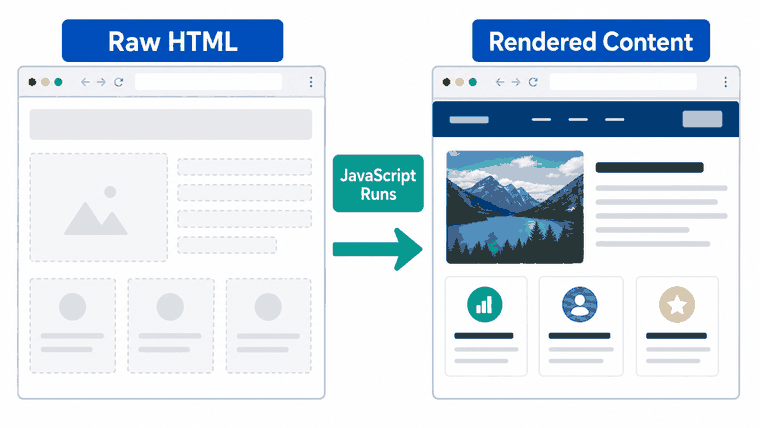
A normal static page may include product titles, prices, links, and tables directly in the HTML. A dynamic page may send only layout placeholders first. The browser then uses the Document Object Model, JavaScript, and network requests to insert the final content into the page.
For the broader definition of scraping, keep the existing IPWeb guide to what web scraping is as the main owner. This article focuses only on the narrower technical problem: what to do when the content is loaded after the first response.
How to Diagnose How the Page Loads Data
Diagnosis should come before tool choice. Open the page in a browser, inspect the raw HTML, check the rendered DOM, and watch the network requests that appear after the page loads or after you scroll.
Start with view-source or a simple HTTP request. If the records are already present, you probably do not need a browser. If the raw HTML contains only placeholders, open the browser's developer tools and inspect the Network tab while refreshing, clicking "next," or scrolling. The browser may call JSON endpoints through the Fetch API or another request mechanism.
- Check whether the target records exist in raw HTML.
- Compare raw HTML with the rendered DOM after the page finishes loading.
- Open the Network tab and filter for XHR, Fetch, or JSON requests.
- Click pagination controls and watch which request changes.
- Scroll the page and check whether new records load through a cursor, offset, or page parameter.
- Confirm that the response contains the records you need, not only tracking or layout data.
- Retest with a clean session so cookies and cached responses do not hide the real loading pattern.
Which Scraping Method Fits the Loading Pattern?
The best method is usually the simplest reliable method. A full browser gives you rendered state, but it is heavier than a direct request. A direct request is fast, but it only works when the request is stable, authorized, and carries the data you need.
| Loading Pattern | What It Looks Like | Better Method | What to Watch For |
|---|---|---|---|
| Static HTML | Records appear in the first HTML response. | HTTP request plus HTML parser. | Changing selectors, malformed markup, duplicate records. |
| JSON request | Records arrive through a visible XHR or Fetch response. | Request the data endpoint when allowed and stable. | Tokens, pagination cursors, headers, rate limits. |
| Rendered DOM | Records appear only after JavaScript modifies the page. | Browser automation or rendering service. | Wait conditions, lazy loading, memory use, session state. |
| Infinite scroll | More records load when the viewport reaches the lower page area. | Find the request trigger or automate controlled scroll steps. | Hidden cursors, duplicate records, incomplete final pages. |
| Interactive filters | Records change after selecting filters, locations, dates, or tabs. | Capture the request parameters behind each interaction. | Dependent parameters, session cookies, unavailable combinations. |
If tool choice is the real problem, use the existing IPWeb guide on how to choose web scraping tools. This article does not rank tools; it explains what signal tells you which method is technically appropriate.
How to Handle Pagination and Infinite Scroll
Web scraping pagination starts with identifying the state that tells the next request which records to return. Traditional pagination may use `page=2`. Modern sites often use offsets, timestamps, cursors, encoded tokens, or infinite-scroll events.
For infinite scroll, do not only scroll until the page stops moving. Watch the network panel. Many pages use a trigger such as viewport visibility, which may rely on browser APIs like Intersection Observer. The important part is the data request that follows the trigger, not the visual scroll effect itself.
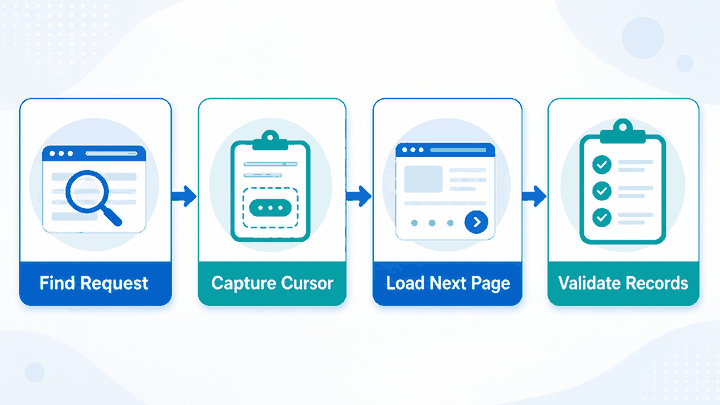
- Record the first page's request URL and parameters.
- Move to the next page or scroll once, then compare what changed.
- Identify whether the state is a page number, offset, cursor, timestamp, or token.
- Check whether records repeat between pages.
- Stop based on data conditions, not only based on page count.
- Validate the final dataset against expected fields and record counts.
Common Failure Points
The most common failure is reading too early. A scraper grabs the page before JavaScript finishes loading records, so it sees empty containers or skeleton cards. Use a wait condition that matches the data you need, not a fixed sleep that sometimes works and sometimes fails.
Another frequent mistake is scraping the rendered UI when the data request would be cleaner. If a network response already returns structured JSON, parsing that response can be more stable than extracting text from changing card layouts. The reverse is also true: if the endpoint is hard to use safely or depends on complex browser state, rendering may be more reliable.
Browser automation frameworks such as Playwright provide ways to wait for page behavior during tests and automation. The official Playwright documentation is useful when you need to understand browser-driven waiting patterns, but this article is not a Playwright setup tutorial.
How to Scale Without Breaking the Workflow
Scaling dynamic scraping is mostly about consistency. Once you know the loading pattern, validate retries, timeout behavior, deduplication, and partial-page handling before collecting at volume.
For authorized public web workflows, unstable routing can make debugging harder because failures may look like page problems when they are actually network problems. If proxy routing is part of your setup, use the existing IPWeb guide on how to choose and test a web scraping proxy instead of adding proxy setup details here.
Compliance still matters. Dynamic content does not make scraping automatically allowed, and a page that loads data through JavaScript may still have terms, robots rules, access controls, or personal-data concerns. Keep the legal and ethical checks in the dedicated guide on whether web scraping is legal.
Frequently Asked Questions
Final Thoughts
Dynamic content is not a separate kind of web data; it is a loading pattern. The practical workflow is to find where the records appear, choose the lightest reliable method, and validate pagination or infinite scroll before scaling the scraper.
If the topic you need is broad scraping basics, use the existing web scraping guide. If the problem is tool choice, use the tool-selection article. For this page, keep the focus on diagnosing dynamic rendering, pagination, and loading behavior so the article stays useful without competing with the rest of the cluster.