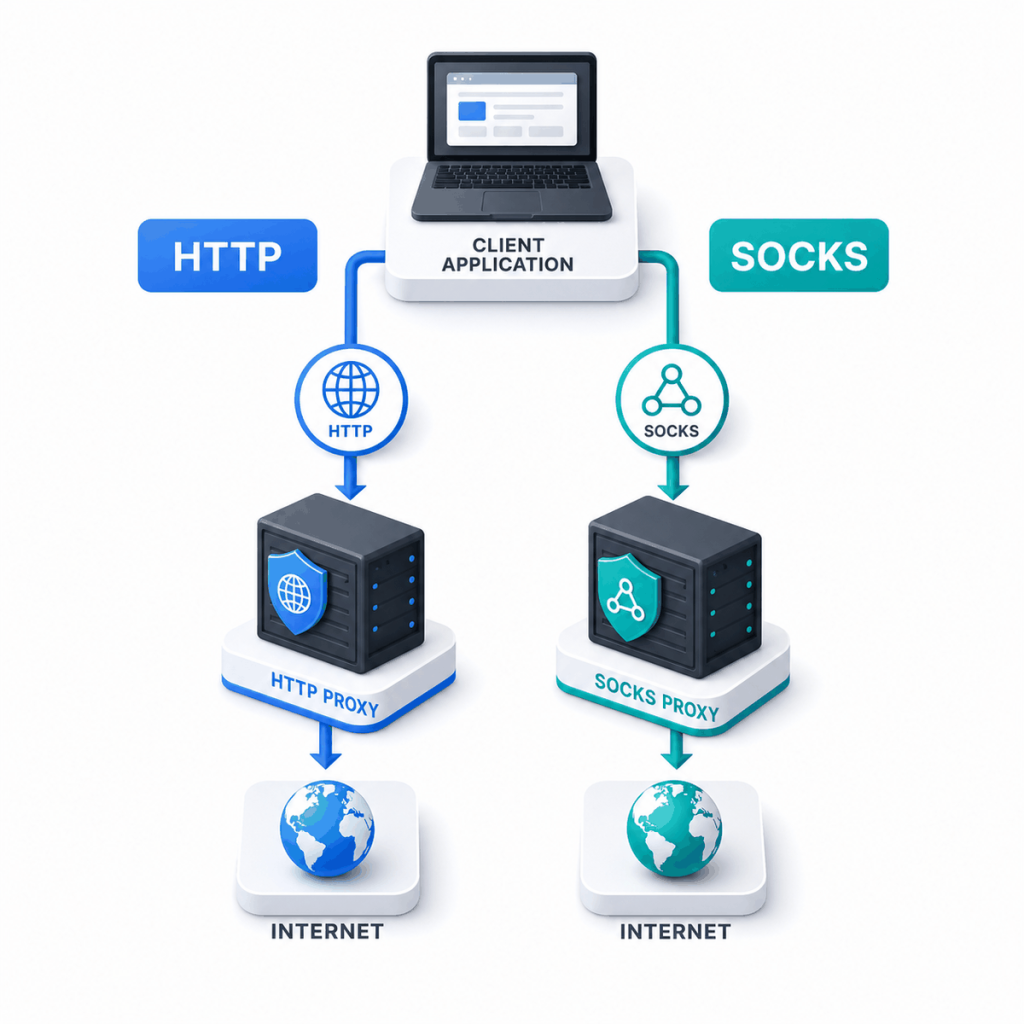
The difference between a SOCKS proxy and an HTTP proxy mainly comes down to traffic type and application support. HTTP proxies are designed for web requests, while SOCKS proxies provide a more general connection method for software that supports the protocol.
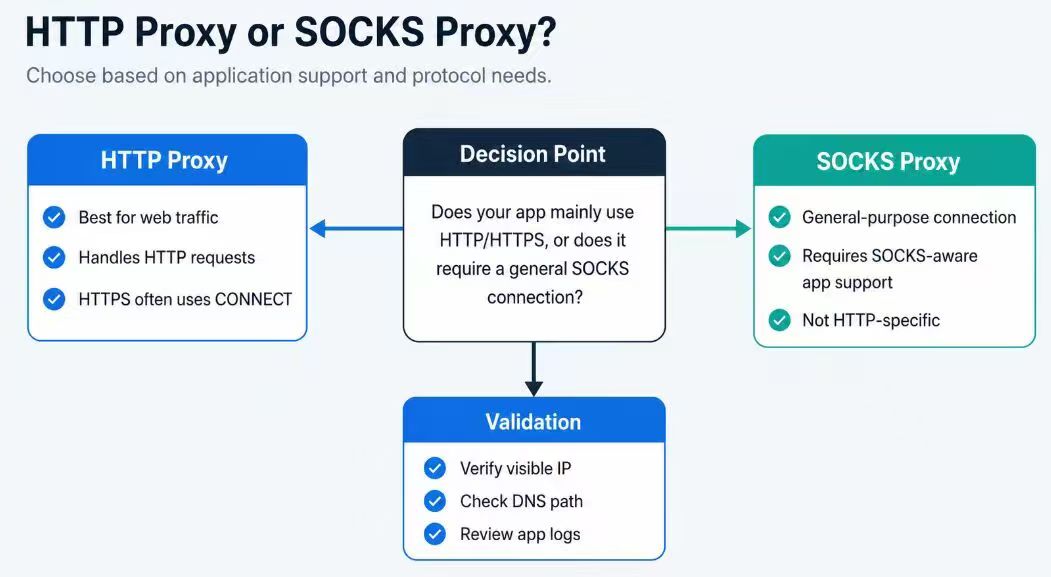
Choose an HTTP proxy for browsers, APIs, crawlers, and other HTTP or HTTPS traffic. Choose SOCKS when the application explicitly supports it and needs to route traffic that is not limited to ordinary web requests. Neither option is automatically better.
- HTTP proxies are usually the simpler choice for web-focused tools.
- SOCKS is useful for applications that need a more general connection tunnel.
- HTTPS can work through an HTTP proxy by using the CONNECT method.
- DNS behavior and protocol support must be checked in the actual application.
What Is the Difference Between SOCKS and HTTP Proxies?
An HTTP proxy is built around HTTP traffic. It works naturally with browsers, API clients, crawlers, and libraries that send HTTP or HTTPS requests.
For an ordinary HTTP request, the proxy can process HTTP methods, headers, and response codes. For HTTPS, the client commonly uses the CONNECT method to establish a tunnel through the proxy before starting the encrypted connection to the destination.
A SOCKS proxy does not depend on HTTP request behavior. Instead, the application asks the SOCKS server to create a connection to the destination. This makes SOCKS useful for software that supports the protocol directly and needs a more general route.
RFC 9110 defines the HTTP CONNECT method, while RFC 1928 defines SOCKS Protocol Version 5.
SOCKS vs HTTP Proxy Comparison
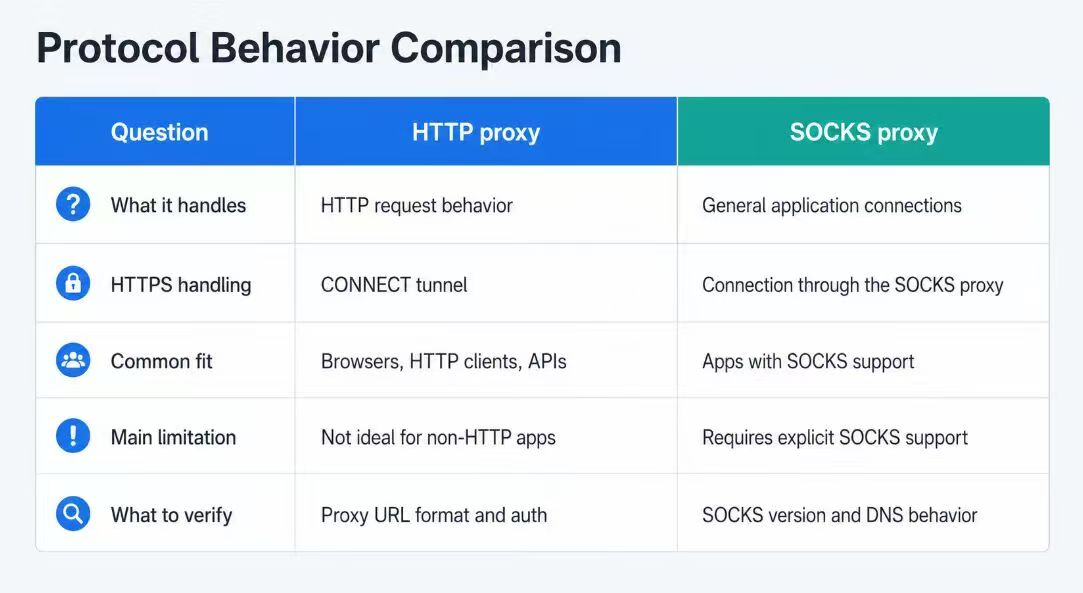
| Comparison | HTTP Proxy | SOCKS Proxy |
|---|---|---|
| Main purpose | Handling HTTP and HTTPS traffic | Creating general connections for SOCKS-aware applications |
| Typical use | Browsers, APIs, crawlers, and HTTP clients | Desktop tools, network utilities, and applications with SOCKS support |
| HTTPS handling | Commonly uses a CONNECT tunnel | Routes the connection through the SOCKS tunnel |
| HTTP awareness | Understands normal HTTP methods, headers, and status codes | Does not rely on HTTP request semantics |
| DNS behavior | Depends on the client and proxy configuration | May use local or proxy-side DNS, depending on the client option |
| UDP support | Not normally used for general UDP relay | SOCKS5 defines UDP relay, but practical support varies |
| Best starting point | When the workflow mainly uses web traffic | When the application specifically requires SOCKS |
When to Use an HTTP Proxy
An HTTP proxy is usually the most practical choice when the application mainly sends web requests. It is commonly supported by browsers, API clients, command-line tools, scraping libraries, and automation frameworks.
Choose an HTTP proxy when:
- The workload mainly uses HTTP or HTTPS.
- The client has clear HTTP proxy settings.
- You need HTTP response codes and proxy-authentication details in logs.
- The application does not require a SOCKS-specific feature.
For a deeper explanation of HTTP requests, proxy authentication, and HTTPS tunneling, see the HTTP proxy guide.
When to Use a SOCKS Proxy
A SOCKS proxy is appropriate when the application explicitly supports SOCKS and needs a general connection tunnel instead of HTTP-specific handling.
Choose SOCKS when:
- The software offers a SOCKS4 or SOCKS5 proxy option.
- The traffic is not limited to normal HTTP requests.
- The application needs a SOCKS-specific DNS setting.
- The workflow requires UDP and both the client and proxy service support it.
Do not choose SOCKS5 only because it sounds more advanced. For ordinary browser, API, or crawler traffic, HTTP may be easier to configure and diagnose.
DNS and Protocol Support Checks
The selected protocol must match the endpoint and port supplied by the proxy service. Changing only the URL scheme does not make an HTTP endpoint support SOCKS or make a SOCKS endpoint support HTTP.
DNS behavior also depends on the client. With curl, socks5:// normally uses local hostname resolution, while socks5h:// asks the SOCKS proxy to resolve the destination hostname. Other applications may use a separate remote-DNS option.
- Confirm the protocols and ports supported by the endpoint.
- Check whether the application supports HTTP, SOCKS4, or SOCKS5.
- Verify the required authentication method.
- Check where destination DNS is resolved.
- Test the route inside the application that will use it.
Test an HTTP Proxy
curl -v --proxy "http://USER:PASS@HOST:PORT" "https://httpbin.org/ip"Test a SOCKS5 Proxy with Proxy-Side DNS
curl -v --proxy "socks5h://USER:PASS@HOST:PORT" "https://httpbin.org/ip"Use the protocol and port supported by the proxy endpoint. Do not publish verbose logs containing credentials or authorization headers.
The curl proxy documentation explains the proxy schemes supported by curl.
Common Selection Mistakes
| Mistake | Why It Causes Problems | Better Approach |
|---|---|---|
| Assuming SOCKS5 is always better | It may add complexity without helping a web-focused workflow | Choose based on application support and traffic type |
| Changing only the URL scheme | The endpoint or port may not support the other protocol | Confirm the supported protocol before testing |
| Assuming SOCKS5 always uses proxy-side DNS | Some clients still resolve the hostname locally | Enable and verify the client’s remote-DNS option |
| Testing in a different application | One client may use the proxy while another connects directly | Validate the route in the application that will use it |
Frequently Asked Questions
Final Thoughts
Use an HTTP proxy for web-focused clients with reliable HTTP proxy support. Use SOCKS when the application requires a more general connection method or a specific SOCKS capability. The correct choice is the protocol that matches both the endpoint and the software using it.