Building a scraper from scratch gives you control, but it also makes your team responsible for requests, rendering, retries, parsing, validation, and maintenance. A web scraping API moves some of those responsibilities behind an HTTP endpoint so your application can request page content or structured output without operating every collection component itself.
This guide focuses on the API layer. For the broader definition, workflow, and common uses of web scraping, start with IPWeb's guide to what web scraping is.
A web scraping API is a hosted interface that accepts a target URL and request options, performs the supported retrieval or rendering work, and returns HTML, text, or structured data. It can reduce infrastructure work, but its exact capabilities depend on the provider and configuration.
- A scraping API is a managed delivery layer, not another name for a raw proxy.
- It is useful when integration speed and reduced infrastructure work matter more than full runtime control.
- A custom scraper remains the better fit for unusual interactions, site-specific parsing, or strict execution requirements.
- Test rendering, output quality, error reporting, billing, rate limits, and response consistency before scaling.
- A successful HTTP response does not automatically mean the returned data is complete or usable.
What Is a Web Scraping API?
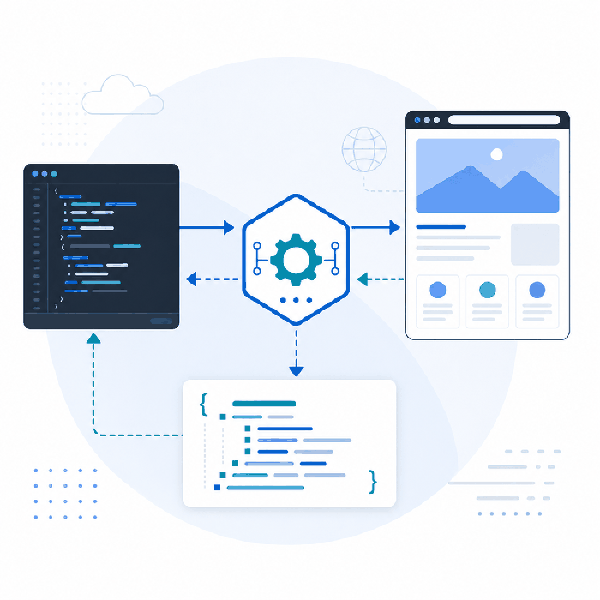
A web scraping API is a hosted service that exposes page-retrieval or extraction functions through an HTTP endpoint. Your application sends a target URL, authentication details, and supported options. The service then performs the configured work and returns a documented response.
Depending on the provider, the response may contain raw HTML, rendered HTML, cleaned text, screenshots, or structured JSON. Some services also handle retries, browser execution, geographic routing, or page-specific extraction. These are provider capabilities, not automatic features of every product described as a scraping API.
A scraping API also differs from a first-party data API. A first-party API exposes data maintained by the source itself. A scraping API retrieves information from web responses, so its output may change when page structure, rendering behavior, or access requirements change.
How the Request Flow Works
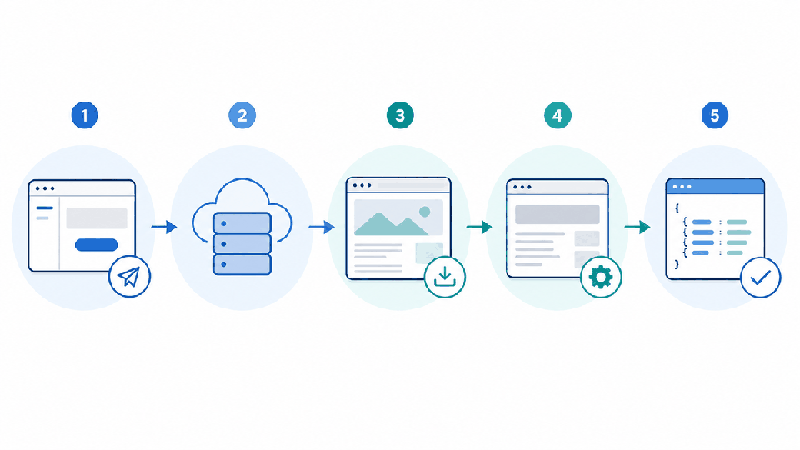
A typical web scraping API request moves through five stages:
- Request construction: Your application sends a target URL, credentials, and supported options such as rendering, location, or output format.
- Validation: The service checks authentication, required fields, account limits, and request syntax.
- Retrieval: The service fetches the target response and may start a browser runtime when rendering is enabled.
- Processing: The response may be returned as HTML or transformed into text, fields, or provider-specific JSON.
- Delivery: Your application receives the result and records status, latency, errors, usage, and data-quality signals.
At the application level, this is still an HTTP request and response workflow. The MDN Fetch API documentation explains the client request model, while MDN's HTTP overview covers the underlying protocol concepts.
Basic API Request Example
The exact endpoint and options vary by provider, but a basic request often follows this pattern:
curl -X POST "https://api.example.com/scrape" \
  -H "Authorization: Bearer YOUR_API_KEY" \
  -H "Content-Type: application/json" \
  -d '{
    "url": "https://example.com/products",
    "render": true,
    "format": "json"
  }'
Do not stop at the HTTP status code. Your integration should also check whether the final response contains the expected page, whether rendering completed, whether required fields are present, and whether the service returned a partial result or provider-specific error.
| Response Check | What to Confirm | Why It Matters |
|---|---|---|
| HTTP status | The request reached the API and received a documented status. | A transport-level success does not guarantee useful page data. |
| Final URL | The response corresponds to the intended page rather than a redirect or consent screen. | Unexpected redirects can produce valid-looking but incorrect output. |
| Required fields | The fields your workflow depends on are present and non-empty. | Partial extraction can silently damage downstream data. |
| Rendering status | Browser execution completed when dynamic content was required. | Initial HTML may not contain the data shown after JavaScript runs. |
| Usage data | The request cost, credits, bandwidth, or billable result matches expectations. | Rendering and retries may affect total cost. |
What a Scraping API Can Handle
A managed scraping API can reduce work around retrieval and infrastructure. Common capabilities include:
- HTTP request handling and configurable headers
- Authentication and request validation
- Retries and timeout management
- Country or regional routing where supported
- JavaScript rendering through a browser runtime
- HTML, text, screenshot, or JSON output
- Request logs, usage records, and error details
Treat this list as a verification checklist. A basic scraper API may only return HTML. A more managed service may render pages or extract structured fields, but it may also impose stricter request limits, service-specific schemas, or higher costs for browser execution.
For JavaScript-heavy pages, first determine whether the required data is present in the initial HTML, loaded through a later network request, or created after a user interaction. The existing guide to web scraping dynamic content covers rendering, pagination, and infinite-scroll diagnosis in more detail.
| Capability | What It Solves | What to Verify |
|---|---|---|
| Raw HTML retrieval | Provides source content for custom parsing. | Does the response contain the fields you need? |
| Browser rendering | Loads content that appears after JavaScript execution. | Which wait conditions, interactions, and browser features are supported? |
| Location selection | Supports region-specific page checks. | Is selection available at country, region, city, or network level? |
| Structured output | Reduces custom parsing work for supported page types. | How are missing fields, schema changes, and partial results represented? |
| Retries and logs | Makes failed requests easier to classify. | Can you separate source errors, timeouts, rendering failures, and extraction errors? |
API vs. Custom Scraper vs. Raw Proxy
A managed scraping API, a custom scraper, and a raw proxy operate at different layers. The right choice depends on which responsibilities your team wants to own.
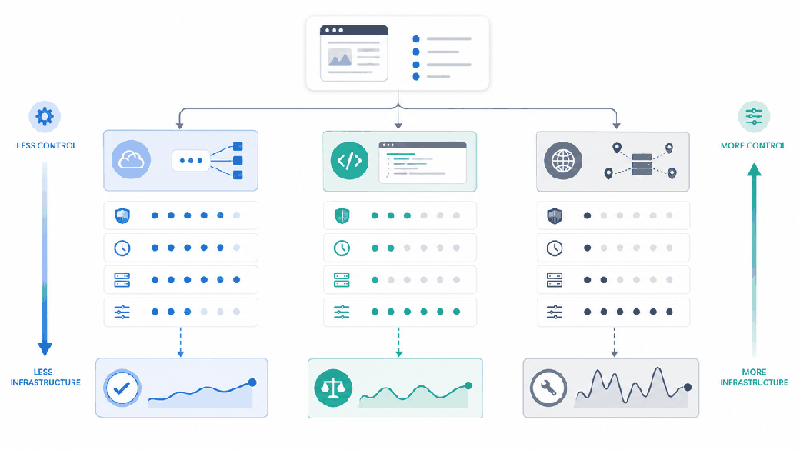
| Option | Best Fit | Your Team Still Owns | Main Tradeoff |
|---|---|---|---|
| Managed scraping API | Teams that want a faster integration and less browser or request infrastructure. | Validation, downstream processing, storage, and workflow-specific quality checks. | Less execution control and provider-specific limits or billing. |
| Custom scraper | Projects with unusual interactions, specialized parsing, or strict runtime requirements. | Requests, browsers, retries, parsing, monitoring, updates, and deployment. | Higher engineering and maintenance cost. |
| Raw proxy | Applications that already manage requests, rendering, parsing, and storage but need a different network route. | All scraping logic, validation, retries, and data handling. | A proxy does not provide extraction or browser execution by itself. |
The phrase “proxy API for web scraping” can describe an endpoint that supplies proxy access or a broader service that performs page retrieval. Confirm which layer the service actually manages. A raw proxy changes the request route; it does not automatically provide rendering, extraction, structured output, or data validation.
For proxy selection, configuration, and route testing, use the web scraping proxy guide. Teams that already manage the scraping stack can also review IPWeb's dynamic residential proxies as a network-routing option. This is a raw proxy service, not a managed web scraping API.
For a broader comparison of browsers, libraries, hosted APIs, and no-code options, see the guide on how to choose web scraping tools.
Web Scraping API Evaluation Checklist
Evaluate a service against your actual page types and failure cases. A polished dashboard or low entry price does not prove that the returned data will be complete, stable, or economical for your workflow.
- Authentication: How are API keys created, restricted, rotated, and revoked?
- Request model: Which methods, headers, cookies, body formats, and custom options are supported?
- Rendering: Can the service wait for selectors, network activity, or delayed content?
- Output contract: Does it return raw HTML, rendered HTML, text, screenshots, or structured JSON?
- Error structure: Can you distinguish API errors, source responses, timeouts, rendering failures, and parsing failures?
- Rate limits: What concurrency, request-per-second, queue, and timeout limits apply?
- Billing: Are requests charged by call, bandwidth, credit, rendering mode, or successful response?
- Data quality: How will your system detect empty pages, consent screens, partial fields, and schema drift?
- Logging: Are request IDs, timestamps, latency, final URLs, and billable usage available?
- Policy review: Does the workflow respect source terms, privacy requirements, robots guidance, and applicable rules?
Run a small validation set before a large integration. Include one server-rendered page, one JavaScript-heavy page, one paginated page, and one known failure case. Compare the returned output with a manually reviewed reference and record completeness, latency, error reasons, and total request cost.
For crawl-policy context, review Google's robots.txt guidance. Robots directives are one part of a broader policy and compliance review, not a complete legal determination.
Common Mistakes to Avoid
Assuming every scraping API returns structured data
Many services return raw or rendered HTML and leave field extraction to your code. Confirm the output contract before designing your database or downstream workflow.
Treating a 200 response as valid data
A successful response can contain a consent page, empty state, source error, redirected page, or incomplete content. Validate the body and the fields that matter instead of accepting the status code alone.
Testing only an easy static page
A service may work well on simple HTML and fail on the pages that matter to your project. Test dynamic rendering, pagination, redirects, empty results, and known error conditions before scaling.
Choosing on request price alone
Rendering, retries, failed responses, location options, or concurrency limits can change the actual cost. Compare the total cost of a representative workload rather than the advertised cost of one basic request.
Using a raw proxy as a complete scraping solution
A proxy can provide the network-routing layer, but it does not replace browser execution, parsing, validation, storage, logging, or maintenance.
Ignoring schema and page changes
Web pages and API output formats change. Add checks for required fields, response shape, empty results, final URLs, and unusual latency so changes become visible failures rather than silent bad data.
Frequently Asked Questions
Final Thoughts
A web scraping API is most useful when your team wants to delegate part of the retrieval infrastructure while keeping control of validation, storage, and downstream processing. It is not automatically the best choice for every site or workflow.
Start with four representative tests: a static page, a JavaScript-rendered page, a paginated page, and a known failure case. Measure response completeness, latency, error clarity, and total request cost. That small test will reveal more than a feature list or a single successful request.