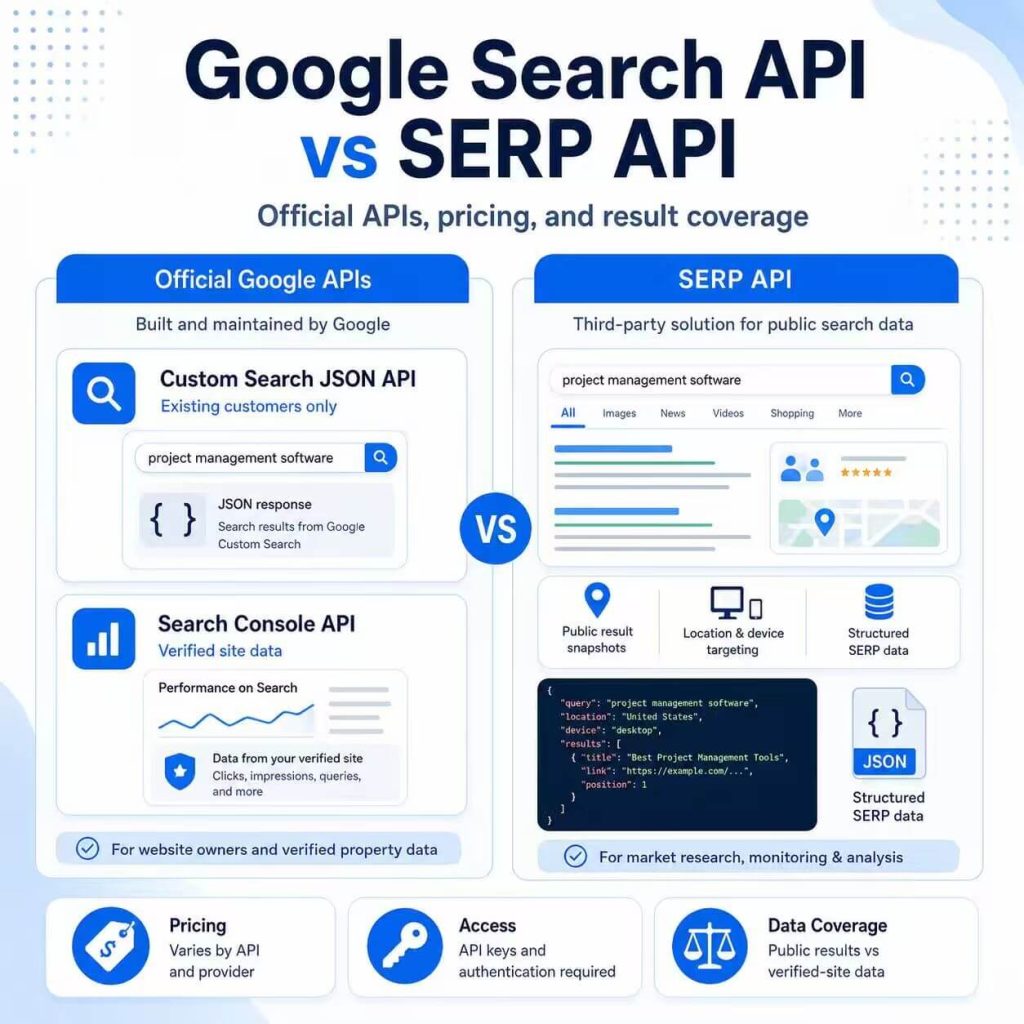
Searching for a “Google Search API” can lead to several different products. You may need search inside a website, performance data for a verified property, or structured snapshots of public Google results. These tools do not return the same data, and choosing the wrong one can create gaps in coverage, pricing, or implementation.
There is also an important 2026 change: Google’s Custom Search JSON API is closed to new customers. Existing customers have until January 1, 2027 to move to another solution. That makes the intended data source—not the broad keyword “Google Search API”—the correct starting point for a new project.
Google does not provide one universal public web-search API. Use the Search Console API for performance data from verified properties you own or manage. Existing Custom Search JSON API customers can use that service only during the transition period ending January 1, 2027. Use a SERP API when an application needs structured snapshots of public Google result pages across queries, locations, languages, devices, or SERP features.
- “Google Search API” can refer to site search, Search Console reporting, or public SERP data collection.
- Google’s Custom Search JSON API is no longer available to new customers.
- The Search Console API reports performance for verified properties; it is not a live public SERP API.
- A SERP API is the better fit when the required dataset is the visible public result page.
- Compare current availability, fields, locations, pricing, quotas, and compliance before implementation.
What People Mean When Searching for “Google Search API”
The phrase “Google Search API” describes an intent, not one universal Google product. A developer may be looking for an API key, an embedded website search, performance data from Google Search Console, or public Google result-page data for SEO, market research, AI, or regional QA.
Start by defining the output:
- Do you need a search experience inside a website or app?
- Do you need clicks, impressions, CTR, and average position for a verified property?
- Do you need public Google result snapshots for multiple keywords and locations?
- Do you need recurring rank monitoring with storage and historical comparisons?
Each requirement points to a different product or workflow. The generic phrase “API for Google search” is not precise enough to choose an implementation.
Official Google APIs vs SERP APIs
Official Google APIs expose data for defined Google products. The Custom Search JSON API documentation describes programmatic results from a configured Programmable Search Engine, but the service is now closed to new customers. The Google Search Console API documentation covers authorized performance reporting for verified properties.
A third-party Google SERP API serves a different purpose. It returns structured snapshots of public Google result pages and may include organic results, local packs, featured snippets, ads, related questions, shopping blocks, or other result features when supported.
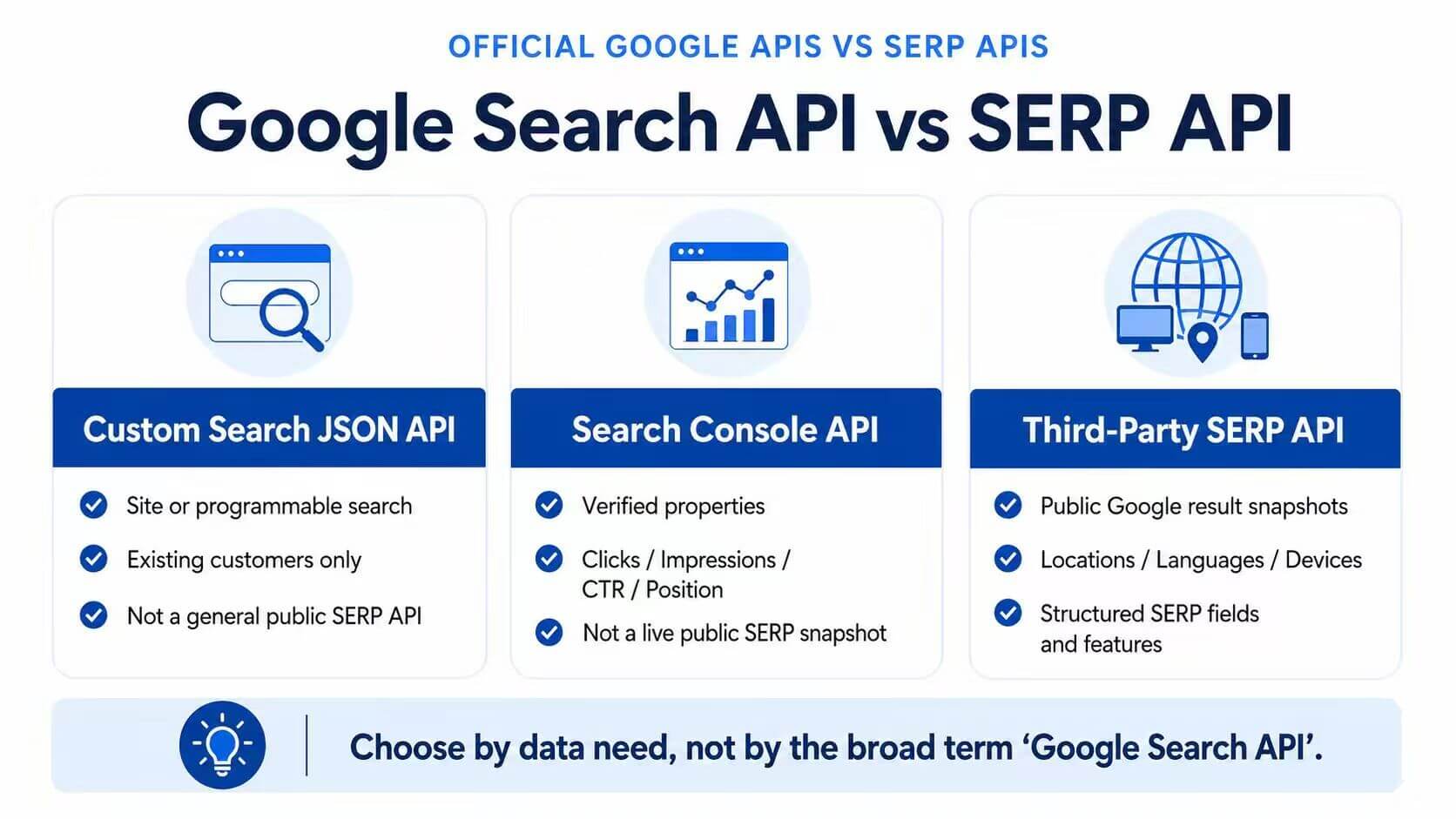
| Option | Best For | Data You Usually Get | Important Limitation |
|---|---|---|---|
| Custom Search JSON API | Existing projects using a configured Programmable Search Engine | JSON results from that configured search engine | Closed to new customers; existing customers must migrate by January 1, 2027 |
| Google Search Console API | Performance reporting for verified properties | Queries, pages, clicks, impressions, CTR, and average position | Not a live public SERP API and may return top rows rather than every data row |
| Third-party Google SERP API | Public result-page snapshots across queries, locations, and devices | Rank, title, URL, snippet, and supported SERP features | Accuracy, location handling, schema, cost, and provider boundaries must be tested |
When an Official Google API Is the Better Fit
Use an official Google API when the task fits a supported Google product boundary. The Search Console API is the appropriate starting point when you need performance data for a verified website. It can return metrics such as clicks, impressions, CTR, and average position, grouped by dimensions such as query, page, country, and device.
Search Console data is not a live browser result page. The API is also subject to internal data limits and does not guarantee every available row. It is designed for property-level performance analysis, not for reconstructing public Google results for arbitrary keywords.
The Custom Search JSON API now applies only to existing customers during a transition period. Google states that it is closed to new customers and that current customers must move to an alternative by January 1, 2027. For new projects involving search across a limited set of domains, Google points users toward Vertex AI Search; projects needing broader web search should review Google’s current guidance before committing to an architecture.
When a SERP API Is the Better Fit
A SERP API is more relevant when the search results themselves are the dataset. Common examples include:
- Comparing public results across countries, languages, cities, or devices.
- Collecting organic positions and supported SERP features for research or AI workflows.
- Building scheduled result snapshots that will be stored and compared over time.
For a detailed explanation of response fields and result features, see IPWeb’s guide to what a SERP API is.
For workflows that need managed Google search-result data across locations, languages, and devices, IPWeb SERP API can reduce the work required to maintain collection, parsing, and structured output internally. Test representative queries and required SERP features before increasing request volume.
Pricing, Quotas, and API Key Checks
Queries such as “does Google charge for their custom search API,” “Google search API pricing,” and “Google search API key” point to the same decision: whether the service is currently available, how access is authenticated, and how usage is billed.
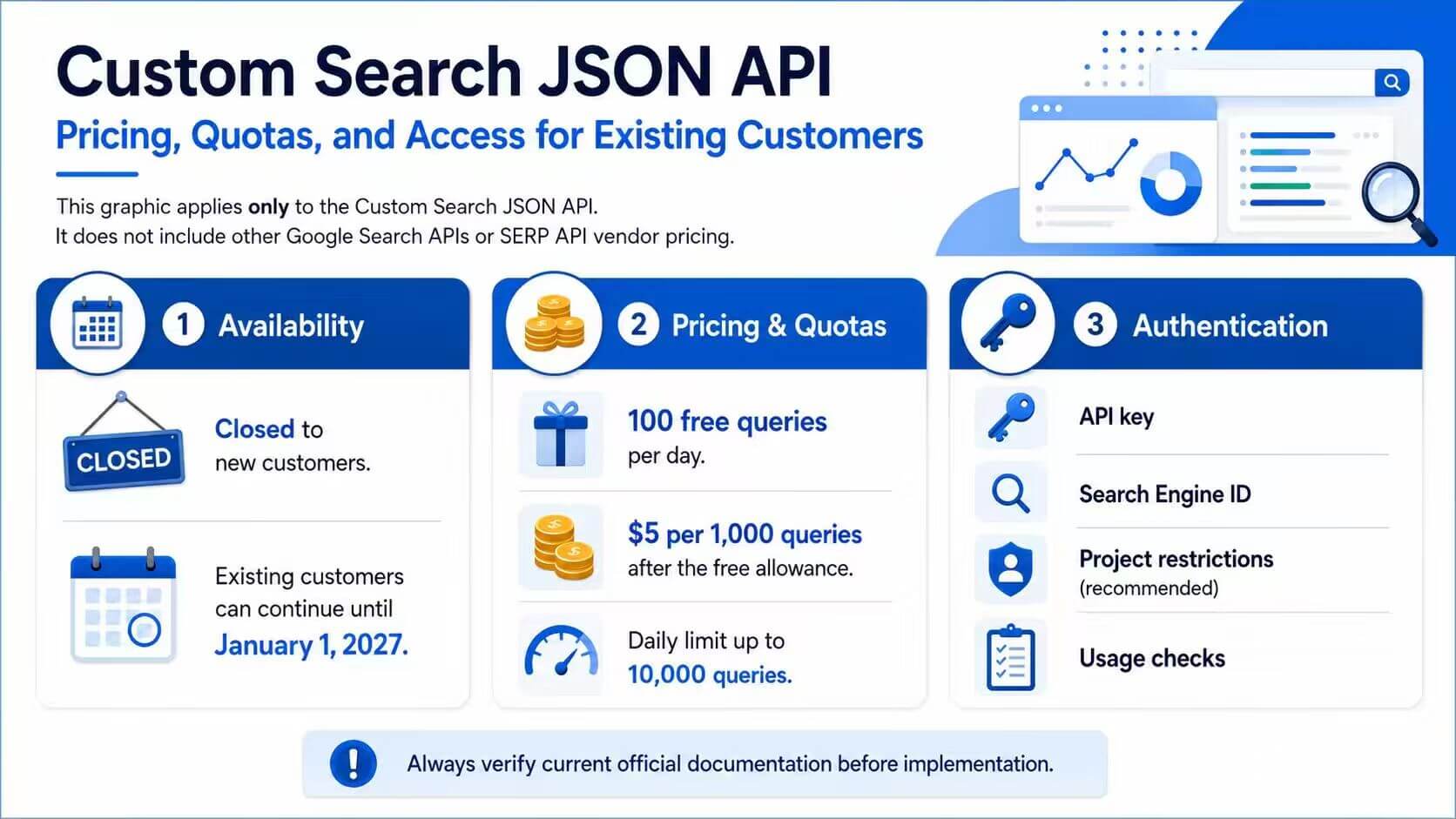
As of July 2026, the Custom Search JSON API is not available to new customers. Existing customers receive 100 free search queries per day. Additional requests cost $5 per 1,000 queries, up to 10,000 queries per day, until the service ends on January 1, 2027. The API requires both an API key and a configured Programmable Search Engine ID.
Search Console API requests require authorization for a property the user can access. Its practical limit is not only request quota: Search Analytics is bounded by internal data limits and may return the top rows rather than every possible row.
Third-party SERP API pricing may be based on requests, credits, result types, locations, successful responses, or included features. Compare the cost of the exact queries and result modules your workflow needs rather than comparing headline prices alone.
- Confirm whether new accounts can still activate the service.
- Check free quota, paid request price, and daily or monthly limits.
- Identify whether an API key, OAuth authorization, project, or search-engine ID is required.
- Confirm which result types and locations are included in the base price.
- Review migration dates, usage terms, and provider acceptable-use boundaries.
A Practical Decision Framework
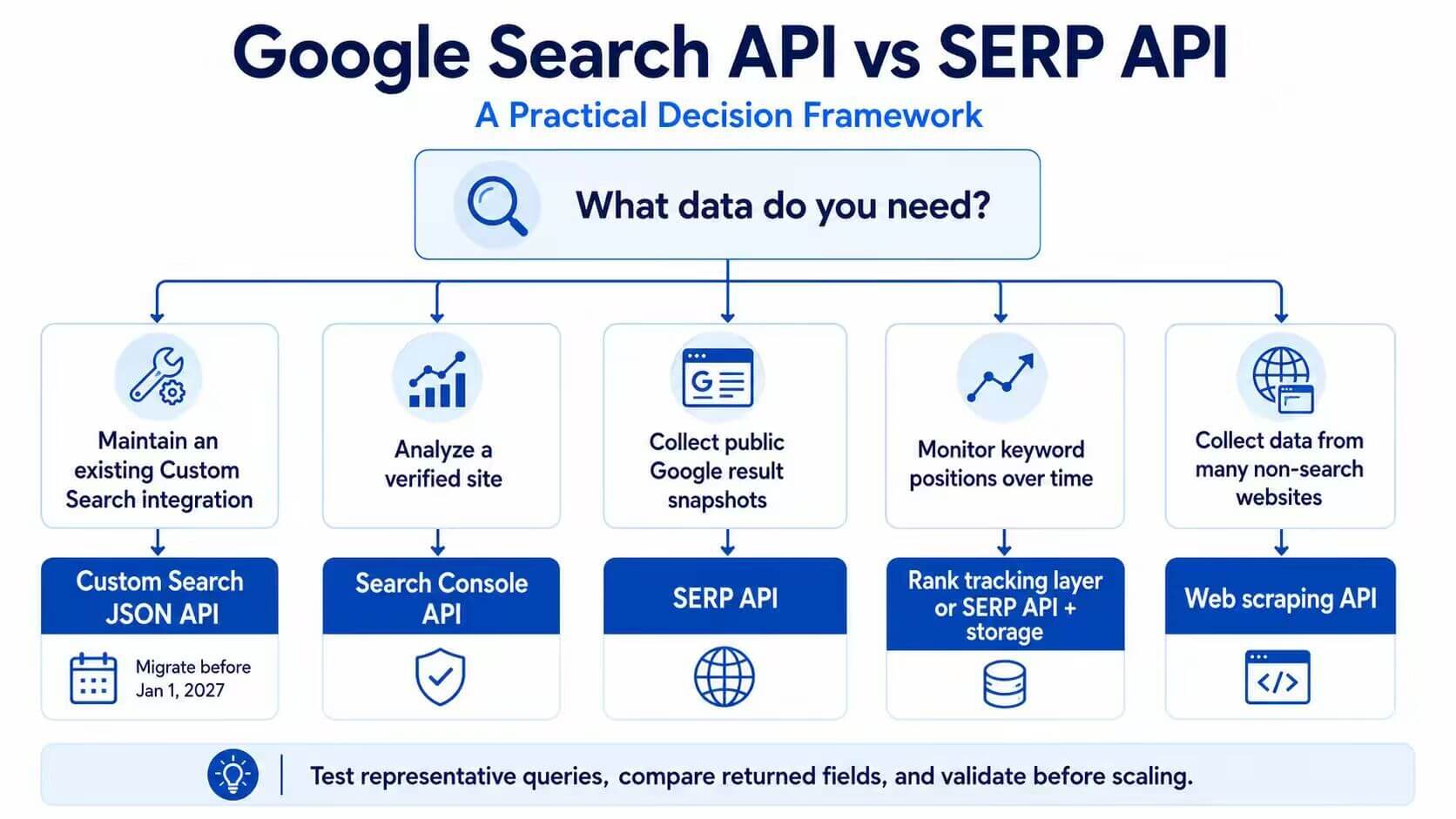
Choose by the required data and ownership model, not by the wording of the keyword.
| Need | Better Starting Point | Why |
|---|---|---|
| Add search to a website or limited domain set | Current Google site-search options or Vertex AI Search | A new project should not depend on the retiring Custom Search JSON API |
| Maintain an existing Custom Search JSON API integration | Use it only while planning migration | Existing customers must move before January 1, 2027 |
| Analyze verified-site search performance | Google Search Console API | It reports property-level clicks, impressions, CTR, and position data |
| Collect public Google result snapshots | Google SERP API | It focuses on result-page fields, locations, devices, and SERP features |
| Monitor keyword positions over time | SERP API plus scheduling and storage | The workflow needs consistent snapshots and historical comparisons |
| Collect data from many non-search websites | Web scraping API | The source is broader than a search results page |
When the answer is still unclear, run a small proof of concept. Test five to ten representative queries, include at least two locations or devices where relevant, compare the returned fields with a manual check, and measure whether the data is stable enough for production.
Common Mistakes
The first mistake is assuming that Google offers one general API that reproduces the public Google Search page. Its official APIs have product-specific boundaries.
The second mistake is treating Search Console data as a live ranking snapshot. Search Console reports aggregated performance for verified properties and may not return every underlying row.
The third mistake is starting a new project on the Custom Search JSON API without checking its availability. New customers cannot activate it, and existing customers need a migration plan before January 1, 2027.
Another common error is comparing prices without comparing result coverage. An organic-only response is not equivalent to a response that includes local packs, ads, shopping modules, images, or People Also Ask.
Finally, do not make direct search-result collection the default before reviewing official APIs and managed SERP API options. Layout changes, policy limits, and maintenance costs can make a custom workflow fragile.
Frequently Asked Questions
Final Thoughts
The correct Google search-data workflow begins with the required output. Search Console API fits verified-property performance reporting. A SERP API fits structured public result-page snapshots. New projects should not depend on the Custom Search JSON API because it is closed to new customers, while existing customers must complete migration before January 1, 2027.
Before scaling, test the actual queries, locations, devices, response fields, quota, pricing, and compliance boundaries. Teams evaluating public Google result data can contact IPWeb support for a small SERP API test aligned with their required searches and result features.