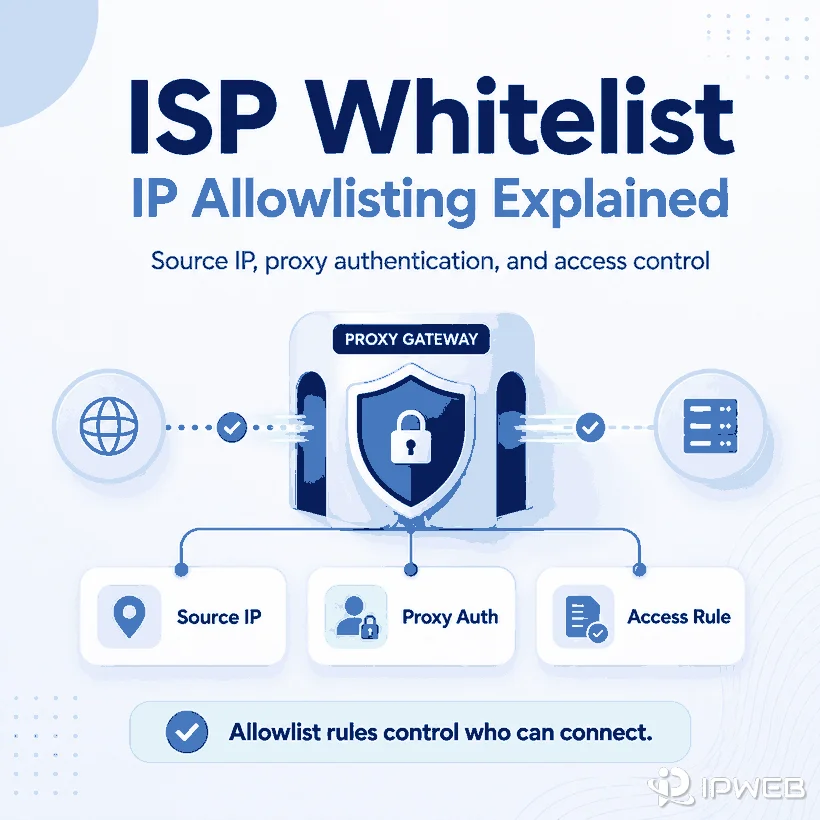
The phrase ISP whitelist is used for several different access-control setups. It may mean allowing a trusted ISP network through a firewall, authorizing a fixed public IP to connect to a proxy gateway, or allowing a proxy exit IP to reach an API or private system. These scenarios look similar, but they authorize different points in the network path.
An ISP whitelist is an allowlist rule that permits traffic from an approved IP address, network range, ASN, or provider network. In a proxy service, IP allowlisting usually authorizes the public source IP that may connect to the proxy gateway. This is separate from proxy username and password authentication, which verifies credentials. A provider may support either method or require both.
- “Whitelist” and “allowlist” usually describe the same access-control concept; allowlist is the preferred modern term.
- A proxy source-IP allowlist authorizes the client or server connecting to the proxy, not the destination website.
- A destination allowlist authorizes the proxy exit IP that reaches an API, firewall, or partner platform.
- Dynamic source IPs, NAT gateways, CI runners, VPN routes, and IPv4/IPv6 differences are common causes of allowlist failures.
- IP allowlisting is one security layer. It does not replace credentials, least-privilege access, logging, or compliance controls.
What ISP Whitelist Means
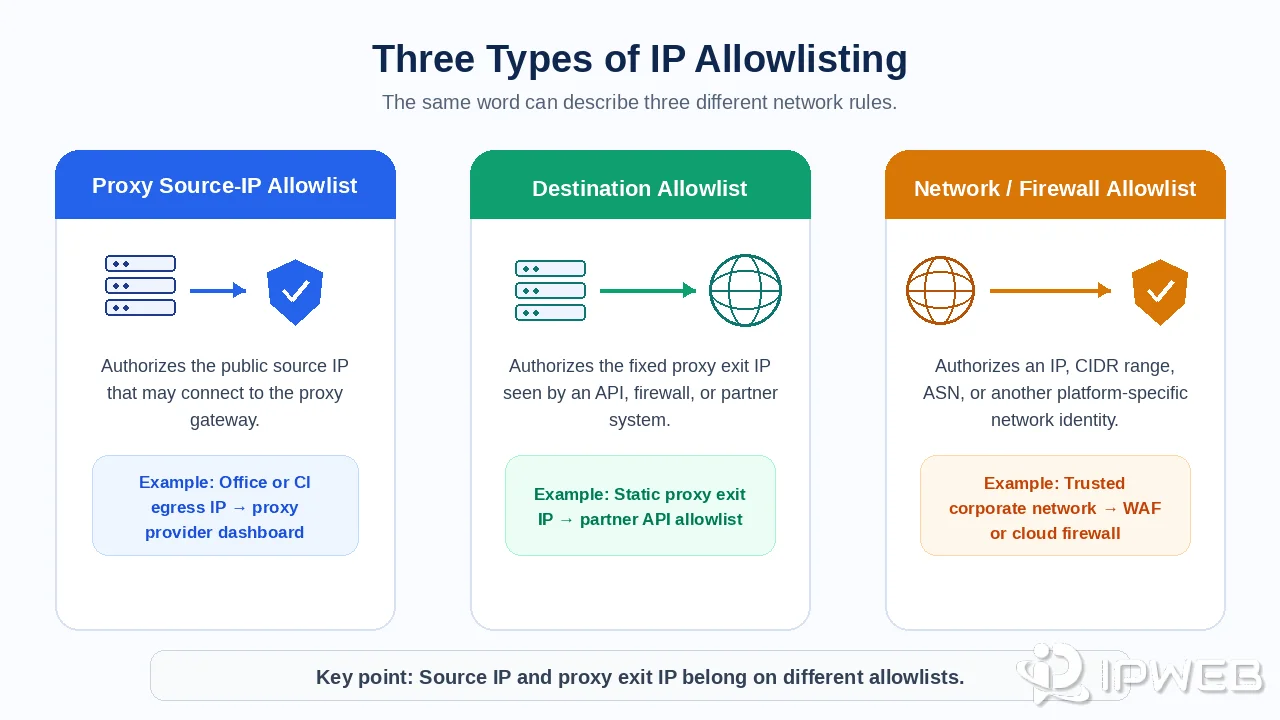
A whitelist, more accurately called an allowlist, is a rule that permits traffic matching an approved identity while denying or restricting other traffic. That identity may be one public IP address, a CIDR range, an ASN, a cloud security-group identity, or another platform-specific network object.
The term ISP whitelist is ambiguous because “ISP” may refer to the subscriber's internet connection, the network owner shown in an IP lookup, an ISP proxy product, or an entire autonomous system. Before changing a rule, identify exactly which address or network the receiving system evaluates.
Cloudflare, for example, supports access rules based on visitor IP addresses, IP ranges, ASNs, and countries, while other platforms may support only individual IPv4 addresses. The supported object and rule behavior always depend on the specific service. See Cloudflare's IP Access Rules documentation for one example of platform-specific behavior.
Three Types of IP Allowlisting
The fastest way to avoid configuration mistakes is to separate the three common allowlist directions.
| Allowlist type | What is authorized | Typical rule location | Example |
|---|---|---|---|
| Proxy source-IP allowlist | The public egress IP of the client, office, server, or CI environment | Proxy provider dashboard | Only an approved office gateway may connect to the proxy endpoint |
| Destination allowlist | The fixed proxy exit IP seen by the destination system | API gateway, firewall, partner platform, or private service | A partner API accepts requests only from a dedicated proxy IP |
| Network or ISP allowlist | An IP, CIDR range, ASN, or provider network | WAF, cloud firewall, router, or access-control service | An internal admin path allows traffic from a known corporate network |
These rules are not interchangeable. Adding your laptop's public IP to a partner API will not help if the API sees a proxy exit IP. Likewise, adding the proxy exit IP to the proxy provider's source-IP allowlist will not authorize the machine that is trying to connect to the gateway.
IP Allowlist vs Proxy Authentication
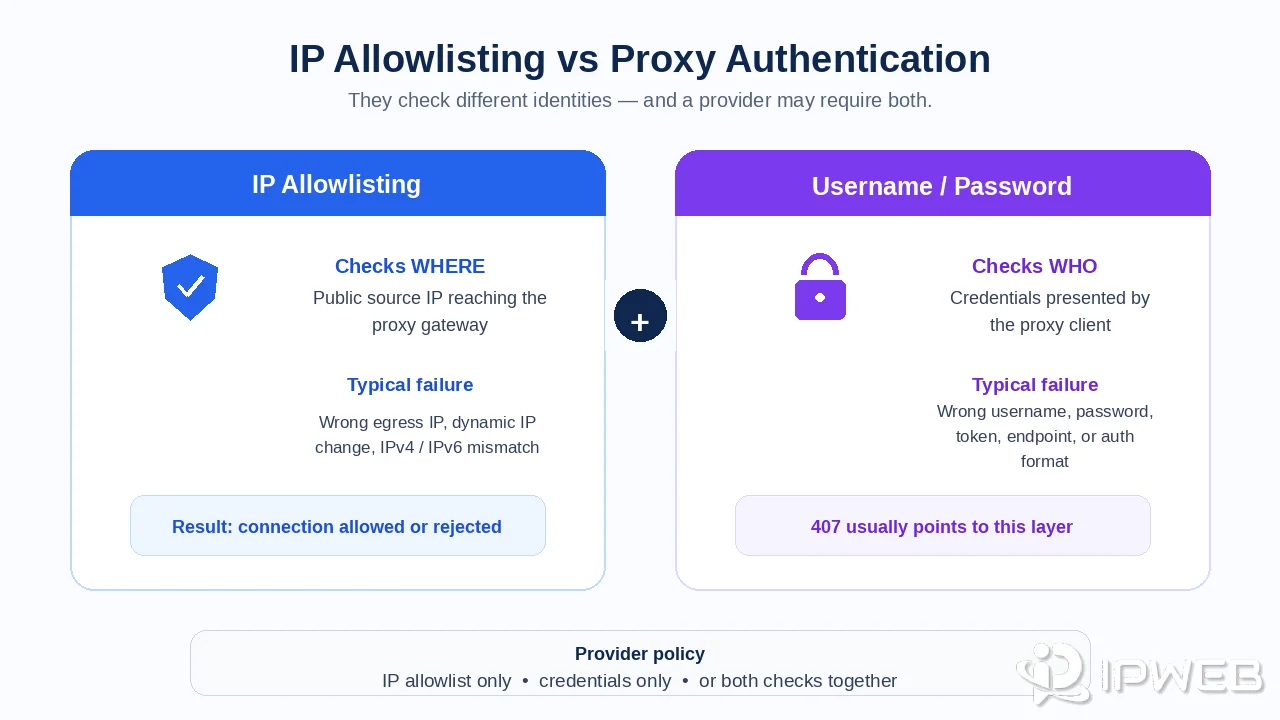
IP allowlisting checks where the proxy connection originates. Username and password authentication checks which credentials the client presents. A provider may allow either method, or it may enforce both layers at the same time.
Major ISP proxy providers commonly support source-IP allowlisting, username/password authentication, or both. Credential authentication is often easier to operate in cloud or autoscaling environments when the outbound source IP is not guaranteed to remain stable.
| Factor | IP allowlisting | Username and password |
|---|---|---|
| Identity checked | Public source IP reaching the proxy gateway | Credentials sent by the proxy client |
| Best fit | Fixed production servers, office gateways, and stable NAT egress | Laptops, CI runners, cloud workers, mobile teams, and changing networks |
| Main advantage | No credential string needs to be embedded in each proxy URL | Access can follow the user or workload across different source IPs |
| Main failure | The source IP changes or the wrong egress IP is added | Username, password, token, endpoint, or authentication format is wrong |
| Can both apply? | Yes. Some systems require both a valid source IP and valid credentials. | |
For HTTP proxies, a 407 Proxy Authentication Required response means the proxy did not receive acceptable authentication credentials. The response commonly includes a Proxy-Authenticate challenge, and the client retries with a Proxy-Authorization header.
How to Configure a Proxy IP Allowlist
Dashboard labels vary, but the underlying process is usually similar.
- Identify the rule direction. Confirm that the provider wants the public source IP connecting to its proxy gateway, not the proxy exit IP.
- Check the public egress IP from the actual runtime. Run the check on the server, browser host, container, CI worker, or office gateway that will make the proxy connection.
- Check both IP families. Determine whether the application connects over IPv4 or IPv6 and whether the provider supports both.
- Review NAT and tunnel routing. Confirm whether traffic leaves through a router, cloud NAT gateway, TUN interface, VPN, corporate firewall, or another proxy.
- Add the exact supported format. Enter the IP or CIDR accepted by the provider. Some proxy services accept only individual IPv4 addresses.
- Confirm the authentication mode. Check whether IP allowlisting replaces credentials or is enforced in addition to them.
- Wait for propagation and reconnect. Some dashboards require time to apply the rule, and existing connections may need to be restarted.
- Test the real endpoint, port, and protocol. Use the same HTTP, HTTPS, or SOCKS configuration that production will use.
- Record the owner and renewal process. Document who updates the rule if the source IP changes.
Many ISP-proxy services only support IPv4-based IP allowlisting for certain products. Do not assume that every dashboard accepts IPv6, CIDR ranges, or ASN-based rules; check the current product documentation before entering a rule.
How to Find the Correct Source IP
The correct source IP is the public address seen by the proxy gateway before the proxy connection is accepted. It is not necessarily the private address shown in the device's network settings.
For a laptop behind a home router, the source is usually the router's public NAT address. For a cloud VM, Kubernetes workload, or CI runner, the source may be a NAT gateway, shared egress address, load balancer, or provider-managed network. For an office, it may be the corporate firewall's external IP.
| Runtime | Likely allowlist IP | Common mistake |
|---|---|---|
| Home or office laptop | Public router or firewall IP | Adding a private address such as 192.168.x.x |
| Cloud VM | Public instance IP or NAT gateway egress IP | Checking the operator's laptop instead of the VM |
| CI runner | Runner or platform egress IP | Assuming every job uses the same address |
| Container or Kubernetes pod | Cluster NAT, node, or egress gateway IP | Adding the pod's internal address |
| VPN-connected device | VPN exit IP if the proxy connection travels through the VPN | Adding the local ISP IP while the VPN changes the route |
When you need to verify the registered network owner or ASN, use a current Regional Internet Registry lookup such as ARIN RDAP. Registration information helps identify the network allocation, but it does not prove which NAT gateway or application route generated the connection.
Quick: Check Your Public Egress IP From the Command Line
Run the first command on the exact machine, server, container, or CI worker that will connect to the proxy gateway. It returns the public source IP that the proxy provider is likely to see before the proxy connection is accepted.
# Return the current public egress IP
curl https://api.ipify.org
After that IP has been added to the provider's allowlist, test the proxy in IP-allowlist mode without a username or password:
# Test an IP-allowlisted proxy and return the proxy exit IP
curl -x http://PROXY_GATEWAY:PORT https://ifconfig.me
Python Example: Verify Source IP and Proxy Exit IP
import requests

# Check local public source IP (run on your proxy-client machine)
resp_src = requests.get("https://api.ipify.org")
print(f"Source IP seen by proxy gateway: {resp_src.text}")

# Test IP-allowlisted proxy (no username/password)
proxies = {
  "http": "http://PROXY_GATEWAY:PORT",
  "https": "http://PROXY_GATEWAY:PORT"
}
resp_exit = requests.get("https://ifconfig.me", proxies=proxies)
print(f"Proxy exit IP seen by destination: {resp_exit.text}")
The two results serve different purposes. The first command identifies the source IP that may need to be allowlisted at the proxy gateway. The second confirms the proxy exit IP presented to the destination. If the first command changes after reconnecting to your ISP, VPN, cloud network, or CI environment, the allowlist may need to be updated.
Common Allowlist Failures
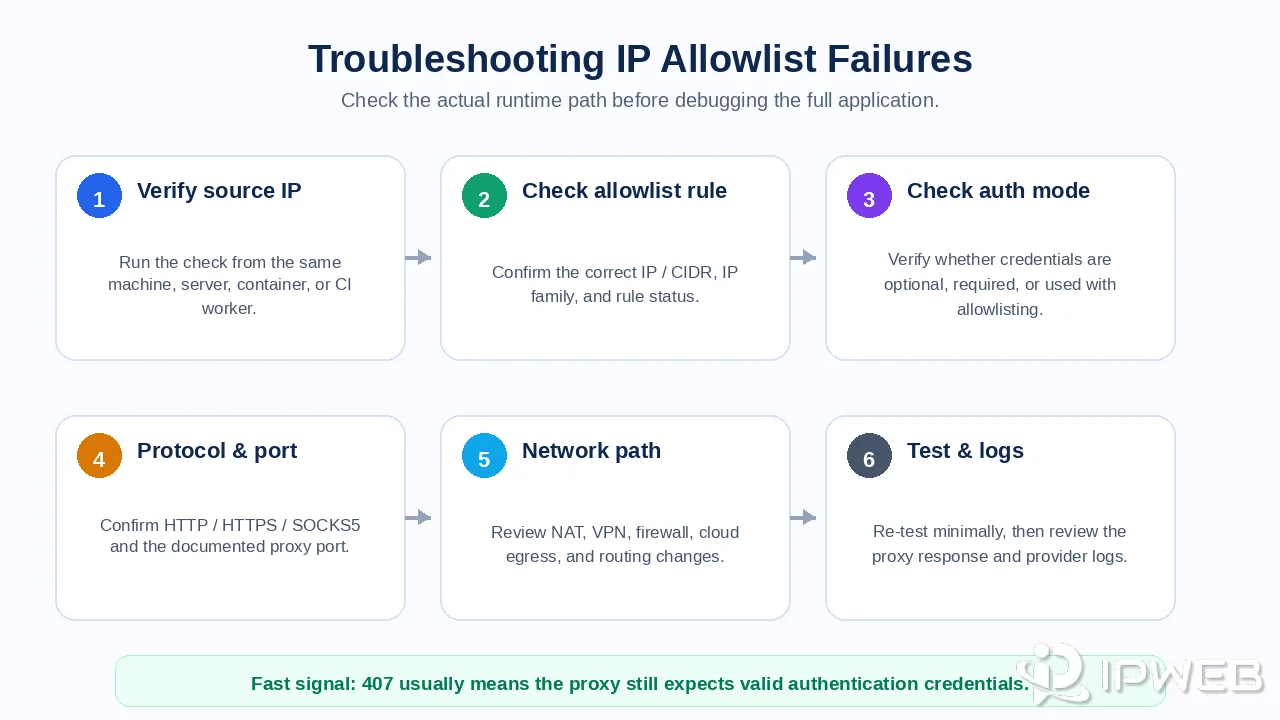
Do not debug every layer at once. Start with the observable symptom, then identify whether the failure occurs at the source-IP rule, proxy authentication, network transport, or destination system.
| Symptom | Likely layer | First checks |
|---|---|---|
407 Proxy Authentication Required | Proxy credentials | Username, password, authentication format, account status, and endpoint |
| Works with credentials but not IP allowlisting | Source-IP rule | Actual public egress IP, dashboard entry, propagation, and allowlist slot limits |
| Works locally but fails in CI | Different egress route | CI runner public IP, shared workers, autoscaling, and NAT gateway |
| Worked yesterday, fails today | Dynamic source IP | Current ISP-assigned public IP and whether the old rule is stale |
| IPv4 works, IPv6 fails | IP-family support | Provider IPv6 support, DNS preference, and which family the client selects |
| Connection timeout or refused | Transport or firewall | Proxy host, port, protocol, outbound firewall, and provider availability |
| Proxy works, but the target rejects requests | Destination-side rule or policy | Proxy exit IP, target allowlist, authentication, permissions, and platform rules |
| CIDR entry rejected | Rule format | Whether the platform accepts CIDR, allowed prefix lengths, or only single IPs |
A minimal command-line request is useful before debugging a larger browser or automation framework. Test with the provider's documented endpoint and authentication mode, then confirm the visible proxy exit IP. The proxy validation guide provides a broader checklist for checking whether the intended application is using the configured route.
Allowlisting a Fixed Proxy Exit IP
Some workflows need the opposite rule direction: the destination system allows requests only from a known proxy exit IP. This is common with partner APIs, private dashboards, databases, internal admin tools, and services protected by an IP allowlist.
In this setup, a rotating residential pool is usually unsuitable because the destination sees changing exit IPs. A fixed dedicated or static ISP-style proxy is easier to register, document, and audit. IPWeb Static Residential / ISP Proxies are relevant when a permitted workflow specifically needs a stable outbound IP that can be added to a destination allowlist.
Before registering the proxy exit IP, confirm whether it is dedicated, how replacement works, which IP family the target accepts, and whether the provider can change the endpoint during maintenance. A fixed IP still does not replace API keys, user permissions, TLS, or other security controls.
Security and Compliance Limits
IP allowlisting reduces the network locations from which a connection may be attempted, but it is not a complete security model. Anyone able to send traffic through an approved shared egress IP may appear to satisfy the same network rule.
- Use strong credentials or tokens when the service supports them.
- Apply least-privilege permissions to proxy dashboards and target systems.
- Review logs for unexpected source IPs, endpoints, ports, and usage patterns.
- Remove stale addresses when servers, employees, vendors, or network routes change.
- Avoid allowlisting an unnecessarily broad CIDR or ASN unless the platform and risk model justify it.
- Keep permissions, website terms, contracts, and data-use policies separate from network access.
Allowlisting controls access to the system where the rule is enforced. It does not force another website to accept a request, grant account permissions, or resolve a platform-policy restriction.
Frequently Asked Questions
Final Thoughts
Start by identifying which network identity the rule is meant to authorize: the client's public egress IP, a proxy exit IP, or an entire IP range or ASN. Then verify the actual runtime route, IP family, authentication mode, endpoint, protocol, and destination rule from the same environment that runs the workflow.
If you are setting up static ISP proxies that require destination-side IP allowlisting, confirm that the proxy exit IP will remain stable before integrating it with an API, firewall, partner platform, or private service. Also document how replacement IPs are handled so an infrastructure change does not silently break an existing allowlist.