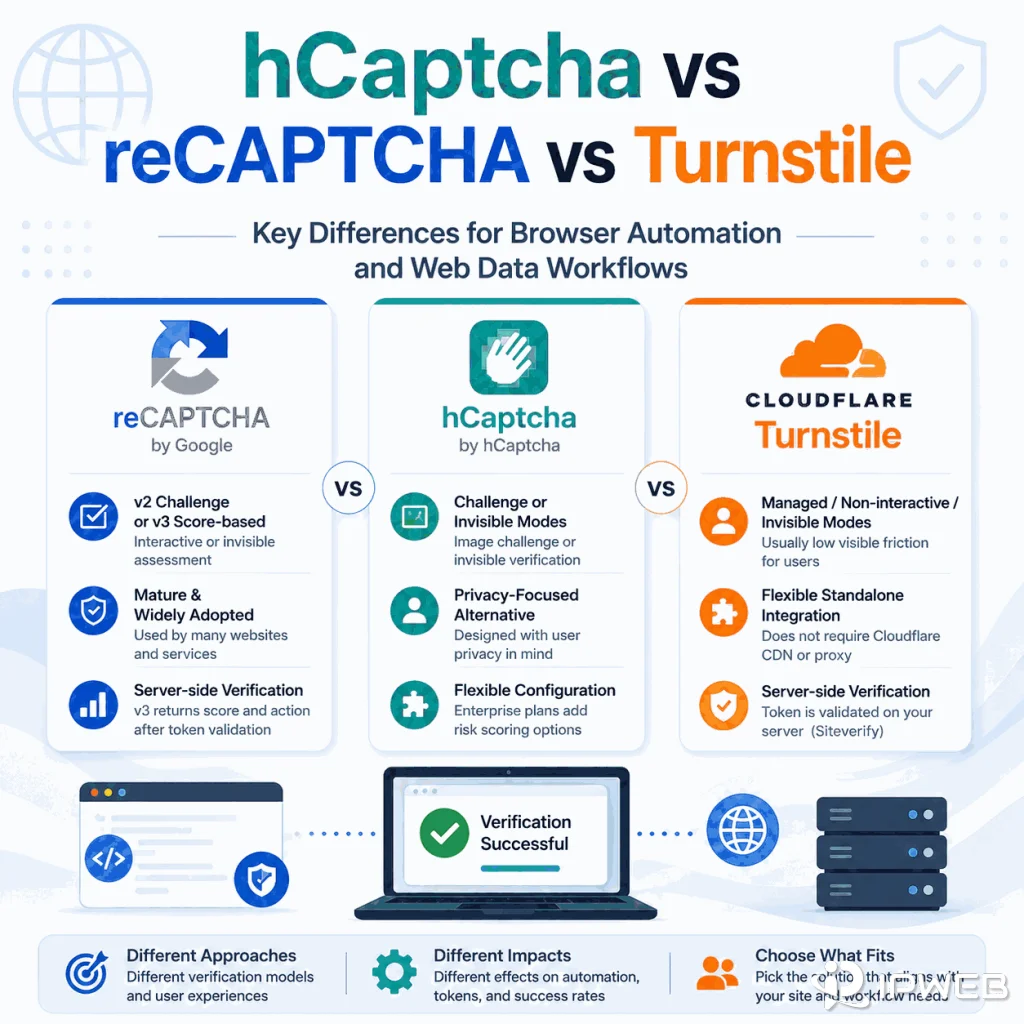
reCAPTCHA, hCaptcha, and Cloudflare Turnstile all reduce automated abuse, but they affect browser automation and web data workflows differently. The key differences are whether verification is visible, what result the site receives, how tokens are handled, and what the browser must execute correctly.
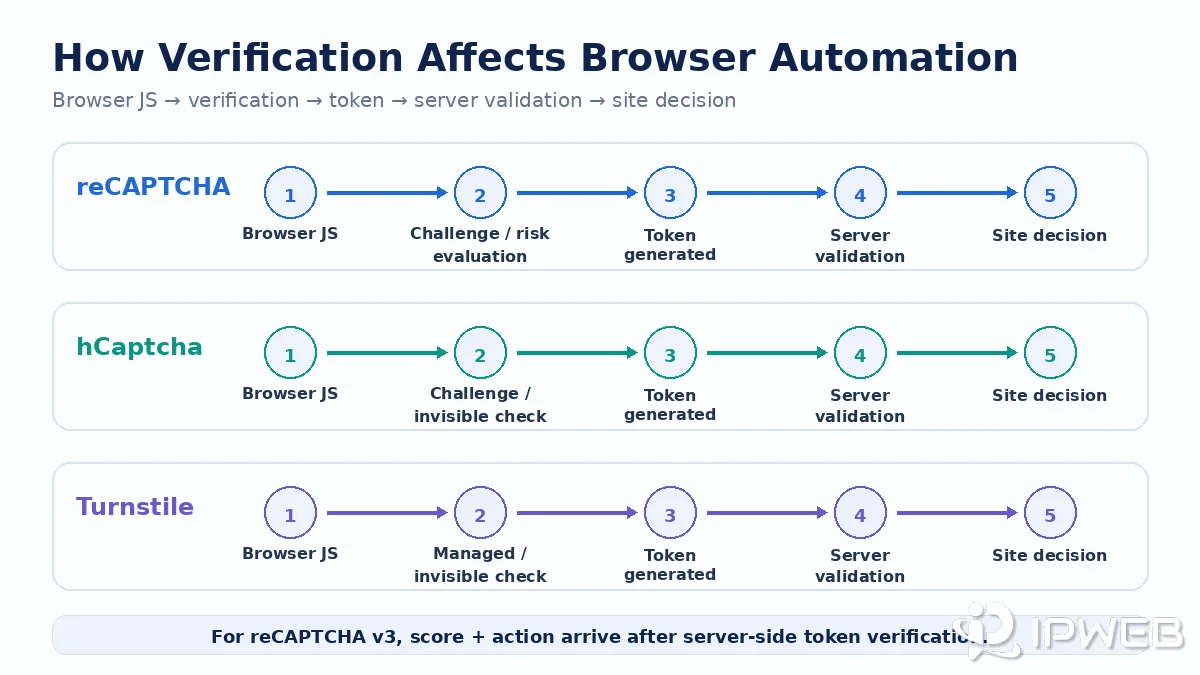
reCAPTCHA, hCaptcha, and Cloudflare Turnstile all protect websites from automated abuse, but their verification models differ. reCAPTCHA v2 can show visible challenges while v3 returns a score, hCaptcha supports challenge and invisible flows with passive verification available for Enterprise, and Turnstile emphasizes managed, non-interactive, or invisible verification. All three still depend on browser-side execution and server-side validation.
- reCAPTCHA v2 can show a checkbox or challenge; reCAPTCHA v3 uses score-based verification without a visible challenge.
- hCaptcha supports challenge and invisible flows; passive risk-score operation is available in Enterprise configurations.
- Cloudflare Turnstile offers managed, non-interactive, and invisible widget modes and does not require a site to use Cloudflare's CDN.
- All three depend on client-side execution plus backend validation, so browser state, token flow, and application logic matter in authorized automation tests.
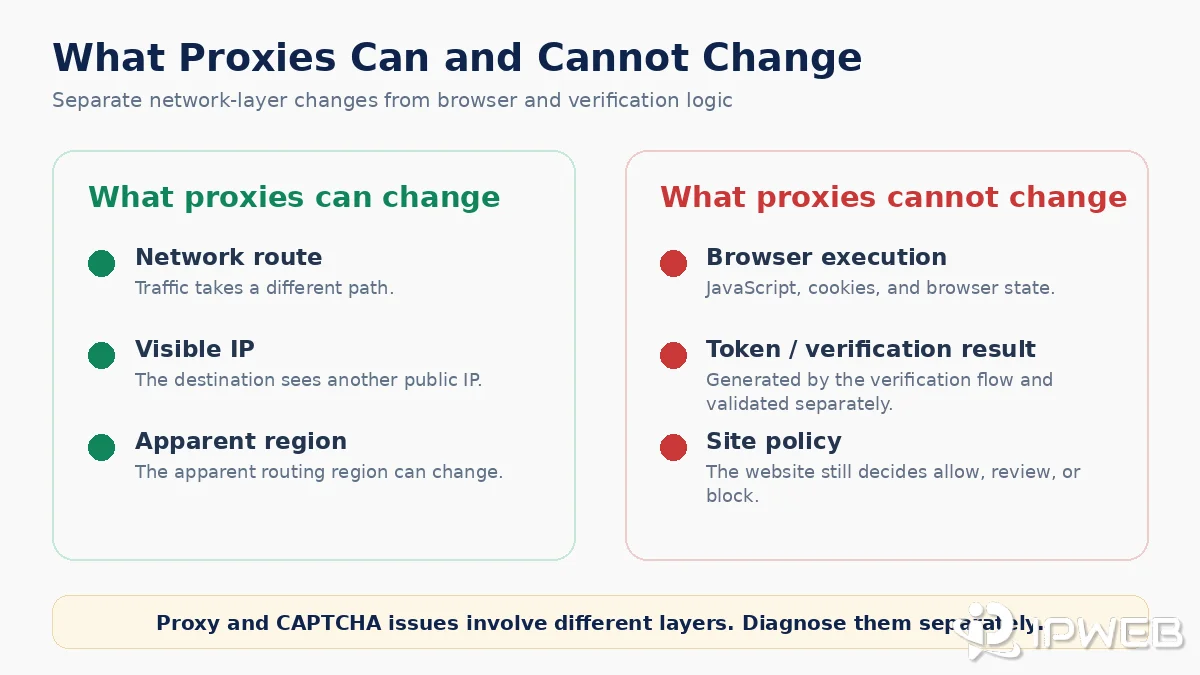
- A proxy changes the network route. It does not reproduce browser execution, create valid verification tokens, or override site-side anti-abuse decisions.
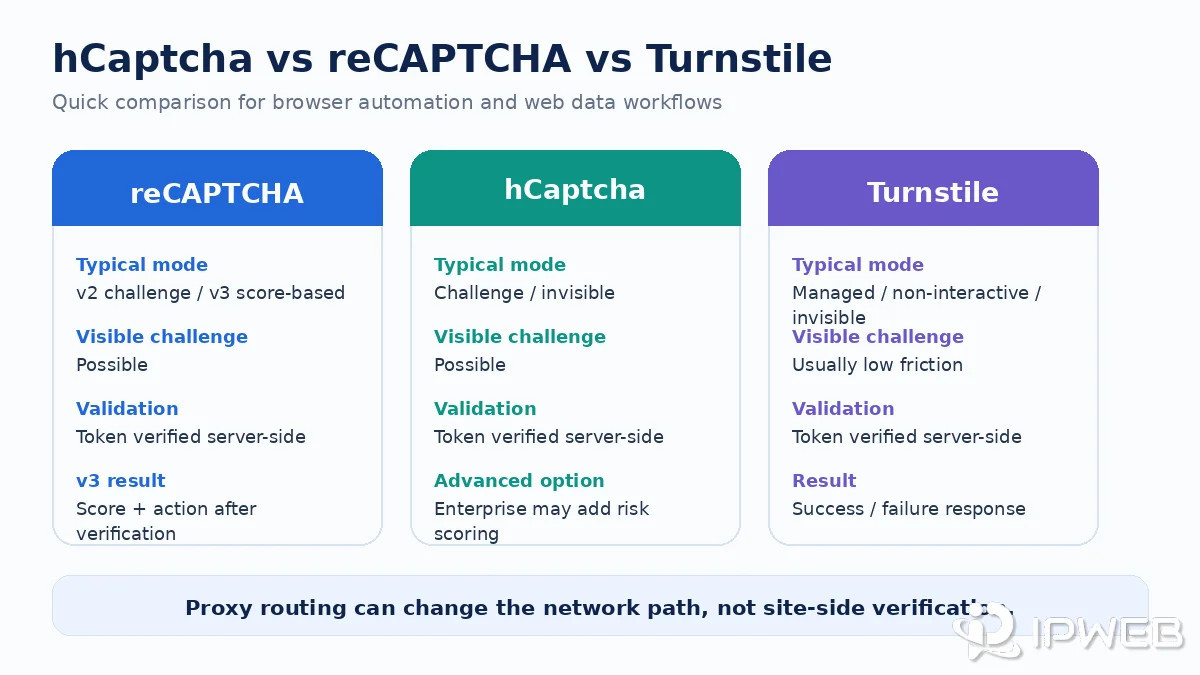
hCaptcha vs reCAPTCHA vs Cloudflare Turnstile: Quick Comparison
From a web-data perspective, the most useful comparison is not “which provider is best?” but “what does each verification flow look like inside a browser or application?” The table below focuses on the differences that affect QA, browser automation, and authorized data workflows.
| Feature | reCAPTCHA | hCaptcha | Cloudflare Turnstile |
|---|---|---|---|
| Common web modes | v2 checkbox, v2 invisible, v3 score-based | Challenge, invisible, and Enterprise passive options | Managed, non-interactive, invisible |
| Visible challenge possible | Yes with v2 | Yes, depending on configuration | Managed mode may request a checkbox; no traditional image/text puzzle |
| Background verification | Yes with v3 and v2 Invisible | Yes with invisible mode; Enterprise can use passive verification | Yes with non-interactive or invisible mode |
| Backend result | Token validation; v3 also returns score + action | Token validation; Enterprise can expose risk scoring | Token validation through Siteverify with success/failure and metadata |
| Browser-side execution | JavaScript-based web integration | JavaScript-based web integration | JavaScript widget/challenge runs in the browser |
| Server-side validation | Required for a complete implementation | Required for a complete implementation | Mandatory through Siteverify |
| Automation impact | Visible interruption with v2 or silent site decisions with v3 | Visible challenge or background verification depending on mode | Often low-visible-friction, but token and browser execution still matter |
| Does a proxy alone solve it? | No | No | No |
hCaptcha vs Cloudflare Turnstile: Key Differences
hCaptcha and Cloudflare Turnstile both support verification flows that can run with little or no visible user interaction, but they differ in how those modes are packaged and how much visible friction they may introduce. hCaptcha can present a traditional challenge, offers Invisible mode, and provides Passive verification for Enterprise customers. Turnstile offers Managed, Non-Interactive, and Invisible modes and is designed to avoid traditional image or text puzzles.
| Feature | hCaptcha | Cloudflare Turnstile |
|---|---|---|
| Main modes | Challenge, Invisible, Enterprise Passive | Managed, Non-Interactive, Invisible |
| Visible interaction | Can present a traditional challenge | Managed mode may request a checkbox; no traditional image/text puzzle |
| Background flow | Invisible mode; Passive verification in Enterprise | Non-Interactive or Invisible mode |
| Server-side validation | Required | Required through Siteverify |
| Primary UX difference | May introduce a visible challenge depending on configuration | Designed to reduce traditional visible challenge friction |
Bottom line: hCaptcha can operate with visible or invisible verification and offers passive verification for Enterprise users. Turnstile focuses more heavily on managed and background verification without traditional image or text puzzles. Both still require client-side execution and server-side validation.
How Each System Affects Browser Automation and Web Scraping
For an authorized browser automation or public-data workflow, verification can fail in more than one way. A visible challenge may interrupt a scripted action, but an invisible system can also affect the result without displaying a puzzle. A form may fail after token validation, an application may reject an expired token, or a site may apply its own rule after receiving a risk score.
This means “no CAPTCHA appeared” does not necessarily mean the workflow passed verification. Teams need to observe the full path: page JavaScript, widget execution, token creation, form or action submission, backend validation, response status, and the site's final decision.
The three systems use different product models, but all of them separate client-side execution from backend validation. That distinction is important when testing with Playwright, Puppeteer, Selenium, a browser-based scraping service, or another environment that must behave like a real browser.
If Playwright is part of an authorized QA workflow and the network route needs to be configured separately, see IPWeb's Playwright proxy setup guide for browser- and context-level route configuration and IP verification.
Minimal Playwright Check for a Verification Widget
The following example does not solve or bypass a CAPTCHA. It only checks whether a known verification iframe is present and whether the page exposes a response field after the site's normal verification flow completes.
import { chromium } from 'playwright';

const browser = await chromium.launch({ headless: true });
const page = await browser.newPage();

await page.goto('https://example.com', { waitUntil: 'domcontentloaded' });

const widget = page.locator(
  'iframe[src*="recaptcha"], iframe[src*="hcaptcha"], iframe[src*="challenges.cloudflare.com"]'
);

console.log('Verification iframe count:', await widget.count());

const responseValue = await page.locator(
  'textarea[name="g-recaptcha-response"], textarea[name="h-captcha-response"], input[name="cf-turnstile-response"]'
).first().inputValue().catch(() => '');

console.log('Response field present:', Boolean(responseValue));

await browser.close();
Use this only on systems you are authorized to test. If the response field stays empty, inspect script loading, widget initialization, token timing, and server-side validation rather than assuming the network route is the cause.
reCAPTCHA in Browser Automation
If you need the foundation first, see what reCAPTCHA is and how it works. For automation, the main distinction is between reCAPTCHA v2 and v3.
Google documents v2 checkbox and invisible variants, while reCAPTCHA v3 runs without user interaction and returns a score. With v2, an automated browser may encounter an explicit checkbox or additional challenge. With v3, there may be no visible interruption at all; the site receives a score and action value and decides what to do next.
That makes v3 especially important for observability. A workflow can reach the page, execute JavaScript, and submit an action yet still receive different downstream behavior because the site's own logic reacts to the verification result. For QA, compare the action, token timing, backend response, and application logs rather than looking only for a visible CAPTCHA.
hCaptcha in Browser Automation
hCaptcha can also appear as an explicit challenge or run with less visible interaction. Its official documentation distinguishes invisible mode from passive mode: invisible mode removes the checkbox and can still present a challenge when criteria are met, while passive verification that consumes risk scores is an Enterprise feature.
For a browser workflow, the practical implication is similar to reCAPTCHA: seeing no initial checkbox does not remove the verification step. The client still needs to execute the provider's code and generate a token, and the application still needs to validate the response on the server. hCaptcha's developer guide explicitly requires server-side verification of the returned token.
In authorized automation testing, record whether the difference appears before token generation, during a visible challenge, during form submission, or after backend verification. That is more useful than assuming every hCaptcha-related failure is an IP problem.
Cloudflare Turnstile in Browser Automation
Cloudflare Turnstile is often less visually disruptive than traditional CAPTCHA flows. Cloudflare currently documents three widget modes: Managed, Non-Interactive, and Invisible. Managed mode can request a checkbox when more interaction is needed, while the other two can run without user interaction.
Turnstile does not require a website to route traffic through Cloudflare's CDN. Cloudflare states that it can be embedded on any website as a standalone verification service. For browser automation, however, that does not make it “just a checkbox.” JavaScript challenges run in the browser, a token is generated, and the application must validate that token through Siteverify.
Cloudflare also makes server-side validation mandatory. Turnstile tokens are single-use and expire after five minutes, so a workflow that waits too long between token generation and submission can fail even when the browser completed the visible part successfully.
What Proxies Can and Cannot Change
A proxy can change the network route and the public IP address seen by the destination. That can be useful when a QA team needs to compare permitted regional behavior or verify whether an application is actually using the intended route.
A proxy does not execute JavaScript, preserve cookies, generate a valid CAPTCHA token, reproduce a browser profile, or override the website's server-side verification rules. It also cannot guarantee that reCAPTCHA, hCaptcha, or Turnstile will accept a particular session.
If the browser or application is supposed to use a proxy, verify that first instead of changing multiple variables at once. IPWeb's proxy route verification checklist covers the basic route checks. If reCAPTCHA itself keeps appearing, the separate guide on why reCAPTCHA keeps appearing goes deeper into browser, timing, and network diagnostics.
What to Check in a Web Data Workflow
When one of these verification systems affects an authorized scraping or browser workflow, avoid random changes. Start by determining where the workflow diverges from a normal browser session.
- Page execution: Confirm required JavaScript loads and the verification widget or API initializes.
- Browser state: Check whether cookies and session state persist as expected.
- Action timing: Record when the protected action occurs and whether the token expires before submission.
- Token flow: Confirm a token is generated and reaches the application's backend in the expected request.
- Backend result: Inspect success/failure, score or action data where the provider exposes it, and relevant application logs.
- Network route: Verify the visible IP and route only after confirming the browser is using the intended configuration.
- Access boundary: Use authorized access, official APIs, or stop when verification represents a site access restriction.
This checklist is intentionally diagnostic. It does not assume that a particular IP, ASN, DNS resolver, browser setting, or timing pattern is a confirmed private scoring signal.
hCaptcha vs reCAPTCHA vs Turnstile: Which Should You Choose?
There is no single best option for every website. The more useful choice depends on whether the application needs visible challenges, score-based risk signals, passive verification, or lower-friction background verification.
| If You Need | Option to Evaluate |
|---|---|
| Checkbox or challenge-based verification | reCAPTCHA v2 or hCaptcha |
| Score-based risk result | reCAPTCHA v3 |
| hCaptcha passive risk scoring | hCaptcha Enterprise |
| Lower visible challenge friction | Cloudflare Turnstile |
| Invisible or background verification | All three have relevant modes, depending on product and plan |
Bottom line: choose based on the verification model and application workflow, not on a universal ranking. The same provider can behave very differently depending on the mode and the site's own backend rules.
Which One Is Harder for Automation?
There is no universal ranking. A visible reCAPTCHA v2 or hCaptcha challenge creates an obvious interruption, but an invisible or score-based system can be harder to diagnose because the site may reject or alter an action without showing a puzzle. Turnstile can also run invisibly while still requiring valid browser execution and server-side token validation.
From an engineering perspective, the better question is: where can this verification flow change the workflow? Compare visible interaction, JavaScript execution, token lifetime, backend validation, and the site's final decision. Those factors are more actionable than a generic claim that one provider is always “harder” than another.
Frequently Asked Questions
Final Thoughts
hCaptcha vs reCAPTCHA vs Cloudflare Turnstile is most useful as a workflow comparison rather than a simple product ranking. Compare challenge visibility, score or token behavior, JavaScript execution, server-side validation, and the site's final decision before choosing an implementation or diagnosing a failure.
For authorized browser and web-data workflows, keep network routing separate from verification logic. A proxy can change the route and public IP, but it does not replace browser execution or create a valid verification result. When troubleshooting, identify whether the failure belongs to the network layer, the browser or token flow, or the application's server-side validation.