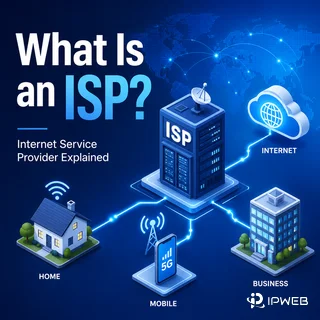
An internet connection does not reach the public internet on its own. It normally passes through a company or network organization that provides access, carries traffic, and assigns or routes the public IP address used by the connection. That organization is commonly called an ISP.
An ISP, or internet service provider, is a company or network organization that connects individuals, businesses, devices, or other networks to the internet. An ISP may provide broadband or mobile access, assign public IP addresses, operate DNS resolvers, and carry traffic between its customers and other networks. In an IP lookup, the ISP label identifies a network provider or operator associated with the address, but it does not prove the exact user, device, or physical location.
- ISP stands for internet service provider.
- An ISP connects customers or downstream networks to the wider internet.
- ISPs may provide residential broadband, mobile access, business connectivity, or wholesale network capacity.
- IP lookup tools may show an ISP, organization, and ASN, but these fields describe related network signals rather than the same thing.
- In proxy and web data workflows, ISP information is useful for route validation and network classification, not for identifying a person.
- What Does ISP Stand For?
- What an ISP Does
- How an ISP Connects You to the Internet
- Common Types of ISPs
- ISP vs IP Address vs ASN vs Organization
- Why ISP Information Matters in Proxy Workflows
- What ISP Data Does Not Prove
- How to Check the ISP Behind an IP Address
- Frequently Asked Questions
- Final Thoughts
What Does ISP Stand For?
ISP stands for internet service provider. The term usually describes the company that gives a home, office, phone, or other device access to the internet. It can also describe a network operator that sells connectivity to businesses or carries traffic for smaller providers.
Examples include national broadband companies, regional fiber providers, mobile carriers, wireless internet providers, and enterprise network operators. The exact service model varies, but the core function is the same: the ISP provides a path between a customer or downstream network and the rest of the internet.
What an ISP Does
An ISP's primary job is to provide internet connectivity. Depending on the provider and service plan, it may also perform several related functions:
- Connect a home, business, mobile device, or downstream network to the internet.
- Assign or route a public IPv4 or IPv6 address.
- Carry traffic between the customer and other autonomous networks.
- Operate DNS resolvers that translate domain names into IP addresses.
- Provide services such as email, hosting, security filtering, or managed business connectivity.
Not every ISP owns every cable, tower, or network segment involved in the connection. Some providers operate their own access infrastructure, while others lease capacity, resell service, or depend on an upstream carrier. This is one reason the ISP name shown by an IP lookup may not exactly match the brand on a customer's bill.
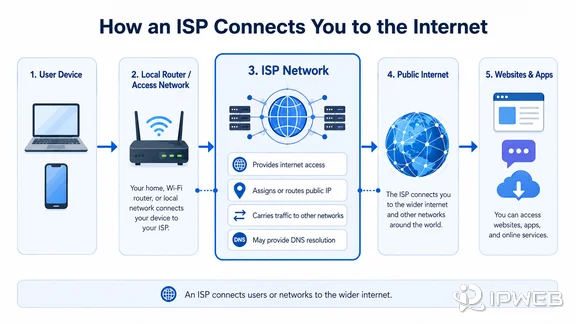
How an ISP Connects You to the Internet
When a device connects through a home router, office gateway, mobile network, or proxy endpoint, the traffic first enters an access network. The provider then routes that traffic toward other networks that can reach the destination website or online service.
The connection may use fiber, cable, DSL, fixed wireless, mobile data, or satellite. These are access technologies rather than separate definitions of an ISP. A single provider may offer several of them.
At the routing layer, networks exchange traffic through peering or paid transit relationships. The public internet is therefore not one centrally operated network. It is a collection of independently managed networks that use shared addressing and routing standards to reach one another.
Common Types of ISPs
ISPs can be grouped by the customers they serve and the part of the network they operate.
| ISP Type | Primary Role | Typical Connection or Customer |
|---|---|---|
| Consumer access ISP | Provides internet access to homes and individuals. | Fiber, cable, DSL, or fixed wireless broadband. |
| Mobile network operator | Provides internet access through cellular infrastructure. | Phones, tablets, mobile routers, and 4G or 5G connections. |
| Business or enterprise ISP | Provides managed, dedicated, or higher-capacity connectivity. | Offices, data facilities, branch networks, and private circuits. |
| Regional or wireless ISP | Serves a limited geographic area, sometimes using wireless links. | Rural communities, local businesses, or underserved locations. |
| Wholesale or transit provider | Carries traffic for other providers and large networks. | Smaller ISPs, enterprises, content networks, and international routes. |
These categories can overlap. A large telecommunications company may sell home broadband, mobile access, enterprise circuits, and wholesale transit under the same corporate group.
ISP vs IP Address vs ASN vs Organization
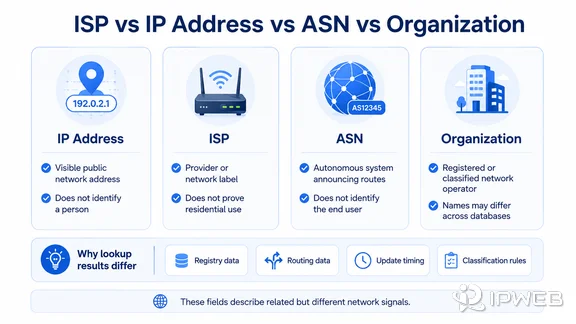
IP lookup tools often place several related fields next to one another. They should not be treated as interchangeable.
| Field | What It Describes | What It Does Not Prove |
|---|---|---|
| IP address | The public network address visible for a connection or endpoint. | The exact person, device owner, or street address. |
| ISP | The provider or network operator associated with the connection or IP range. | That the address is used by a residential customer. |
| ASN | The autonomous system that announces routes for an IP prefix. | The exact access product, end user, or application using the address. |
| Organization | The company or entity registered, inferred, or classified as operating the network. | That every database will use the same company name. |
| IP location | An approximate geographic result from a provider's database. | A precise real-time physical location. |
Public registry services such as ARIN RDAP can show registration data for IP ranges, while IANA's number resource information explains how global IP address and autonomous system resources are coordinated. Commercial lookup tools may combine registry data with routing observations, company records, geolocation models, and their own classification rules.
As a result, the ISP field may represent the direct access provider, a parent network, an upstream carrier, a reseller, or a database-assigned company label. The ASN field is usually more specific to the network announcing the route, but it still does not identify the person behind an individual request.
Why ISP Information Matters in Proxy Workflows
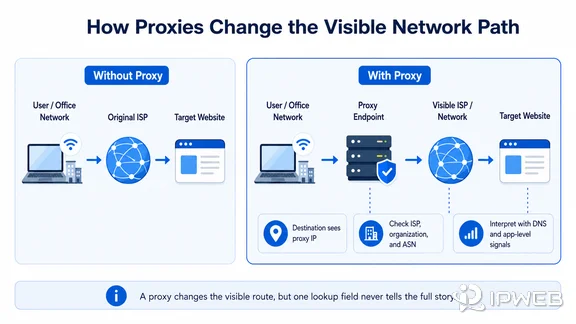
In a proxy workflow, the destination normally sees the proxy endpoint's public IP and associated network instead of the original office or home connection. Checking the ISP, organization, and ASN can help confirm whether traffic is leaving through the expected network path.
For example, a planned ISP-style route should not unexpectedly show the original office provider. A datacenter route may correctly appear as a hosting or cloud network, while a residential or mobile route may show a consumer ISP or mobile carrier. These labels are useful classification clues, but they are not universal measures of connection quality.
Some web data teams also use ISP proxies, sometimes described as static residential proxies. These proxies provide stable IP addresses registered to or associated with consumer ISP networks, distinguishing them from datacenter proxies and standard rotating residential proxies. ISP proxy architecture, session behavior, and use cases require a separate explanation and are not covered in detail here.
ISP information can support regional QA, ad verification, browser automation testing, and compliant public web data workflows. It should be evaluated together with the visible IP, DNS behavior, session settings, target response, and the exact application being tested.
What ISP Data Does Not Prove
ISP data does not reveal an exact person, account, or device. It also does not guarantee an exact city or physical address. Many users may share infrastructure, addresses may be reassigned, and databases may update at different times.
An ISP label also does not prove that an address is residential, safe, trusted, or suitable for a particular website. A provider may operate consumer broadband, business networks, mobile services, hosting infrastructure, and wholesale capacity under related names.
If two lookup tools disagree, compare the IP range registration, ASN, organization, and recent routing result before deciding that either tool is wrong. A difference may reflect update timing, naming conventions, reseller relationships, or separate classification methods.
How to Check the ISP Behind an IP Address
Run the lookup from the exact browser profile, app, server, or script you want to verify. Record the visible IP, ISP or organization, ASN, country, and network type. You can start with IPWeb's What Is My IP guide to understand these fields.
If you are validating a proxy, do not stop after confirming that one IP-check request changed. Test the actual application path and compare the result with the intended endpoint. The proxy testing checklist explains the broader checks without repeating them here.
- Test from the exact application or browser profile in use.
- Record the visible IP, ISP or organization, ASN, and country.
- Compare the result with the expected connection or proxy endpoint.
- Check a registry source when ownership or naming is unclear.
- Treat location and provider labels as evidence, not exact identity.
Frequently Asked Questions
Final Thoughts
An ISP connects users or downstream networks to the internet, but the ISP name shown beside an IP address is only one part of the network picture. For a reliable interpretation, compare the visible IP, ISP or organization, ASN, location data, DNS behavior, and the route used by the actual application.