
Your Node.js proxy forwards ordinary HTTP requests, but the moment you try an HTTPS URL the request hangs, closes, or never reaches the same request handler. That is the most common point of confusion in a hand-built HTTP proxy: HTTPS does not use the same forwarding path as plain HTTP.
The practical fix is to handle CONNECT separately. A working proxy needs one path for normal HTTP requests and another path that opens a TCP tunnel for HTTPS. The steps below start from the failure, reproduce it on Windows, add CONNECT support, and then show how to tell whether a 400, 403, 502, timeout, or connection-refused error belongs to the client, the local proxy, or the upstream destination.
If curl.exe -x http://127.0.0.1:8080 http://example.com/ works but the HTTPS version fails, your HTTP forwarding code may be fine. Add a listener for Node.js's connect event, parse the requested host:port, open the upstream TCP connection with net.connect(), return 200 Connection Established, and pipe both sockets. Then verify the route separately from the destination response.
- HTTP works but HTTPS fails: check whether the proxy handles the
connectevent. - HTTPS never reaches the normal request callback: that is expected for CONNECT tunneling.
- 403 during CONNECT: check the local port policy before blaming the destination.
- 502 during CONNECT: the client reached the proxy, but the proxy could not open the upstream connection.
- IPv6 target fails: do not parse CONNECT authorities with a simple
split(':'). - Unsure whether the proxy was used: validate process → route → response as separate checks.
Start With the Symptom: HTTP Works, HTTPS Fails
A useful debugging sequence starts with what you can observe, not with proxy theory. If the Node.js process is listening on 127.0.0.1:8080, compare one HTTP request with one HTTPS request through the same proxy endpoint.
| What you see | Most likely boundary | First check |
|---|---|---|
| HTTP works, HTTPS hangs or closes | CONNECT path | Confirm the server listens for the connect event. |
| HTTPS never appears in the normal request callback | Expected proxy behavior | Inspect the CONNECT handler instead of the ordinary request handler. |
| Connection refused | Client → local proxy | Confirm Node.js is running and the client uses the correct port. |
| 403 during CONNECT | Local proxy policy | Check whether the destination port is allowed. |
| 502 during CONNECT | Proxy → upstream | Check DNS, destination reachability, and the upstream TCP connection. |
This implementation is an explicit HTTP forward proxy: the client is configured to use a proxy host and port. It is not a browser page where a user pastes a URL, and it is not a reverse proxy in front of an application. If you need those architecture differences first, see Forward Proxy vs Reverse Proxy.
Reproduce the Failure on Windows
Before editing code, make sure the destination itself works from the same Windows machine. This prevents a DNS or destination outage from being mistaken for a proxy bug.
curl.exe -v http://example.com/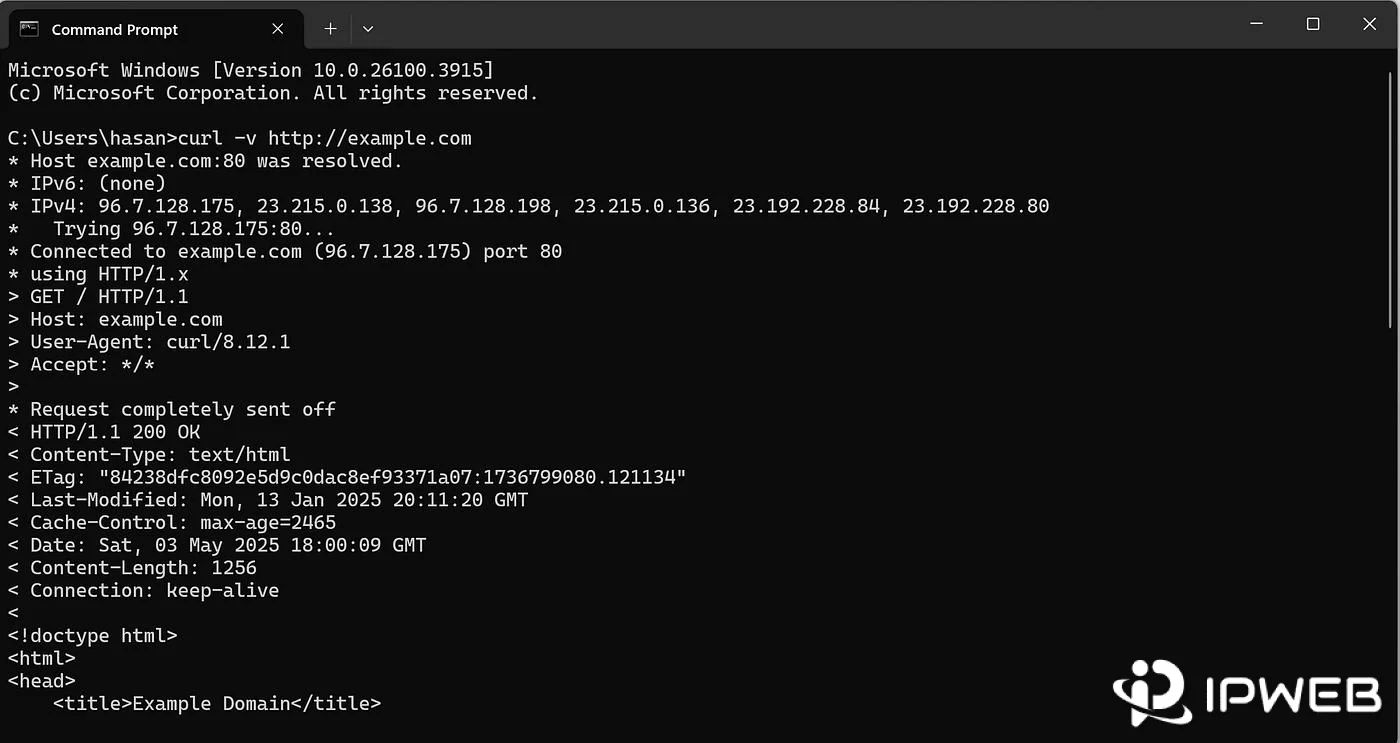
If the direct request succeeds, start the proxy and test plain HTTP through it:
curl.exe -x http://127.0.0.1:8080 http://example.com/Then change only the destination protocol:
curl.exe -v -x http://127.0.0.1:8080 https://example.com/If HTTP succeeds while HTTPS fails, you have already narrowed the problem. The local listener is reachable and ordinary forwarding works; the missing or broken part is likely the CONNECT path.
Build a Known-Good HTTP Baseline
Use a minimal HTTP-only version first. Its job is not to be production-ready; its job is to prove that the client can reach the proxy, the proxy can parse an absolute HTTP URL, and the proxy can stream the request and response without buffering the whole body in memory.
const http = require('node:http');
const { URL } = require('node:url');

const HOST = '127.0.0.1';
const PORT = 8080;

const proxy = http.createServer((clientReq, clientRes) => {
  let target;

  try {
    target = new URL(clientReq.url);
  } catch {
    clientRes.writeHead(400, { 'Content-Type': 'text/plain' });
    clientRes.end('Bad Request\n');
    return;
  }

  if (target.protocol !== 'http:') {
    clientRes.writeHead(400, { 'Content-Type': 'text/plain' });
    clientRes.end('This first version only handles HTTP\n');
    return;
  }

  const headers = {
    ...clientReq.headers,
    host: target.host
  };

  delete headers['proxy-connection'];
  delete headers['proxy-authorization'];

  console.log(`${clientReq.method} ${target.href}`);

  const upstreamReq = http.request(
    {
      hostname: target.hostname,
      port: target.port || 80,
      method: clientReq.method,
      path: `${target.pathname}${target.search}`,
      headers
    },
    (upstreamRes) => {
      clientRes.writeHead(
        upstreamRes.statusCode || 502,
        upstreamRes.headers
      );
      upstreamRes.pipe(clientRes);
    }
  );

  upstreamReq.on('error', (err) => {
    console.error(`HTTP upstream error: ${err.message}`);

    if (!clientRes.headersSent) {
      clientRes.writeHead(502, { 'Content-Type': 'text/plain' });
      clientRes.end('Bad Gateway\n');
    } else {
      clientRes.destroy(err);
    }
  });

  clientReq.pipe(upstreamReq);
});

proxy.listen(PORT, HOST, () => {
  console.log(`Proxy listening on http://${HOST}:${PORT}`);
});
Start it with:
node simple-proxy.jsAt this point, curl.exe -x http://127.0.0.1:8080 http://example.com/ should work. If it does not, do not add CONNECT yet; fix the listener, URL parsing, DNS, or upstream HTTP path first. That keeps one failure from hiding behind another.
For the underlying protocol behavior, see What Is an HTTP Proxy and How Does It Work?.
Add HTTPS CONNECT Tunneling
An HTTPS request through an HTTP proxy normally begins by asking the proxy to open a TCP tunnel to a destination authority such as example.com:443:
CONNECT example.com:443 HTTP/1.1
Host: example.com:443
If the proxy can open the upstream TCP connection, it answers:
HTTP/1.1 200 Connection Established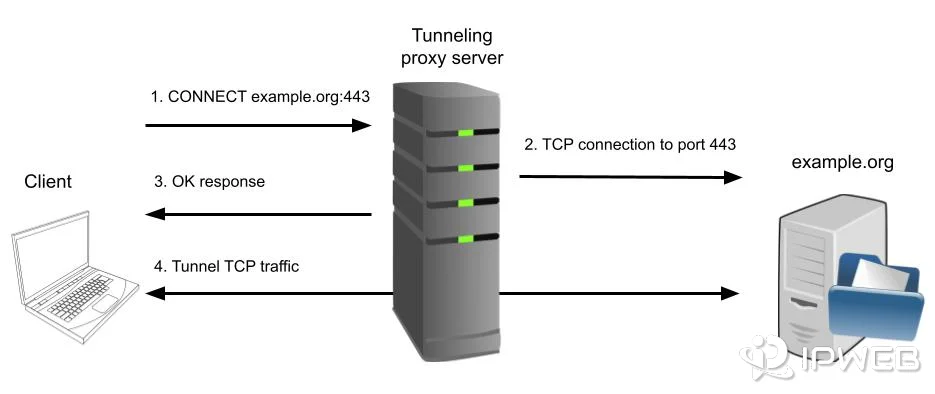
After that response, the proxy is no longer forwarding another ordinary HTTP request. It is relaying bytes between two sockets. That is why a proxy that only uses http.createServer((req, res) => ...) can handle HTTP correctly yet still fail on HTTPS.
The RFC 9110 CONNECT specification defines the tunnel semantics, and Node.js exposes CONNECT requests through the server's connect event.
Use the Complete Node.js Proxy Code
The version below keeps the HTTP forwarding path and adds the missing pieces that commonly break real tests: CONNECT handling, IPv6-aware authority parsing, an explicit CONNECT port allowlist, preservation of Node.js's head bytes, timeout handling, and cleanup when either side of the tunnel closes.
const http = require('node:http');
const net = require('node:net');
const { URL } = require('node:url');

const HOST = '127.0.0.1';
const PORT = 8080;
const UPSTREAM_TIMEOUT_MS = 15000;
const ALLOWED_CONNECT_PORTS = new Set([443]);

function endSocket(socket, statusLine) {
  if (!socket.destroyed) {
    socket.end(`${statusLine}\r\nConnection: close\r\n\r\n`);
  }
}

function parseConnectAuthority(authority) {
  if (!authority) return null;

  let hostname;
  let portText;

  if (authority.startsWith('[')) {
    const closingBracket = authority.indexOf(']');

    if (
      closingBracket === -1 ||
      authority[closingBracket + 1] !== ':'
    ) {
      return null;
    }

    hostname = authority.slice(1, closingBracket);
    portText = authority.slice(closingBracket + 2);
  } else {
    const colon = authority.lastIndexOf(':');

    if (colon <= 0) return null;

    if (authority.indexOf(':') !== colon) {
      return null;
    }

    hostname = authority.slice(0, colon);
    portText = authority.slice(colon + 1);
  }

  if (!hostname || !/^\d+$/.test(portText)) {
    return null;
  }

  const port = Number(portText);

  if (
    !Number.isInteger(port) ||
    port < 1 ||
    port > 65535
  ) {
    return null;
  }

  return { hostname, port };
}

const proxy = http.createServer((clientReq, clientRes) => {
  let target;

  try {
    target = new URL(clientReq.url);
  } catch {
    clientRes.writeHead(400, { 'Content-Type': 'text/plain' });
    clientRes.end(
      'Bad Request: expected an absolute http:// URL\n'
    );
    return;
  }

  if (target.protocol !== 'http:') {
    clientRes.writeHead(400, { 'Content-Type': 'text/plain' });
    clientRes.end(
      'Bad Request: HTTPS should use CONNECT tunneling\n'
    );
    return;
  }

  const headers = {
    ...clientReq.headers,
    host: target.host
  };

  delete headers['proxy-connection'];
  delete headers['proxy-authorization'];

  console.log(`${clientReq.method} ${target.href}`);

  const upstreamReq = http.request(
    {
      hostname: target.hostname,
      port: target.port || 80,
      method: clientReq.method,
      path: `${target.pathname}${target.search}`,
      headers
    },
    (upstreamRes) => {
      clientRes.writeHead(
        upstreamRes.statusCode || 502,
        upstreamRes.headers
      );
      upstreamRes.pipe(clientRes);
    }
  );

  upstreamReq.setTimeout(UPSTREAM_TIMEOUT_MS, () => {
    upstreamReq.destroy(new Error('Upstream timeout'));
  });

  upstreamReq.on('error', (err) => {
    console.error(`HTTP upstream error: ${err.message}`);

    if (!clientRes.headersSent) {
      clientRes.writeHead(502, { 'Content-Type': 'text/plain' });
      clientRes.end('Bad Gateway\n');
    } else {
      clientRes.destroy(err);
    }
  });

  clientReq.pipe(upstreamReq);
});

// HTTPS CONNECT tunnel handler
proxy.on('connect', (req, clientSocket, head) => {
  const target = parseConnectAuthority(req.url);

  if (!target) {
    endSocket(clientSocket, 'HTTP/1.1 400 Bad Request');
    return;
  }

  const { hostname, port } = target;

  if (!ALLOWED_CONNECT_PORTS.has(port)) {
    endSocket(clientSocket, 'HTTP/1.1 403 Forbidden');
    return;
  }

  console.log(`CONNECT ${hostname}:${port}`);

  let tunnelEstablished = false;

  const upstreamSocket = net.connect(
    { host: hostname, port },
    () => {
      tunnelEstablished = true;

      clientSocket.write(
        'HTTP/1.1 200 Connection Established\r\n\r\n'
      );

      if (head.length > 0) {
        upstreamSocket.write(head);
      }

      upstreamSocket.pipe(clientSocket);
      clientSocket.pipe(upstreamSocket);
    }
  );

  upstreamSocket.setTimeout(UPSTREAM_TIMEOUT_MS, () => {
    upstreamSocket.destroy(new Error('Upstream timeout'));
  });

  upstreamSocket.on('error', (err) => {
    console.error(`CONNECT upstream error: ${err.message}`);

    if (!tunnelEstablished) {
      endSocket(clientSocket, 'HTTP/1.1 502 Bad Gateway');
    } else {
      clientSocket.destroy();
    }
  });

  upstreamSocket.on('close', () => {
    if (!clientSocket.destroyed) {
      clientSocket.destroy();
    }
  });

  clientSocket.on('error', () => {
    if (!upstreamSocket.destroyed) {
      upstreamSocket.destroy();
    }
  });

  clientSocket.on('close', () => {
    if (!upstreamSocket.destroyed) {
      upstreamSocket.destroy();
    }
  });
});

proxy.on('clientError', (err, socket) => {
  console.error(`Client error: ${err.message}`);
  endSocket(socket, 'HTTP/1.1 400 Bad Request');
});

proxy.on('error', (err) => {
  if (err.code === 'EADDRINUSE') {
    console.error(
      `Port ${PORT} is already in use. Change PORT and try again.`
    );
  } else {
    console.error(err);
  }
});

proxy.listen(PORT, HOST, () => {
  console.log(`Proxy listening on http://${HOST}:${PORT}`);
  console.log(
    'Local-only demo: do not expose this listener to the public internet.'
  );
});
Run the final version with node simple-proxy.js, then test both protocols again:
curl.exe -x http://127.0.0.1:8080 http://example.com/
curl.exe -v -x http://127.0.0.1:8080 https://example.com/
A successful HTTPS test should show the CONNECT exchange before the destination response. The exact curl output varies by Windows and curl version, but the important transition is the same: CONNECT is accepted and the tunnel is established.
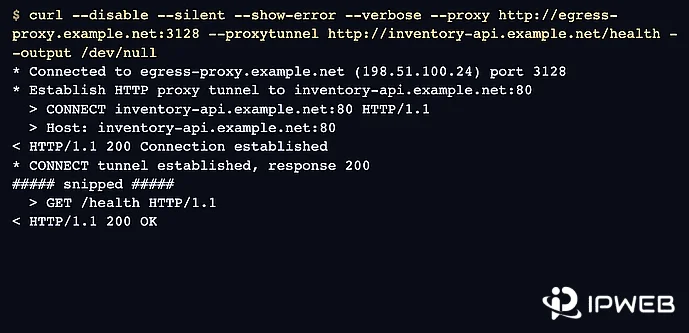
The screenshot is a reference CONNECT example, not the exact localhost run above. Your own Node.js console and curl.exe -v output are the evidence that matters.
Prove the Request Actually Uses Your Proxy
A 200 response from the destination does not prove the request went through your Node.js process. Verify three things separately.
Process: Is Node.js listening on 127.0.0.1:8080?
Route: Does the request fail when you stop the proxy but keep the same -x option?
Response: Once the route is proven, does the destination return the expected status and content?
Run the working proxy request, stop simple-proxy.js, and repeat the exact same command. If the second request can no longer connect to 127.0.0.1:8080, the successful request depended on your proxy. If it still succeeds, check the command, environment variables, or application proxy settings before debugging CONNECT.
Diagnose 400, 403, 502, and Connection Errors
| Symptom | What it tells you | Next check |
|---|---|---|
| Connection refused | The client cannot reach the local proxy. | Confirm Node.js is running and the proxy host/port are correct. |
EADDRINUSE |
Another process already owns port 8080. | Stop the other listener or change PORT. |
ENOTFOUND |
The proxy cannot resolve the destination hostname. | Check the hostname and DNS resolution from the proxy machine. |
| HTTP works but HTTPS fails | The ordinary forwarding path works, but CONNECT does not. | Check the connect listener, authority parsing, TCP connection, and 200 handshake. |
| 400 during CONNECT | The proxy rejected the CONNECT authority as invalid. | Inspect the requested host:port, especially IPv6 formatting. |
| 403 during CONNECT | The local proxy policy rejected the requested port. | Check ALLOWED_CONNECT_PORTS. |
| 502 Bad Gateway | The client reached the proxy, but the proxy could not connect upstream before the tunnel was established. | Check destination reachability, DNS, firewall rules, and upstream timeout. |
Avoid Four CONNECT Implementation Traps
Do not open every CONNECT port by default
The sample allows port 443. If you control an HTTPS service on 8443, add it explicitly. A broad TCP tunnel policy creates a much larger security and abuse surface than this local debugging proxy needs.
Do not replace the allowlist with an all-port set such as new Set([...Array(65536).keys()]) on any listener that could be reached beyond your own machine. That effectively turns CONNECT into a general-purpose TCP tunnel and removes one of the main safeguards in this example.
Do not parse CONNECT with split(':') when IPv6 matters
example.com:443 contains one colon, but [2001:db8::1]:443 does not. The dedicated parser handles bracketed IPv6 separately and rejects ambiguous unbracketed authorities instead of silently producing the wrong host or port.
Do not drop the head buffer
Node.js can provide bytes that arrived immediately after the CONNECT headers in head. If bytes are present, they belong to the new tunnel and should be written to the upstream socket before normal piping continues.
Do not send another HTTP error after 200 Connection Established
Before the 200 response, the proxy can still return an HTTP status such as 502. After the tunnel is established, the connection is an opaque byte stream; a later failure should close the relevant socket instead of trying to inject another HTTP response.
Know Where This Local Proxy Stops
The code solves a specific development problem: forwarding HTTP locally, tunneling HTTPS with CONNECT, and giving you enough logging and failure boundaries to debug the route. It does not add authentication, client allowlists, rate limits, production logging, concurrency controls, health checks, high availability, or a deployment security model.
It also binds to 127.0.0.1 on purpose. Changing that address to make the listener remotely reachable is not a small configuration tweak; it changes who can use the proxy and requires a separate access-control and deployment design.
When a Managed Proxy Makes More Sense
Keep the local Node.js proxy when your goal is development, protocol learning, or debugging a controlled application path. If the actual requirement is managed IP resources, geographic routing, sessions, authentication, capacity, and service availability, maintaining your own localhost proxy does not solve that layer.
For approved workflows that need managed residential IP routes rather than a local development endpoint, IPWeb's Dynamic Residential Proxies provide managed proxy endpoints. Register an account first, then contact customer service to request a trial for the intended workflow.
Frequently Asked Questions
Plain HTTP can be forwarded as a normal proxy request. HTTPS through an HTTP proxy usually begins with CONNECT, so the server needs a separate connect handler that creates a TCP tunnel to the destination.
When the client uses CONNECT, Node.js emits the server's connect event rather than treating the tunnel setup as an ordinary request handled by the normal request callback.
In this sample, 403 means the requested destination port is not in ALLOWED_CONNECT_PORTS. Check the port before investigating the destination server.
The client reached the Node.js proxy, but the proxy failed to open the upstream connection before the tunnel was established. Check DNS, destination reachability, firewalls, and the upstream timeout.
It may work for example.com:443, but IPv6 addresses contain multiple colons. A bracketed authority such as [2001:db8::1]:443 needs explicit parsing.
No. It opens a TCP tunnel and relays the encrypted TLS stream. It does not terminate the destination TLS session or inspect the HTTPS payload.
It can route requests in a controlled test, but this localhost proxy is designed for learning and debugging rather than large-scale scraping. For approved scraping workflows that need managed IP pools, geographic routing, sessions, and capacity, use a managed residential proxy service instead.
Not as written. It listens only on 127.0.0.1. Remote access would require a different bind address plus authentication, authorization, network restrictions, destination policy, and resource controls.
Final Thoughts
If plain HTTP succeeds but HTTPS fails, do not rewrite the whole proxy first. Prove that the local listener works, reproduce the failure with the same destination, then inspect the CONNECT path. Once the tunnel is established, verify the route independently from the destination response.
That sequence turns a vague “my Node.js proxy does not work” problem into a small set of observable boundaries: client → local proxy, CONNECT policy, proxy → upstream, and final response. The code matters, but knowing which boundary failed is what makes the problem fast to diagnose.
Direct request works → HTTP through proxy works → HTTPS through proxy fails → inspect CONNECT → verify route → diagnose by status or socket error.
If you need a protocol-level explanation after the implementation is working, continue with What Is an HTTP Proxy and How Does It Work?. For client protocol selection rather than implementation, see SOCKS vs HTTP Proxy.