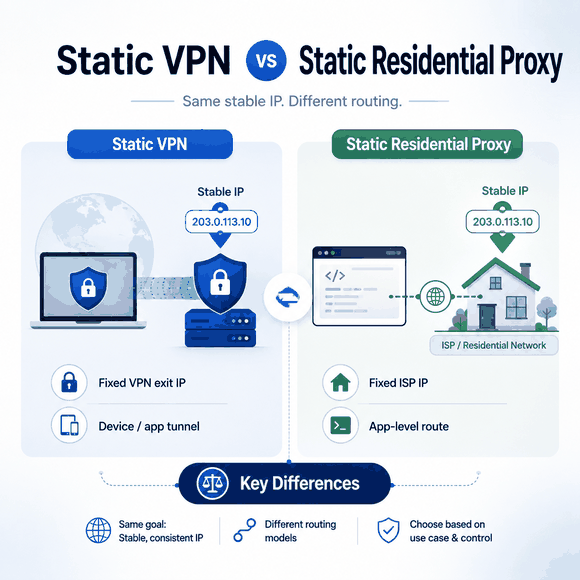
Static VPNs and static residential proxies can both keep the same public exit IP, but they solve different routing problems. A static VPN keeps a VPN exit stable, while a static residential proxy keeps an application-level proxy route stable and uses an IP associated with an Internet Service Provider. The better fit depends on routing scope, network identity, and how the fixed IP will be used.
The important questions are where the IP comes from, whether it is shared or dedicated, which applications use the route, and whether you need a device-level VPN tunnel or an application-level proxy connection.
A static VPN is commonly a VPN service or server option that gives you the same public exit IP across connections; depending on the provider, that IP may be shared or dedicated. A static residential proxy is a fixed proxy endpoint with an ISP-registered IP, often called an ISP proxy. Choose a static or dedicated-IP VPN when you need a VPN tunnel across a device or selected applications, and choose a static residential proxy when you need a stable proxy route for specific browsers, scripts, or workflows.
- Both options can provide a stable exit IP, but they route traffic at different layers.
- A static or dedicated-IP VPN is the closer fit when you need a persistent VPN exit for device-wide or selected-app traffic.
- A static residential proxy is the closer fit when a browser, script, crawler, or recurring job needs its own stable ISP-registered route.
- Static describes IP persistence, not exclusivity. Check separately whether an address is shared or dedicated.
- A dedicated VPN IP is not automatically residential; IP assignment and network classification are separate properties.
- For IP allowlisting, verify persistence, assignment, ASN, and routing scope rather than relying on the product label alone.
Static VPN vs Static Residential Proxy: Quick Comparison
| Factor | Static / Dedicated-IP VPN | Static Residential Proxy |
|---|---|---|
| What stays static | VPN server exit IP | Proxy exit IP |
| Dedicated by default? | No. Static VPN servers may be shared; dedicated-IP plans are exclusive | Provider-specific; verify whether the assigned IP is shared or dedicated |
| Typical network identity | VPN-provider or server infrastructure; a dedicated IP is not automatically residential | ISP-registered / ISP ASN, commonly hosted on stable server infrastructure |
| Routing scope | Device traffic or selected applications, depending on VPN and split-tunnel rules | Browser, script, crawler, or application configured to use the proxy |
| Client-to-exit encryption | Provided by the VPN tunnel | Not equivalent to a device-wide VPN tunnel; transport security depends on protocol and application traffic |
| Typical setup | VPN app or VPN configuration | Proxy host, port, authentication, and protocol |
| Multiple independent fixed routes | Usually less convenient on one device | Well suited to separate browser profiles, scripts, or jobs when the provider permits it |
| IP allowlisting | Strong fit when a dedicated or reliably static VPN IP is used | Strong fit when the proxy IP is assigned consistently to the account |
| Typical fit | Remote access, public Wi-Fi protection, whole-device or selected-app routing | Browser QA, fixed-route automation, crawlers, recurring sessions, application-specific routing |
The fixed IP is the shared feature. The network architecture is not. A static VPN solves “keep my VPN exit stable,” while a static residential proxy solves “keep this proxy route stable and ISP-registered.”
Choose a static or dedicated-IP VPN when the main requirement is one persistent VPN exit for a device or selected applications. Choose a static residential proxy when a browser, script, crawler, or recurring job needs its own stable ISP-registered proxy route.
If your requirement is a persistent ISP-registered route for a browser, script, or recurring workflow, see how static residential proxies are assigned and configured. If the decision is broader than fixed-IP persistence, Residential VPN vs Residential Proxy compares residential network identity, routing scope, session control, and browser-level use in more detail.
What Does “Static VPN” Mean?
“Static VPN” is not a separate VPN protocol. In practice, the phrase usually refers to a VPN service that keeps the same public exit IP when you reconnect to a specific server or dedicated-IP option.
The word static describes IP persistence, not exclusivity. Surfshark's static-IP documentation, for example, distinguishes a Static IP server from a Dedicated IP: users connecting to the same Static IP server can share its fixed address, while a Dedicated IP remains fixed and is assigned only to one subscriber. NordVPN's dedicated-IP documentation similarly defines a dedicated IP VPN as a VPN connection with a personal fixed IP.
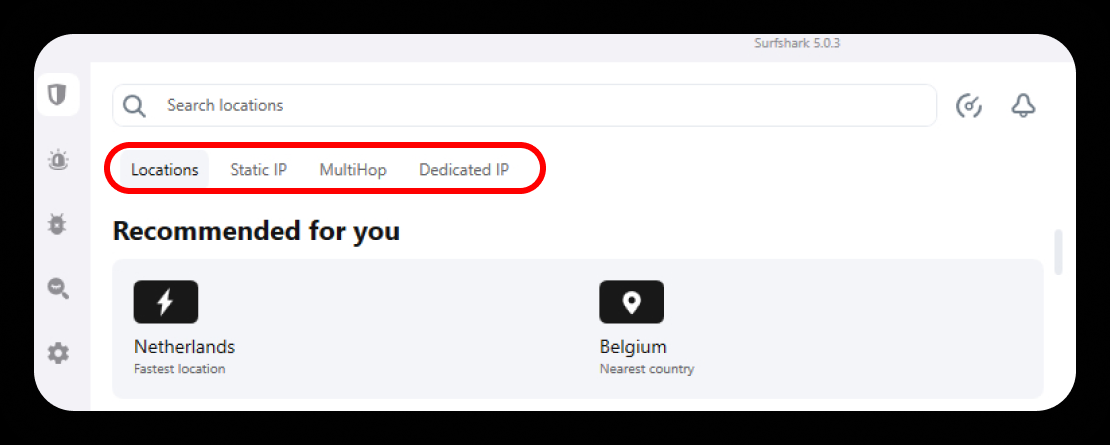
That distinction matters when a service requires an allowlisted source address. A shared static VPN IP can remain stable without being exclusive, while a dedicated VPN IP combines stability with one-customer assignment.
A dedicated VPN IP is typically designed to remain fixed for the assigned customer, but not every static VPN IP is dedicated.
What Is a Static Residential Proxy?
A static residential proxy is a proxy endpoint that keeps the same ISP-registered IP instead of rotating to a new address between requests or sessions. Providers also commonly call this an ISP proxy or static ISP proxy.
The word residential in this category refers primarily to the IP's ISP registration and network identity, not necessarily to a physical computer sitting in someone's home. Oxylabs describes static residential proxies as IPs assigned through Internet Service Providers while using server infrastructure for stability. Bright Data and other ISP-proxy providers document a similar ISP-registered, server-hosted model.
Because provider terminology is not fully standardized, it helps to separate network identity from allocation behavior. What Is an ISP Proxy? explains how ISP association, static assignment, shared allocation, and dedicated allocation describe different properties of the service.
A static residential proxy is configured at the proxy layer. A browser, crawler, script, or backend service connects to the proxy using a supported proxy protocol, and the destination sees the proxy's public IP for the traffic routed through that connection.
This differs from a VPN client, which normally creates a tunnel at the device or operating-system routing layer. A proxy can provide a stable public route without automatically turning every application on the device into part of the same tunnel.
Why Can the Same Fixed-IP Goal Use Two Different Networks?
IP persistence and transport architecture are separate properties. The same public address can stay stable whether traffic reaches it through a VPN tunnel or through an application-level proxy connection.
VPN implementations use different protocols, but the core design is a protected network path between a client and a VPN endpoint. NIST SP 800-77 Rev. 1 describes IPsec as a network-layer security control for protecting communications over IP networks and documents its use for virtual private networks.
With a static residential proxy, the application connects to a proxy endpoint instead. Only traffic sent through that proxy follows the route. SOCKS5 is one example of this application-oriented model: RFC 1928 places SOCKS conceptually between the application and transport layers rather than defining a device-wide VPN tunnel. This narrower scope is useful when one browser, script, crawler, or backend task needs a fixed IP while unrelated applications should keep their normal network path.
For the broader architectural distinction, see Proxy vs VPN.
Is a Dedicated IP VPN Residential?
No—not automatically. Dedicated describes who is assigned the address; residential describes the IP's network classification or ISP association.
A VPN provider can assign one customer a fixed, exclusive IP that still belongs to server or VPN-provider infrastructure. NordVPN, for example, explicitly notes that its dedicated IP can still be identified as a VPN address and describes it as belonging to a data center linked to the VPN provider.
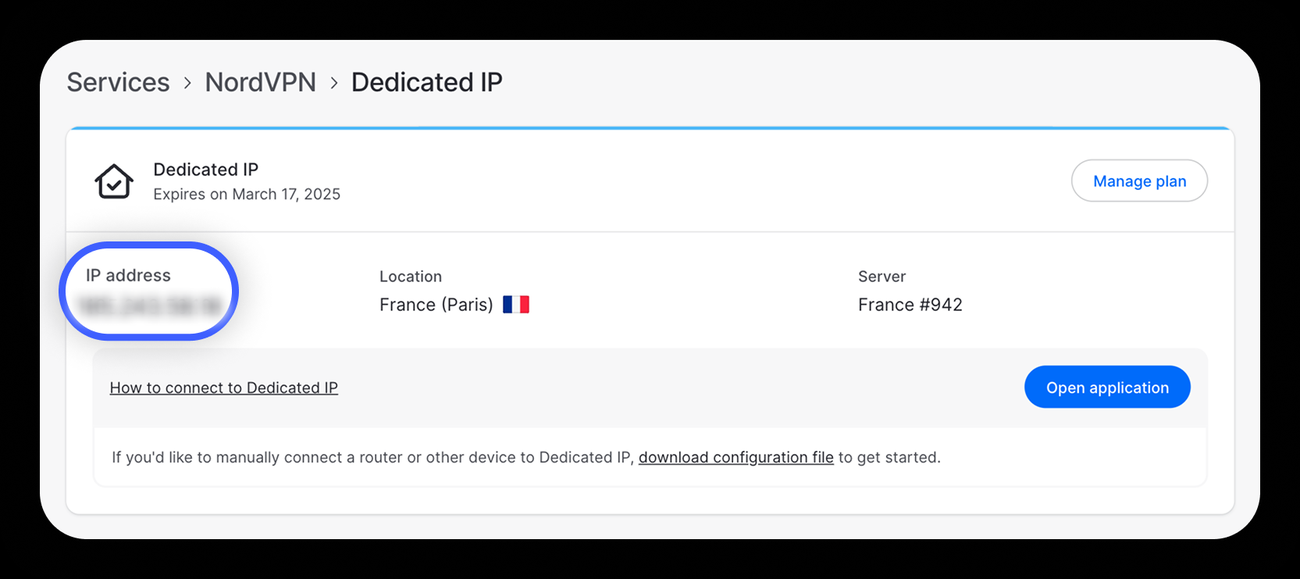
Some services separately offer VPN connections with residential IPs, but that is an additional property and should not be inferred from the words static or dedicated. If ISP classification matters to the workflow, verify the IP's ASN and organization rather than relying on the product label. The RIPE NCC explanation of Autonomous System Numbers describes an AS as a group of IP networks under a defined routing policy and the ASN as its unique routing identifier.
How Does Routing Scope Change the Choice?
A static VPN is usually the broader routing tool. When the VPN client connects, eligible traffic from browsers and other applications can use the same VPN exit. Split tunneling can narrow that scope by excluding or including selected applications.
A static residential proxy is normally more granular. You decide which browser, script, crawler, command-line tool, or backend service uses the proxy credentials. Other programs can continue using the normal network connection or another proxy.
This difference becomes important when several environments must run at the same time. A testing workstation may need one fixed route in Browser A, a different fixed route in Browser B, and the normal company connection in a terminal. Application-level proxy configuration makes that separation easier than changing the device's primary VPN exit for every task.
Neither routing model changes cookies, logged-in account state, browser fingerprints, or application identity by itself. A stable IP is one network signal, not a replacement for validating the rest of the environment. Does a VPN Hide Your IP Address? explains the boundary between changing the visible network route and the browser, account, device, and location signals that can remain available.
Which Is Better for IP Allowlisting?
Both can work for IP allowlisting, but the better option depends on what must use the allowlisted address.
A dedicated-IP VPN is a strong fit when a remote worker or device needs a stable source IP while also using a VPN tunnel. Corporate firewalls, private servers, and administrative systems can allowlist that dedicated exit as long as the organization accepts the VPN architecture.
A static residential proxy is more precise when only a browser, script, API client, crawler, or backend process needs to originate from a known address. The rest of the device does not need to share that route.
The word residential is not a requirement for ordinary IP allowlisting. What matters is that the source IP remains predictable and that the provider's assignment model matches the access policy. If exclusivity is required, confirm that the IP is dedicated rather than assuming every static plan is private. Some services may still restrict an allowlisted address if its network is classified as VPN, hosting, datacenter, or another disallowed category. When that classification matters, verify the IP's ASN, organization, network type, and reputation in addition to its stability and exclusivity. How VPN Detection Works explains how ASN, network ownership, geolocation, reputation, and other IP intelligence signals can affect that classification.
Which Is Better for Browser QA, Crawlers, and Long Sessions?
A static residential proxy is usually the more flexible choice when a fixed ISP-registered route must be attached to one browser profile, crawler, script, or recurring job. The proxy endpoint can remain stable while other applications use different network paths.
That makes the model practical for location-based QA, repeated public-page checks, long-running browser sessions, and workflows that depend on a consistent source IP. It also gives engineering teams a clear configuration object to log: proxy host, port, protocol, credentials, and assigned exit IP.
For workflows that need this fixed application-level route, confirm the provider's IP-assignment model, supported proxy protocols, location coverage, and session rules before integrating the route into a browser, script, or backend tool.
If SOCKS5 is the protocol used for that application-level route, SOCKS5 Proxy vs VPN compares protocol behavior, encryption, DNS resolution, and per-application routing in more detail.
A static or dedicated-IP VPN is often simpler when the entire workstation should share one protected route. It is also the more natural choice when the primary requirement is an encrypted device-to-VPN-server tunnel rather than per-application proxy control.
How Do You Verify a Static IP Setup?
Do not stop after seeing the expected country on one IP-check page. Verify persistence, network identity, routing scope, and assignment separately.
- Record the public IP. Check the address inside the application that is supposed to use the static route.
- Reconnect and check again. A static service should return the same assigned exit under the provider's normal service conditions.
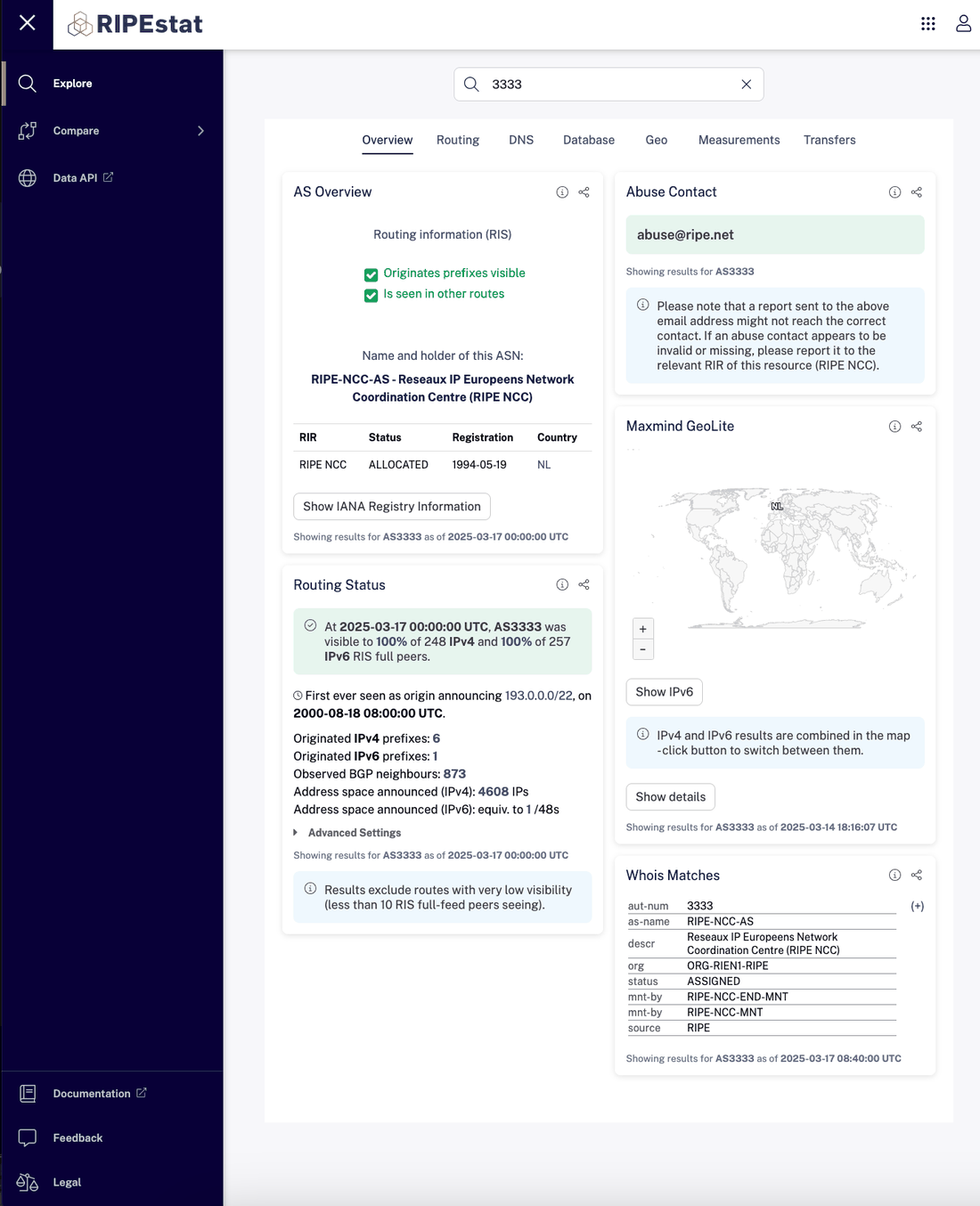
- Check the ASN and organization. Use a service such as RIPEstat to inspect routing and ASN information when network classification matters.
- Compare another application. A terminal or second browser can reveal whether the route is device-wide or limited to the configured proxy application.
- Confirm exclusivity separately. You cannot reliably infer from the IP address alone whether the provider also assigns it to other customers.
- Check DNS behavior when relevant. A stable public IP does not prove that every resolver or network signal follows the same route.
A static address is designed to remain stable, but no provider can make an IP literally permanent under every circumstance. Subscription changes, infrastructure maintenance, address replacement, or provider policies can still cause reassignment. Treat “static” as a service property, not an immutable characteristic of the Internet.
Which Should You Choose?
Choose the network layer that matches the task. The fact that both options offer a fixed IP should not be the deciding factor by itself.
| Requirement | Better Fit | Why | What to Verify |
|---|---|---|---|
| One fixed exit for most device traffic | Static or dedicated-IP VPN | VPN client can route eligible device traffic through one tunnel | Whether the IP is shared or dedicated; split-tunnel rules |
| Corporate remote access with an allowlisted source IP | Dedicated-IP VPN | Combines a stable exclusive exit with VPN tunneling | VPN protocol, dedicated assignment, company access policy |
| Fixed ISP-registered route for one browser or script | Static residential proxy | Application-level routing keeps the route isolated to the configured workflow | ASN, location, protocol, IP assignment |
| Several simultaneous jobs needing different fixed IPs | Static residential proxy | Separate proxy endpoints are easier to assign per job or environment | Concurrency rules and whether each IP is dedicated |
| Need a residential or ISP-classified exit | Static residential proxy | The product is built around ISP-registered IP space | ASN and provider documentation |
| Need a fixed IP but not necessarily ISP classification | Either | Both can provide stability | Routing scope, exclusivity, encryption, and integration requirements |
If the task is mainly about securing and routing a device through one persistent VPN exit, start with a static or dedicated-IP VPN. If the task is mainly about assigning a stable ISP-registered route to individual browsers, scripts, or jobs, a static residential proxy is usually the cleaner architecture.
Common Mistakes
Treating Static and Dedicated as Synonyms
A static IP can be shared. A dedicated IP is assigned exclusively under the provider's service model. Always check both persistence and exclusivity.
Assuming a Dedicated VPN IP Is Residential
Dedicated tells you who uses the IP, not which network owns or announces it. Check the ASN and provider documentation when ISP classification matters.
Expecting a Proxy to Create a Device-Wide VPN Tunnel
A proxy routes traffic from the applications configured to use it. It does not automatically provide the same device-level tunnel scope as a VPN client.
Choosing a Residential IP When Stability Is the Only Requirement
Some workflows only need a predictable source address for allowlisting. In that case, the decision may depend more on routing scope, exclusivity, security policy, and integration than on residential classification.
Assuming a Fixed IP Changes Every Other Browser Signal
A stable exit IP does not reset cookies, browser storage, account state, fingerprints, language, timezone, or application behavior. Validate those signals separately when they matter.
Frequently Asked Questions
Final Thoughts
A static VPN and a static residential proxy solve the same narrow problem—keeping an exit IP stable—but they solve it at different network layers. A VPN is the better fit when a device or selected applications need a VPN tunnel with a persistent exit. A static residential proxy is the better fit when a browser, script, crawler, or recurring job needs its own fixed ISP-registered proxy route.
Before choosing, verify four things separately: IP persistence, IP exclusivity, network classification, and routing scope. Those properties tell you far more than the words static, dedicated, VPN, or residential on their own.