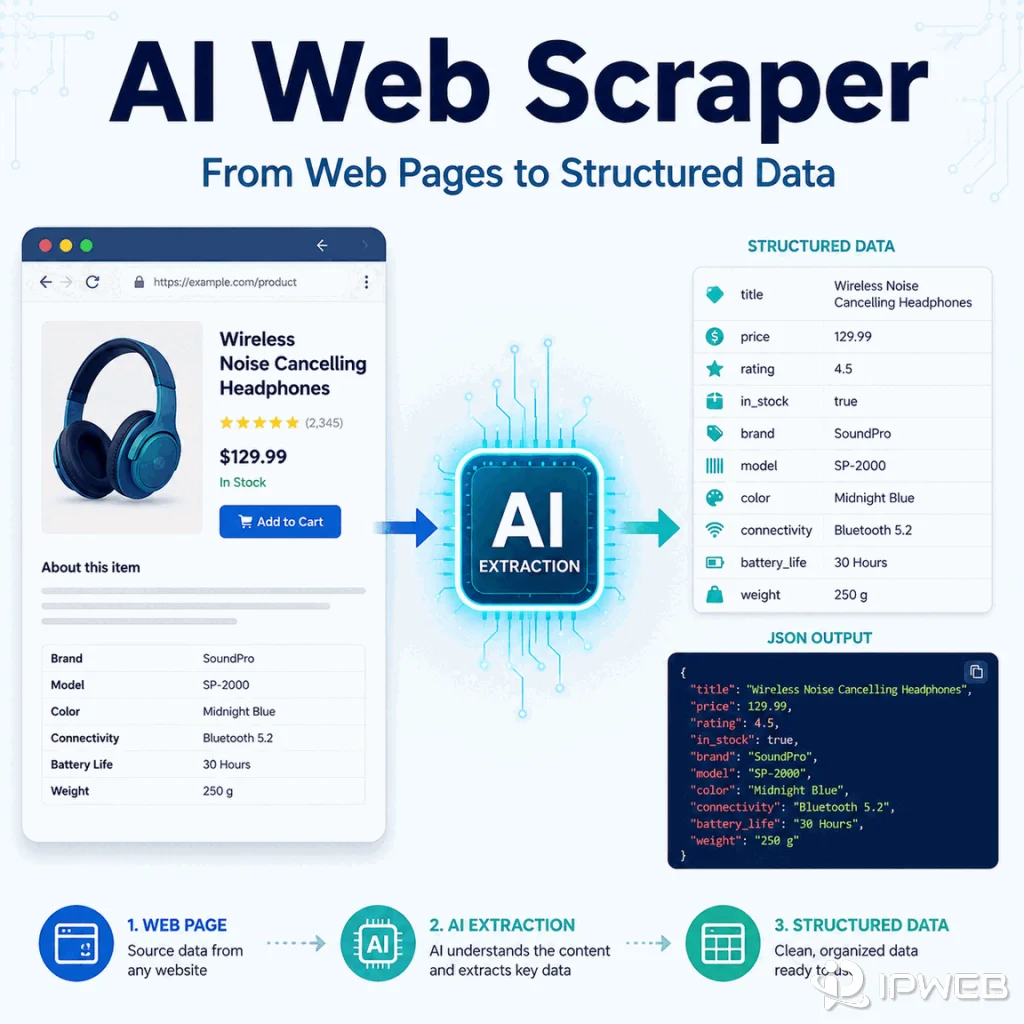
An AI web scraper is a web extraction tool that uses AI to understand page content, identify fields, handle layout variation, or convert pages into structured data with less hand-written parsing logic. It still needs normal web scraping fundamentals: permitted sources, stable requests, rendering checks, schema validation, and error handling.
The term can be confusing because people use it for several related workflows: a scraper with an LLM extraction step, a browser automation tool controlled by an AI agent, a no-code extraction product with AI field detection, or a pipeline that turns HTML into Markdown or JSON for AI systems. The shared idea is that AI helps interpret or structure page content, while the surrounding scraping workflow still handles access, rendering, validation, and delivery.
An AI web scraper uses AI to help find, extract, label, or structure information from web pages. It can reduce manual selector work, but it does not remove the need to follow source rules, run quality checks, control request rates, validate routing, and review important data.
- AI web scrapers are useful when page layouts vary or fields are hard to capture with fixed selectors.
- They are not a replacement for web scraping basics such as status-code handling, rendering, deduplication, and validation.
- AI extraction should be checked against a schema, sample pages, and known edge cases.
- An AI web scraper is different from an LLM scraper: the former is a broader tool category, while the latter commonly focuses on preparing pages for LLM use.
- For stable sources with official APIs, an API may be more reliable than scraping.
How AI Web Scraping Works
Traditional scraping often relies on selectors, DOM paths, XPath, regular expressions, or structured APIs. AI web scraping adds a model-assisted layer. The model may classify page sections, identify product names and prices, summarize visible text, normalize messy fields, or map raw page content into a predefined JSON schema. As Apify's overview of AI web scraping explains, AI can reduce manual extraction work, but it does not replace the loading and processing steps around it.
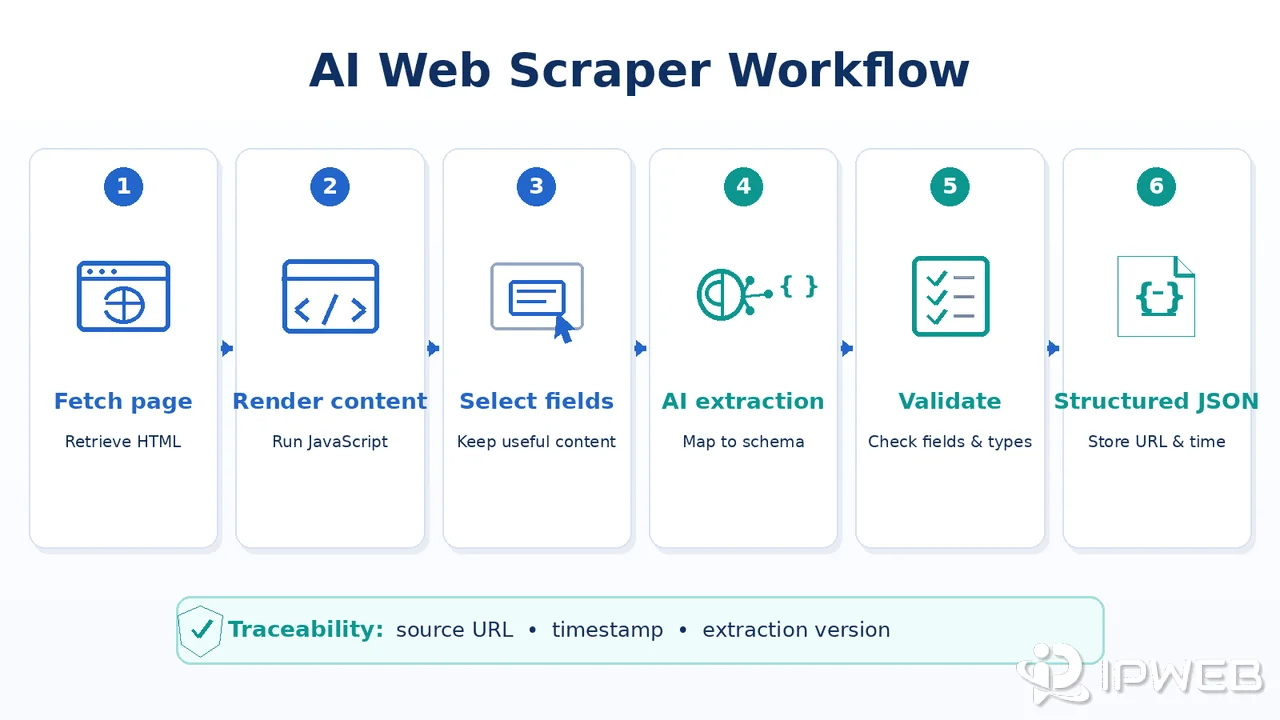
A typical workflow looks like this:
- Discover or provide the target URLs.
- Load the page with an HTTP client, browser, crawler, or web scraping API.
- Render dynamic content if needed.
- Extract page text, HTML, screenshots, or structured blocks.
- Ask an AI model or extraction engine to identify fields.
- Validate the output against rules and sample records.
- Store the result with source URL, timestamp, and extraction version.
The AI step helps when the page is messy, but the surrounding workflow decides whether the data is trustworthy.
Minimal Python Example
This simplified example requests a permitted public page, sends a limited HTML sample to an LLM, and requires the result to match a small JSON schema. It uses the OpenAI Responses API with Structured Outputs. Install requests and openai, then set OPENAI_API_KEY and OPENAI_MODEL as environment variables before running it.
import json
import os

import requests
from openai import OpenAI

URL = "https://example.com/"
MODEL = os.environ.get("OPENAI_MODEL")

if not MODEL:
    raise RuntimeError("Set the OPENAI_MODEL environment variable.")

page = requests.get(
    URL,
    headers={"User-Agent": "AI extraction demo/1.0"},
    timeout=20,
)
page.raise_for_status()

client = OpenAI()
response = client.responses.create(
    model=MODEL,
    input=[
        {
            "role": "system",
            "content": "Extract the page title, summary, and canonical URL. Use an empty string if no canonical URL is present.",
        },
        {
            "role": "user",
            "content": page.text[:12000],
        },
    ],
    text={
        "format": {
            "type": "json_schema",
            "name": "page_record",
            "strict": True,
            "schema": {
                "type": "object",
                "properties": {
                    "title": {"type": "string"},
                    "summary": {"type": "string"},
                    "canonical_url": {"type": "string"},
                },
                "required": ["title", "summary", "canonical_url"],
                "additionalProperties": False,
            },
        }
    },
)

record = json.loads(response.output_text)
print(json.dumps(record, indent=2, ensure_ascii=False))
This is a learning example rather than a production crawler. A production workflow should also enforce domain allowlists, content-size limits, rate controls, retries, logging, and schema validation across representative test pages. Treat fetched HTML as untrusted input and keep page content separate from the extraction instructions.
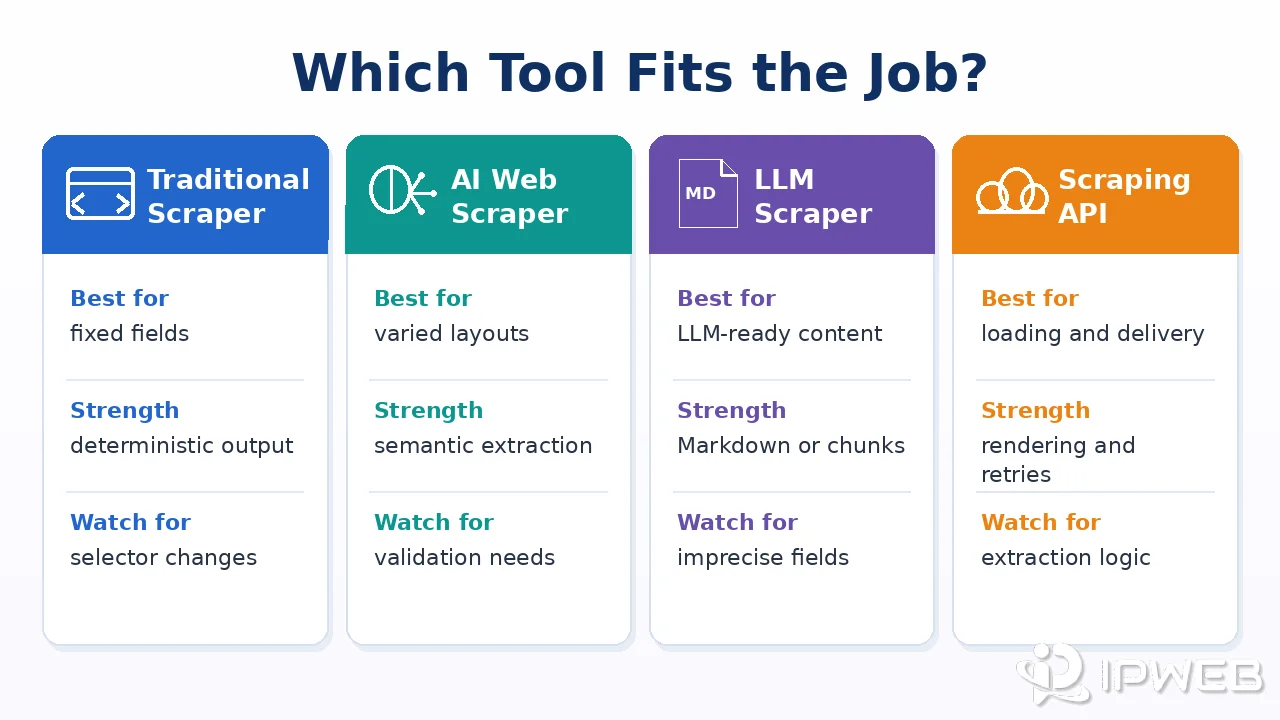
AI Web Scraper vs LLM Scraper vs Traditional Scraper
These terms overlap, but they should not be treated as identical.
| Tool type | Main job | Best fit | Main limitation |
|---|---|---|---|
| Traditional scraper | Extract known fields using deterministic rules | Stable layouts, repeatable pages, large-scale jobs | Selectors may fail when the relevant DOM structure changes |
| AI web scraper | Use AI to identify or structure fields | Variable layouts, messy text, exploratory extraction | Needs validation and can misread fields |
| LLM scraper | Commonly converts pages into LLM-ready text, Markdown, JSON, chunks, or metadata | RAG, summarization, AI search, knowledge bases | Not always optimized for strict database fields |
| Web scraping API | Manage rendering, retries, headers, and delivery | Teams that want infrastructure handled | Still needs data-use rules and output validation |
If you need exact fields at scale from stable pages, a traditional scraper may be better. If the pages vary but the task is bounded, AI extraction can save time. If the goal is to feed an LLM or RAG workflow, an LLM scraper may be the closer fit.
When an AI Web Scraper Helps
AI web scraping is strongest when the extraction problem is semantic, not just technical. For example, a model can often identify a product title even when the CSS class changes, or separate a policy update from navigation text.
Good use cases include:
- Extracting similar fields from pages with different templates.
- Turning long public pages into structured summaries.
- Classifying listings, articles, or documents before storage.
- Normalizing messy text fields from public pages.
- Building prototypes before writing deterministic extraction rules.
It is less useful when the source already has a clean API, when every field must be exact with no review, or when the page cannot be used within the source's legal or policy limits. Review web scraping legality and source rules before building a production workflow.
How to Choose an AI Web Scraper
The best AI web scraper is not simply the tool with the most automation. It is the one that fits your page types, output requirements, validation process, and operating constraints.
Check whether the tool can:
- Accept a predefined JSON schema instead of returning uncontrolled text.
- Handle JavaScript-rendered pages or connect to a browser-based rendering step.
- Return raw HTML, cleaned text, Markdown, or structured fields when needed.
- Preserve the source URL, extraction timestamp, and prompt or model version.
- Expose failed pages, missing fields, retries, and status codes for debugging.
- Support sample review, test sets, and repeatable validation before production use.
For stable pages with exact fields and high volume, deterministic extraction may still be the better choice. Use AI where semantic interpretation saves meaningful development time, not as a default layer for every page.
If your main bottleneck is JavaScript rendering, request management, and structured delivery rather than semantic field selection, the IPWeb Web Scraping API is the more relevant product path. It can handle the page-access and delivery layer while your extraction schema and validation logic remain under your control.
Quality Checks for AI Extraction
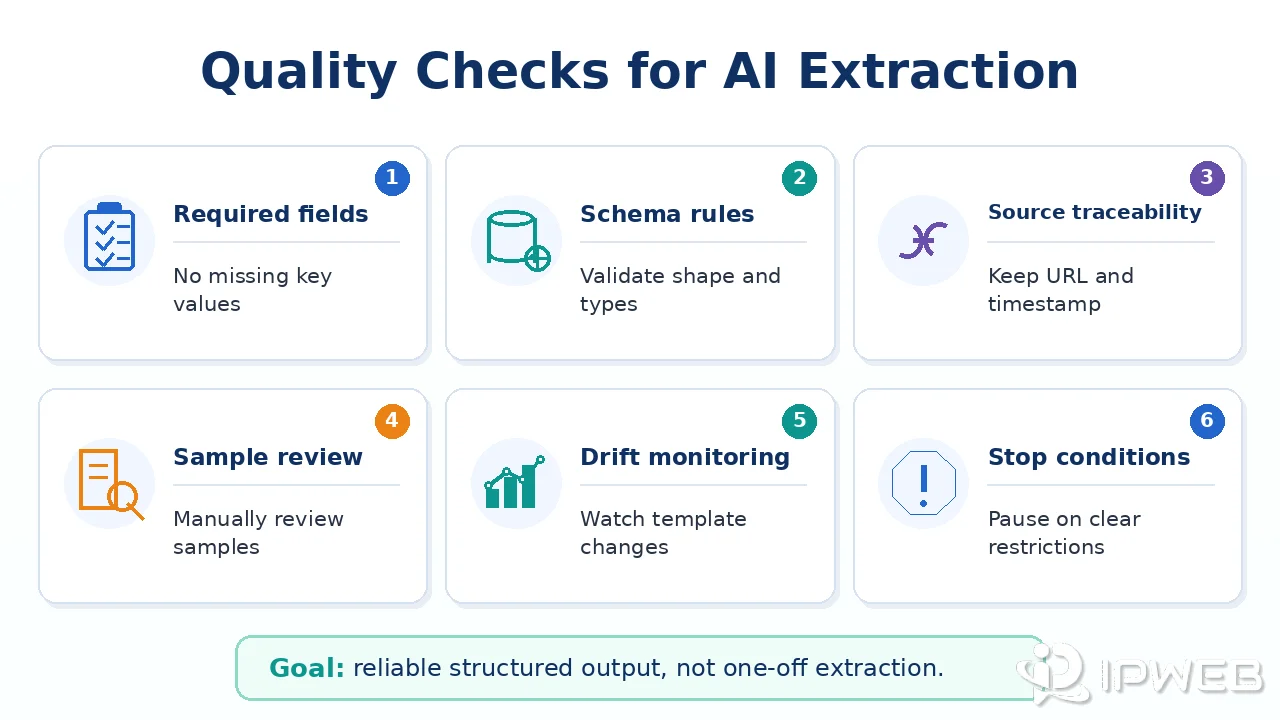
AI extraction needs measurement. A good-looking JSON object is not proof that the scraper worked.
Use checks such as:
- Required fields: every record must include the core fields.
- Type checks: prices, dates, URLs, and counts should match expected formats.
- Source traceability: each extracted field should be tied to a source URL and timestamp.
- Sample review: inspect outputs from normal, edge-case, and failed pages.
- Drift monitoring: compare extraction quality after layout changes.
- Stop conditions: apply capped retries and stop automated requests when a 403, 451, or similar response indicates a clear access restriction.
For high-value workflows, keep a small labeled test set. Run new extraction prompts or models against that set before changing production behavior. Zyte's discussion of agentic web-data workflows similarly treats extraction as one part of a broader workflow that still needs controls and verification.
Where Proxies Fit
Proxies can support AI web scraping when the task requires network testing, regional QA, or stable request routing for permitted public pages. They can also help distinguish local connection issues from target-site responses.
They do not solve data permission, account restrictions, legal restrictions, or bad extraction logic. If a page returns a legal restriction or a clear access denial, the correct response is to stop or choose a permitted source, not to force the request.
Frequently Asked Questions
Final Thoughts
AI web scrapers are useful when extraction requires judgment, flexible field detection, or quick prototyping across varied pages. They still need the same discipline as any web data workflow: approved data sources, clean routing, render checks, schema validation, and stop rules.