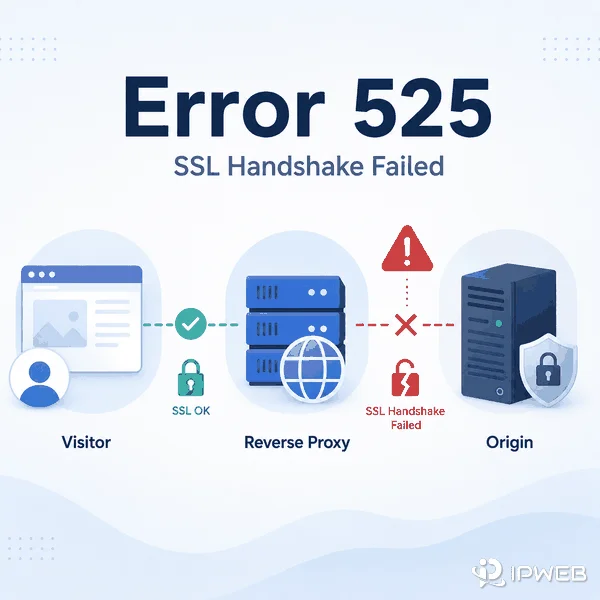
SSL handshake failed error code 525 means Cloudflare reached the origin server but could not complete the SSL/TLS handshake with it. The visitor-to-Cloudflare connection may be working normally while the separate Cloudflare-to-origin connection fails.
The problem usually belongs to the origin-side TLS path. Common areas to inspect include port 443, the origin certificate, SNI, supported TLS versions and cipher suites, firewalls, reverse proxies, load balancers, and inconsistent backend configuration.
Error 525 is a TLS handshake failure between Cloudflare's reverse proxy and the origin server. A visitor-side residential or forward proxy usually does not cause or fix it. However, an origin-side reverse proxy, load balancer, or TLS gateway can be part of the failure when it mishandles port 443, SNI, certificates, protocol versions, cipher suites, or connection policies.
- Error 525 occurs between Cloudflare and the origin server, not necessarily between the browser and Cloudflare.
- Start with port 443, SNI, protocol and cipher compatibility, origin logs, and every server behind the load balancer.
- Error 525 means the handshake could not complete; Error 526 more specifically means Cloudflare could not validate the origin certificate in Full (Strict) mode.
- Cloudflare is the reverse proxy directly involved in Error 525. A visitor-side proxy is usually only a diagnostic variable, while an origin-side reverse proxy or load balancer can be part of the TLS failure.
- Repeated 525 responses should normally be treated as an infrastructure incident rather than an ordinary retryable web response.
What Error 525 Means
Cloudflare defines Error 525 as a failed SSL handshake between Cloudflare and the origin web server. Cloudflare states that the error appears when the handshake fails and the zone is using Full or Full (Strict) SSL/TLS encryption mode.
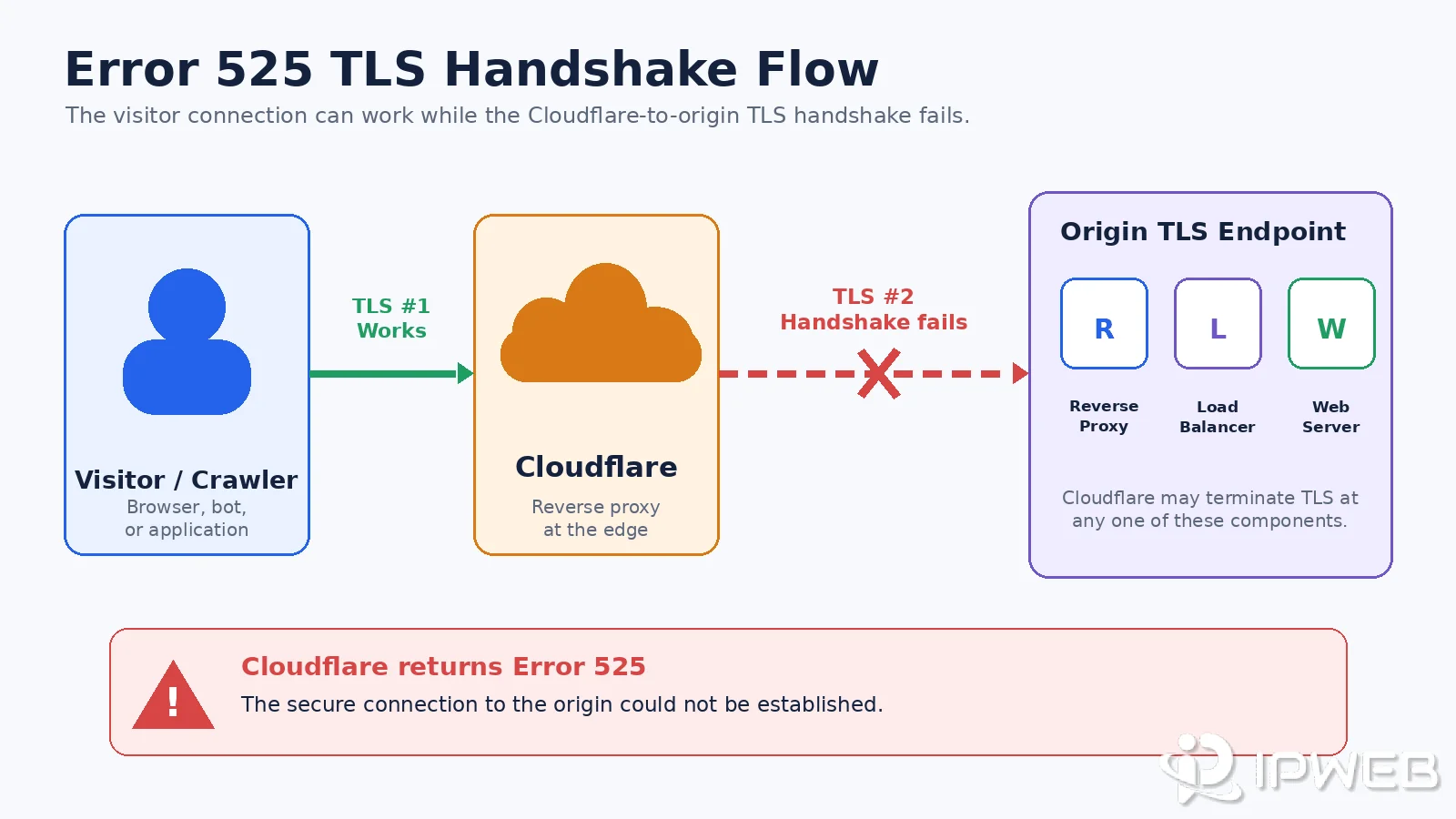
A normal HTTPS request can involve two separate encrypted connections. The browser first negotiates TLS with Cloudflare. Cloudflare then opens another TLS connection to the origin. Error 525 identifies a failure on that second connection.
The origin may still be reachable at the network level. A TCP connection can succeed while TLS negotiation fails because the origin does not present a usable certificate, does not support SNI, offers incompatible protocol or cipher settings, resets the connection, or routes the hostname to the wrong backend.
Error 525 vs Error 526
Error 526 is the closest neighboring Cloudflare error, but it describes a different stage of the origin TLS check. Error 525 means Cloudflare and the origin could not complete the TLS handshake. Error 526 means Cloudflare reached the certificate-validation stage but could not validate the origin certificate while Full (Strict) mode was enabled.
| Error | What Failed | Primary Checks |
|---|---|---|
| Error 525 SSL Handshake Failed | The Cloudflare-to-origin TLS handshake could not complete. | Port 443, SNI, TLS versions, cipher suites, connection resets, firewalls, reverse proxies, load balancers, and origin capacity. |
| Error 526 Invalid SSL Certificate | Cloudflare could not validate the origin certificate in Full (Strict) mode. | Certificate expiration, hostname coverage, revocation, trust, and certificate-chain completeness. |
Cloudflare's Error 526 documentation explains the certificate-validation case. A certificate should still be inspected during 525 diagnosis, but a certificate that is expired, untrusted, mismatched, or incomplete more directly points to Error 526 when the handshake itself succeeds far enough for Full (Strict) validation.
A single response returns one status based on where the origin TLS process fails. If negotiation breaks before certificate validation can complete, Cloudflare returns 525. If the connection reaches certificate validation but Full (Strict) rejects the origin certificate, Cloudflare returns 526. In a mixed backend pool, different requests may alternate between 525 and 526 when different nodes fail at different stages.
Unlike a 502 Bad Gateway or 503 Service Unavailable response, Error 525 specifically identifies the TLS negotiation between Cloudflare and the origin. Those errors are linked here only for boundary clarification and are not part of this article's main troubleshooting scope.
Common Causes of Error 525
Port 443 Is Closed or the TLS Service Is Not Listening
Cloudflare must be able to reach an HTTPS service at the configured origin port. A firewall may allow the server to respond on port 80 while port 443 is closed, filtered, routed to the wrong service, or not bound by the web server.
SNI Is Missing or Routed Incorrectly
Cloudflare sends the requested hostname during TLS negotiation. If the origin, reverse proxy, or load balancer does not support SNI correctly, it may present the wrong virtual host, default certificate, or no usable TLS service at all.
TLS Versions or Cipher Suites Do Not Overlap
The origin and Cloudflare must negotiate a shared TLS version and cipher suite. A server restricted to obsolete protocols, unusual cipher combinations, or inconsistent node-level policies may fail the handshake before an HTTP request reaches the application.
Do not confuse origin compatibility with Cloudflare's Minimum TLS Version setting under Edge Certificates. That setting controls visitor-to-Cloudflare connections, not the separate Cloudflare-to-origin handshake. For example, setting the edge minimum to TLS 1.3 does not by itself cause Error 525 merely because the origin supports TLS 1.2; the origin-side protocol and cipher overlap must be checked separately.
A Firewall, WAF, or Reverse Proxy Interrupts the Handshake
Security controls may permit a TCP connection but reset or terminate TLS negotiation. Review origin firewall rules, WAF events, reverse-proxy logs, and any controls that limit or block Cloudflare source ranges.
Only Some Origin Servers Are Misconfigured
Intermittent Error 525 responses often indicate that one backend, availability zone, load balancer target, or certificate deployment differs from the others. Testing only the main hostname can hide a node-specific failure.
Also verify that every A record, AAAA record, and load balancer endpoint points to a backend with the same port, SNI, certificate, and TLS configuration. Cloudflare normally prefers IPv4 when a proxied record has both IPv4 and IPv6 origin addresses, so intermittent 525 responses should not be attributed to random IPv6 selection without DNS, routing, or origin-log evidence.
The Origin Is Overloaded or Drops New TLS Connections
TLS handshakes require CPU, memory, and available connections. An overloaded origin may accept a TCP connection and then reset, time out, or abandon the handshake. Correlate 525 timestamps with resource metrics and origin error logs.
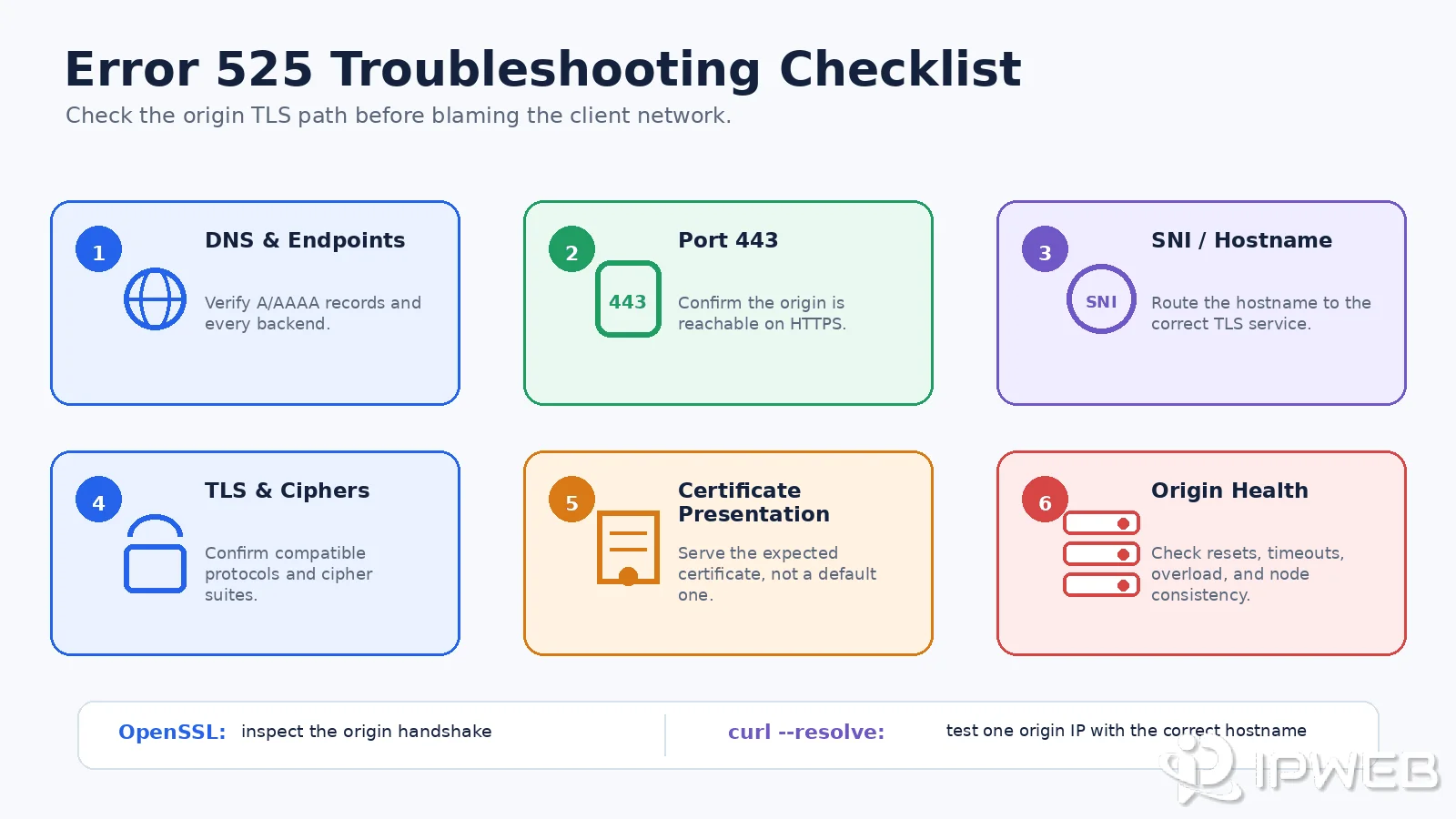
Error 525 Troubleshooting Checklist
Start by confirming that the failure occurs through Cloudflare and that you are authorized to inspect the origin. Record the hostname, timestamp, Cloudflare Ray ID when available, affected regions, and the specific backend or load balancer target involved.
- Confirm that the zone uses Full or Full (Strict) encryption mode.
- Verify that the origin is listening on port 443 or the configured secure port.
- Confirm SNI routes the hostname to the correct virtual host and TLS configuration.
- Check for a shared TLS version and cipher suite.
- Review origin, reverse-proxy, WAF, firewall, and load balancer logs at the same timestamp.
- Test every backend rather than only the public hostname.
- Compare continuous failures with intermittent failures and correlate them with capacity metrics.
- Inspect the certificate and chain, especially when Full (Strict) mode or Error 526 is also involved.
Inspect the Origin TLS Handshake with OpenSSL
Run this command from an authorized system that can reach the origin. Replace the hostname and address with values from your own infrastructure.
openssl s_client \
  -connect 203.0.113.10:443 \
  -servername www.example.com \
  -showcerts
Check whether the handshake completes, which certificate is presented, whether the certificate chain is included, which TLS version and cipher are negotiated, and whether the connection ends with an alert, reset, or timeout. A missing negotiated protocol or cipher suggests a handshake compatibility problem.
Test a Specific Origin IP While Preserving the Hostname
The following curl command connects directly to the specified origin IP while sending the correct hostname and SNI value:
curl -Iv \
  --resolve www.example.com:443:203.0.113.10 \
  https://www.example.com/
This test bypasses the Cloudflare edge, so use it only for infrastructure you administer or are authorized to inspect. A local certificate-trust warning does not always prove that the Cloudflare-to-origin connection is invalid: Cloudflare Origin CA certificates are designed to be trusted by Cloudflare, not by ordinary browsers or local trust stores.
| Test Result | Likely Area to Investigate |
|---|---|
| No certificate or immediate handshake alert | Wrong service, closed or misrouted TLS port, SNI failure, or TLS configuration error. |
| No shared cipher or protocol | TLS version and cipher-suite compatibility between Cloudflare and the origin. |
| Wrong hostname or incomplete chain | Certificate deployment and Error 526 risk in Full (Strict) mode. |
| Connection reset or timeout during negotiation | Firewall, WAF, reverse proxy, load balancer, network path, or origin capacity. |
| One backend succeeds and another fails | Inconsistent node configuration, certificate deployment, SNI mapping, or TLS policy. |
How Error 525 Relates to Proxies
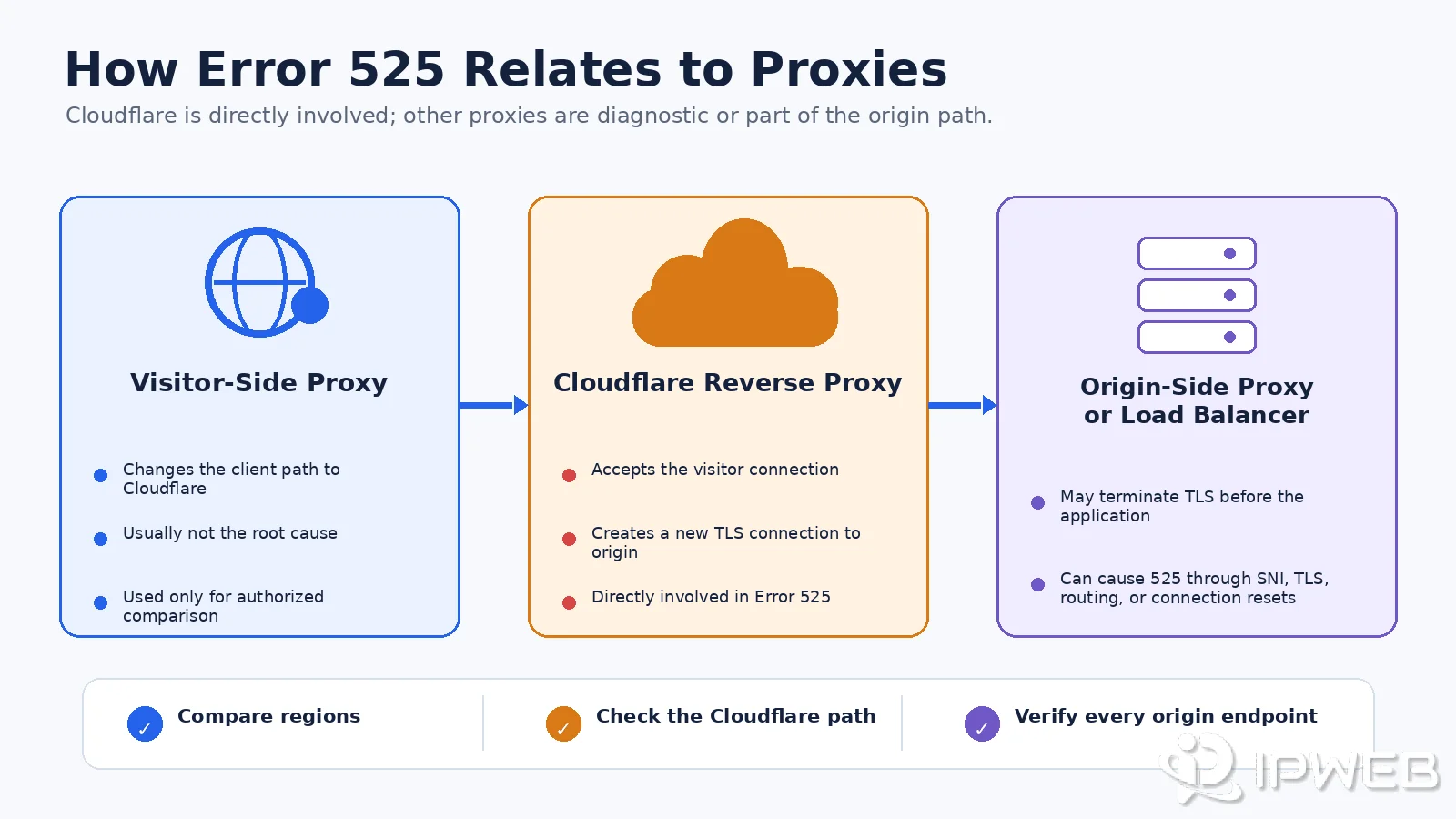
As Cloudflare's Error 525 documentation explains, the failed handshake occurs between Cloudflare and the origin server. This gives Error 525 a direct relationship with reverse-proxy architecture: the visitor establishes one TLS connection to Cloudflare, while Cloudflare establishes a separate TLS connection to the origin.
| Proxy or Network Component | Relationship to Error 525 | What to Check |
|---|---|---|
| Cloudflare reverse proxy | Directly involved. Error 525 is generated when Cloudflare cannot complete TLS negotiation with the origin. | Cloudflare encryption mode, origin port, SNI, TLS compatibility, origin logs, and Cloudflare-to-origin connectivity. |
| Visitor-side residential or forward proxy | Usually not the root cause. It changes the visitor's path to Cloudflare, but it does not configure the Cloudflare-to-origin TLS connection. | Use only to compare whether the same Cloudflare error appears from other authorized networks or regions. |
| Origin-side reverse proxy, TLS gateway, or load balancer | Can be part of the root cause because it may terminate TLS or route the handshake before traffic reaches the application server. | Port 443, SNI mapping, certificate selection, TLS versions, cipher suites, mTLS rules, backend routing, and connection resets. |
- Whether several authorized networks receive the same Cloudflare 525 response.
- Whether the failure appears only through one Cloudflare region or network path.
- Whether a local proxy problem is being confused with the target site's Error 525 response.
- Whether monitoring nodes report the same failure at the same timestamp.
In authorized crawler diagnostics, dynamic residential proxies can compare whether the same Cloudflare 525 response appears across multiple geographic regions and help rule out a location-specific client path. They do not repair the Cloudflare-to-origin TLS handshake.
If many unrelated websites fail only through one proxy route, inspect that route separately with our proxy error guide or the steps in How to Check If a Proxy Is Working. That is a different problem from a genuine Cloudflare Error 525 page.
Proxy testing is therefore diagnostic, not corrective. The repair still belongs on the origin path: port availability, SNI, certificates, TLS and cipher support, reverse-proxy configuration, load balancer routing, firewall policy, or server capacity.
How to Prevent Error 525
- Monitor origin-certificate expiration and certificate-chain deployment.
- Keep port 443 and the configured secure origin ports available to Cloudflare.
- Use consistent SNI, TLS-version, and cipher policies across every backend.
- Test each load balancer target after certificate renewals and infrastructure changes.
- Review firewall and WAF changes for effects on Cloudflare source traffic.
- Collect TLS handshake errors and correlate them with system capacity metrics.
- Validate the Cloudflare SSL/TLS encryption mode before production migrations.
Many Error 525 incidents appear after certificate rotation, load balancer migration, origin-IP changes, TLS hardening, WAF updates, or inconsistent deployment across an origin pool. A post-change handshake test is more reliable than waiting for user reports.
Frequently Asked Questions
Final Thoughts
Error 525 is narrower than a general gateway or availability failure. Cloudflare can reach the origin, but the two systems cannot finish TLS negotiation. That makes port availability, SNI, TLS and cipher compatibility, connection resets, load balancers, and origin logs the most useful starting points.
Visitor-side proxy tests are diagnostic only. The reliable repair is to correct the Cloudflare-to-origin TLS path and verify every reverse proxy, load balancer, TLS gateway, and backend that terminates or routes the secure connection.