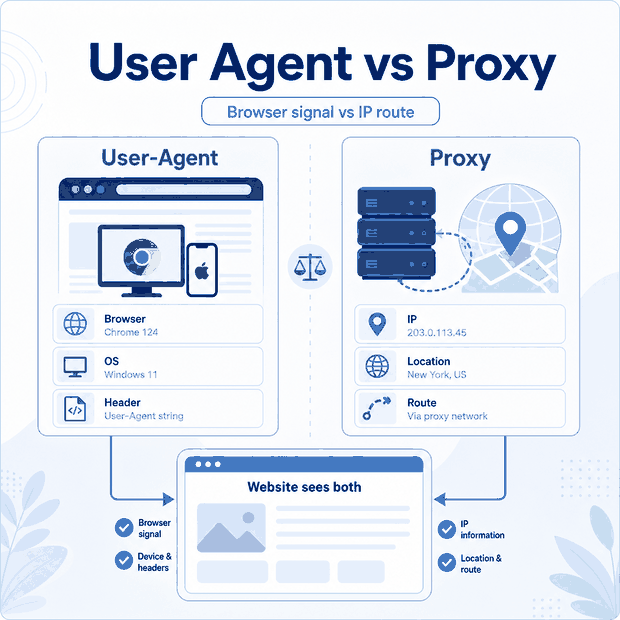
A user agent is the browser, application, or software client that sends a web request. A proxy is an intermediary that forwards that request through another network route.
In simple terms, the user agent describes the client, while the proxy affects where the connection comes from. Understanding that difference matters when testing websites, configuring Playwright or Puppeteer, or troubleshooting a browser that still receives unexpected results after the proxy has changed.
A user agent operates at the client and browser level. A proxy operates at the network level. Changing one does not recreate the other, so reliable testing should verify the IP route, request headers, browser state, and session settings separately.
- The user agent is the client software; the
User-Agentheader is one string it may send. - A proxy changes the network route when the application is configured to use it.
- Residential, static, and datacenter labels do not determine whether HTTP headers are rewritten.
- Changing only the IP may leave browser, session, and request signals unchanged.
The Core Difference
The easiest way to understand the distinction is to separate the request into two layers.
The client layer includes the browser or application creating the request. It controls browser capabilities, cookies, storage, language, viewport, JavaScript behavior, and request headers.
The network layer determines how the request reaches the destination. A proxy sits in this layer and forwards the connection through another public IP.
The User-Agent header belongs to the client layer. It is a text value that may describe the browser family, operating system, or client library. It is not the same thing as the complete browser environment.
| Component | Main Role | Typical Examples |
|---|---|---|
| User agent | Creates and sends the request. | Chrome, Firefox, Playwright, Puppeteer, curl, or a mobile app. |
User-Agent header |
Provides a client-controlled identification string. | Browser family, platform, or client library information. |
| Proxy | Forwards the request through another network route. | HTTP, HTTPS, or SOCKS5 proxy configuration. |
For a broader explanation of network routing, see IPWeb’s guide to what a proxy server is.
Why Changing the IP Alone May Not Be Enough
A common automation mistake is to confirm that the public IP has changed and assume the entire browser environment has changed with it.
That assumption can produce confusing results. The new proxy route may work correctly while the browser still keeps its existing cookies, storage, language, timezone, viewport, headers, or session history.
For example, a Playwright context may use a proxy located in one region while continuing to send browser settings created for another region. This does not automatically mean that access will fail, but it can make regional QA results difficult to interpret.
| What Was Changed | What Was Left Unchanged | Possible Result |
|---|---|---|
| Proxy IP | Cookies and account session | The website continues to use earlier session context. |
| Proxy location | Language and timezone | Regional page behavior becomes harder to validate. |
User-Agent string |
Viewport and browser capabilities | The claimed client and actual browser behavior may differ. |
| Browser proxy | DNS or another application route | Different tools may appear to use different network paths. |
| Rotating IP | Session design | Related requests may unexpectedly use different routes. |
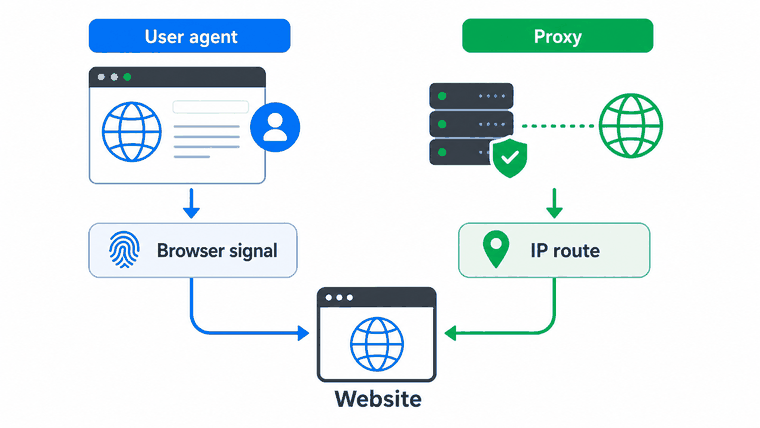
This is especially relevant in headless browser workflows, where the network route and browser context are often configured in separate places.
What Each Setting Actually Changes
The proxy and User-Agent header should be treated as separate configuration controls.
| Setting | What It Can Change | What It Does Not Recreate |
|---|---|---|
| Proxy | Visible IP, route, ASN, and approximate IP location. | Browser engine, cookies, storage, viewport, or account state. |
User-Agent header |
The identification string included in the request. | The real browser engine, operating system, or device capabilities. |
| Browser context | Cookies, storage, locale, timezone, viewport, permissions, and session state. | The public network route unless a proxy is also configured. |
| Client Hints | Structured browser and platform information supplied by supported browsers. | The IP route or complete device identity. |
The traditional User-Agent string is also no longer the only browser identifier available to websites. Modern browsers may reduce parts of that string and provide selected information through Client Hints such as Sec-CH-UA and Sec-CH-UA-Platform.
MDN provides a technical overview of the User-Agent request header.
Do Proxies Rewrite HTTP Headers?
Not all proxy systems handle headers in the same way. More importantly, the label residential, static, or datacenter does not determine whether a header will be changed.
Those labels describe the network source or session model. Header behavior depends on the protocol, proxy software, gateway features, and service configuration.
An ordinary forward HTTP proxy normally forwards the browser’s existing end-to-end request headers. A SOCKS5 proxy works below the HTTP layer and does not normally inspect the User-Agent header. Header rewriting is more commonly associated with managed gateways, enterprise security products, reverse proxies, or services that explicitly provide header transformation.
| Setup | Typical Header Behavior | What to Check |
|---|---|---|
| HTTP forward proxy | Normally forwards end-to-end request headers without changing the User-Agent value. | Proxy logs, gateway settings, and the headers received by a controlled endpoint. |
| SOCKS5 proxy | Transports the connection without normally interpreting HTTP headers. | Whether the application routes all required traffic through SOCKS5. |
| Managed proxy gateway | May add, remove, normalize, or rewrite headers when that feature is configured. | Service documentation and account-level routing rules. |
| Enterprise security gateway | May inspect or transform traffic according to security policy. | TLS inspection, header policy, certificates, and administrator settings. |
| Reverse proxy | May modify requests before they reach the website’s application server. | This sits on the website side and is not the same as a client-side forward proxy. |
A residential HTTP proxy and a datacenter HTTP proxy can therefore forward headers in the same way. Their main difference is the network route and IP classification, not the User-Agent header.
What Websites Can Still Observe
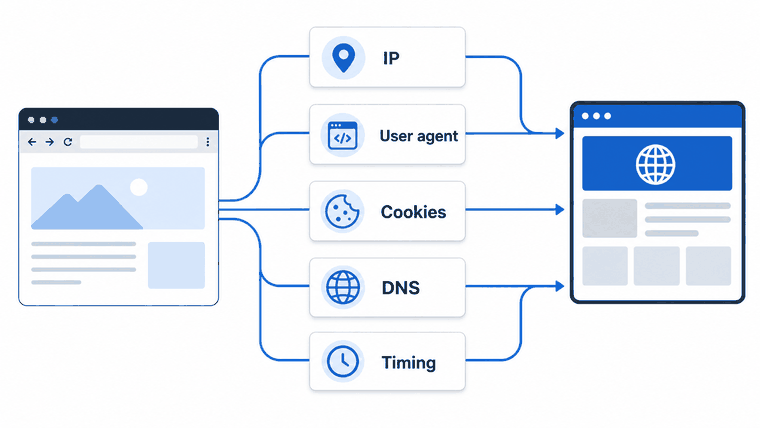
A website can receive the visible IP used for the connection and the headers supplied by the client. Browser JavaScript may also expose other environment properties.
Depending on the page and browser, observable signals can include:
- Public IP, ASN, and estimated region.
User-Agentand supported Client Hints.- Cookies and local storage state.
- Language, locale, and timezone.
- Viewport, screen properties, and touch support.
- JavaScript and browser API behavior.
- TLS connection characteristics.
- Request timing, retries, and navigation patterns.
A standard HTTP request does not directly include the user’s local DNS resolver path. DNS-related information requires a separate test and should not be described as something every website automatically receives.
How to Test the Setup
Test the network route and browser settings from the same environment used by the real workflow. A successful curl test does not prove that a browser, extension, or desktop application uses the same configuration.
Check the User-Agent Header
Use this command when you only need to confirm the User-Agent value received by a test endpoint:
curl -sS \
  -A "ExampleBrowser/1.0" \
  https://httpbin.org/headers
The response should contain the custom User-Agent string. The command does not change the IP route.
Check the Proxy Route
Use this command when you need to confirm that curl is connecting through the configured proxy:
curl -sS \
  -x "http://username:password@proxy.example:port" \
  https://httpbin.org/ip
Replace the example credentials and address with the actual proxy configuration. Compare the returned IP with the result from a direct connection.
Check a Playwright Browser Context
This example is useful when the browser context needs an explicit proxy, User-Agent string, locale, timezone, and viewport:
from playwright.sync_api import sync_playwright

with sync_playwright() as p:
    browser = p.chromium.launch(
        proxy={
            "server": "http://proxy.example:port",
            "username": "username",
            "password": "password",
        }
    )

    context = browser.new_context(
        user_agent="ExampleBrowser/1.0",
        locale="en-US",
        timezone_id="America/New_York",
        viewport={"width": 1366, "height": 768},
    )

    page = context.new_page()
    page.goto(
        "https://httpbin.org/headers",
        wait_until="domcontentloaded"
    )

    print(page.locator("body").inner_text())
    browser.close()
The settings above are explicit test controls, not proof that every browser signal now represents one real device profile. Inspect the actual headers, browser behavior, IP route, and session state rather than assuming they changed together.
The same principle applies to Puppeteer: configure the proxy route, browser context, headers, cookies, and page settings as separate parts of the test.
- Confirm the visible IP inside the exact browser or application.
- Inspect the User-Agent header received by a controlled endpoint.
- Check whether Client Hints are present.
- Start with a clean browser context when old cookies are not required.
- Verify locale, timezone, viewport, and language only when relevant to the test.
- Confirm whether the proxy is rotating or keeping the same session.
- Check whether the service or gateway has an optional header-rewrite feature.
- Record status codes, redirects, timeouts, and route changes separately.
Common Automation Mistakes
Changing Only the User-Agent String
A different User-Agent string does not create a matching viewport, operating system, rendering engine, browser API set, or mobile network route.
Changing Only the Proxy
The route may change while cookies, storage, language, timezone, and earlier session state remain active.
Assuming Proxy Type Controls Headers
Residential, static, and datacenter describe the IP source or session design. They do not tell you whether the proxy gateway modifies HTTP headers.
Testing curl Instead of the Real Browser
curl, Playwright, Chrome, and desktop applications may each use different proxy settings. Test from the client that will perform the actual workflow.
Using Rotation During a Multi-Step Session
If related requests unexpectedly use different routes, login-neutral QA, shopping-flow testing, or multi-page navigation may produce inconsistent results. Use a suitable sticky session when route consistency is required.
Interpreting Every Challenge as an IP Problem
An access challenge can be influenced by routing, session state, browser behavior, request rate, account context, or website policy. Confirm each layer before changing proxy types.
Frequently Asked Questions
Final Thoughts
A proxy and a user agent solve different parts of the connection. The proxy controls the route. The browser context controls headers, cookies, storage, locale, timezone, and other client-level properties.
For reliable automation, confirm the visible IP first, then inspect the browser and session settings that matter to the workflow. Do not assume that changing one layer updates everything around it.
When regional browser tests genuinely require changing residential routes, dynamic residential proxies can provide location selection and configurable sessions. The proxy should still be tested together with the real Playwright, Puppeteer, browser, or application environment rather than evaluated only through a standalone IP lookup.