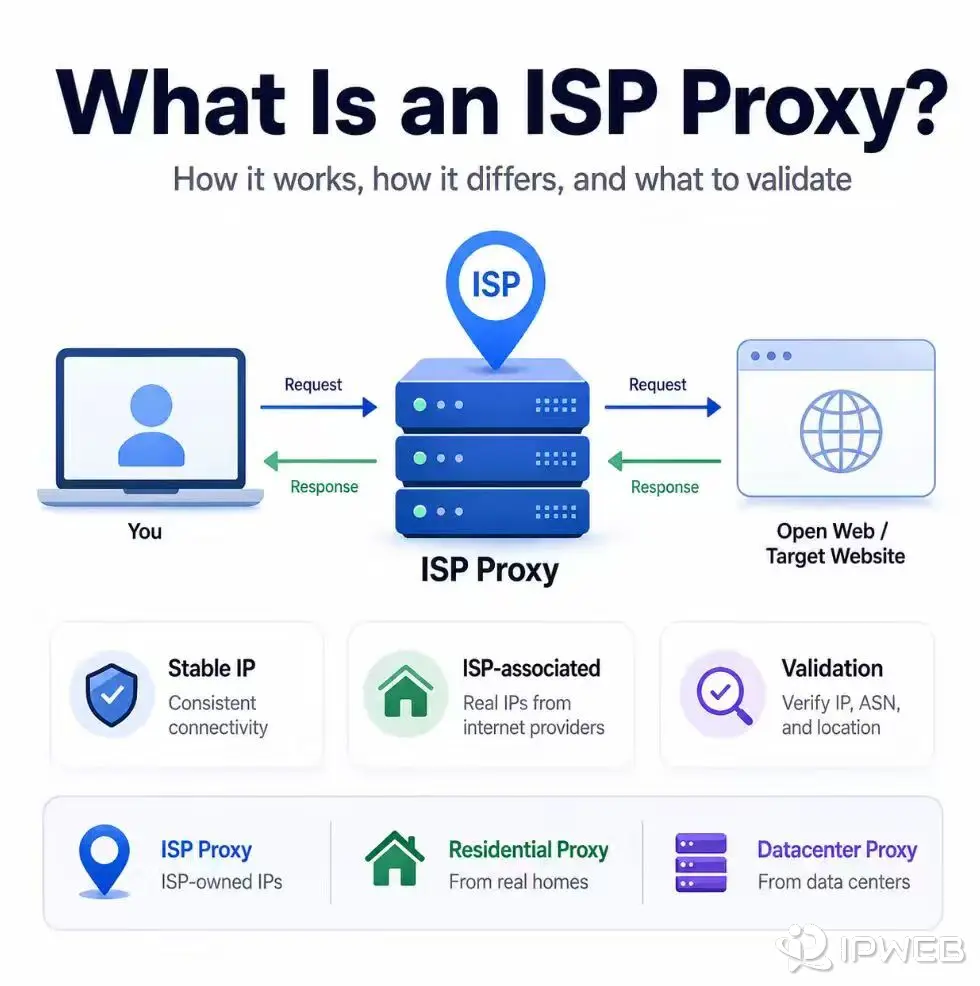
The term ISP proxy is not used in exactly the same way by every provider. It commonly refers to a stable proxy IP registered to, allocated through, or leased from an internet service provider, while the proxy infrastructure itself is often hosted on servers rather than ordinary household devices.
An ISP proxy, often called a static residential proxy, is a proxy endpoint that commonly uses a stable IP address associated with an internet service provider. It combines persistent IP sessions with ISP-related network registration, but it does not prove that traffic comes from a household device or guarantee access, compliance, or account approval.
- ISP proxies are commonly marketed as static residential proxies.
- Their request forwarding works like other forward proxies; the main distinction is the exit IP's registration, classification, and session behavior.
- ISP proxies usually prioritize stable or long-lived IP identity rather than broad IP rotation.
- Static does not automatically mean dedicated. Allocation and exclusivity depend on the provider and plan.
- Visible IP, ASN, organization, location, DNS behavior, and session persistence should be verified instead of trusting a product label alone.
How an ISP Proxy Works
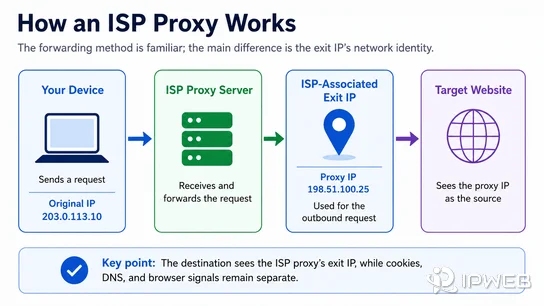
A forward proxy sits between a client and a destination server. The client sends its request to the proxy, and the proxy sends that request onward through its own exit IP. The destination therefore sees the proxy IP instead of the client's original public IP. This is the same basic forwarding role described in MDN's proxy server documentation.
With an ISP proxy, the forwarding mechanism is not fundamentally different from a datacenter proxy. The main difference is the network identity attached to the exit IP. The range may be registered to, allocated through, or commercially sourced from an ISP, so IP intelligence tools may associate it with an ISP or broadband organization rather than a cloud or hosting company.
In practice, the user configures a proxy host, port, authentication credentials, and protocol in a browser, crawler, application, or script. The exact application must use the intended proxy route. DNS handling, session settings, headers, cookies, and browser behavior remain separate signals.
Readers who need the underlying network definition can first review what an ISP is and how ISP, IP address, and ASN data relate.
ISP Proxy vs Residential vs Datacenter Proxy
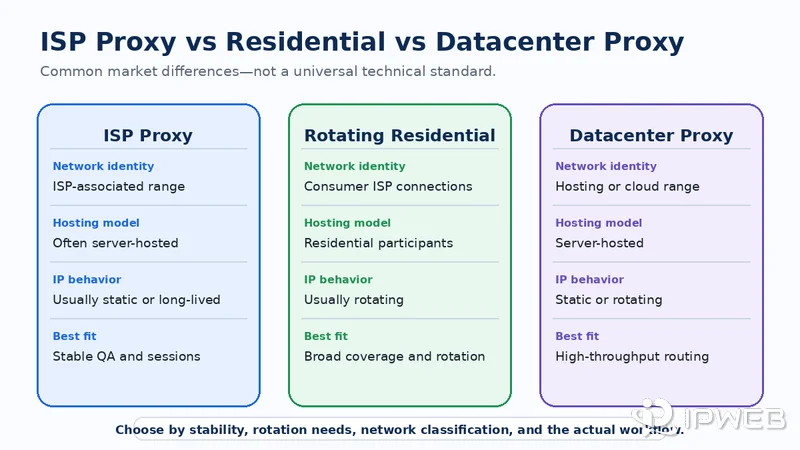
The clearest differences are the IP source, hosting model, rotation behavior, and session stability. Provider terminology still varies, so the table describes common market usage rather than a universal technical standard.
| Feature | ISP Proxy | Rotating Residential Proxy | Datacenter Proxy |
|---|---|---|---|
| Typical IP relationship | Registered to, allocated through, or associated with an ISP | Associated with consumer ISP connections and participating devices | Associated with hosting, cloud, or data center networks |
| Typical hosting model | Often server-hosted | Usually routed through residential network participants | Server-hosted |
| IP behavior | Usually static or long-lived | Usually rotating, with optional sticky sessions | Static or rotating, depending on the product |
| Session stability | Typically high | Depends on pool availability and session limits | Typically high |
| IP diversity | Usually lower than a large rotating residential pool | Usually high | Depends on the provider and allocation |
| Common fit | Repeatable QA, stable sessions, and consistent routing tests | Broad regional coverage and workflows that benefit from rotation | High-throughput routing and infrastructure testing |
Residential and ISP proxies can both display ISP-associated network data, but that does not make them identical. A rotating residential proxy commonly uses a wider pool with changing endpoints. An ISP proxy usually emphasizes a stable IP hosted on managed infrastructure.
Datacenter proxies also offer stable and fast server-based routing, but their IP ranges are commonly classified under hosting or cloud organizations. An ISP proxy attempts to pair server-level stability with an ISP-associated IP identity.
Are ISP Proxies Static or Dedicated?
Most ISP proxy products are described as static because the same exit IP can remain available for a long session or a fixed allocation period. Static refers to IP persistence. It does not automatically describe who else can use the address.
| Term | What It Means | What to Confirm |
|---|---|---|
| Static ISP proxy | The IP remains stable instead of rotating on every request. | Session duration, replacement policy, and whether manual rotation is available. |
| Dedicated ISP proxy | The IP is allocated to one customer under the provider's stated terms. | Exclusivity, allocation period, concurrent connections, and renewal rules. |
| Shared ISP proxy | The same infrastructure or IP pool may serve multiple customers. | Usage limits, concurrency, reputation management, and allocation behavior. |
A dedicated ISP proxy is usually static, but a static ISP proxy is not necessarily dedicated. Before selecting a plan, confirm whether the IP is exclusive, how long it remains assigned, whether replacements are allowed, and whether pricing is based on IP count, traffic, bandwidth, or ports.
When an ISP Proxy Is Useful
ISP proxies are most useful when a workflow needs a consistent network identity over time. A stable endpoint can reduce noise when the goal is to compare page behavior, repeat the same test, or maintain an application session without changing the visible IP on every request.
- Regional QA: compare permitted public pages, localization, or service behavior from a consistent regional route.
- Ad and landing-page verification: repeat checks without introducing unnecessary IP changes between test runs.
- Public price or content verification: collect comparable observations from a stable network path.
- Browser automation testing: keep the network endpoint consistent while debugging cookies, sessions, DNS, and application routing.
- Long-running sessions: use the same IP when frequent rotation would interrupt a permitted workflow.
ISP proxies are not ideal for large-scale public data workflows that require thousands of frequently changing IPs or broad geographic rotation. In those cases, rotating residential proxies are usually a better fit because they provide a larger and more diverse IP pool.
For workflows that genuinely require stable ISP-associated endpoints, IPWeb Static Residential / ISP Proxies provide a product path focused on consistent IP allocation rather than broad rotation.
How to Verify an ISP Proxy
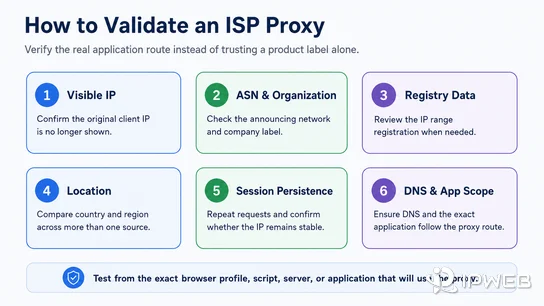
Do not rely only on the plan name. Verify the route from the exact browser profile, script, server, or application that will use the proxy. A test in one browser does not prove that another application is following the same route.
| Signal | What to Check | Why It Matters |
|---|---|---|
| Visible IP | Confirm that the original client IP is no longer shown. | Verifies whether the tested application is using the proxy route. |
| ASN and organization | Compare the announcing network and company label with the expected endpoint. | Helps validate the network identity behind the IP. |
| Registry data | Check the IP range through a source such as ARIN RDAP when applicable. | Provides registration context for the IP range, although it is not an exact end-user record. |
| Location | Compare country and region results across more than one lookup source. | Location databases can differ or update at different times. |
| Session persistence | Repeat requests over the intended session period and record whether the IP changes. | Confirms whether the endpoint behaves as a static or long-lived route. |
| DNS and application scope | Check whether DNS queries and the exact application follow the intended configuration. | Prevents a partially configured route from being mistaken for a working proxy. |
You can use the What Is My IP guide to interpret the visible IP, ASN, ISP, organization, and location fields. For a broader application-level check, follow the proxy testing checklist.
- Run the test from the exact application that will use the proxy.
- Confirm the visible IP, ASN, organization, and expected country or region.
- Repeat the test to confirm session persistence.
- Check DNS behavior and make sure no required application remains outside the route.
- Verify whether the IP is shared or dedicated instead of assuming that static means exclusive.
Limits and Misconceptions
An ISP proxy is best understood as network-routing infrastructure, not as a universal access solution. It cannot override platform rules, legal restrictions, account requirements, permissions, or website-specific access decisions.
It also does not automatically change cookies, browser fingerprints, request frequency, automation behavior, login history, or application data. A stable ISP-associated IP may improve repeatability, but stability alone does not make the rest of a session consistent.
Finally, the label does not guarantee city-level accuracy, exclusivity, unlimited session length, or a particular performance level. Those properties must be confirmed from the provider's plan terms and verified in the real application route.
Frequently Asked Questions
Final Thoughts
An ISP proxy is best understood as a stable proxy route with an ISP-associated IP identity. Evaluate it by checking the actual IP, ASN, organization, location, DNS behavior, session persistence, and allocation model. These signals provide a clearer picture than the product name alone.