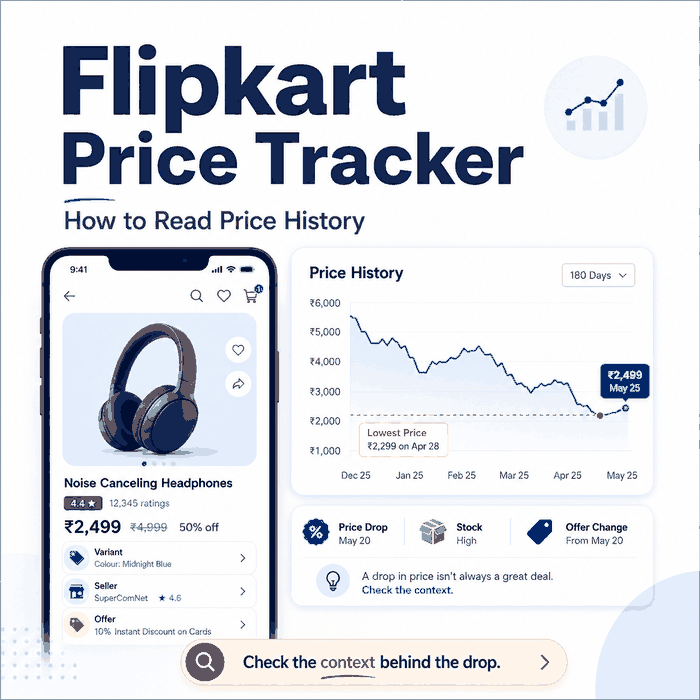
A Flipkart price tracker can show how a product's observed price changes over time, but the chart is only useful when you know what was actually compared. A lower number may reflect a different variant, seller, offer state, stock status, or delivery context rather than a like-for-like price drop.
To check Flipkart price history, copy the product URL or search for the product in a tracker that supports Flipkart, open its historical price chart, and compare the current price with previous observations. If you set a price drop alert, verify the product variant, seller, availability, delivery location, and offer conditions before treating the alert as a confirmed buying opportunity.
- A Flipkart price tracker can show historical price changes, lowest recorded prices, and price drop alerts.
- Always compare the same product, variant, seller, and offer state before treating a historical low as a genuine price drop.
- A lowest recorded price is not automatically the final price available to every buyer at checkout.
- Extensions are convenient for quick shopping checks; structured workflows are better when you need repeatable records across many products.
- Keep timestamps and page context when a price change will trigger reporting, purchasing, or downstream automation.
How to Check Flipkart Price History
The simplest method is to start with the exact Flipkart product you want to compare. Copy its product URL, then paste the link into a price tracker that supports Flipkart. Some trackers also let you search by product name, but a direct product URL usually reduces the chance of opening a similar model by mistake.
- Open the Flipkart product page and confirm the model, size, color, storage, or bundle you want.
- Copy the product URL and enter it into the price tracker.
- Open the price history or price graph for that product.
- Compare the current observation with the recent range, lowest recorded price, and any major drops shown on the chart.
- Before buying, confirm that the current Flipkart page still shows the same variant, seller, availability, and offer conditions.
A historical low is best treated as a reference point, not a guaranteed checkout price. The useful question is not only “Was the product cheaper before?” but also “Was the same product state cheaper before?”
How to Set a Flipkart Price Drop Alert
If the tracker supports alerts, add the product to tracking and choose the price level you care about. The exact controls vary by service, but the workflow is usually the same: select the product, enter a target price or enable a drop notification, and save the alert.
When an alert arrives, reopen the product page instead of relying on the notification alone. Check whether the target variant is still selected, whether the same seller is shown, whether the item is in stock, and whether the displayed amount depends on a coupon, bank offer, exchange offer, or other condition.
That final verification matters because a tracker records an observation at a point in time. It does not guarantee that every buyer will see the same final amount when they reach checkout.
What a Flipkart Price Tracker Actually Tracks
A Flipkart price tracker usually watches a product page over time and stores the visible price it observed at each check. Depending on the tool, it may also show a price graph, lowest recorded price, highest recorded price, recent changes, and price drop alerts.
For a casual shopper, the price curve may be enough. For a monitoring workflow, the visible price is only one field. You also need the product URL, product title, selected variant, seller, availability, delivery context, timestamp, and whether the page showed a deal, coupon, bank offer, exchange price, or limited-stock message.
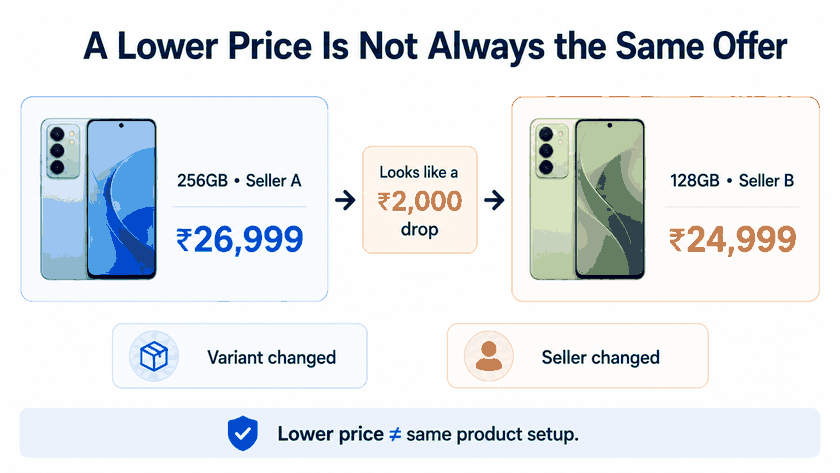
When a tracker stores only the number, it can report a change that is technically real but not comparable. A lower price from a different seller, a different storage size, or a different offer state should not automatically be treated as the same product becoming cheaper.
Why Flipkart Price History Can Be Misread
Flipkart price history is most useful when the product state stays consistent between checks. It becomes harder to interpret when seller, stock, variant, delivery, or offer conditions change.
For example, imagine a tracker records a 128GB phone at ₹24,999 and later captures a 256GB variant at ₹22,999 after the selected option changes. The chart could appear to show a ₹2,000 price drop even though the two observations are not for the same variant.
Delivery context can create a similar problem. Flipkart's shipping guidance explains that serviceability can be checked using the delivery pincode.
When availability or delivery conditions matter to a comparison, keep the tested location with the price record instead of treating the number as location-independent.
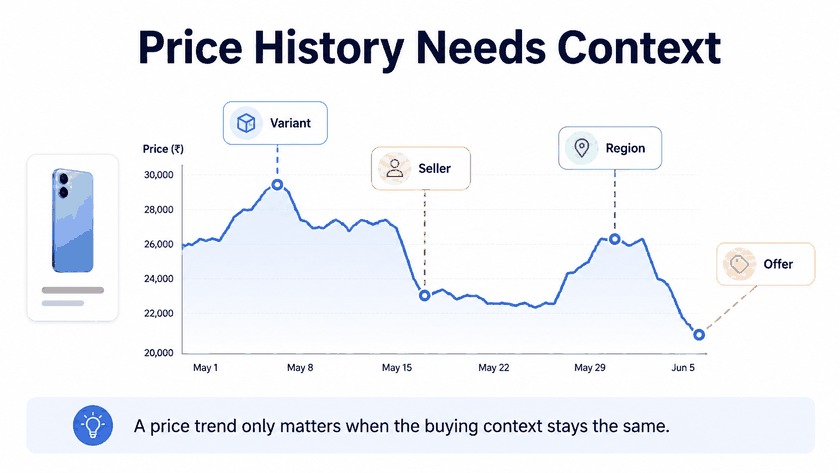
This is why a useful tracking record keeps more than a curve. At minimum, retain the observed URL, collection time, visible price, seller, availability, variant label, and page status. If delivery context affects the observation, record the tested pincode or region as part of the comparison.
Price Graph, Price Chart, and Price Drop Alert
A price graph and price chart both visualize historical price observations. A price drop alert is different: it is a notification triggered when a new observation meets the tracker's alert rule, such as reaching a target price or falling below an earlier value.
The chart is useful for seeing direction and range, but the matching logic still matters. If one observation refers to one storage size and the next refers to another, the graph can suggest a drop that is not like-for-like. The same problem can occur when seller or offer conditions change.
| Signal | What it can tell you | What to verify |
|---|---|---|
| Price graph | Historical trend for observed page states | Same product, variant, seller, and context |
| Lowest price | Lowest stored observation | Whether the observation depended on a limited offer or different product state |
| Price drop alert | A new observation met an alert rule | Whether the target product is actually available at that amount now |
| Extension result | Fast shopper-facing check while browsing | Whether it is reading the intended product and selected variant |
| Online tracker result | URL‑ or search‑based price history | Whether the URL, variant, seller, or availability changed |
Takeaway: Use the chart as a signal, then verify that the product state behind the new price matches the earlier observation before treating it as a real drop.
Extension, Online Tracker, or Data Workflow?
Use a Flipkart price tracker extension when the job is personal shopping and you want quick access to historical pricing while browsing. The main advantage is convenience: you can check the product close to the page you are already viewing.
Use an online price tracker when you want to paste a product URL or search for a product and review its stored history. This works well for one‑off checks, but the tracker may not expose every field needed for reporting or validation.
Use a structured data workflow when decisions depend on many products, repeated checks, or regional QA. Treat price tracking as a validation process rather than a single‑number lookup.
If you are deciding how to collect the underlying product data, see our Flipkart API vs Scraper API comparison to compare official, third-party, and public-page data sources.
For continuous, high-volume public-page monitoring, unlimited residential proxies can fit workflows that need steady traffic capacity for repeated regional price and availability checks.
Collect product identity, seller, price, currency, availability, timestamp, and source context before sending an alert downstream. For broader API‑level design, see IPWeb's guide to an e‑commerce price tracking API.
Checks Before You Trust a Flipkart Price Drop
Before treating a Flipkart price drop as real, run a short validation pass.
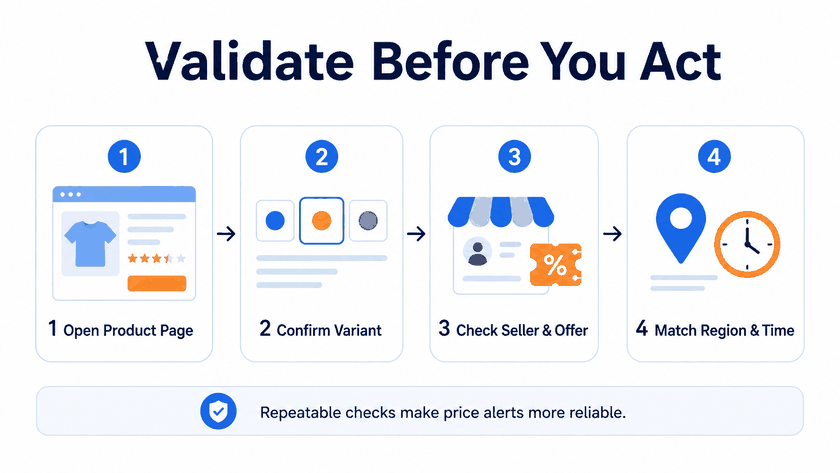
- Confirm the product URL still resolves to the same product.
- Check whether the selected size, color, storage, model, or bundle changed.
- Record the seller or marketplace offer shown with the price.
- Verify the stock state and delivery context used during the check.
- Separate base price from coupons, bank offers, exchange values, and shipping‑related costs.
- Keep a timestamp so the alert can be compared with the correct observation window.
For public‑page monitoring, also review the source's rules and your collection boundaries. Flipkart's Terms of Use set the conditions for using the platform.
IPWeb's guide on whether web scraping is legal covers broader legal and ethical considerations for web data workflows.
Frequently Asked Questions
Final Thoughts
A Flipkart price tracker is most useful when it helps answer two questions together: how the observed price has changed, and whether today's observation is truly comparable with the earlier one. Check the history, set an alert if useful, then confirm the product, variant, seller, availability, delivery context, and offer conditions before acting on a reported drop.