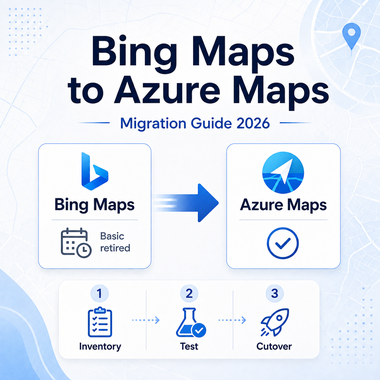
Bing Maps for Enterprise is already in its retirement window. Free Basic-account access has been retired, and existing Enterprise customers can continue using Bing Maps for Enterprise services only until June 30, 2028. Any application that still depends on Bing Maps REST APIs, the Web Control SDK, or related services needs a migration plan before that deadline.
The difficult part is not choosing a new product name. Azure Maps covers many of the same mapping and geospatial jobs, but request formats, authentication, coordinate order, SDK behavior, and response schemas can differ. A safe migration starts by identifying exactly what the current application uses, then testing each Azure Maps replacement with representative data before production traffic moves.
Bing Maps for Enterprise is deprecated. Basic-account access has been retired, while eligible existing Enterprise customers can continue using Bing Maps services until June 30, 2028. Microsoft directs Bing Maps customers to migrate to Azure Maps. New projects should evaluate Azure Maps rather than starting a new dependency on Bing Maps, and existing applications should test authentication, request parameters, response schemas, coordinate conventions, and SDK behavior before cutover.
- Bing Maps Basic access has already been retired; it is not a suitable starting point for a new project.
- Eligible existing Bing Maps Enterprise customers have until June 30, 2028 to complete migration.
- Azure Maps is Microsoft's successor for mapping and geospatial services, but migration is not always a drop-in endpoint swap.
- Test authentication, HTTP methods, response objects, coordinate order, map controls, coverage, quotas, and error handling before production cutover.
- Running Bing Maps and Azure Maps side by side with the same test locations makes differences easier to catch before users see them.
Is Bing Maps API Still Available?
Bing Maps for Enterprise is deprecated and has been retired for free Basic-account customers. Existing Enterprise customers can continue using Bing Maps for Enterprise services until June 30, 2028. Microsoft states that applications using Bing Maps REST APIs and SDKs need to move to Azure Maps before that date to avoid service disruption.
For a new application, the practical choice is to start with Azure Maps and verify that its services cover the required markets and features. For an existing Bing Maps application, keep the current integration stable while you inventory dependencies and build a testable migration path.
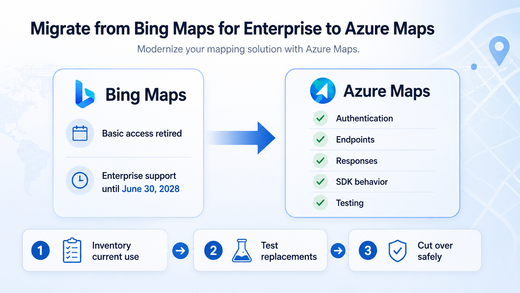
Microsoft's Bing Maps migration overview provides service-by-service guidance for moving REST APIs and SDK-based applications to Azure Maps.
Plan the Migration Before Changing Code
Begin with an inventory of what the production application actually calls. A project may use only geocoding and routing, or it may also depend on map rendering, traffic, spatial data, static imagery, custom styling, or Bing Maps Web Control behavior. Treat each dependency as a separate migration item instead of assuming one global replacement will behave the same way.
Next, build a small test set that represents the application rather than a few easy addresses. Include the countries you serve, ambiguous addresses, postal codes, rural locations, route edge cases, and any coordinates that feed downstream systems. The goal is to compare outputs before changing production behavior.
- List every Bing Maps REST endpoint, SDK, map control, and data source used by the application.
- Identify the Azure Maps replacement for each required feature.
- Compare authentication, request parameters, HTTP methods, response objects, and coordinate conventions.
- Retest geocoding, routing, map rendering, place search, and error handling with representative locations.
- Update secrets, quotas, monitoring, logging, and deployment configuration for Azure Maps.
- Run Bing Maps and Azure Maps in parallel during validation when the application architecture and existing service terms allow it.
- Remove the Bing Maps dependency only after downstream consumers accept the new response contracts.
Bing Maps vs Azure Maps: What Changes?
Azure Maps provides mapping, geocoding and search, routing, traffic, rendering, geolocation, time-zone, weather, and other geospatial services. The feature names may look familiar, but the implementation details are not always identical.
| Migration area | What to check | Why it matters |
|---|---|---|
| Authentication | Shared Key, Microsoft Entra ID, or SAS options in Azure Maps | Credential storage and authorization design may change. |
| HTTP methods | GET versus POST requirements for the Azure replacement service | Existing request code may need more than a hostname change. |
| Response format | JSON or GeoJSON structure, property names, and nested objects | Parsers and downstream schemas can fail even when the request succeeds. |
| Coordinates | Bing latitude/longitude versus Azure GeoJSON longitude/latitude where applicable | A silent order swap can place pins, routes, or polygons in the wrong location. |
| Web SDK | Events, controls, data layers, tiles, styling, and zoom behavior | Front-end behavior can change even when the map still renders. |
| Coverage | Required countries, place types, route modes, traffic, and map features | Feature availability should be tested against the markets the application serves. |
This comparison is a migration checklist, not a guarantee of one-to-one feature parity. Test every service and market the application relies on before switching production traffic.
Compare Bing and Azure Maps Geocoding Requests
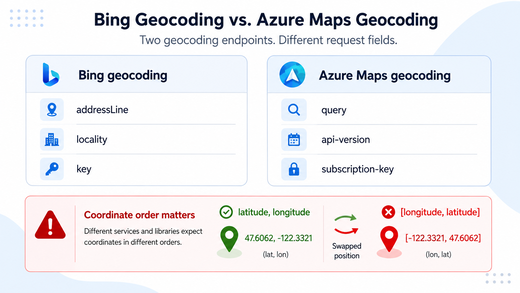
A simple geocoding request shows why migration work needs explicit testing. The Bing Maps Locations API accepts a Bing Maps key with address parameters. The Azure Maps Get Geocoding API uses an Azure Maps endpoint and API version, and Shared Key authentication can be sent with the subscription-key header. Microsoft recommends stronger identity-based options such as Microsoft Entra ID when they fit the application security model.
Bing Maps address geocoding
curl -G "https://dev.virtualearth.net/REST/v1/Locations" \
  --data-urlencode "addressLine=1 Microsoft Way" \
  --data-urlencode "locality=Redmond" \
  --data-urlencode "adminDistrict=WA" \
  --data-urlencode "postalCode=98052" \
  --data-urlencode "key=$BING_MAPS_KEY"
Azure Maps geocoding
curl -G "https://atlas.microsoft.com/geocode" \
  --data-urlencode "api-version=2026-01-01" \
  --data-urlencode "query=1 Microsoft Way, Redmond, WA 98052" \
  -H "subscription-key: $AZURE_MAPS_KEY"
The two requests are intentionally small. Production code should also compare response fields, error handling, rate limits, localization, market coverage, and the authentication approach used outside a local test. Keep subscription keys out of public repositories and client-side code when a server-side or identity-based design is available.
Common Migration Problem: Coordinate Order
One of the easiest migration bugs to miss is a coordinate-order mismatch. Bing Maps commonly represents points as latitude, longitude. Azure Maps GeoJSON positions use longitude, latitude. A parser that keeps the old order can return a successful response and still place a point in the wrong part of the world.
Suppose an existing Bing Maps workflow stores Redmond as 47.6405,-122.1293. A GeoJSON position in Azure Maps should be handled as [-122.1293,47.6405]. The values are the same, but the order is not.
The safest fix is to convert coordinates at a clearly defined boundary, then add automated tests for known locations. Check both the raw API response and the downstream map or database record. A migration can look correct at the HTTP layer while still corrupting spatial data later in the pipeline.
When Local Business Data Is a Different Problem
Not every project that starts with a map search actually needs a map API. Geocoding, route calculation, map rendering, and documented place search are geospatial API jobs. Maintaining changing business names, branch pages, visible contact details, opening-status changes, source URLs, or custom fields across public websites is a separate data problem.
Define the required record before choosing the collection method. When a stable official API exposes the fields you need and permits the intended use, it is usually easier to maintain. When required information lives only on public pages, a separate extraction and validation workflow may be necessary. The web scraping workflow explains how public page fields are turned into structured records and why validation matters when page layouts or regional content change.
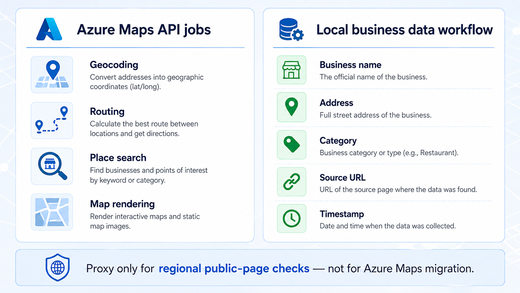
| Need | Azure Maps fit | Public local-data workflow fit |
|---|---|---|
| Geocoding an address | Strong fit | Usually unnecessary |
| Route calculation | Strong fit | Not a replacement |
| Place or POI search | Strong fit where supported | Useful only when additional public fields must be checked |
| Track visible business-page changes | Not the primary job | Strong fit |
| Custom business-record schema | Limited to available API fields | Flexible when the required fields are publicly available and permitted to collect |
| Freshness audit by source URL | Not the primary job | Strong fit |
A place-search API can return structured POI data, but it is not a substitute for source-level page checks when the required fields are not exposed by that API.
Fields to Validate in Local Business Data
Local-business records become useful when they can be traced, compared, and refreshed. Keep source URLs and collection timestamps alongside normalized business fields so later checks can distinguish a current observation from an old record.
| Field | What to verify | Common problem |
|---|---|---|
| Business name | Canonical name and branch naming | Abbreviations, duplicate branches, or renamed locations |
| Address | Street, locality, region, and postal code | Old or incomplete addresses |
| Coordinates | Coordinates match the normalized address | Misplaced pins or coordinate-order errors |
| Category | Consistent taxonomy | Different sources use different category labels |
| Source URL | Original page is still reachable | Redirects, duplicates, or removed pages |
| Timestamp | When the record was observed | No way to distinguish current data from stale data |
These checks improve auditability, but they do not prove that a source is complete, current, or permitted for every use case. Source terms and data-use requirements still need separate review.
Where Proxy Infrastructure Fits
Proxy infrastructure is irrelevant to normal Bing Maps-to-Azure Maps migration. It does not replace Azure Maps authentication, change the retirement deadline, fix an incompatible response parser, or solve coordinate-order bugs.
A proxy becomes relevant only in a separate public-page workflow that genuinely needs regional network routing. For example, a permitted comparison of public local listings across several markets may use a dynamic residential proxy when the same page displays region-dependent content. The proxy changes the network route; the application remains responsible for source selection, request rate, parsing, deduplication, timestamps, validation, and data-use compliance.
Keep those two decisions separate. Azure Maps migration is an API and application-integration task. Regional public-page collection is a different workflow and should add proxy infrastructure only when network location is actually part of the requirement.
Frequently Asked Questions
Final Thoughts
Bing Maps migration is now a deadline-driven engineering task. Basic access has already been retired, and eligible Enterprise customers have until June 30, 2028 to move remaining Bing Maps dependencies. Inventory the services in use, map them to Azure Maps, compare requests and responses, test coordinate handling, and validate representative locations before production cutover.
Keep local-business data collection outside that migration path unless it is genuinely part of the application requirement. A mapping API, a public-page data workflow, and proxy routing solve different problems. Separating them makes both the migration plan and the data architecture easier to test and maintain.