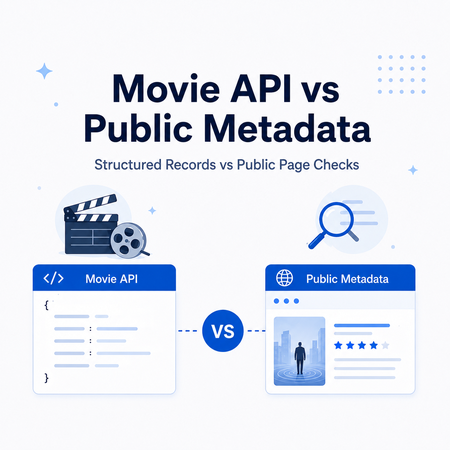
A catalog team can have a clean movie record in an API and still see a different title, rating, artwork, or listing state on a public storefront. That is why movie API data and public movie metadata should not be treated as interchangeable sources.
Use the API as the structured record. Use public-page checks when the page itself matters—for example, regional catalog QA, localized presentation, or confirming a recent listing change.
Use a movie API when you need documented, structured fields for application integration or catalog enrichment. Use public movie metadata checks when you need to verify what a public catalog or storefront currently displays. For reliable entity matching, start with stable IDs, then verify release year, language, region, and source URL.
- Movie APIs are best for structured records, predictable fields, and programmatic lookups.
- Public-page checks are better for source presentation, regional visibility, language variants, and recent page changes.
- TMDB supports movie search and movie-detail retrieval; OMDb supports common title and IMDb ID lookups.
- Google Play Movies is now partly a legacy search term. Current Google movie discovery and purchase experiences are centered on Google TV and YouTube.
- Residential proxies can support permitted regional QA of public pages, but they do not provide movie data or replace an API.
What a Movie API Provides
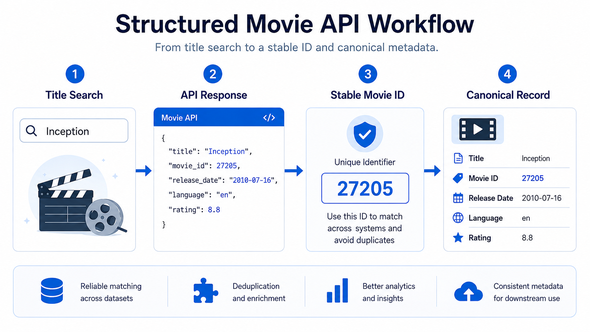
Movie APIs expose data through documented endpoints. A response can include a movie ID, title, original title, release date, language, genre, runtime, credits, images, ratings, and related records. Exact coverage depends on the provider.
The TMDB API documentation covers movie, TV, actor, and image data. Its movie search endpoint accepts a title query, while its movie details endpoint retrieves a record by movie ID.
The OMDb API is a RESTful movie‑information service. Common lookups use either a title or an IMDb ID, with optional fields such as year, result type, plot length, and response format.
For repeated processing, structured responses are easier to validate and store than page layouts. They also make joins more predictable when an internal catalog needs to connect records from several sources.
Quick cURL Examples
Search TMDB by movie title
This request uses TMDB's movie search endpoint. Replace the token before running it.
curl --request GET \
  --url 'https://api.themoviedb.org/3/search/movie?query=Inception&language=en-US' \
  --header 'Authorization: Bearer YOUR_TMDB_ACCESS_TOKEN' \
  --header 'accept: application/json'
The response includes a results array. Use the returned movie ID for a follow‑up details request instead of relying on title text alone.
Query OMDb by title and year
OMDb supports a compact title lookup. Adding the release year helps narrow ambiguous titles.
curl 'https://www.omdbapi.com/?apikey=YOUR_OMDB_API_KEY&t=Inception&y=2010'For an existing catalog that already stores IMDb IDs, use OMDb's ID lookup instead of repeating a title search.
Movie API vs Public Page Data
A movie API and a public catalog page can describe the same title, but they answer different questions. The API is optimized for structured retrieval. The public page shows what a user‑facing source presents at that moment.
| Source path | Best fit | Typical fields or evidence | Main caution |
|---|---|---|---|
| Movie API | Application integration and catalog enrichment | IDs, titles, dates, genres, credits, images, ratings | Coverage and usage terms vary by provider |
| Public catalog page | Current source presentation and catalog checks | Displayed title, artwork, labels, source URL, visible status | Page structure can change |
| Public storefront or discovery surface | Regional and language presentation checks | Listing presence, localized title, visible rating, category | Fields can vary by country, language, device, or interface |
| Internal normalized record | Cross‑source matching and downstream analysis | Canonical ID, matched source IDs, timestamps, validation status | Quality depends on matching rules and freshness |
Bottom line: use the API for the canonical structured record, and add public‑page evidence only when current presentation or regional context is part of the question.
When Public Metadata Checks Matter
An API does not always answer the operational question. A catalog team may need to confirm whether a title is currently listed on a public source, whether the displayed name changes by language, or whether artwork and rating information changed after an update.
Keep these checks focused on public metadata. Useful fields include title, source ID, release year, region, language, category, rating, source URL, visible listing state, and check time.
Do not mix page validation with viewing access. Public metadata checks are not a substitute for licensed playback, account access, downloading, or permission to access restricted material.
What Happened to Google Play Movies Metadata?
Searches for “Google Play Movies store” still exist, but the product surface has changed. Google TV now handles movie discovery and library experiences on supported devices, while YouTube also supports movie and TV purchases in supported countries.
A current metadata workflow should therefore record the exact Google surface being checked. Store the source URL, country, language, interface, and timestamp when they matter. Do not assume one global Google Play Movies storefront.
This distinction is important for older keyword research. The legacy term can still describe the search intent, but the actual validation target may now be Google TV or YouTube.
Example: Regional Catalog QA
Consider a catalog operations team checking the same movie across the US, UK, and Canada. The internal API record has one canonical ID and release year. The public storefronts, however, may show different localized titles, artwork, labels, or availability messages.
A clean workflow keeps those layers separate. The API record remains the canonical entity. Each public‑page observation is stored as source‑specific evidence with its region, URL, and timestamp.
If the team is authorized to perform region‑specific public‑page QA, a residential proxy can provide the required network route for each market. The proxy does not decide whether two records match. The ID and metadata rules still do that work.
Validate Entity Identity Before Analysis
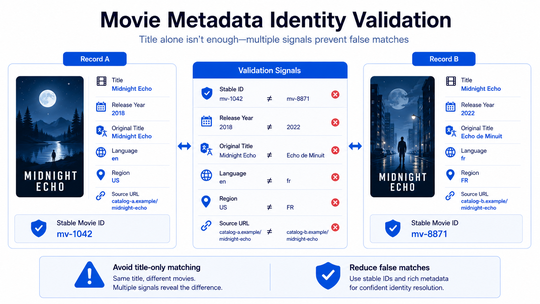
Movie titles are not unique. Remakes, translations, alternate titles, and re‑releases can all produce false matches.
Start with a stable provider or catalog ID whenever one is available. Then verify release year, original title, language, country, and source URL. Keep the original source ID alongside the internal canonical ID.
- Stable movie or catalog ID
- Title and original title
- Release year or full release date
- Language and region
- Source URL
- Last‑checked timestamp
Choose the Right Source Path
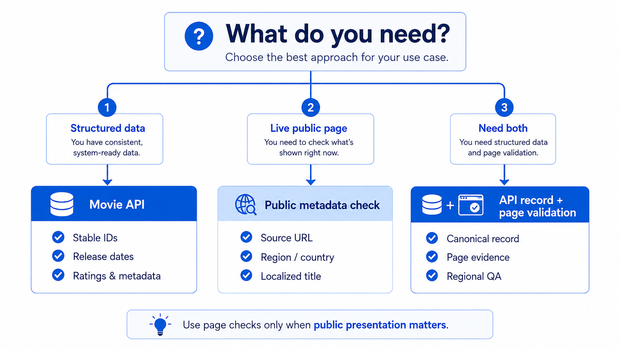
Start with the required output, not the tool. List the fields, permitted sources, regions, update frequency, and matching rules first.
| Requirement | Recommended starting point |
|---|---|
| Structured movie fields for an application | Movie API |
| Current public‑page presentation | Public metadata check |
| Regional or language listing comparison | Public source checks with explicit region and language labels |
| Cross‑source catalog matching | API or internal canonical record plus source‑specific validation |
| Repeated evidence over time | Time‑stamped public checks with stable matching rules |
Bottom line: do not collect a page when the API already supplies the required field. Add page checks only when the public source itself provides evidence the API cannot replace.
Where Residential Proxies Fit
Residential proxies are relevant only to the public‑page side of the workflow. They do not replace a movie API, and they do not provide movie metadata.
IPWeb Dynamic Residential Proxies fit permitted QA that compares public pages across multiple countries, regions, or cities. Rotating or sticky sessions can support separate location‑specific checks.
IPWeb Static Residential Proxies fit repeated checks where the same residential IP should remain stable across a longer validation session. A fixed route can make repeated comparisons easier to reproduce.
In both cases, the workflow should follow the source's terms, access rules, and applicable data‑use requirements. A proxy is a routing component, not permission to access restricted content.
Frequently Asked Questions
A movie API retrieves structured movie data programmatically. Common fields include movie IDs, titles, release dates, genres, credits, images, ratings, and related metadata, depending on the provider.
A movie API returns documented structured data. Public movie metadata reflects what a user‑facing catalog, storefront, or discovery page currently displays. APIs are usually better for integration; public checks are better for source presentation and regional validation.
Not always. Current Google movie experiences are centered on Google TV and YouTube, while “Google Play Movies” often appears as a legacy term. Record the exact source, region, language, and URL being checked.
Use stable provider or catalog IDs first. Then validate the match with release year, original title, language, region, and source URL. Title‑only matching is risky because remakes and localized titles can share similar names.
A residential proxy can support permitted public‑page QA when the workflow needs region‑specific comparisons or a stable network route. It does not provide movie metadata itself and should not be used to defeat access controls.
Final Thoughts
Use a movie API for the structured record. Add public‑page validation only when source presentation, region, language, or current listing evidence matters. Keep stable IDs, source URLs, regions, and timestamps together so each observation can be verified later.