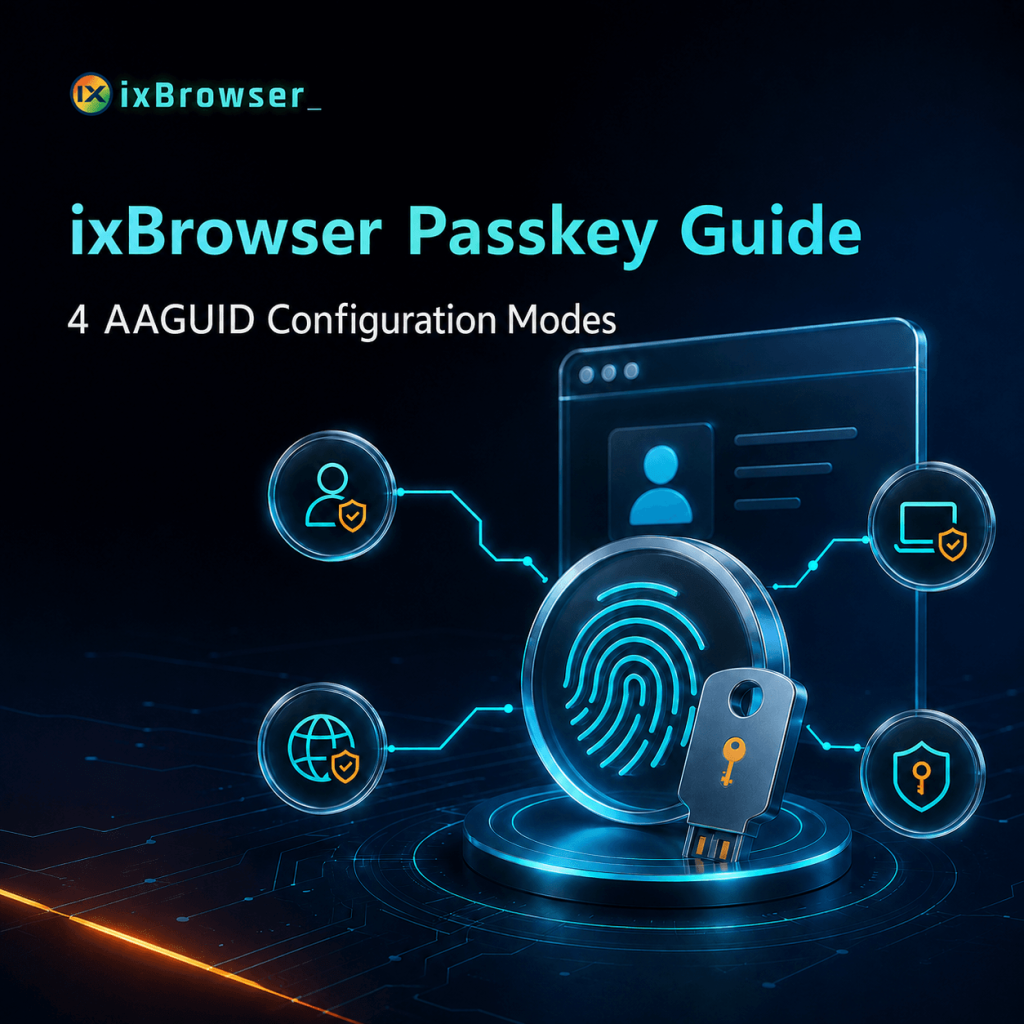
In 2026, Google Ads and Amazon are accelerating the mandatory rollout of Passkey. Starting July 15, Google Ads requires Passkey for sensitive operations (e.g., adding users, modifying billing); from August 5, API new refresh tokens must be authenticated with Passkey; and from August 19, Passkey will be mandatory for all Admin, Billing, and Standard users. Amazon, meanwhile, fully opened Passkey login for Seller Central to global sellers in July and plans to mandate it for some stores starting in the second half of this year. These timelines make it clear: Passkey has moved from optional to mandatory.
For multi-account operators, Passkey’s inherent binding to physical devices greatly increases the risk of device fingerprint correlation—how can you meet platform security requirements while preventing multiple accounts from being identified as originating from the same device or studio? ixBrowser’s newly launched Passkey feature offers four flexible AAGUID configuration modes (Follow System, Random, Zero AAGUID, and IX-Passkey), allowing you to precisely control how device fingerprints are presented across different scenarios, striking the optimal balance between compliance and anti-association.
What is Passkey?
Passkey is a next-generation passwordless authentication technology based on the FIDO Alliance standards. It uses built-in biometrics (fingerprint, facial recognition) or screen-lock PINs on your device to verify your identity, so you never need to remember any passwords.
In short, Passkey replaces “a password you remember” with “you yourself” to prove who you are.
Core Advantages of Passkey
Compared with traditional passwords, Passkey delivers revolutionary improvements in security and user experience:
Phishing-resistant and leak-proof: Passkeys are bound to the device and cannot be shared, guessed, copied, or accidentally disclosed to others. They are never transmitted over the network, so even on phishing sites, they cannot be stolen.
Faster and more convenient: Logging in with a Passkey takes just a fingerprint scan or a face scan—up to 50% faster than traditional passwords. No need to remember passwords or wait for SMS verification codes.
Privacy protection: Your biometric data is stored only locally on your device; platforms do not collect or store any biometric information.
Cross-platform compatibility: Major platforms including Apple, Google, and Microsoft fully support Passkey, and over 15 billion accounts worldwide can already use Passkeys.
Why Must You Pay Attention to Passkey Now?
In the past, Passkey was just a “nice-to-have” option. But starting in the second half of 2026, it is becoming a “must-have” requirement.
If you manage multiple Google Ads accounts or Amazon stores simultaneously, the traditional “one device, one identity” model will no longer work—because each Passkey is tied to a specific physical device. How can you enable multiple accounts to use Passkey independently within their own “environments” without interfering with or linking to each other?
This is exactly the core problem that ixBrowser’s Passkey feature solves.
Four Configuration Modes of ixBrowser Passkey
ixBrowser offers four flexible Passkey AAGUID configuration modes for different scenarios. Before diving in, let’s briefly explain what AAGUID is.
AAGUID (Authenticator Attestation Global Unique Identifier) is a 16-byte identifier defined in the WebAuthn specification that identifies the model of the authenticator (i.e., the password manager or device) that created the Passkey. In simple terms, AAGUID is the “device ID card” of a Passkey—it tells the website: “this Passkey was created by iCloud Keychain” or “this Passkey was created by Windows Hello.”
Website servers can use the AAGUID to determine the type of device the user is using, enabling device fingerprinting and risk control decisions.
ixBrowser’s four Passkey configuration modes essentially allow you to flexibly control how this “device ID card” is presented, adapting to different operational scenarios.
Follow System
Operation mechanism: Automatically reads the User-Agent (UA) and operating system information of the current browser environment and mimics the most reasonable native authenticator for that environment. For example, under Mac/Safari it mimics Apple’s iCloud Keychain; under Windows/Edge it mimics Windows Hello.
Core distinction: Highly consistent with the environment—device fingerprints perfectly match the browser environment.
Use cases:
Registration/login on high-risk websites: Some strict sites (e.g., financial platforms, large internet platforms) verify device fingerprints. If the UA shows an iPhone but the AAGUID is a Windows-specific device identifier, it will likely be flagged as risky. “Follow System” perfectly solves this environmental mismatch.
Everyday incognito use: The preferred option for mimicking an ordinary real user.
Random
Operation mechanism: Each time the Passkey interface is called, a brand-new, completely random AAGUID is dynamically generated.
Core distinction: Each interaction appears as a new “unknown device,” with no correlation between devices.
Use cases:
Batch account registration/disposal: Prevents multiple accounts from being linked by the website server to the same device or studio due to sharing the same AAGUID.
Stress testing or black-box testing: Developers use this to test the server’s handling and compatibility with unknown or massive numbers of AAGUIDs.
Note: On a very small number of extremely strict websites that only accept AAGUIDs from “known vendors,” this mode may cause registration failures.
Zero AAGUID
Operation mechanism: Forces output of an all-zero AAGUID (00000000-0000-0000-0000-000000000000).
Core distinction: An absolute privacy mode that complies with the WebAuthn official standard. The WebAuthn specification clearly states that if you do not wish to expose the device model to protect user privacy, you should use an all-zero AAGUID. An all-zero AAGUID is a privacy signal indicating that the authenticator actively hides the device model—it is not an error or a null value.
Use cases:
General website access: The vast majority of standard-compliant websites support the all-zero AAGUID—this is the most universally safe option.
Anti-tracking: You do not want the website to collect any information about your hardware/software type; not even “pretending” is desired—you simply tell the website “no comment.”
ixB-Passkey
Operation mechanism: Uses a fixed, dedicated AAGUID pre-set by ixBrowser.
Core distinction: Has a highly stable fixed signature, clearly declaring itself as ixBrowser Passkey.
Use cases:
Internal systems / corporate intranets: Some internal or specific systems may have whitelisted ixBrowser’s AAGUID, allowing only this identifier to be trusted and granted access.
How to Use ixBrowser’s Passkey Feature and Important Notes
Using ixBrowser’s Passkey feature is very simple and requires only a few steps:
Open ixBrowser and enter the browser environment you wish to configure.
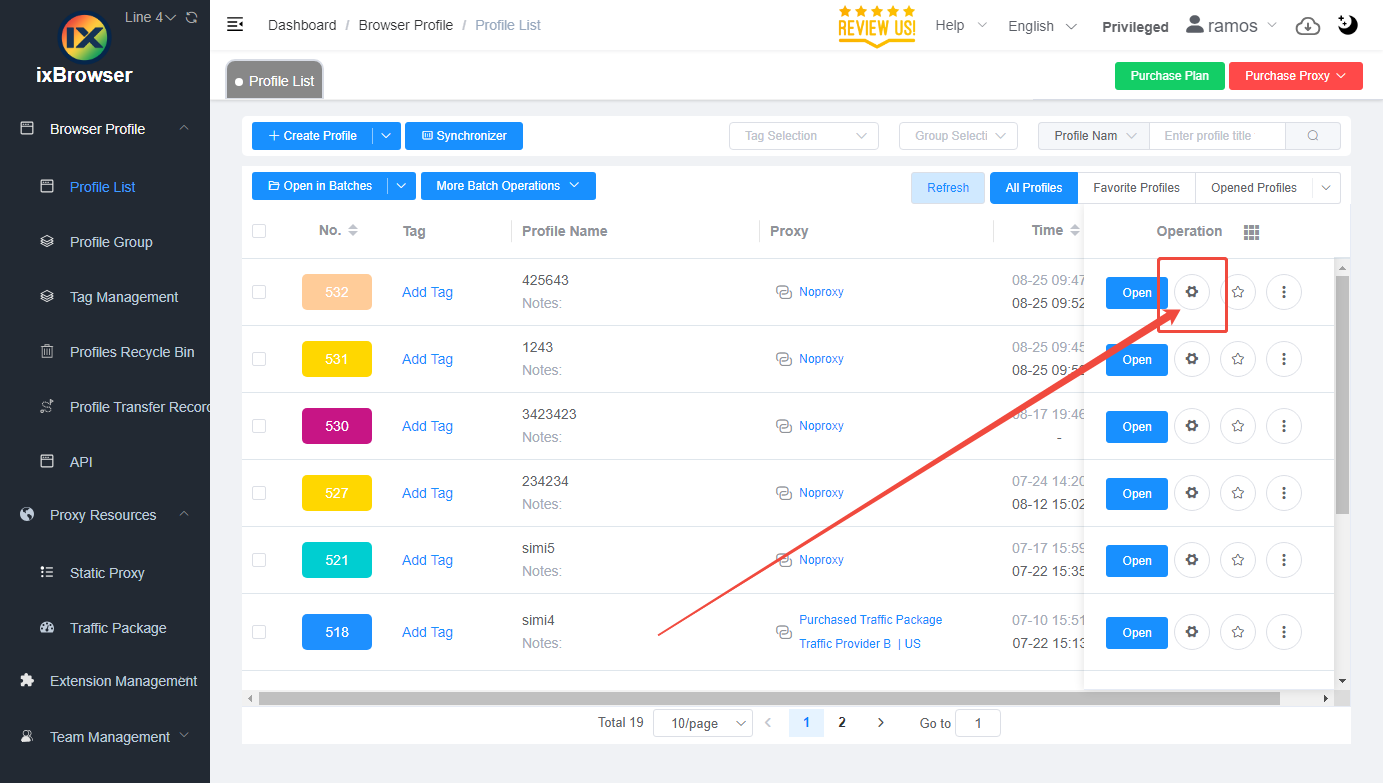
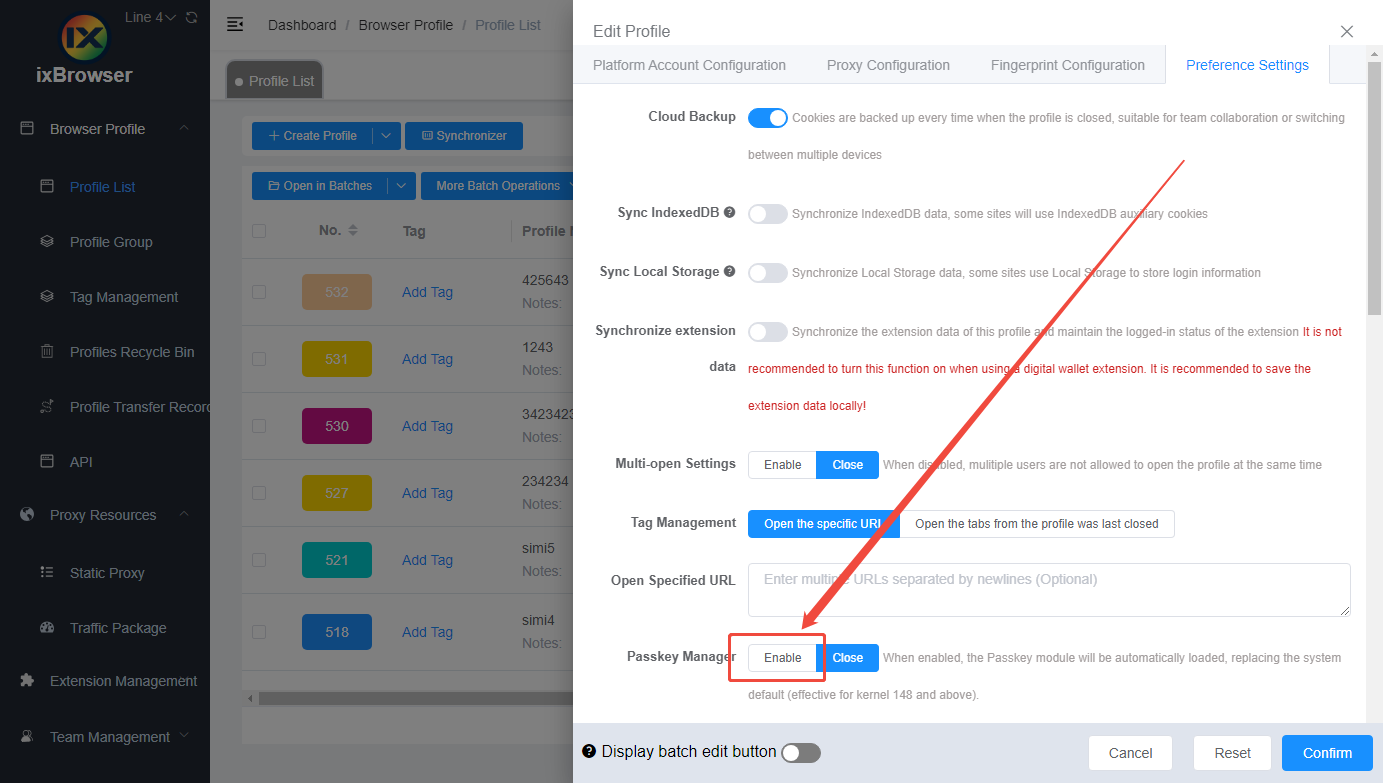
In the Preferences, locate the Passkey Manager item and click to enable it.
After enabling, the Passkey simulation identity configuration option appears below. Choose one of the four modes according to your usage.
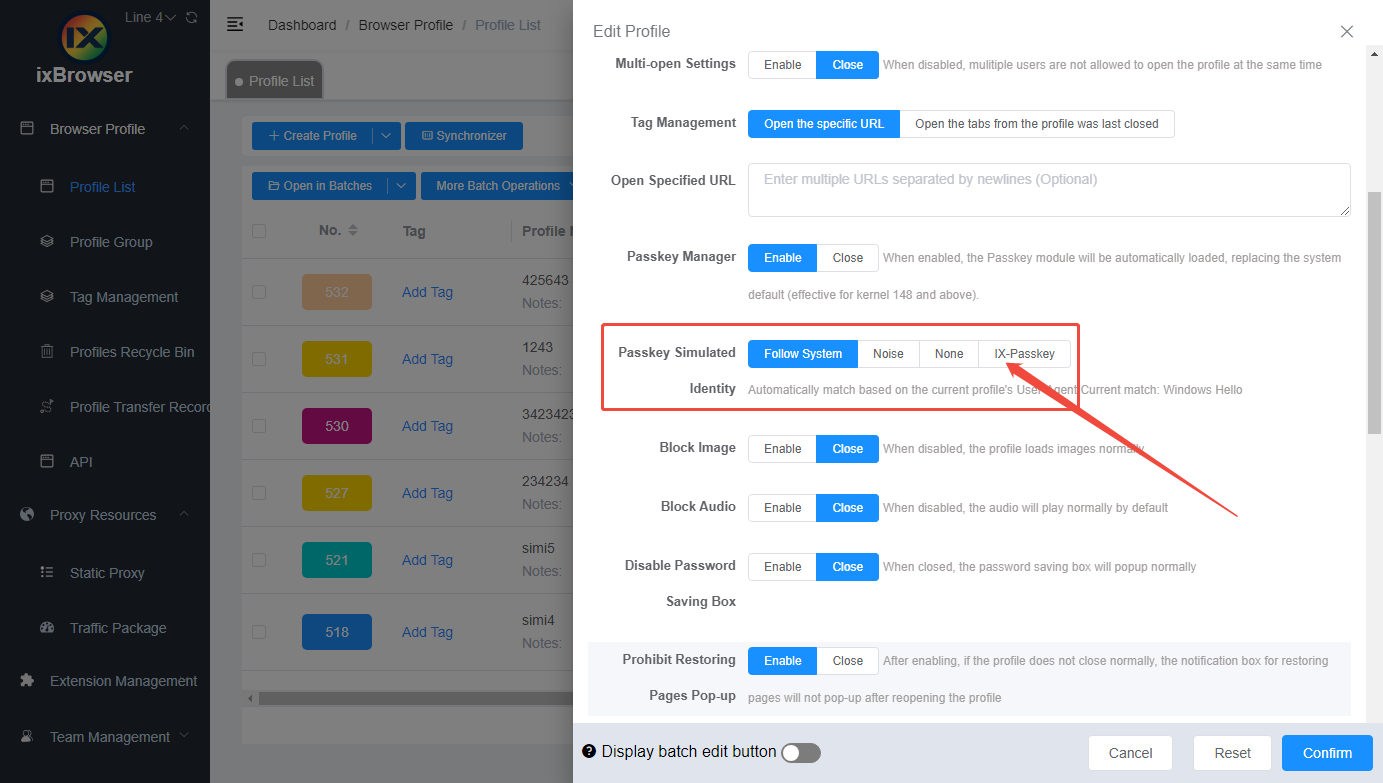
Save the settings. Then, when you call the WebAuthn interface to create or use a Passkey within that browser environment, the AAGUID strategy you selected will be applied automatically.
Note: The Passkey feature supports kernel version 148 and above only.
2026 is the critical turning point when Passkey moves from “optional” to “standardised.” The simultaneous push by Google Ads and Amazon means that passwordless authentication has become an irreversible trend.
For multi-account operators, this is both a challenge and an opportunity—those who can adapt to the new rules of the Passkey era first will gain the upper hand in account security and operational efficiency.
Experience ixBrowser’s Passkey feature now, plan ahead, and confidently embrace the passwordless future!