
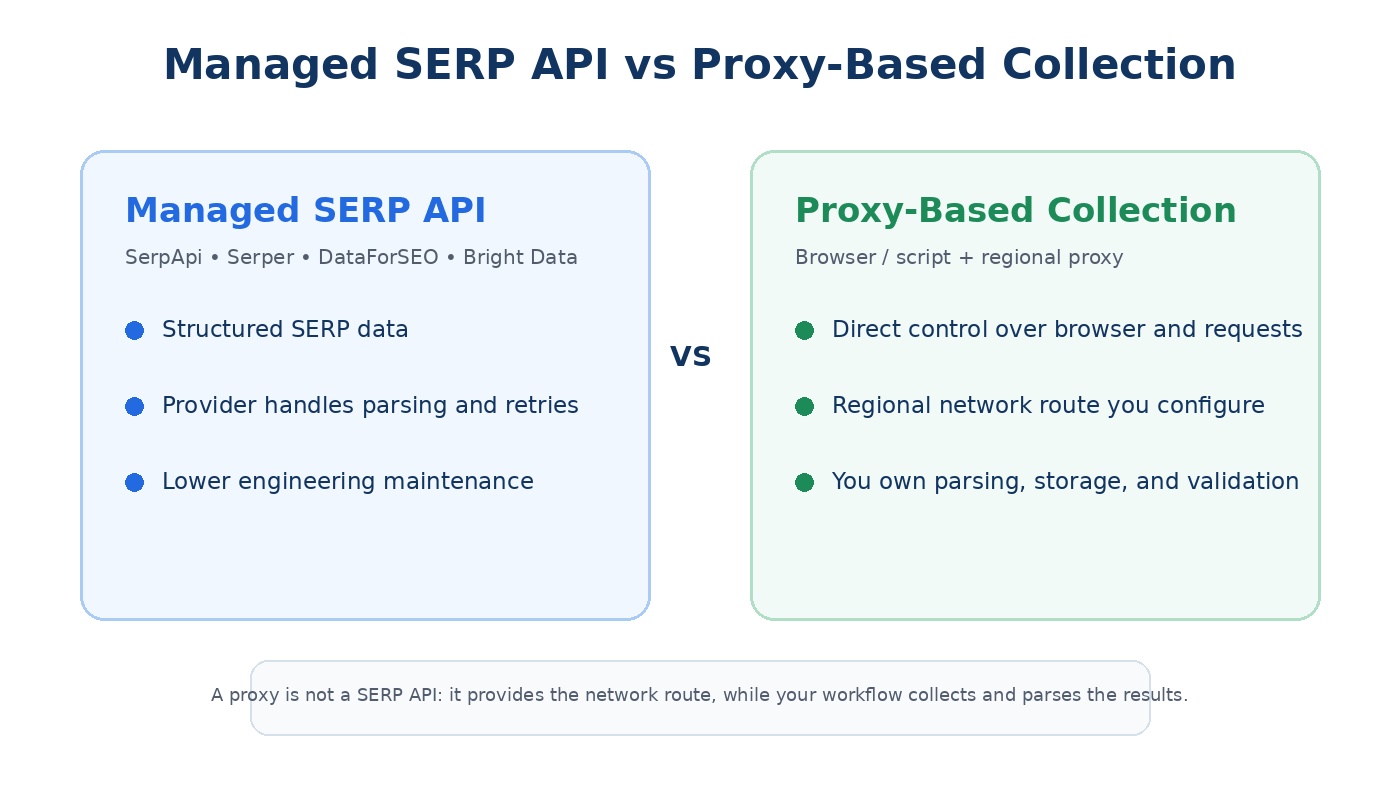
SerpApi is one of several ways to obtain search-results data, but choosing an alternative is not only about comparing API prices. The more important decision is whether you want a managed SERP API that returns structured data, or a self-managed collection workflow where your team controls the browser or request layer, regional network route, parsing, storage, and validation.
Choose a managed SERP API such as Serper, DataForSEO, or Bright Data when you need ready-to-use structured search data with less infrastructure work. Consider a proxy-based collection architecture when you need direct control over the browser or HTTP client, regional network routing, custom extraction, or independent browser-side validation. A residential proxy is not a drop-in replacement for SerpApi: it supplies the network route and regional IP context, while your team still owns collection, parsing, retries, storage, and QA.
- A proxy is not a SERP API. It changes the network route; it does not automatically return parsed rankings, snippets, local packs, shopping results, or JSON.
- Managed SERP APIs are usually the simpler choice when your application needs normalized fields and predictable API output.
- Dynamic residential proxies fit permitted multi-country or multi-city validation workflows where route diversity matters.
- Static residential proxies fit repeated checks that benefit from the same assigned regional endpoint.
- Google documents that search results can vary with location, language, device, time, and other context, so a single SERP snapshot should not be treated as a universal result.
- Compare total cost per usable result, including retries, parsing, engineering time, validation, and maintenance.
What Counts as a SerpApi Alternative?
SerpApi is a managed search-results API. Instead of maintaining the collection stack yourself, you send a request with parameters such as search engine, query, location, language, and device, then receive structured search-result data.
A SerpApi alternative can therefore mean two different things. The first is another managed SERP API with a different pricing model, engine coverage, location controls, latency, throughput, or parsed fields. The second is an alternative architecture: a browser or HTTP client sends requests through a regional proxy while your own system handles extraction, parsing, retries, validation, and storage.
These approaches solve different operational problems. Managed APIs reduce engineering overhead. Proxy-based collection gives you more direct control over the collection environment, but it also makes your team responsible for more of the stack. Treating a residential proxy as a drop-in API replacement would hide that difference.
Managed SERP API Options
Managed providers are usually the most practical alternatives when an application expects normalized JSON and does not need to control every browser or network-layer detail. The main comparison points are engine coverage, regional targeting, parsed SERP features, latency, concurrency, pricing, documentation, and how much infrastructure the provider manages for you.
| Option | Best fit | Current pricing model | Main trade-off |
|---|---|---|---|
| SerpApi | Broad managed SERP coverage and established integrations | Monthly plans; Starter currently lists $25 for 1,000 searches | Higher entry cost than some lower-cost request-based alternatives |
| Serper | Google-focused applications that value simple top-up pricing | Credit-based top-up; Starter currently lists $50 for 50,000 queries | More Google-focused than broader multi-engine platforms |
| DataForSEO | SEO platforms and high-volume workflows that want granular execution options | Pay as you go; standard Google SERP pricing currently starts at $0.60 per 1,000 SERPs | Cost varies by execution mode, depth, and optional parameters |
| Bright Data SERP API | Managed multi-engine collection with routing, rendering, parsing, and retry infrastructure bundled together | Pay per successful request; PAYG currently lists $1.50 per 1,000 requests | More infrastructure is abstracted behind the service, which reduces direct control over the collection stack |
| Browser / Script + Regional Proxy | Custom browser-side validation, controlled regional routing, or workflows needing custom extraction logic | Proxy traffic or IP cost plus your own engineering and infrastructure | Your team owns extraction, parsing, retries, storage, maintenance, and policy review |
If the end product is a dashboard, rank database, or application that depends on stable fields, a managed SERP API usually minimizes the amount of custom infrastructure you need. If the goal is to inspect the visible page in a controlled browser environment or build a highly customized collection pipeline, a self-managed architecture can offer more flexibility.
When Proxy-Based SERP Collection Makes Sense
A proxy-based workflow makes sense when you need direct control over the request or browser environment rather than only a provider's parsed response. In this model, the proxy supplies the network route and regional IP context; your own browser, script, or crawler performs the permitted request and decides what to capture.
This can be useful for regional QA, browser rendering checks, custom extraction, and independent validation of search-data outputs. IPWeb dynamic residential proxies provide country- and city-level residential routes for permitted workflows that need to compare public web results across multiple markets.
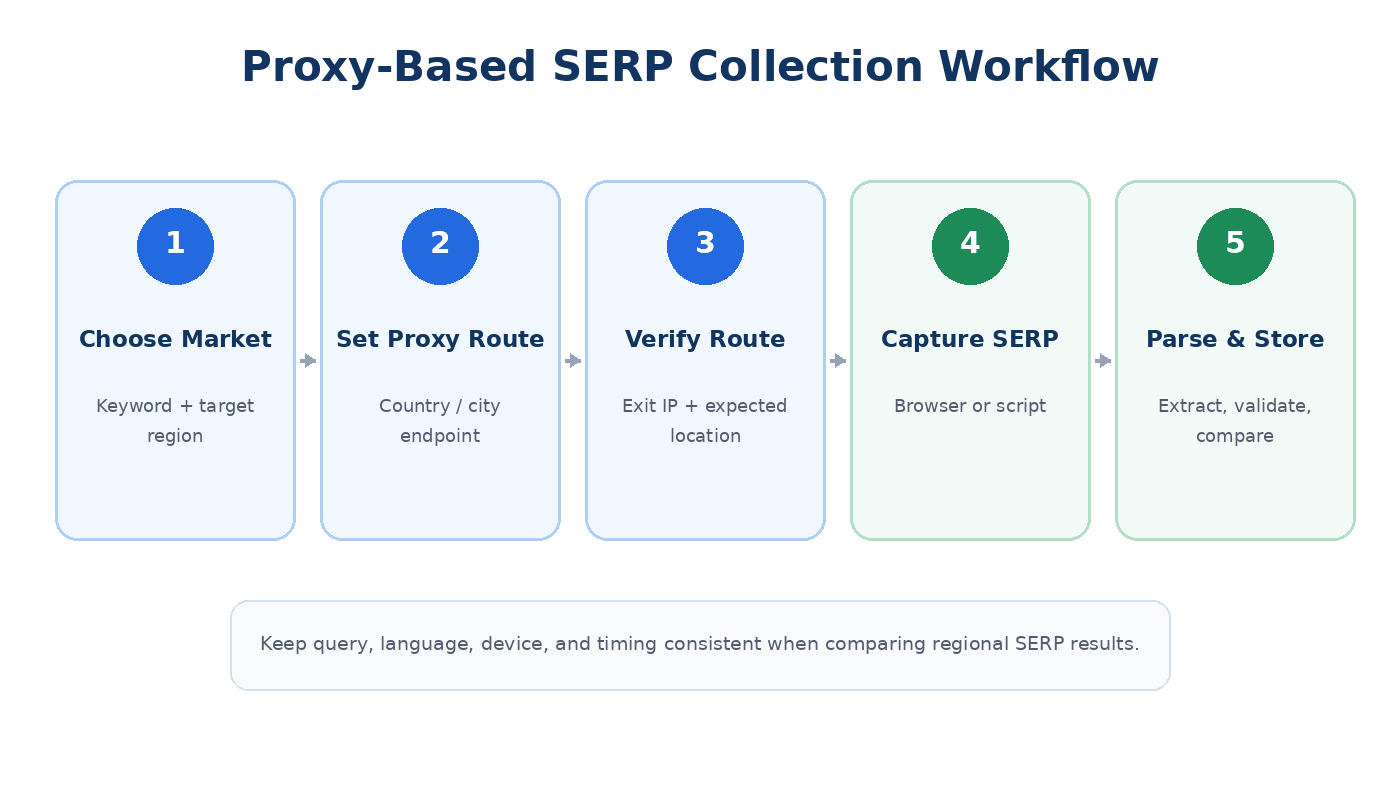
The extra control comes with extra work. Your team must maintain browser or HTTP behavior, parser logic, retry rules, storage, timestamps, result validation, and changes in page layout. If you are still deciding how rotating, sticky, and fixed sessions differ for public-web workflows, the web scraping proxy guide provides the broader proxy-selection context.
| Requirement | Managed SERP API | Proxy-based collection |
|---|---|---|
| Parsed JSON fields | Usually included | Your team builds and maintains the parser |
| Regional routing | Configured through provider parameters | Configured directly through the proxy route and session |
| Browser-level visual QA | Depends on provider and output mode | Strong fit when you control the browser session |
| Custom extraction logic | Limited to exposed fields and parameters | High flexibility |
| Retry and parser maintenance | Mostly handled by provider | Handled by your team |
| Operational overhead | Lower | Higher |
Dynamic vs Static Residential Proxies for SERP Workflows
Dynamic and static residential proxies solve different routing needs inside a self-managed workflow.
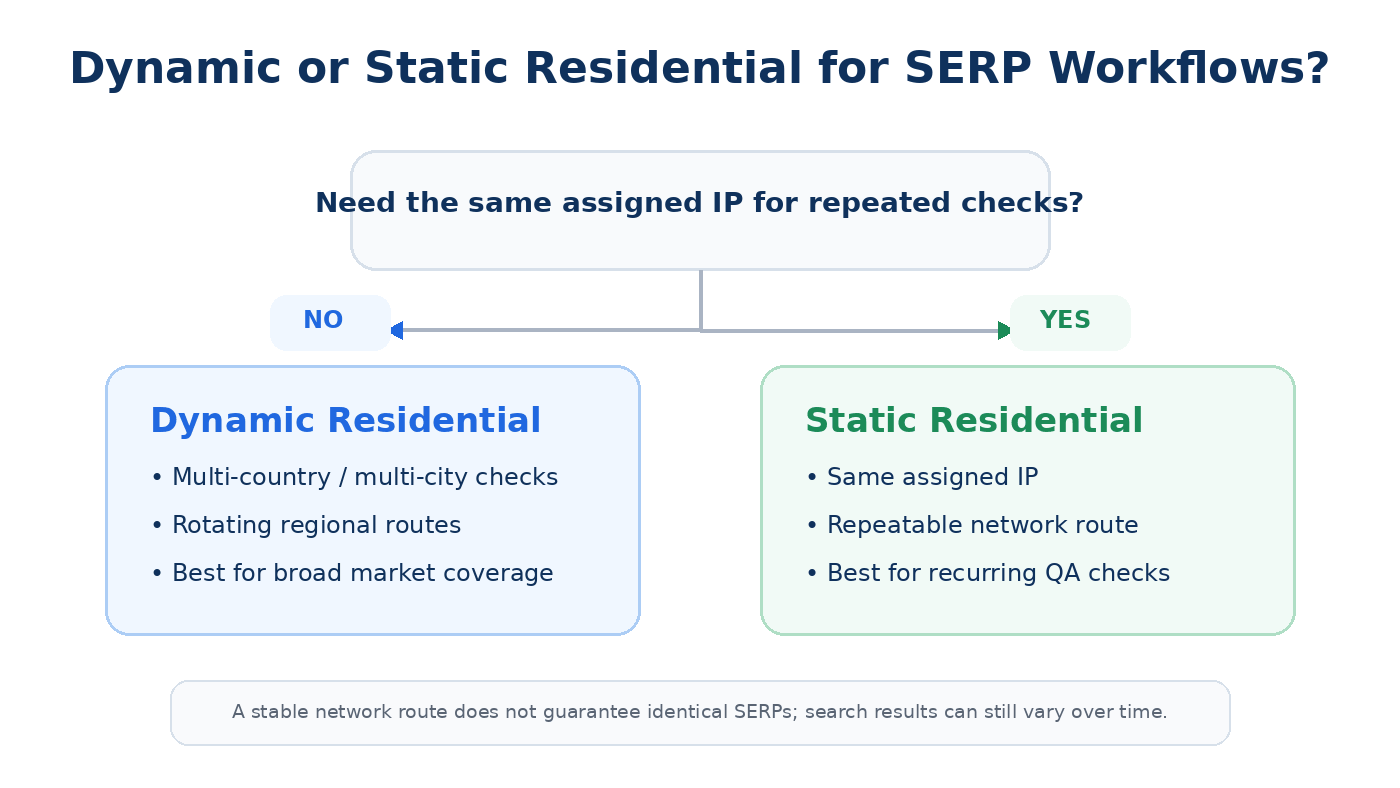
Use dynamic residential proxies when a permitted workflow needs to compare many countries or cities and route diversity matters more than preserving the same exit IP. They are a better fit for broad market coverage and distributed regional checks.
Use static residential proxies when repeated checks benefit from the same assigned regional endpoint. Keeping one route stable can remove one source of network variation during recurring QA, but it does not make the search results themselves deterministic.
Before interpreting a regional result, verify that the expected route is active. The IPWeb Whoer IP check guide explains how to review the visible exit IP, ISP or ASN, DNS, and location estimate before comparing results.
Why Local Search Results Can Still Differ
Regional routing is only one part of search context. Google explains that search results can vary because of time, location, language, device type, recent searches, and personalization. That means two checks can produce different layouts or rankings even when the keyword is identical.
IP address is also not the only source Google can use to estimate location. Google's documentation on how Search determines location describes several possible signals, including device location, saved home or work information, previous activity, and the IP address of the internet connection.
This distinction matters when validating a SERP API with a browser. A regional proxy controls the IP-based network route, but it does not reproduce every account, device, or location signal that may affect what Google serves. Treat a browser-side comparison as evidence from a controlled test context, not as proof that every user in that city will see the same page.
Keep the query, language, device type, timing, and browser state as consistent as possible. Verify the network route separately, then document any remaining differences instead of automatically attributing them to the proxy or API provider.
How to Evaluate SerpApi Alternatives
Start with the output your production workflow actually needs. Google's Visual Elements gallery shows that a search results page can contain multiple visual elements and result formats, and the exact layout can vary by device, country, language, and query.
For API evaluation, that means "supports Google Search" is not specific enough. Test the fields that matter to your application: organic results, local results, images, videos, shopping elements, snippets, knowledge-related elements, and other search features your reports actually use.
Google's How Search Works documentation also notes that serving results depends on factors such as location, language, device, and query context. Your test set should therefore include the same markets, devices, languages, and search types you expect in production.
After field coverage, evaluate operational reliability: response success rate, latency, throughput, retry behavior, field stability, missing-field frequency, documentation, SDK quality, support, status visibility, and contract terms.
| Criterion | What to test | Why it matters |
|---|---|---|
| Coverage | Search engines, countries, cities, languages, devices, search types | Prevents gaps between demo coverage and production requirements |
| Field quality | Organic, local, shopping, snippets, images, video, AI-related elements | Determines whether output can support your actual reports |
| Regional behavior | Compare equivalent queries under controlled locations and devices | Helps separate context differences from parsing differences |
| Reliability | Success rate, latency, retries, throughput, missing fields | Affects usable output and engineering load |
| Schema stability | Field names, nested objects, versioning, deprecations | Reduces reporting breaks during provider changes |
| Support and documentation | SDKs, examples, status page, support response, changelog | Determines long-term integration cost |
Test Failure Modes, Not Only Successful Responses
A useful provider test should include ambiguous local queries, mobile queries, product-heavy searches, news-sensitive searches, multilingual searches, and queries with complex result layouts. Record whether the provider returns an error, an empty field, a partial field, or a structurally different object.
That distinction is important during migration. A field that is absent because a feature did not appear is different from a field that is missing because the parser failed. Your reporting layer should be able to tell those cases apart.
Pricing and Total Cost of Ownership
Headline request price is only one part of the comparison. A lower-cost provider can become more expensive if your workflow requires repeated retries, extra result depth, premium parameters, manual QA, or engineering work to normalize unstable fields.
Managed APIs bundle different amounts of operational work into the request price. Bright Data, for example, currently describes proxy management, rendering, retries, and data parsing as part of its SERP API service. DataForSEO uses separate execution modes with different prices and turnaround times. Serper uses prepaid credits, while SerpApi uses monthly search allowances.
A proxy-based architecture has a different cost profile. You pay for the proxy network or fixed IP allocation, then add browser or HTTP infrastructure, parser maintenance, storage, retries, logging, validation, and engineering time. It can still be the right architecture when control and customization matter, but it should not be described as cheaper until those operating costs are measured.
Compare cost per usable result, not only cost per request. A usable result is one that passes your validation rules and contains the fields or page evidence your workflow actually needs.
| Cost component | Managed SERP API | Proxy-based collection |
|---|---|---|
| Search request / access cost | Included in API pricing | Proxy traffic or IP plan plus request infrastructure |
| Parsing | Usually included | Built and maintained by your team |
| Retries | Often handled by provider | Your system must detect and retry failures |
| Schema maintenance | Provider maintains parser; you adapt to API changes | Your team adapts directly to page-layout changes |
| QA and validation | Still required for important reports | Required and usually more hands-on |
Compliance and Access Boundaries
Architecture and permission are separate decisions. A proxy can change the network route, but it does not change the target service's terms, machine-readable access rules, contractual restrictions, or applicable data-use requirements.
For Google Search specifically, Google's spam policies on machine-generated traffic state that automated queries, including scraping results for rank checking without express permission, violate Google's policies and Terms of Service. If your workflow involves automated access to a search engine, review that engine's current rules and use an approved or permitted access method.
This is also why a managed SERP API and a proxy-based workflow should not be compared only on technical capability. The provider's compliance model, contractual terms, supported use cases, and your own permission to collect the data are part of the architecture decision.
Migration and Architecture Checklist
If you are moving from SerpApi to another managed API, map every production field before switching. Confirm authentication, request parameters, location syntax, language codes, device settings, pagination, result depth, rate limits, error codes, retry behavior, timestamps, and output formats.
If you are moving from a managed API to a self-managed proxy-based stack, add infrastructure questions: which browser or HTTP client will make the permitted request, how regions are selected, how exit IPs are verified, how pages are parsed, how retries are controlled, how layout changes are detected, and what access rules apply to the target service.
- Build a fixed query set that represents real production requirements.
- Use the same locations, languages, devices, and search types across providers.
- Map old fields to new fields and flag differences in meaning, not only field names.
- Run old and new systems in parallel for a limited validation period.
- Compare missing-field rates, regional behavior, feature detection, timestamps, latency, and errors.
- If using proxies, verify the exit IP and expected region before interpreting regional differences.
- Review the target service's current access policies and contractual requirements.
- Document methodology changes so reporting teams do not mistake tool changes for search-performance changes.
Keep Historical Reports Comparable
A provider migration can create artificial changes in dashboards if the old and new systems define positions, local results, ads, or feature presence differently. Preserve the old methodology during the parallel test, document field mappings, and record the cutover date in downstream reporting.
For critical metrics, store both the normalized value used in your report and enough source context to explain why the value was produced. That makes later audits much easier when providers change parsers or search engines change page layouts.
Frequently Asked Questions
Final Thoughts
The best SerpApi alternative depends on the output and level of control you need. Managed SERP APIs reduce engineering work and provide structured data. A proxy-based collection architecture gives you more control over regional routing and the browser or request layer, but it also makes your team responsible for parsing, retries, storage, maintenance, validation, and access-policy review.
For permitted regional workflows, IPWeb dynamic residential proxies fit broad multi-market routing, while static residential proxies fit repeated checks that benefit from a stable assigned endpoint. Keep the architecture decision separate from the vendor decision, then compare output quality, regional behavior, total cost, maintenance load, and compliance requirements with a representative production test set.