Browser stores use labels such as proxy extension, VPN extension, VPN proxy, and secure browser extension for tools that can look almost identical from the toolbar. The names are not enough to tell you how the traffic is actually routed. Two extensions with similar buttons may use completely different network architectures behind the browser.
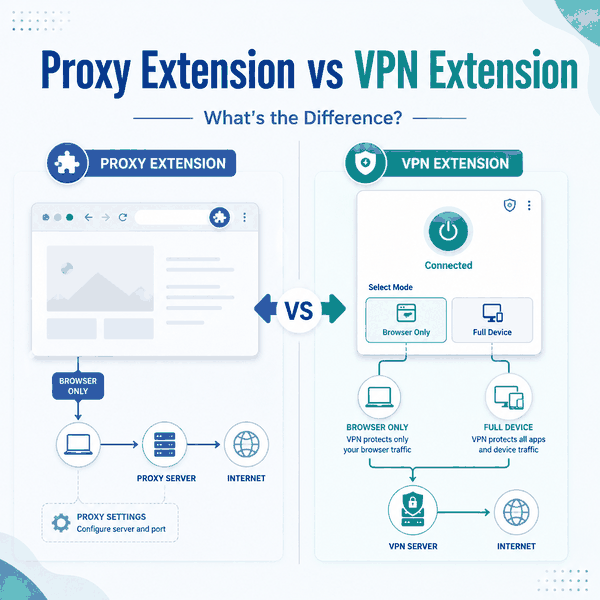
A proxy extension and a VPN extension are both browser extensions, but the labels do not guarantee different networking technology. A proxy extension explicitly routes browser requests through a proxy, while a product called a VPN extension may also be a browser proxy, a controller for a desktop VPN app, or a hybrid that supports both modes. The reliable way to compare them is to check traffic scope, whether a native VPN tunnel exists, and what happens outside the browser.
- A proxy extension and a VPN extension are the same type of software container: both are browser extensions.
- “VPN extension” is a product label, not proof that the extension creates a device-wide VPN tunnel.
- Some VPN-branded extensions route only browser traffic through proxy infrastructure.
- Some extensions control a separate native VPN application, while newer hybrid products can switch between browser-only proxy mode and full-device VPN mode.
- Chrome and Firefox provide browser proxy APIs that extensions can use to manage browser routing.
- The quickest architecture check is to compare the public IP in the extension-enabled browser with a terminal or second browser.
What Is a Proxy Extension?
A proxy extension is a browser add-on that configures or controls proxy routing for browser requests. It may set a fixed HTTP, HTTPS, or SOCKS proxy, apply a PAC script, switch between proxy profiles, or decide which requests should use a proxy.
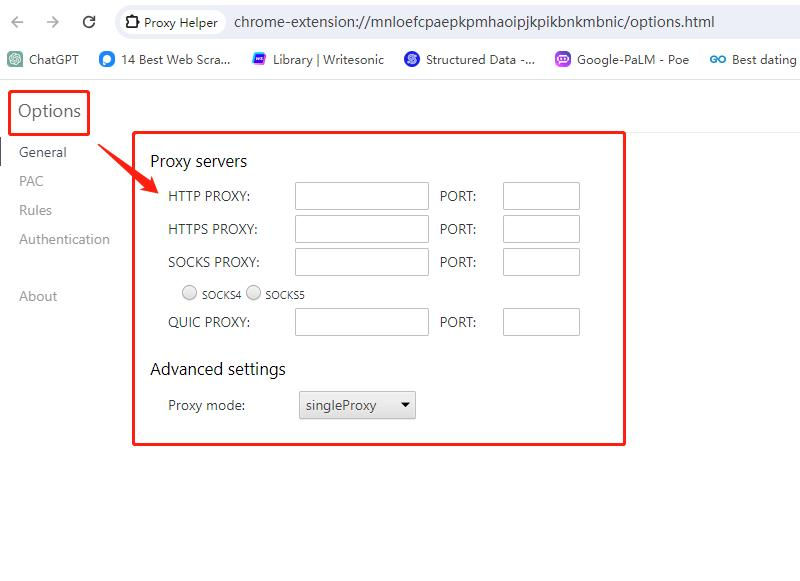
Chrome provides the chrome.proxy API for extensions that need to manage Chrome's proxy settings. The API supports modes including direct connections, system settings, fixed proxy servers, and PAC scripts. Firefox provides its own WebExtensions proxy API, which can set proxy behavior globally or make proxy decisions for individual web requests.
The defining point is not the extension button or its branding. The defining point is that browser traffic is being sent through a proxy route rather than through a native device-wide VPN tunnel.
If the browser extension is configured with a SOCKS5 endpoint, the routing model is still different from a VPN tunnel. SOCKS5 Proxy vs VPN compares their routing scope, encryption, DNS behavior, and application-level control in more detail.
What Is a VPN Extension?
A VPN extension is a browser extension marketed as part of a VPN service, but the term does not describe one standardized network architecture. The extension may route browser traffic through proxy infrastructure, act as a remote control for an installed VPN application, or combine both behaviors.
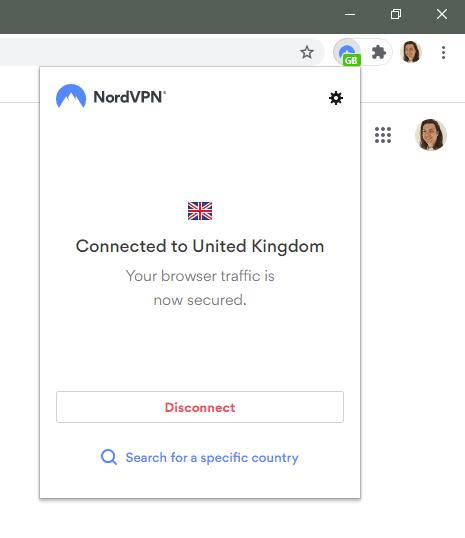
This distinction is visible in current commercial implementations. NordVPN states that its Chrome extension acts as a proxy and secures only traffic that passes through the browser, while its full VPN application covers device traffic more broadly. NordVPN's Chrome extension documentation makes that browser-versus-device distinction explicit.
ExpressVPN now demonstrates a different design. Its 2026 browser extension supports a browser-only Proxy Mode and a Remote Control Mode that works with the desktop VPN application. ExpressVPN's browser-extension release notes show why the label “VPN extension” cannot be interpreted from the name alone.
A VPN-branded extension is not automatically a full VPN client. Check whether the extension itself routes browser traffic through a proxy, controls a native VPN app, or supports both modes.
Proxy Extension vs VPN Extension: Quick Comparison
| Factor | Proxy Extension | VPN Extension |
|---|---|---|
| Software form | Browser extension | Browser extension |
| Typical purpose | Configure or control browser proxy routing | Provide VPN-branded browser routing or control a VPN service |
| Underlying network method | Proxy | May be proxy-only, native-VPN control, or hybrid |
| Browser traffic | Can be routed through a proxy | Usually covered when enabled |
| Traffic from other apps | Usually unaffected | Unaffected in browser-only mode; may be covered when controlling a native VPN app |
| Native VPN tunnel required | No | Depends on implementation and mode |
| Desktop app required | Usually no | Sometimes |
| Best way to identify it | Check browser proxy settings and extension permissions | Check provider documentation, desktop-app dependency, and traffic outside the browser |
The practical difference is therefore not “extension versus VPN.” Both products are extensions. The real comparison is between the networking behavior implemented behind each extension.
Three Architectures Behind the “VPN Extension” Label
Most VPN-branded browser extensions fit into one of three architectures. Identifying the architecture is more useful than relying on the product name.
Browser-Only Proxy Extension
The extension routes browser traffic through the provider's proxy infrastructure. Other applications on the device continue using their normal route. This is common because browser extension APIs can directly manage browser proxy behavior without installing a system-level network tunnel.
VPN App Controller
The extension is mainly a browser interface for a native VPN application already installed on the device. Clicking Connect in the extension can trigger or control the desktop client, while the actual VPN tunnel is created outside the browser.
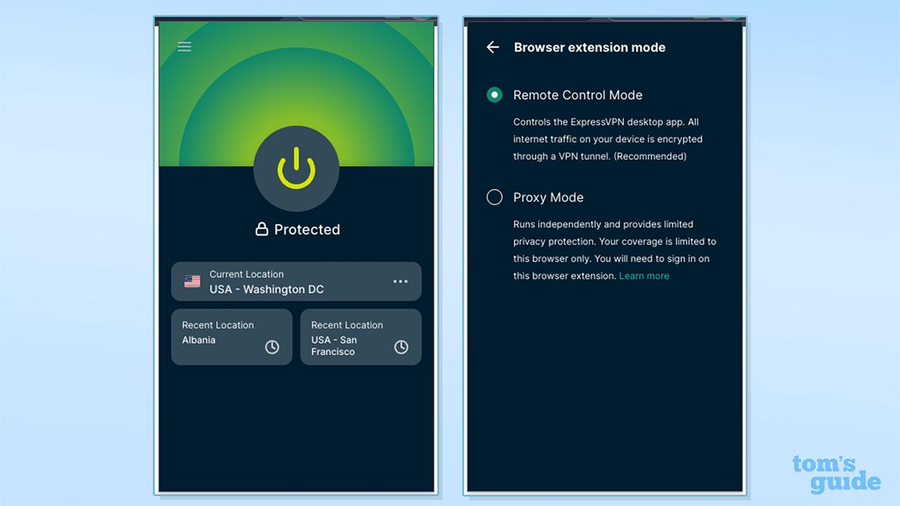
Hybrid Extension
A hybrid extension can offer both browser-only and device-wide modes. ExpressVPN's current extension is a real-world example: Proxy Mode can work at browser scope, while Remote Control Mode manages the desktop VPN app for broader coverage.
| Architecture | Browser Traffic | Other App Traffic | Native VPN App |
|---|---|---|---|
| Proxy-only extension | Routed through browser proxy | Usually unchanged | Not required |
| VPN app controller | Uses the VPN route when the app connects | Can use the same VPN route | Required |
| Hybrid extension | Depends on selected mode | Depends on selected mode | Required only for full-device mode |
This three-way model explains why two products both called “VPN extensions” can behave differently during the same IP or DNS test.
How Do Browser Proxy APIs Fit In?
Browser proxy APIs give extensions a supported way to change how the browser reaches the network. In Chrome, an extension with the proxy permission can set a fixed proxy, use system settings, load a PAC script, or return to a direct connection. In Firefox, an extension can set proxy settings or use proxy.onRequest to decide whether and how a request should be proxied.
These APIs explain why many lightweight “VPN” extensions can operate without creating a traditional VPN interface at the operating-system level. The extension can change the browser route directly.
In Chrome, proxy settings are tied to the browser profile rather than applied as a device-wide network setting. Separate Chrome profiles keep their own settings and extensions, while regular and incognito contexts within a profile can use different ChromeSetting scopes. The effective proxy configuration can also be overridden by another extension or an enterprise policy.
They also explain why browser scope matters. An extension that modifies Chrome's proxy settings does not automatically change the route used by a terminal, native email client, or unrelated application.
Do Both Extensions Encrypt Traffic?
You cannot determine encryption from the words “proxy extension” or “VPN extension” alone. The answer depends on the proxy protocol, the connection between the browser and provider, the destination protocol, and whether a native VPN tunnel is actually active.
HTTPS still encrypts the browser-to-website application traffic regardless of whether the request reaches the site directly or through a compatible proxy. A provider may also encrypt the browser-to-proxy leg, but that is an implementation detail that should be confirmed in its documentation.
A native VPN application is different because it establishes a VPN tunnel outside the browser. When a VPN extension merely controls that application, the device-level encryption comes from the native VPN client and protocol, not from the fact that a toolbar extension exists.
Avoid the shortcut “proxy extension = unencrypted, VPN extension = encrypted.” That binary rule is too simple for current browser products.
What About DNS, WebRTC, and Browser State?
Changing the browser's route does not prove that every browser-related signal follows the same path. DNS behavior depends on the browser, proxy type, extension implementation, secure-DNS settings, and whether a native VPN is active.
WebRTC is also separate from the basic proxy label. Some VPN-branded extensions include WebRTC controls, while other proxy extensions leave browser defaults unchanged. The same applies to geolocation permissions and other browser APIs.
Neither type of extension automatically replaces cookies, local storage, logged-in account state, language, timezone, or the browser fingerprint. Those signals belong to different layers from the public network route.
The same distinction applies to a full VPN connection: changing the public IP does not automatically remove browser, account, device, or location signals. Does a VPN Hide Your IP Address? explains what a VPN changes at the network layer and what can still remain visible.
How Can You Check What an Extension Really Does?
The fastest test is to compare the extension-enabled browser with software outside that browser.
First, enable the extension and open a public IP lookup page in that browser. Record the visible IP, country, and ASN. Then run a separate IP check from a terminal:
curl -s "https://api.ipify.org?format=json"Next, compare the results:
- If only the extension-enabled browser shows the new exit IP, the extension is operating at browser scope.
- If the browser and terminal both change after the extension connects, check whether the extension is controlling a native VPN client.
- If the product offers both proxy and VPN modes, repeat the test in each mode instead of assuming they have the same scope.
- If DNS results do not match the expected route, inspect browser secure-DNS settings, proxy DNS behavior, and VPN DNS configuration separately.
A second browser without the extension is another useful control. If it keeps the normal IP while the configured browser changes, the routing difference is clearly browser-specific.
Which Extension Should You Use?
Choose based on the networking behavior you need, not the label in the extension store.
| Requirement | Better Fit | Why |
|---|---|---|
| Route only one browser through a proxy | Proxy extension | The scope is explicit and limited to the browser |
| Simple browser-only routing under a VPN brand | Proxy-based VPN extension | Can provide a lightweight browser route without a desktop tunnel |
| Control a full-device VPN from the browser | VPN app controller extension | The extension provides the interface while the native app creates the tunnel |
| Switch between browser-only and device-wide modes | Hybrid extension | Supports different routing scopes from one browser interface |
| Use a specific HTTP, HTTPS, or SOCKS proxy endpoint | Proxy extension or direct browser proxy configuration | The proxy endpoint and protocol remain explicit |
If the real decision is between a proxy architecture and a full VPN tunnel rather than two browser extensions, the broader Proxy vs VPN comparison is the better reference.
What Fits Browser QA and Data Workflows?
If the choice has narrowed to residential network routing, Residential VPN vs Residential Proxy compares the two models by routing scope, IP assignment, session control, and browser-level use.
For browser QA, profile-based testing, or workflows that benefit from a consistent browser exit, IPWeb static residential proxies can provide a stable proxy endpoint for a browser or application without routing the entire device through a VPN.
For automated browsers, direct proxy configuration at launch is usually easier to reproduce than relying on a manually clicked extension. The important variables are the actual proxy endpoint, protocol, authentication, DNS behavior, and browser profile—not whether the extension store calls the tool a VPN.
When a workflow needs changing residential routes at browser or application scope, IPWeb dynamic residential proxies can be configured through supported proxy protocols without requiring the entire workstation to share one VPN route.
Network routing is only one part of the environment. Cookies, browser fingerprints, account history, request rate, and application behavior can still affect how a public site responds.
Common Mistakes
Assuming “VPN” in the Name Means a Native VPN Tunnel
The product may be a browser proxy, a controller for a desktop VPN client, or a hybrid. Check the architecture before comparing features.
Comparing Extension Branding Instead of Traffic Scope
Two extensions can have different names but identical browser-only routing behavior. Compare what happens to browser traffic and traffic outside the browser.
Assuming Every Proxy Extension Has the Same Encryption Model
Proxy protocols and provider implementations differ. Confirm the transport and security model rather than inferring it from the word “proxy.”
Ignoring the Desktop-App Dependency
If an extension requires a native VPN application, the browser add-on may be acting mainly as a control panel. Removing or disconnecting the desktop client can change what the extension is able to do.
Treating a Changed IP as Proof That Everything Changed
A new public IP does not prove that DNS, WebRTC, cookies, browser fingerprinting, or other applications use the same route. Validate each layer that matters to the task.
Frequently Asked Questions
Final Thoughts
A proxy extension and a VPN extension belong to the same software layer: both are browser extensions. The important difference is the network architecture behind them. A proxy extension openly describes browser proxy routing, while a VPN-branded extension may use that same model, control a native VPN application, or combine both approaches.
Do not choose between them by name alone. Check whether a desktop client is required, compare browser and terminal IPs, verify DNS behavior, and confirm which applications actually share the route. That reveals what the extension is doing far more reliably than the label shown in the browser store.