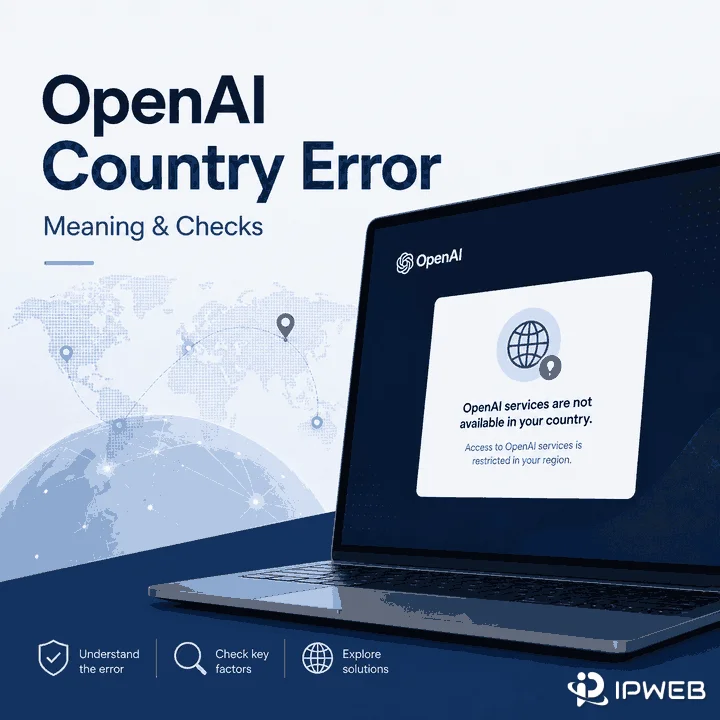
A GPT-5.6 browser agent can inspect a page, choose the right action, and work through a multi-step task. It can still fail for reasons that have almost nothing to do with intelligence.
The page may load too slowly. The login session may expire halfway through the task. A regional version of the website may display a different button, price, or currency. The agent may retry a form submission that already succeeded and create a duplicate entry.
The model can make the correct decision and the workflow can still break.
That is the more important story behind GPT-5.6 computer use. OpenAI has improved the decision-making layer, but real-world reliability still depends on the agent runtime, browser state, network connection, account permissions, and the website being operated.
GPT-5.6 makes browser agents better at deciding what to do next. It does not guarantee that the browser, session, network, or target website will behave as expected.
What GPT-5.6 Actually Changed
OpenAI presents GPT-5.6 as a family of three models. Sol is the flagship option for complex professional work, Terra balances capability and cost, and Luna is designed for faster, cost-sensitive, high-volume tasks.
The current OpenAI GPT-5.6 model guidance recommends Sol for the most demanding reasoning and coding tasks, Terra when cost and capability need to be balanced, and Luna for efficient workloads at larger volume.
| Model | Primary Role | Potential Browser-Agent Use |
|---|---|---|
| GPT-5.6 Sol | Flagship capability | Long or difficult workflows that require planning and verification |
| GPT-5.6 Terra | Balanced capability and cost | Regular production workflows with moderate complexity |
| GPT-5.6 Luna | Fast, lower-cost execution | Higher volumes of shorter or more structured tasks |
More important for browser automation, the GPT-5.6 family supports Computer Use. OpenAI's Computer Use documentation describes a loop in which the model receives a screenshot, proposes interface actions, and then reviews the updated screen after the execution environment performs those actions.
This gives an agent more freedom than a traditional browser script. Instead of following only a fixed sequence, it can inspect the current page and decide what should happen next.
But that flexibility solves only one part of the problem.
Why Smarter Agents Still Fail
A browser agent does not operate inside a clean benchmark. It operates inside a live website where content loads asynchronously, sessions expire, interfaces change, and the same action can produce different results depending on timing and account state.
An agent clicks a Submit button and waits for a confirmation message. The page responds slowly, so the confirmation does not appear before the agent's timeout expires.
The agent tries again. The first request had already succeeded, which means the retry creates a duplicate order, ticket, or form submission.
The model may have selected the correct button both times. The actual failure came from weak state validation and an unsafe retry policy.
An agent opens a US checkout page through a US network exit, but the browser language, time zone, stored cookies, or account region still reflect another location.
The site displays a different currency or regional flow. The agent interprets the unexpected page as an interface change and continues with the wrong assumptions.
Again, the model is not necessarily the problem. The test environment contains conflicting signals.
Other common failures are less dramatic but just as disruptive:
- A button appears before it is ready to receive a click.
- A cookie banner covers the element the agent needs.
- The session expires after several successful steps.
- A redirect sends the browser to an unexpected page.
- A verification screen replaces the expected content.
- A background request fails even though the visible page looks normal.
Better reasoning helps an agent respond to unexpected states. It does not make those states disappear.
The Failure Is Often Outside the Model
The model is only one layer in a browser-agent system. A complete workflow also needs an agent runtime, a browser, a network connection, and a target service that responds as expected.
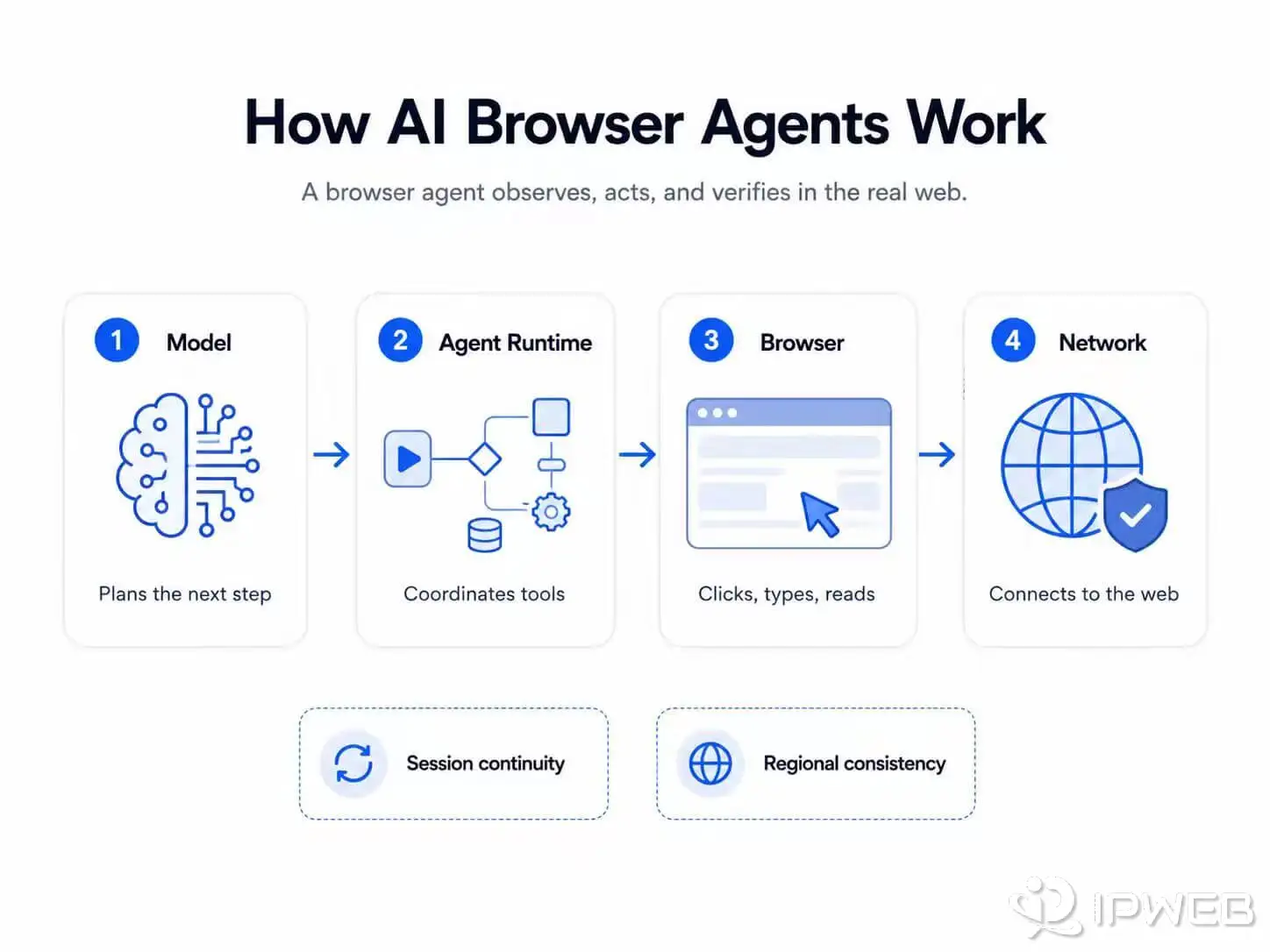
| Layer | What It Does | What Can Break |
|---|---|---|
| Model | Interprets the goal and chooses the next action | Misreads the interface or selects the wrong step |
| Agent runtime | Manages tools, memory, permissions, and task progress | Loses state, repeats an action, or ignores a stop condition |
| Browser | Loads pages and stores cookies and local state | Session expires, an element moves, or a page loads incompletely |
| Network | Connects the browser to the target service | Timeout, unstable route, location mismatch, or interrupted request |
| Target service | Returns content and processes actions | Outage, rate limit, verification, policy rule, or account restriction |
A stronger model cannot repair a failed network route. A different IP cannot correct a bad tool call. More retries cannot give an account a permission it does not have.
Before changing models or adding infrastructure, teams need to identify which layer actually failed.
Where Network and Session Problems Begin
Network problems become more visible as browser tasks grow longer and more agents run at the same time.
A long task needs a consistent session
Authenticated workflows rely on cookies, tokens, browser storage, and account state. A major change in the browser or network environment during the task can trigger another login, additional verification, or a different regional experience.
This does not mean every task needs a fixed IP. A thirty-second check of a public page has different requirements from a thirty-minute workflow inside an authenticated account.
Regional testing needs more than a regional IP
Location-sensitive websites may consider multiple signals, including IP location, language, time zone, stored cookies, account details, and previous activity.
For a repeatable regional test, teams should record the entire environment rather than changing one setting and assuming the result represents a specific market.
Concurrency changes the cost of small failures
A single failed page load may be harmless. The same failure across hundreds of workers can increase browser runtime, model calls, bandwidth, storage, and retry volume.
At scale, teams should distinguish between:
- A page-load timeout.
- A missing or delayed interface element.
- An expired session.
- An unexpected redirect.
- A failed background request.
- An incorrect action selected by the model.
Grouping every problem under “the agent failed” makes the system much harder to debug.
What a Proxy Can Fix—and What It Cannot
A proxy changes the route that browser traffic uses to reach a destination. It can support the network layer, but it cannot repair every other layer in the workflow.
Where a proxy can help
- Providing an approved network exit in a selected country or city.
- Separating network environments used by different browser workers.
- Supporting authorized regional website testing.
- Maintaining a consistent route during a longer task when stable sessions are available.
- Providing sufficient capacity for parallel public-web workflows.
Where a proxy cannot help
- Improving the model's reasoning.
- Correcting an incorrect browser action.
- Changing account-level permissions.
- Adding GPT-5.6 to an ineligible plan or workspace.
- Removing the need for approval before sensitive actions.
- Changing a destination website's terms or automation rules.
- Guaranteeing that a live website will respond consistently.
OpenAI notes that GPT-5.6 availability depends on factors such as the user's plan, product, workspace settings, and supported region. The current details are maintained in the GPT-5.6 availability guide.
A proxy should therefore be treated as network infrastructure, not as a way to change product eligibility or account permissions.
For sustained, authorized browser workloads with large or unpredictable traffic, teams may compare direct connections, metered services, and unlimited residential proxy plans using actual bandwidth, concurrency, session duration, and task-completion data.
Unlimited traffic is not automatically the best choice. A small test environment may be easier and less expensive to run through a direct connection or limited usage plan.
A Safer Way to Run Browser Agents
The safest way to scale browser agents is not to start with more agents. It is to start with one workflow that can fail clearly, stop safely, and produce enough evidence to explain what happened.
Define what success actually means
Do not give the agent only a broad instruction such as “check the website.” Define the expected result, the information it may access, the actions it may take, and the conditions that require human review.
Isolate each browser worker
Different workers should not accidentally share cookies, local storage, or authentication state. The Playwright browser-context documentation explains how independent contexts can isolate browser sessions while running inside the same browser process.
Keep the environment reproducible
Record the browser version, operating system, language, time zone, screen size, network location, and authentication state used during each test.
Without this information, a failure that happens once may be almost impossible to reproduce later.
Validate before retrying
A retry should not simply repeat the last click. The system should first check whether the original action succeeded, whether the page changed, and whether repeating the action is safe.
Page loads, authentication attempts, element waits, model re-evaluations, and total task duration should all have clear limits.
Separate network testing from agent testing
Before blaming the model, confirm that the browser can reach the destination and that the reported IP location matches the intended environment.
A basic procedure to check whether a proxy is working can help separate network failures from browser-state or agent-planning problems.
Keep humans at irreversible boundaries
Payments, publishing, deletion, account security changes, message sending, and other difficult-to-reverse actions should require explicit approval.
A more capable model can reduce routine supervision. It does not remove responsibility for the result.
Scale only after the failures make sense
Before adding more workers, measure:
- Task-completion rate.
- Average task duration.
- Retries per completed task.
- Bandwidth per task.
- Human-review frequency.
- Failure rate by website and region.
Running an unreliable workflow at higher concurrency usually creates more cost and more logs, not proportionally more useful results.
Will AI Agents Replace Browser Scripts?
Not for every task.
Traditional scripts remain a strong choice when the interface is stable, the steps are known, and repeatability matters more than flexibility. They are usually faster, cheaper, and easier to test than asking a model to reconsider every action.
AI agents become more useful when:
- The interface varies between tasks.
- The workflow requires interpretation instead of fixed extraction.
- The next step depends on information discovered during the task.
- The system needs to move between several tools or applications.
- A selector-based script would require frequent maintenance.
The most practical production design is often a hybrid.
Deterministic code can handle navigation, validation, data processing, and irreversible actions. The model can handle visual interpretation, planning, and situations where the next step cannot be fully defined in advance.
GPT-5.6 expands what can be assigned to the decision layer. It does not eliminate the engineering required around that layer.
Frequently Asked Questions
Final Takeaway
GPT-5.6 makes the decision layer of browser automation more capable. It can interpret interfaces, select actions, and adapt when a workflow does not follow a perfectly fixed path.
But smarter decisions do not automatically produce reliable outcomes. The browser can lose state, the network can fail, the target page can change, and a poorly designed retry can turn a small delay into a serious error.
The teams that benefit most from GPT-5.6 will not simply connect it to a browser and hope it completes the task. They will build controlled workflows that can observe failures, validate outcomes, stop safely, and make it clear whether the model, browser, network, or target service was responsible.
A datacenter proxy routes your internet traffic through an IP address provided by a hosting company, cloud provider, or data center network. The destination website sees the proxy IP instead of your original public IP address.
Datacenter proxies are widely used because they are fast, relatively affordable, and easy to scale. They work well for website testing, fixed-IP access, public web data tasks, API requests, and other workflows that do not require a consumer broadband connection.
The main tradeoff is that websites and IP databases can often identify the IP as belonging to hosting or server infrastructure. That does not make the proxy unusable, but it can affect whether it is suitable for a specific target.
A datacenter proxy is usually the practical choice when speed, stable infrastructure, and lower cost matter more than residential network characteristics.
What Is a Datacenter Proxy?
A datacenter proxy is a proxy server that forwards traffic through an IP address associated with commercial server infrastructure.
Instead of connecting directly to a website, your browser, application, or script connects to the proxy first. The proxy sends the request to the destination and returns the response to you.
The destination normally sees the datacenter proxy IP as the source of the connection.
The term datacenter IP refers to the address itself, while datacenter proxy refers to a proxy service using that address. In everyday proxy discussions, the two terms are often used interchangeably.
For a broader explanation of the connection model, read what a proxy server is and how it works.
How Does a Datacenter Proxy Work?
A typical connection follows five steps:
- Your browser or application connects to the proxy server.
- The proxy checks your username, password, or allowed IP address.
- The proxy sends the request to the target website.
- The target responds to the proxy IP.
- The proxy returns the response to your application.
This process changes the public IP visible to the destination. It does not automatically change cookies, browser language, account history, timezone, or other application-level settings.
Types of Datacenter Proxies
Datacenter proxies are usually classified by access model and IP behavior. These categories can overlap.
Shared and Dedicated Proxies
A shared datacenter proxy may be used by multiple customers or workloads. It usually costs less, but other users may affect the IP's reputation or performance.
A dedicated datacenter proxy is assigned to one customer. It offers more control and is often used for IP allowlists, development systems, business tools, and other workflows that need a consistent address.
Static and Rotating Proxies
A static datacenter proxy keeps the same IP for an extended period. A rotating datacenter proxy changes the outgoing IP based on time, requests, session settings, or provider rules.
A proxy can therefore be both dedicated and static, or shared and rotating.
HTTP, HTTPS, and SOCKS5
Datacenter proxies commonly support HTTP, HTTPS, or SOCKS5 connections. The correct protocol depends on the browser, script, operating system, or third-party application being configured.
The protocol does not determine the IP type. A SOCKS5 proxy can still use a datacenter, residential, or ISP address.
Advantages and Limitations
| Area | Advantage | Limitation |
|---|---|---|
| Performance | Usually fast with predictable server bandwidth | Speed still depends on routing, congestion, and distance |
| Cost | Usually less expensive than residential proxies | Very cheap shared IPs may have inconsistent quality |
| Scalability | Easy to deploy across large server-based IP pools | Large volumes can still trigger target-side limits |
| Session control | Dedicated static IPs can remain stable for long periods | Rotating IPs may interrupt stateful sessions |
| Network type | Suitable for infrastructure-focused workflows | Does not normally appear as consumer broadband traffic |
| Location | Commonly available in major countries and server regions | City-level consumer coverage may be limited |
A hosting classification is only one signal. Websites may also consider request frequency, cookies, account state, session behavior, browser settings, and the wider reputation of the IP range.
Common Use Cases
Website and API Testing
Developers can use datacenter proxies to test page responses, redirects, API status codes, external connectivity, and broad regional behavior.
Fixed-IP Allowlisting
A dedicated static datacenter proxy can provide a consistent external IP for dashboards, databases, APIs, and internal systems that only accept connections from approved addresses.
Public Web Data Tasks
Datacenter proxies can support authorized public web data workflows when the target does not require residential network characteristics. Their predictable performance also makes infrastructure costs easier to estimate.
Regional Content Checks
Teams can use proxies in different countries to review language, currency, redirects, landing pages, and regional availability.
The IP is not always the only location signal. Websites may also use cookies, account settings, browser language, and previous activity.
SEO and Availability Checks
Datacenter proxies can help test search result availability, page status codes, redirects, and broad country-level differences. Residential proxies may be more representative when highly localized consumer results are required.
How to Test a Datacenter Proxy
Before using a proxy in a larger workflow, confirm that the connection works and that the target sees the expected IP.
Test with cURL
First, check your normal public IP:
curl "https://api.ipify.org?format=json"Then send the same request through your proxy:
curl --proxy "http://username:password@proxy.example.com:8000" \
"https://api.ipify.org?format=json"
The second response should display the proxy IP instead of your normal public IP.
Test with Python
Install the Requests package if it is not already available:
pip install requestsUse the following script to compare the direct and proxied connections:
import requests

CHECK_URL = "https://api.ipify.org?format=json"
PROXY_URL = "http://username:password@proxy.example.com:8000"

proxies = {
    "http": PROXY_URL,
    "https": PROXY_URL,
}

try:
    direct_response = requests.get(CHECK_URL, timeout=15)
    direct_response.raise_for_status()

    proxy_response = requests.get(
        CHECK_URL,
        proxies=proxies,
        timeout=15,
    )
    proxy_response.raise_for_status()

    print("Direct IP:", direct_response.json()["ip"])
    print("Proxy IP:", proxy_response.json()["ip"])

except requests.RequestException as error:
    print(f"Proxy test failed: {error}")
A different IP confirms that the request passed through the proxy. It does not guarantee that the location, ASN, reputation, or target compatibility is correct.
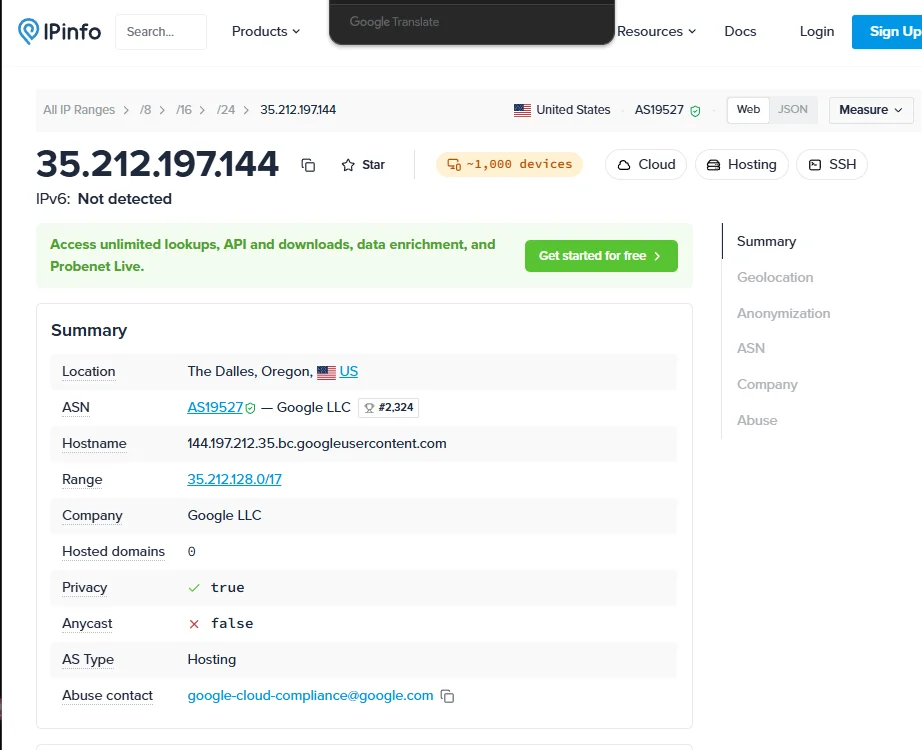
You can check the visible IP's network owner and ASN through an official registration service such as ARIN RDAP. Other regional registries may hold the authoritative record for IPs registered outside the ARIN service region.
Common Pitfalls
Assuming “Hosting” Means the Proxy Is Broken
An IP lookup tool may label the address as hosting, cloud, or datacenter. That classification describes the network source. It does not prove that the proxy connection has failed.
Judge the IP using the actual workflow, response codes, speed, session stability, and target behavior.
Using Rotating IPs for Stateful Sessions
Changing IPs during a login, checkout, account session, or multi-step task may create an inconsistent connection environment.
Use a static or sticky session when the same network identity needs to remain active throughout the task.
Testing Only the IP Address
A successful IP check confirms that one request used the proxy. It does not confirm that every browser request, DNS lookup, application connection, or background service follows the same route.
Test the actual browser or application you plan to use, not only a command-line IP endpoint.
Ignoring Special Characters in Credentials
Proxy usernames and passwords containing characters such as @, :, /, or # may need URL encoding. Otherwise, the proxy URL may be parsed incorrectly.
Scaling Before Testing the Target
A proxy may work with an IP-checking service but behave differently on the real target. Start with a small sample and record connection success, response time, status codes, location accuracy, and session behavior before increasing concurrency.
Datacenter vs Residential vs ISP Proxy
| Comparison | Datacenter Proxy | Residential Proxy | ISP Proxy |
|---|---|---|---|
| Typical IP source | Hosting, cloud, or server network | Consumer broadband connection | ISP-associated address hosted on server infrastructure |
| Network appearance | Commercial server traffic | Household internet traffic | ISP-style traffic |
| Typical speed | Fast and predictable | Varies by route and session | Usually stable and fast |
| Typical cost | Usually lowest | Usually highest | Often between the two |
| Session stability | High with static dedicated IPs | Depends on rotation and session settings | Often suited to longer sessions |
| Location coverage | Mainly server regions | Broad country, state, and city coverage | Depends on available ISP ranges |
| Scalability | Easy to scale | Depends on residential pool availability | More limited than large rotating pools |
| Hosting classification | Easier to identify | Normally appears residential | Normally appears ISP-associated |
| Best fit | Testing, APIs, fixed IPs, infrastructure tasks | Consumer-location and residential network tasks | Stable sessions needing an ISP-style address |
The categories describe different network sources rather than a universal quality ranking. The correct option depends on the target, location requirements, session length, budget, and workload.
How to Choose a Datacenter Proxy
Use the task requirements to narrow down the correct configuration:
- Choose a dedicated proxy when one customer needs full control of the IP.
- Choose a shared proxy when lower cost matters more than exclusive access.
- Choose a static IP for allowlists and long-running sessions.
- Choose rotating IPs for workloads designed to use an IP pool.
- Confirm that the required country or server region is available.
- Check whether your software supports HTTP, HTTPS, or SOCKS5.
- Test the real target before increasing request volume or concurrency.
For workflows that need a fixed and dedicated server-based IP, static datacenter proxies can provide a consistent address for allowlisted systems, development tools, QA testing, and other infrastructure-focused tasks.
Frequently Asked Questions
Final Takeaway
A datacenter proxy routes traffic through an IP associated with hosting, cloud, or server infrastructure. Its main advantages are speed, stable performance, lower cost, and easy scalability.
Its main limitation is that the network source is easier to identify as hosting traffic. Whether that matters depends on the target and the task.
Choose a datacenter proxy when you need predictable infrastructure, a fixed external IP, or efficient server-side connections. Test the real workflow before scaling rather than judging the proxy only by an IP database label.