
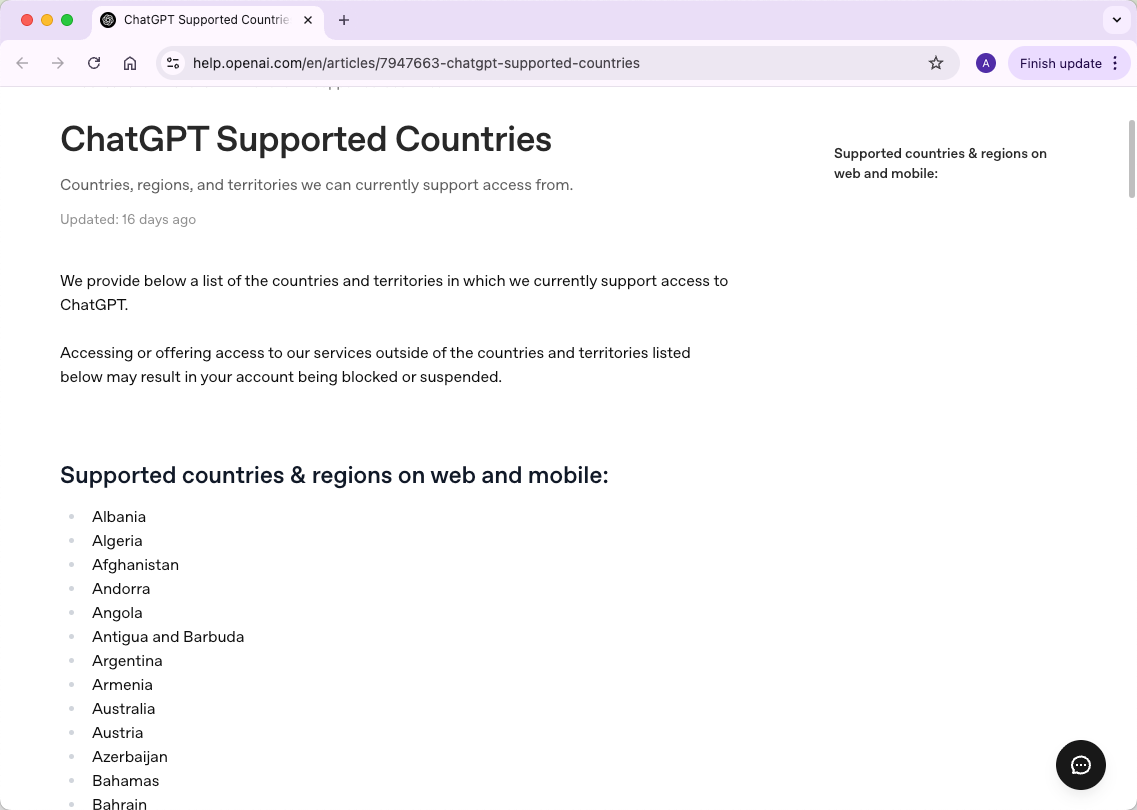
If you are asking “Can I use ChatGPT in China?”, check official availability before trying browser or network fixes. Mainland China is not currently listed among OpenAI's supported countries and territories for ChatGPT.
That does not mean every China-related failure looks the same. One person may see an unsupported-country warning, another may reach ChatGPT but get stuck during sign-in, and another may see only a loading or network error. Those symptoms point to different layers and should not be diagnosed as the same problem.
Mainland China is not currently on OpenAI's ChatGPT supported-country list. OpenAI also states that accessing its services from outside the listed countries and territories may result in an account being blocked or suspended. If you already have an account and encounter a problem while in China, record the exact message first. An unsupported-country warning, login loop, verification screen, page-load failure, and network error each require a different next check.
- Mainland China is not currently listed as a supported ChatGPT location by OpenAI.
- An account created in a supported country may still have trouble while the user is in an unsupported region.
- An unsupported-country warning should not be treated as an ordinary browser or network fault.
- If the page loads but login fails, browser state and authentication method become more relevant.
- If the same account and browser behave differently on two networks, the network path is worth investigating.
- A changed IP or route does not change OpenAI's official country-support policy or guarantee account access.
Is ChatGPT Supported in Mainland China?
OpenAI's current ChatGPT supported-countries page does not list mainland China among the countries and territories where ChatGPT access is supported.
OpenAI also states that accessing or offering access to its services outside the countries and territories on that list may result in an account being blocked or suspended.
This should be separated from a technical failure. A browser setting can change whether a page loads correctly. A different network can change the route used by the connection. Neither changes whether OpenAI officially lists a country as supported.
Throughout this page, “China” refers to mainland China unless otherwise stated.
Start With the Exact Symptom
Do not begin by changing several settings. First record exactly where the process fails.
The first visible failure tells you much more than the broad statement “ChatGPT does not work.”
| What You See | What It Suggests | Best First Check |
|---|---|---|
| “Unsupported country” or another regional warning | The failure explicitly points to regional availability | OpenAI's supported-country guidance |
| The login page opens, but sign-in loops or fails | The service is reachable, so authentication or browser state is now more relevant | Original sign-in method and a clean browser session |
| ChatGPT or the login page does not load | The failure occurs before normal authentication | OpenAI Status, then a controlled network comparison |
| The same account works on one network but not another | The network path may be contributing to the difference | Repeat the same test while changing only the network |
| Login works, but subscription payment fails | The access problem and billing problem are separate | Check billing or payment eligibility instead of login settings |
When the symptom changes, change the diagnosis. Do not continue applying network fixes to an authentication problem or browser fixes to an explicit country-availability warning.
If You See an Unsupported-Country Warning
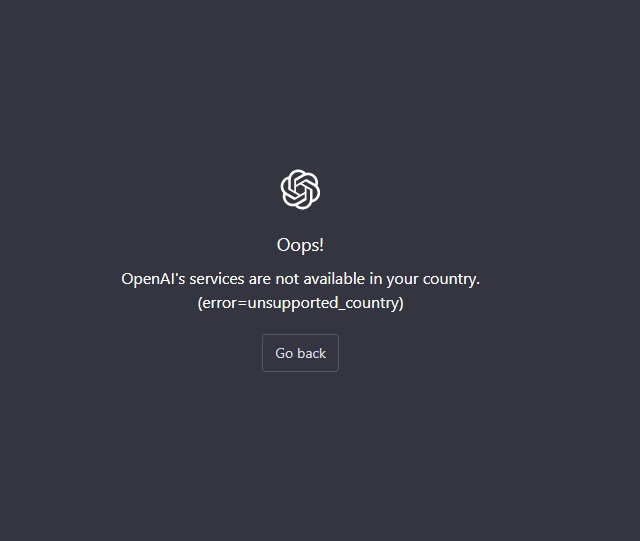
An explicit unsupported-country warning is the clearest case because the message itself points to regional availability.
OpenAI's unsupported-country guidance explains that this type of error can appear when someone attempts to sign up or create an API key from somewhere outside its supported countries and territories.
If the exact failure is an official regional-availability message, clearing cookies, changing DNS, or repeatedly restarting the login process does not change the underlying supported-country rule.
If you need to diagnose the regional warning itself, IPWeb's OpenAI country error guide separates country availability from browser, account, billing, and network symptoms.
If ChatGPT Loads but Login Fails
If ChatGPT reaches the login screen normally, basic page reachability has already succeeded. The next checks should focus on the authentication flow and browser session rather than immediately changing the network.
OpenAI's ChatGPT login guidance recommends using the same sign-in method that was originally used to create the account. An account created with Google, Microsoft, Apple, or email and password can fail when a different authentication method is attempted later.
For a controlled browser check:
- try ChatGPT in a private window or clean browser profile;
- allow cookies and JavaScript for ChatGPT and OpenAI domains;
- temporarily disable extensions that alter scripts, privacy settings, or authentication requests;
- keep the same account and sign-in method while testing;
- record whether the failure changes before modifying another variable.
If a clean browser works while the normal profile does not, the result points more strongly toward browser or session state. The ChatGPT Login Not Working guide covers login-method mismatches, session problems, verification loops, and account-side warnings in more detail.
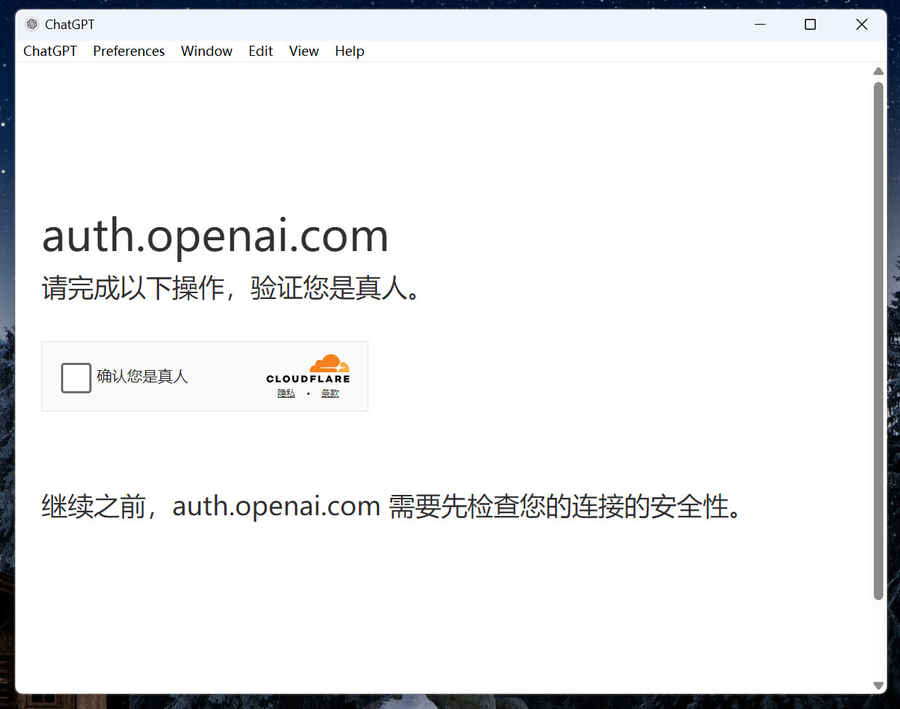
For Cloudflare verification loops and suspicious-login warnings, OpenAI's own troubleshooting guidance recommends disabling VPN or proxy services during testing, allowing cookies and JavaScript, and trying a clean browser profile or another network.
If ChatGPT Does Not Load
If the page fails before a normal login screen appears, first check OpenAI Status. A broader service incident can produce loading and conversation failures even when nothing has changed on the user's device.
If no relevant incident is shown, compare the same action across two networks without changing the account, browser profile, or device at the same time.
If the same browser consistently reaches ChatGPT on one connection but not another, the result supports investigating the network path. It does not by itself prove why a platform allowed or rejected a particular account session.
For WebSocket, Wi-Fi, DNS, firewall, secure-network, and related connection symptoms, continue with the ChatGPT Network Error guide.
If You Already Have a ChatGPT Account
An existing account that was created in a supported country does not guarantee normal access while the user is physically in an unsupported region.
OpenAI's travel guidance says users may have trouble logging in or accessing ChatGPT or the API after traveling to a region that OpenAI does not currently support.
The same guidance also covers a useful edge case: a user may return to a supported location and continue seeing an unsupported-region error. OpenAI recommends clearing browser cache and cookies, trying another browser or incognito mode, and contacting Support if the problem remains.
This creates a useful boundary between two situations:
- You are currently in an unsupported region: official availability remains the first constraint.
- You returned to a supported region but the old warning remains: browser or session cleanup becomes a meaningful test.
When the Network Route Actually Matters
A network route matters when a controlled comparison produces a repeatable difference.
Keep the same account, device, browser profile, and action. Change only the network, then repeat the test.
- Record the exact result on the first connection.
- Note whether the page loads, login completes, and a normal chat can begin.
- Keep the same browser profile and account.
- Change only the network path.
- Repeat the same action.
- Compare the results before changing anything else.
If only one network repeatedly fails, investigate the route rather than assuming the account itself changed.
One useful baseline is the public IP seen by the browser. IPWeb's What Is My IP? guide explains how to record the visible IP, country, ISP, and ASN. If the reported location looks unexpected, Why Is My IP Location Wrong? explains how IP databases, ISP routing, reassigned ranges, and other network factors can produce different location results.
For teams performing permitted regional QA or repeatable network-path comparisons, IPWeb Dynamic Residential Proxies provide residential routes that can be selected by location and session behavior. Use the proxy route as one network test variable. It does not change OpenAI's supported-country rules, account eligibility, billing requirements, or guarantee ChatGPT access.
If a proxy is part of a legitimate network test, confirm that the intended browser or application is actually using it before interpreting the result. IPWeb's proxy testing guide shows how to compare the visible IP, location, ISP, and ASN before and after applying the route.
What a VPN or Proxy Result Actually Proves
A visible query around this topic is “Can I use ChatGPT in China with a VPN?” The useful distinction is between a network result and an official availability result.
A VPN or proxy can change the public IP and network route seen by a destination. It does not make mainland China an officially supported ChatGPT region, change account eligibility, or guarantee that login will work.
It also does not reset browser cookies, logged-in identity, account history, or other session-level information. IPWeb's VPN and IP address guide explains what changes at the network layer and what remains visible outside it.
There is an important counterexample: if the symptom is a Cloudflare verification loop or suspicious-login warning, OpenAI's login guidance recommends disabling VPN or proxy services while troubleshooting. A route change can therefore be useful evidence in one test and an extra variable that should be removed in another.
The result should be interpreted narrowly:
- a changed public IP confirms that the tested traffic used a different outward route;
- a different result on two networks supports investigating the network layer;
- neither result proves that OpenAI officially supports the location or explains every account decision.
When to Stop Troubleshooting One Layer
Repeatedly applying the same fix after the evidence has moved elsewhere wastes time and makes the cause harder to identify.
| If You Confirm This | Stop Repeating | Move to |
|---|---|---|
| The message explicitly says the country or region is unsupported | Browser or DNS changes intended to alter official availability | OpenAI's supported-country guidance |
| A clean private window works | Treating the entire network as the problem | Browser and session-state checks |
| Only one network repeatedly fails | Changing login credentials or authentication methods | Network-path diagnosis |
| OpenAI Status shows a relevant incident | Repeated local configuration changes | Retest after service recovery |
| Login succeeds but payment alone fails | Basic login troubleshooting | Billing or subscription eligibility |
Change one variable, repeat the same small test, and record whether the result changes. A repeatable comparison is more useful than changing several settings until the symptom disappears.
Frequently Asked Questions
Final Thoughts
For ChatGPT in mainland China, official availability comes first. If the exact message is an unsupported-country warning, treat it as a regional-availability issue rather than an ordinary browser or network fault.
If the symptom is different, follow the evidence. A login loop points toward authentication and browser state. A page that fails before login points toward service health or connectivity. A repeatable difference between two networks makes the network path worth investigating.
Keep each test controlled and stop using a troubleshooting path once the result points somewhere else. That lets you separate official availability from browser, account, and network problems without assuming that one fix applies to every ChatGPT access issue.