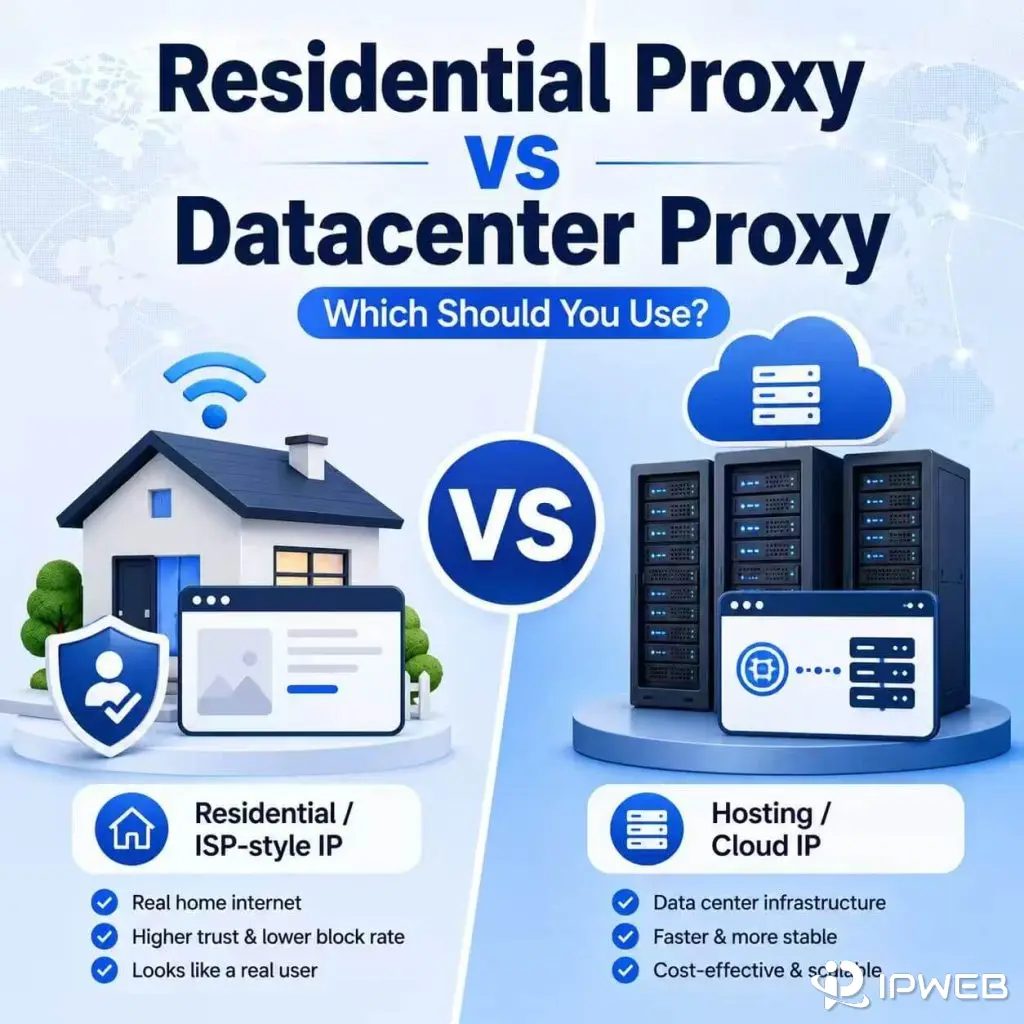
Residential proxies and datacenter proxies can both change the IP address a website sees. But they are not built for the same job.
A residential proxy uses an IP address associated with a residential or ISP-style network. A datacenter proxy uses an IP address from hosting, cloud, or data center infrastructure. That difference affects speed, cost, reliability, IP classification, and where each proxy type makes sense.
If you are checking localized pages, managing browser profiles, or working with account-based sessions, the network source may matter. If you are running backend tests, response checks, API routing, or internal QA tasks, paying extra for residential IPs may not make sense.
The mistake is assuming one type is always better. Residential proxies are not automatically the premium answer for every task. Datacenter proxies are not automatically low quality just because they come from server infrastructure. The right choice depends on what you need the proxy to do.
- Use residential proxies when the task depends on residential or ISP-style network appearance, location coverage, or account environment consistency.
- Use datacenter proxies when the task values speed, lower cost, stable infrastructure, and simple server-side routing.
- Residential proxies are usually more expensive because residential IP resources are harder to source and manage.
- Datacenter proxies are often faster and cheaper, but they may be easier to classify as hosting or cloud traffic.
- The best choice depends on IP source, session behavior, speed needs, traffic volume, target website behavior, and IP quality.
- Residential Proxy vs Datacenter Proxy: Quick Answer
- What Is a Residential Proxy?
- What Is a Datacenter Proxy?
- Residential Proxy vs Datacenter Proxy: Key Differences
- IP Source: Why It Matters
- Speed and Cost Differences
- Reliability, Session Stability, and IP Quality
- When Should You Use Residential Proxies?
- When Should You Use Datacenter Proxies?
- Common Mistakes When Choosing Proxy Type
- How to Choose the Right Proxy Type
- Frequently Asked Questions
Residential Proxy vs Datacenter Proxy: Quick Answer
Choose a residential proxy when the task depends on residential network source, location behavior, account environment consistency, or consumer-like IP appearance. Choose a datacenter proxy when the task depends on speed, lower cost, stable server infrastructure, or predictable fixed IP routing.
A residential proxy is best when the network source matters. A datacenter proxy is best when performance, cost, and infrastructure predictability matter more than residential IP appearance.
For example, residential proxies usually make more sense when you are checking localized pages, reviewing regional search results, testing how a site behaves from residential networks, or keeping a browser profile on a more consistent residential route.
Datacenter proxies usually make more sense when you are checking whether a page returns 200, 403, or 500; testing response time from a fixed server location; routing API requests where IP type does not matter; monitoring internal staging pages; or using a dedicated IP for an allowlisted system.
| Need | Better Choice | Why |
|---|---|---|
| Residential network appearance | Residential proxy | The IP is associated with residential or ISP-style networks. |
| Lower cost and faster response | Datacenter proxy | Datacenter IPs are easier to scale and often run through faster infrastructure. |
| Account-based browser sessions | Residential or static ISP-style proxy | A stable residential or ISP-style IP can keep the network route more consistent. |
| Backend QA checks | Datacenter proxy | Residential IP appearance may not matter for server-side checks. |
| Regional page review | Residential proxy | Location and residential network source may matter. |
| Fixed IP for allowlisted systems | Datacenter proxy | A dedicated datacenter IP can be simpler and more predictable. |
| High-speed infrastructure tasks | Datacenter proxy | Datacenter routes are often more predictable for performance-focused tasks. |
What Is a Residential Proxy?
A residential proxy routes traffic through an IP address associated with a residential or ISP-style internet connection. When a browser, app, or tool uses a residential proxy, the destination website usually sees the residential proxy IP instead of the user’s original public IP address.
The key difference is the IP source. Residential proxies are still proxies. They route selected traffic through another IP address. What makes them different is that the outgoing IP is tied to a consumer-like or ISP-style network rather than a cloud or hosting provider.
If you want the full foundation, read our guide on what a residential proxy is. In this article, we are focusing on how residential proxies compare with datacenter proxies.
Residential proxies are often used when IP type, location, ISP label, session consistency, and browser environment matter. They are not automatically better for every use case, but they are useful when the network source is part of the job.
What Is a Datacenter Proxy?
A datacenter proxy routes traffic through an IP address hosted in data center, cloud, or server infrastructure. The website sees the datacenter proxy IP rather than the user’s original IP address.
Datacenter proxies are usually built for speed, availability, and cost efficiency. Because the IPs come from server infrastructure, they often provide faster response times and more predictable performance than residential routes. They are also easier to scale.
The tradeoff is classification. Many websites and IP intelligence systems can identify whether an IP belongs to hosting, cloud, or data center networks. That does not make the proxy useless, but it means datacenter proxies are not ideal for tasks that specifically need residential network appearance.
Datacenter proxies are commonly used for backend tests, page response checks, uptime-style checks, internal QA runs, API routing where IP type does not matter, allowlisted systems, and fixed infrastructure tasks where speed and predictability matter more than residential IP source.
Residential Proxy vs Datacenter Proxy: Key Differences
The biggest difference between residential and datacenter proxies is the IP source. Residential proxies use IPs associated with residential or ISP-style networks. Datacenter proxies use IPs from hosting, cloud, or data center infrastructure.
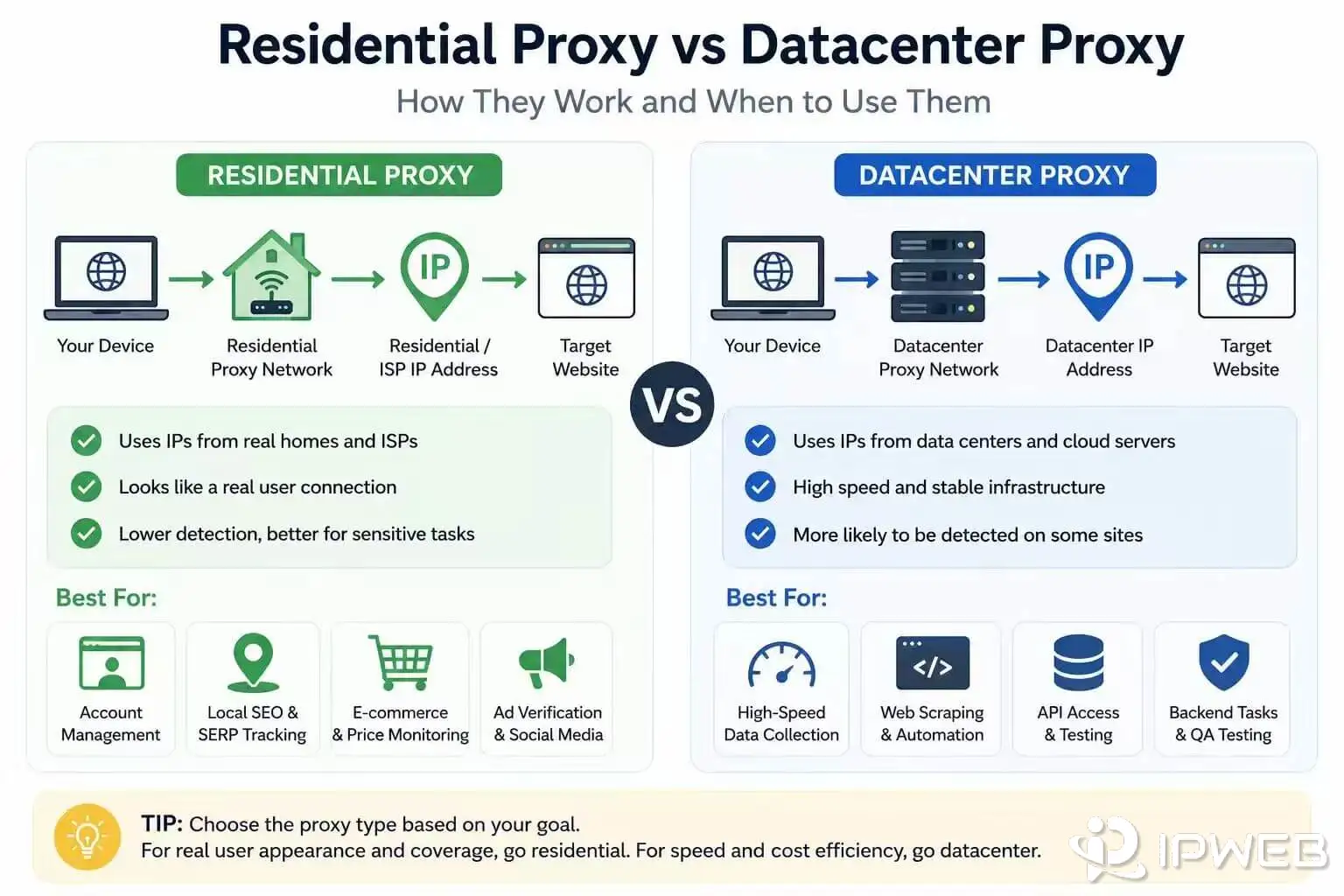
| Feature | Residential Proxy | Datacenter Proxy |
|---|---|---|
| IP source | Residential or ISP-style network. | Hosting, cloud, or data center network. |
| Network appearance | Closer to consumer internet traffic. | Closer to server or infrastructure traffic. |
| Speed | Can vary by route, ISP, location, and session type. | Often faster and more predictable. |
| Cost | Usually higher. | Usually lower. |
| Location coverage | Often useful for city, region, and consumer-network checks. | Usually tied to data center locations. |
| Best use | Localized checks, account environments, browser profiles, and residential-network tasks. | Backend tests, QA checks, API routing, allowlisted systems, and cost-sensitive tasks. |
| Main limitation | Higher cost and more variable performance. | More likely to be classified as hosting or data center traffic. |
A residential proxy is not always better. A datacenter proxy is not always worse. Residential asks: does the task need a residential-looking network source? Datacenter asks: can the task run well on fast, lower-cost server infrastructure?
IP Source: Why It Matters
IP source matters because websites and risk systems often evaluate more than country or city. They may also look at the IP’s network owner, ASN, hosting classification, privacy signals, past usage, and whether the IP belongs to residential, ISP, cloud, or data center infrastructure.
IANA explains global Internet number resources, including IP addressing and Autonomous System Numbers, through its Number Resources page. This helps explain why two IPs in the same country can still be classified very differently.
External IP intelligence providers also show why classification matters. IPinfo’s Privacy Detection database describes data associated with VPNs, Tor, proxies, relays, and hosting services. MaxMind’s GeoIP Anonymous IP database is also designed to identify VPN, proxy, hosting, and other masked IP address types.
That is why a residential proxy and a datacenter proxy can behave differently even when both show the correct country. The website may not only ask “Where is this IP?” It may also ask “What kind of network does this IP come from?”
Speed and Cost Differences
Datacenter proxies are usually faster and cheaper than residential proxies. They run on server infrastructure with more predictable bandwidth, direct routing, and easier scaling. That makes them useful for performance-focused tasks where residential appearance is not required.
Residential proxies often cost more because residential IP resources are harder to source, manage, and maintain. Their performance can also vary more because routes may depend on consumer-like networks, ISP conditions, location, session behavior, and provider quality.
Speed and cost should not be the only deciding factors. A fast datacenter proxy may still be the wrong choice if the target task expects residential or ISP-style traffic. A residential proxy may be unnecessary if the task only needs fast server-side access and does not care about network source.
| Factor | Residential Proxy | Datacenter Proxy |
|---|---|---|
| Typical speed | Can vary by residential route and session quality. | Often faster and more predictable. |
| Typical cost | Higher. | Lower. |
| Bandwidth predictability | Depends on provider, plan, and network route. | Often easier to forecast. |
| Scaling cost | Usually more expensive at large volume. | Usually easier to scale affordably. |
| Best cost-performance use | Tasks where residential network source matters. | Tasks where speed and infrastructure stability matter more. |
A practical rule: if the task does not need residential network appearance, test datacenter proxies first. If the task depends on residential IP source, location behavior, or account environment consistency, residential proxies may justify the higher cost.
Reliability, Session Stability, and IP Quality
Reliability is not only about whether the proxy connects. It also includes session stability, IP reputation, location accuracy, ASN classification, and whether the proxy behavior matches the task.
Residential proxies can work well for long-session tasks when the IP is stable and the environment is consistent. Static residential or ISP-style proxies are often used when the same browser profile, dashboard, or account task needs a consistent IP route.
Datacenter proxies can also be reliable. In fact, they are often easier to manage for infrastructure tasks because they run on stable server networks. If your team is testing API responses, monitoring staging pages, checking status codes, or routing traffic from a fixed allowlisted IP, datacenter proxies may be more practical than residential IPs.
IP quality still matters for both. A residential IP with poor history can create friction. A datacenter IP from a heavily used range can also be treated differently. If you are not sure why an IP behaves poorly, review your IP quality score instead of assuming the proxy type alone explains the issue.
| Reliability Question | Residential Proxy | Datacenter Proxy |
|---|---|---|
| Does the IP need to look residential? | Usually a better fit. | Usually not a fit. |
| Does the task need fast server infrastructure? | May work, but may cost more. | Usually a better fit. |
| Does the task need long sessions? | Static residential or ISP-style proxy may fit. | Static datacenter may fit if residential appearance is not required. |
| Does the IP need strong location consistency? | Depends on provider and geolocation data. | Depends on data center location and IP records. |
| Does IP reputation matter? | Yes. | Yes. |
When Should You Use Residential Proxies?
You should use residential proxies when the task depends on residential or ISP-style network appearance, location coverage, or account environment consistency. They are often useful when the session should look closer to normal consumer internet traffic than server infrastructure traffic.
Residential proxies are a better fit when you need:
- Residential or ISP-style IP source
- Localized page review from consumer-like networks
- Regional search result checks
- Ad and landing page review by location
- Product availability or pricing display checks
- Stable browser profile routing
- Long-session account environments
- Approved data access tasks where residential coverage matters
When a task needs residential IP coverage across locations, IPWeb’s dynamic residential proxies can support browser-based testing, regional review, and approved data access sessions without relying on one fixed infrastructure IP for every request.
The key is not to use residential proxies just because they sound more natural. Use them when the task truly depends on residential network source, location behavior, or long-session consistency.
When Should You Use Datacenter Proxies?
You should use datacenter proxies when speed, lower cost, and infrastructure stability matter more than residential network appearance. They are often a better fit for practical technical tasks where the target does not require residential or ISP-style IP behavior.
Datacenter proxies are a better fit when you need:
- Fast response times
- Lower cost per IP or per request
- Stable server-side routing
- Status code checks, such as 200, 403, or 500 responses
- Internal QA tasks and staging page checks
- API request routing where residential IP source is not required
- Dedicated fixed IPs for allowlisted systems
- Infrastructure tests from a predictable network path
For fixed infrastructure tasks where residential network appearance is not required, IPWeb’s static datacenter proxies can provide a predictable IP route for QA checks, allowlisted systems, and server-side workflows.
The main tradeoff is classification. If the target website treats hosting or cloud IPs differently, datacenter proxies may not fit the task. If the task only needs speed, predictable routing, and a stable fixed IP, they may be the cleaner choice.
Common Mistakes When Choosing Proxy Type
Many proxy problems come from choosing based on labels instead of the actual task. A residential proxy may be overkill. A datacenter proxy may be too easy to classify as hosting traffic. A static proxy may be too narrow. A rotating proxy may be too inconsistent.
Common mistakes include:
- Assuming residential proxies are always better than datacenter proxies.
- Assuming datacenter proxies are always low quality.
- Choosing the cheapest proxy without checking IP source, ASN, and reputation.
- Using datacenter proxies for tasks that clearly need residential network appearance.
- Using residential proxies for simple server-side checks where speed and cost matter more.
- Ignoring session behavior when the task involves login or account continuity.
- Checking only country location and ignoring ISP, ASN, and IP classification.
- Scaling before testing visible IP, location, speed, session behavior, and target response.
A better approach is to define the task first. Ask what the website needs to see, how long the session should last, whether the IP source matters, and whether speed or network appearance matters more.
How to Choose the Right Proxy Type
Choosing between residential and datacenter proxies becomes easier when you translate the task into practical requirements.
| Question | If Yes | If No |
|---|---|---|
| Does the task need residential or ISP-style IP appearance? | Use residential or static ISP-style proxies. | Datacenter proxies may be enough. |
| Is speed more important than residential network source? | Test datacenter proxies first. | Residential proxies may be worth the higher cost. |
| Does the task involve long account sessions? | Use static residential, ISP-style, or another stable dedicated setup. | Rotating residential or datacenter proxies may work. |
| Do you need broader regional coverage? | Use residential proxies with location targeting. | A fixed datacenter IP may be enough. |
| Is the task cost-sensitive and not tied to consumer IP appearance? | Use datacenter proxies. | Residential proxies may provide a better fit. |
| Does the target respond differently to hosting traffic? | Residential proxies may be a better fit. | Datacenter proxies may be simpler and cheaper. |
Pre-Scaling Proxy Testing Checklist
Before scaling either proxy type, test a small task first. The goal is not to prove the proxy will work everywhere. The goal is to catch obvious mismatches before you commit to a larger setup.
- Visible IP test: Confirm the website or tool sees the proxy IP instead of your original IP.
- Location test: Check the IP country, region, city, ISP, and ASN across more than one lookup source.
- Classification test: Review whether the IP appears as residential, ISP, hosting, cloud, proxy, VPN, or another category in external IP intelligence tools.
- Speed test: Compare page load time or response time during peak and off-peak hours.
- Session test: Recreate the actual task, such as dashboard login, page review, ad review, product availability checks, API response checks, or QA checks.
- Stability test: Watch for unexpected IP changes, session drops, location mismatches, or inconsistent target responses.
If the proxy is configured but the website still sees your original IP, start with the basics. Our guide on how to check if your proxy is working walks through the first troubleshooting steps.
Frequently Asked Questions
The main difference is IP source. A residential proxy uses an IP associated with a residential or ISP-style network. A datacenter proxy uses an IP from hosting, cloud, or data center infrastructure.
Not always. A residential proxy is better when the task needs residential network appearance, location consistency, or account environment stability. A datacenter proxy is better when speed, lower cost, and infrastructure stability matter more.
Often, yes. Datacenter proxies usually run on server infrastructure with more predictable routes and bandwidth. Residential proxy speed can vary more by ISP route, location, session type, and provider quality.
Usually, yes. Residential IP resources are harder to source and manage, so residential proxies often cost more than datacenter proxies. Datacenter proxies are usually easier to scale at lower cost.
Use residential proxies when the task needs residential or ISP-style IP source, regional coverage, account environment consistency, localized page review, ad review, or approved data access tasks that depend on residential network behavior.
Usually, yes. If the task only needs fast response, stable routing, or fixed infrastructure IPs, and residential network appearance does not matter, datacenter proxies are often the more practical choice.
No. Datacenter proxies are not bad by default. They are simply easier to identify as hosting or cloud traffic. For backend tests, API routing, QA checks, and allowlisted systems, that classification may not matter.
You can technically configure them, but they are often not the best fit for account-based environments where residential or ISP-style network consistency matters. For long-running seller accounts, brand profiles, or browser profiles, residential or static ISP-style proxies are usually a better match than generic datacenter IPs.
Yes, a static datacenter proxy can keep the same IP for long sessions. However, it still appears as data center or hosting infrastructure, so it is not the same as a residential or ISP-style long-session proxy.
Start with the task. If residential network source matters, choose residential. If speed and cost matter more and hosting classification is acceptable, choose datacenter. Then test visible IP, location, ASN, speed, IP quality, and session behavior before scaling.
Final Thoughts
Residential proxies and datacenter proxies are different tools for different jobs. Residential proxies are usually better when IP source, location behavior, and residential network appearance matter. Datacenter proxies are usually better when speed, cost efficiency, and infrastructure stability matter more.
The best choice is not the proxy type with the most impressive label. The best choice is the one that matches the task. If the task needs a residential or ISP-style environment, residential proxies are worth testing. If the task only needs a fast, stable, lower-cost route, datacenter proxies may be the smarter option.
Before scaling either setup, test the visible IP, location, ASN, classification signals, speed, session behavior, and target website response. That small validation step will tell you more than choosing based on “residential” or “datacenter” alone.