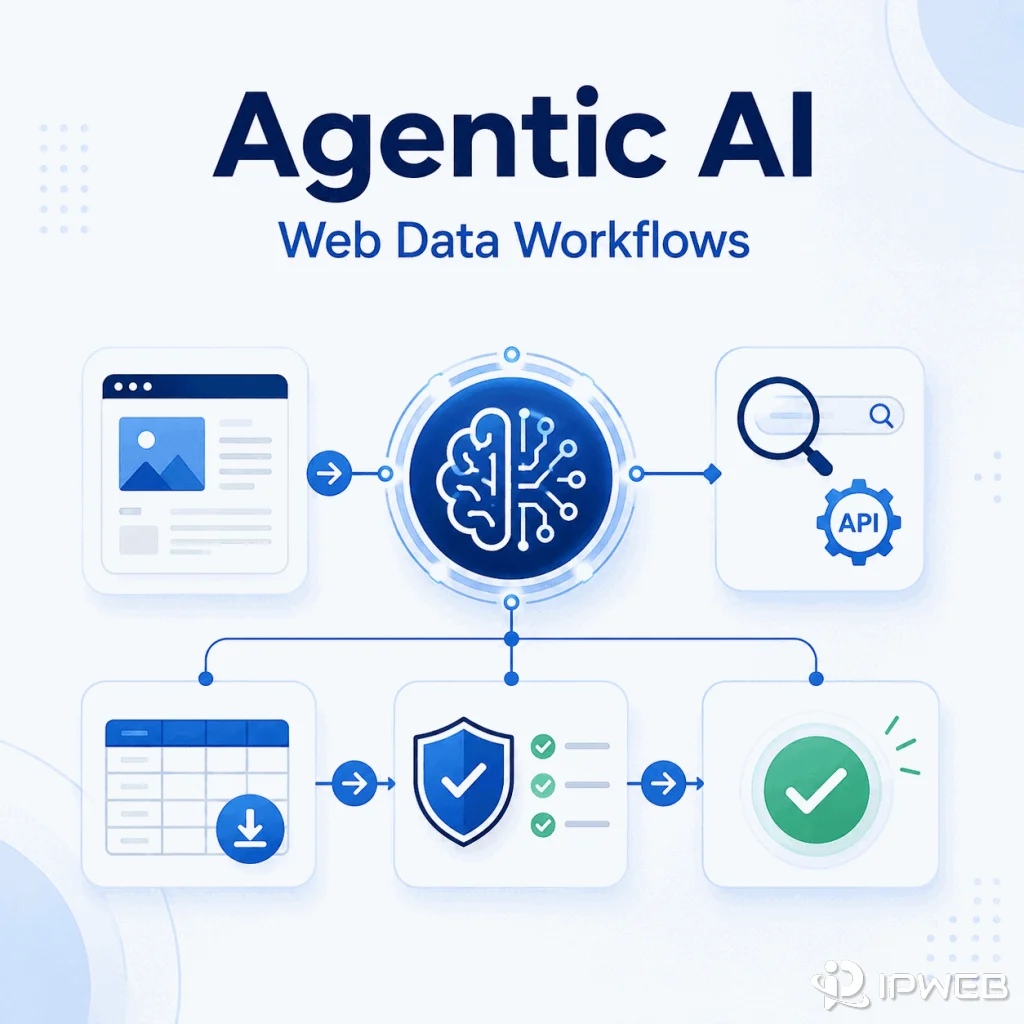
Agentic AI is an AI system that can plan a task, choose tools, take intermediate actions, evaluate results, and continue until it reaches a defined goal. In web data workflows, an AI agent may call a search API, open a browser, extract visible page content, compare sources, validate structured records, or route a request through an approved network path.
The useful question is not only "What is agentic AI?" It is also "What does an agent need before it can act safely on live web information?" The answer is a controlled workflow with clear goals, tool boundaries, fresh data, validation steps, audit logs, stop conditions, and human approval for sensitive actions.
Agentic AI is a goal-driven workflow in which a model can decide what step to take next instead of only producing one response. For web data tasks, an agent may use browsers, search APIs, crawlers, scrapers, and validation tools. Those capabilities still need human-defined rules for source permissions, data quality, tool access, retries, and safe use.
- Agentic AI often uses a generative model as its reasoning component, then adds planning, tools, state, and feedback loops.
- Live web data matters when the task depends on current pages, prices, policies, listings, documents, or search results.
- A web data agent needs extraction, validation, retry limits, audit logs, and clear stop conditions.
- Content retrieved from webpages should be treated as untrusted input, not as instructions that can override system rules.
- Proxies can support approved network testing or regional QA, but they do not change source permissions or legal obligations.
What Is Agentic AI?
Agentic AI describes systems that can pursue a goal through a sequence of decisions and tool calls. Instead of only responding to a prompt, an agent can break a task into steps, choose a permitted tool, observe the result, evaluate whether the result is sufficient, and decide what to do next.
For example, a simple chatbot might provide a general summary of market trends. An agentic workflow could search an approved set of public pages, open product listings, extract visible fields, compare changes, flag missing records, and return a result with source evidence.
IBM's agentic AI explainer emphasizes goal-directed behavior and tool use, while the Google Cloud agentic AI guide describes systems that reason, plan, and act across multiple steps. For web data teams, the practical focus is how that decision loop interacts with live sources, extraction tools, and validation rules.
Agentic AI vs Generative AI
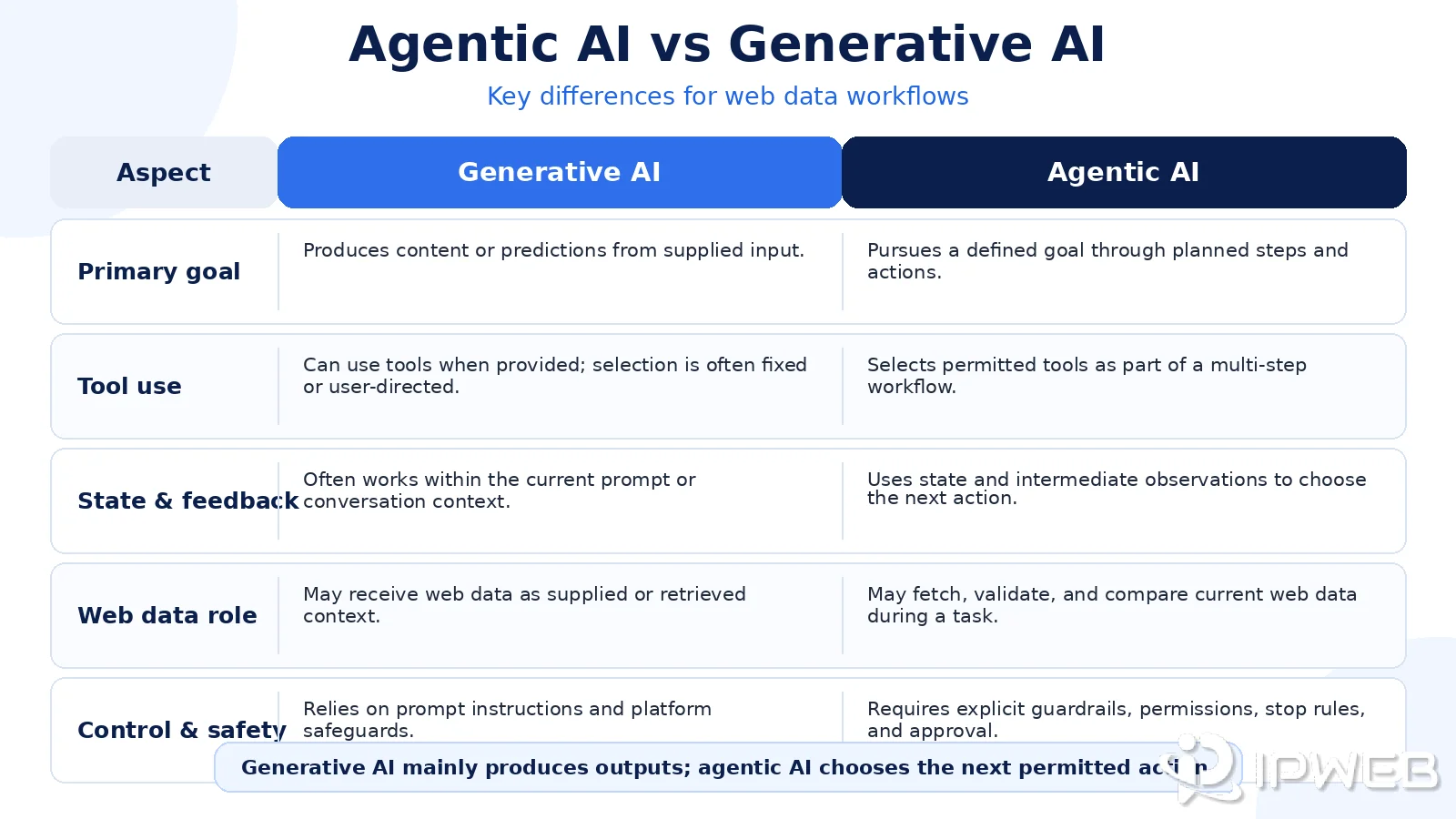
Generative AI primarily produces content or predictions from supplied context. Agentic AI often uses a generative model as its reasoning component, then adds planning, tool access, state, feedback, and action loops so the system can work toward a goal.
| Capability | Generative AI | Agentic AI |
|---|---|---|
| Main output | A response, draft, summary, prediction, or classification | A multi-step result produced through controlled actions |
| Tool use | Optional, fixed, or directed by the user | Selected within a defined tool and permission boundary |
| State and feedback | Often limited to the supplied conversation or context | Uses observations and intermediate results to choose the next step |
| Web data role | Usually supplied as context | May be discovered, opened, extracted, checked, and compared during the task |
| Risk | Hallucination, outdated context, and weak grounding | The same risks plus tool errors, unsafe actions, repeated failures, and untrusted content |
| Best fit | Drafting, summarizing, rewriting, and reasoning over supplied information | Research workflows, structured data tasks, QA, and bounded decision support |
Agentic AI therefore needs stronger operational controls than a one-shot prompt. The system can make more progress without constant user direction, but it can also repeat a poor action faster when tool permissions, retry limits, or validation rules are unclear.
Why Agentic AI Needs Live Web Data
Many agent tasks become useful only when the system can inspect current public information. A price comparison workflow needs the latest listed values. A compliance review needs the current policy page. A market research workflow may need recently published catalogs, job posts, reviews, or search results.
Static training data is not enough for those tasks. Even a capable model may be outdated when a page changed recently. Agentic workflows therefore often combine a model with retrieval, search APIs, browser automation, crawlers, scrapers, and structured extraction. Before collected pages enter an agent workflow, they still need the source metadata, cleaning, permissions, and quality checks described in our LLM-ready data guide.
The industry connection between agents and live web infrastructure is also visible in Zyte's discussion of agentic AI workflows with rapid web data. The model may choose the next action, but page access, rendering, extraction, validation, and source governance remain separate engineering responsibilities.
The practical challenge is evidence quality. The workflow must verify that a page loaded correctly, dynamic content rendered, required fields are complete, and the result is reliable enough to support another action. It should apply predefined source policies and route unclear permission or usage questions for human review.
A Safe Web Data Agent Architecture
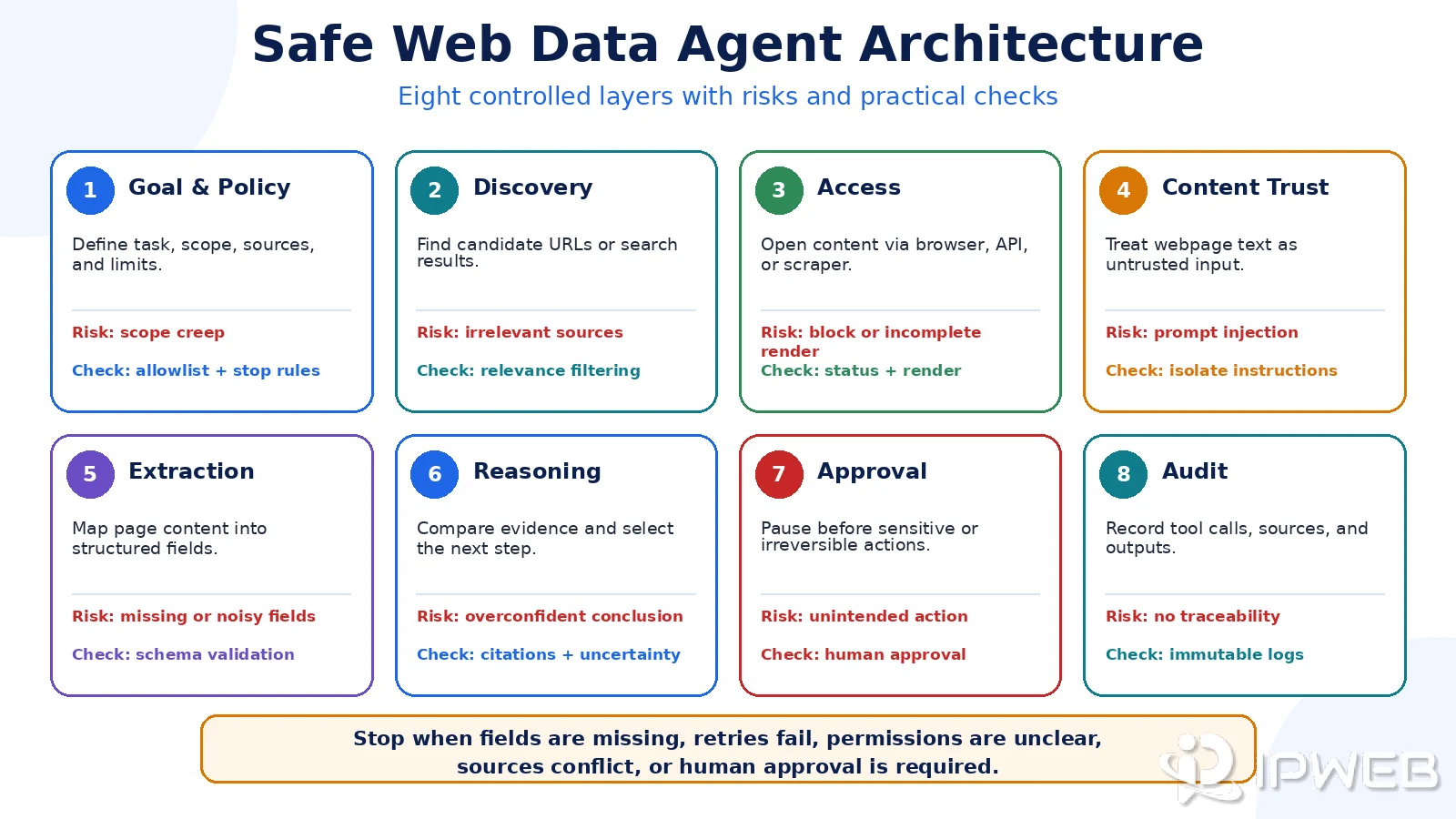
A web data agent should have clear layers rather than one uncontrolled loop. The AWS security principles for agentic AI systems emphasize keeping deterministic safeguards outside the model and treating untrusted inputs as a separate security concern.
| Layer | What it does | What can go wrong | Practical check |
|---|---|---|---|
| Goal and policy | Defines allowed tasks, sources, and outcomes | The agent works outside the approved scope | Use source allowlists, action limits, and explicit review triggers |
| Discovery | Finds candidate URLs or search results | Sources are irrelevant, duplicated, or low quality | Deduplicate URLs and score source relevance before access |
| Access | Opens pages through a browser, API, or crawler | Timeouts, wrong region, incomplete rendering, or blocked requests | Log status codes, render state, timestamps, and network path |
| Content trust | Separates webpage content from system instructions | A page contains prompt injection or misleading tool instructions | Treat retrieved text as untrusted data and reject instructions that exceed the task policy |
| Extraction | Turns pages into structured fields | Missing fields, layout drift, duplicated templates, or noisy text | Validate the schema, required fields, and source-to-field mapping |
| Reasoning | Compares evidence and selects the next step | The agent forms a confident conclusion from weak or conflicting evidence | Require citations, uncertainty flags, conflict handling, and fallback rules |
| Approval | Controls sensitive or irreversible actions | The agent submits, sends, deletes, purchases, or exposes data without review | Require human approval for credentialed, external, financial, or irreversible actions |
| Audit | Records what the workflow did | There is no trace for debugging, compliance, or review | Save the task, source, tool call, timestamp, decision, and output version |
A web data agent should stop when required fields remain missing, repeated retries fail, source permissions are unclear, retrieved sources materially conflict, or the next action requires credentials or human approval. A stop condition is a safety feature, not a workflow failure.
Where Browsers, APIs, Scrapers, and Proxies Fit
An agentic AI workflow may use different tools for different jobs. A search API can discover candidate pages. A browser can render JavaScript-heavy content. An LLM scraper can convert permitted page content into structured text or fields. A proxy can help test how a public site responds from an approved network or region.
These tools are not interchangeable. A browser is useful when rendering matters. An API is cleaner when a stable official interface exists. A scraper is useful when the page structure is predictable and the intended collection is permitted. A proxy is a network-layer tool, not a permission layer.
Modern browser-agent stacks may combine headless browsers with approved regional network routes to verify page availability, locale-specific rendering, and public content differences across locations. This supports controlled QA and permitted data workflows; it does not override site rules, access controls, or source permissions.
Use the safest direct source first. If an official API or licensed feed meets the task, use it. When public webpages must be checked, document the source, respect site rules, and review the compliance considerations in our guide to whether web scraping is legal.
Browser-controlled agents also need a clear separation between page content and trusted instructions. Our article on browser agents and web workflows explores how tool-enabled models interact with websites and why access controls still matter.
Practical Examples
Agentic AI can support web data work when the scope, sources, output, and stop condition are defined:
- A retail analyst asks an agent to compare public product prices across a fixed list of pages and flag material changes with source URLs.
- A search-quality team asks an agent to check whether a landing page renders correctly from approved regions and record status codes or missing elements.
- A data team asks an agent to collect public documentation updates, extract changed fields, and send uncertain cases for review.
- A QA workflow asks an agent to identify whether a page returns 200, 403, 451, 502, 503, or another status before attempting extraction.
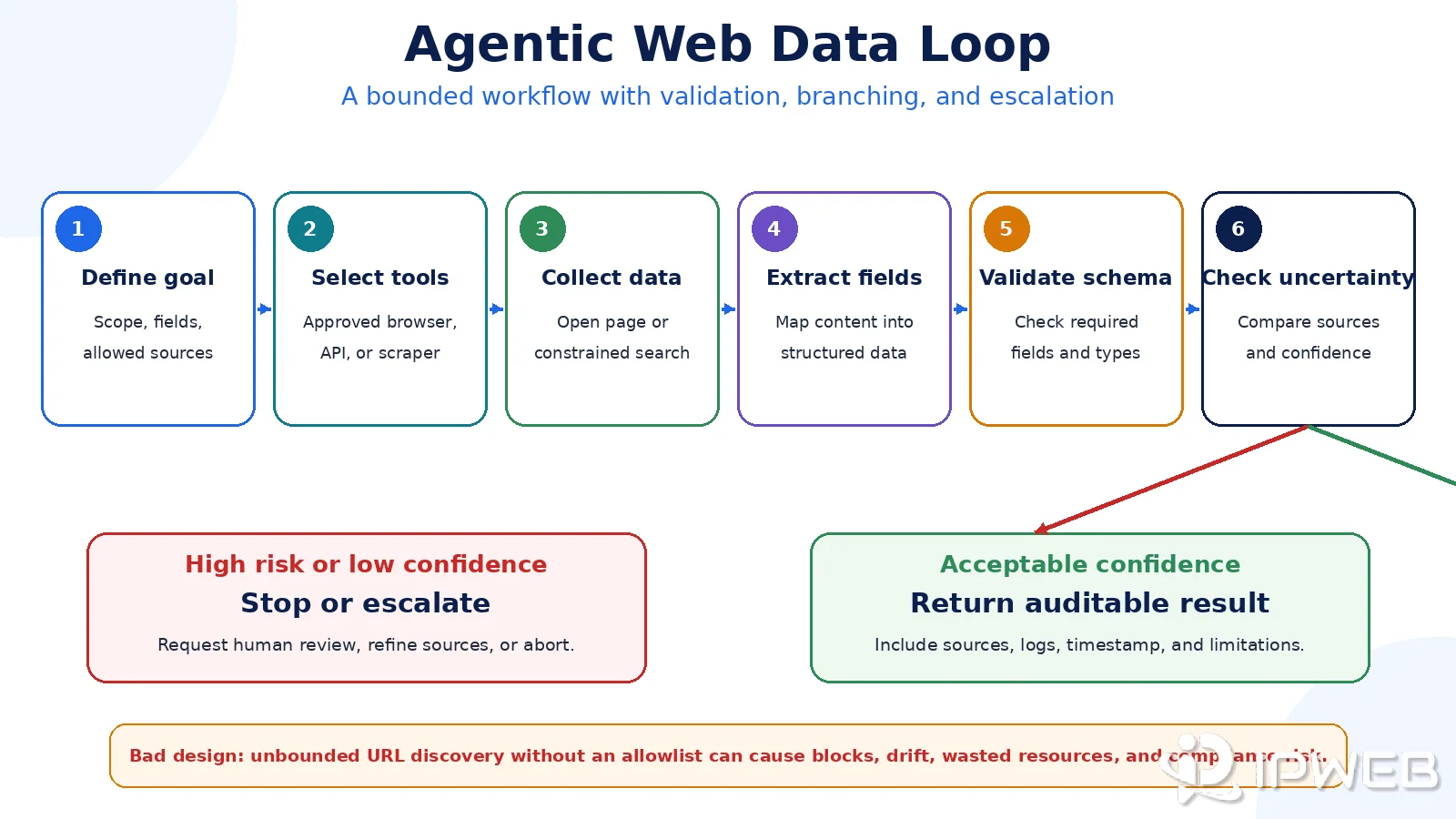
An unbounded agent that discovers thousands of unknown URLs without a source allowlist can trigger uncontrolled collection, repeated request failures, unnecessary cost, and compliance risk. Discovery limits, approved domains, retry caps, and stop conditions should be defined before the first tool call.
A Minimal Web Data Agent Loop
- Define the goal: specify the question, allowed sources, required fields, and acceptable output.
- Select approved tools: expose only the search, browser, API, scraper, or network functions required for the task.
- Collect evidence: open the permitted sources and record the canonical URL, timestamp, and access result.
- Validate the data: check rendering, required fields, schema validity, duplication, and source consistency.
- Evaluate uncertainty: compare sources and flag missing, stale, or conflicting evidence.
- Apply stop and approval rules: stop after repeated failures or request human review before sensitive actions.
- Return an auditable result: provide the structured output, supporting sources, limitations, and workflow log.
The following minimal Python example shows the loop without giving the agent unrestricted discovery or action permissions. Replace the example search function with an approved search API, and keep the domain allowlist and request limits in production.
from urllib.parse import urlparse

import requests
from bs4 import BeautifulSoup

ALLOWED_HOSTS = {"example.com"}
MAX_URLS = 3
REQUIRED_FIELDS = {"url", "title", "text"}


def search_urls(query):
    """Replace this stub with an approved search API."""
    return ["https://example.com/"]


def is_allowed(url):
    return urlparse(url).hostname in ALLOWED_HOSTS


def visit(url):
    response = requests.get(
        url,
        timeout=15,
        headers={"User-Agent": "WebDataAgentDemo/1.0"},
    )
    response.raise_for_status()
    return response.text


def extract(url, html):
    soup = BeautifulSoup(html, "html.parser")
    title = soup.title.get_text(strip=True) if soup.title else ""
    text = " ".join(soup.stripped_strings)[:500]
    return {"url": url, "title": title, "text": text}


def is_valid(record):
    return REQUIRED_FIELDS.issubset(record) and all(record.values())


def run_agent(query):
    results = []

    for url in search_urls(query)[:MAX_URLS]:
        if not is_allowed(url):
            continue

        try:
            record = extract(url, visit(url))
        except requests.RequestException as error:
            print(f"Access failed for {url}: {error}")
            continue

        if is_valid(record):
            results.append(record)

    return results


if __name__ == "__main__":
    print(run_agent("example query"))
This demo stops after a small candidate set, rejects domains outside the allowlist, validates required fields, and records access failures instead of retrying indefinitely. A production agent should also add structured logs, permission checks, rate limits, source timestamps, and human approval for sensitive actions.
Frequently Asked Questions
Final Thoughts
Agentic AI becomes useful for web data only when the agent has reliable tools and enforceable boundaries. The model can plan and reason, but the workflow still needs source rules, content-trust controls, extraction validation, retry limits, human approval, audit logs, and compliance checks.
Treat the agent as an orchestrator rather than a shortcut around data quality or access rules. The safest design gives the system enough authority to complete a bounded task while keeping sensitive decisions, permissions, and irreversible actions under deterministic controls.