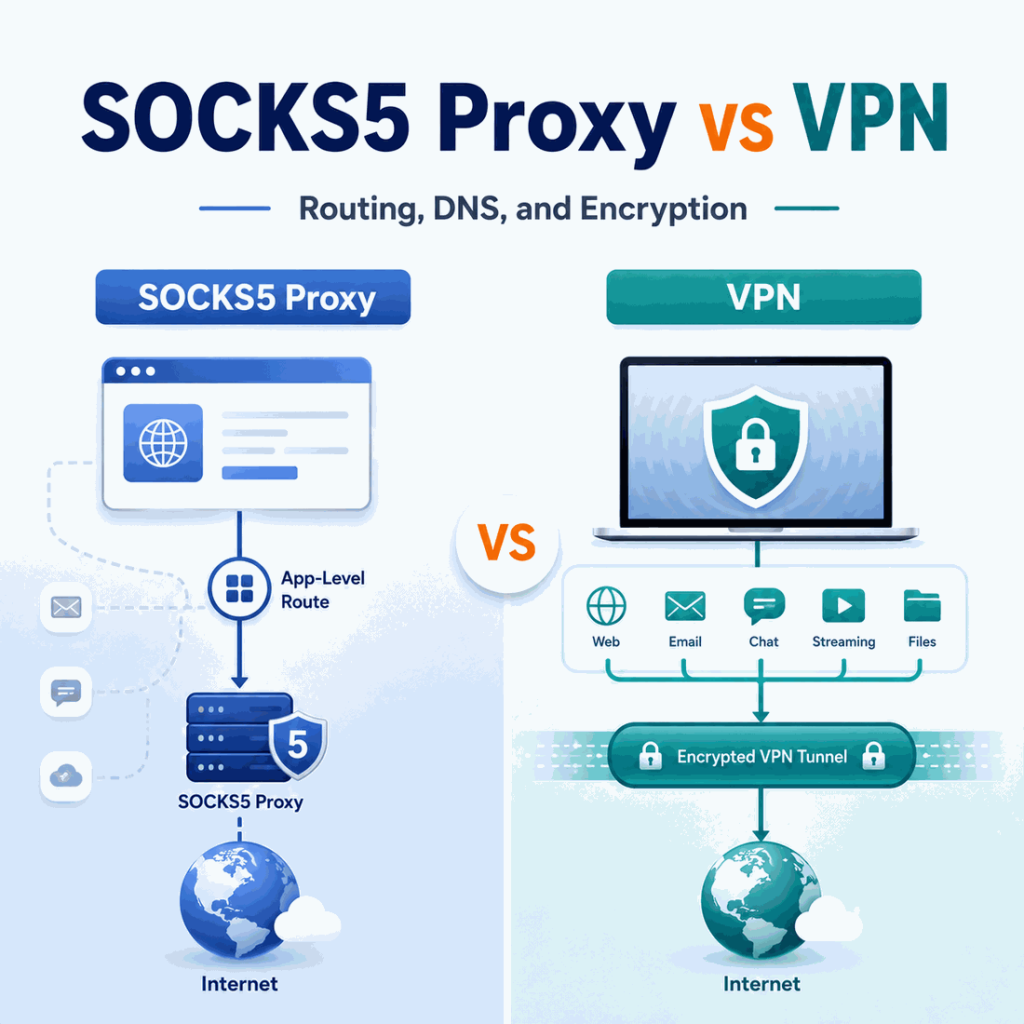
SOCKS5 proxies and VPNs can both change the network path between an application and the internet, but they solve different problems. The practical SOCKS5 proxy vs VPN difference is routing scope: SOCKS5 is usually configured for a specific browser, script, crawler, profile, or application, while a VPN normally creates an encrypted tunnel that can carry traffic for an entire device or a defined set of apps.
A SOCKS5 proxy forwards traffic from a configured application through a SOCKS5 server. A VPN creates an encrypted tunnel between the device or VPN client and a VPN server, then routes traffic through that server. SOCKS5 offers granular per-app or per-job routing and can support TCP and UDP, but the SOCKS5 protocol itself does not provide VPN-style tunnel encryption. A VPN is usually simpler when many apps on one device should share one protected route.
- SOCKS5 is a proxy protocol, not a VPN protocol.
- A SOCKS5 proxy is commonly assigned to one browser, app, crawler, profile, or command-line request.
- A VPN usually applies a tunnel at the device or app-routing level and encrypts traffic between the client and VPN server.
- SOCKS5 can handle TCP and, where the client and proxy implementation support it, UDP.
- DNS behavior depends on the SOCKS5 client. In cURL,
socks5://resolves the destination locally whilesocks5h://asks the proxy to resolve the hostname. - For crawling, browser QA, and multi-session data workflows, SOCKS5 often provides more granular route control than a device-wide VPN.
SOCKS5 Proxy vs VPN: Quick Comparison
| Factor | SOCKS5 Proxy | VPN |
|---|---|---|
| Routing scope | Usually per browser, app, profile, script, or job | Usually device-wide or applied to selected apps |
| Main configuration | Proxy host, port, authentication, and client settings | VPN client, tunnel protocol, server, and routing rules |
| Client-to-endpoint encryption | Not provided by SOCKS5 itself | Core part of the VPN tunnel |
| TCP | Supported | Supported through the tunnel |
| UDP | Defined by SOCKS5, but implementation support varies | Depends on the VPN protocol and client |
| Destination DNS | Can be local or proxy-side, depending on the client and configuration | Usually follows the VPN client's DNS and routing configuration |
| Per-profile routing | Usually straightforward | Possible, but often requires separate environments or app-routing rules |
| Whole-device routing | Not the normal model | Common use case |
| Typical technical fit | Crawlers, browser profiles, scripts, QA, per-job routing | Whole-device privacy, remote access, one route for multiple apps |
A SOCKS5 proxy is usually the more granular routing tool. A VPN is usually the broader tunnel. Neither is automatically better; the useful choice depends on whether the route should apply to one workload or to much of the device.
- One workload needs its own route: use SOCKS5 when a browser, script, crawler, profile, or job should be routed independently.
- Most device traffic should share one protected path: a VPN is the more natural fit when one encrypted tunnel should carry traffic for many applications.
- Several jobs need independently testable routes: SOCKS5 makes it easier to assign and verify a different proxy endpoint per workload.
- The requirement is device-level routing or remote access: a VPN usually provides the simpler control model.
What Is a SOCKS5 Proxy?
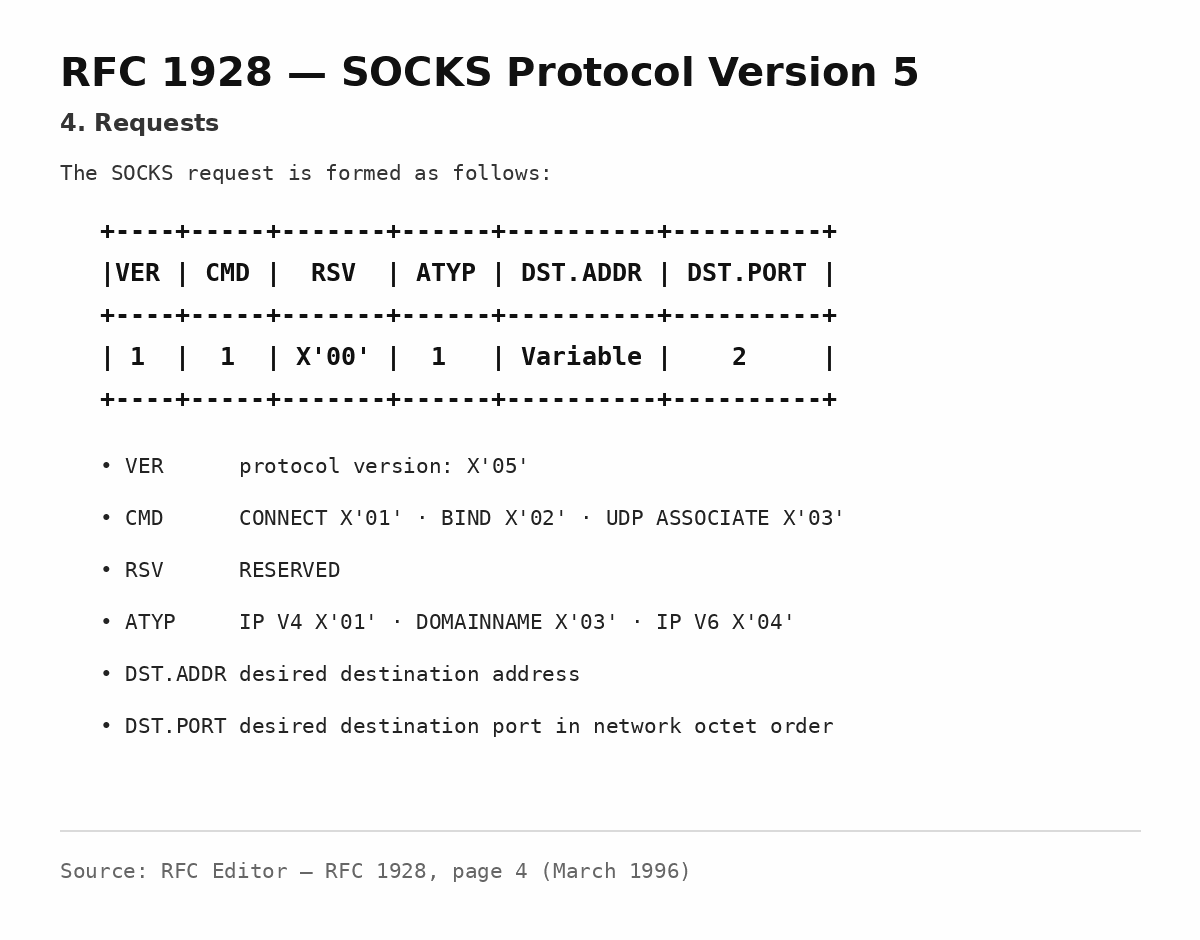
SOCKS5 is version 5 of the SOCKS protocol. It sits between an application and the transport layer and relays connections through a SOCKS server. The original specification, RFC 1928, defines support for TCP connections, UDP association, IPv4 addresses, IPv6 addresses, domain names, and authentication negotiation.
That makes SOCKS5 more general than an HTTP-specific proxy. A SOCKS5-aware application does not need the proxy to understand the application protocol in the same way an HTTP proxy understands HTTP requests. The SOCKS server receives a destination address and port, evaluates the request, and establishes or denies the relay.
SOCKS5 is commonly used with browsers, command-line tools, automation software, crawlers, messaging clients, and other applications that support SOCKS configuration. The route normally applies only to software that has been configured to use the proxy.
Not by itself. SOCKS5 defines proxy negotiation and traffic relaying, but it is not a VPN-style encrypted tunnel protocol. If the application connects to an HTTPS destination, TLS still protects the HTTPS session between the client and destination. That application-level encryption is separate from the SOCKS5 proxy protocol.
What Is a VPN?
A VPN creates a protected network path between a VPN client and a VPN server. Mozilla's VPN overview describes this as a secure tunnel that conceals the user's normal public IP from destinations and encrypts traffic between the device and the VPN provider.
A VPN can route most device traffic through one tunnel or apply the tunnel selectively through features such as split tunneling. That broader routing model is the main contrast with SOCKS5, which is commonly configured inside the individual application or workload that needs the proxy route.
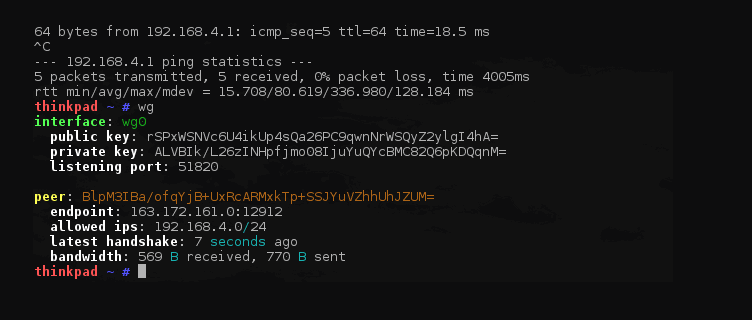
Routing Scope and Encryption
Routing scope is the clearest practical difference. A browser or Python script can use a SOCKS5 endpoint while other applications on the same device continue to use their normal route. A VPN usually establishes the tunnel first and then sends eligible application traffic through it, with split tunneling used when some apps should be included or excluded.
Encryption is a separate question. A VPN is designed to encrypt traffic between the VPN client and VPN server. SOCKS5 does not add equivalent tunnel encryption by default, but that does not make every proxied request plaintext. HTTPS still uses TLS and SSH still uses its own encrypted transport; the proxy protocol and the application protocol operate at different layers.
If one workload needs an independently controlled route, SOCKS5 is usually easier to assign and verify. If most device traffic should share one encrypted path, a VPN is usually the simpler fit.
If the decision is specifically between a residential proxy route and a VPN connection, Residential VPN vs Residential Proxy compares IP sourcing and session behavior in more detail. For the broader proxy-versus-VPN question, see Proxy vs VPN; this page stays focused on SOCKS5-specific routing, DNS, and client behavior.
SOCKS5 and DNS Resolution
DNS is one of the most important implementation details in a SOCKS5 setup. A proxy can change the TCP route correctly while the destination hostname is still resolved somewhere else.
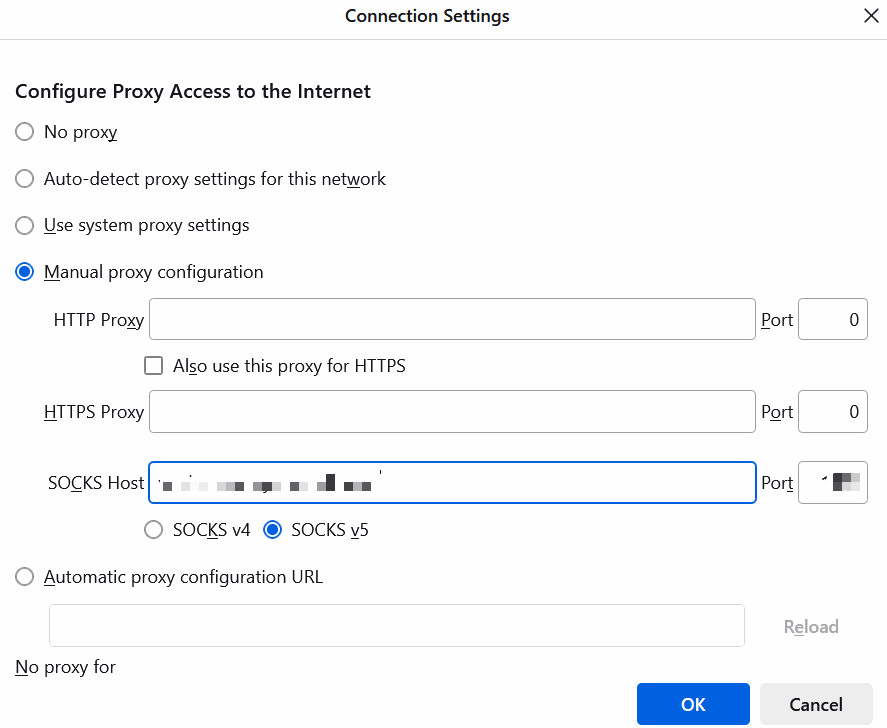
With cURL, Everything cURL's SOCKS proxy documentation distinguishes two common forms:
| cURL Proxy Scheme | Who Resolves the Destination Hostname? | Use Case |
|---|---|---|
socks5:// |
The cURL client resolves the hostname locally | Use when local DNS resolution is intentional |
socks5h:// |
The SOCKS5 proxy resolves the hostname | Use when the destination should be resolved from the proxy-side network |
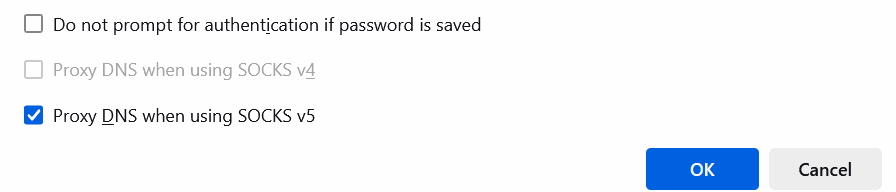
This distinction can affect regional tests and debugging. A request can exit through the expected proxy while local DNS resolves a hostname to an edge or address selected for the client's own network. Proxy-side hostname resolution can make the DNS path align more closely with the proxy route.
Do not assume every SOCKS5 library uses the same syntax as cURL. Some clients expose a "remote DNS" option, some use a separate scheme such as socks5h, and others handle DNS internally. Check the client documentation before treating a successful connection as proof that DNS followed the intended path.
Speed and Performance
SOCKS5 is often described as faster than a VPN because it does not add a VPN tunnel around the entire route. That can be true in some setups, but it is not a reliable universal rule.
Real performance depends on the proxy or VPN server, geographic distance, congestion, routing quality, encryption overhead, destination latency, connection reuse, and the application itself. A nearby VPN server with efficient routing can outperform a distant SOCKS5 proxy. A well-placed SOCKS5 route can also outperform a heavily loaded VPN endpoint.
Measure the workload that matters instead of relying on a protocol label. For web data tasks, useful metrics include connection time, time to first byte, request success rate, TLS handshake time, retry rate, and sustained throughput. For interactive browsing, page responsiveness and connection stability matter more than a single bandwidth test.
SOCKS5 for Crawlers and Data Workflows
SOCKS5 is particularly useful when a crawler or data workflow needs network control at the job level. A crawler can assign one proxy route to one task, a second route to another task, and leave unrelated applications untouched. That is harder to express cleanly with one device-wide VPN tunnel.
For browser automation, the same idea applies at the profile level. One browser profile can use one SOCKS5 endpoint while another profile uses a different route. This makes it easier to record which route produced a particular result and to isolate failures by session.
Network routing is still only one part of the environment. Browser fingerprints, logged-in accounts, cookies, request rate, session history, TLS behavior, and site-specific limits can influence the result. If a crawl starts returning more 403 or 429 responses after a route change, compare the network route with request behavior instead of assuming the proxy label alone caused the response.
For browser profiles, regional QA, or data workflows that benefit from a stable residential IP, IPWeb static residential proxies support SOCKS5 alongside HTTP and HTTPS, allowing a consistent proxy route to be assigned to the browser, crawler, or application that actually needs it.
How to Test a SOCKS5 Proxy
A simple test should answer three questions: can the client reach the proxy, does authentication work, and what public IP does the destination see?
$SOCKS_HOST = "proxy.example.com"
$SOCKS_PORT = "1080"
$SOCKS_USER = "USERNAME"
$SOCKS_PASS = "PASSWORD"

curl.exe -sS --proxy "socks5h://${SOCKS_HOST}:${SOCKS_PORT}" --proxy-user "${SOCKS_USER}:${SOCKS_PASS}" "https://api.ipify.org?format=json"
On Windows PowerShell, use curl.exe so the command calls the native cURL executable rather than a shell alias. The socks5h:// scheme sends the destination hostname to the SOCKS5 proxy for resolution. If local DNS is required for your test, use socks5:// instead.
import requests

proxy = "socks5h://USERNAME:PASSWORD@proxy.example.com:1080"

proxies = {
    "http": proxy,
    "https": proxy,
}

response = requests.get(
    "https://api.ipify.org?format=json",
    proxies=proxies,
    timeout=10,
)
response.raise_for_status()

print(response.json())
Python requests needs SOCKS support installed, typically with pip install "requests[socks]". The test checks the visible exit IP for this specific request. It does not prove that unrelated applications on the device use the same route.
After the IP check, verify the target workflow itself. Record the proxy endpoint, timestamp, destination, visible IP, HTTP result, and any DNS configuration relevant to the client. This makes later failures easier to reproduce. If you need a broader route-validation sequence, How to Check If a Proxy Is Working explains how to compare the visible IP, country, ISP, ASN, protocol, and test environment before judging the target result.
Can You Use SOCKS5 and a VPN Together?
Yes. An application can use a SOCKS5 proxy while the operating system is also connected to a VPN. In that arrangement, the application may first send traffic into the VPN tunnel and then reach the SOCKS5 proxy through the VPN route, depending on the local routing rules.
That does not automatically make the setup better. Layering a proxy and VPN increases the number of places where routing, DNS, latency, authentication, or connection failures can occur. If the goal is simply to change one application's route, SOCKS5 alone may be easier to debug. If the goal is to protect most device traffic, a VPN alone may be simpler.
Use both only when the routing requirement is clear. Document which layer controls the public exit IP, where DNS is resolved, and which applications are included or excluded.
Common Mistakes
Assuming SOCKS5 Includes VPN-Style Encryption
SOCKS5 is a relay protocol. It does not automatically encrypt all traffic between the application and proxy server. Application protocols such as HTTPS and SSH can still provide their own encryption.
Using socks5:// When Proxy-Side DNS Is Required
In cURL, socks5:// and socks5h:// do not have the same DNS behavior. Use the form that matches the test instead of assuming the hostname follows the proxy route.
Assuming Every SOCKS5 Service Supports UDP
RFC 1928 defines UDP association, but real provider and client implementations vary. Confirm UDP support before designing a workflow around it.
Routing a Browser but Forgetting Other Applications
A browser configured with SOCKS5 does not automatically route desktop applications, command-line tools, or background services. The same browser-only scope can also appear in proxy extensions and some VPN-branded browser extensions. Proxy Extension vs VPN Extension explains how browser proxy routing differs from extensions that control a native VPN tunnel. Test each component from the environment that actually runs it.
Stacking SOCKS5 and a VPN Without a Routing Plan
Adding layers without a clear reason can make DNS and connection troubleshooting harder. More routes do not automatically mean more privacy, reliability, or better performance.
Frequently Asked Questions
socks5:// resolves the destination hostname locally, while socks5h:// asks the SOCKS5 proxy to resolve the hostname. Other clients may expose the same behavior through different settings.Final Thoughts
SOCKS5 and VPNs can both change the route a destination sees, but the control model is different. SOCKS5 is usually the better fit when one browser, crawler, script, or profile needs an explicit proxy route. A VPN is usually simpler when many applications on one device should share one protected tunnel.
Choose based on routing scope, encryption requirements, DNS behavior, client support, and how easily the setup can be tested. For technical workflows, validate the route from the actual application rather than assuming a device-level network change applies everywhere.