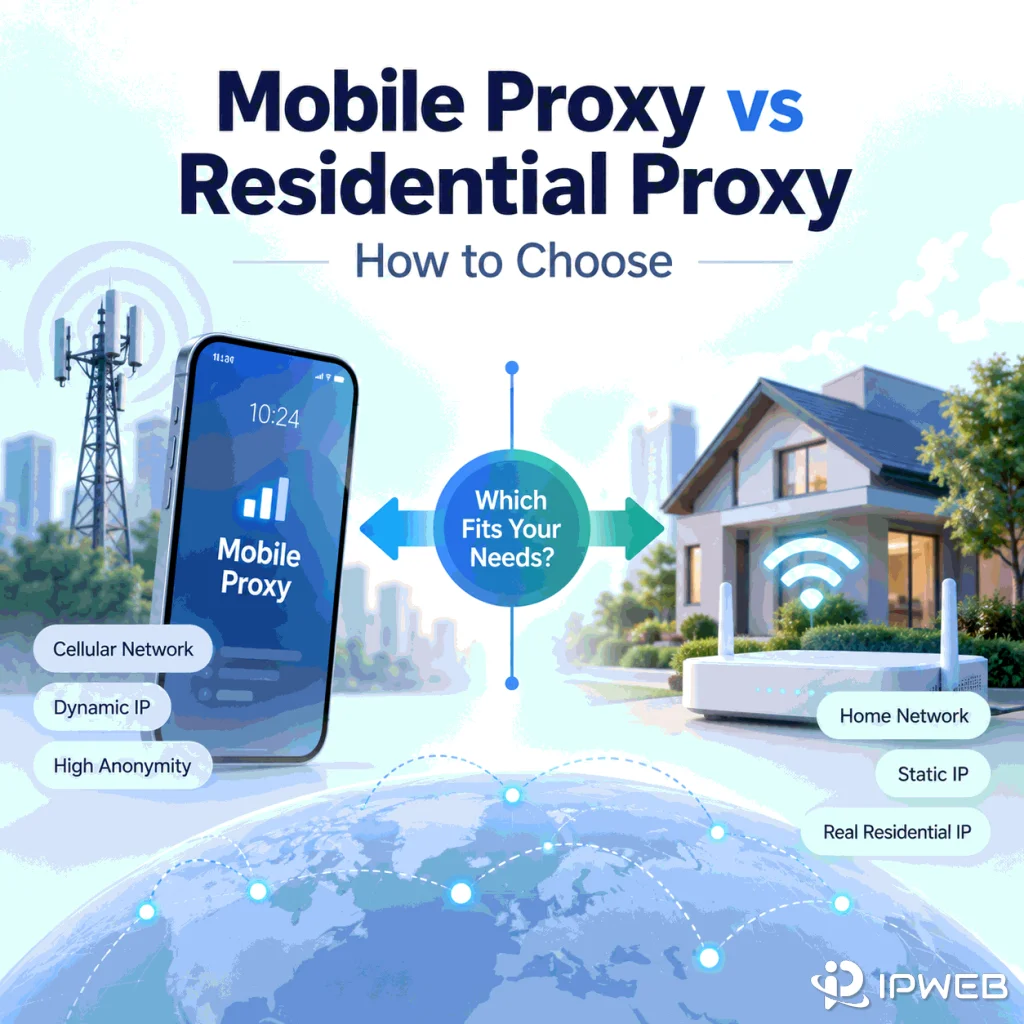
Choosing between a mobile proxy and a residential proxy starts with one question: what network identity does your workflow actually need to reproduce? Use a mobile route when the cellular carrier network itself matters. Start with residential when you need a consumer ISP path, broader residential geography, or repeatable web QA across residential locations.
The important difference is not which proxy type sounds more “trusted.” Look at what the destination can observe instead: the ASN and organization behind the IP, how the public address is shared, how sessions change, and whether the location signal matches the test.
Choose a mobile proxy when your test specifically depends on a cellular carrier path, such as carrier-specific mobile QA, mobile app behavior, or mobile advertising checks. Choose a residential proxy when you need residential ISP geography, broader location coverage, or controlled residential sessions for web QA and public-web research. Do not choose by a generic claim that one type is more trusted. Choose by the network evidence your workflow needs to reproduce, then verify that evidence before scaling.
- Mobile and residential proxies are different network categories, not quality tiers.
- The most useful comparison signals are ASN, organization, network type, location behavior, and session behavior.
- Mobile carrier networks may place many subscribers behind shared public IPv4 infrastructure, so one visible IP should not be treated as one device.
- Residential proxies are usually the cleaner choice when the requirement is residential ISP geography rather than cellular-network behavior.
- Mobile proxies are most valuable when the carrier path itself is part of the test.
- Always verify the route in the exact browser, script, or application that will use it.
Start With Network Identity, Not Trust
A mobile proxy and a residential proxy can both give you a consumer-network-looking public IP, but they do not represent the same network condition. A mobile proxy uses an IP associated with a cellular carrier network. A residential proxy uses an IP associated with a residential or consumer-access ISP network.
That difference matters because an IP address is not just a location label. It belongs to a routed network. An Autonomous System Number, or ASN, identifies the autonomous system that announces the route. Cloudflare's ASN overview explains that an autonomous system is a network or group of networks operating under a common routing policy.
For a practical proxy decision, the question is therefore not “Which proxy is better?” It is “Which network should the destination see for this test?”
If you need a refresher on the residential side before comparing network types, IPWeb's residential proxy guide explains how residential routing, rotation, and sticky sessions work.
What Changes When the Network Source Changes?
ASN and Organization
The first difference is who appears to operate the network. A mobile route should normally map to a cellular carrier or telecom network. A residential route should normally map to a consumer-access ISP or residential broadband network.
This is why a product label alone is not enough. If a service is marketed as “4G residential,” verify the actual ASN and organization. The useful distinction is whether the observed route belongs to a mobile carrier network or a residential ISP network.
Address Sharing and Carrier-Grade NAT
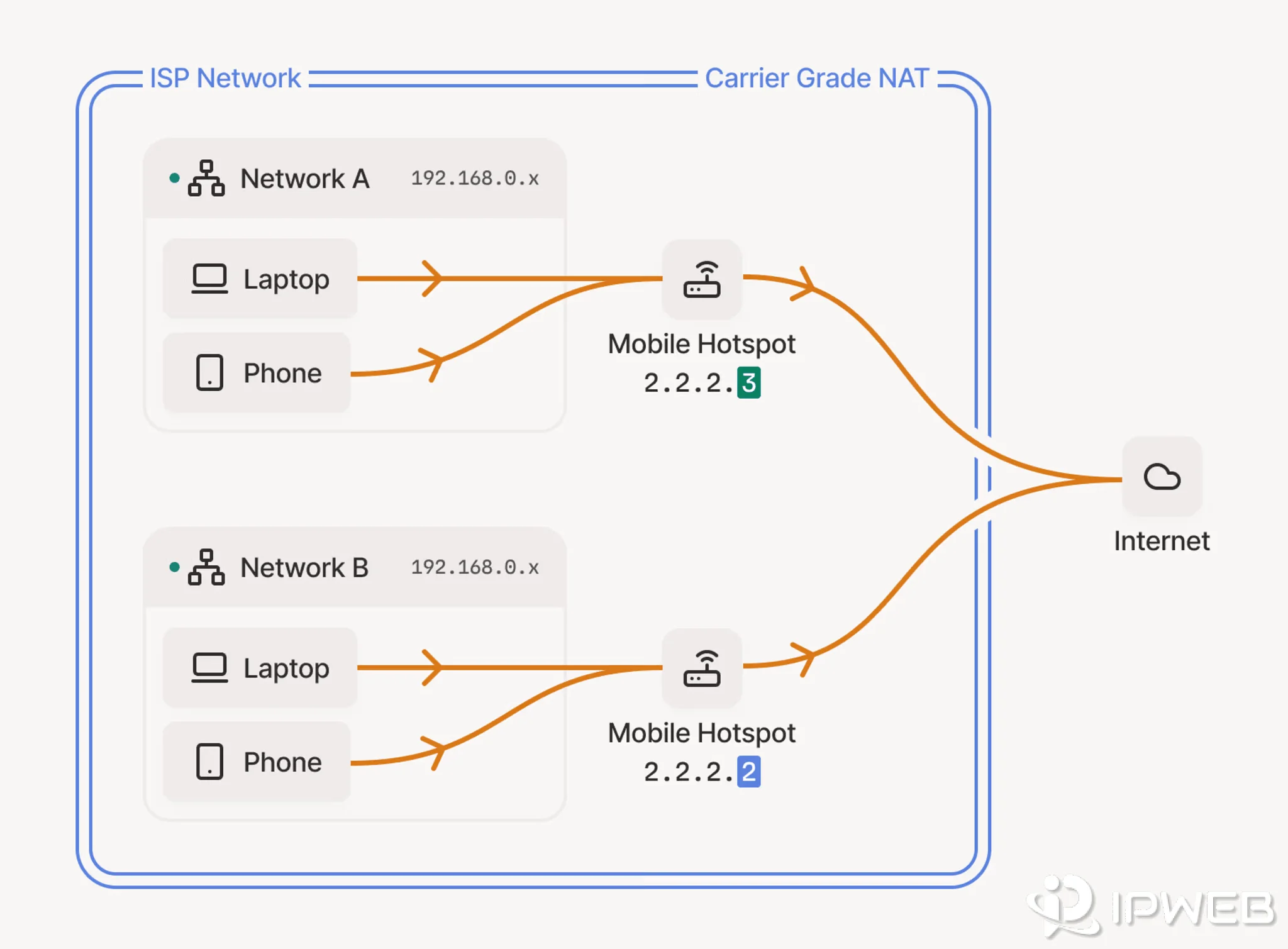
Mobile networks often rely on large-scale address sharing. Carrier-grade NAT allows multiple subscribers to share a public IPv4 address. RFC 6888 describes CGN as a NAT function used by an ISP to share the same IPv4 address among several subscribers. That means a mobile public IP can represent a shared carrier exit rather than one unique subscriber or one device.
This does not make mobile proxies inherently better or worse. It changes what the public IP represents. When many subscribers share the same public egress, a destination that applies reputation scoring or per-IP rate limits may group unrelated users under one address. In practice, that can make IP history noisier and can create shared rate-limit pressure. It does not mean every CGNAT address has poor reputation or will be rate-limited.
That distinction matters during procurement. If the carrier path itself is the signal you need, shared mobile-network behavior may be part of the test. If you only need residential geography, adding carrier-grade address sharing can introduce another variable without improving the result.
Session Behavior
Proxy session behavior is separate from network category. Mobile proxies can rotate or use sticky sessions. Residential proxies can also rotate or keep a route for a defined session. Do not assume that “mobile” means constantly changing or that “residential” means stable.
If your real requirement is long session continuity rather than mobile-versus-residential identity, compare session models separately. IPWeb's ISP proxy vs residential proxy guide is more relevant when the main question is stable endpoints versus a broader rotating pool.
Location Precision
Country, region, and city targeting should be treated as observed output, not as a promise implied by the product category. Carrier routing can cover wide service areas, and IP geolocation databases can disagree. Residential IPs can also produce different city-level results across databases.
Mobile location can be especially tricky when a carrier sends traffic through a relatively small or centralized public IP pool. In those cases, an IP database may place the egress near a carrier gateway rather than the user's physical city. Residential routes can also disagree across databases, so this is a tendency to test, not a universal rule.
If city precision matters, compare the actual routes your workflow receives across the geolocation sources that matter to you. Do not assume that a mobile or residential label guarantees a particular city result.
| Decision Signal | Mobile Proxy | Residential Proxy |
|---|---|---|
| Typical network identity | Cellular carrier or telecom network | Residential or consumer-access ISP network |
| ASN / organization | Carrier or mobile operator | Residential broadband or consumer ISP |
| Shared public IP behavior | Carrier-grade address sharing may be part of the network | Depends on the ISP route and proxy provider design |
| Session model | Rotating or sticky, depending on service settings | Rotating or sticky, depending on service settings |
| Best reason to choose it | The cellular carrier path itself matters | Residential ISP geography or residential web behavior matters |
| Main validation focus | Carrier ASN, location, route changes, session behavior | ISP ASN, location, route changes, session behavior |
Mobile Proxy vs Residential Proxy: Decision Table
The fastest way to choose is to start from the condition you need to reproduce. Do not pay for a mobile route when the mobile carrier itself adds no value to the test, and do not use a residential route when the carrier network is the variable you are trying to observe.
| Your Requirement | Better Starting Point | Why |
|---|---|---|
| Need a residential ISP ASN | Residential proxy | The residential ISP identity is the relevant network signal. |
| Need a cellular carrier ASN | Mobile proxy | The carrier network itself is part of the test. |
| Localized public website QA | Residential proxy | A residential ISP route is usually sufficient unless mobile carrier behavior matters. |
| Mobile app or mobile-only carrier QA | Mobile proxy | The workflow needs a cellular-network path rather than only a geographic IP. |
| Broad residential location sampling | Residential proxy | The requirement is network and geographic breadth, not a specific carrier. |
| Carrier-specific regional behavior | Mobile proxy | The carrier or cellular ASN is part of the test condition. |
| Long stable session with one route | Depends on session product | This is primarily a session-persistence decision, not a mobile-versus-residential decision. |
Cost can be a tie-breaker when both routes would satisfy the technical requirement. On IPWeb's current published rate cards, mobile traffic is priced above Dynamic Residential traffic at the lower published per-GB floor. If the carrier network does not change the test result, paying for a mobile route adds cost without adding useful signal. Compare the live Mobile Proxy pricing and Dynamic Residential pricing before scaling because plan tiers can change.
When a Residential Proxy Is the Better Starting Point
Residential proxies are usually the cleaner starting point when the business requirement is about residential geography or public web behavior rather than mobile carrier infrastructure.
- A residential ISP route rather than a cellular carrier route.
- Country, region, city, or ISP-based web QA across many residential locations.
- Public-page localization checks where mobile carrier identity is not part of the requirement.
- Controlled rotation across a broader residential pool.
- Sticky residential sessions for multi-request workflows without requiring a fixed carrier path.
For those workflows, IPWeb's Dynamic Residential Proxies are the natural product path. They are designed around rotating residential routes, location selection, and session control rather than cellular carrier identity.
The important business question is whether a mobile network would change the result you care about. If the answer is no, choosing mobile simply adds a network variable that the workflow did not require.
When a Mobile Proxy Is the Better Starting Point
Mobile proxies make sense when the cellular network is not incidental but part of the test itself.
- A route associated with a mobile carrier or telecom ASN.
- Mobile app QA where network conditions should resemble a cellular path.
- Carrier-specific ad or landing-page checks.
- Regional mobile-web checks where the carrier network is a deliberate test variable.
- 4G, LTE, or 5G carrier routing where available and relevant to the workflow.
When the test genuinely requires a carrier network, IPWeb's Mobile Proxies are the closer network match. The product supports mobile carrier routes and both rotating and sticky session options, so the decision can still be made around the session behavior the workflow needs.
Do not choose mobile merely because it sounds more authentic. If the destination only needs a residential geographic route, the carrier identity may not add meaningful information to the test.
What You Lose When You Choose the Wrong Proxy Type
Using Mobile When You Only Need Residential Geography
You may introduce carrier-specific routing and shared-network behavior that the workflow does not need. That makes the test harder to interpret because a different network category has been added without answering a new business question.
Using Residential When the Carrier Is Part of the Test
The location may look correct while the network condition is still wrong. A residential ISP route cannot reproduce the fact that traffic is coming from a cellular carrier ASN. If the test is specifically about mobile-carrier behavior, geography alone is not enough.
Choosing by “Trust” Instead of Measurable Signals
“More trusted” is not a reliable technical selection rule. A site can evaluate many signals beyond the IP category, and the route itself can have different history, sharing, and session characteristics. Compare the network evidence you can measure instead of assuming that one proxy category automatically receives better treatment.
Treating “4G Residential Proxy” as a Precise Category
The phrase is ambiguous. Some services use it for a true cellular carrier route; others use it loosely around consumer-network IPs. Check the ASN, organization, and network type before deciding that the route matches a mobile requirement.
How to Verify the Route Before You Commit
Do not validate a proxy type with a product label alone. Run the same small test through the exact application that will use the route.
Quick ASN Check With curl on Windows
One simple check is to send an IP lookup request through the proxy itself. IPinfo Lite returns the observed IP, ASN, organization name, and country. It requires an IPinfo token.
curl.exe -x http://HOST:PORT -U "USERNAME:PASSWORD" "https://api.ipinfo.io/lite/me?token=YOUR_IPINFO_TOKEN"A response may look like this:
{
  "ip": "203.0.113.10",
  "asn": "AS64500",
  "as_name": "Example Network",
  "country_code": "US"
}
Use asn and as_name as the first network-identity check. The Lite response does not by itself prove that an IP is mobile or residential, so cross-check the ASN or carrier/ISP classification with the lookup source your workflow relies on. IPinfo documents the Lite fields and endpoint in its Lite API reference.
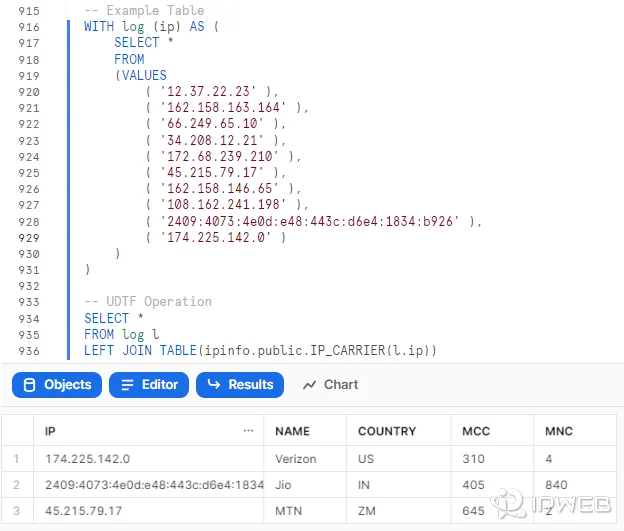
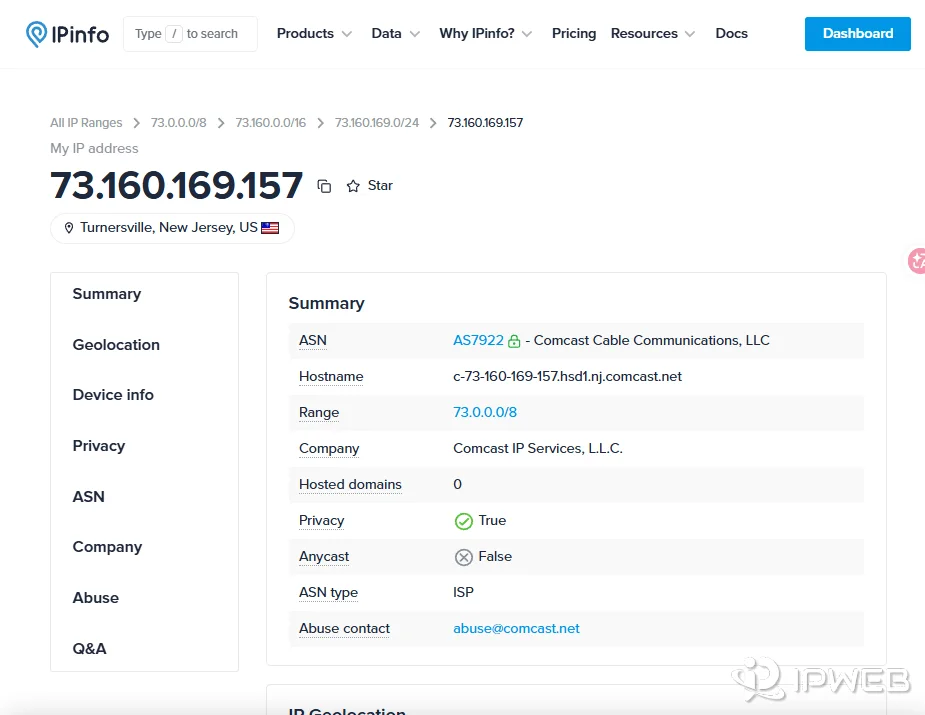
- Check the visible IP. Confirm the application is actually using the proxy route.
- Check ASN and organization. Decide whether the observed network looks like the carrier or residential ISP you intended to test.
- Check network classification. Compare carrier, ISP, hosting, and privacy signals rather than reading only the country field.
- Check location. Compare country, region, and city across the databases that matter to your workflow.
- Repeat the request. Record whether the route stays stable, rotates, or changes after reconnecting.
- Test the real workflow. A proxy that passes an IP checker can still behave differently in the actual browser, script, or application.
IPWeb's IP quality score guide explains how ASN, organization, privacy, and reputation signals should be read separately. For a full connection check, use the proxy validation checklist.
The useful outcome is not “this IP checker says mobile” or “this database says residential.” The useful outcome is that the observed network identity, location, and session behavior match the condition your workflow was designed to test.
A Practical Selection Framework
Before buying either proxy type, answer these four questions in order.
| Question | If the Answer Is Yes | Likely Direction |
|---|---|---|
| Does the test require a cellular carrier ASN? | The carrier itself is part of the requirement. | Start with mobile. |
| Do you only need a residential ISP route and geographic variation? | The cellular layer adds no value. | Start with residential. |
| Is the real requirement a long-lived stable IP? | Session persistence matters more than network category. | Compare sticky, ISP, or static options separately. |
| Can you verify ASN, location, and session behavior before scaling? | You can validate the choice with evidence. | Run a small representative test first. |
This framework prevents a common purchasing mistake: solving a location problem with a carrier product, or solving a carrier problem with a generic residential route.
Frequently Asked Questions
Final Thoughts
Do not start with “Which proxy is better?” Start with “What network condition am I trying to reproduce?” Choose residential when residential ISP identity, geographic coverage, or residential session control is the important variable. Choose mobile when the cellular carrier network itself is part of the test.
Then validate the route with actual network evidence before increasing traffic. ASN, organization, location, and session behavior tell you more about whether the proxy fits the job than a product label alone.