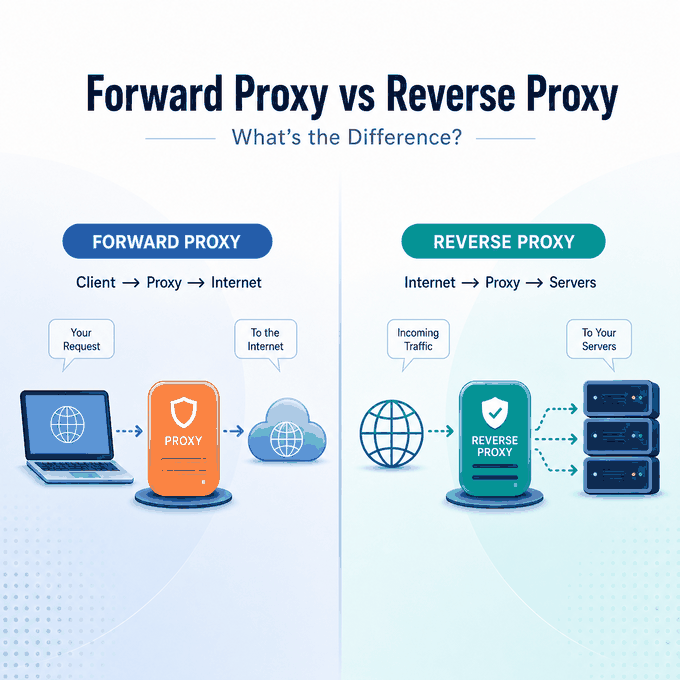
A forward proxy and a reverse proxy are both intermediaries, but they stand on opposite sides of an application. A forward proxy represents clients making outbound requests. A reverse proxy represents servers receiving inbound requests. That difference determines who configures it, what it protects, and what problem it can solve.
A forward proxy sits in front of a client, browser, application, or client network and sends outbound requests on that client’s behalf. A reverse proxy sits in front of one or more origin servers and receives inbound requests before passing them to the appropriate backend. A forward proxy can help control a client’s outbound network path; a reverse proxy can help a site manage traffic to its own infrastructure. Neither is a substitute for the other.
- A forward proxy represents the client; a reverse proxy represents the server.
- Forward proxies are selected by a client, application, or client network. Reverse proxies are operated by the owner of a website or service.
- The useful question is not which proxy is “better.” It is whether you need to control outbound client traffic or inbound traffic to an application.
- A client-side proxy does not add load balancing, TLS termination, or origin shielding to a website you do not operate.
- A reverse proxy does not give a browser or script a selected outbound IP address.
What Is the Difference Between a Forward Proxy and a Reverse Proxy?
The simplest distinction is who the proxy speaks for. A forward proxy speaks for the client. A reverse proxy speaks for the origin server or application. The HTTP specification makes the same distinction: RFC 9110 defines a proxy as an intermediary chosen by the client and a gateway, or reverse proxy, as an intermediary acting on behalf of another server.
That is why the ordinary proxy configured in a browser, a script, or an operating system is usually a forward proxy. It sits between the client and the public internet. The target service receives a request from the proxy rather than a direct request from the client. For the broader client-side model, see IPWeb’s guide to what a proxy server is.
A reverse proxy is different even though the request still passes through an intermediary. It is placed in front of the application’s backend servers. Visitors connect to the reverse proxy first. The reverse proxy then routes each request to an origin server, cache, or service behind it. Cloudflare’s reverse proxy overview describes this client-side versus server-side placement clearly.
| Question | Forward proxy | Reverse proxy |
|---|---|---|
| Who does it represent? | A client, user, application, or client network. | A website, API, or group of origin servers. |
| Where does it sit? | Between the client and external destinations. | Between external clients and backend servers. |
| Who normally configures it? | The client, client-network administrator, or application owner. | The website owner, platform team, or infrastructure operator. |
| What traffic does it manage? | Outbound requests from selected clients. | Inbound requests to an application or service. |
| Typical goal | Control the client’s network route, policy, or visible egress IP. | Route, protect, cache, or distribute traffic before it reaches origins. |
| What it does not replace | A site’s load balancer, CDN, or server-edge layer. | A browser or script’s outbound proxy setting. |
How Each Proxy Changes the Request Path
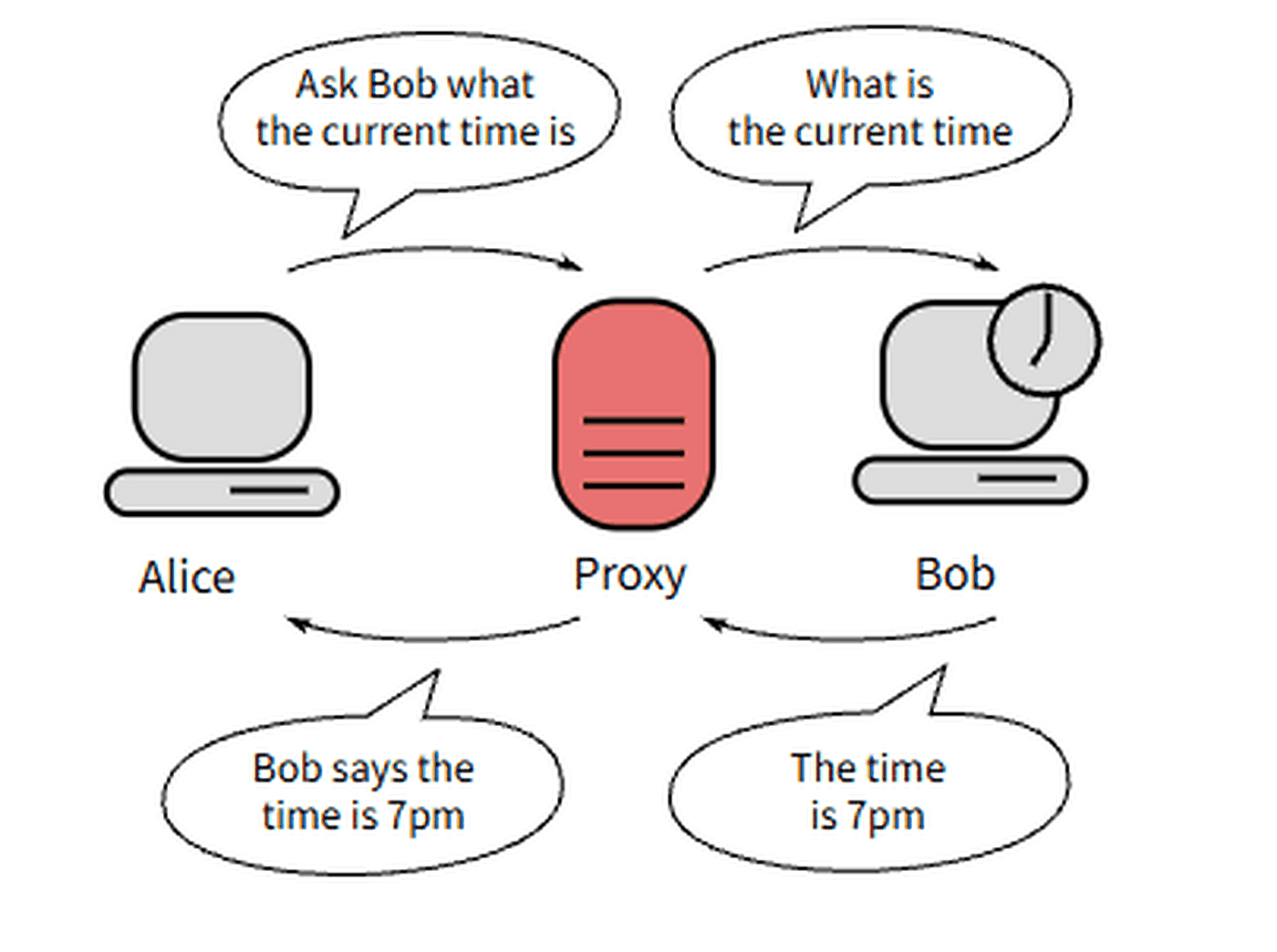
With a forward proxy, the client deliberately sends a request to the proxy. The proxy then contacts the destination and returns the response. From the destination’s network perspective, the request usually arrives from the proxy’s address rather than directly from the client.
Forward-proxy path: client or application -> forward proxy -> destination service -> forward proxy -> client.
With a reverse proxy, an outside visitor reaches the proxy at the application’s public edge. The proxy decides which backend should handle the request, then returns that backend’s response to the visitor. The visitor normally does not connect to the origin server directly.
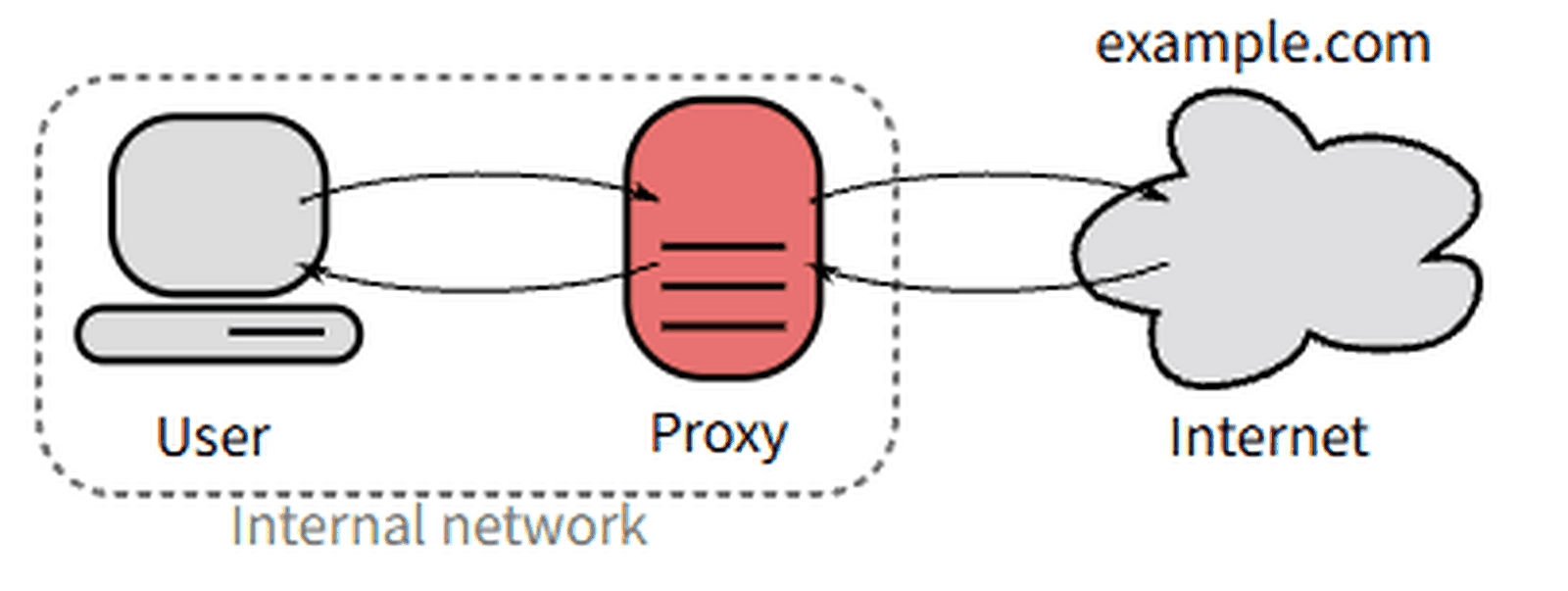
Reverse-proxy path: visitor -> reverse proxy -> origin service or server pool -> reverse proxy -> visitor.
Both flows have request and response traffic in both directions. “Forward” and “reverse” describe the side being represented, not a one-way traffic direction. The same proxy software family can expose several features. The architecture still depends on whether it is acting for clients or for servers.
What Changed in a Controlled Proxy Lab
For this article, we ran a controlled local HTTP test with one origin server, one forward proxy, and one reverse proxy. The goal was not to benchmark performance. It was to observe which connection and request fields changed when the same client reached the origin directly, through a client-selected forward proxy, and through a server-side reverse proxy.
- Origin server:
127.0.0.1:18180 - Forward proxy:
127.0.0.1:18181, with its outbound connection bound to127.0.0.2 - Reverse proxy:
127.0.0.1:18182, with its backend connection bound to127.0.0.3 - Client:
127.0.0.1
Using different loopback addresses made the connection boundary visible without involving an external network. The origin recorded the peer IP and selected HTTP headers for each request.
| Request path | Peer IP seen by origin | Host seen by origin | Forwarding metadata | What changed |
|---|---|---|---|---|
| Direct client → origin | 127.0.0.1 |
127.0.0.1:18180 |
No Via or X-Forwarded-For |
The origin received the client's direct connection. |
| Client → forward proxy → origin | 127.0.0.2 |
127.0.0.1:18180 |
Via: 1.1 lab-forward-proxy |
The origin's network peer changed to the forward proxy's outbound address, while the destination remained the origin. |
| Client → reverse proxy → origin | 127.0.0.3 |
origin.internal:18180 |
X-Forwarded-For: 127.0.0.1X-Forwarded-Host: 127.0.0.1:18182 |
The origin received a backend connection from the reverse proxy, which also carried selected client-facing context forward. |
The experiment shows the architectural difference more clearly than the names alone. In the forward-proxy case, the client deliberately selected an intermediary for reaching the destination, and the origin saw the proxy's outbound connection. In the reverse-proxy case, the client connected to the service edge, while the reverse proxy created a separate backend connection to the origin.
The headers in this lab are implementation choices, not universal signatures. A forward proxy does not have to add Via, and a reverse proxy can omit, rewrite, or use different forwarding headers. The reliable distinction is still ownership and connection placement: who selected the intermediary, and on which side of the application boundary it operates.
This observation is consistent with RFC 9110's intermediary model, which distinguishes a client-chosen proxy from a gateway or reverse proxy acting on behalf of another server.
The Practical Differences That Matter
The placement difference creates different operational responsibilities.
A forward proxy is about the client’s route
Use a forward proxy when a browser, application, script, or managed client network needs a defined outbound route. Common uses include outbound policy, controlled regional testing, and separating approved tools or environments.
The proxy can only affect traffic that is configured to use it. If a browser profile uses a proxy but a second browser does not, the second browser may still connect directly. It also does not automatically align cookies, account history, device state, DNS behavior, or every other browser signal.
A reverse proxy is about the application’s edge
Use a reverse proxy when you operate the website or service behind it and need a controlled entry point for incoming traffic. Depending on its configuration, it can route traffic across services and cache responses. Apache HTTP Server’s official reverse proxy guide describes this model as forwarding client requests to backend servers and highlights uses such as security, high availability, load balancing, and centralized authentication. A reverse proxy can also terminate TLS, apply access controls, and keep origin-server details less directly exposed.
Those capabilities apply only to infrastructure you control. A forward proxy cannot become a protective edge for a third-party website, and a reverse proxy in front of your own service does not give employees, browsers, or scripts a new outbound egress IP.
When a Forward Proxy Fits
A forward proxy is the better fit when the question starts with the client:
- “Which route will this browser, app, or script use?”
- “Can our client network apply outbound filtering or logging?”
- “Can we validate how an authorized public page responds from a selected region?”
- “Which egress IP will the destination see for this configured tool?”
If the workflow needs a configurable client-side endpoint with location targeting and rotation controls, IPWeb’s dynamic residential proxies are a forward-proxy option for browsers, scripts, and applications that support HTTP(S) or SOCKS5.
Before treating a proxy as the answer, verify the application actually supports the selected protocol and that the proxy is configured in the same environment you will test. A successful IP check proves one request used the route; it does not prove every app, DNS query, background connection, or account action uses the same path.
Residential, ISP, and datacenter proxy services can all operate in a forward-proxy role; the differences are mainly the exit network, allocation model, and session behavior. For a stable ISP-associated example, see what an ISP proxy is.
When a Reverse Proxy Fits
A reverse proxy is the better fit when the question starts with the service you operate:
- “How do we route requests across several backend services?”
- “How can we add a public edge in front of origin servers?”
- “Where should caching, TLS handling, or request policy be applied?”
- “How do we keep clients from connecting directly to backend topology?”
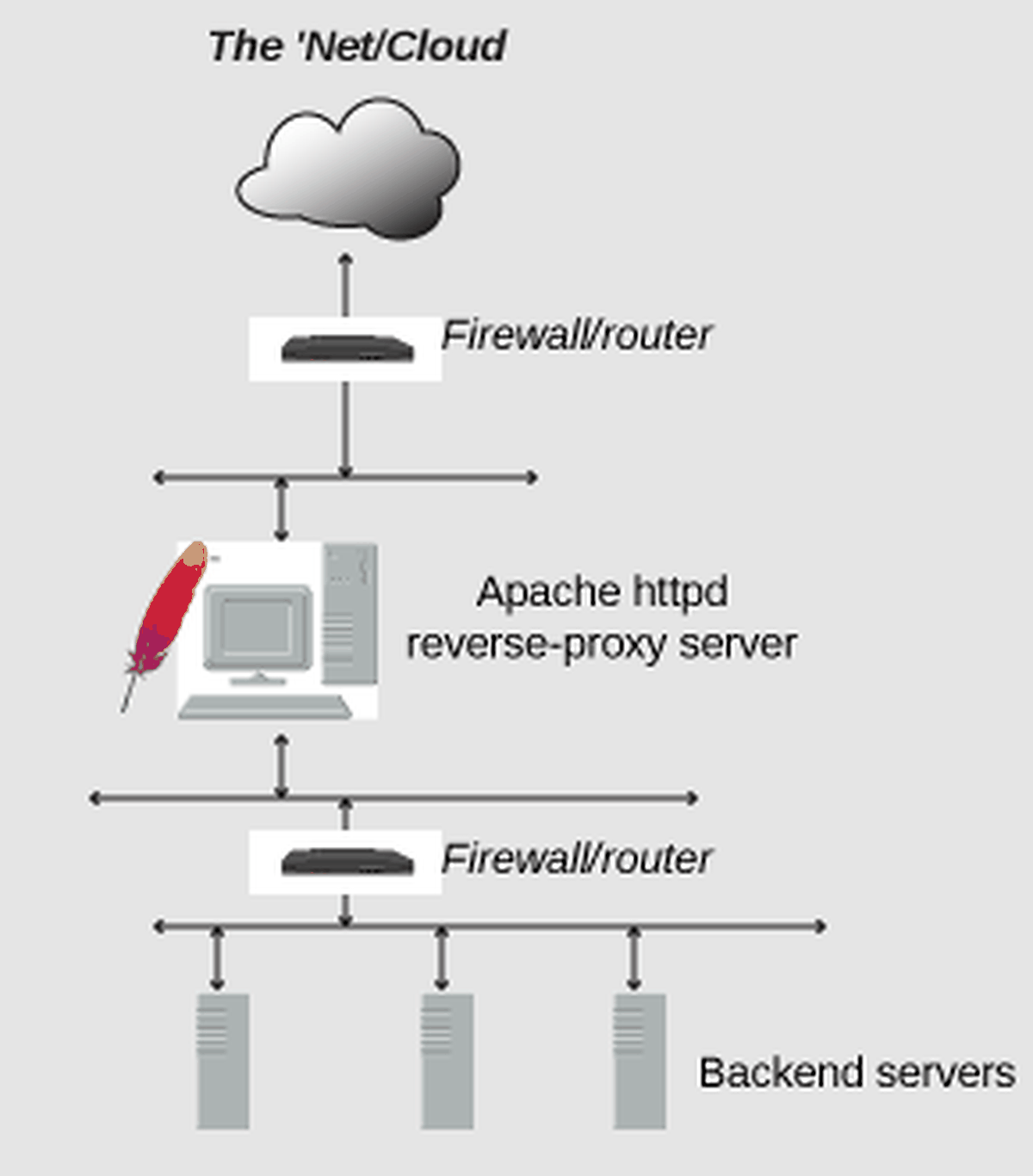
The design still needs clear origin health checks, TLS policy, headers, caching rules, and failure behavior. A reverse proxy can centralize those concerns. It does not remove the need to secure the application itself or correctly configure the origin servers behind it.
Common Mistakes When Choosing Between Them
The first mistake is treating “proxy” as one product category. The word describes an intermediary role; the client-side and server-side roles solve different operational problems.
The second is using a forward proxy to solve a server-side problem. If your aim is to distribute inbound traffic, protect backend servers, or manage TLS for a site you own, you need a reverse-proxy or edge architecture. An outbound client proxy is the wrong layer.
The third is assuming a reverse proxy can make a client’s outbound browsing or automation traffic appear from a chosen IP. It cannot. That requires client-side routing and an application configured to use it.
Finally, do not treat either pattern as a universal security or access fix. A proxy can help with routing and controlled traffic handling, but it cannot override account rules, service policies, authorization requirements, or application vulnerabilities.
Frequently Asked Questions
proxy_pass. General-purpose forward proxying is not the usual built-in deployment model. If you need Nginx to act on behalf of outbound clients, verify the required configuration or modules first, or use software designed specifically for forward-proxy traffic.
Final Thoughts
Forward and reverse proxies are not competing versions of the same setup. A forward proxy represents the client and manages outbound traffic. A reverse proxy represents the service and manages inbound traffic before it reaches origin servers. Choose the layer that matches the side of the connection you control, then validate the behavior in the real application path.
For the broader client-side concept, read What Is a Proxy Server?. For a specific forward-proxy model associated with ISP networks, see What Is an ISP Proxy?.