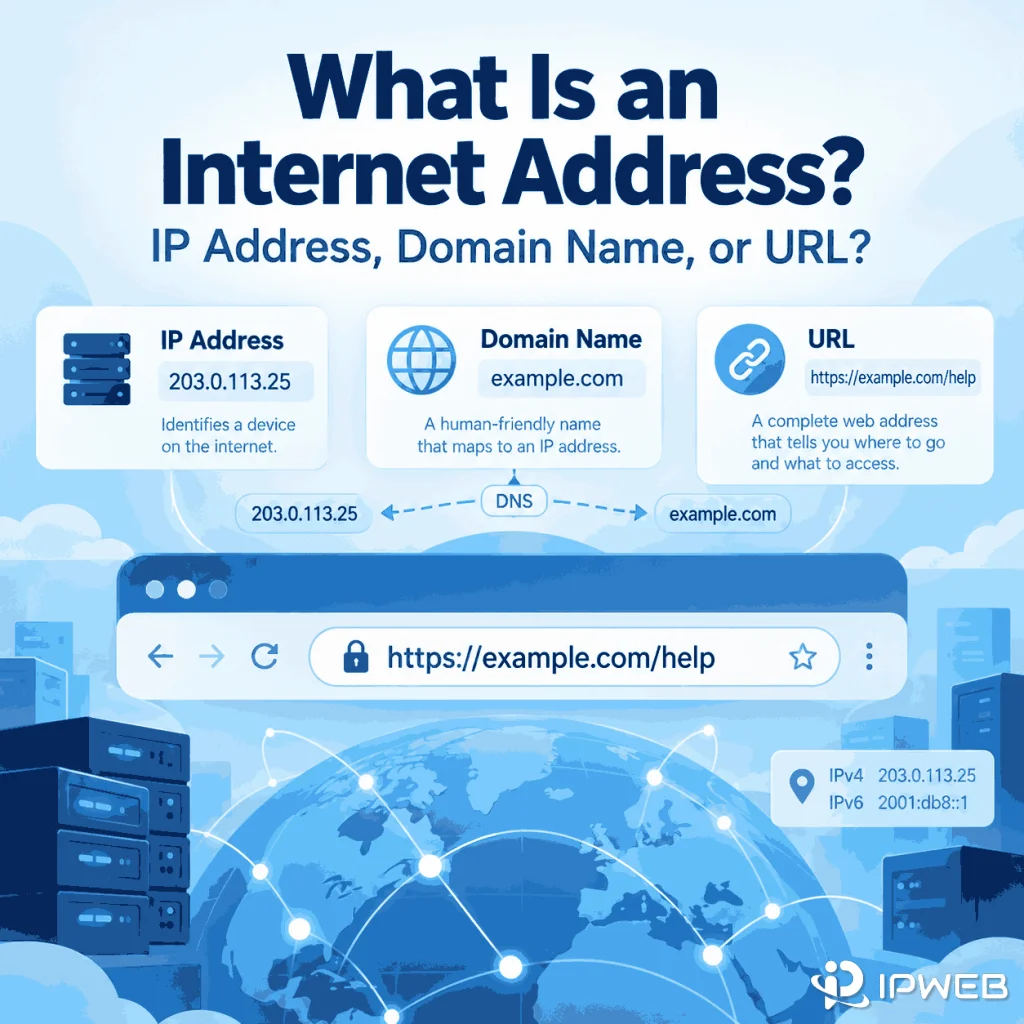
The phrase “internet address” is easy to misunderstand because it is used in more than one way. In networking, it usually points to an IP address. In everyday web use, someone may use the same phrase for a domain name, a full URL, or even an email address.
Those terms are related, but they describe different parts of how the Internet identifies destinations and resources. Knowing the difference matters when you are checking a network connection, reading browser settings, troubleshooting DNS, or trying to understand which address a website can actually see.
In networking terminology, an internet address generally means an IP address used for Internet Protocol communication. In everyday web use, the phrase may be used more loosely for a domain name, URL, or email address. A domain name can resolve to one or more IP addresses through DNS, while a URL identifies a specific resource and can include a scheme, host, path, query, and fragment.
- In IP networking, “internet address” most commonly refers to an IP address.
- A domain name is a human-readable DNS name; it is not the IP address itself.
- A URL identifies a resource and can contain a domain name or IP address as its host.
- Public and private IP addresses serve different routing scopes.
- A MAC address identifies a network interface on a local link and is not a substitute for an Internet-routed IP address.
What Does “Internet Address” Mean?
In IP networking, an internet address is an IP address: a numerical address used as a source or destination for traffic carried by the Internet Protocol. An older IETF Internet Users’ Glossary used “internet address” as another name for an IP address, which reflects the term’s traditional technical meaning.
Outside networking documentation, the phrase is less precise. A person might call example.com an internet address because it leads to a website, or call https://example.com/help an internet address because it appears in a browser’s address bar. That usage is understandable, but the technical terms are different: the first is a domain name and the second is a URL.
The safest way to interpret “internet address” is to look at context. If the discussion is about routing, IPv4, IPv6, public IPs, or network interfaces, it almost certainly means an IP address. If the discussion is about a website or browser address bar, the intended term may be a domain name or URL.
Internet Address vs IP Address vs Domain Name vs URL
An IP address, domain name, URL, and MAC address identify different things. They can appear in the same connection workflow, but they are not interchangeable.
| Term | Example | What It Represents | Main Role |
|---|---|---|---|
| IP address | 203.0.113.25 |
A numerical Internet Protocol address | Routing IP traffic between networks |
| Domain name | example.com |
A human-readable DNS name | Naming a host or service without requiring people to remember an IP address |
| URL | https://example.com/help |
An identifier for a specific resource | Telling a client what resource to access and how |
| MAC address | 02:1A:2B:3C:4D:5E |
A link-layer interface identifier | Local network communication |
A domain name is not simply a friendlier spelling of one permanent IP address. DNS records can return multiple addresses, and the answer can vary by network, location, load-balancing configuration, or record type. Likewise, one IP address can serve more than one hostname.
A URL is broader than a domain name. According to MDN’s URL reference, a URL can contain components such as the scheme, authority or host, path, query parameters, and fragment. For example, in https://example.com/help?topic=ip, example.com is the host, while the full string is the URL.
How Do Domain Names and IP Addresses Work Together?
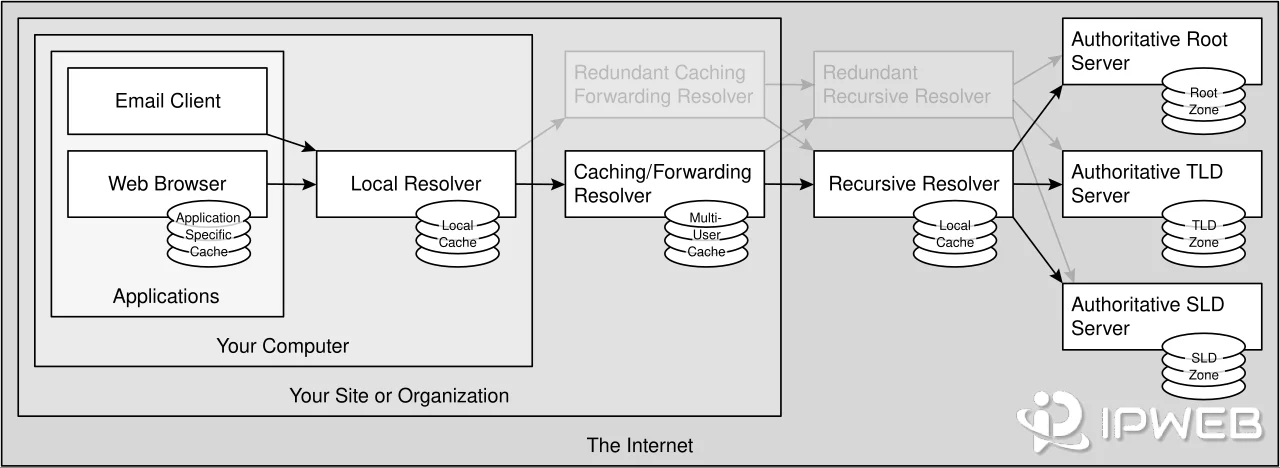
Domain names make Internet destinations easier for people to use, while DNS connects those names to IP addresses that network software can route to.
A simplified web request looks like this:
https://example.com/help
        ↓
Browser reads the host: example.com
        ↓
DNS looks up the domain name
        ↓
DNS returns one or more IP addresses
        ↓
The connection is made to an IP destination
        ↓
The server handles the requested resource
ICANN describes DNS as the system that lets people use names instead of remembering numerical IP addresses. The mapping is essential, but the name and the address remain separate entities.
DNS also does more than one simple domain-to-one-IP translation. A hostname can have IPv4 records, IPv6 records, aliases, and multiple answers. Applications may choose among those results according to their own networking behavior.
What Is a Public Internet Address?
A public internet address usually means a public IP address: an address used in public Internet routing. A private IP address, by contrast, is intended for communication inside a private network and is not globally unique.
| Characteristic | Public IP Address | Private IP Address |
|---|---|---|
| Typical scope | Public Internet routing | Local or private network |
| Uniqueness | Allocated for use in public address space | The same ranges can be reused by many separate private networks |
| What a remote website normally sees | The source address presented by the Internet-facing route | Usually not the device’s private LAN address |
| Common examples | Provider-assigned public IPv4 or IPv6 | 10.x.x.x, 172.16–31.x.x, 192.168.x.x for IPv4 |
IANA lists the private IPv4 ranges reserved for private internets: 10.0.0.0/8, 172.16.0.0/12, and 192.168.0.0/16. Those addresses can be reused on independent local networks because they are not globally routed as ordinary public IPv4 addresses.
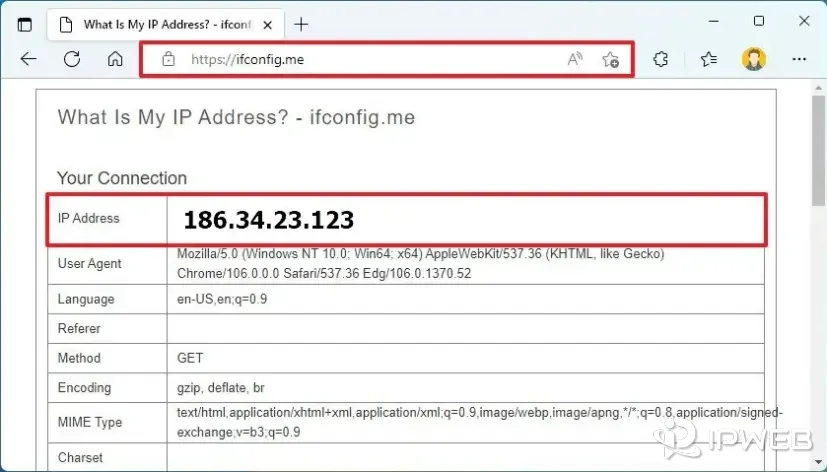
A home or office device may therefore have a private IP such as 192.168.1.20 while its outbound traffic appears to websites under a different public IP. If you want to understand which address is public and how to check it, see IPWeb’s What Is My IP? guide rather than relying on the local address shown in your adapter settings.
“Public” does not mean “every device can connect to it directly.” Firewalls, carrier-grade NAT, routing policy, and service configuration can still limit reachability.
Are IPv4 and IPv6 Both Internet Addresses?
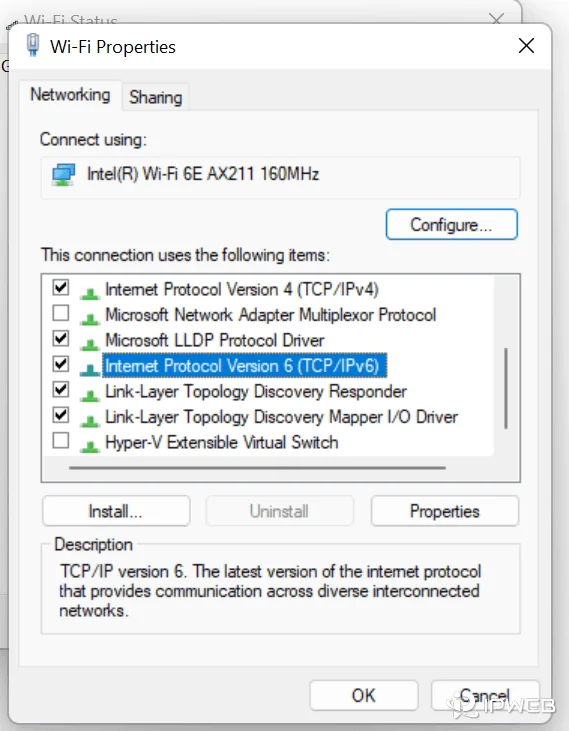
Yes. IPv4 and IPv6 both provide IP addresses for Internet Protocol communication, but they use different address sizes and formats.
IANA’s number resource overview identifies IPv4 as a 32-bit address space and IPv6 as a 128-bit address space. Both are actively used, and many current networks operate in dual-stack mode with both protocols available.
| Protocol | Address Size | Documentation Example | Typical Appearance |
|---|---|---|---|
| IPv4 | 32 bits | 203.0.113.25 |
Four decimal numbers separated by dots |
| IPv6 | 128 bits | 2001:db8::25 |
Hexadecimal groups separated by colons, with compression allowed |
The examples above use ranges reserved for documentation, so they should not be treated as real destination addresses. A dual-stack device can have both IPv4 and IPv6 addresses at the same time, and the address used for a connection depends on which protocol and route the application selects.
Is a MAC Address an Internet Address?
A MAC address is not an Internet-routed IP address. It is primarily a link-layer identifier used on the local network segment, while IP addresses are used to move traffic across IP networks.
When traffic crosses a router, the link-layer framing changes for the next network segment. The original device’s MAC address is therefore not carried end-to-end across the public Internet in the same way an IP source or destination address is used for routing.
If you need the distinction in more detail, IPWeb’s MAC address guide explains what a MAC address identifies, where it is visible, and how it differs from an IP address.
Examples of Internet Addresses and Related Identifiers
The word “address” appears in several Internet and networking concepts. The examples below show why the exact term matters.
| Example | Correct Term | What It Tells You |
|---|---|---|
203.0.113.25 |
IPv4 address | An IPv4 address used here as a documentation example |
2001:db8::25 |
IPv6 address | An IPv6 address used here as a documentation example |
example.com |
Domain name | A DNS name that can resolve to network destinations |
https://example.com/help |
URL | A specific resource address including a scheme, host, and path |
alex@example.com |
Email address | A mailbox identifier in an email system |
02:1A:2B:3C:4D:5E |
MAC address | A link-layer interface identifier used on a local network |
These are all “addresses” or address-like identifiers in ordinary conversation, but they do not belong to one interchangeable technical category. Saying “IP address,” “domain name,” “URL,” “email address,” or “MAC address” removes ambiguity immediately.
How Do I Find My Internet Address?
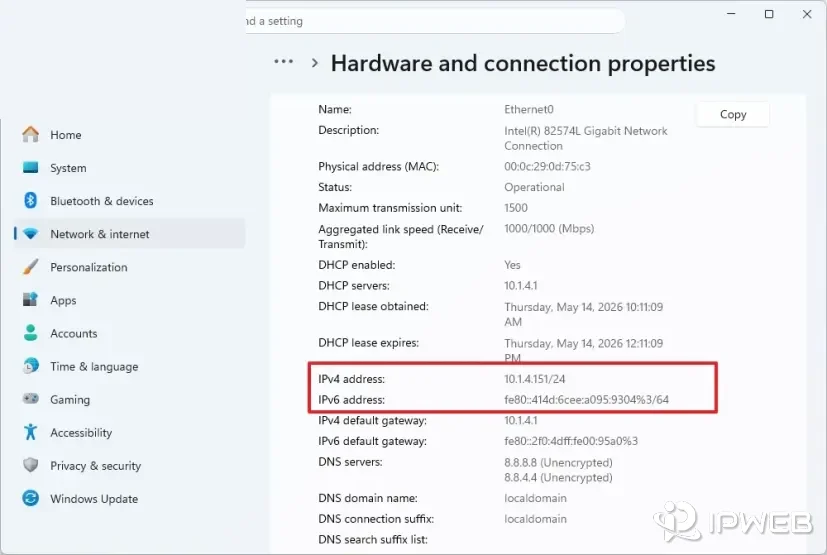
First decide which address you mean. If you want the public IP that a website sees from your current connection, check your public IP. If you want the device’s private LAN address, open the network details on the device or router. If you mean a website address, the browser’s address bar shows the URL.
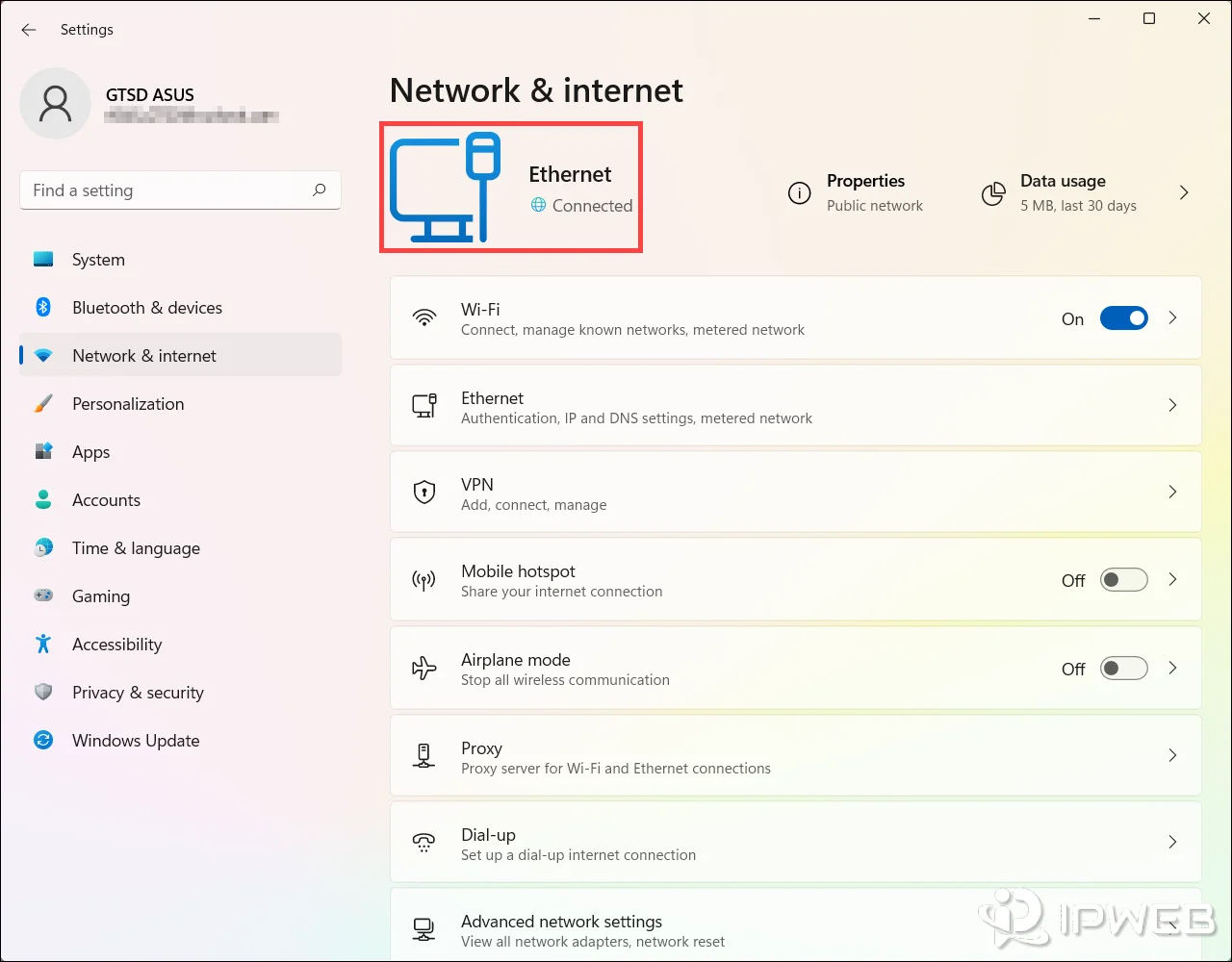
For the public-IP case, IPWeb’s What Is My IP? guide explains how to check the public address visible from your connection. Compare that result with the private address listed in your local network settings; seeing two different values is normal on networks that use NAT or other address translation.
Common Internet Address Mistakes
Calling a domain name and a URL the same thing
example.com is a domain name. https://example.com/help is a URL. The URL contains a host plus additional information that identifies how and where to access a resource.
Assuming the private IP is what every website sees
A private address such as 192.168.1.20 is normally meaningful inside the local network. Traffic leaving that network may be translated or routed under a different public source IP before it reaches a remote website.
Treating an IP address as a person’s identity
An IP address identifies a network-layer source or destination in a connection context; it does not, by itself, identify a specific human being. Addresses can be shared, reassigned, translated, or associated with gateways and providers rather than one individual device.
Expecting IP geolocation to match a precise physical location
IP geolocation is an estimate based on network and registration data, not GPS. A result can point to a nearby city, a provider location, or another reasonable network location instead of the device’s exact position. If the reported location looks wrong, see why IP location can differ from your actual location.
Using “MAC address” as another name for “IP address”
MAC and IP addresses operate at different layers and have different scopes. A MAC address helps local-link communication; an IP address participates in IP routing.
Frequently Asked Questions
Final Thoughts
“Internet address” is most precise when it means an IP address, but everyday usage is broader. The easiest way to avoid confusion is to name the exact object: an IP address for network routing, a domain name for DNS naming, a URL for a resource, or a MAC address for a local-link interface.
If the question is “What address does a website see from my connection?”, the relevant value is normally the public source IP, not the device’s private LAN address or MAC address. If the question is about a website location, the relevant value is the URL. That distinction resolves most of the ambiguity around the phrase.