A web unblocker is a managed request-delivery layer that sits between your application and a target URL. Instead of maintaining every routing, retry, response-checking, and optional rendering step yourself, you send the target through one hosted endpoint and receive page content or another supported output.
The practical difference from a standard proxy server is ownership of the workflow: a proxy mainly changes the network route, while a web unblocker manages more of request delivery. Your application still owns target selection, parsing, validation, and downstream data use.
A web unblocker combines proxy routing with managed delivery tasks such as automatic IP changes, retries, response checks, and sometimes JavaScript rendering. Use one when request delivery is the maintenance burden you want to reduce. Use a standard proxy when you want direct control over routing, client behavior, retries, and diagnostics. For approved public-data collection, neither option replaces access rules or response validation.
- A web unblocker manages more of request delivery than a standard proxy.
- A proxy mainly changes the route; your application keeps control of retries, rendering, parsing, and diagnostics.
- A web unblocker is a stronger fit when routing, retries, response checks, or rendering create recurring maintenance work.
- A standard proxy is often enough when your collector already handles the rest of the request stack reliably.
- Returned content still needs validation for the expected page, context, fields, and downstream use.
Web Unblocker vs Standard Proxy
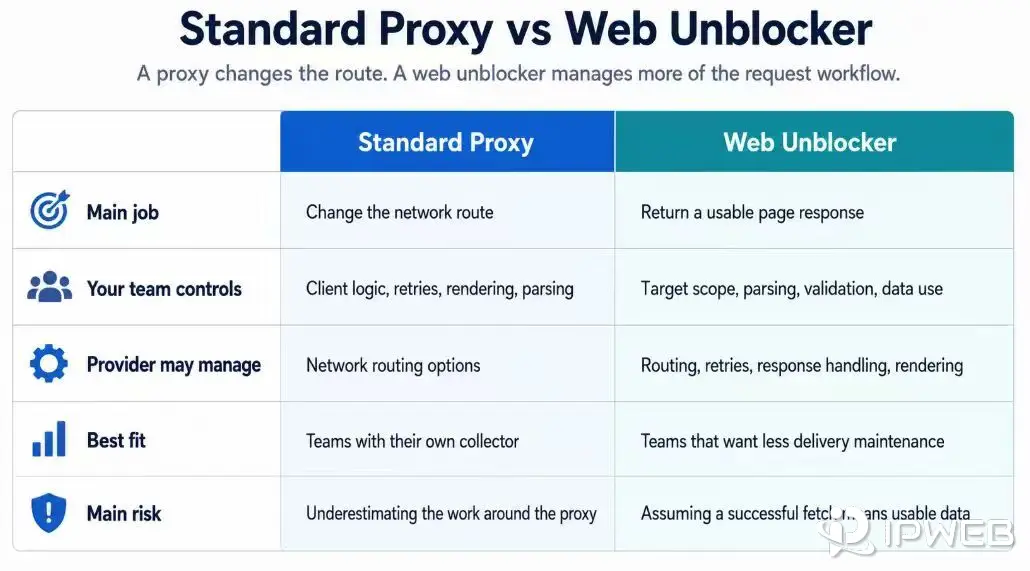
The cleanest way to separate the two is to look at ownership. With a standard proxy, the network route changes, but your application still owns most of the collection stack. With a web unblocker, the provider owns more of the delivery layer, while your team still owns legality, target selection, parsing quality, and downstream use.
| Decision point | Standard proxy | Web unblocker |
|---|---|---|
| Main job | Route traffic through another endpoint | Return a public-page response through managed retrieval |
| Your team controls | Client behavior, retries, headers, rendering, parsing, validation | Target choice, request scope, parser, validation, and data use |
| Provider may manage | Network endpoint only, depending on proxy type | Routing, retries, some response handling, and sometimes rendering |
| Best fit | Teams that run their own collector and need route control | Teams reducing delivery-layer maintenance |
| Main risk | Underestimating the work around the proxy | Treating a successful fetch as permission or complete data |
Bottom line: use a standard proxy when you want direct control over the request stack; use a web unblocker when you want the provider to manage more of request delivery.
- Choose a web unblocker when routing, retries, response checks, or rendering are the delivery tasks you want the provider to manage.
- Choose a standard proxy when your application already owns those tasks and you want direct control over the route and request logic.
This distinction matters during troubleshooting. If your proxy test shows the expected visible IP but your data pipeline still fails, the problem may be parsing, JavaScript, localization, request timing, target policy, or an empty response. A web unblocker can reduce some delivery work, but it will not remove the need to classify the response.
What Is a Web Unblocker?
“Web unblocker” is a broad product term for a managed web-retrieval service. Some providers use web unlocker for a similar category. The name is not a strict technical standard, so the useful definition comes from what the service actually manages: route selection, retries, response checks, request context, and optional rendering around a target request.
In this article, the term refers to public-data retrieval infrastructure rather than consumer tools marketed for school, workplace, streaming, account, or device-access restrictions. The exact feature set varies by provider, so compare the operating model and returned output rather than relying on the product label alone.
How Does a Web Unblocker Work?
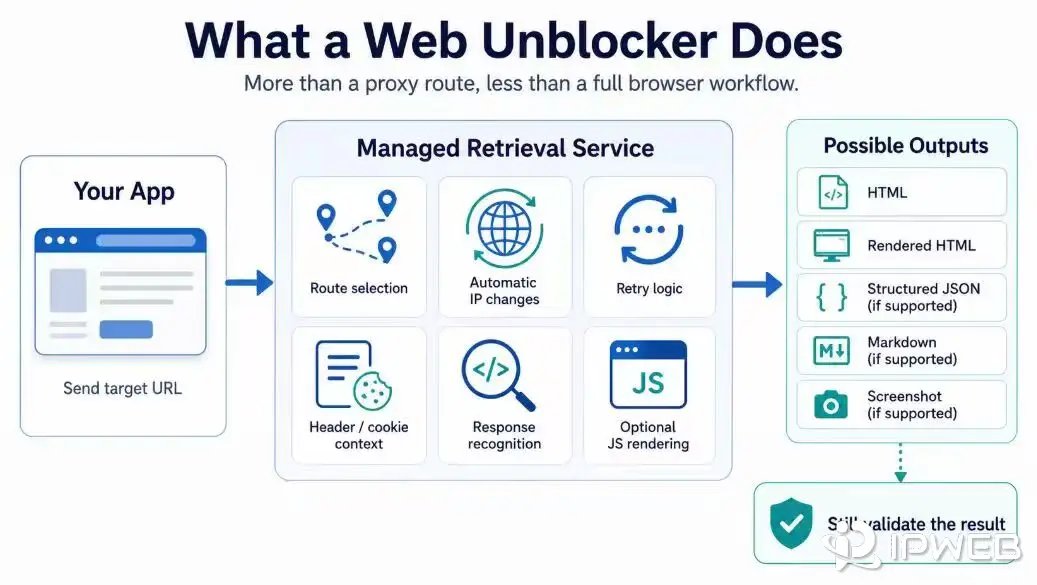
A web-unblocker workflow starts with the same thing as a basic fetch: a target URL. The difference is that the hosted layer can take over more of the delivery decisions before returning a response to your application.
- Send the target URL and request options. The request may include region, rendering, headers, cookies, or output settings when the provider supports them.
- Select and manage the route. The service may choose or change proxy routes instead of requiring your client to rotate endpoints directly.
- Evaluate failures and retries. The service can classify failed or unusable responses and retry according to its own delivery logic.
- Render when needed. Some services can use browser rendering when the required content is not present in the initial HTML response.
- Return content for validation. Your application still needs to confirm that the returned page, fields, locale, timestamp, and parser output match the intended record.
Depending on the provider, a web unblocker may return raw HTML, rendered HTML, or a screenshot. Structured extraction is more commonly handled by a scraping API or by a separate parsing layer in your own pipeline. Exact capabilities vary. For example, the Oxylabs Web Unblocker documentation describes managed proxy selection, browser parameters, response recognition, retries, and optional JavaScript rendering.
Common Web Unblocker Integration Patterns
Web unblockers are not exposed through one universal API shape. Some products behave like a managed proxy endpoint, while others expose a hosted retrieval API. Check the provider documentation before assuming that credentials, target URLs, rendering controls, or response formats are configured the same way.
Pattern 1: Proxy-Like Endpoint
In a proxy-like integration, your application still requests the target URL directly, but the traffic is sent through the provider endpoint. Authentication and request controls may be passed through proxy credentials, headers, session settings, or other provider-specific parameters.
$proxy = "http://PROVIDER_HOST:PORT"
$user = "USERNAME"
$pass = "PASSWORD"

curl.exe -sS `
  --proxy $proxy `
  --proxy-user "${user}:${pass}" `
  "https://example.com/public-page"
This pattern is closer to a standard proxy from the client's point of view, but the provider may manage more of the delivery logic behind the endpoint. The exact authentication, routing, rendering, and retry controls remain provider-specific.
Pattern 2: Hosted Retrieval API
Some managed retrieval products accept a target URL and request options through a hosted API, then return page content or another supported output. The example below is a vendor-neutral template rather than a specification for every web unblocker.
import requests

endpoint = "https://provider.example/v1/retrieve"

headers = {
    "Authorization": "Bearer YOUR_API_KEY",
    "Content-Type": "application/json",
}

payload = {
    "url": "https://example.com/public-page",
    "render": False,
    "format": "html",
}

response = requests.post(
    endpoint,
    headers=headers,
    json=payload,
    timeout=60,
)

response.raise_for_status()

print(response.text[:500])
In either pattern, a successful transport only proves that the provider returned a response for that test. Validate the returned page, context, and fields before using the data downstream.
When a Web Unblocker Fits
A web unblocker is most useful when the task is repetitive public-page retrieval and the needed output can be checked from the returned document. It handles part of page delivery, while the broader web scraping workflow still covers field extraction, normalization, validation, and storage.
Examples include collecting public product pages for price tracking, capturing public search-result pages for analysis, checking public listing pages, or building a data QA sample from approved URLs.
For teams that prefer a hosted endpoint instead of maintaining the delivery layer themselves, a managed retrieval service can provide page retrieval with optional JavaScript rendering and request controls for public-page retrieval within an authorized scope.
The fit is stronger when your team can define the target clearly:
- The exact public URLs or URL patterns are known.
- The required fields are visible in the returned document or rendered page.
- The workflow does not need account-only content, private data, or restricted session state.
- The expected output can be validated against source URL, timestamp, region or language context, and parser version.
- The team wants to reduce request-delivery maintenance without outsourcing data-quality judgment.
For example, a product-price tracking workflow might send a product URL through an automated request-delivery layer, then validate product ID, displayed price, currency, seller, availability, and capture time. The web unblocker helps retrieve the page. It does not decide whether the price was parsed correctly or whether the workflow is permitted.
When a Standard Proxy Is Enough
A standard proxy is often enough when your team already has a working collector and needs precise control over the client. If the application can fetch the page, classify failures, handle retries, render when necessary, and parse data reliably, a managed web unblocker may add cost or reduce visibility without solving the real problem.
Start with a proxy when you need to test route behavior, country or ASN context, authentication, DNS behavior, or whether one application is actually using the intended network route. Follow the same-environment checks in the guide on how to check if a proxy is working before blaming the target page or parser.
For collectors that need direct control over request logic while sampling permitted public pages across multiple locations, dynamic residential proxies can provide selectable network routes. Your application still remains responsible for retries, rendering, parsing, validation, and compliance.
Standard proxies also make sense for debugging because the moving parts stay visible. You can inspect the exact request, retry rule, timeout, browser behavior, and parser output. If you move too early to a managed layer, you may hide the failure reason behind a single "success" or "failed" response.
Web Unblocker, Scraping API, or Browser?
After you understand the web unblocker versus proxy boundary, compare the output each product actually provides. A web unblocker often returns raw or rendered page content, although some services also support structured formats or screenshots. A scraping API may return raw content, structured records, or both, depending on its rendering and extraction model.
A browser workflow is more appropriate when the task genuinely requires visual state, scrolling, clicks, or other permitted interactions.
| Need | Better starting point | Why |
|---|---|---|
| Change the network route for your own collector | Standard proxy | You keep control of request logic, parsing, and diagnostics |
| Retrieve public page responses with less delivery work | Web unblocker | The service manages part of the request-delivery layer |
| Use hosted rendering or receive normalized fields through an endpoint | Scraping API | Capabilities vary; the API may return page content, structured records, or both |
| Verify visual state, scrolling, clicks, or permitted session flow | Browser workflow | A browser is closer to what the page actually displays |
The simplest choice depends on the output you need: routing, managed page retrieval, structured extraction, or browser interaction.
- Use a standard proxy if: your collector already handles retries, rendering, parsing, and validation, and you want direct control over routing.
- Use a web unblocker if: request delivery is the main maintenance burden and you want the provider to manage more of that layer.
- Use a scraping API if: you want hosted retrieval plus rendering or structured extraction through one endpoint.
- Use a browser workflow if: the task genuinely requires visual state, scrolling, clicks, or other permitted interaction.
Do not choose a browser just because a page is difficult. First confirm whether the required public data is already available in the document returned by a simpler request. Browser workflows add state, latency, cost, and testing responsibility.
A Practical Selection Checklist
Before you choose a web unblocker, answer these questions in writing:
- Is the target data public, permitted for the intended use, and within the planned collection volume?
- Do you need raw page content, rendered content, a screenshot, or structured records?
- Can the parser confirm that the response is the intended page rather than an empty shell, interstitial, localized variant, or stale cache?
- Which context may change the result, such as country, language, device type, timestamp, or login state?
- Which team owns failed requests, incorrect fields, duplicate records, and policy review?
If the workflow does not yet have a controlled URL list, first clarify whether it needs page discovery or field extraction. The guide to web scrapers versus web crawlers explains why a crawler may need to build the URL list before a web unblocker or scraper processes the selected pages.
The last question is usually the deciding one. A managed layer can reduce request-delivery work, but the business still owns the collection purpose, the validation method, and the quality of the dataset.
What to Validate After a Successful Response
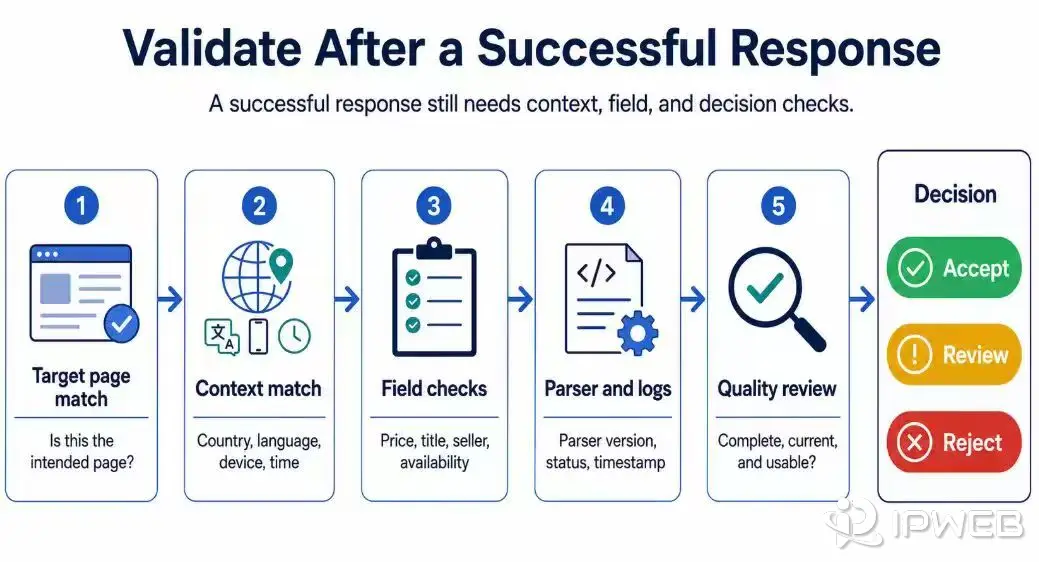
Treat a successful response as the start of validation, not the end of the workflow. An HTTP response status code indicates how a specific request was handled.
It does not prove that the returned content is complete, current, permitted for the intended use, or correctly parsed.
For a price workflow, compare product ID, title, seller, displayed price, currency, availability, and timestamp. For a SERP workflow, compare query, country, language, device context, result type, organic result fields, ads, local packs, and capture time. For a content change-tracking workflow, compare canonical URL, publication date, title, author, visible body text, and duplicate status.
Keep enough evidence to debug later: source URL, request time, route or region context when relevant, response status, parser version, validation result, and a small sample of the returned content. This makes it easier to separate a routing issue from a target change, parser mistake, or policy boundary.
Where a Web Unblocker Does Not Help
A web unblocker cannot make restricted data public, repair an unavailable account, remove legal availability limits, or guarantee that a platform will serve a specific response. It also cannot replace a data model. If the workflow needs entity matching, deduplication, change detection, or normalized fields, your pipeline still needs those checks.
It should also not be used as a shortcut around target rules. If the intended workflow depends on accessing content restricted by school, workplace, account, regional licensing, copyright, or platform rules, stop and review the use case. A proxy or managed retrieval service can help with some network-layer problems, but it cannot fix every access, account, compliance, or platform policy issue.
Common Decision Mistakes
| Mistake | Why it causes problems | Better approach |
|---|---|---|
| Treating "web unblocker" as a universal access tool | It confuses public-data retrieval with consumer VPN or unblocker tools, which serve a different use case. | Define the permitted public-data workflow first |
| Moving to a managed layer before testing the proxy route | The failure may come from credentials, DNS, parsing, or configuration | Run a route and response check first |
| Trusting a 200 response without content validation | Empty shells, localized pages, interstitials, and stale pages can look successful | Validate fields against the expected page |
| Choosing a browser for every difficult page | Browser workflows add state, latency, and debugging complexity | Use a browser only when interaction or visual state is required |
| Comparing vendors by feature lists only | Similar claims can still produce different outputs and ownership models | Compare output format, validation evidence, retry behavior, and support model |
Most web-unblocker mistakes come from choosing the tool before defining the required output and who owns validation.
Frequently Asked Questions
Final Thoughts
A web unblocker is best understood as managed retrieval infrastructure for public-data workflows. It can reduce the work of routing, retries, response handling, and sometimes rendering, but it does not replace compliance review, proxy diagnostics, parsing, or data validation.
Start with the output you need, decide who should own the request logic, and validate every returned record before it enters a dataset. Choose a hosted retrieval API when you want less delivery-layer maintenance, or a standard proxy when your team needs direct control over routing and request logic.