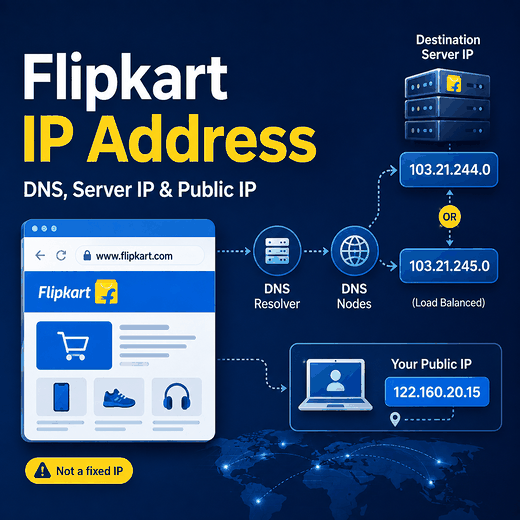
Searching for a Flipkart IP address can mean several different things: the server IP returned by DNS, your own public IP while connecting to Flipkart, an API endpoint address, or an IP used for network testing. These are different values, and only some of them are under your control.
Do not treat Flipkart as if it has one permanent public IP address that can be copied into a configuration forever. DNS can return one or more IPv4 or IPv6 addresses for a hostname, and those records can change as infrastructure, routing, caching, or traffic-management systems change. Query the hostname when you need a current result, and use the documented hostname rather than a manually resolved IP for normal web or API connections.
flipkart.com,www.flipkart.com, and API hostnames are domain names, not permanent IP-address guarantees.- DNS A records return IPv4 addresses; AAAA records return IPv6 addresses.
- A DNS lookup is a point-in-time observation and should not be treated as a permanent Flipkart IP list.
- Your public client IP is different from the destination IP used by Flipkart's infrastructure.
- A proxy changes the client-side egress IP seen by the destination; it does not make Flipkart's server IP fixed.
- For APIs, monitoring, and HTTPS connections, use the documented hostname unless the service owner explicitly provides fixed IP ranges for allowlisting.
What Does “Flipkart IP Address” Mean?
The phrase can refer to several different network values. The first step is to identify which one you actually need.
| Term | What it means | Who controls it |
|---|---|---|
| Flipkart server IP | An IP address returned when a Flipkart hostname is resolved through DNS | Flipkart and its infrastructure providers |
| Your public IP | The public egress address used by your connection when accessing Flipkart | Your ISP, network, VPN, or proxy provider |
| Proxy egress IP | The proxy address presented to the destination for a proxied connection | The proxy service and your selected configuration |
| API endpoint IP | The current resolved address behind an API hostname | The API operator and its infrastructure |
| Private IP | A local address such as 192.168.x.x or 10.x.x.x | Your local network |
Table takeaway: A Flipkart server IP and the public IP of the user connecting to Flipkart are different sides of the same network connection.
Does Flipkart Have One Fixed IP Address?
You should not assume that one DNS result is a permanent Flipkart server address. DNS is a distributed naming system that maps hostnames to resource records, including address records. Those records can be cached and refreshed, and the DNS design explicitly supports data that changes over time.
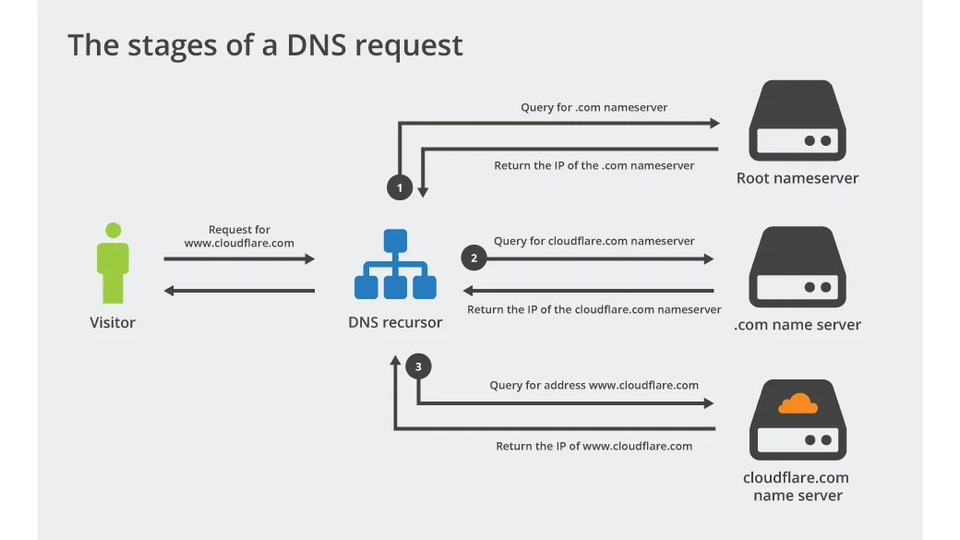
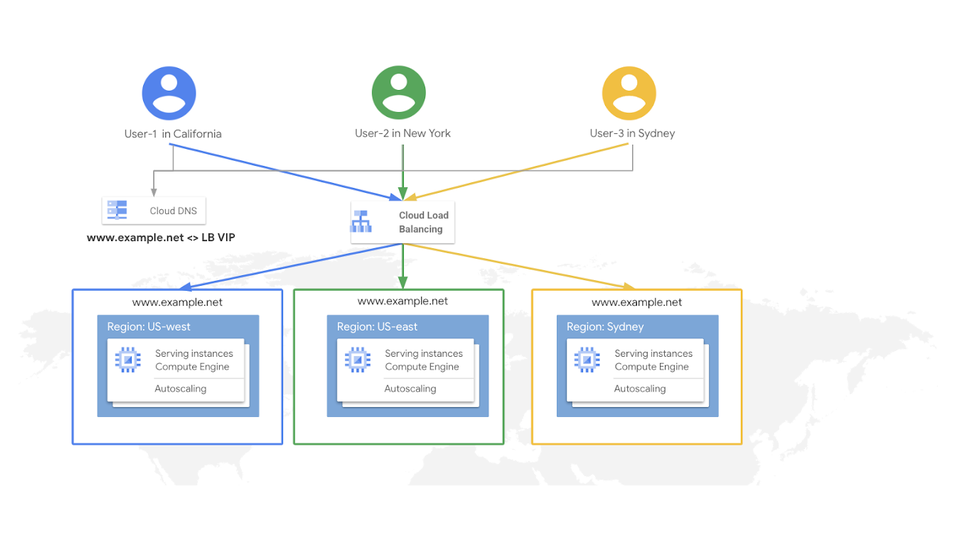
Large web services can also place load balancers, edge infrastructure, or other traffic-management layers in front of backend systems. A load balancer can distribute requests to multiple backends while users continue to connect through a hostname or frontend address. Google Cloud's load-balancing documentation shows this general architecture, but the exact infrastructure used by Flipkart at any moment should not be inferred from a single lookup.
The practical rule is simple: treat the hostname as the stable application identifier and the resolved address as current network data.
How to Check the Current Flipkart IP Address
You can query DNS directly from the command line. The result reflects the resolver and network context used for that lookup.
Windows: nslookup
nslookup www.flipkart.commacOS or Linux: dig
dig A www.flipkart.com
dig AAAA www.flipkart.com
PowerShell
Resolve-DnsName www.flipkart.com -Type A
Resolve-DnsName www.flipkart.com -Type AAAA
Google Public DNS JSON API
Google Public DNS exposes a DNS-over-HTTPS JSON endpoint that can query A and AAAA records without relying on a browser's normal DNS interface.
curl "https://dns.google/resolve?name=www.flipkart.com&type=A"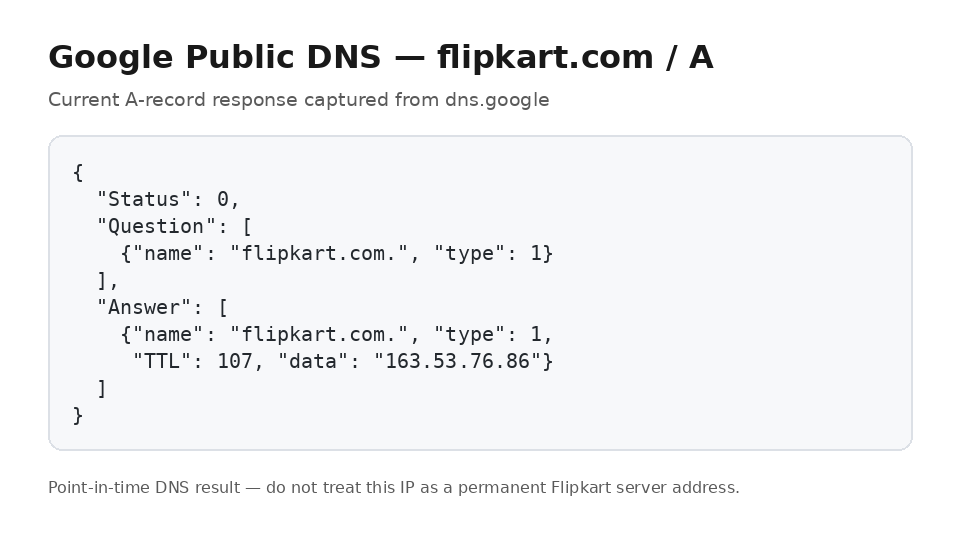
To query IPv6 instead, change type=A to type=AAAA. Google documents dns.google/resolve as its JSON DNS-over-HTTPS API.
What a DNS Result Actually Tells You
A DNS lookup tells you what a resolver returned for a hostname at that time. It does not prove that the returned IP is the only address used by the service, the backend origin, or a permanent address.
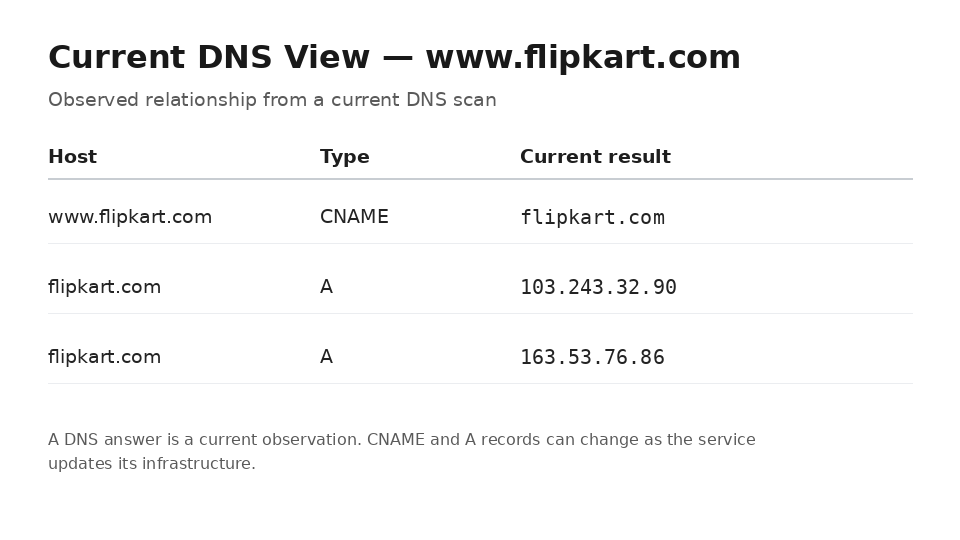
- Record the exact hostname you queried, not just the brand name.
- Check whether the answer contains A records, AAAA records, or an alias chain.
- Save the lookup time if you are troubleshooting a change.
- Record the TTL when your DNS tool exposes it.
- Do not assume that a different resolver must return the same answer at the same moment.
- Do not label a resolved address as an origin server unless you have authoritative evidence.
DNS caching is intentional. RFC 1034 describes cached DNS data as information that can be retained and refreshed according to timeout values, which is why a local resolver can temporarily show an older answer after an authoritative record changes.
Why Flipkart IP Results Can Change
There are several legitimate reasons why the IP address you see for a web hostname may differ over time or between networks.
DNS Records Can Be Updated
A service operator can change address records as infrastructure changes. DNS was designed for distributed administration and periodic refresh rather than a permanent one-name-to-one-address mapping.
Cached Answers Have TTLs
Resolvers can cache records until the configured time-to-live expires. Two resolvers can temporarily show different answers when one still has a cached record and another has already refreshed it.
Traffic Can Be Distributed Across Infrastructure
Load-balancing systems can route requests to different backend services while clients continue to use one hostname. This is a normal scaling pattern for web applications and does not mean the hostname itself has changed.
IPv4 and IPv6 Are Separate Record Types
An A-record lookup asks for IPv4. An AAAA-record lookup asks for IPv6. A hostname can expose one, both, or neither depending on the service configuration.
Server IP vs Public IP vs Proxy IP
This distinction matters when troubleshooting Flipkart access or testing network routes.
| Address | Role | Does a proxy change it? |
|---|---|---|
| Resolved Flipkart server IP | Destination address selected through DNS and routing | No. A proxy does not make Flipkart's DNS records fixed. |
| Your ISP public IP | Normal outbound address without a VPN or proxy | Yes. A proxied request uses the proxy's egress path instead. |
| Proxy egress IP | Client-side public address presented by the proxy route | This is the address selected by the proxy configuration. |
| Local private IP | Device address inside the local network | Normally not exposed as the internet destination address. |
Table takeaway: A proxy changes the outbound client-side route; it does not replace Flipkart's DNS infrastructure or convert a dynamic destination into a permanent server IP.
If an approved QA, partner, or allowlisting workflow needs one consistent client-side egress address, static residential proxies can provide a fixed outbound IP across recurring sessions. That is a client-network choice, not a way to obtain a permanent Flipkart server address.
Why You Should Not Hardcode a Resolved IP
Connecting to a manually copied IP instead of the documented hostname can break normal assumptions made by modern web infrastructure.
- The DNS record can change while your configuration still points to the old address.
- HTTPS certificates are issued for hostnames, not for arbitrary assumptions about one resolved IP.
- Virtual hosting and traffic routing can depend on the requested hostname.
- An edge or frontend IP is not necessarily the origin server.
- IP-based allowlists become brittle if the service owner has not promised a stable address or published a supported range.
If a vendor explicitly provides fixed IP ranges for allowlisting, use that official list. Otherwise, do not create your own permanent list from a one-time DNS lookup.
Flipkart API Hostnames and IP Addresses
API integrations should also use the documented API hostname rather than resolving the hostname once and storing the resulting IP. Authentication, TLS, routing, and service changes are all designed around the documented endpoint.
For Affiliate API authentication, product feeds, pagination, and documented errors, see IPWeb's Flipkart Affiliate API guide. If you are deciding between official interfaces, third-party data APIs, and permitted public-page observation, use the Flipkart API vs Scraper API comparison.
The same rule applies in both cases: use the current documented hostname. Do not replace it with a historical DNS result unless the service owner explicitly tells you to connect by IP.
How to Monitor DNS Changes Safely
If your goal is troubleshooting rather than finding a permanent Flipkart IP, record DNS observations over time.
- Query the exact hostname you are testing.
- Record A and AAAA answers separately.
- Save the timestamp, resolver, and TTL.
- Repeat the lookup only as often as the troubleshooting task requires.
- Compare changes with connection errors, TLS failures, or routing symptoms.
- Keep DNS changes separate from product, seller, price, and availability changes.
If the actual goal is product-price history rather than network diagnosis, use a product-level workflow instead. IPWeb's Flipkart price tracker guide explains why price observations need product, seller, variant, availability, and timestamp context.
Common Mistakes
| Mistake | Why it is unreliable | Better approach |
|---|---|---|
| Publishing one resolved IP as “the Flipkart IP” | The answer can change and may represent only one frontend path | Publish the hostname and explain how to resolve it |
| Mixing server IP with user public IP | They are opposite sides of the connection | Identify whether you are troubleshooting destination or egress |
| Hardcoding a DNS result for HTTPS | TLS and routing often depend on the hostname | Connect using the documented hostname |
| Calling an edge IP the origin server | The frontend can sit in front of hidden backends | Use “resolved IP” unless the origin is verified |
| Ignoring IPv6 | An AAAA result is separate from an A result | Check both record types when relevant |
| Treating DNS change as a product-data change | Network routing and marketplace data are unrelated layers | Log network and product observations separately |
Table takeaway: The safest language is “current DNS result,” not “permanent Flipkart IP address.”
Frequently Asked Questions
nslookup, dig, PowerShell Resolve-DnsName, or a DNS-over-HTTPS resolver. Query A records for IPv4 and AAAA records for IPv6.Final Thoughts
A Flipkart IP lookup is useful for troubleshooting, but the result should be treated as current DNS data rather than a permanent infrastructure map. Query the exact hostname, distinguish IPv4 from IPv6, record the resolver and timestamp, and keep server-side destination IPs separate from your own public or proxy egress IP. For normal browsing and API integrations, use the documented hostname unless the service owner explicitly publishes fixed IP ranges for a supported network configuration.